CSRF vulnerability that allows an attacker to modify encryption settings
A POST endpoint that changes the core encryption_enabled setting did not require a unique anti-CSRF token, so an attacker could make a logged-in admin's browser toggle that setting. The attacker could activate or deactivate encryption on the instance.

- Triaged in 16 hours
- Fixed in 5 months
- Disclosed after 5 months
The POST request to /ocs/v2.php/apps/provisioning_api/api/v1/config/apps/core/encryption_enabled is missing a unique token, so that if an attack can trick an admin user with an active session to visit an attacker controlled website, he/she can control the core application setting "encryption_enabled"
Steps to reproduce:
- Set up a HTTP proxy between your browser and the Nextcloud server
- Login to Nextcloud website
- Go to HTTP proxy tool and copy the value of Cookie header from any request subsequent to login
- Execute the following curl command by replacing <nextcloud_server> with Nextcloud server address and by replacing <cookies> with valid cookie values copied in step 3
curl -i -s -k -X $'POST' -H $'Host: <nextcloud_server>' -H $'Proxy-Connection: keep-alive' -H $'Content-Length: 10' -H $'Accept: /' -H $'Content-Type: application/x-www-form-urlencoded; charset=UTF-8' -H $'OCS-APIREQUEST: true' -H $'Origin: http://<nextcloud_server>' -H $'User-Agent: Mozilla/5.0 (Windows NT 6.1; WOW64) AppleWebKit/537.36 (KHTML, like Gecko) Chrome/72.0.3626.96 Safari/537.36' -H $'X-Requested-With: XMLHttpRequest' -H $'requesttoken: sSxMouPIwzbpI5ErZycXzGqCsOzacYntRk18kUOwin4=:gBUhzYWys3qhEqNPFE1frx663pq9BdjaKiwz5zfo6y4=' -H $'Accept-Encoding: gzip, deflate' -H $'Accept-Language: en-US,en;q=0.9 ' -H $'Cookie: <cookies>' --data-binary $'value=no\x0d\x0a' $'http://<nextcloud_server>/ocs/v2.php/apps/provisioning_api/api/v1/config/apps/core/encryption_enabled'
-
Watch how the request executes successful every time it is executed. By modifying the value (--data-binary $'value=yes\x0d\x0a') and updating the Content-Length header accordingly, you can toggle the state of encryption_enabled setting.
-
You can verify the request was executed successfully by checking the value of "encryption_enabled" configkey in nextcloud database:
select * from oc_appconfig where appid='core' and configkey='encryption_enabled';
Impact
An attacker can activate/deactivate the encryption_enabled setting
Attachments
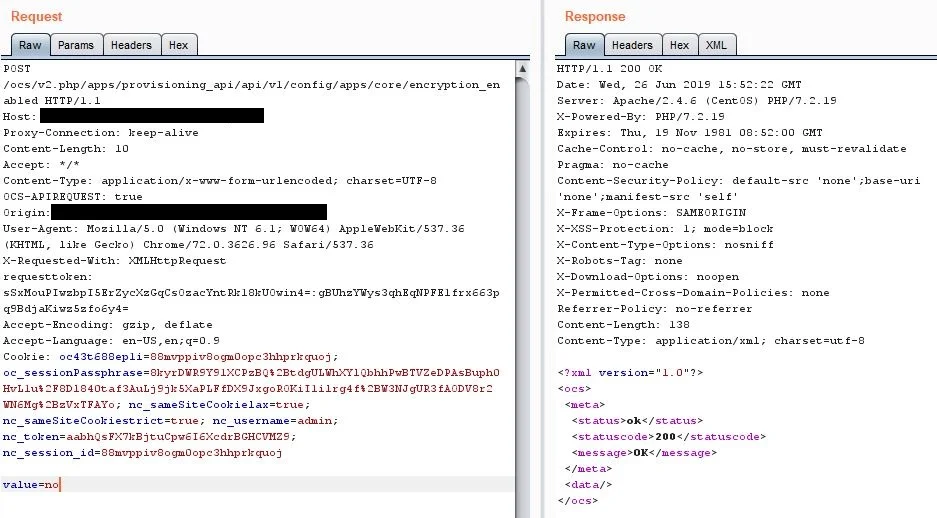

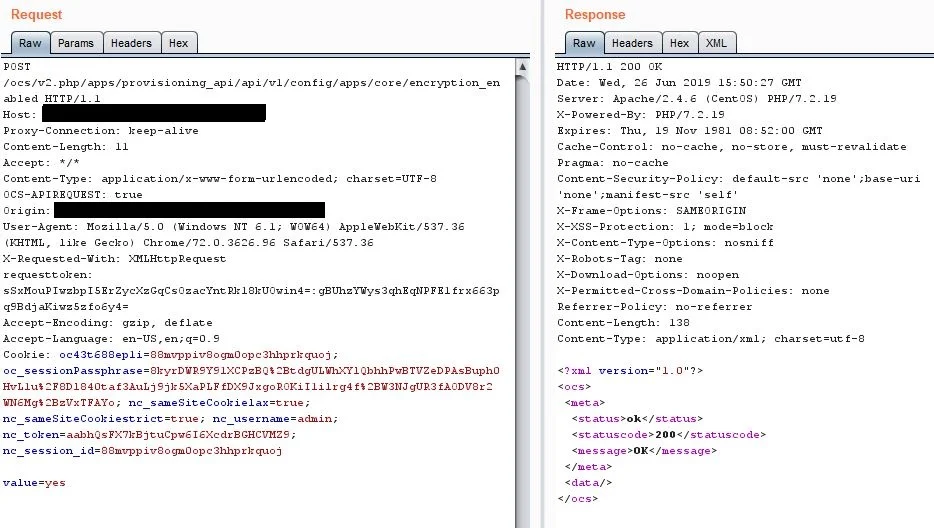

Context
Nextcloud exposes an OCS provisioning API under /ocs/v2.php/apps/provisioning_api/. Among the endpoints it offers is one that reads and writes application configuration values, addressed by app and config key. The report focuses on the core app and the key encryption_enabled, the setting that switches server-side encryption on or off for the instance.
The endpoint in question is:
/ocs/v2.php/apps/provisioning_api/api/v1/config/apps/core/encryption_enabled
A POST to it with a value parameter changes the stored setting. The researcher found that this state-changing POST is sent without a unique token, which makes it reachable cross-site against an authenticated administrator.
Setup
The only precondition is an administrator with an active Nextcloud session. The researcher used a browser with an HTTP proxy in front of it, so that requests between the browser and the server could be inspected and headers copied. No special role beyond the logged-in admin is described, and no version numbers are given in the report.
Finding it
The researcher noticed that the POST request to the configuration endpoint is missing a unique token. Because the request changes server state and is authenticated by the session cookie, an attacker who tricks an administrator into visiting an attacker-controlled site can change the setting. The setting that can be flipped this way is encryption_enabled in the core application.
Exploitation
Step 1: Put a proxy in place
Set up an HTTP proxy between the browser and the Nextcloud server so that the traffic can be read and replayed.
Step 2: Log in
Log in to the Nextcloud website as an administrator.
Step 3: Copy the session cookie
In the proxy tool, copy the value of the Cookie header from any request made after login. That value is the credential the forged request will carry.
Step 4: Send the state-changing request
Replace <nextcloud_server> with the Nextcloud server address and <cookies> with the cookie values copied in step 3, then run:
curl -i -s -k -X $'POST' -H $'Host: <nextcloud_server>' -H $'Proxy-Connection: keep-alive' -H $'Content-Length: 10' -H $'Accept: */*' -H $'Content-Type: application/x-www-form-urlencoded; charset=UTF-8' -H $'OCS-APIREQUEST: true' -H $'Origin: http://<nextcloud_server>' -H $'User-Agent: Mozilla/5.0 (Windows NT 6.1; WOW64) AppleWebKit/537.36 (KHTML, like Gecko) Chrome/72.0.3626.96 Safari/537.36' -H $'X-Requested-With: XMLHttpRequest' -H $'requesttoken: [redacted]=:[redacted]=' -H $'Accept-Encoding: gzip, deflate' -H $'Accept-Language: en-US,en;q=0.9 ' -H $'Cookie: <cookies>' --data-binary $'value=no\x0d\x0a' $'http://<nextcloud_server>/ocs/v2.php/apps/provisioning_api/api/v1/config/apps/core/encryption_enabled'
The important parts:
-X $'POST'with--data-binary $'value=no\x0d\x0a'sends a form body setting the configuration value tono. The trailing CRLF is part of the body and is accounted for byContent-Length: 10.OCS-APIREQUEST: truemarks the call as an OCS API request.X-Requested-With: XMLHttpRequestand theOriginheader are present, but the request still succeeds, which is the point: neither is treated as a substitute for a per-request token.- The
Cookieheader carries the administrator's session, which is the only thing authorising the change.
Step 5: Toggle the setting
The researcher observed that the request executes successfully every time it is sent. Changing the body to --data-binary $'value=yes\x0d\x0a' and updating Content-Length accordingly toggles encryption_enabled back on. In other words, the same request with a different value switches the setting in either direction.
Step 6: Confirm in the database
Verify that the value was written by querying the configuration table:
select * from oc_appconfig where appid='core' and configkey='encryption_enabled';
The row for core / encryption_enabled reflects the value that was posted.
The attachments show the setting before and after the request, both in the interface and in the database. The attachments show the setting before and after the request:
Root cause
The configuration endpoint accepts a state-changing POST authenticated only by the session cookie. It does not require a unique, unpredictable token tied to the user's session, so a cross-site request can carry the victim's cookie and be processed as if the administrator had submitted it. The researcher's request included Origin and X-Requested-With headers and still succeeded; the report does not describe the server-side validation logic. The report does not describe the server-side code, so the exact validation logic is not stated.
Impact
An attacker who can persuade an administrator with an active session to visit an attacker-controlled website can activate or deactivate the encryption_enabled setting. The report rates this as low severity (CVSS 3.4). The effect is limited to toggling that one configuration value; the report does not claim access to encrypted data or any other setting.
Fix
Variants to test
- Other provisioning API config endpoints under
/ocs/v2.php/apps/provisioning_api/api/v1/config/apps/<app>/<key>: a positive result is aPOSTthat changes the stored value when sent with only the session cookie and no valid token. - Other OCS endpoints that write settings or user attributes: look for a successful state change from a request that lacks the per-request token.
- Requests that already send
OCS-APIREQUEST: trueandX-Requested-With: XMLHttpRequest: if these alone are accepted as sufficient protection, the endpoint is still forgeable from a browser context that can set those headers. - Toggling a setting in both directions (
value=yesandvalue=no) to confirm the write is persistent rather than a transient response.
Hunting notes
This kind of bug hides in administrative and provisioning APIs: endpoints that write configuration, toggle features or change account attributes, especially where the client normally sends a token header that the server does not actually enforce. During recon, watch for state-changing requests whose only credential is the session cookie, and for endpoints that accept application/x-www-form-urlencoded bodies with simple value= parameters. The researcher demonstrated impact by replaying the request with a copied cookie, showing it succeeded repeatedly, flipping the value in both directions, and confirming the stored result directly in the oc_appconfig table. That chain, from forged request to persisted configuration change, is what makes the finding concrete.
What happened, in plain words
Nextcloud is a piece of software that lets an organisation run its own file storage and sharing service, a bit like a private version of Google Drive or Dropbox that the organisation hosts on its own computers. Administrators of a Nextcloud installation can turn features on and off through settings pages.
One of those settings is called encryption_enabled. It switches server-side encryption on or off, meaning whether files stored on the server are scrambled so that someone who gets hold of the disk cannot read them directly.
The researcher found that the request which changes this setting can be sent by any website, as long as the person visiting that website is logged in to Nextcloud as an administrator. The request carries no unique token, which is the extra secret value a well-protected application asks for to prove that a change really came from its own pages and not from somewhere else. This class of bug is called Cross-Site Request Forgery, or CSRF: an attacker's website quietly makes the victim's browser send a request to another site, and that other site treats it as a genuine action by the logged-in user.
A useful comparison: imagine a bank counter that accepts a withdrawal slip with no signature, only the customer's face. If the customer is standing at the counter, anyone who can walk them there and hand over a slip gets the withdrawal processed. The session cookie is the face; the missing token is the missing signature.
The product and the feature
Nextcloud exposes something called an OCS provisioning API under /ocs/v2.php/apps/provisioning_api/. An API (Application Programming Interface) is a set of addresses a program can talk to in order to read or change things, without a human clicking buttons. Think of it as a service hatch next to the front door: same building, same rules, but designed for automated callers rather than for people.
Among the endpoints (individual addresses within that API) is one that reads and writes application configuration values. Each value is addressed by two names: the application it belongs to and the key of the setting. The report focuses on the core application and the key encryption_enabled, the setting that switches server-side encryption on or off for the instance.
The endpoint in question is:
/ocs/v2.php/apps/provisioning_api/api/v1/config/apps/core/encryption_enabled
Reading that address from left to right: /ocs/v2.php is the entry script for the OCS API, apps/provisioning_api names the app that provides the API, api/v1 is the version of the API, config/apps says we are dealing with application configuration, core is the application whose setting we want, and encryption_enabled is the setting itself.
A POST to it with a value parameter changes the stored setting. POST is one of the verbs of the web: a browser uses GET when it just wants to read a page, and POST when it is submitting something that should change something on the server, such as a form. A parameter is a named piece of data sent along with the request, here simply value plus whatever the new setting should be.
The researcher found that this state-changing POST is sent without a unique token, which makes it reachable cross-site against an authenticated administrator. "Cross-site" means the request can originate from a different website than Nextcloud, and "authenticated" means the browser is already carrying the administrator's logged-in session.
Setup
The only precondition is an administrator with an active Nextcloud session. A session is the period during which the server remembers who you are after you log in; it recognises you by a cookie, a small piece of data the server asks the browser to store and send back with every later request. Think of the cookie as a cloakroom ticket: show it and you get your coat, no need to prove your identity again.
The researcher used a browser with an HTTP proxy in front of it, so that requests between the browser and the server could be inspected and headers copied. A proxy is a middleman program that sits between the browser and the server; every request and response passes through it, and the proxy can display them. Headers are the labelled lines at the top of a request that carry information such as which site the request is for, what type of content it contains, and which cookies belong to it.
No special role beyond the logged-in admin is described, and no version numbers are given in the report.
Finding it
The researcher noticed that the POST request to the configuration endpoint is missing a unique token. Because the request changes server state and is authenticated by the session cookie, an attacker who tricks an administrator into visiting an attacker-controlled site can change the setting. The setting that can be flipped this way is encryption_enabled in the core application.
Why does the browser allow this? Because a browser automatically attaches the cookies belonging to a site to any request aimed at that site, no matter which page the request started from. That behaviour is what makes sessions convenient, and it is also what CSRF abuses.
Exploitation
Step 1: Put a proxy in place
Set up an HTTP proxy between the browser and the Nextcloud server so that the traffic can be read and replayed. This step exists because the researcher needs to see the exact request the browser sends, including the cookie, in order to copy it and send it again by hand.
Step 2: Log in
Log in to the Nextcloud website as an administrator. This creates the session and the cookie that the forged request will rely on.
Step 3: Copy the session cookie
In the proxy tool, copy the value of the Cookie header from any request made after login. That value is the credential the forged request will carry. It is copied rather than guessed because it is a long random-looking string that the server issued; possessing it is equivalent to being logged in as that administrator until the session ends.
Step 4: Send the state-changing request
Replace <nextcloud_server> with the Nextcloud server address and <cookies> with the cookie values copied in step 3, then run:
curl -i -s -k -X $'POST' -H $'Host: <nextcloud_server>' -H $'Proxy-Connection: keep-alive' -H $'Content-Length: 10' -H $'Accept: */*' -H $'Content-Type: application/x-www-form-urlencoded; charset=UTF-8' -H $'OCS-APIREQUEST: true' -H $'Origin: http://<nextcloud_server>' -H $'User-Agent: Mozilla/5.0 (Windows NT 6.1; WOW64) AppleWebKit/537.36 (KHTML, like Gecko) Chrome/72.0.3626.96 Safari/537.36' -H $'X-Requested-With: XMLHttpRequest' -H $'requesttoken: [redacted]=:[redacted]=' -H $'Accept-Encoding: gzip, deflate' -H $'Accept-Language: en-US,en;q=0.9 ' -H $'Cookie: <cookies>' --data-binary $'value=no\x0d\x0a' $'http://<nextcloud_server>/ocs/v2.php/apps/provisioning_api/api/v1/config/apps/core/encryption_enabled'
curl is a command-line tool for sending web requests by hand, so the researcher can control every part of the request instead of letting a browser decide. Going through the command piece by piece:
-iasks curl to print the response headers as well as the body, so the result can be inspected.-ssilences the progress meter.-ktells curl to accept a TLS certificate it cannot verify, which is common when testing a server with a self-signed certificate.-X $'POST'chooses thePOSTverb, the one that changes things on the server.-H $'Host: <nextcloud_server>'states which server the request is addressed to.-H $'Proxy-Connection: keep-alive'is a header aimed at the proxy, asking it to keep the connection open.-H $'Content-Length: 10'declares that the body of the request is 10 bytes long. The body isvalue=nofollowed by a carriage return and a line feed, which is exactly 10 bytes, so the number matches.-H $'Accept: */*'says the caller will accept any kind of response.-H $'Content-Type: application/x-www-form-urlencoded; charset=UTF-8'says the body is formatted like a web form, the same format a browser uses when you submit a form, in UTF-8 text encoding.-H $'OCS-APIREQUEST: true'marks the call as an OCS API request, telling Nextcloud which of its APIs is being used.-H $'Origin: http://<nextcloud_server>'states which site the request supposedly came from. Browsers set this automatically; here the researcher sets it by hand.-H $'User-Agent: ...'identifies the client software, here a Chrome browser string, so the server sees a request that looks like it came from a normal browser.-H $'X-Requested-With: XMLHttpRequest'is a header browsers attach to background requests made by JavaScript on a page, as opposed to a full page load.-H $'requesttoken: ...'is a token header. A token is a value the server hands out and expects back to prove a request came from its own pages. The value shown here is a secret and has been replaced with [redacted].-H $'Accept-Encoding: gzip, deflate'says the caller can accept compressed responses.-H $'Accept-Language: en-US,en;q=0.9 'states the preferred language for the response.-H $'Cookie: <cookies>'carries the administrator's session, which is the only thing authorising the change. This is the copied cloakroom ticket.--data-binary $'value=no\x0d\x0a'is the body: it sets the configuration value tono. The\x0d\x0ais a carriage return followed by a line feed, the same pair of invisible characters a Windows text file uses at the end of a line. The trailing CRLF is part of the body and is accounted for byContent-Length: 10.- The final argument is the URL the request is sent to, with
<nextcloud_server>filled in.
The important parts, in summary:
-X $'POST'with--data-binary $'value=no\x0d\x0a'sends a form body setting the configuration value tono.OCS-APIREQUEST: truemarks the call as an OCS API request.X-Requested-With: XMLHttpRequestand theOriginheader are present, but the request still succeeds, which is the point: neither is treated as a substitute for a per-request token.- The
Cookieheader carries the administrator's session, which is the only thing authorising the change.
Step 5: Toggle the setting
The researcher observed that the request executes successfully every time it is sent. Changing the body to --data-binary $'value=yes\x0d\x0a' and updating Content-Length accordingly toggles encryption_enabled back on. In other words, the same request with a different value switches the setting in either direction. The report says to update Content-Length accordingly when changing the body to value=yes.
Step 6: Confirm in the database
Verify that the value was written by querying the configuration table:
select * from oc_appconfig where appid='core' and configkey='encryption_enabled';
This is a database query written in SQL, the language used to talk to relational databases. select * means "return every column". from oc_appconfig names the table that stores application configuration; the oc_ prefix is Nextcloud's naming convention for its tables. where appid='core' and configkey='encryption_enabled' restricts the result to the single row belonging to the core application and the encryption_enabled key. Running it shows what the server actually stored, which is stronger evidence than a success message in the response.
The row for core / encryption_enabled reflects the value that was posted.
The attachments show the setting before and after the request, both in the interface and in the database. The attachments show the setting before and after the request:
Root cause
The configuration endpoint accepts a state-changing POST authenticated only by the session cookie. It does not require a unique, unpredictable token tied to the user's session, so a cross-site request can carry the victim's cookie and be processed as if the administrator had submitted it. The researcher's request included Origin and X-Requested-With headers and still succeeded; the report does not describe the server-side validation logic. The report does not describe the server-side code, so the exact validation logic is not stated.
Impact
An attacker who can persuade an administrator with an active session to visit an attacker-controlled website can activate or deactivate the encryption_enabled setting. The report rates this as low severity (CVSS 3.4). CVSS is a standard scoring system for the seriousness of a security flaw, where a higher number means more damage is possible. The effect is limited to toggling that one configuration value; the report does not claim access to encrypted data or any other setting.
Fix
Variants to test
- Other provisioning API config endpoints under
/ocs/v2.php/apps/provisioning_api/api/v1/config/apps/<app>/<key>: a positive result is aPOSTthat changes the stored value when sent with only the session cookie and no valid token. - Other OCS endpoints that write settings or user attributes: look for a successful state change from a request that lacks the per-request token.
- Requests that already send
OCS-APIREQUEST: trueandX-Requested-With: XMLHttpRequest: if these alone are accepted as sufficient protection, the endpoint is still forgeable from a browser context that can set those headers. - Toggling a setting in both directions (
value=yesandvalue=no) to confirm the write is persistent rather than a transient response.
Hunting notes
This kind of bug hides in administrative and provisioning APIs: endpoints that write configuration, toggle features or change account attributes, especially where the client normally sends a token header that the server does not actually enforce. During recon (the early phase of exploring a target to map what it exposes), watch for state-changing requests whose only credential is the session cookie, and for endpoints that accept application/x-www-form-urlencoded bodies with simple value= parameters. The researcher demonstrated impact by replaying the request with a copied cookie, showing it succeeded repeatedly, flipping the value in both directions, and confirming the stored result directly in the oc_appconfig table. That chain, from forged request to persisted configuration change, is what makes the finding concrete.
Glossary
- API: a set of addresses a program can call to read or change data, designed for software rather than for people clicking buttons.
- Endpoint: one specific address within an API that performs one specific job.
- OCS API: the particular API style Nextcloud uses under
/ocs/v2.phpfor provisioning and configuration tasks. - POST: the web verb used when a request is meant to change something on the server, such as submitting a form.
- GET: the web verb used when a request only wants to read something.
- Parameter: a named piece of data sent with a request, such as
value=no. - Header: a labelled line at the top of a web request or response carrying information such as cookies, content type or origin.
- Body: the part of a request that carries the actual data being submitted.
- Cookie: a small piece of data the server asks the browser to store and send back with later requests, used here to recognise the logged-in administrator.
- Session: the period during which the server remembers who you are after login, identified by a cookie.
- Token: a value the server hands out and expects back to prove a request came from its own pages; a unique token makes a request hard to forge.
- CSRF (Cross-Site Request Forgery): a bug where another website causes the victim's browser to send a state-changing request to a site where the victim is logged in, and the site accepts it.
- State-changing request: a request that alters something stored on the server, as opposed to merely reading it.
- HTTP proxy: a middleman program between browser and server that lets you inspect and replay the traffic.
- curl: a command-line tool for sending web requests by hand, with full control over headers and body.
- Content-Length: a header declaring how many bytes long the request body is.
- Content-Type: a header declaring the format of the request body, here a web form encoded as text.
- Origin: a header stating which site a request supposedly came from.
- X-Requested-With: a header browsers attach to background requests made by JavaScript on a page.
- User-Agent: a header identifying the client software making the request.
- CRLF: a carriage return followed by a line feed, a pair of invisible characters marking the end of a line in text.
- SQL: the language used to query and change data in a relational database.
- Database table: a grid of rows and columns inside a database where data is stored.
oc_appconfig: the Nextcloud database table that stores application configuration values.- Server-side encryption: scrambling files on the server so that someone who obtains the storage cannot read them directly.
- CVSS: a standard scoring system for the severity of a security flaw, where a higher number means more potential damage.
- Severity: a rating of how serious a flaw is, here low.
- Recon: the early phase of exploring a target to map what it exposes before testing it.


