More content spoofing through dir param in the files app
The files app accepted an invalid directory parameter and displayed its contents as a message in the breadcrumb area, allowing an attacker to spoof arbitrary text. A crafted link could also use URL-encoded periods to bypass traversal prevention or a null byte to trigger a CSP error that blocked the redirect, keeping the spoofed message visible.

- Triaged in 3 hours
- Fixed in 2 months
- Paid in 2 months
- Disclosed after 3 months
Hi! It's still possible to use an invalid dir param to spoof messages in the directory breadcrumbs area.
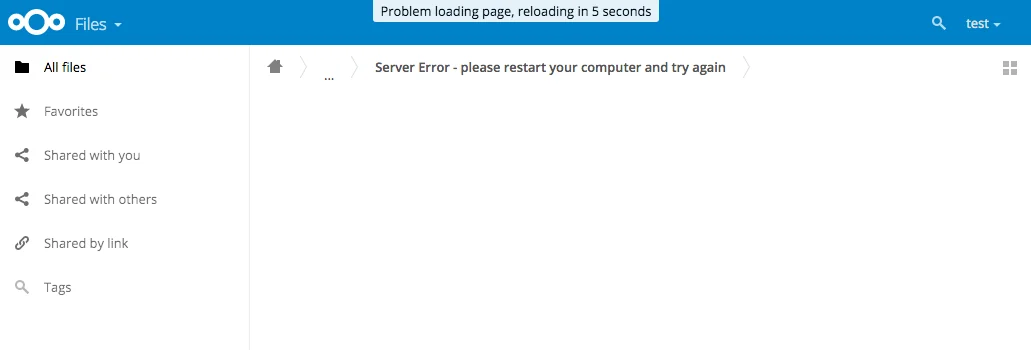
For example, you can use URL-encoded periods to bypass the directory traversal prevention. By referencing a path that returns a 301, you can add a message in the dir param F108266:
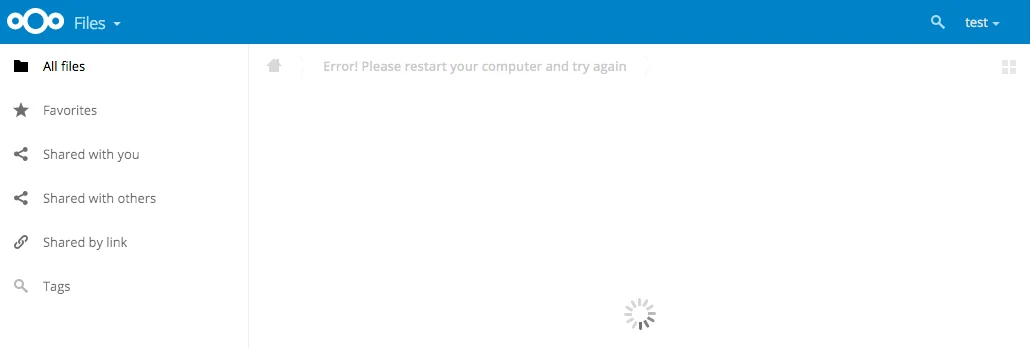
Also, in Chrome, the presence of a null byte (%00) in the url causes a CSP error for an ajax request upon pageload, which prevents the redirect to dir=/ and allows you to put a message in the dir param F108267:
Please let me know if you need more info. Thanks!
Attachments
What the report shows
The target is Nextcloud's Files app, specifically the directory breadcrumbs area that uses the dir request parameter. The researcher found that an invalid dir value could still be used to inject an arbitrary message into that breadcrumb area, a content spoofing issue. The report is a follow-up: the phrasing "still possible" indicates that earlier attempts to prevent this had not fully closed the hole.
Two separate bypasses are described.
Bypass 1: URL-encoded periods plus a 301 response
The first technique uses URL-encoded periods (%2E) to get past the directory traversal prevention. By pointing at a path that returns a 301 redirect, the message placed in the dir parameter is rendered in the breadcrumbs:
https://demo.nextcloud.com/index.php/apps/files/?dir=%2E%2E/%2E%2E/%2E%2E/.well-known/caldav/Error%20-%20please%20restart%20your%20computer%20to%20continue
The encoded periods bypass the directory traversal prevention, the path returns a 301, and the message in the dir parameter is placed in the breadcrumbs.
Bypass 2: a null byte in Chrome
The second technique relies on browser behaviour specific to Chrome. A null byte (%00) in the URL causes a CSP error on an Ajax request during page load. That error prevents the redirect to dir=/, so the injected text survives in the dir parameter and is displayed:
https://demo.nextcloud.com/index.php/apps/files/?dir=%00Error!%20Please%20restart%20your%20computer%20and%20try%20again
Outcome
The report was rated low severity with a CVSS score of 3.1, classified as a violation of secure design principles, and paid a bounty of 50.00 USD. It was disclosed on 4 November 2016. The text does not describe a fix.
Root cause
In the second case the null byte triggers a CSP error on an Ajax request, which prevents the redirect to dir=/.
Impact
The researcher demonstrates content spoofing: an attacker can make the Files app display an arbitrary message in the breadcrumb area, such as a fake error telling the user to restart their computer. The report does not claim script execution, data theft or any other consequence, and the low severity rating reflects that.
How this kind of bug works
Content spoofing through a reflected parameter happens when user-controlled input reaches a page without being treated purely as text. The parameter is echoed into the DOM, and because the value is not validated against what the feature expects (a real directory path), arbitrary strings appear in a place users trust. The bug class is closely related to reflected XSS, but the payload is plain text rather than markup, so the impact is limited to what the attacker can convince the user to believe.
Bypasses usually come from mismatches between layers. A filter may check for ../ literally while the server or browser decodes %2E%2E afterwards. A client-side redirect may be the only thing that cleans up a bad value, so anything that stops the redirect (a CSP error, a blocked request, a script failure) leaves the value in place. Null bytes are a classic source of this kind of inconsistency because different components truncate or reject them at different points.
Defences are straightforward: validate the parameter against the expected format (an existing, permitted path), reject anything that does not match, and encode the value on output so it is always rendered as inert text. Relying on a redirect to sanitise state is fragile, because the client may never follow it.
How to test for it
- Find parameters that are reflected into the page, especially ones that name a path, file, folder, page or view, and especially where the value appears in navigation or breadcrumbs.
- Send a value that is clearly not valid for the feature, such as a random word, and see whether it is echoed verbatim.
- Try encoded traversal sequences (encoded dots and slashes) and see whether the filter rejects them or lets them through.
- Try special characters such as null bytes and observe whether the response, redirect or client-side behaviour changes.
- Watch the browser console and network tab: a blocked request or CSP error that stops a cleanup redirect is a strong signal.
- A positive result is your arbitrary text rendered in a trusted part of the UI, ideally in a state a victim would reach by clicking a link.
Common false positives: the value is reflected but HTML-encoded and clearly presented as user input; the reflection only appears in a response the user never sees; or the text is stripped before rendering. Confirm the message actually appears in the rendered page, not just in the raw response.
How it is fixed
Hunting notes
This bug class tends to hide in features that echo a path or identifier into navigation: file managers, breadcrumbs, tabs, page titles and error pages. Recon signals include parameters named dir, path, folder, view or page that appear in URLs and are reflected. To show impact, produce a link that renders a convincing message in the application's own interface and explain the social engineering scenario; keep the claim to spoofing unless you can demonstrate more. Programs are more likely to accept a report when the payload survives normalisation and the rendered result is unambiguous.
What happened, in plain words
Nextcloud is a self-hosted file storage and sharing product, a bit like running your own private version of a cloud drive. Its Files app is the part you see when you browse your folders in the browser. At the top of that view there is a breadcrumb: the little trail of folder names showing where you are, for example Home / Documents / Reports. The Files app uses a value in the web address called the dir parameter.
A request is what your browser sends to a server when you click a link or load a page: a short message asking for something, here "show me the folder named in dir". A parameter is a named value attached to that request, the part after the ? in a URL. The researcher found that an invalid dir value can still be used to spoof messages in the breadcrumb area. So a crafted link can make the application display a message of the attacker's choosing, such as a fake error. This is called content spoofing: the page shows text that looks like it came from the application, but the attacker wrote it.
The report is a follow-up. The phrase "still possible" tells us that earlier attempts to block this had not fully closed the hole. Two different ways around the protection are described.
Bypass 1: encoded dots and a redirect
The first trick uses URL encoding. Some characters cannot appear literally in a web address, so they are written as a percent sign and two hex digits. A period becomes %2E, and a space becomes %20. The application was supposed to reject paths that climb out of the folder you are allowed to see, written as ../ ("go up one level"). By writing the dots in encoded form, the researcher got past that check:
https://demo.nextcloud.com/index.php/apps/files/?dir=%2E%2E/%2E%2E/%2E%2E/.well-known/caldav/Error%20-%20please%20restart%20your%20computer%20to%20continue
Line by line:
https://demo.nextcloud.com/index.php/apps/files/is the Files app page.?dir=starts the parameter that names the folder to show.%2E%2E/%2E%2E/%2E%2E/is three encoded../segments, an attempt to walk up three folder levels..well-known/caldav/is a path that, according to the report, makes the server answer with a 301 redirect. A 301 is a standard server reply meaning "this thing has moved, go here instead".Error%20-%20please%20restart%20your%20computer%20to%20continueis the attacker's message, with%20standing for spaces. Decoded, it readsError - please restart your computer to continue.
Because the path produces a 301, the message placed in dir is added in the breadcrumb area.
Bypass 2: a null byte in Chrome
A null byte is a character with the numeric value zero, written %00 in a URL. It is not a normal printable character, and different pieces of software handle it differently. In Chrome, the report says, a null byte in the URL causes a CSP error on an Ajax request when the page loads. CSP, Content Security Policy, is a set of rules a site sends to the browser saying which resources may be loaded; when something breaks those rules, the browser blocks it and logs an error. Ajax is the background request a page makes without reloading itself.
Normally the application would redirect the browser to dir=/, the clean root folder, which would wipe out the bad value. The CSP error stops that cleanup from happening, so the injected text survives:
https://demo.nextcloud.com/index.php/apps/files/?dir=%00Error!%20Please%20restart%20your%20computer%20and%20try%20again
Here dir=%00 puts the null byte first, and the rest is the message Error! Please restart your computer and try again, again with %20 for spaces. The redirect to dir=/ is prevented, allowing a message to be put in the dir parameter.
Outcome
The report was rated low severity with a CVSS score of 3.1, classified as a violation of secure design principles, and paid a bounty of 50.00 USD. It was disclosed on 4 November 2016. The text does not describe a fix.
In general, how this kind of bug works
Content spoofing through a reflected parameter happens when something the user controls in the URL is copied into the page without being treated purely as text. The parameter is echoed into the page, and because the value is not checked against what the feature expects (a real folder path), any string appears in a place users trust. It is close to reflected XSS, where an attacker gets their own code to run in someone else's browser, but here the payload is plain text, so the damage is limited to what the attacker can make the user believe.
Bypasses usually come from mismatches between layers. A filter may look for ../ literally while the server or browser decodes %2E%2E afterwards. A client-side redirect may be the only thing that cleans up a bad value, so anything that stops the redirect, such as a CSP error or a blocked request, leaves the value in place. Null bytes are a classic source of this inconsistency because different components truncate or reject them at different points.
Defences are straightforward: validate the parameter against the expected format (an existing, permitted path), reject anything that does not match, and encode the value on output so it is always shown as inert text. Relying on a redirect to clean up state is fragile, because the browser may never follow it.
How to test for it
- Find parameters that are reflected into the page, especially ones naming a path, file, folder, page or view, and especially where the value appears in navigation or breadcrumbs.
- Send a value that is clearly not valid for the feature, such as a random word, and see whether it is echoed verbatim.
- Try encoded traversal sequences (encoded dots and slashes) and see whether the filter rejects them or lets them through.
- Try special characters such as null bytes and observe whether the response, redirect or browser behaviour changes.
- Watch the browser console and network tab: a blocked request or CSP error that stops a cleanup redirect is a strong signal.
- A positive result is your arbitrary text rendered in a trusted part of the interface, ideally in a state a victim would reach by clicking a link.
Common false positives: the value is reflected but HTML-encoded and clearly presented as user input; the reflection only appears in a response the user never sees; or the text is stripped before rendering. Confirm the message actually appears in the rendered page, not just in the raw response.
How it is fixed
Hunting notes
This bug class tends to hide in features that echo a path or identifier into navigation: file managers, breadcrumbs, tabs, page titles and error pages. Recon signals include parameters named dir, path, folder, view or page that appear in URLs and are reflected. To show impact, produce a link that renders a convincing message in the application's own interface and explain the social engineering scenario; keep the claim to spoofing unless you can demonstrate more. Programs are more likely to accept a report when the payload survives normalisation and the rendered result is unambiguous.
Glossary
- Nextcloud: a self-hosted file storage and sharing product, similar to a private cloud drive.
- Files app: the part of Nextcloud used to browse folders and files in the browser.
- Breadcrumb: the trail of folder names at the top of a view showing where you are.
- Request: the message a browser sends to a server asking for a page or resource.
- Parameter: a named value attached to a request, appearing after the
?in a URL. dirparameter: the value in the URL that names the folder the Files app should show.- URL encoding: writing characters as a percent sign plus two hex digits, such as
%2Efor a period or%20for a space. - Directory traversal: using
../segments to climb out of the folder you are meant to be in. - 301 redirect: a standard server reply meaning the requested thing has moved and the browser should go elsewhere.
- Null byte: a character with value zero, written
%00in a URL, handled inconsistently by different software. - CSP (Content Security Policy): rules a site sends to the browser saying which resources may be loaded; violations are blocked and logged.
- Ajax: a background request a page makes without reloading itself.
- Content spoofing: making a trusted page display text the attacker wrote, so it looks like the application's own message.
- Reflected parameter: a URL value that the page copies back into its output.
- XSS (cross-site scripting): getting an attacker's code to run in another user's browser; related to spoofing but more severe.
- CVSS: a standard scoring system for rating the severity of a vulnerability.
- Social engineering: manipulating people into trusting something or doing something, often using convincing fake messages.
- Phishing: a lure, often a link or message, designed to trick someone into trusting it.
- False positive: a test result that looks like a bug but is not one in practice.




