Hacking the NHS for Fun and No Profit
A publicly exposed NHS login form was vulnerable to SQL injection, allowing the attacker to extract a user table with weakly hashed passwords. After cracking an administrator's password, the attacker logged in and found further issues such as local file inclusion and source code disclosure.
 Published on medium.com
On the 25th of October, 2016, I woke up and thought to myself “How easy would it be to hack the NHS?”. By lunch time I was writing a report.
The full write-up lives on its author's site
It belongs to its author, so we link to it rather than copy it. The other two tabs are our own rewrites, checked against it.
Context
On 25 October 2016 the author set out to answer a simple question: how easy would it be to hack the NHS? By lunchtime he was writing a report. The target was a webserver found on Shodan at [redacted], also known as monitor.nhs.uk, presenting a simple login form. The application turned out to be the monitoring tool for the N3 Internet gateway, the national broadband network for the English NHS. According to the Wikipedia quote in the post, N3 connects all NHS locations and 1.3 million employees across England, and BT was awarded the contract to deliver and manage the IT project on behalf of the NHS in 2004, with N3 following NHSnet and becoming N3 in 2006.

The application exposed gateway metrics (broadband, DNS infrastructure, VPN tunnels, firewalls and more), traffic visualisation (GCSX, datacenters, PoPs, gateways), logs, HTTP probes and alerts, N3 IP address lookups, and further tools. The login form was the entry point the author chose to attack.
Setup
The only precondition was that the host was reachable from the Internet and that its ASN could be filtered. The NHS has its own ASN, AS41373 (NATIONAL HEALTH SERVICE), and Shodan has an ASN filter to limit results to a specific ASN. That made discovery of Internet-facing machines belonging to the organisation straightforward. The author used sqlmap, described in the post as a powerful open source toolkit for detecting and exploiting SQL injection vulnerabilities. No credentials were held beforehand; the login form accepted a username, a password and a login button.
Finding it
After a few minutes of Shodan filtering the author found the webserver with the login form. From there, multiple routes were possible, but he decided to test for SQL injection first. The request he used pointed sqlmap at the login endpoint with a random user agent, a POST body matching the form fields, batch mode and database enumeration:
$ python sqlmap.py -u 'https://[redacted]/login.php' --random-agent --data='username=test&password=test&btnLogin=Login' --batch --dbs
The -u option sets the target URL, --random-agent rotates the User-Agent header, --data supplies the POST body with the form fields username, password and btnLogin, --batch accepts default answers to prompts, and --dbs asks sqlmap to enumerate databases. The author was not hopeful, but it paid off.
Exploitation
Step 1: Confirm and characterise the injection
sqlmap reported the username POST parameter as vulnerable and identified three injection types after 454 HTTP(s) requests:
POST parameter 'username' is vulnerable. Do you want to keep testing the others (if any)? [y/N] Nsqlmap identified the following injection point(s) with a total of 454 HTTP(s) requests:---Parameter: username (POST) Type: boolean-based blind Title: MySQL RLIKE boolean-based blind - WHERE, HAVING, ORDER BY or GROUP BY clause Payload: username=test' RLIKE (SELECT (CASE WHEN (3915=3915) THEN 0x74657374 ELSE 0x28 END))-- MgVq&password=test&btnLogin=LoginType: error-based Title: MySQL >= 5.0 AND error-based - WHERE, HAVING, ORDER BY or GROUP BY clause (FLOOR) Payload: username=test' AND (SELECT 5095 FROM(SELECT COUNT(*),CONCAT(0x716b707171,(SELECT (ELT(5095=5095,1))),0x716b7a6a71,FLOOR(RAND(0)*2))x FROM INFORMATION_SCHEMA.PLUGINS GROUP BY x)a)-- ppwP&password=test&btnLogin=LoginType: AND/OR time-based blind Title: MySQL <= 5.0.11 OR time-based blind (heavy query) Payload: username=test' OR 4720=BENCHMARK(5000000,MD5(0x6d7a554b))-- GVLM&password=test&btnLogin=Login---
The boolean-based payload wraps a CASE expression in RLIKE so that the response differs depending on whether the condition is true. The error-based payload forces a duplicate-key error through FLOOR(RAND(0)*2) and GROUP BY over INFORMATION_SCHEMA.PLUGINS, embedding the result in the error message. The time-based payload uses BENCHMARK to burn CPU and produce a measurable delay. All three confirm the backend is MySQL and that the username value is concatenated into the query without sanitisation.
Step 2: Enumerate databases and the users table
sqlmap listed the databases with ease. Exploring the primary database, the author found a users table with 73 rows, so access was clearly limited to a select number of people. The first user was the person who originally wrote the application, a consultant from the UK. The passwords were hashed with MD5, and sqlmap automatically cracked the hash. His password was test.
Step 3: Log in as the developer
Using the consultant's username and the cracked password, the author logged in to the application.
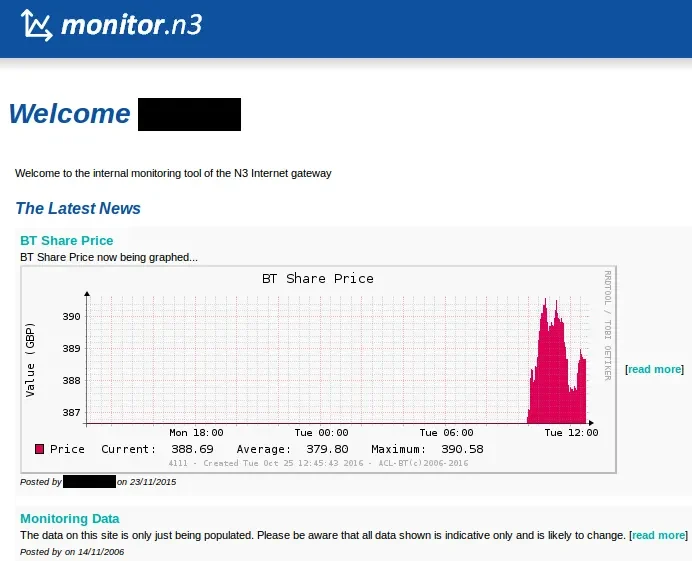
The home page after login confirmed the session. He was logged in as a privileged administrator, with the ability to manage users, edit configurations, execute system commands and more, all from a leftover developer account with a password weak enough to guess.
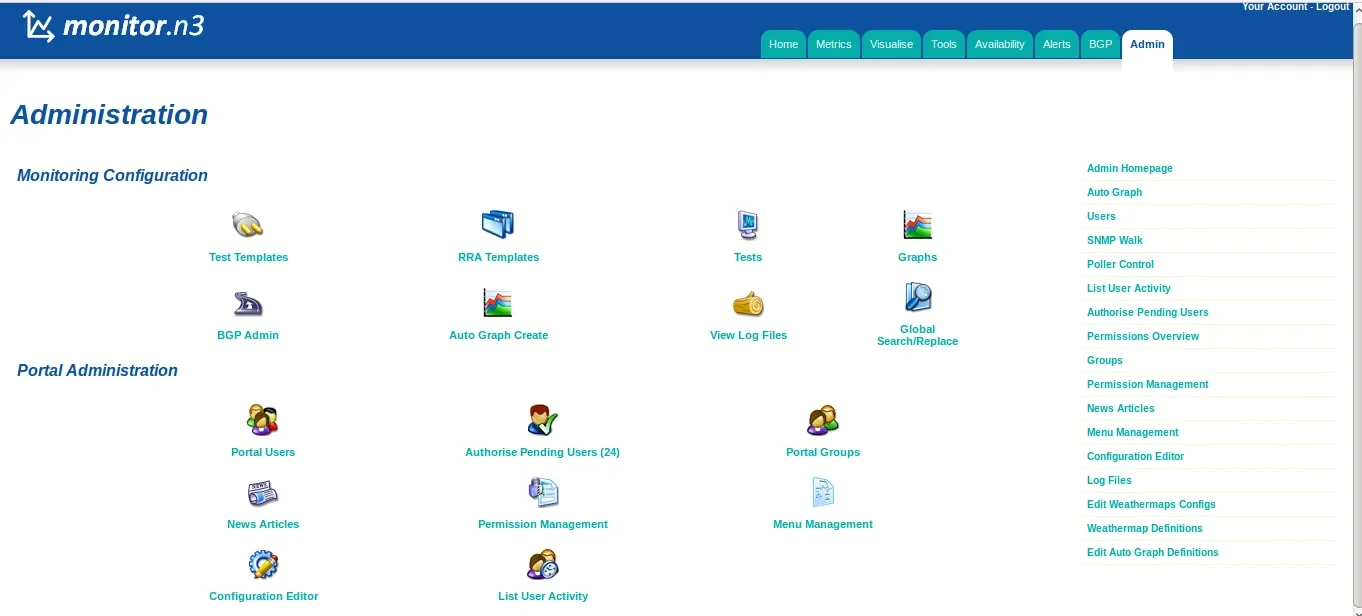
The other users in the database were BT employees, some of whom were also using weak passwords.
Step 4: Local file inclusion in the log viewer
The application's log viewer allowed arbitrary files to be read from the filesystem, including source code.
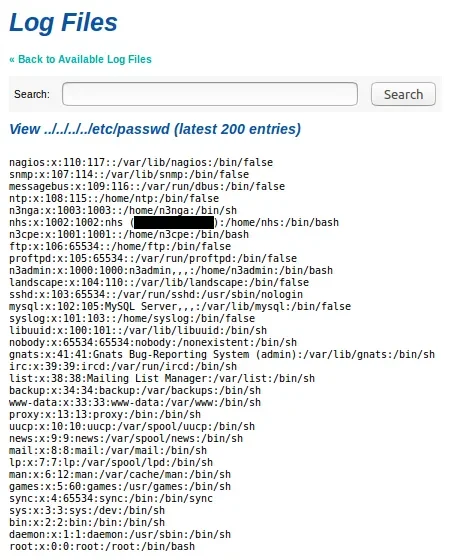
The log viewer limited how many lines could be viewed, but the inclusion itself was enough to read files. Having read the system hosts file, the author saw other interesting machines on the network, though he did not go as far as probing them.
Step 5: Source code disclosure through a directory index
The server had directory indexes enabled, which allowed the contents of the includes directory to be listed. Someone had made a backup copy of common.inc.php and named it common.inc.php.old. The server did not recognise the extension and prompted a download of the file instead of executing it.
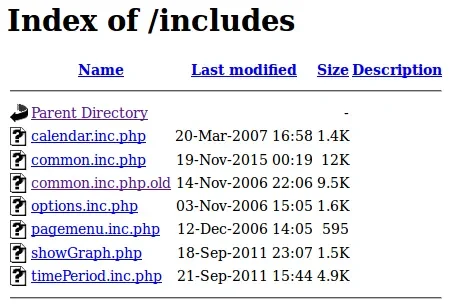
Appending .old or .bak to older revisions is common practice, but such files are easily enumerated and can pose a serious risk. They are messy and lazy, and should never make their way into production.
The author did not bother looking for further SQL injection or XSS vulnerabilities, having already concluded the application should be nuked from orbit. He would have been surprised if it had not already been hacked in the past.
Root cause
The username POST value was injectable, which is what allowed all three sqlmap techniques to work. The application also shipped with a leftover developer account whose password was test, stored as an MD5 hash that sqlmap could crack automatically. On the application side, the log viewer allowed arbitrary files to be read, and the web server had directory indexes enabled, exposing backup files such as common.inc.php.old that the server served as downloads rather than executing. The report does not describe the code behind these features, so the exact mistakes are inferred from behaviour.
Impact
An attacker on the Internet could obtain administrator access to the N3 monitoring tool through SQL injection and a weak, crackable password. From that position the author could manage users, edit configurations and execute system commands, and could read arbitrary files from the filesystem, including source code and the hosts file, which revealed other machines on the network. The other users in the database were BT employees, some with weak passwords too. The author notes he was limited in what he could share, and he did not probe the other machines he saw in the hosts file. The application was the monitoring tool for the N3 Internet gateway.
Fix
The author first reached out to the consultant, but never received a reply. He next contacted a BT employee who was a user of the application, and the message was passed along to BTCERT, who contacted him the next day.
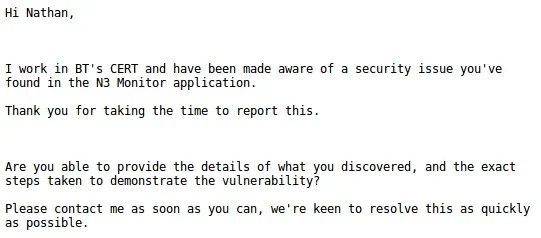
He wrote up a report of everything he had found and sent it along, and received a reply a few hours later stating the application had been taken down.
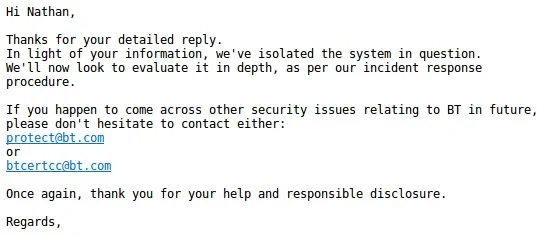
The author was pleased with BT's response and with the existence of an incident response plan. The takeaways he lists are: you do not need NSA exploits to breach sensitive systems, because a chain is only as strong as its weakest link; know your assets and know them well, because if you are not in control, who is; and do not allow internal applications to face the Internet, even if they require authentication.
Variants to test
- Login forms on other ASN-scoped hosts. Run sqlmap against POST login endpoints with
--datamatching the form fields and--dbs. A positive result is any of the boolean, error-based or time-based injection types being reported for a field such asusername. - Weak password hashes in user tables. After dumping a
userstable, check whether hashes are unsalted MD5 and let sqlmap crack them. A positive result is a recovered plaintext password, especially a trivial one liketest. - Log viewers and file readers. Try path traversal or direct file parameters in any viewer that displays logs or files. A positive result is reading a file outside the intended directory, such as the hosts file or application source.
- Directory indexes on include directories. Request directories such as
includes/and look for listings. A positive result is a directory index that reveals backup files likecommon.inc.php.oldor.bakfiles, which can then be downloaded. - Leftover developer accounts. Enumerate usernames from the user table and test the cracked passwords against the login form. A positive result is a session with administrative privileges, such as user management, configuration editing or command execution.
What happened, in plain words
On 25 October 2016, a security researcher asked himself a simple question: how easy would it be to hack the NHS? By lunchtime he was already writing up a report. This is the story of what he found, retold for someone who has never done any security work before. You only need to know how to use a browser and a computer to follow it.
The short version: he found a website belonging to the NHS that had a login form, discovered that the form could be tricked into revealing the contents of its database, cracked a weak password, logged in as an administrator, and then found two more problems inside the application. He reported it all, and the site was taken down.
To follow the story you need a handful of ideas. I will explain each one the first time it appears, with a short everyday comparison where it helps.

Still not sorry for the shitty stock art.
The background: what the NHS and N3 are
Before the technical part, a bit of context. The application the researcher found turned out to be the monitoring tool for something called N3. The post quotes Wikipedia to explain it:
N3 is the national broadband network for the English National Health Service (NHS), connecting all NHS locations and 1.3 million employees across England. In 2004, BT was awarded the contract to deliver and manage the IT project on behalf of the NHS. N3 was preceded by NHSnet, becoming N3 in 2006. Wikipedia
In plain words: N3 is the private, nationwide computer network that connects NHS buildings and staff across England. BT, a large telecommunications company, was paid to build and run it. A network like this needs to be watched, the way a building needs a security desk that watches the cameras. The monitoring tool is that security desk: it shows the health of the network and lets administrators manage it.
It's still pronounced jif.
Step 1: Finding a target
The researcher started by looking for NHS computers that were reachable from the public Internet. He used a search engine called Shodan.
Shodan is a search engine for devices connected to the Internet, rather than for web pages. Where Google indexes pages, Shodan indexes servers, routers, cameras and anything else with an Internet address. Think of it as a directory of every front door on the Internet that is open to the street.
To narrow the search, he used the fact that the NHS owns its own block of Internet addresses. Every network on the Internet belongs to an ASN, which stands for Autonomous System Number. An ASN is like a postcode district: it identifies a whole organisation's slice of the Internet. The NHS has AS41373 (NATIONAL HEALTH SERVICE). Shodan has an ASN filter, so the researcher could ask it to show only machines inside that postcode district. That made the search far easier than guessing addresses one by one.
After a few minutes he found a webserver at [redacted], also known as monitor.nhs.uk, presenting a simple login form. A webserver is the computer that sends web pages to your browser when you visit a site. A login form is the username and password box you have seen on countless websites.
From that login form there were several possible routes of attack, but he decided to test for SQL injection first. We will come to what that means in a moment.
Step 2: The tool and the idea behind it
The researcher's favourite tool for this job is sqlmap, which the post describes as a powerful open source toolkit for detecting and exploiting SQL injection vulnerabilities. He ran it from his own machine.
To understand what sqlmap does, you need to know what a database is and what SQL is.
A database is an organised store of information. Think of a very large spreadsheet with many sheets: one sheet might hold user accounts, another might hold logs, another might hold settings. Websites use databases constantly, for example to check whether the username and password you typed match an account.
SQL (Structured Query Language) is the language used to talk to that database. When you submit a login form, the website builds a SQL sentence like "find the user whose name is this and whose password is that" and sends it to the database. The database answers, and the website decides whether to let you in.
SQL injection is a trick where an attacker types special characters into a form field so that the website's SQL sentence is changed. Imagine a form that fills in a sentence like "Give me the record for [your name]". If you type a name that contains the word "and also give me every other record", and the website pastes your text straight into the sentence without checking, the database will obediently hand over everything. That is the essence of SQL injection: user input is treated as part of the instruction rather than as plain data.
sqlmap automates the process of trying many such tricks and reporting which ones work.
Step 3: The first request
The researcher pointed sqlmap at the login page. The command he ran was:
$ python sqlmap.py -u 'https://[redacted]/login.php' --random-agent --data='username=test&password=test&btnLogin=Login' --batch --dbs
Line by line, in plain words:
python sqlmap.pyruns the sqlmap program using Python, the programming language it is written in. You can think of Python as the engine and sqlmap as the car.-u 'https://[redacted]/login.php'tells sqlmap the address of the page to attack. The-ustands for URL. The address is the login page of the server he found.--random-agentmakes sqlmap introduce itself differently on every request. Every time your browser contacts a website it sends a User-Agent header, a short line identifying the browser and operating system. Randomising it makes the traffic look less like a single automated tool and more like many different visitors. A header is a small piece of extra information sent alongside a web request, like the label on a parcel.--data='username=test&password=test&btnLogin=Login'supplies the contents of the form. When you fill in a login form and press the button, your browser sends the field values to the server. Here the researcher sendsusername=test,password=testandbtnLogin=Login, which are the three fields the form expects. The&separates the fields, the way a shopping list separates items.--batchtells sqlmap to accept the default answer to any question it would normally ask, so it can run without a human sitting there clicking yes or no.--dbsasks sqlmap, once it has confirmed an injection, to list the databases on the server.dbsis short for databases.
The researcher was not hopeful, but it was worth a shot, and it paid off.
Step 4: What sqlmap found
sqlmap reported that the username field was vulnerable. It identified three different injection techniques after 454 HTTP(s) requests. An HTTP request is a single message your browser (or a tool) sends to a server asking for something; 454 of them is simply how many attempts it took to be sure.
The output was:
POST parameter 'username' is vulnerable. Do you want to keep testing the others (if any)? [y/N] Nsqlmap identified the following injection point(s) with a total of 454 HTTP(s) requests:---Parameter: username (POST) Type: boolean-based blind Title: MySQL RLIKE boolean-based blind - WHERE, HAVING, ORDER BY or GROUP BY clause Payload: username=test' RLIKE (SELECT (CASE WHEN (3915=3915) THEN 0x74657374 ELSE 0x28 END))-- MgVq&password=test&btnLogin=LoginType: error-based Title: MySQL >= 5.0 AND error-based - WHERE, HAVING, ORDER BY or GROUP BY clause (FLOOR) Payload: username=test' AND (SELECT 5095 FROM(SELECT COUNT(*),CONCAT(0x716b707171,(SELECT (ELT(5095=5095,1))),0x716b7a6a71,FLOOR(RAND(0)*2))x FROM INFORMATION_SCHEMA.PLUGINS GROUP BY x)a)-- ppwP&password=test&btnLogin=LoginType: AND/OR time-based blind Title: MySQL <= 5.0.11 OR time-based blind (heavy query) Payload: username=test' OR 4720=BENCHMARK(5000000,MD5(0x6d7a554b))-- GVLM&password=test&btnLogin=Login---
This block is dense, so let us unpack it piece by piece.
POST parameter 'username' is vulnerable.A POST parameter is a value sent in the body of a request rather than in the address bar. When you submit a login form, your browser sends a POST request carrying the field values. sqlmap is saying: the value you type into the username box is being pasted into the database query in a way that can be manipulated.Do you want to keep testing the others (if any)? [y/N] Nsqlmap asked whether to test the password field too. The researcher answered N, no. One vulnerable field was enough.sqlmap identified the following injection point(s) with a total of 454 HTTP(s) requestsThis is the summary line: after 454 requests, sqlmap is confident about what it found.Parameter: username (POST)The vulnerable field isusername, sent as a POST parameter.Type: boolean-based blindThe first technique. Boolean-based blind injection means the attacker cannot see the database contents directly, but can ask yes/no questions. The trick is to make the page behave differently depending on whether a condition is true. It is like playing twenty questions with a database that only answers "yes" or "no".Title: MySQL RLIKE boolean-based blind - WHERE, HAVING, ORDER BY or GROUP BY clauseMySQL is the brand of database software the server runs.RLIKEis a MySQL feature for pattern matching. The title simply names the specific variant of the technique.Payload: username=test' RLIKE (SELECT (CASE WHEN (3915=3915) THEN 0x74657374 ELSE 0x28 END))-- MgVq&password=test&btnLogin=LoginThe payload is the actual text sqlmap typed into the field. TheCASE WHEN (3915=3915)part asks a question that is always true, and the two hex values are the two possible answers. The-- MgVqat the end is a SQL comment: everything after--is ignored by the database, which is a common way to cut off the rest of the original query. The&password=test&btnLogin=Loginis the rest of the form, unchanged.Type: error-basedThe second technique. Error-based injection makes the database produce an error message that contains the answer. It is like asking a librarian for a book and having them shout the entire shelf list back at you when they cannot find it.Title: MySQL >= 5.0 AND error-based - WHERE, HAVING, ORDER BY or GROUP BY clause (FLOOR)Again, the specific variant.FLOORis a MySQL function that rounds numbers down, and it is used here to force a deliberate error.Payload: username=test' AND (SELECT 5095 FROM(SELECT COUNT(*),CONCAT(0x716b707171,(SELECT (ELT(5095=5095,1))),0x716b7a6a71,FLOOR(RAND(0)*2))x FROM INFORMATION_SCHEMA.PLUGINS GROUP BY x)a)-- ppwP&password=test&btnLogin=LoginThis payload builds a query that deliberately causes a duplicate-key error, and hides the answer inside the error text.INFORMATION_SCHEMA.PLUGINSis a built-in MySQL table that lists installed plugins; it is used here only as a convenient source of rows.Type: AND/OR time-based blindThe third technique. Time-based blind injection makes the database pause for a measurable amount of time when a condition is true. If the page takes five seconds longer to answer, the attacker knows the answer was yes. It is like asking a question and agreeing that one knock means yes and two knocks mean no.Title: MySQL <= 5.0.11 OR time-based blind (heavy query)The specific variant, using a deliberately expensive query.Payload: username=test' OR 4720=BENCHMARK(5000000,MD5(0x6d7a554b))-- GVLM&password=test&btnLogin=LoginBENCHMARKis a MySQL function that runs an operation many times to burn CPU. RunningMD5five million times takes a noticeable moment, which is the delay the attacker measures.
All three techniques confirm two things: the backend is MySQL, and the username value is pasted into the query without any sanitisation. Sanitisation means cleaning user input before using it, for example by escaping special characters or, better, by using parameterised queries, where the input is sent separately from the instruction so it can never be mistaken for code.
Step 5: Reading the database
With the injection confirmed, sqlmap listed the databases with ease. The researcher then explored the primary database and found a users table. It had 73 rows, so access was clearly limited to a select number of people. The first user was the person who originally wrote the application, a consultant from the UK.
The passwords in the table were hashed with MD5. A hash is a one-way scramble of a value: you can turn a password into a hash easily, but you are not supposed to be able to turn the hash back into the password. Websites store hashes so that even if the database leaks, the passwords are not immediately readable. MD5 is a particular hashing algorithm, and it is old and weak: it is fast to compute, which means an attacker can try billions of guesses per second. sqlmap automatically cracked the hash for the consultant, and his password was test.
It's pronounced jif.
Step 6: Logging in as the developer
Using the consultant's username and the cracked password, the researcher logged in to the application.
The "home" page displayed after logging in.
The home page after login is shown in the post. When you log in, the server sends your browser a small piece of data, often called a cookie, and your browser sends it back with every subsequent request. Think of it as a wristband at a festival: you show it once at the gate, and after that staff recognise you without asking for your ticket again.
He was logged in as a privileged administrator. An administrator is a user with special powers: managing other users, changing settings, and in this case executing system commands. Executing system commands is one of the administrator capabilities the report lists. That is a very powerful position.
All of this came from a leftover developer account with a password weak enough to guess. A leftover developer account is an account created while the application was being built and never removed before it went live. It is like a builder leaving their master key in the door of a finished house.
The other users in the database were BT employees, some of whom were also using weak passwords.
Step 7: What the application could do
The application was loaded with many tools. The researcher could view gateway metrics (broadband, DNS infrastructure, VPN tunnels, firewalls and more), visualise traffic (GCSX, datacenters, PoPs, gateways), view logs, HTTP probes and alerts, look up N3 IP addresses, and much more. A few of those terms in plain words:
- DNS is the system that turns a name like
monitor.nhs.ukinto the numeric address of a server, like a phone book for the Internet. - VPN stands for Virtual Private Network, a private tunnel through the public Internet.
- Firewall is a filter that decides which network traffic is allowed in or out.
- PoP stands for Point of Presence, a physical location where a network connects to the wider world.
- HTTP probe is an automated check that asks a website or server whether it is responding, and records the answer.
Although the researcher was limited in what he could share, he described a few of the things he found.
Step 8: Local file inclusion in the log viewer
Local file inclusion in the log viewer
The log viewer allowed arbitrary files to be read from the filesystem, including source code. This is called local file inclusion, often shortened to LFI. The idea is that a feature which is supposed to read one specific file, such as a log file, can be persuaded to read a different file on the same server. Imagine a librarian who is asked for "the log book" but who will fetch any book you name, including the staff room diary and the safe combination.
Source code is the human-written program that makes the application work.
The log viewer limited how many lines could be viewed, but the inclusion itself was enough to read files. Having read the system hosts file, the researcher saw other interesting machines on the network, though he did not go as far as probing them. The hosts file is a small file on a computer that maps names to addresses, a bit like a personal address book. It can reveal the names of other machines on the same network.
Step 9: Source code disclosure through a directory index
Source code disclosure
The server had directory indexes enabled. Normally, when you request a folder on a website, the server either refuses or shows a default page. With directory indexes enabled, the server instead shows a list of every file in that folder, like a filing cabinet with the doors open and every folder labelled.
This allowed the researcher to view the contents of the includes directory. Someone had made a backup copy of common.inc.php and named it common.inc.php.old. The server did not recognise the .old extension, so instead of running the file as a program, it offered it as a download. That is how the source code was disclosed.
Appending .old or .bak to older revisions is common practice among developers, but such files are easily enumerated and can pose a serious risk. Enumerating here means guessing likely file names one after another, which is easy when the pattern is obvious. These backup files are messy and lazy, and they should never make their way into production. Production: the live system, as opposed to a test system.
The researcher did not bother looking for further SQL injection or XSS vulnerabilities, having already concluded the application should be nuked from orbit. XSS, or Cross-Site Scripting, is a different class of web bug. He would have been surprised if the application had not already been hacked in the past.
Step 10: Reporting it
The researcher first reached out to the consultant, but never received a reply. He next contacted a BT employee who was a user of the application, and the message was passed along to BTCERT, who contacted him the next day. BTCERT is the team that handled the report inside BT. Think of it as the fire brigade for computer problems.
He wrote up a report of everything he had found and sent it along, and received a reply a few hours later stating the application had been taken down.
The researcher was pleased with BT's response and with the existence of an incident response plan, which is a prepared procedure for what to do when something goes wrong, so that people are not improvising in a panic.
The takeaways he lists are:
- You do not need NSA exploits to breach sensitive systems. A chain is only as strong as its weakest link.
- Know your assets, and know them well. If you are not in control, who is?
- Do not allow your internal applications to face the Internet, even if they require authentication.
In plain words: the attack did not use anything exotic. It used a login form, a common tool, and a password of test. The lesson is that the weakest point is often the most ordinary one, and that an internal tool should not be reachable from the public Internet at all, because a login form is only as strong as its weakest password.
Glossary
- BTCERT: the team that handled the report inside BT.
- Executing system commands: one of the administrator capabilities the report lists.
- Session: how a website remembers that you are logged in between page loads.
- Source code: the human-written program that makes an application work.
- XSS (Cross-Site Scripting): a different class of web bug.




