[atlasboard-atlassian-package] Cross-site Scripting (XSS)
The atlasboard-atlassian-package's blockers widget inserts JIRA issue summaries into the dashboard without sanitisation, allowing an attacker who can create or modify JIRA issues to inject client-side JavaScript or HTML. This could execute in the context of the dashboard when it displays the issue.

- Triaged in 3 months
- Fixed in 13 months
- Disclosed after 13 months
I would like to report XSS in atlasboard-atlassian-package
It allows to inject clientside javascript (or HTML) in cases when attacker has opportunity to create or modify issues on JIRA server (e.g bug tracker) which is configured to work with application from module.
Module
module name: atlasboard-atlassian-package
version: 0.0.2
npm page: https://www.npmjs.com/package/atlasboard-atlassian-package
Module Description
this is a package ready to be used with Atlasboard. It contains dashboards, widgets and jobs related to Atlassian products.
Module Stats
1 downloads in the last day 9 downloads in the last week 20 downloads in the last month
Vulnerability
Vulnerability Description
atlasboard-atlassian-packageis a collection of widgets foratlasboardwhich is another package and a dashboard framework, 'blockers' widget dedicated to show issues from JIRA with 'Blocked' status (which actually can be used to show any kind of issues because it uses configurable JQL query for requesting data from Jira server) doesn't have proper incoming data sanitization.
Steps To Reproduce:
First of all it requires atlasboard installed
that is why steps a from https://www.npmjs.com/package/atlasboard#installation
install atlasboard
npm install -g atlasboard
create your dashboard
atlasboard new mywallboard
go to dashboard directory and install atlasboard-atlassian-package
cd mywallboard/
git init
git submodule add https://bitbucket.org/atlassian/atlasboard-atlassian-package packages/atlassian
then configure packages/atlassian/dashboards/example1.json to use Jira server,
...
  "config": {
    "confluence-blockers": {
      "timeout": 30000,
      "retryOnErrorTimes": 3,
      "interval": 120000,
      "jira_server": "https://your-jira-portal.atlassian.net",
      "jql": "project = \"YOUR-PROJECT\" ORDER BY priority DESC"
    },
...
where jira_server - url of your Jira portal
jql - query that you want to use for getting jira issues list
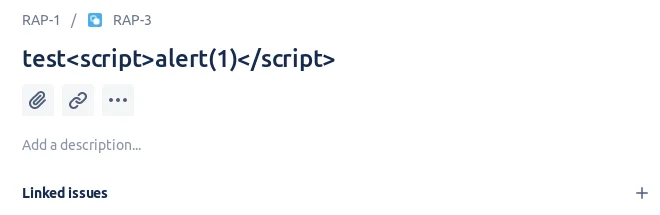
then create a ticket in Jira with summary containing payload e.g. test<script>alert(1)</script>
F386186
then start your dashboard
atlasboard start
or
node start.js
url dashboard-server:port/example1 will contain payload
where dashboard-server - your server location where you host the dashboard
port - port of your server where you host the dashboard
by default it's localhost:3000
var $summary = $("<div/>").addClass("issue-summary").append(blocker.summary).appendTo(listItem);
blocker is an issue object recieved from Jira
if an attacker has access for changing issues summary in Jira any kind of markup (HTML / JS) can be injected on the dashboard
Patch
I suppose it's better to use 'text' instead of 'append' here
var $summary = $("<div/>").addClass("issue-summary").text(blocker.summary).appendTo(listItem);
Supporting Material/References:
- Linux Mint current
- Node.js 8.11.1
- NPM 6.4.0
Wrap up
- I contacted the maintainer to let them know:N
- I opened an issue in the related repository: N
Didn't do a patch myself because I'm not familiar with bitbucket and don't have account there, didn't contacted the maintainer for the same reason. It's obviously has a low level impact but I guess this is important due to the fact that this package is presented as a good place to start creating your own dashboards for atlasboard https://www.npmjs.com/package/atlasboard#importing-your-first-package May be it won't affect somebody directly, but as long as this package is created by well known company (Atlassian) it can be a bad example of how to not sanitize your inputs
Impact
Cross-site Scripting
Attachments
Not written yet. The AI write-up for this report has not been written yet. The Original tab links to the source.
How it worked
Root cause
The widget uses jQuery's .append() to insert the issue summary as HTML instead of using .text() to treat it as plain text.
Impact
An attacker with the ability to create or modify JIRA issues could inject arbitrary HTML or JavaScript that executes in the dashboard, potentially leading to cross-site scripting.
What the attacker needed
Atlasboard installed; atlasboard-atlassian-package configured; JIRA server access; ability to create or modify JIRA issues
The fix
The widget should use .text() instead of .append() to insert the issue summary as plain text.
How it was found
- Install atlasboard globally and create a new dashboard.
- Add the atlasboard-atlassian-package as a submodule in the dashboard's packages directory.
- Configure the example dashboard to point to a JIRA server and set a JQL query.
- Create a JIRA ticket with a summary containing a script payload.
- Start the dashboard and visit the example dashboard URL, which will contain the payload.
Explained by bugbounty.wiki with AI from the original and checked against quotes from it; it can still be wrong. Read the original before relying on a detail.
Not written yet. The AI write-up for this report has not been written yet. The Original tab links to the source.
A dashboard widget puts JIRA issue text into the page without cleaning it. If an attacker controls that text, they can make the dashboard run their JavaScript.
What is XSS?
Script an attacker supplies runs in another user's browser, on the target's origin, with that user's session.





