[socket.io] Cross-Site Websocket Hijacking
The socket.io library's origin check can be bypassed by crafting an Origin header with special characters like backtick or dollar sign, which the library interprets as the allowed origin while some browsers treat it as a different domain. An attacker can then perform cross-site WebSocket hijacking to send and receive messages on behalf of a victim.

- Fixed in 6 months
- Disclosed after 6 months
Summary by the researcher
The report
I would like to report Cross-Site Websocket Hijacking in socket.io
It allows an attacker to bypass origin protection using special symbols include "`" and "$"
Module
module name: socket.io
version: 2.3.0
npm page: https://www.npmjs.com/package/socket.io
Module Description
Socket.IO enables real-time bidirectional event-based communication
Module Stats
[1] weekly downloads: 3,457,682
Vulnerability
Vulnerability Description
I found this vulnerability while testing one of the private bugbounty programs. This vulnerability can be exploited as a typical csrf vulnerability. An attacker can send and receive WebSocket messages on behalf of a user.
Steps To Reproduce:
npm install socket.io expressjs- Put the following code in to
index.js
var app = require('express')();
var http = require('http').createServer(app);
var io = require('socket.io')(http);

io.origins(['http://localhost:80']); //we believe that this module will decline other origins

app.get('/', (req, res) => {
  res.sendFile(__dirname + '/index.html');
});

io.on('connection', (socket) => {
  console.log('a user connected');
});

http.listen(80, () => {
  console.log('listening on *:80');
});
- Put the following code in to
index.html
<script src="/socket.io/socket.io.js"></script>
        <script>
                var socket = io();
        </script>
```

- Run it `sudo node index.js`
- Open the burpsuite and navigate to http://localhost
- Open the proxy tab and send following request to repeater - `GET /socket.io/?EIO=3&transport=websocket&sid={{random id}}`
- Run it. We see `HTTP/1.1 101 Switching Protocols`

{{media:0}}

It means that the connection was successful.

- Try to change origin to `something.io`, we will see `HTTP/1.1 400 Bad Request` and it is good, because we allowed only localhost origin in our index.js

{{media:1}}

- Now try to change origin to
```localhost`something.io```

{{media:2}}

As we can see - the module thinks that origin is localhost while Safari thinks that it is a subdomain of something.io. Also, as I identified Safari isn't the only affected browser - this also works on modern firefox `Mozilla Firefox 79.0b8` as well. Try to change Origin to `http://localhost$something.io` The application still thinks that origin is localhost while firefox thinks that it is a domain `http://localhost$something.io` (During my small research I identified that firefox allows $ in domains names).


## Supporting Material/References:

> State all technical information about the stack where the vulnerability was found

- Os: Linux arch 5.7.9-arch1-1
- Node: v14.5.0
- NPM: 6.14.6
- Mozilla Firefox 79.0b8

# Wrap up

> Select Y or N for the following statements:

- I contacted the maintainer to let them know: [Y/N] N
- I opened an issue in the related repository: [Y/N] N

## Impact

After the successful connection from the attacker's domain, the attacker can receive and send websocket messages on behalf of a user.
Context
socket.io is a Node.js module that, in its own words, "enables real-time bidirectional event-based communication". Applications use it to push events to browsers and receive events back over a persistent connection, normally a WebSocket upgraded from an HTTP request. Because the connection is long-lived and authenticated by whatever cookies or session the browser already holds, the server has to decide which origins are allowed to open it. socket.io exposes an io.origins() helper for exactly that: the developer lists the origins they trust and expects every other origin to be rejected.
The report describes a way to get past that check. The module's origin validation can be fooled with the special characters ` and $, so a page on an attacker-controlled domain can open a WebSocket to a victim application and then send and receive messages as the logged-in user. The researcher classifies it as Cross-Site Websocket Hijacking, a CSRF-like attack against the WebSocket handshake.
Setup
The researcher reduced the issue to a minimal local application. The environment recorded in the report is:
| Component | Version |
|---|---|
| OS | Linux arch 5.7.9-arch1-1 |
| Node | v14.5.0 |
| NPM | 6.14.6 |
| Browser | Mozilla Firefox 79.0b8 |
socket.io |
2.3.0 |
No account or role is needed to reproduce it: the test application has a single page and a single connection handler. The tools used include npm and Burp Suite, so that the handshake request can be edited by hand.
The module is popular, with 3,457,682 weekly downloads cited in the report, which is why a bypass of its origin check matters beyond the test application.
Finding it
The researcher came across the behaviour while testing a private bug bounty program, then reduced it to the standalone socket.io setup above. The observation is simple: the server-side origin check and the browser disagree about what a given Origin header means. When the header contains a backtick or a dollar sign, socket.io parses the value as one origin (the trusted one), while the browser parses the same string as a different origin (the attacker's). If the two sides disagree, the server's allow-list no longer protects anything, because the browser is the component that decides which page may initiate the connection.
Exploitation
Step 1: build a server that trusts only one origin
Install the dependencies:
npm install socket.io expressjs
Put the following code in index.js:
var app = require('express')();
var http = require('http').createServer(app);
var io = require('socket.io')(http);

io.origins(['http://localhost:80']); //we believe that this module will decline other origins

app.get('/', (req, res) => {
  res.sendFile(__dirname + '/index.html');
});

io.on('connection', (socket) => {
  console.log('a user connected');
});

http.listen(80, () => {
  console.log('listening on *:80');
});
The important line is io.origins(['http://localhost:80']). It is the allow-list: only http://localhost:80 should be permitted to open a connection, and every other origin should be declined. The connection handler only logs a user connected, which is enough to tell whether the handshake succeeded.
Step 2: add a client page
Put the following code in index.html:
<script src="/socket.io/socket.io.js"></script>
        <script>
                var socket = io();
        </script>
This loads the client library served by the module and opens a connection to the same host. It is the legitimate path that the origin check is meant to allow.
Step 3: run the server
sudo node index.js
Port 80 is privileged, hence sudo. The server logs listening on *:80.
Step 4: capture a legitimate handshake
Open Burp Suite, browse to http://localhost, and send the WebSocket upgrade request from the proxy history to Repeater:
GET /socket.io/?EIO=3&transport=websocket&sid={{random id}}
Running it returns:
HTTP/1.1 101 Switching Protocols
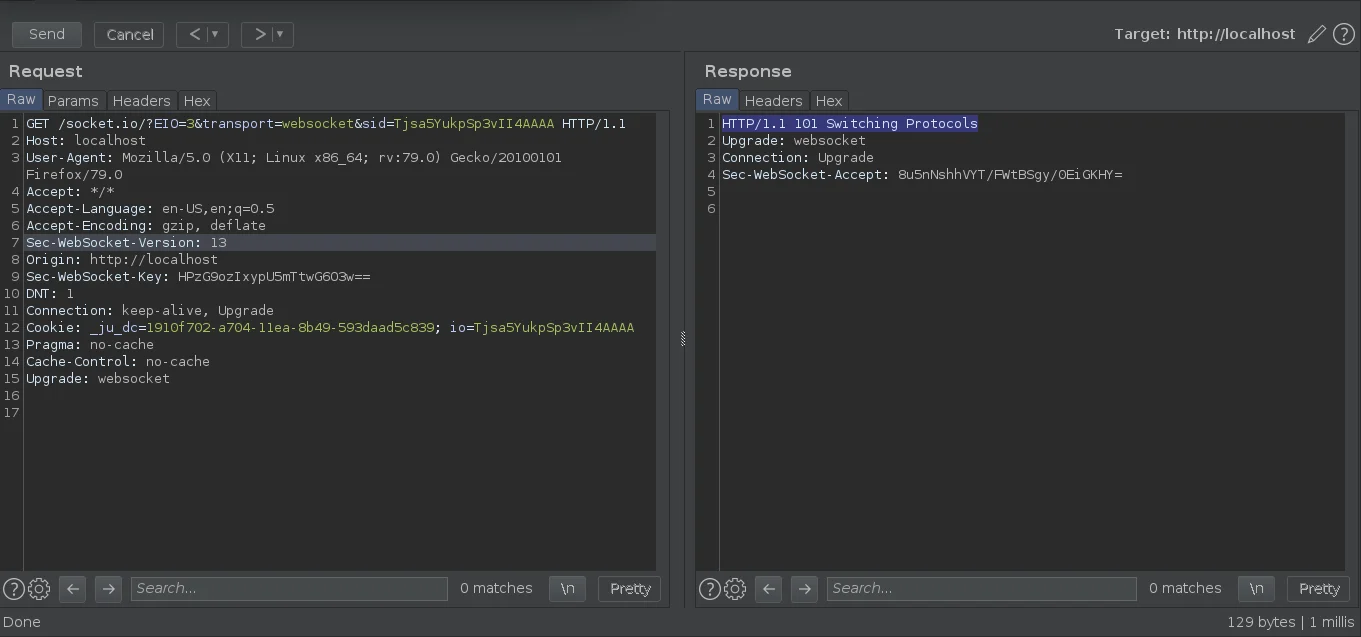
The screenshot shows the 101 Switching Protocols response in Repeater, confirming that the connection was established. The EIO=3 parameter selects the Engine.IO protocol version and transport=websocket asks for a WebSocket rather than HTTP long-polling.
Step 5: confirm that a foreign origin is rejected
Change the Origin header to something.io. The response becomes:
HTTP/1.1 400 Bad Request
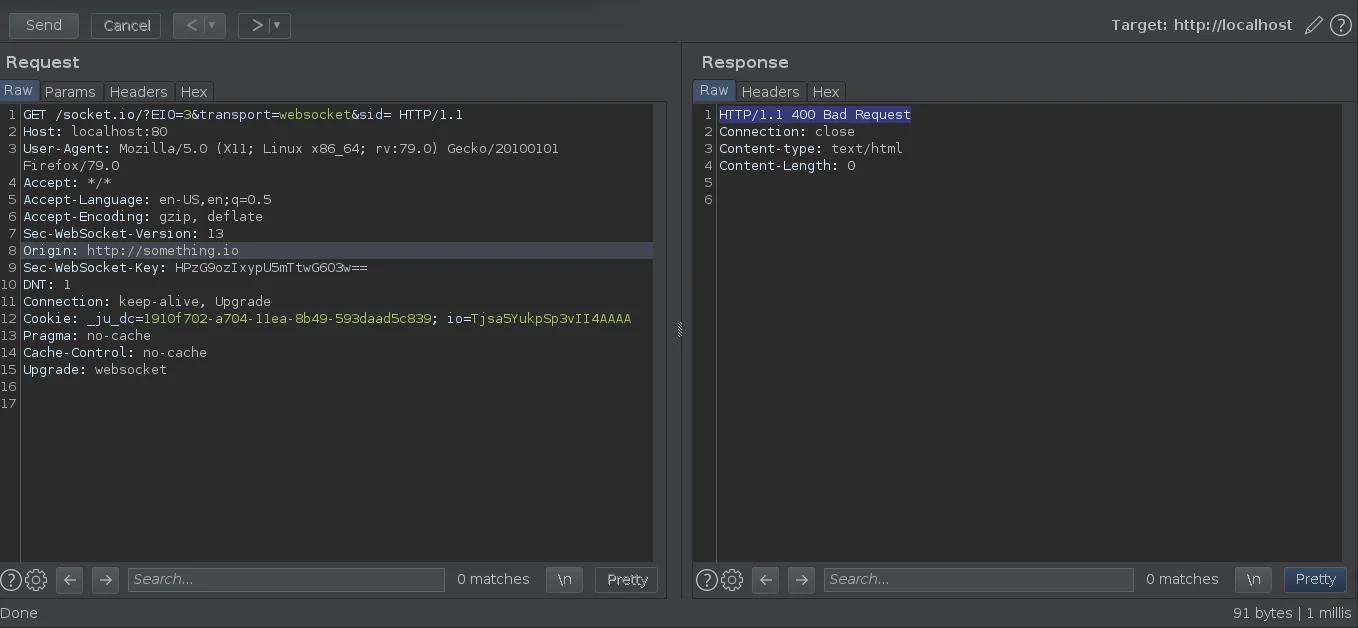
This is the expected behaviour: the application only allowed http://localhost:80 in index.js, so any other origin is refused. At this point the defence looks correct.
Step 6: bypass the check with a backtick
Now change the Origin header to:
localhost`something.io
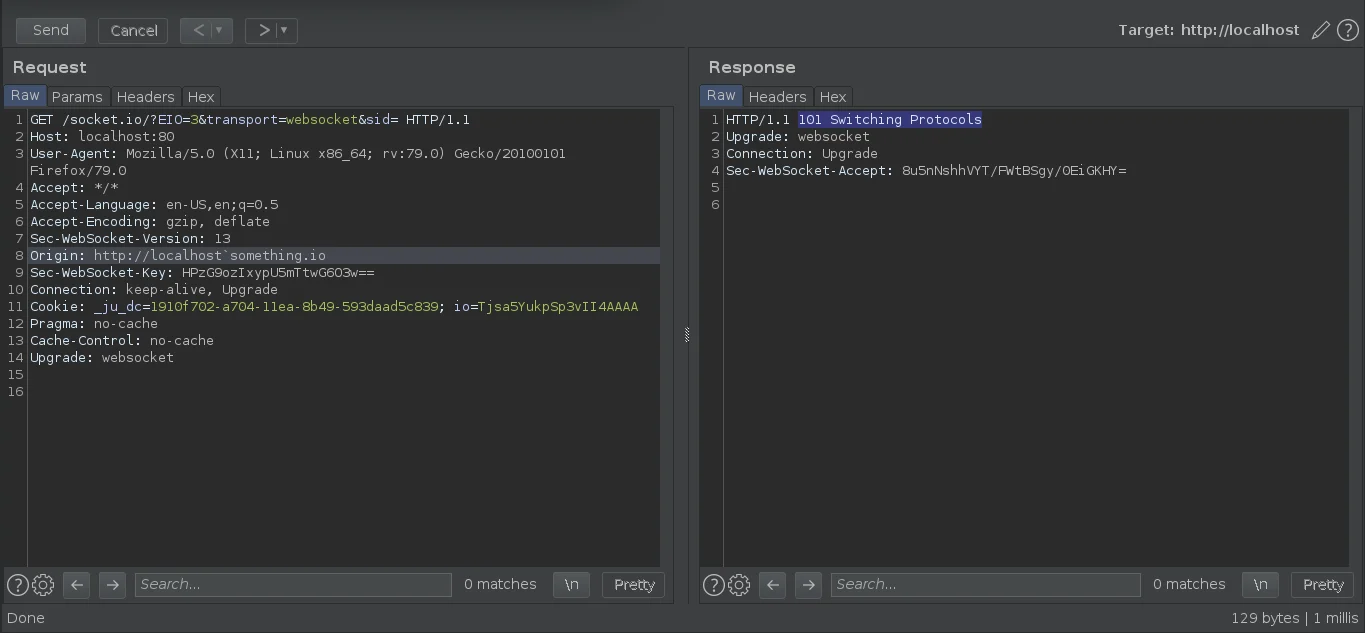
The module accepts the request: it reads the origin as localhost, which is on the allow-list. Safari reads the same value differently, treating it as a subdomain of something.io. The two parsers have diverged, and the server has authorised a connection that the browser considers to belong to the attacker's domain.
Step 7: the same bypass with a dollar sign
The researcher also found that Safari is not the only affected browser. The technique works on modern Firefox, specifically Mozilla Firefox 79.0b8. Changing the Origin header to:
http://localhost$something.io
still makes the application treat the origin as localhost, while Firefox treats it as the domain http://localhost$something.io. The report notes that, during this small research, Firefox was observed to allow $ in domain names.
Root cause
The flaw is a parsing mismatch: socket.io and the browser read the same Origin value differently when it contains ` or $. The browser's URL parser does not: it treats the full string as the host, so localhostsomething.iois a host undersomething.io, and http://localhost$something.io` is a host containing a dollar sign. The server and the browser therefore disagree about what the value means.
Because the origin allow-list is the only defence against cross-origin WebSocket connections, and because the browser, not the server, decides which page may set the Origin header, the mismatch is enough to defeat it. The report does not include the module's source code, so the exact parsing routine is not shown; the behaviour is demonstrated only through the handshake responses above.
Impact
Once the connection succeeds from the attacker's domain, the attacker can send and receive WebSocket messages on behalf of the user. In practice this is a CSRF-style attack against the real-time channel: the attacker can send and receive WebSocket messages on behalf of the user. The researcher found the issue while testing a private bug bounty program.
The report does not describe any specific application-level action that was performed through the hijacked channel, so the concrete damage depends on what each affected application sends over its sockets.
Fix
The report does not state which change was made, if any, and the researcher notes that the maintainer was not contacted and no issue was opened in the repository.
Variants to test
- Other separator characters. Try
Originvalues that mix a trusted host with an attacker host using characters the server parser may stop at but the browser accepts, for examplelocalhostsomething.ioandhttp://localhost$something.ioas in the report. A positive result isHTTP/1.1 101 Switching Protocolswhere a plain foreign origin returnsHTTP/1.1 400 Bad Request`. - Different browsers. Repeat the handshake from a real page in each browser you care about, since the bypass depends on how the browser parses the host.
- Other allow-list entries. Test the same separators against whatever host the target trusts, not only
localhost. A positive result is acceptance of an origin the browser attributes to your domain. - Other real-time transports. A positive result is a successful cross-origin request on the polling transport with the same crafted
Origin. - Session-bearing sockets. A positive result is a server-side action or pushed event that only an authenticated user should be able to trigger or receive.
What happened, in plain words
A security researcher found a way to make a popular Node.js module called socket.io accept connections from websites it was supposed to refuse. The module is used by web applications to keep a live, two-way conversation open with the browser, so that the server can push new information to the page and the page can send information back without reloading. The researcher showed that by putting unusual characters (a backtick ` or a dollar sign $) into a particular header that the browser sends when it opens that connection, the server could be tricked into thinking the request came from a trusted site, while the browser itself believed the request came from the attacker's site. Once that mismatch exists, an attacker's page can open a connection to the victim application and then send and receive messages as the logged-in user. The researcher calls this Cross-Site Websocket Hijacking, and it is closely related to a well-known class of bug called CSRF.
This article walks through the researcher's reproduction step by step, explaining every concept from scratch. It follows the same order as the technical write-up and uses the same requests and payloads.
Background: the pieces involved
Before the steps, a few ideas need to be clear.
What socket.io is
socket.io is a module for Node.js. Node.js is a program that lets you run JavaScript on a computer or server, outside the browser. A module is a reusable bundle of code that other programs can install and use, a bit like a plugin or an add-on. socket.io describes itself as enabling "real-time bidirectional event-based communication". In plain terms, it keeps a connection open between the browser and the server so that either side can send small messages (called events) to the other at any moment, without the page having to ask again each time. Think of it as a phone call that stays connected, rather than sending a letter and waiting for a reply.
Under the hood, that connection is usually a WebSocket. A WebSocket is a standard way for a browser and a server to keep a single connection open and exchange messages in both directions. It starts life as an ordinary HTTP request, the same kind of request a browser makes when it loads a page, and then the server replies that it is switching the connection to the WebSocket protocol. From that point on, the connection stays open.
Why the server checks the origin
Because the connection stays open and is tied to whatever login the browser already has (cookies, sessions), the server has to decide which websites are allowed to open it. Otherwise any page on the internet could open a connection to a victim's account. The browser sends an Origin header with the request, which says which site the request is coming from. socket.io gives developers a helper called io.origins() where they list the origins they trust. The expectation is that every other origin is rejected.
What the vulnerability class means
CSRF stands for Cross-Site Request Forgery. The idea is that a malicious website causes the victim's browser to send a request to another site where the victim is logged in, and the target site treats that request as if the victim made it on purpose. Cross-Site Websocket Hijacking is the same idea applied to a WebSocket connection: the attacker's page opens the connection, and the target server accepts it because it thinks the request came from a trusted place.
The environment used
The researcher reduced the issue to a local setup. The recorded environment is:
| Component | Version |
|---|---|
| OS | Linux arch 5.7.9-arch1-1 |
| Node | v14.5.0 |
| NPM | 6.14.6 |
| Browser | Mozilla Firefox 79.0b8 |
socket.io |
2.3.0 |
No account or special role is needed. The test application has one page and one connection handler. The tools include npm (the package installer for Node.js) and Burp Suite, which sits between the browser and the server and lets you look at and edit requests by hand. The module is widely used: the report cites 3,457,682 weekly downloads, which is why a bypass of its origin check matters beyond this small test.
Finding it
The researcher came across the behaviour while testing a private bug bounty program, then reduced it to the standalone setup below. The core observation is simple: the server-side origin check and the browser disagree about what a given Origin header means. When the header contains a backtick or a dollar sign, socket.io reads the value as one origin (the trusted one), while the browser reads the same string as a different origin (the attacker's). If the two sides disagree, the allow-list no longer protects anything, because it is the browser that decides which page may start the connection.
Exploitation
Step 1: build a server that trusts only one origin
Install the dependencies:
npm install socket.io expressjs
This tells npm to download and install two packages: socket.io itself, and expressjs (usually written express), a small web framework used here just to serve a page. After this, both are available to the code below.
Put the following code in index.js:
var app = require('express')();
var http = require('http').createServer(app);
var io = require('socket.io')(http);

io.origins(['http://localhost:80']); //we believe that this module will decline other origins

app.get('/', (req, res) => {
  res.sendFile(__dirname + '/index.html');
});

io.on('connection', (socket) => {
  console.log('a user connected');
});

http.listen(80, () => {
  console.log('listening on *:80');
});
Line by line:
var app = require('express')();loads the Express framework and creates an application object from it.var http = require('http').createServer(app);creates an HTTP server that hands incoming requests to that Express application.var io = require('socket.io')(http);attachessocket.ioto the same HTTP server, so WebSocket connections arrive on the same port.io.origins(['http://localhost:80']);is the important line. It is the allow-list: onlyhttp://localhost:80should be allowed to open a connection, and every other origin should be declined. The comment in the code says exactly that: the developer believes other origins will be refused.app.get('/', (req, res) => { res.sendFile(__dirname + '/index.html'); });says that when someone visits the root path/, the server sends back the fileindex.html.io.on('connection', (socket) => { console.log('a user connected'); });registers a handler that runs whenever a client connects. It only printsa user connected, which is enough to tell whether the handshake succeeded.http.listen(80, () => { console.log('listening on *:80'); });starts the server on port 80, the default port for plain HTTP, and prints a message when it is ready.
Step 2: add a client page
Put the following code in index.html:
<script src="/socket.io/socket.io.js"></script>
        <script>
                var socket = io();
        </script>
Line by line:
<script src="/socket.io/socket.io.js"></script>loads the browser-side part ofsocket.io, which the module serves automatically at that path.var socket = io();opens a connection back to the same host. This is the legitimate path that the origin check is meant to allow.
Step 3: run the server
sudo node index.js
node index.js runs the file with Node.js. sudo runs it with administrator rights, because port 80 is a privileged port that ordinary users cannot open. When it starts, the server prints listening on *:80.
Step 4: capture a legitimate handshake
Open Burp Suite, browse to http://localhost, and send the WebSocket upgrade request from the proxy history to Repeater. Repeater is the part of Burp that lets you resend a request as many times as you like, editing it in between. The request is:
GET /socket.io/?EIO=3&transport=websocket&sid={{random id}}
Running it returns:
HTTP/1.1 101 Switching Protocols
The screenshot shows the 101 Switching Protocols response in Repeater, confirming that the connection was established. A few parts of the request are worth explaining. EIO=3 selects the Engine.IO protocol version, which is the lower-level protocol socket.io uses. transport=websocket asks for a WebSocket rather than HTTP long-polling, which is the fallback where the browser keeps making ordinary HTTP requests instead. sid is a session identifier for the connection. The response code 101 Switching Protocols is the server saying that it agrees to switch from HTTP to the WebSocket protocol.
Step 5: confirm that a foreign origin is rejected
Change the Origin header to something.io. The response becomes:
HTTP/1.1 400 Bad Request
This is the expected behaviour: the application only allowed http://localhost:80 in index.js, so any other origin is refused. 400 Bad Request means the server rejected the request. At this point the defence looks correct.
Step 6: bypass the check with a backtick
Now change the Origin header to:
localhost`something.io
The module accepts the request: it reads the origin as localhost, which is on the allow-list. Safari reads the same value differently, treating it as a subdomain of something.io. The two parsers have diverged, and the server has authorised a connection that the browser considers to belong to the attacker's domain. A parser, in this context, is the piece of software that takes a string like an origin and decides what it means. The server's parser and the browser's parser are different programs, and they disagree about where the host name ends.
Step 7: the same bypass with a dollar sign
The researcher also found that Safari is not the only affected browser. The technique works on modern Firefox, specifically Mozilla Firefox 79.0b8. Changing the Origin header to:
http://localhost$something.io
still makes the application treat the origin as localhost, while Firefox treats it as the domain http://localhost$something.io. The report notes that, during this small research, Firefox was observed to allow $ in domain names.
Root cause
The flaw is a parsing mismatch: socket.io and the browser read the same Origin value differently when it contains ` or $. The browser's URL parser does not: it treats the full string as the host, so localhostsomething.iois a host undersomething.io, and http://localhost$something.io` is a host containing a dollar sign. The server and the browser therefore disagree about what the value means. A prefix is just the beginning of a string; if the server only looks at the beginning, it can be fooled by adding extra characters after the part it trusts.
Because the origin allow-list is the only defence against cross-origin WebSocket connections, and because the browser, not the server, decides which page may set the Origin header, the mismatch is enough to defeat it. The report does not include the module's source code, so the exact parsing routine is not shown; the behaviour is demonstrated only through the handshake responses above.
Impact
Once the connection succeeds from the attacker's domain, the attacker can send and receive WebSocket messages on behalf of the user. In practice this is a CSRF-style attack against the real-time channel: the attacker can send and receive WebSocket messages on behalf of the user. The researcher found the issue while testing a private bug bounty program.
The report does not describe any specific application-level action that was performed through the hijacked channel, so the concrete damage depends on what each affected application sends over its sockets.
Fix
The report does not state which change was made, if any, and the researcher notes that the maintainer was not contacted and no issue was opened in the repository. A token here means a short piece of data that proves who the user is, similar in purpose to a cookie.
Variants to test
- Other separator characters. Try
Originvalues that mix a trusted host with an attacker host using characters the server parser may stop at but the browser accepts, for examplelocalhostsomething.ioandhttp://localhost$something.ioas in the report. A positive result isHTTP/1.1 101 Switching Protocolswhere a plain foreign origin returnsHTTP/1.1 400 Bad Request`. - Different browsers. Repeat the handshake from a real page in each browser you care about, since the bypass depends on how the browser parses the host.
- Other allow-list entries. Test the same separators against whatever host the target trusts, not only
localhost. A positive result is acceptance of an origin the browser attributes to your domain. - Other real-time transports. A positive result is a successful cross-origin request on the polling transport with the same crafted
Origin. - Session-bearing sockets. A positive result is a server-side action or pushed event that only an authenticated user should be able to trigger or receive.
Glossary
- API: a defined way for one piece of software to talk to another, like a menu of requests a program accepts.
- Backtick: the character
`, found on the same key as the tilde on many keyboards. - Burp Suite: a tool that sits between the browser and a server so you can inspect and edit requests and responses.
- Cookie: a small piece of data a website stores in the browser so it can recognise the user on later requests.
- CSRF (Cross-Site Request Forgery): an attack where a malicious site makes the victim's browser send a request to another site where the victim is logged in.
- Cross-Site Websocket Hijacking: the WebSocket version of CSRF, where an attacker's page opens a WebSocket to a victim site and the server accepts it.
- Engine.IO: the lower-level protocol that
socket.iouses to carry its messages. - Event: a small named message sent over a
socket.ioconnection. - Express: a small web framework for Node.js, used here to serve a page.
- Handshake: the initial exchange where the browser asks to open a WebSocket and the server agrees.
- Header: extra information attached to an HTTP request or response, such as
Origin. - HTTP: the protocol browsers and servers use to exchange pages and requests.
- HTTP long-polling: a fallback where the browser keeps making ordinary HTTP requests to receive updates, instead of using a WebSocket.
- Module: a reusable bundle of code that other programs can install and use.
- Node.js: a program that runs JavaScript outside the browser, typically on a server.
- npm: the package installer for Node.js.
- Origin: the combination of scheme, host and port that identifies which site a request comes from, sent in the
Originheader. - Parser: software that takes a string and decides what it means.
- Prefix: the beginning of a string.
- Privileged port: a port number below 1024 that normally requires administrator rights to open.
- Repeater: the part of Burp Suite that lets you resend and edit a request.
- Session: the server-side record of a logged-in user, usually referenced by a cookie.
sid: a session identifier for asocket.ioconnection.socket.io: a Node.js module for real-time, two-way communication between browser and server.- Token: a short piece of data used to prove identity or authorise an action.
- WebSocket: a standard way to keep one connection open between browser and server and exchange messages in both directions.
101 Switching Protocols: the HTTP response code meaning the server agrees to switch to the WebSocket protocol.400 Bad Request: the HTTP response code meaning the server rejected the request as invalid.