Chain the vulnerabilities and take your report impact on the moon csrf to html injection
The application failed to sanitise special characters in some parameters, allowing HTML injection. The author then used a meta refresh tag to log users out or redirect them to an external site, and found a misconfigured WebSocket Origin header that allowed cross-origin connections, which they chained into a CSRF attack.
 Published on medium.com
It was weekend and time for some Research. So i started reading some public disclosures from https://hackerone.com/hacktivity. after reading some good blogs i have decided to implement them. so i quickly i had selected my target.
The full write-up lives on its author's site
It belongs to its author, so we link to it rather than copy it. The other two tabs are our own rewrites, checked against it.
Context
Legal Robot is the target of this write-up, and the researcher picked it because of its reputation on HackerOne for quick responses and fast fixes. The work started on a weekend, after reading public disclosures on the HackerOne hacktivity feed and deciding to try the same techniques against a chosen target. The report does not name the specific asset or feature beyond a "roadmap page" where the injected markup was reflected. The feature involved is a page that reflects user-supplied parameters into its HTML without sanitising special characters.
Setup
No accounts, roles, tool versions or special tooling are described. The researcher read the program scope, then began looking into the application. The only precondition visible in the report is that the vulnerable page reflects a parameter into HTML, and that the application serves a Content Security Policy (CSP) and uses WebSockets.
Finding it
While looking into the application, the researcher noticed that some parameters were not sanitising special characters. Injecting HTML tags worked, which established HTML injection as the first bug.
The next step was to see whether the injection could be escalated to cross-site scripting. A payload was injected, but the application uses CSP and the alert did not pop up. The report shows the failed attempt:
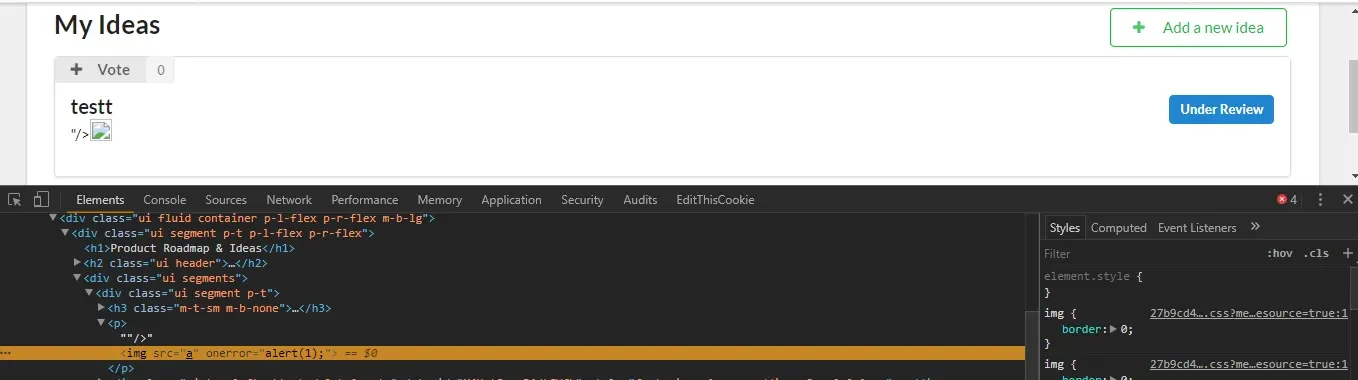
That is where the first line of investigation stalled: markup injection was confirmed, script execution was blocked by the policy.
Exploitation
Step 1: HTML injection
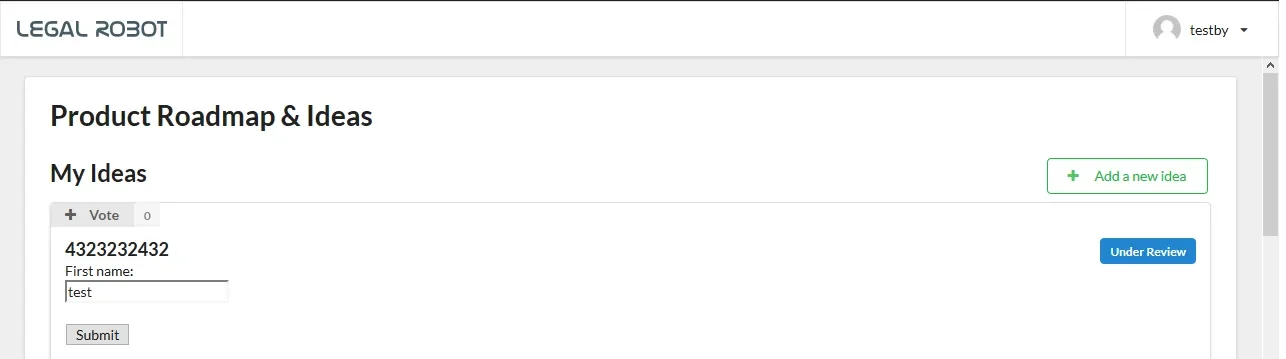
Injecting HTML tags into the unsanitised parameter succeeded, confirming HTML injection (BUG #1).
Step 2: Forced logout through a meta refresh
The researcher kept digging and tried a second payload:
“/><META HTTP-EQUIV=”refresh” CONTENT=”1;url=https://app.legalrobot.com/sign-out">
The “/> sequence closes the attribute and tag the value was being placed into, and the <META HTTP-EQUIV="refresh"> element makes the browser navigate to the given URL after the interval in CONTENT. With this payload, any user who visits the roadmap page is automatically signed out of their account.
Step 3: Open redirect and script execution
The forced logout was judged tricky but not enough, so the researcher changed the refresh target to an external site hosting a malicious script:
“/><META HTTP-EQUIV=”refresh” CONTENT=”1;url=http://www.mysite.com/malicious_script.html">
This produced an open redirect (BUG #2) and, the researcher says, also executed his malicious scripts. The report states that malicious tasks could be performed this way.
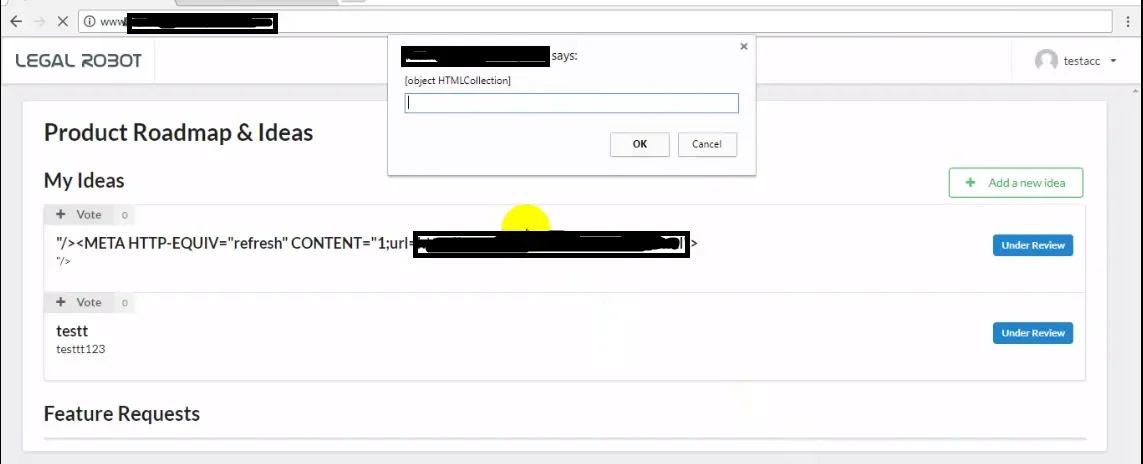
A proof of concept was made and reported, and the team replied quickly.

The bug was triaged, but the team noted that an attacker would have to do a little social engineering. The researcher accepted that point but was not satisfied with it, and took the team's mention of an "unknown exploit" as a hint to keep going.
Step 4: Misconfigured Origin on WebSockets
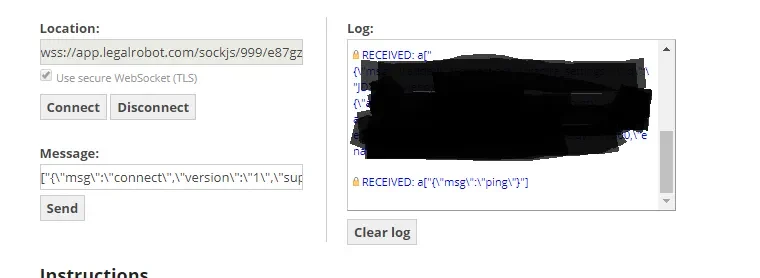
Digging further, the researcher noticed that the application uses WebSockets. Checking the headers of every page revealed an Origin header that was misconfigured (BUG #3). Connecting to the application from third-party WebSocket clients worked: the server accepted WebSocket connections from a different origin, which it should not do. The researcher speculates that the mobile app has no origin, and notes being unsure about that.
Step 5: CSRF and the chain
Using the cross-origin WebSocket acceptance, the researcher was able to perform a CSRF attack (BUG #4). The HTML injection that resulted in an open redirect was then chained to the CSRF attack, and a proof of concept of the chain was made and reported.

The reply was quick and the bug was patched in a single day.
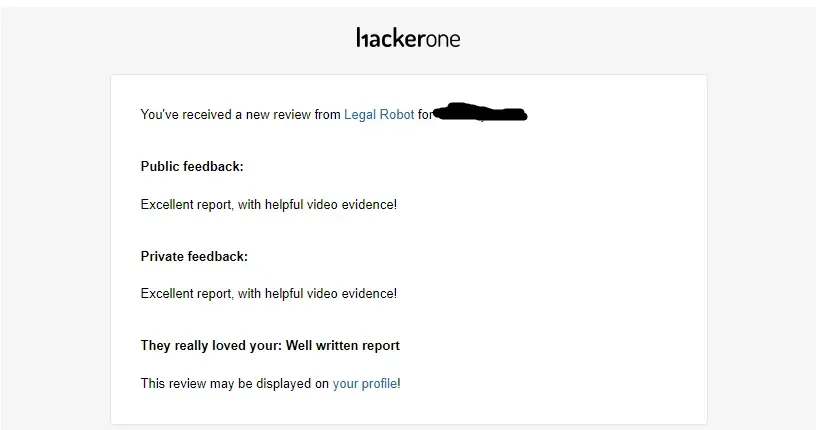
The researcher received good feedback and a bounty.

Root cause
The initial mistake is missing sanitisation of special characters in some parameters, which lets an attacker break out of the surrounding attribute and inject arbitrary HTML. CSP prevented script execution, so the injected markup was used instead: a <META HTTP-EQUIV="refresh"> element needs no script to navigate the browser, which is why the policy did not stop the redirect or the forced logout. The open redirect follows from the refresh target being fully attacker-controlled.
The CSRF component comes from the WebSocket layer accepting connections whose Origin header does not match the application, so a page on another origin can open a socket to the application. The report does not describe the server-side validation logic beyond this.
Impact
An attacker who gets a victim to visit the affected page can force a logout, or redirect the victim to an attacker-controlled page that runs a malicious script. Combined with the cross-origin WebSocket acceptance, the researcher was able to perform a CSRF attack and chain it with the redirect. The team's triage response noted that the attack requires a degree of social engineering, which limits who can be reached: the victim has to be brought to the crafted page. The report does not enumerate which actions the CSRF could perform.
Fix
The team patched the reported bug within a single day, and the researcher received a bounty. Based on the findings, the fixes would be to sanitise or encode the reflected parameters so markup cannot be injected, to restrict the refresh target or remove the injection point entirely, and to validate the Origin header on WebSocket connections so that only the application's own origins are accepted.
Variants to test
- Reflected parameters that accept HTML: inject a harmless tag and check whether it appears unencoded in the response. A positive result is the tag rendering as markup rather than text.
- CSP-protected reflections: try a
<META HTTP-EQUIV="refresh">payload pointing at a page you control. A positive result is the browser navigating away without any script running. - Forced logout: point the refresh at the application's sign-out URL and confirm the session ends on page load.
- WebSocket origin checks: connect from a page on a different origin and see whether the handshake completes. A positive result is an accepted connection from an origin the application does not own.
- Chaining: combine a cross-origin WebSocket connection with a state-changing action and check whether the action succeeds without a user gesture on the target origin.
What happened, in plain words
A security researcher spent a weekend reading public bug reports on HackerOne, a platform where companies pay people to find and report security problems in their websites. He picked Legal Robot because it had a reputation for replying quickly and fixing bugs fast. He looked at the program's scope (the list of things he was allowed to test), then started poking at the application.
He found that some parts of the website took text from the address bar and put it into the page without cleaning it first. That let him insert his own HTML, the language used to build web pages. He could not run JavaScript, the programming language that makes pages interactive, because the site had a Content Security Policy (CSP), a set of rules the browser follows to block unauthorised scripts. So instead he used a different HTML trick: a meta refresh tag, which tells the browser to go to another web address automatically. With that he could log a user out, or send them to a malicious site. That was an open redirect.
Then he noticed the site used WebSockets, a way for a browser and a server to keep a two-way conversation open. The server accepted connections from any website, not just its own, because it did not check the Origin header (a label the browser sends saying which site the request comes from). That let him perform a CSRF attack (Cross-Site Request Forgery), where a malicious site makes a logged-in user's browser send requests to another site without the user knowing. He chained the HTML injection and open redirect with the CSRF to make a stronger attack. He reported it, the team fixed it in a single day, and he received a bounty of 40.00 USD.
The target and the setup
Legal Robot is the company whose website was tested. The researcher chose it because other hackers on HackerOne had said it responds quickly and fixes problems fast. He read the program's scope, which lists which parts of the site are fair game, and then began exploring.
The report does not name the exact page or feature beyond a "roadmap page" where the injected code appeared. The report itself focuses on the application's behaviour. The key precondition was that some parameters (pieces of data in a URL, like ?name=value) were reflected back into the page's HTML without sanitising special characters. Sanitising means cleaning input so that characters like < and > cannot be interpreted as code.
Finding the first bug: HTML injection
While exploring, the researcher noticed that some parameters did not sanitise special characters. He tried inserting HTML tags and they appeared in the page as actual markup, not as plain text. That confirmed an HTML injection vulnerability, which he labelled BUG #1.
HTML injection means an attacker can insert their own HTML elements into a page. On its own it might seem harmless, but it can be used to change the page's appearance, insert fake login forms, or, as we will see, redirect users.
Trying to escalate to XSS
HTML injection is often a stepping stone to cross-site scripting (XSS), where an attacker runs their own JavaScript in the victim's browser. The researcher tried injecting a script payload, but the application uses a Content Security Policy (CSP). CSP is a browser feature: the server sends a header telling the browser which sources of script are allowed. If an injected script does not come from an allowed source, the browser refuses to run it. So the alert did not pop up.
The report shows the failed attempt but does not include the exact payload used. The key point is that CSP blocked script execution, so the researcher had to find another way to abuse the HTML injection.
Step 2: Forced logout with a meta refresh
He kept digging and tried a different payload:
“/><META HTTP-EQUIV=”refresh” CONTENT=”1;url=https://app.legalrobot.com/sign-out">
Let's break this down. The sequence “/> is designed to close whatever HTML attribute and tag the injected value is placed inside. For example, if the page has <input value="USER_INPUT">, injecting “/> would close the value attribute and the <input> tag, allowing new tags to be added. Then <META HTTP-EQUIV="refresh" CONTENT="1;url=https://app.legalrobot.com/sign-out"> is a meta refresh tag. HTTP-EQUIV="refresh" tells the browser this is a refresh instruction. CONTENT="1;url=..." means after 1 second, navigate to the given URL. Here the URL is the application's sign-out page. So when a user visits the roadmap page with this payload in the URL, their browser automatically goes to the sign-out page, logging them out. The researcher found this tricky but not yet severe enough.
Step 3: Open redirect and script execution
He then changed the refresh target to an external site hosting a malicious script:
“/><META HTTP-EQUIV=”refresh” CONTENT=”1;url=http://www.mysite.com/malicious_script.html">
Again, the “/> breaks out of the existing HTML context. The meta refresh now points to http://www.mysite.com/malicious_script.html, a page the attacker controls. This creates an open redirect (BUG #2): the application redirects users to any URL an attacker chooses. The researcher says this also executed his malicious scripts. In other words, the combination of HTML injection and open redirect allowed him to perform malicious tasks.
He made a proof of concept (PoC), a small demonstration that the bug is real, and reported it. The team replied quickly.
The team triaged the bug (confirmed it as valid) but noted that an attacker would need to do a little social engineering, meaning tricking the victim into visiting the crafted URL. The researcher agreed but was not fully satisfied. The team also mentioned an "unknown exploit", which he took as a hint to keep looking.
Step 4: Misconfigured Origin on WebSockets
While digging further, he noticed the application uses WebSockets. WebSockets allow a browser and server to keep a persistent connection for real-time communication. When a browser opens a WebSocket, it sends an Origin header indicating which site the connection is coming from. Servers should check this header and only accept connections from their own site. The researcher checked the headers of every page and found that the Origin header was misconfigured (BUG #3). He was able to connect to the application's WebSocket from third-party WebSocket clients, meaning the server accepted connections from different origins. He speculates that the mobile app might not send an Origin header, but he is unsure.
This misconfiguration is dangerous because it allows any website to open a WebSocket to the application on behalf of a logged-in user.
Step 5: CSRF and the chain
Using the cross-origin WebSocket acceptance, the researcher was able to perform a CSRF attack (BUG #4). CSRF is an attack where a malicious site makes a user's browser send requests to another site where the user is authenticated, without the user's knowledge. Because the WebSocket accepted connections from any origin, a malicious page could open a socket to Legal Robot and perform actions as the user. He then chained the HTML injection that resulted in an open redirect with the CSRF attack. He made a PoC of the chain and reported it.
The reply was quick and the bug was patched in a single day.
He received good feedback and a bounty.
Why it worked
The root cause is missing sanitisation of special characters in some parameters, allowing HTML injection. CSP blocked script execution, but the meta refresh tag does not require JavaScript, so it bypassed CSP. The open redirect came from the refresh target being fully controllable by the attacker. The CSRF was possible because the WebSocket server did not validate the Origin header, accepting connections from any site. The report does not describe the server-side validation logic beyond this.
What an attacker could do
An attacker who convinces a victim to visit a crafted URL can force a logout or redirect the victim to a malicious page that runs scripts. Combined with the WebSocket misconfiguration, the attacker can perform CSRF actions. The team noted that the attack requires social engineering, so the victim must be tricked into visiting the page. The report does not list which specific actions the CSRF could perform.
How it was fixed
The team patched the reported bug within a single day. Based on the findings, the fixes would be to sanitise or encode reflected parameters so markup cannot be injected, to restrict the refresh target or remove the injection point, and to validate the Origin header on WebSocket connections so only the application's own origins are accepted.
Variants to test
- Reflected parameters that accept HTML: inject a harmless tag and check whether it appears unencoded in the response. A positive result is the tag rendering as markup rather than text.
- CSP-protected reflections: try a
<META HTTP-EQUIV="refresh">payload pointing at a page you control. A positive result is the browser navigating away without any script running. - Forced logout: point the refresh at the application's sign-out URL and confirm the session ends on page load.
- WebSocket origin checks: connect from a page on a different origin and see whether the handshake completes. A positive result is an accepted connection from an origin the application does not own.
- Chaining: combine a cross-origin WebSocket connection with a state-changing action and check whether the action succeeds without a user gesture on the target origin.
Glossary
- API: Application Programming Interface; a set of rules that lets different software talk to each other.
- Bounty: A reward, often money, paid by a company to a security researcher who reports a valid vulnerability.
- Content Security Policy (CSP): A browser security feature that restricts which sources of content (like scripts) a page can load, helping prevent XSS.
- Cross-Site Request Forgery (CSRF): An attack where a malicious site makes a logged-in user's browser send requests to another site without the user's knowledge.
- Cross-Site Scripting (XSS): A vulnerability where an attacker injects malicious scripts into a web page viewed by other users.
- HTML injection: A vulnerability where an attacker can insert arbitrary HTML into a web page.
- HackerOne: A platform where organisations run bug bounty programs and security researchers report vulnerabilities.
- Header: Extra information sent with an HTTP request or response, such as the
Originheader. - Meta refresh: An HTML tag that tells the browser to automatically navigate to a different URL after a specified time.
- Open redirect: A vulnerability where a website redirects users to any URL an attacker supplies, often used for phishing.
- Origin: In web security, the combination of protocol, domain, and port that identifies where a request comes from; also an HTTP header indicating the source of a request.
- Parameter: A piece of data in a URL, typically after a
?, like?name=value. - Proof of Concept (PoC): A small demonstration that a vulnerability exists and can be exploited.
- Sanitisation: The process of cleaning user input to remove or neutralise dangerous characters.
- Social engineering: Tricking people into revealing information or performing actions, often by manipulating them.
- Triaged: The process where a security team reviews a reported vulnerability and confirms it is valid.
- WebSocket: A protocol that provides a persistent, two-way communication channel between a browser and a server.
- XSS: See Cross-Site Scripting.