Armaan Patha
The private event invitation feature allowed inviting users who were not friends, by manipulating a user ID parameter. An attacker could also post on behalf of the invited user that they were going to the event.
 Published on medium.com
One day I was playing with the events and I found that the user can make private events and can invite the guests I created a private event.
The full write-up lives on its author's site
It belongs to its author, so we link to it rather than copy it. The other two tabs are our own rewrites, checked against it.
Context
Facebook Events lets a user create an event, choose its privacy (public or private) and invite guests. For a private event, the platform's stated policy is that you can only invite Facebook users who are already in your friend list. The researcher, Armaan Pathan (@armaancrockroax), was testing this invitation flow and found that the restriction could be bypassed, and that the bypass also allowed posting on behalf of the invited user. The report was disclosed on 11 August 2017 and rewarded with 2,000 USD.
Setup
The researcher used a Facebook testing account and Burp Suite to intercept the invitation request. Two other accounts were used as targets: @hackerspider1 and @jaypatel9717, neither of which was in the testing account's friend list. Later, a freshly created Facebook account with an empty friend list was used to confirm the behaviour. The report does not give browser, Burp or Facebook version details.
Finding it
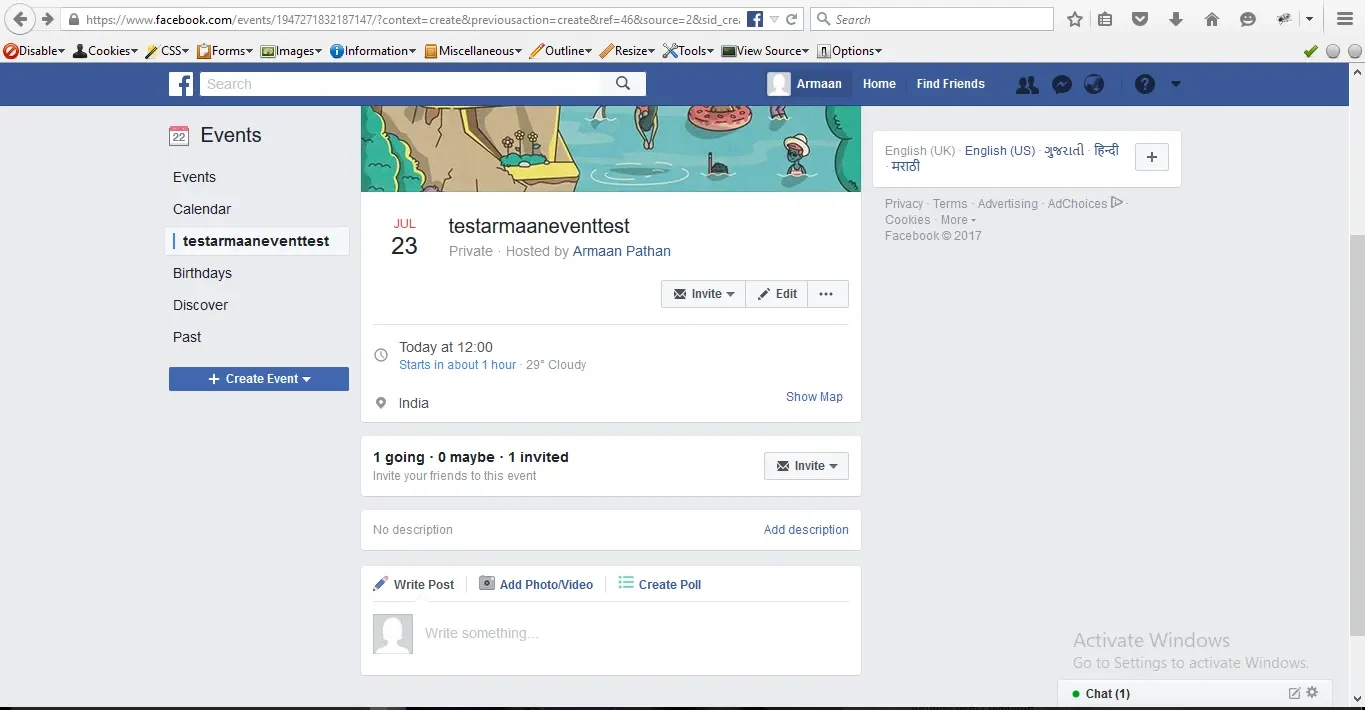
The researcher created a private event and started inviting people while capturing the request in Burp Suite.
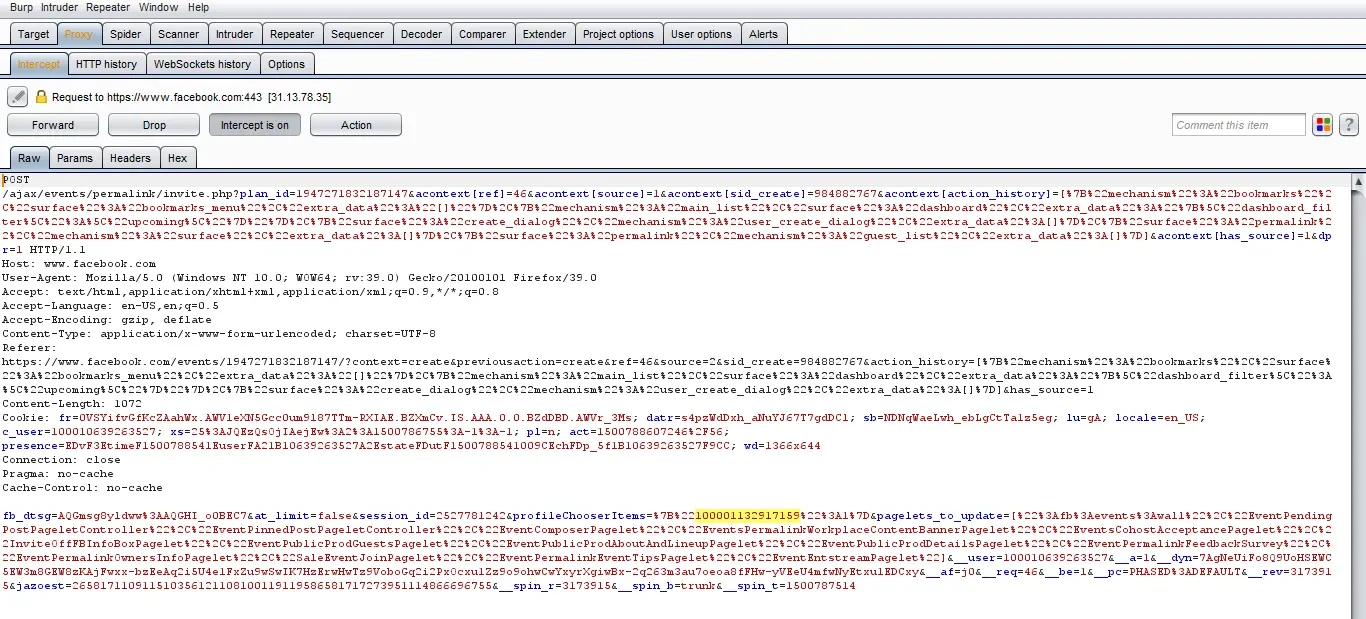
The request contained a parameter called profilechooseritems whose value was the user id of the account being invited. Because the researcher was inviting himself, the value was his own user id. He decided to fuzz this parameter with different values.
He noted that every Facebook account gets a unique username and a user id, and that per Facebook's policy only friends should be invitable to a private event. He then put @hackerspider1, who was not in the testing account's friend list, into the event and the invitation succeeded.
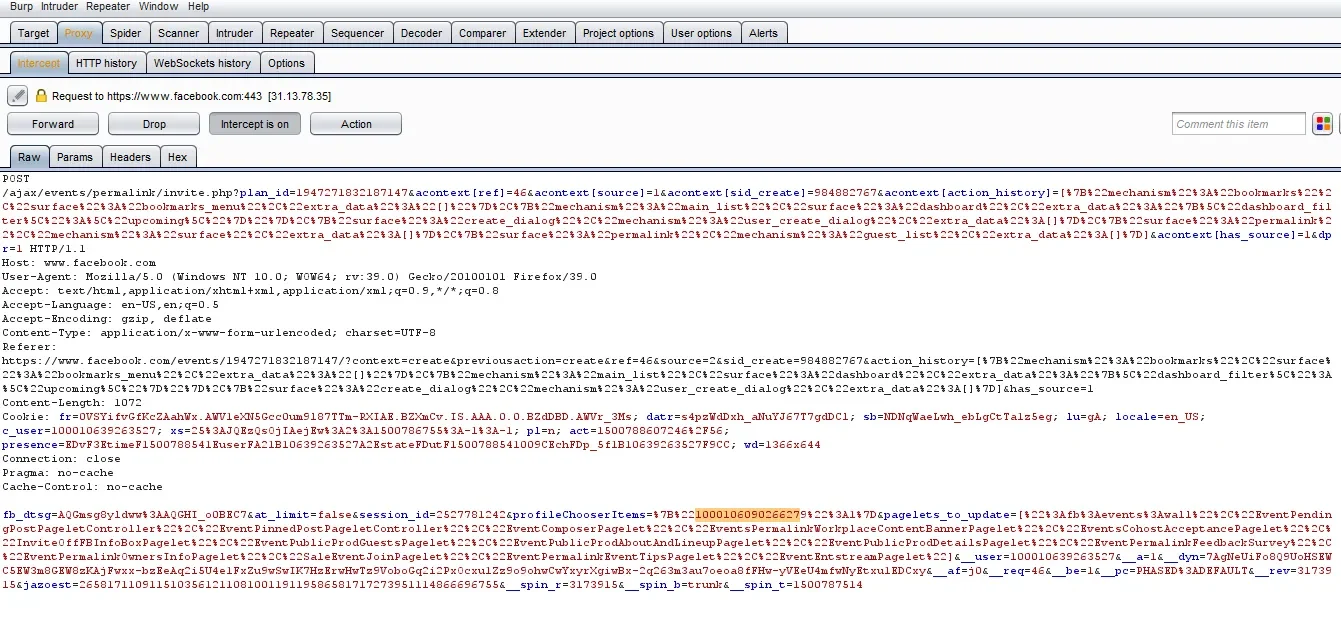
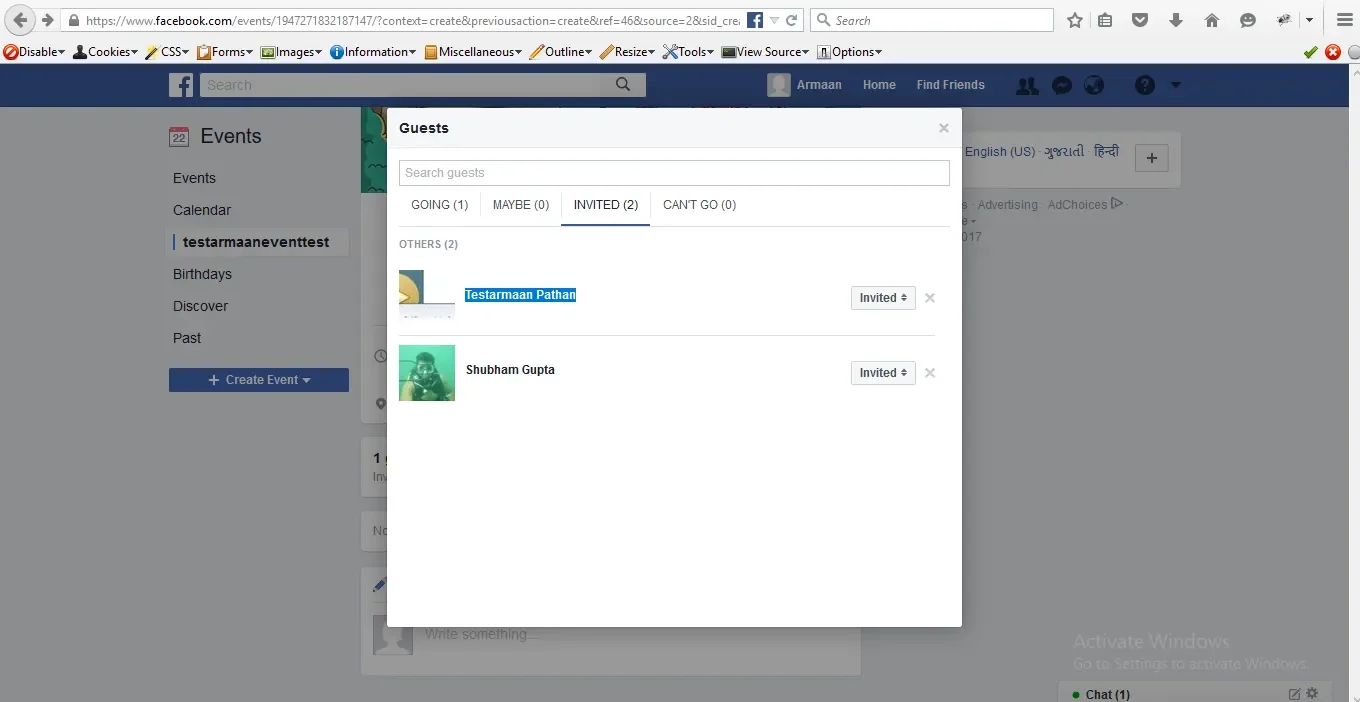
He repeated the test with a second testing account, also not a friend, and that account could be invited too.
Exploitation
Step 1: Invite a non-friend by changing the user id
The invitation request was intercepted in Burp Suite and the profilechooseritems parameter was changed from the researcher's own user id to the user id of a non-friend. The server accepted the change and added the non-friend to the private event. The report does not reproduce the raw request, only the highlighted parameter in the screenshot.
Step 2: Invite a second non-friend
The same manipulation was repeated with another testing account that was not in the friend list, and it was also added to the event.
Step 3: Post on behalf of the invited user
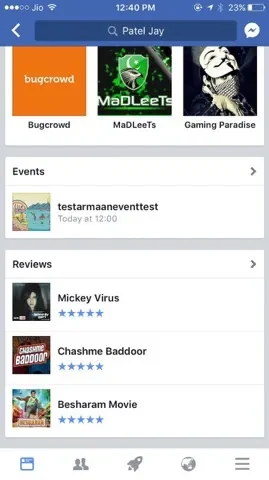
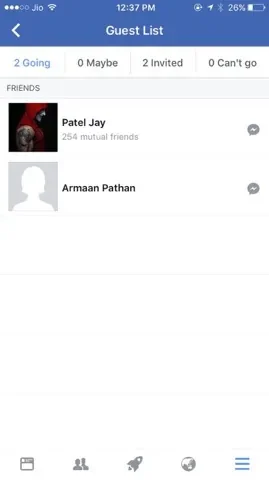
While scrolling the news feed, the researcher saw a friend's post of the form "******** is going to DHINCHAK POOJA's Live Event". He then tested whether he could produce the same kind of post on behalf of @jaypatel9717, who had been added to the event without being a friend. The post succeeded: the event activity appeared as if jay patel was going to the event.
Step 4: First report and rejection
A PoC was submitted to Facebook and a reply arrived the next morning.
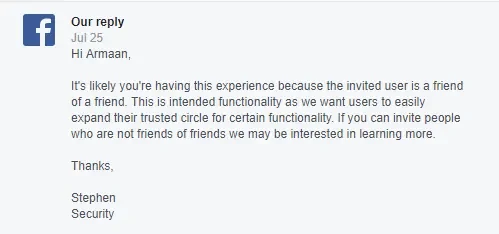
The reply explained that Facebook's policy allows adding users who are not in your friend list if they are in the friend list of someone who is in your friend list, and that this is normal behaviour.
Step 5: Retest with an isolated account
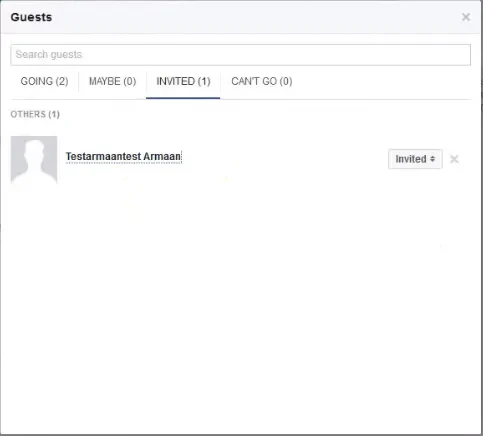
To remove that ambiguity, the researcher created a brand new Facebook account with no friends at all. From the testing account he tried to add this fresh account to the private event, and it was added. He was also able to make the same kind of post, of the form "testarmaanpathantest armaan is going to soo and so event".
Step 6: Second report and fix
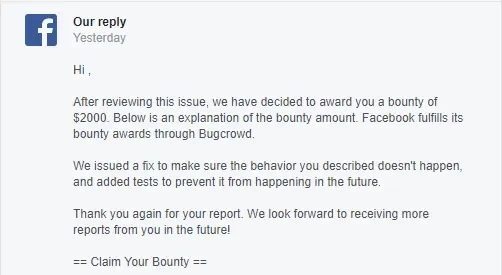
A new PoC was submitted. After 5 to 6 days Facebook replied that the issue had been patched and asked the researcher to confirm it was no longer reproducible. After confirming, the researcher was rewarded.
Root cause
The invitation request carried a client-supplied user id in the profilechooseritems parameter, and changing it to a non-friend's id was accepted. The researcher was also able to make an event activity post attributed to the invited user. The report does not describe the server-side code or the specific change.
Impact
An attacker who can create a private event could add non-friend users to it and generate event activity posts attributed to them. The first report was answered with Facebook's policy that adding users who are in a friend's friend list is normal behaviour; the second report used a completely isolated account. The report does not quantify how many users could be affected or whether the invited users were notified.
Fix
Facebook patched the issue and asked the researcher to confirm it was no longer reproducible. A correct fix would be to validate on the server that the invited user id is in the inviter's friend list before adding them to a private event, and to apply the same check before generating any activity post on the invited user's behalf.
Variants to test
- On other social platforms with private events or groups, intercept the invitation request and swap the invitee id for a non-friend's id. A positive result is the non-friend appearing in the member list.
- Test whether the same id swap allows actions attributed to the invited user, such as RSVP posts or notifications. A positive result is an activity post appearing under the other user's name.
- Test with a freshly created account that has no friends and no mutual connections, to rule out indirect relationship checks. A positive result is the isolated account being added.
- Fuzz other id-bearing parameters in the same request (for example, any list of selected users) to see whether the server validates each id individually. A positive result is any id outside the friend list being accepted.
- Check whether the bypass also works for other privacy levels, such as secret groups or closed events. A positive result is a non-member being added to a restricted object.
What happened, in plain words
Facebook has a feature called Events. Any user can create an event, decide who can see it (public or private), and invite guests. For a private event, Facebook's rule is simple: you should only be able to invite people who are already in your friend list. The researcher, Armaan Pathan (@armaancrockroax), was testing this invitation flow and found that the rule could be bypassed. Worse, once a non-friend had been added to the event, the researcher could also make a post that looked as if that person was going to the event. The report was disclosed on 11 August 2017 and rewarded with 2,000 USD.
If you are new to security, the key idea to hold on to is this: a website often trusts information that your browser sends it. When that information is an identifier for someone else, and the server does not check whether you are allowed to act on that person, you can often swap the identifier for another one and make the server do something it should not. That class of mistake is called an Insecure Direct Object Reference, or IDOR. The rest of this article walks through how the researcher found it, step by step, with the same screenshots and the same parameter names.
Background concepts, from zero
Before the walkthrough, a few everyday ideas will make everything else easier to follow.
- A request is what your browser sends to a website when you click something. Think of it as a form you hand to a clerk at a counter: it says what you want and who you are.
- An API is the part of a website that receives those requests and answers them. It is the clerk behind the counter. You do not see the clerk, only the result on your screen.
- A parameter is one field inside a request. If the request is a form, each parameter is one line on the form, with a name and a value. For example,
profilechooseritems=12345means the field calledprofilechooseritemshas the value12345. - A user id is the unique number Facebook gives every account. It is not secret; it appears in profile URLs and in many requests. A username is the other unique handle, the one people type, such as
@hackerspider1. - Fuzzing means trying many different values in a field to see how the server reacts. It is like trying many keys on a lock to find which one turns.
- Burp Suite is a tool that sits between your browser and the website. It lets you pause a request, look at every field inside it, change a value, and send it on. Security testers use it constantly for exactly this kind of work.
- A PoC, or proof of concept, is a short, repeatable demonstration that a bug is real. It is the difference between saying "I think this is broken" and showing the exact steps that prove it.
- A private event is an event only invited guests can see. The whole point of the privacy setting is that the guest list is controlled.
With those terms in hand, the story is easy to follow.
Setting up
The researcher used a Facebook testing account, meaning an account created for testing rather than for everyday use. He also used Burp Suite to intercept the invitation request. Two other accounts were used as targets: @hackerspider1 and @jaypatel9717. Neither of them was in the testing account's friend list. Later, a freshly created Facebook account with an empty friend list was used to confirm the behaviour. The report does not give browser, Burp or Facebook version details.
Finding it
The researcher created a private event and started inviting people while capturing the request in Burp Suite.
The first screenshot shows the private event that was created. The point of starting here is that a private event is the restricted object: if the invitation rule can be broken here, the privacy setting is not doing its job.
This screenshot shows the invitation request captured in Burp Suite. The request contained a parameter called profilechooseritems whose value was the user id of the account being invited. Because the researcher was inviting himself, the value was his own user id. That is the important observation: the field that says who to invite is filled in by the browser, not chosen by the server. He decided to fuzz this parameter with different values.
He also noted that every Facebook account gets a unique username and a user id, and that per Facebook's policy only friends should be invitable to a private event. He then put @hackerspider1, who was not in the testing account's friend list, into the event, and the invitation succeeded.
This screenshot shows the attempt to invite @hackerspider1, a non-friend. The server accepted it. That is the moment the researcher suspected a real bug: the policy said no, but the server said yes.
He repeated the test with a second testing account, also not a friend, and that account could be invited too.
This screenshot shows the second non-friend being added. Repeating the test matters because a single success could be a fluke or a caching artefact; two successes with different accounts make it look like a pattern.
Exploitation
Step 1: Invite a non-friend by changing the user id
The invitation request was intercepted in Burp Suite and the profilechooseritems parameter was changed from the researcher's own user id to the user id of a non-friend. The server accepted the change and added the non-friend to the private event. The report does not reproduce the raw request, only the highlighted parameter in the screenshot.
In plain words: the browser was telling the server "invite user 12345". The researcher changed 12345 to the id of someone he was not allowed to invite, and the server did not check whether that person was his friend. It simply did what the request said. That is the IDOR: the server trusted a value supplied by the client and did not verify the client's permission to use it.
Step 2: Invite a second non-friend
The same manipulation was repeated with another testing account that was not in the friend list, and it was also added to the event. This second run is what turns a one-off into a reproducible finding.
Step 3: Post on behalf of the invited user
While scrolling the news feed, the researcher saw a friend's post of the form "******** is going to DHINCHAK POOJA's Live Event". He then tested whether he could produce the same kind of post on behalf of @jaypatel9717, who had been added to the event without being a friend. The post succeeded: the event activity appeared as if jay patel was going to the event.
These two screenshots show the resulting post. The significance is that the bug was not only about the guest list. Once the non-friend was in the event, the platform generated an activity post attributed to that person. In effect, the researcher could make another user appear to have joined an event they had never agreed to attend.
Step 4: First report and rejection
A PoC was submitted to Facebook and a reply arrived the next morning.
The reply explained that Facebook's policy allows adding users who are not in your friend list if they are in the friend list of someone who is in your friend list, and that this is normal behaviour.
This is a common experience in bug hunting: a finding can look real and still be explained away by a policy you did not know about. The lesson is to remove every possible innocent explanation before reporting, which is exactly what the next step does.
Step 5: Retest with an isolated account
To remove that ambiguity, the researcher created a brand new Facebook account with no friends at all. From the testing account he tried to add this fresh account to the private event, and it was added. He was also able to make the same kind of post, of the form "testarmaanpathantest armaan is going to soo and so event".
This screenshot shows the isolated account being added and the post being generated. Because the new account had no friends and no mutual connections, the "friend of a friend" explanation could not apply. The behaviour held anyway, with no friends or mutual connections involved.
Step 6: Second report and fix
A new PoC was submitted. After 5 to 6 days Facebook replied that the issue had been patched and asked the researcher to confirm it was no longer reproducible. After confirming, the researcher was rewarded.
This screenshot shows the reward. The report does not describe the exact code change Facebook made.
Root cause
The invitation request carried a client-supplied user id in the profilechooseritems parameter, and changing it to a non-friend's id was accepted. The researcher was also able to make an event activity post attributed to the invited user.
In everyday terms: the clerk at the counter accepted the name you wrote on the form without checking whether that person was on your guest list. The fix is for the clerk to look up the list before acting.
Impact
An attacker who can create a private event could add non-friend users to it and generate event activity posts attributed to them. The first report was answered with Facebook's policy that adding users who are in a friend's friend list is normal behaviour; the second report used a completely isolated account. The report does not quantify how many users could be affected or whether the invited users were notified.
Fix
Facebook patched the issue and asked the researcher to confirm it was no longer reproducible. A correct fix would be to validate on the server that the invited user id is in the inviter's friend list before adding them to a private event, and to apply the same check before generating any activity post on the invited user's behalf.
Variants to test
If you want to practise this kind of thinking on a platform you are allowed to test, here are directions the same idea can take. Each one is a variation on the same question: does the server check who you are allowed to act on, or does it just trust the id you send?
- On other social platforms with private events or groups, intercept the invitation request and swap the invitee id for a non-friend's id. A positive result is the non-friend appearing in the member list.
- Test whether the same id swap allows actions attributed to the invited user, such as RSVP posts or notifications. A positive result is an activity post appearing under the other user's name.
- Test with a freshly created account that has no friends and no mutual connections, to rule out indirect relationship checks. A positive result is the isolated account being added.
- Fuzz other id-bearing parameters in the same request (for example, any list of selected users) to see whether the server validates each id individually. A positive result is any id outside the friend list being accepted.
- Check whether the bypass also works for other privacy levels, such as secret groups or closed events. A positive result is a non-member being added to a restricted object.
Glossary
- API: the part of a website that receives requests from your browser and sends back answers; the clerk behind the counter.
- Authorisation check: a check on the server that asks whether the person making a request is allowed to do the thing they are asking for.
- Burp Suite: a tool that sits between your browser and a website so you can pause, inspect and modify requests before they are sent.
- Client: your browser, or more generally the software on your side that sends requests.
- Fuzzing: trying many different values in a field to see how the server responds.
- IDOR (Insecure Direct Object Reference): a bug where the server accepts an identifier supplied by the client and acts on it without checking that the client is allowed to use that identifier.
- Parameter: one named field inside a request, with a name and a value.
- PoC (proof of concept): a short, repeatable demonstration that a bug is real.
- Private event: an event that only invited guests can see, as opposed to a public one.
- Request: the message your browser sends to a website when you click or submit something.
- Server: the computer that runs the website and answers requests.
- User id: the unique number Facebook assigns to each account.
- Username: the unique handle for an account, such as
@hackerspider1.



