Exploiting an SSRF trials and tribulations
A proxy endpoint fetched any URL the client supplied but only allowed hosts matching a loose domain whitelist. Because the whitelist matched any domain ending in the company name rather than only its own subdomains, the hunter registered a lookalike domain and pointed DNS records at the cloud metadata service and localhost, letting the server fetch internal resources.
 Published on medium.com
I mostly wanted to share this post not because it’s a novel and unique attack, but to show the thought process of attacking this particular functionality, and understanding how the system works to identify what would and would not work. This post is covering an SSRF (Server Side Request Forgery) bug that was really…
The full write-up lives on its author's site
It belongs to its author, so we link to it rather than copy it. The other two tabs are our own rewrites, checked against it.
Context
This is a write-up of a Server Side Request Forgery (SSRF) bug in a proxy endpoint. The endpoint took a URL from the client, made an HTTP request to it server side, and returned the response body to the user as HTML. That is the classic SSRF shape: the server fetches whatever the client names, and the client sees the result.
The endpoint was something like https://company.com/proxy. The same endpoint appeared on about 15 subdomains according to the Wayback Machine. The author was pointed at it by another bug hunter, Ibram, after the two realised they were working on the same program. It was their first collaboration, and they shared findings back and forth about how the application behaved.
Setup
The tools used were:
- Burp Collaborator, to see whether the server would make an outbound request to a host the author controlled.
- Findomain, for subdomain discovery on
*.company.com. - httprobe, to find live hosts among the discovered subdomains.
- Waybackurls, to pull archived URLs for those hosts from the Wayback Machine.
- An S3 bucket and later an EC2 instance on AWS, to serve attacker-controlled content from an allowed domain.
- A small Flask application on the EC2 instance, with endpoints to serve content, perform redirects, and accept a
urlandcodequery parameter.
The precondition for the whole attack was that the proxy enforced a whitelist of hosts it would fetch. The author's job was to get a URL through that whitelist that pointed somewhere useful.
Finding it
The first test was to hand the proxy a Burp Collaborator instance and see whether it would fetch it.
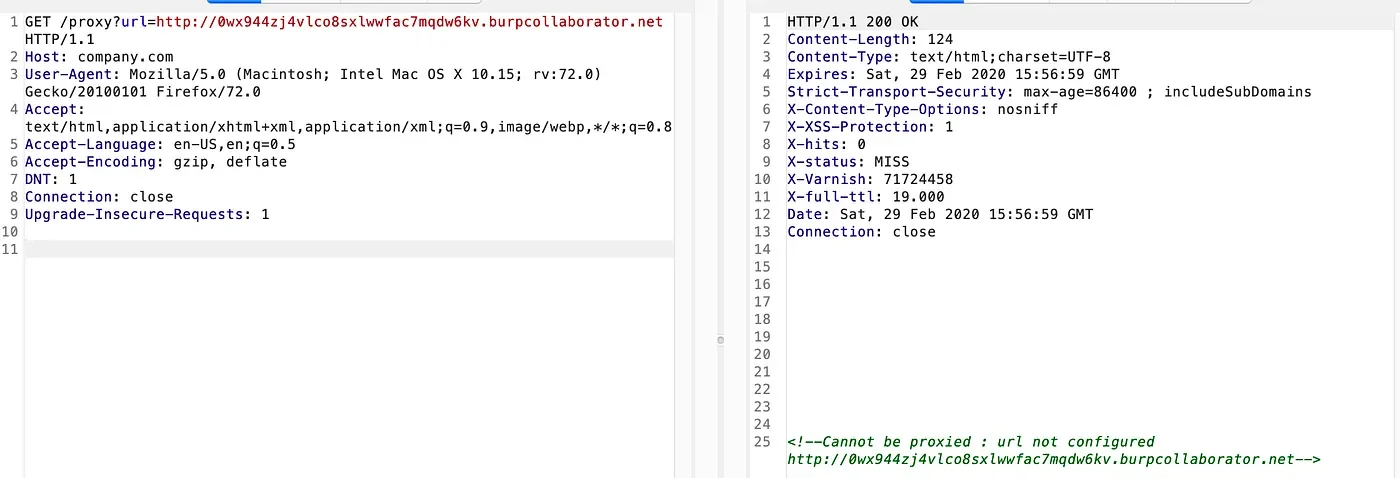
The result showed a whitelist in use: only hosts on a trusted list were fetched. Trying different company.com domains showed they all worked, which suggested *.company.com was allowed. The next step was to look for an open redirect or a subdomain takeover on *.company.com, so that a trusted domain could be made to redirect to, or serve content from, something the attacker controlled or something internal.
Subdomain discovery with Findomain, liveness checks with httprobe, and Waybackurls produced a list of a few hundred thousand URLs to search. The first pass looked for open redirects by grepping the wayback output:
grep "=http" wayback.txt
This matches query parameters whose value starts with http, which is a good indicator of a URL being passed in a parameter, and therefore a candidate for open redirects and SSRFs. A few open redirects were found quite easily. When they were fed to the proxy, however, any redirect produced a 302 to a default error page and the redirect was not followed. The server fetched a single URL and returned the response; anything other than a 200 made the application throw a 302. More hunting for subdomain takeovers found nothing.
With open redirects ruled out, the author passed the previously discovered subdomains through the url parameter, on the theory that domains that did not resolve or timed out were likely internally accessible, and that fetching them might reveal hidden content the server could reach. Nothing interesting came back. Checking *.company.com for DNS records pointing to localhost or [redacted] also found nothing.
The next attempt was to break the URL parser and get an arbitrary URL through the whitelist. The author went through special and unusual characters, redirect and SSRF bypass techniques, and the publicly available wordlists, without success. IP addresses and decimal-encoded versions produced generic errors. The parser logic held up, so the author turned to the opposite question: was the whitelist too permissive?
A list of the top 1000 domains from GitHub was passed through the url parameter. amazonaws.com came back as an allowed domain. Because AWS customers get their own endpoints and subdomains under amazonaws.com for services such as S3 and EC2, this gave the author a way to serve their own content from an allowed domain.
Exploitation
Step 1: serve content from S3
An XSS HTML file was hosted on S3 and fetched through the proxy.
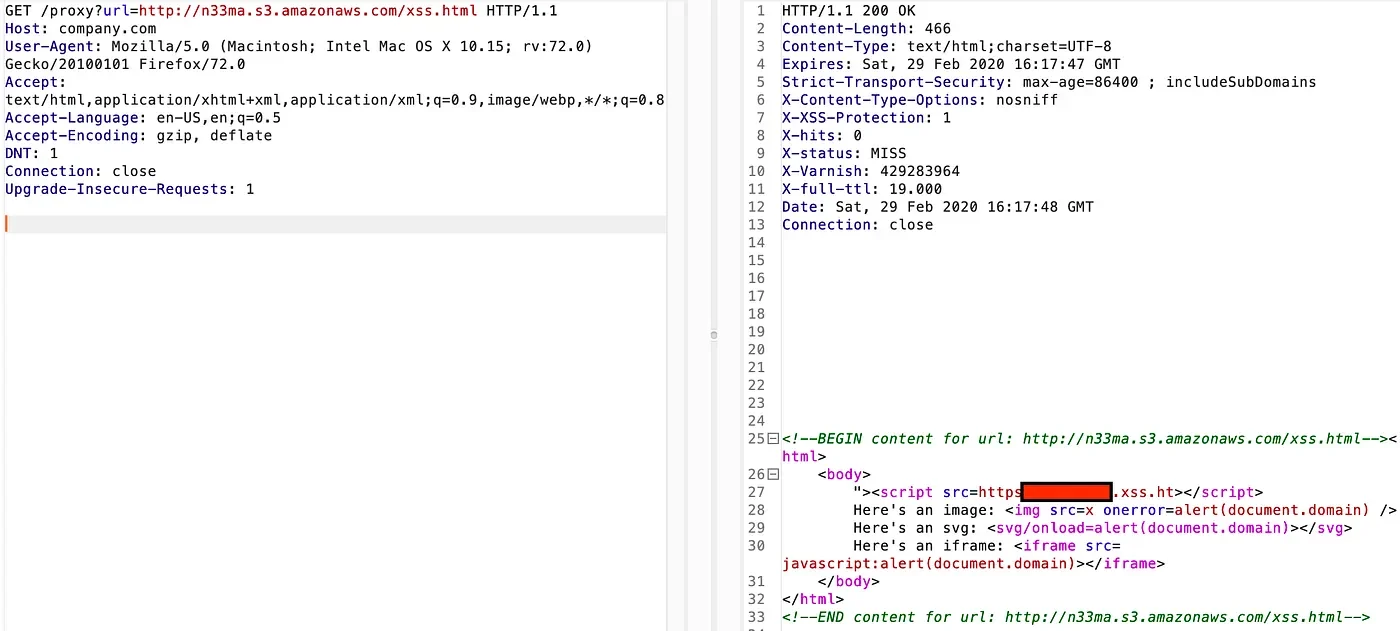
It worked, which at minimum gave a reportable XSS. The author kept pushing, trying to get the server to execute HTML or JavaScript that would load sensitive content in iframes or images, for example:
<iframe src="http://[redacted]/latest/meta-data/"></iframe>
<img src="file:///etc/passwd">
Neither worked. As the earlier behaviour suggested, the server did not execute anything at the target URL; it fetched the content and returned it.
Step 2: move to EC2 and revisit redirects
An EC2 instance was launched to serve more dynamic content, with a few simple Flask endpoints to serve content, perform redirects, and do a couple of other things. Serving files did not produce anything more interesting, so redirects were revisited on the theory that a particular response code might be followed. A Flask endpoint was written to accept url and code query parameters so that every HTTP status code could be iterated through easily.
The application cached responses from the same URL, so each request needed a unique URL. A unique query string on each request was enough:
https://my-ec2.amazonaws.com/redirect?1&url=...&code=302
https://my-ec2.amazonaws.com/redirect?2&url=...&code=302
No status code worked. A search for any *.amazonaws.com domain with a DNS record pointing to localhost, [redacted] or [redacted] also found nothing.
Step 3: read the whitelist more carefully
After many trials, the author noticed that the application responded differently when a URL was not allowed compared with when the target URL simply did not return a 200. That difference revealed the whitelist was not *.company.com but *company.com. The earlier tests against company.com subdomains had failed only because the domains did not exist, which had masked the real rule.
With that, the author bought neemacompany.com on AWS while walking home on a phone, and set up DNS records: md.neemacompany.com pointing to [redacted] and local.neemacompany.com pointing to [redacted].
Step 4: hit the metadata service
Once the domain was registered and the DNS records had propagated, the record pointing at the AWS metadata service was requested through the proxy.
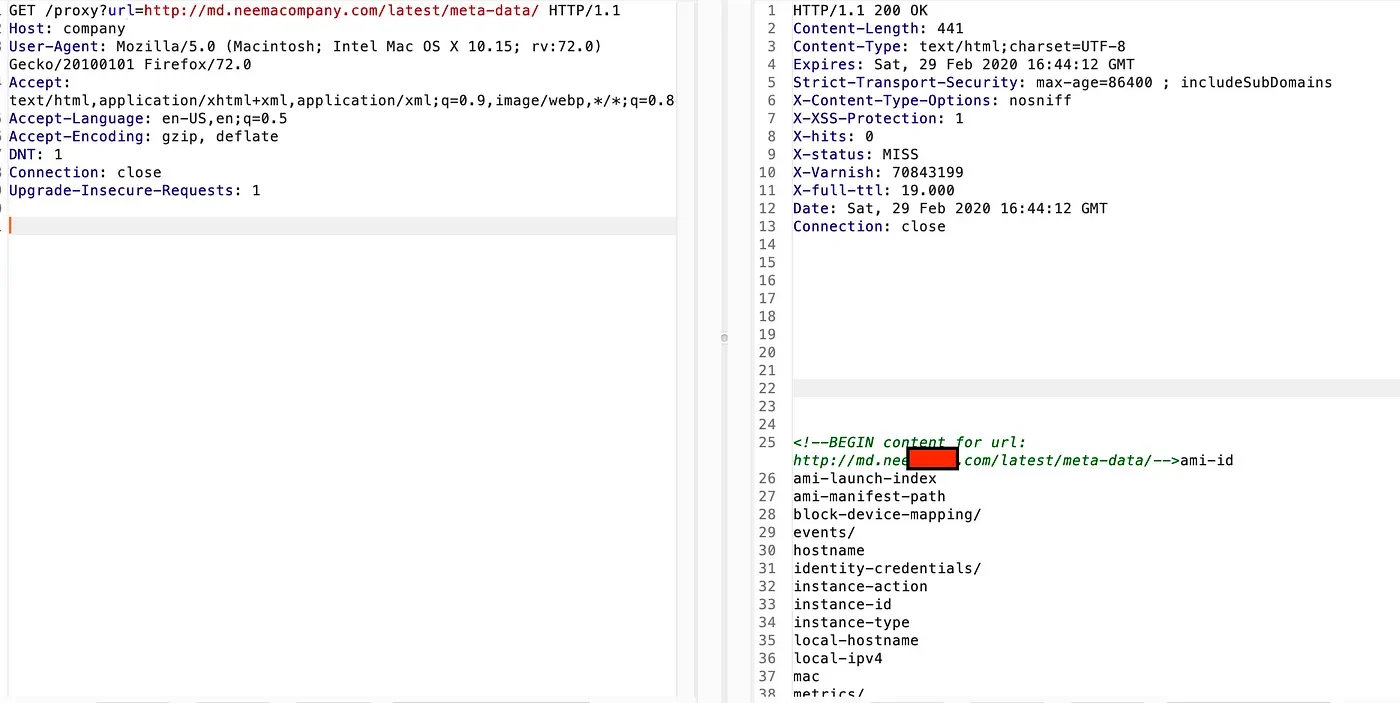
The response from the AWS Metadata service came back successfully. The AWS Metadata service can be used to obtain temporary AWS credentials and, depending on their permissions, access to the company's AWS environment. The local.neemacompany.com record was also tried and confirmed that localhost could be reached, along with other internal services.
Step 5: the report
The report was written and submitted. The next morning the response was a duplicate of a report from nearly a year earlier.
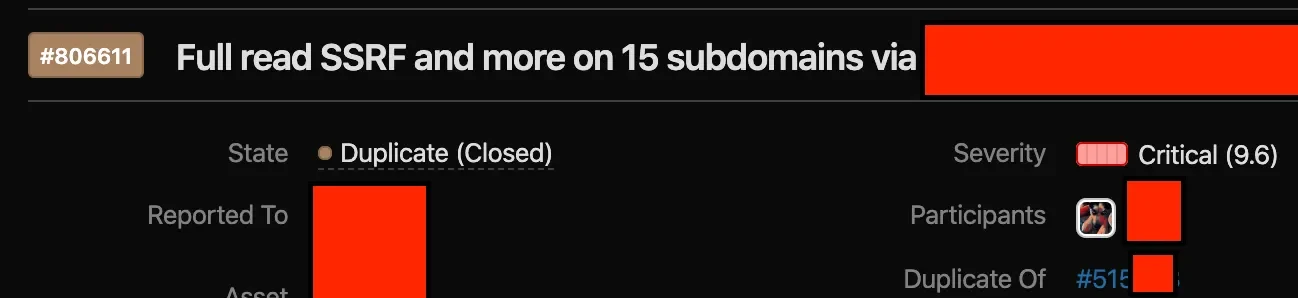
The author suspected the original report did not show a high impact, given that the issue had not been fixed in a year, but could not confirm that. The domain purchase cost $12.
Root cause
The whitelist was written as *company.com rather than *.company.com. The whitelist was *company.com rather than *.company.com, which let the author register neemacompany.com and pass it through. Because the attacker controlled the DNS for that domain, they could point records at internal addresses such as [redacted] and [redacted], and the proxy would fetch them.
The parser itself was not the weak point: special characters, IP encodings and public bypass wordlists all failed, and redirects were not followed. The whitelist check was the weak point, and it was weak in a way that only showed up when a URL passed the check but failed to resolve, which is why the difference in error responses mattered.
Impact
An attacker who can register a domain matching the whitelist pattern can make the server fetch arbitrary internal HTTP endpoints, including the AWS metadata service and localhost services. From the metadata service, temporary AWS credentials can be obtained, and what those credentials allow depends on their permissions. The author also confirmed reachability of localhost services. The report does not state which internal services were reachable or what the credentials could do.
Fix
The report does not say what fix, if any, was applied.
Variants to test
- Suffix-match whitelists. Try a domain you own whose name ends with the trusted string, for example
trustedcompany.comagainst a rule of*trustedcompany.com. A positive result is the proxy fetching your host. - Error-message differences. Send an allowed host that does not resolve and a disallowed host, and compare the responses. A difference tells you whether a URL passed the whitelist or simply failed to return a 200.
- Cloud metadata via DNS. Point a record on a domain that passes the whitelist at
[redacted]and request it through the proxy. A positive result is metadata content in the response. - Localhost via DNS. Point a record at
[redacted]and request it. A positive result is a response from a service bound to loopback. - Redirect handling. Serve 301, 302, 303, 307 and 308 responses from an allowed host and see whether any is followed. A positive result is the proxy fetching the redirect target.
- Caching. Repeat the same URL and then vary a query string to see whether responses are cached per URL. A positive result is a stale response for the repeated URL and a fresh one for the varied URL, which tells you to make every test URL unique.
- Broad cloud domains. Pass
amazonaws.comand similar provider domains through the whitelist. A positive result is the proxy fetching a resource you control under that domain.
What happened, in plain words
A company had a web page that worked like a delivery service for other web pages. You gave it a web address, and its own server went and fetched that page for you, then showed you what came back. The author of this write-up found a way to make that server fetch pages it was never supposed to reach: pages on the company's own internal network, and even a special page that hands out cloud passwords. The trick was a small mistake in the list of addresses the server was allowed to visit. The author spent a lot of effort on it, bought a domain name for $12 to make it work, submitted the report, and the next morning found out someone else had reported the same bug almost a year earlier.
This is a beginner's version of that story. Every technical idea is explained from scratch as it comes up, and every command and payload is copied exactly as it appeared, with a plain-words explanation after it.
The vulnerability: SSRF
SSRF stands for Server Side Request Forgery. To understand it, you need to know what a request is.
When you type an address into your browser and press Enter, your browser sends a request to a web server and gets a response back. That is the normal direction: your computer asks, the server answers.
In SSRF, the attacker gets the server to make a request instead. The server is usually inside a private network, behind firewalls, with access to things you cannot reach from the outside. If you can make the server fetch a page of your choosing, you are borrowing its position inside the network. A useful everyday comparison: imagine you cannot get into an office building, but the receptionist will happily walk to any room you name and read out what is written on the whiteboard. You never enter the building, but you see inside it.
The classic shape of an SSRF bug is exactly what this report describes: a feature that takes a URL from the user, fetches it on the server, and returns the result.
The feature that was attacked
The endpoint was something like https://company.com/proxy. An endpoint is simply a particular address on a website that does a particular job, like a specific counter in a shop. This one was a proxy: a middleman. You give it a URL, it fetches that URL for you and shows you the response as HTML (the language web pages are written in).
The same endpoint turned up on about 15 subdomains, according to the Wayback Machine. A subdomain is a prefix on a domain name: in shop.example.com, shop is the subdomain. The Wayback Machine is an archive that keeps old copies of web pages, so it can reveal pages and addresses that once existed publicly.
The author was pointed at this endpoint by another bug hunter, Ibram, after the two realised they were working on the same bug bounty program. A bug bounty program is a scheme where a company invites outside researchers to test its systems. It was their first collaboration, and they shared findings back and forth about how the application behaved.
The tools and the setup
Before the steps, here is what each tool does, in plain terms:
- Burp Collaborator: a service that gives you a unique address you control and tells you when something contacts it. If you hand that address to a server and the server fetches it, Collaborator records the visit. It is like leaving a marked envelope and seeing whether it comes back opened.
- Findomain: a program that discovers subdomains of a domain by consulting public sources.
- httprobe: a program that takes a list of hostnames and checks which ones actually respond.
- Waybackurls: a program that pulls archived URLs for a host from the Wayback Machine.
- S3 and EC2: two Amazon Web Services products. S3 stores files; EC2 gives you a virtual computer you can run things on. Both give customers their own addresses under
amazonaws.com. - Flask: a small framework for writing web applications in Python. The author used it to build a tiny server with a few addresses that served content, performed redirects, and accepted parameters.
The precondition for the whole attack was that the proxy enforced a whitelist: a list of hosts it was allowed to fetch. A whitelist is the opposite of a blacklist. A blacklist says "everything except these"; a whitelist says "only these". The author's job was to get a URL through that whitelist that pointed somewhere useful.
Step 1: confirm the server fetches what you give it
The first test was to hand the proxy a Burp Collaborator address and see whether the server would fetch it.
The result showed a whitelist in use: only hosts on a trusted list were fetched. The author then tried different company.com domains and found they all worked. That suggested the rule was *.company.com, meaning any subdomain of company.com. The asterisk is a wildcard: it stands for "anything".
Step 2: look for a way around the whitelist
The next idea was to find an open redirect or a subdomain takeover on *.company.com.
An open redirect is a page on a trusted site that will forward you to any address you name, for example trusted.com/go?to=https://elsewhere.com. If the proxy only checks the first address, a trusted address that redirects to an attacker's address gets the attacker's content fetched.
A subdomain takeover is when a subdomain points at a service that no longer exists, so anyone can claim that service and serve their own content from the trusted subdomain.
Either one would let a trusted domain deliver attacker-controlled or internal content. To hunt for them, the author ran subdomain discovery with Findomain, checked which hosts were live with httprobe, and pulled archived URLs with Waybackurls. That produced a list of a few hundred thousand URLs to search.
The first pass looked for open redirects by searching the archived URLs for query parameters whose value starts with http:
grep "=http" wayback.txt
Line by line:
grepis a command-line program that searches text for a pattern and prints matching lines."=http"is the pattern. It looks for an equals sign immediately followed byhttp. In a URL,?something=http...means a parameter calledsomethingholds a web address as its value.wayback.txtis the file holding the archived URLs.
Why this works: if a page takes a URL as a parameter, that page is a candidate for an open redirect (it might forward you there) and for SSRF (a server might fetch it). A few open redirects were found quite easily.
Step 3: redirects are not followed
When the open redirects were fed to the proxy, any redirect produced a 302 to a default error page, and the redirect was not followed.
A 302 is an HTTP status code meaning "this page has moved, go here instead". Status codes are three-digit numbers servers use to describe the result: 200 means success, 302 means a redirect, 404 means not found. The proxy fetched a single URL and returned the response. Anything other than a 200 made the application throw a 302 of its own. So the redirect path was closed. More hunting for subdomain takeovers found nothing either.
Step 4: try internal-looking hosts
With open redirects ruled out, the author passed the previously discovered subdomains through the url parameter. The url parameter is the input field where you supply the address to fetch. The theory: domains that did not resolve or timed out were probably only reachable from inside the company network, so fetching them might reveal hidden content the server could reach.
Nothing interesting came back. The author also checked *.company.com for DNS records pointing to localhost or [redacted]. DNS is the phone book of the internet: it translates names into numeric addresses. localhost and [redacted] both mean "this same machine", so a public name pointing there would let the proxy reach the server's own machine. Nothing was found.
Step 5: try to break the URL parser
The next attempt was to break the URL parser and sneak an arbitrary URL through the whitelist. A parser is the part of the program that reads a URL and splits it into pieces: scheme, host, path, and so on. If you can confuse the parser, the whitelist check might see one host while the fetcher visits another.
The author went through special and unusual characters, redirect and SSRF bypass techniques, and publicly available wordlists, without success. IP addresses and decimal-encoded versions produced generic errors. Decimal encoding is a way of writing an IP address as one large number instead of four dotted parts; some parsers accept it, which can slip past naive checks. The parser logic held up.
Step 6: ask whether the whitelist is too broad
So the author turned to the opposite question: was the whitelist too permissive? A list of the top 1000 domains from GitHub was passed through the url parameter. amazonaws.com came back as an allowed domain.
This was the opening. AWS customers get their own endpoints and subdomains under amazonaws.com for services such as S3 and EC2. So the author could create their own address under an allowed domain and serve their own content from it.
Step 7: serve content from S3
An XSS HTML file was hosted on S3 and fetched through the proxy. XSS stands for Cross-Site Scripting: a bug where an attacker gets their own JavaScript to run in someone else's browser. JavaScript is the programming language browsers run to make pages interactive.
It worked, which at minimum gave a reportable XSS. The author kept pushing, trying to get the server to execute HTML or JavaScript that would load sensitive content in iframes or images. An iframe is a page embedded inside another page; an image tag loads a picture from a URL. The payloads were:
<iframe src="http://[redacted]/latest/meta-data/"></iframe>
Line by line:
<iframe ...>is an HTML tag that embeds another page inside the current one.src="..."says where the embedded page lives.http://[redacted]/latest/meta-data/is the address of the AWS metadata service, explained below.
<img src="file:///etc/passwd">
Line by line:
<img ...>is an HTML tag that loads an image.src="..."says where the image lives.file:///etc/passwdis a local file path on a Linux machine./etc/passwdis a classic file listing user accounts.
Neither worked. As the earlier behaviour suggested, the server did not execute anything at the target URL; it fetched the content and returned it. The server was a reader, not a browser.
Step 8: move to EC2 and revisit redirects
An EC2 instance was launched to serve more dynamic content, with a few simple Flask endpoints to serve content, perform redirects, and do a couple of other things. Serving files did not produce anything more interesting, so redirects were revisited on the theory that a particular response code might be followed.
A Flask endpoint was written to accept url and code query parameters so that every HTTP status code could be iterated through easily. The application cached responses from the same URL, so each request needed a unique URL. Caching means the server stores a copy of a response and reuses it for the same address; a unique query string defeats that. The examples were:
https://my-ec2.amazonaws.com/redirect?1&url=...&code=302
Line by line:
https://my-ec2.amazonaws.com/redirectis the author's own Flask endpoint on EC2.?1is a query string with no name, used only to make the URL unique so the cache is bypassed.&url=...passes the target address to redirect to.&code=302asks the endpoint to respond with status code 302.
https://my-ec2.amazonaws.com/redirect?2&url=...&code=302
The same request with ?2 instead of ?1, again only to make the URL different from the previous one.
No status code worked. A search for any *.amazonaws.com domain with a DNS record pointing to localhost, [redacted] or [redacted] also found nothing.
Step 9: read the whitelist more carefully
After many trials, the author noticed that the application responded differently when a URL was not allowed compared with when the target URL simply did not return a 200. That difference was the clue. It revealed the whitelist was not *.company.com but *company.com.
The difference matters enormously. *.company.com means "any subdomain of company.com". *company.com means "any name that ends with the characters company.com". Under the second rule, neemacompany.com qualifies, because it ends in company.com. And neemacompany.com was a domain the author could simply buy.
The earlier tests against company.com subdomains had failed only because those domains did not exist, which had masked the real rule. This is why the error-message difference mattered: it separated "you are not allowed here" from "I tried and could not reach it".
With that, the author bought neemacompany.com on AWS while walking home on a phone, and set up DNS records: md.neemacompany.com pointing to [redacted] and local.neemacompany.com pointing to [redacted].
[redacted] is the AWS metadata service. It is a special address that only the cloud machine itself can reach, and it hands out information about the machine, including temporary credentials. Credentials are the username-and-password equivalent for programs: a token that proves identity. If you can read them, you may be able to act as the machine inside the company's cloud account.
Step 10: hit the metadata service
Once the domain was registered and the DNS records had propagated, the record pointing at the AWS metadata service was requested through the proxy.
The response from the AWS Metadata service came back successfully. The AWS Metadata service can be used to obtain temporary AWS credentials and, depending on their permissions, access to the company's AWS environment. The local.neemacompany.com record was also tried and confirmed that localhost could be reached, along with other internal services.
Step 11: the report and the duplicate
The report was written and submitted. The next morning the response was a duplicate of a report from nearly a year earlier.
The author suspected the original report did not show a high impact, given that the issue had not been fixed in a year, but could not confirm that. The domain purchase cost $12.
Why it worked
The whitelist was written as *company.com rather than *.company.com. The whitelist was *company.com rather than *.company.com, which let the author register neemacompany.com and pass it through. Because the attacker controlled the DNS for that domain, they could point records at internal addresses such as [redacted] and [redacted], and the proxy would fetch them.
The parser itself was not the weak point: special characters, IP encodings and public bypass wordlists all failed, and redirects were not followed. The whitelist check was the weak point, and it was weak in a way that only showed up when a URL passed the check but failed to resolve, which is why the difference in error responses mattered.
What an attacker could do
An attacker who can register a domain matching the whitelist pattern can make the server fetch arbitrary internal HTTP endpoints, including the AWS metadata service and localhost services. From the metadata service, temporary AWS credentials can be obtained, and what those credentials allow depends on their permissions. The author also confirmed reachability of localhost services. The report does not state which internal services were reachable or what the credentials could do.
How to fix it
The report does not say what fix, if any, was applied.
Things to try on other targets
- Suffix-match whitelists. Try a domain you own whose name ends with the trusted string, for example
trustedcompany.comagainst a rule of*trustedcompany.com. A positive result is the proxy fetching your host. - Error-message differences. Send an allowed host that does not resolve and a disallowed host, and compare the responses. A difference tells you whether a URL passed the whitelist or simply failed to return a 200.
- Cloud metadata via DNS. Point a record on a domain that passes the whitelist at
[redacted]and request it through the proxy. A positive result is metadata content in the response. - Localhost via DNS. Point a record at
[redacted]and request it. A positive result is a response from a service bound to loopback. - Redirect handling. Serve 301, 302, 303, 307 and 308 responses from an allowed host and see whether any is followed. A positive result is the proxy fetching the redirect target.
- Caching. Repeat the same URL and then vary a query string to see whether responses are cached per URL. A positive result is a stale response for the repeated URL and a fresh one for the varied URL, which tells you to make every test URL unique.
- Broad cloud domains. Pass
amazonaws.comand similar provider domains through the whitelist. A positive result is the proxy fetching a resource you control under that domain.
Glossary
- 302: an HTTP status code meaning the requested page has moved elsewhere.
- 200: an HTTP status code meaning the request succeeded.
- API: a defined set of addresses a program exposes so other programs can talk to it.
- AWS: Amazon Web Services, Amazon's cloud computing platform.
- Burp Collaborator: a service that gives you a unique address and reports when something contacts it.
- Burp Suite: a tool for intercepting and modifying web traffic.
- Caching: storing a copy of a response so the same request can be answered without fetching again.
- Credentials: data that proves identity, such as a token or password.
- DNS: the system that translates domain names into numeric IP addresses.
- Domain: a name on the internet, such as
example.com. - EC2: an AWS product that gives you a virtual computer.
- Endpoint: a specific address on a website that performs a specific job.
- Findomain: a tool for discovering subdomains.
- Flask: a small Python framework for building web applications.
- grep: a command-line program that searches text for a pattern.
- HTML: the language web pages are written in.
- HTTP: the protocol browsers and servers use to exchange requests and responses.
- httprobe: a tool that checks which hostnames respond.
- iframe: an HTML element that embeds one page inside another.
- IP address: a numeric address identifying a machine on a network.
- JavaScript: the programming language browsers run to make pages interactive.
- localhost / [redacted]: names for the machine itself.
- Metadata service ([redacted]): a special address in cloud environments that returns information about the machine, including temporary credentials.
- Open redirect: a page on a trusted site that forwards visitors to any address supplied to it.
- Parameter: a named value passed in a URL, after
?, such as?url=.... - Parser: the part of a program that reads and splits a URL into its parts.
- Proxy: a middleman that fetches something on your behalf.
- Query string: the part of a URL after
?, carrying parameters. - S3: an AWS product for storing files.
- SSRF: Server Side Request Forgery, making a server fetch a URL of the attacker's choosing.
- Status code: a three-digit number a server returns to describe the result of a request.
- Subdomain: a prefix on a domain, such as
shopinshop.example.com. - Subdomain takeover: claiming a subdomain that points at an abandoned service, so you can serve content from it.
- URL: a web address.
- Wayback Machine: an archive of old web pages and URLs.
- Waybackurls: a tool that pulls archived URLs for a host from the Wayback Machine.
- Whitelist: a list of things that are allowed, with everything else denied.
- Wildcard: the
*character, standing for "anything". - XSS: Cross-Site Scripting, getting attacker JavaScript to run in someone else's browser.



