[takeapeek] XSS via HTML tag injection in directory lisiting page
The takeapeek static web server does not sanitise filenames when generating directory listings, allowing a file named with a javascript: URI to execute arbitrary JavaScript when clicked. An attacker could execute malicious JavaScript in the context of another user's browser.

- Triaged in 16 hours
- Fixed in 5 months
- Disclosed after 5 months
I was taking a peek at takeapeek module and found it is vulnerable to XSS via malicious injection in directory listing.
It allows execution of arbitrary JS code.
Module
module name: takeapeek
version: 0.2.2
npm page: https://www.npmjs.com/package/takeapeek
Module Description
A simple static webserver with only one command. Heavily inspired by glance, this is really more of a learning experience then anything.
Module Stats
weekly downloads 4
Vulnerability
Vulnerability Description
takeapeek module provides a directory listing feature in it's HTTP server but it doesn't sanitize the filename hence a malicious payload in the filename cane be used to invoke an XSS. For example a file can be strategically named as javascript:alert(1) and we can see the XSS executing in the browser on clicking that link.
Steps To Reproduce:
- Install
takeapeek
$ npm install -g takeapeek
- Create a file with name
javascript:alert(1)
$ touch 'javascript:alert(1)'
- Start server in current directory
$ takeapeek
takepeek listening at http://localhost:3141
- Visit the address in any browser and click on malicous file link that we created.
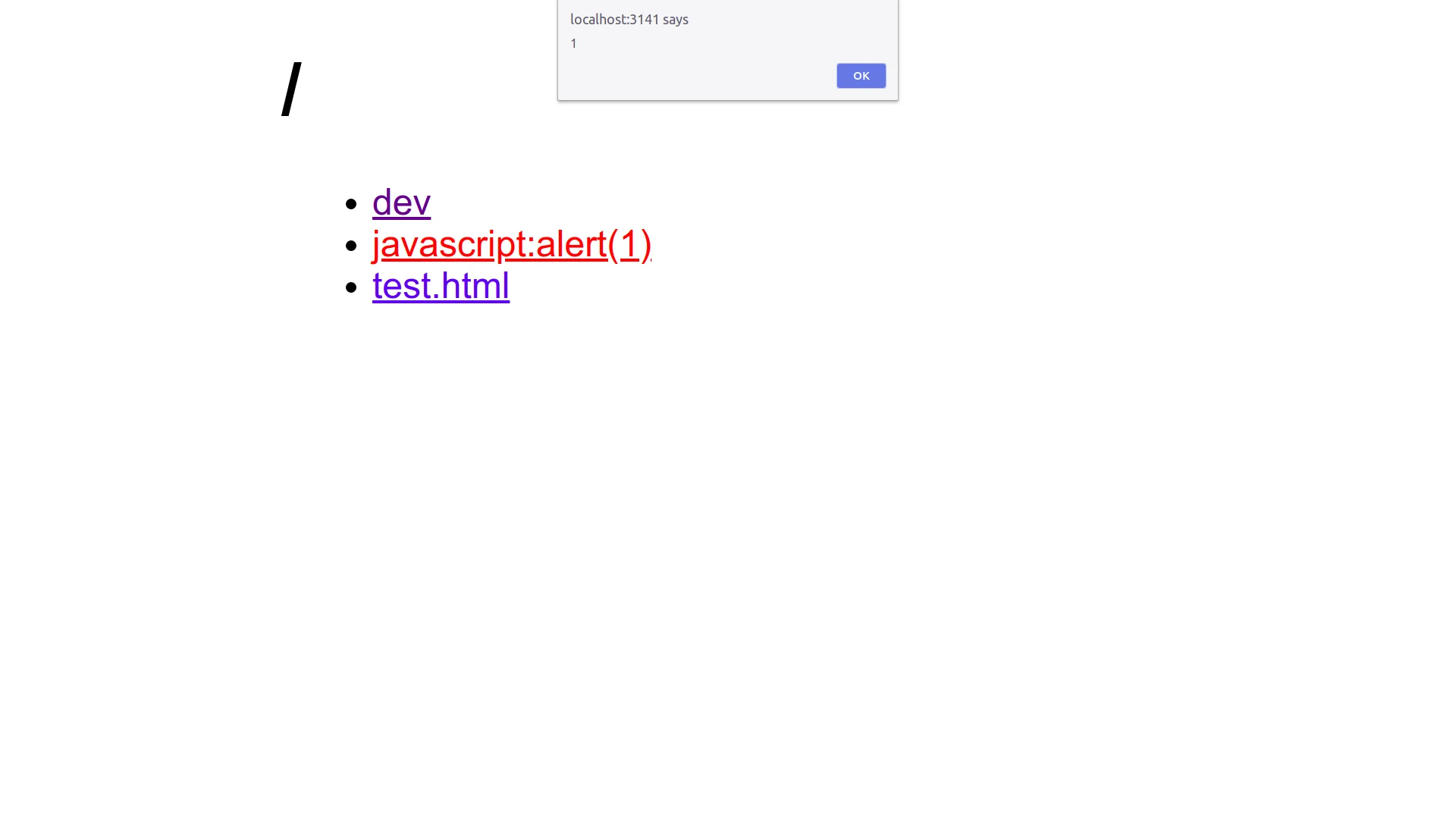
Supporting Material/References:
- Ubuntu 16.04
- node v11.3.0
- npm 6.7.0
- Chrome 72
Wrap up
- I contacted the maintainer to let them know: N
- I opened an issue in the related repository: N
Impact
An attacker is able to execute malicious JavaScript in context of other user's browser.
Not written yet. The AI write-up for this report has not been written yet. The Original tab links to the source.
How it worked
Root cause
The server fails to sanitise or encode filenames before inserting them into HTML links in the directory listing.
Impact
An attacker is able to execute malicious JavaScript in context of other user's browser.
What the attacker needed
Takeapeek server running; attacker can create a file with a crafted name; victim clicks the malicious link
How it was found
- Install the takeapeek module globally using npm.
- Create a file with a name that is a javascript: URI.
- Start the takeapeek server in the current directory.
- Visit the server address in a browser and click the malicious file link.
Explained by bugbounty.wiki with AI from the original and checked against quotes from it; it can still be wrong. Read the original before relying on a detail.
Not written yet. The AI write-up for this report has not been written yet. The Original tab links to the source.
A directory listing is a web page that shows the files in a folder. The takeapeek server puts file names directly into links without cleaning them, so a file named with a 'javascript:' link can run code when someone clicks it. This lets an attacker run their own JavaScript in the victim's browser.
What is XSS?
Script an attacker supplies runs in another user's browser, on the target's origin, with that user's session.





