Poppin shells with Okta Verify on Windows
The Okta Verify auto-update service on Windows accepted a user-supplied update URL and used Path.Combine with attacker-controlled data, allowing an unprivileged local user to write arbitrary files as SYSTEM. By writing a DLL to a location loaded before signature verification, an attacker could execute code as SYSTEM, and in an Active Directory domain, any domain user could trigger this remotely via the named pipe.
The original lives on securifera.com
We do not hold its text, so we link to it rather than copy it. The other two tabs are our own rewrites, checked against it.
Context
Okta Verify is Okta's multi-factor authentication client. On Windows it installs a privileged service, Okta.Coordinator.Service, which runs as SYSTEM. The service exists to let low-privileged parts of the product talk to a high-privileged component, in particular to perform software updates, which normally need elevated rights. The researcher describes this as a common Windows design pattern that is complex and easy to get wrong, and therefore a good place to look for bugs.
The write-up covers two related findings. The first is a local privilege escalation that the researcher submitted early and was paid for at a P3. The second, developed after that payout, is an arbitrary file write as SYSTEM that is chained into code execution and then into remote code execution against domain-joined machines. The report does not give the technical details of the first bug, because at the time of writing Okta had not fixed it or issued it a CVE. Only the second chain is described in depth, and it was assigned CVE-2024-0980.
The article carries a disclaimer that it is not affiliated with, sponsored by or endorsed by Okta, and that graphics are shown under fair use.

Setup
The researcher already had Okta Verify installed on a Windows machine, required for what the article calls "enhanced" 2FA. It had been sitting there for months. The work was done over a holiday break, with no special access from Okta beyond the public bug bounty programme run on Bugcrowd, in which Okta Verify is in scope.
Tools used, as named in the report:
- Sysinternals Procmon, to observe what the service does at runtime.
- JetBrains dotPeek, to decompile the .NET binaries.
- PowerShell, to confirm the named pipe server exists.
- A web server under the researcher's control, to serve update metadata and payloads.
- A hosts file entry on the test machine, to satisfy the subdomain whitelist.
- A test Active Directory network stood up in AWS, to check remote access from a domain context.
No versions of Okta Verify, Windows or the .NET runtime are given in the report.
Finding it
The researcher started with the usual low-hanging fruit for a Windows service, following the DLL hijacking material linked in the article. Procmon showed a service called Okta.Coordinator.Service running as SYSTEM. That first look produced a finding, which was reported and paid promptly.
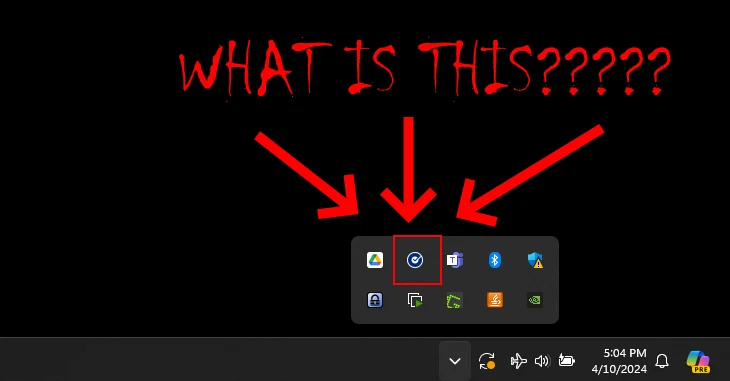
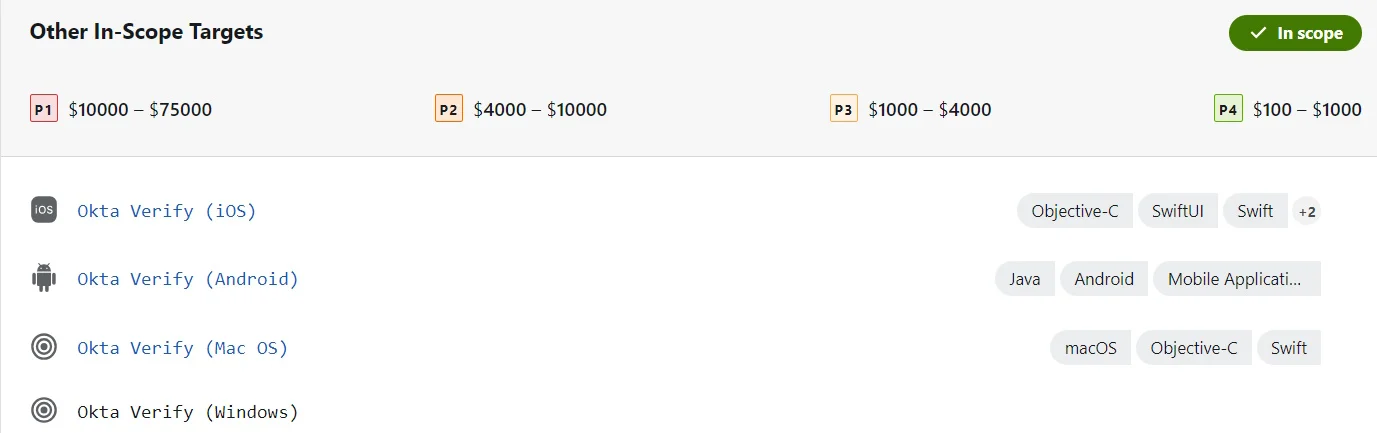
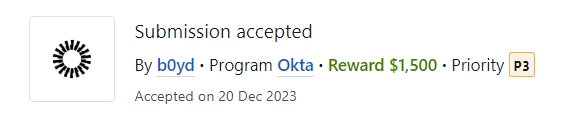
The payout for that first report was a P3 at the lower end, even though the researcher considered the bug an unequivocal 7.8 CVSS. The report does not describe the bug itself. The researcher's reading is that the low payout was a deliberate nudge to dig deeper, and it worked: the decision was made to open the binary and look properly, with the larger payout as the goal.
Exploitation
Step 1: identify the binaries
The guess before disassembly was that Okta.Coordinator.Service.exe is a .NET application, based on its name and on the presence of Okta.Coordinator.Service.exe.config next to it, a file normally seen with .NET applications.
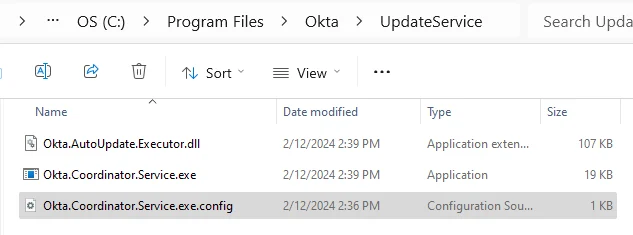
Opening the executable in dotPeek confirmed it is .NET. The binary is a service wrapper handling install, uninstall, start and stop. It references an Okta.AutoUpdate.Executor class, and a matching DLL sits in the same directory.
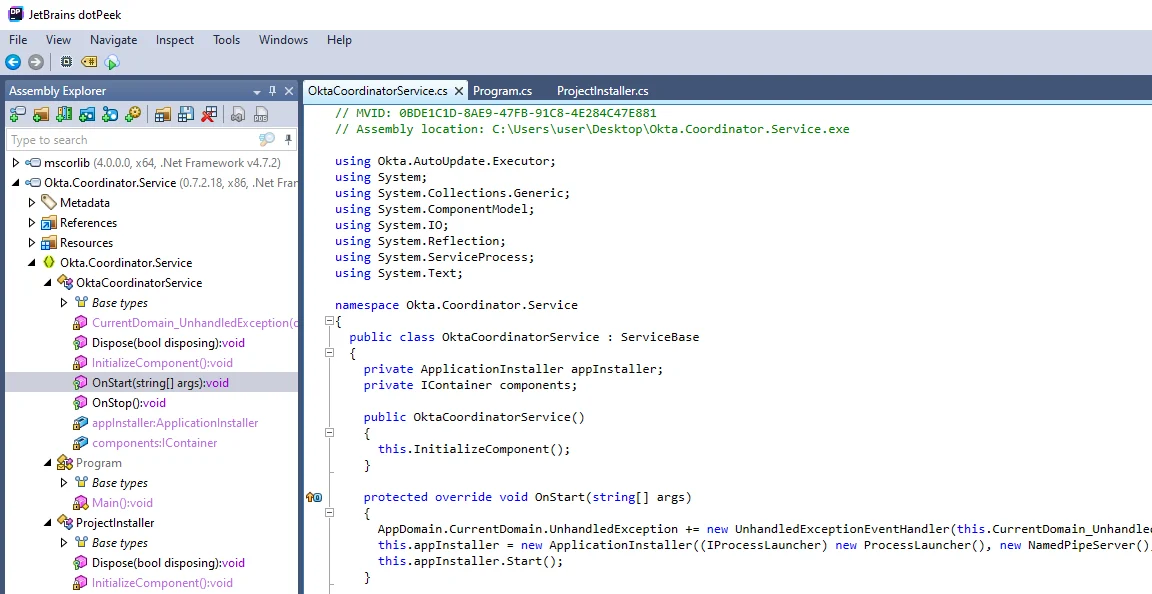
Step 2: read the update logic
The DLL, opened in dotPeek, contains the code the service actually runs. The first thing noticed is that it sets up a named pipe server that listens for commands to update the Okta Verify software. The researcher confirmed the named pipe server exists with a little PowerShell. The exact command is not reproduced in the report.

Step 3: understand the message format and the URL check
The named pipe handler processes a JSON message with several fields, some of which are checked against expected values. The field of primary interest is the update URL. If the input passes validation, the software fetches details from that URL about the most recent update package. The URL's domain or subdomain is verified against a whitelist before proceeding.

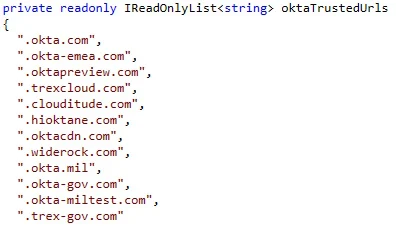
Rather than try to meet or bypass the whitelist at this stage, the researcher added an entry to the hosts file on the test machine so that a whitelisted name resolved to the local web server. Normally a proof of concept client would be written at this point to send a JSON message to the pipe and watch for a connection, but since no potential vulnerability had been spotted yet, that step was skipped.
Step 4: the metadata and the file write
The code that processes the JSON retrieved from the attacker-controlled update server expects metadata about an update package: versioning information and an array of file metadata objects. Each object carries the download URL, size, hash, type and command line arguments. The download URL is validated with the same domain checking algorithm as before. If the check passes, the software downloads the file and writes it to disk.
The file path is built by parsing the download URL and calling Path.Combine. The report shows the relevant code in a screenshot rather than as text, so the exact source is not reproduced here.
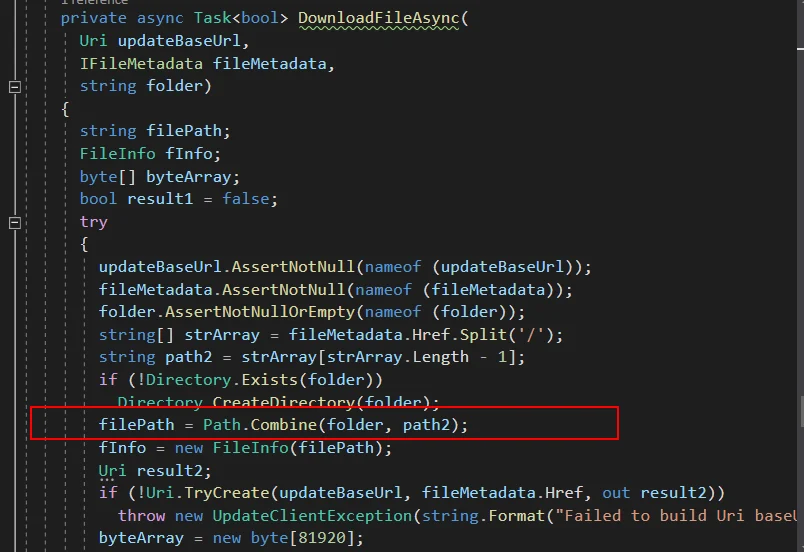
Three things combine. First, Path.Combine is called with user-supplied data: if the second argument is a full path, the first argument, normally the parent folder, is ignored. The researcher links a previous blog post on attacking .NET web services for the full explanation. Second, the filename is parsed by splitting the file location URL on forward slashes and taking the last element. A full Windows path can be inserted there using backslashes and the result is still a valid URL. Third, the service runs as SYSTEM, so it can write anywhere.
The report says the payload "looks something like the script below", but the script itself is not present in the text supplied here, so it cannot be reproduced.
Step 5: trigger the write
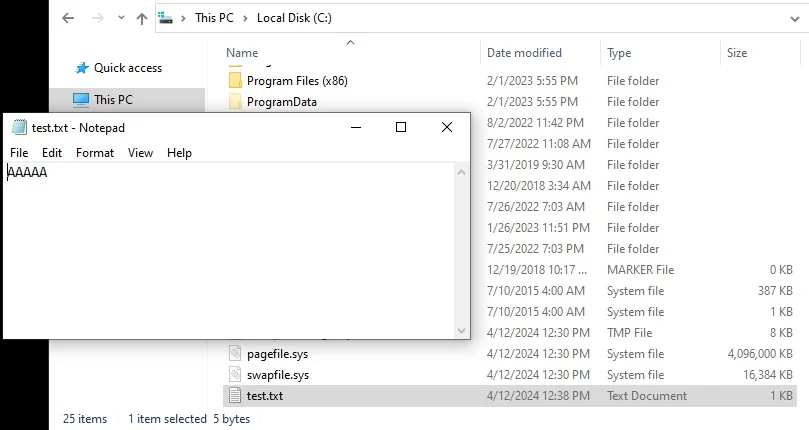
With a candidate bug, the researcher wrote a proof of concept named pipe client to trigger the update, reusing code that already exists in the .NET DLL. With the web server code in place, the request was sent. The file write succeeded.
Step 6: turn the write into code execution
The question posed next is how to get on-demand remote code execution from an arbitrary file write as SYSTEM. The first idea is DLL hijacking. Phantom DLL hijacking had been used before, but that suits red team operations where time is not a constraint; here the need is to force execution shortly after the write.
Since the service exists to install an update, the next question is whether it can be used to execute the researcher's code directly. Reviewing the code after the file write, the file type field in the file object metadata decides which file to execute. If the type is EXE or MSI, the application validates the file signature before executing it, along with any supplied arguments. The process launcher sets UseShellExecute to false, so command injection is not possible.
The original plan was to deliver a legitimate Okta Verify package, which would pass the signature check, and then use ProcMon to find a DLL hijack in the install package. Privileged DLL hijacks occur in almost all services because the assumption is that writing to a privileged location already requires the permissions. In this case the service binary itself contained a DLL hijack just before signature verification, used to load the necessary cryptographic libraries. Writing a DLL to C:\Program Files (x86)\Okta\UpdateService\wintrust.dll gets it loaded just prior to signature verification.
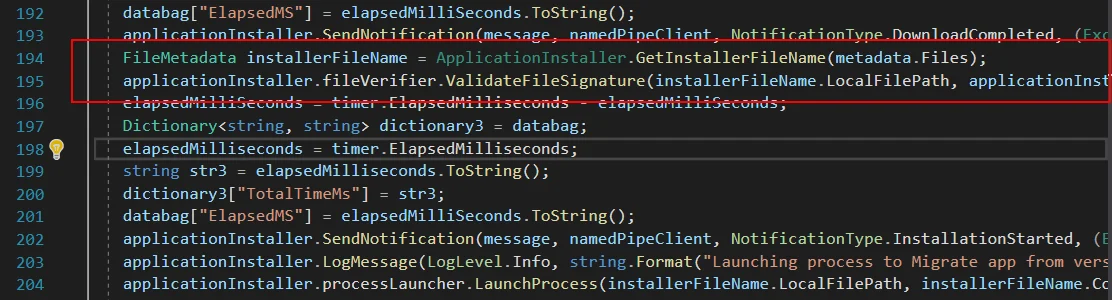
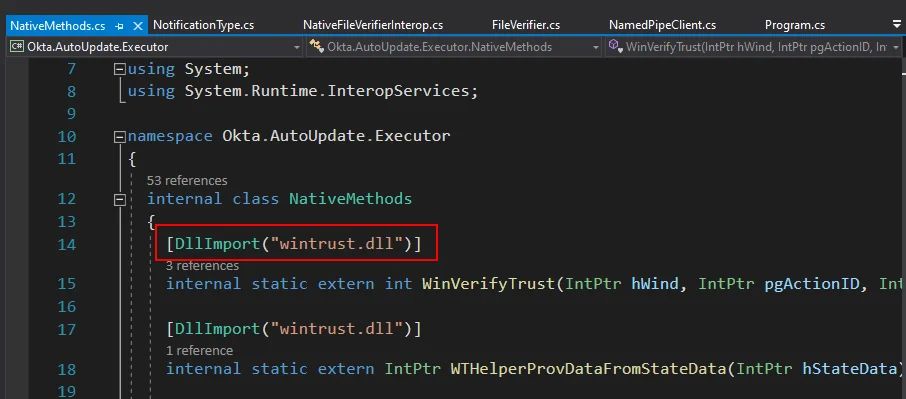
At this point the chain runs from an unprivileged user to SYSTEM. The researcher guessed this would not meet the bar for P1 or P2 and started thinking about remote code execution.
Step 7: check the named pipe permissions
Named pipes are often remotely accessible, depending on the permissions set. The code sets full control to the BUILTIN\Users group. The exact permission-setting code is shown in a screenshot, not as text.
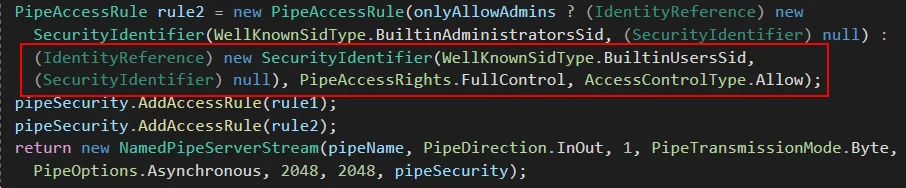
Testing from a remote system on the researcher's network gave permission denied when connecting to the named pipe.
Step 8: test the domain hypothesis
After a couple of days an idea came: on a Windows system that is part of an Active Directory domain, do the BUILTIN\Users permissions automatically become Domain Users? If so, any user in an AD domain could remotely execute code on any system with Okta Verify installed. Since the software targets large corporate enterprises, it would likely be in the standard build and deployed broadly. That is not explicitly Domain Admin, but a good chance of it.
To find out, the researcher stood up a test AD network in AWS. The report presents the result as a video rather than in text; the written text does not spell out the outcome.
Step 9: look for a subdomain to complete the chain
The researcher expected the missing Okta subdomain to keep the bug from a P1, since without a subdomain takeover the significance would likely be minimised. Time was spent searching for one. Standard subdomain takeover tools produced one viable candidate: oktahelpspot.okta.com. It pointed to an IP with no open ports, managed by a small VPS provider named Arcustech.
After signing up for an account and some very innocent social engineering, the researcher received a response, and then a second email from the first person's manager. The attempt went nowhere. The emails are shown as images; their contents are not reproduced in the text.
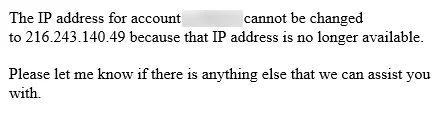
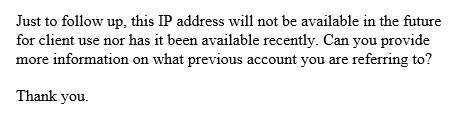
Step 10: try a custom client subdomain
The next idea was a custom Okta client subdomain. When a new client registers with Okta they receive a personalised subdomain to manage identity providers, for example trial-XXXXXXX.customdomains.okta.com. The researcher found a way to set custom routes in the web management application that redirect traffic from the custom domain to a user-defined URL. The redirect was implemented in JavaScript rather than as a conventional 301 or 302 HTTP redirect, so the .NET HTTP client used by the update service did not execute the JavaScript and did not follow the redirect as a browser would.
Root cause
The file write comes from passing user-controlled data to Path.Combine and from deriving the filename by taking the last element after splitting the URL on forward slashes. A full Windows path supplied with backslashes is still a valid URL, and as the second argument to Path.Combine it causes the intended parent folder to be ignored. Because the service runs as SYSTEM, the write can land anywhere.
Execution comes from the update mechanism itself: the file type field selects what to execute, and EXE and MSI files are signature-checked first. The signature check is undermined by a DLL hijack in the service binary, which loads wintrust.dll from its own directory just before verification.
Remote reach comes from the named pipe permissions granting full control to BUILTIN\Users, combined with the researcher's hypothesis that this maps to Domain Users in a domain.
The subdomain whitelist on the update URL is the main defence, and the researcher did not bypass it. The chain as demonstrated relies on a hosts file entry on the test machine, and the report is explicit that the absence of an Okta subdomain is what likely keeps the severity down. The researcher also notes that common URL parsing confusion and encoding tricks were attempted against the whitelist without success, and invites anyone who finds a bypass to get in touch.
Impact
An unprivileged local user can write arbitrary files as SYSTEM and escalate to code execution by writing wintrust.dll to C:\Program Files (x86)\Okta\UpdateService\. If the domain mapping hypothesis holds, any user in an AD domain could remotely execute code on any domain-joined system with Okta Verify installed, which in large enterprises would likely include the standard build. The researcher is careful not to claim Domain Admin, only a good chance of it.
The full remote chain as described depends on controlling a whitelisted Okta subdomain, which was not achieved.
Fix
Okta accepted the report, awarded $13,337 as a P2, and issued CVE-2024-0980 with a security advisory titled for arbitrary code execution in the Okta Verify Windows auto-update. The researcher thanks Okta for the bounty, the quick resolution and permission to publish.
Variants to test
- Look for other privileged services that build file paths with
Path.Combinefrom URL or JSON fields. A positive result is a write landing outside the intended directory when the second argument is an absolute path. - Check filename derivation that splits a URL on forward slashes. A positive result is a backslash-containing value that survives validation and becomes a full Windows path.
- Inspect update or installer services for signature checks preceded by DLL loads from the application directory. A positive result is a writable directory from which a DLL such as
wintrust.dllis loaded before verification. - Enumerate named pipe permissions for privileged services. A positive result is full control granted to
BUILTIN\Users, followed by a successful connection from a remote domain-joined machine. - Test whether
BUILTIN\UsersACLs on a pipe translate toDomain Usersin a lab domain. A positive result is a remote connection succeeding for an ordinary domain account. - Probe update URL whitelists with URL parsing confusion and encoding tricks. A positive result is a request reaching an attacker-controlled host without a hosts file entry.
- Look for client subdomain features that redirect to user-defined URLs. A positive result is a server-side redirect, such as a 301 or 302, that a non-browser HTTP client will follow.
What happened, in plain words
A security researcher found a way to make a Windows program called Okta Verify do something it was not supposed to do. Okta Verify is a small piece of software that many companies ask their employees to install. It helps prove that the person logging in is really who they say they are, usually by showing a code on a phone or a computer. On Windows, Okta Verify also installs a background service. A service is a program that runs without a visible window, often with high privileges, so it can do things ordinary users cannot. This particular service is called Okta.Coordinator.Service and it runs as SYSTEM, which on Windows is the most powerful account, roughly like the administrator of the whole machine.
The researcher discovered that this service can be tricked into downloading a file from a web address and saving it anywhere on the computer, including places only SYSTEM should be able to write to. From there, the researcher found a way to make Windows load a file they controlled, which gave them the ability to run their own code with SYSTEM privileges. That is called local privilege escalation: a normal user becomes the all-powerful SYSTEM account on the same machine. Then they looked at whether the same trick could be used from another computer over the network, which would be remote code execution. The report shows a test in a small Active Directory lab, but the written text does not spell out the result of that test. The researcher also tried to find a way to bypass a check that only allows certain Okta web addresses, but did not succeed. Okta fixed the issue, paid a bounty of $13,337, and published a security advisory with the identifier CVE-2024-0980.
The article begins with a disclaimer that it is not affiliated with, sponsored by or endorsed by Okta, and that the graphics are shown under fair use. Fair use is a legal idea that allows limited use of copyrighted material, for example for commentary or education.
Setting the scene
The researcher already had Okta Verify installed on a Windows computer, because some "enhanced" two-factor authentication was required to access something. Two-factor authentication, or 2FA, means logging in with two different things, usually a password plus a code from an app or a phone. The software had been sitting there for months. The work was done over a holiday break. There was no special access from Okta: the researcher used the public bug bounty programme that Okta runs on a platform called Bugcrowd. A bug bounty programme is a scheme where a company pays people for reporting security problems in its products. Okta Verify was in scope, meaning it was one of the products the programme covered.
The tools used, as named in the report, were:
- Sysinternals Procmon, a free Microsoft tool that records what programs do on a Windows machine, such as which files they read or write and which network connections they make.
- JetBrains dotPeek, a free tool that can turn a compiled .NET program back into readable source code. .NET is a software platform from Microsoft; programs written for it are compiled into a form that dotPeek can decompile.
- PowerShell, a scripting tool built into Windows that lets you run commands and small programs.
- A web server under the researcher's control, to serve the fake update information and files.
- An entry in the hosts file on the test machine. The hosts file is a small text file on every computer that maps names, like
example.com, to numeric addresses. It is checked before the normal internet lookup, so it can be used to make a name point to a machine you control. - A test Active Directory network set up in AWS. Active Directory, or AD, is Microsoft's system for managing users and computers in a company network. AWS is Amazon Web Services, a cloud provider where you can rent virtual computers.
The report does not give the versions of Okta Verify, Windows or the .NET runtime that were used.
Finding the first bug
The researcher started with the usual low-hanging fruit for a Windows service. "Low-hanging fruit" means the easy, well-known classes of problems. The article links to a guide about DLL hijacking. A DLL is a Dynamic Link Library, a file full of code that a program can load and use. DLL hijacking is when an attacker places a malicious DLL where a program will load it instead of the real one. Procmon showed a service called Okta.Coordinator.Service running as SYSTEM. That first look produced a finding, which was reported and paid promptly.
The payout for that first report was a P3 at the lower end. Bug bounty programmes often rank findings from P1 (most severe) to P4 or P5 (least severe). The researcher considered the bug an unequivocal 7.8 on the CVSS scale. CVSS is a standard way of scoring the severity of a security flaw from 0 to 10. The report does not describe the bug itself. The researcher's reading is that the low payout was a deliberate nudge to dig deeper, and it worked: the decision was made to open the binary and look properly, with the larger payout as the goal. A binary is the compiled file that the computer actually runs.
Exploitation
Step 1: identify the binaries
Before opening the file in a disassembler, the researcher guessed that Okta.Coordinator.Service.exe is a .NET application. The guess was based on its name and on the presence of Okta.Coordinator.Service.exe.config next to it. A .config file is a settings file that .NET applications commonly use, so seeing one is a strong hint that the program is .NET.
Opening the executable in dotPeek confirmed it is .NET. The binary is a service wrapper: it handles the service-related tasks such as install, uninstall, start and stop. It references an Okta.AutoUpdate.Executor class, and a matching DLL sits in the same directory. In .NET, a class is a named block of code; a reference to a class means the program uses code from another file, here the DLL.
Step 2: read the update logic
The DLL, opened in dotPeek, contains the code the service actually runs. The first thing noticed is that it sets up a named pipe server. A named pipe is a way for programs on the same computer, and sometimes on other computers, to send messages to each other. This one listens for commands to update the Okta Verify software. The researcher confirmed the named pipe server exists with a little PowerShell. The exact command is not reproduced in the report.
Step 3: understand the message format and the URL check
The named pipe handler processes a JSON message with several fields, some of which are checked against expected values. JSON is a text format for structured data, like a very simple form with field names and values. The field of primary interest is the update URL. A URL is a web address, like https://example.com/file. If the input passes validation, the software fetches details from that URL about the most recent update package. The URL's domain or subdomain is verified against a whitelist before proceeding. A whitelist is a list of allowed values; anything not on the list is rejected. A domain is the main part of a web address, such as okta.com, and a subdomain is a prefix, such as help.okta.com.
Rather than try to meet or bypass the whitelist at this stage, the researcher added an entry to the hosts file on the test machine so that a whitelisted name resolved to the local web server. Normally a proof of concept client would be written at this point to send a JSON message to the pipe and watch for a connection. A proof of concept, or POC, is a small program that demonstrates a bug. But since no potential vulnerability had been spotted yet, that step was skipped.
Step 4: the metadata and the file write
The code that processes the JSON retrieved from the attacker-controlled update server expects metadata about an update package: versioning information and an array of file metadata objects. Metadata is data about data, here information describing the update files. An array is an ordered list. Each object carries the download URL, size, hash, type and command line arguments. A hash is a short fingerprint of a file's contents, used to check that the file is the expected one. Command line arguments are extra words passed to a program when it starts, like options. The download URL is validated with the same domain checking algorithm as before. If the check passes, the software downloads the file and writes it to disk.
The file path is built by parsing the download URL and calling Path.Combine. Path.Combine is a .NET function that joins two pieces of a file path, for example a folder and a filename, into one path. The report shows the relevant code in a screenshot rather than as text, so the exact source is not reproduced here.
Three things combine. First, Path.Combine is called with user-supplied data: if the second argument is a full path, the first argument, normally the parent folder, is ignored. The researcher links a previous blog post on attacking .NET web services for the full explanation. Second, the filename is parsed by splitting the file location URL on forward slashes and taking the last element. A full Windows path can be inserted there using backslashes and the result is still a valid URL. Third, the service runs as SYSTEM, so it can write anywhere.
The report says the payload "looks something like the script below", but the script itself is not present in the text supplied here, so it cannot be reproduced.
Step 5: trigger the write
With a candidate bug, the researcher wrote a proof of concept named pipe client to trigger the update, reusing code that already exists in the .NET DLL. A client is a program that connects to a server. With the web server code in place, the request was sent. The file write succeeded.
Step 6: turn the write into code execution
The question posed next is how to get on-demand remote code execution from an arbitrary file write as SYSTEM. Remote code execution, or RCE, means running your own code on a machine, often over the network. The first idea is DLL hijacking. Phantom DLL hijacking had been used before, but that suits red team operations where time is not a constraint. A red team is a group that simulates attackers to test defences. Here the need is to force execution shortly after the write.
Since the service exists to install an update, the next question is whether it can be used to execute the researcher's code directly. Reviewing the code after the file write, the file type field in the file object metadata decides which file to execute. If the type is EXE or MSI, the application validates the file signature before executing it, along with any supplied arguments. A file signature is a cryptographic stamp that shows who made the file and that it has not been altered. The process launcher sets UseShellExecute to false, so command injection is not possible. Command injection is when an attacker sneaks extra commands into a string that is later run by the system.
The original plan was to deliver a legitimate Okta Verify package, which would pass the signature check, and then use ProcMon to find a DLL hijack in the install package. Privileged DLL hijacks occur in almost all services because the assumption is that writing to a privileged location already requires the permissions. In this case the service binary itself contained a DLL hijack just before signature verification, used to load the necessary cryptographic libraries. Writing a DLL to C:\Program Files (x86)\Okta\UpdateService\wintrust.dll gets it loaded just prior to signature verification. wintrust.dll is a Windows library related to trust and signature checking.
At this point the chain runs from an unprivileged user to SYSTEM. The researcher guessed this would not meet the bar for P1 or P2 and started thinking about remote code execution.
Step 7: check the named pipe permissions
Named pipes are often remotely accessible, depending on the permissions set. The code sets full control to the BUILTIN\Users group. BUILTIN\Users is a standard Windows group that contains ordinary local user accounts. The exact permission-setting code is shown in a screenshot, not as text.
Testing from a remote system on the researcher's network gave permission denied when connecting to the named pipe.
Step 8: test the domain hypothesis
After a couple of days an idea came: on a Windows system that is part of an Active Directory domain, do the BUILTIN\Users permissions automatically become Domain Users? Domain Users is the group of all ordinary user accounts in an AD domain. If so, any user in an AD domain could remotely execute code on any system with Okta Verify installed. Since the software targets large corporate enterprises, it would likely be in the standard build and deployed broadly. That is not explicitly Domain Admin, but a good chance of it. Domain Admin is the most powerful account in an AD domain.
To find out, the researcher stood up a test AD network in AWS. The report presents the result as a video rather than in text; the written text does not spell out the outcome.
Step 9: look for a subdomain to complete the chain
The researcher expected the missing Okta subdomain to keep the bug from a P1, since without a subdomain takeover the significance would likely be minimised. A subdomain takeover is when an attacker gains control of a subdomain that points to a service no longer in use, and can then host their own content there. Time was spent searching for one. Standard subdomain takeover tools produced one viable candidate: oktahelpspot.okta.com. It pointed to an IP with no open ports, managed by a small VPS provider named Arcustech. A VPS is a virtual private server, a rented computer in the cloud.
After signing up for an account and some very innocent social engineering, the researcher received a response, and then a second email from the first person's manager. Social engineering is the art of manipulating people into doing something or giving out information. The attempt went nowhere. The emails are shown as images; their contents are not reproduced in the text.
Step 10: try a custom client subdomain
The next idea was a custom Okta client subdomain. When a new client registers with Okta they receive a personalised subdomain to manage identity providers, for example trial-XXXXXXX.customdomains.okta.com. An identity provider is a service that handles logins. The researcher found a way to set custom routes in the web management application that redirect traffic from the custom domain to a user-defined URL. A redirect is when a web server tells a browser to go to a different address. The redirect was implemented in JavaScript rather than as a conventional 301 or 302 HTTP redirect. JavaScript is code that runs in a browser. 301 and 302 are HTTP status codes that mean the page has moved. The .NET HTTP client used by the update service did not execute the JavaScript and did not follow the redirect as a browser would.
Root cause
The file write comes from passing user-controlled data to Path.Combine and from deriving the filename by taking the last element after splitting the URL on forward slashes. A full Windows path supplied with backslashes is still a valid URL, and as the second argument to Path.Combine it causes the intended parent folder to be ignored. Because the service runs as SYSTEM, the write can land anywhere.
Execution comes from the update mechanism itself: the file type field selects what to execute, and EXE and MSI files are signature-checked first. The signature check is undermined by a DLL hijack in the service binary, which loads wintrust.dll from its own directory just before verification.
Remote reach comes from the named pipe permissions granting full control to BUILTIN\Users, combined with the researcher's hypothesis that this maps to Domain Users in a domain.
The subdomain whitelist on the update URL is the main defence, and the researcher did not bypass it. The chain as demonstrated relies on a hosts file entry on the test machine, and the report is explicit that the absence of an Okta subdomain is what likely keeps the severity down. The researcher also notes that common URL parsing confusion and encoding tricks were attempted against the whitelist without success, and invites anyone who finds a bypass to get in touch.
Impact
An unprivileged local user can write arbitrary files as SYSTEM and escalate to code execution by writing wintrust.dll to C:\Program Files (x86)\Okta\UpdateService\. If the domain mapping hypothesis holds, any user in an AD domain could remotely execute code on any domain-joined system with Okta Verify installed, which in large enterprises would likely include the standard build. The researcher is careful not to claim Domain Admin, only a good chance of it.
The full remote chain as described depends on controlling a whitelisted Okta subdomain, which was not achieved.
Fix
Okta accepted the report, awarded $13,337 as a P2, and issued CVE-2024-0980 with a security advisory titled for arbitrary code execution in the Okta Verify Windows auto-update. CVE stands for Common Vulnerabilities and Exposures, a public catalogue of known security flaws. The researcher thanks Okta for the bounty, the quick resolution and permission to publish.
Variants to test
- Look for other privileged services that build file paths with
Path.Combinefrom URL or JSON fields. A positive result is a write landing outside the intended directory when the second argument is an absolute path. - Check filename derivation that splits a URL on forward slashes. A positive result is a backslash-containing value that survives validation and becomes a full Windows path.
- Inspect update or installer services for signature checks preceded by DLL loads from the application directory. A positive result is a writable directory from which a DLL such as
wintrust.dllis loaded before verification. - Enumerate named pipe permissions for privileged services. A positive result is full control granted to
BUILTIN\Users, followed by a successful connection from a remote domain-joined machine. - Test whether
BUILTIN\UsersACLs on a pipe translate toDomain Usersin a lab domain. An ACL is an access control list, the set of rules saying who can do what. A positive result is a remote connection succeeding for an ordinary domain account. - Probe update URL whitelists with URL parsing confusion and encoding tricks. A positive result is a request reaching an attacker-controlled host without a hosts file entry.
- Look for client subdomain features that redirect to user-defined URLs. A positive result is a server-side redirect, such as a 301 or 302, that a non-browser HTTP client will follow.
Glossary
- Active Directory (AD): Microsoft's system for managing users, computers and permissions in a company network.
- AWS: Amazon Web Services, a cloud provider where you can rent virtual computers.
- Binary: the compiled file that a computer actually runs.
- Bug bounty programme: a scheme where a company pays people for reporting security problems in its products.
- BUILTIN\Users: a standard Windows group containing ordinary local user accounts.
- Class (in .NET): a named block of code.
- Command injection: when an attacker sneaks extra commands into a string that is later run by the system.
- Command line arguments: extra words passed to a program when it starts, like options.
- CVE: Common Vulnerabilities and Exposures, a public catalogue of known security flaws.
- CVSS: a standard way of scoring the severity of a security flaw from 0 to 10.
- DLL: Dynamic Link Library, a file full of code that a program can load and use.
- DLL hijacking: when an attacker places a malicious DLL where a program will load it instead of the real one.
- Domain (web): the main part of a web address, such as
okta.com. - Domain Admin: the most powerful account in an AD domain.
- Domain Users: the group of all ordinary user accounts in an AD domain.
- Fair use: a legal idea that allows limited use of copyrighted material, for example for commentary or education.
- Hash: a short fingerprint of a file's contents, used to check that the file is the expected one.
- Hosts file: a small text file on every computer that maps names to numeric addresses, checked before the normal internet lookup.
- Identity provider: a service that handles logins.
- JavaScript: code that runs in a browser.
- JSON: a text format for structured data, like a very simple form with field names and values.
- Metadata: data about data, here information describing the update files.
- Named pipe: a way for programs on the same computer, and sometimes on other computers, to send messages to each other.
- .NET: a software platform from Microsoft; programs written for it are compiled into a form that tools like dotPeek can decompile.
- Path.Combine: a .NET function that joins two pieces of a file path into one path.
- Proof of concept (POC): a small program that demonstrates a bug.
- Remote code execution (RCE): running your own code on a machine, often over the network.
- Red team: a group that simulates attackers to test defences.
- Service: a program that runs without a visible window, often with high privileges.
- Social engineering: the art of manipulating people into doing something or giving out information.
- Subdomain: a prefix to a domain, such as
helpinhelp.okta.com. - Subdomain takeover: when an attacker gains control of a subdomain that points to a service no longer in use, and can then host their own content there.
- SYSTEM: on Windows, the most powerful account, roughly like the administrator of the whole machine.
- Two-factor authentication (2FA): logging in with two different things, usually a password plus a code from an app or a phone.
- URL: a web address, like
https://example.com/file. - VPS: a virtual private server, a rented computer in the cloud.
- Whitelist: a list of allowed values; anything not on the list is rejected.
- wintrust.dll: a Windows library related to trust and signature checking.