Open Redirect
The site's URL rewriting logic accepted a crafted path containing encoded slashes and redirected the browser to an external domain. An attacker could use this to send users to a malicious site for phishing.
 Originally disclosed on HackerOne
- Triaged in 3 hours
- Fixed in 8 days
- Paid in 8 days
- Disclosed after 21 days
Open Redirect Vulnerability
URL : https://www.omise.co////bing.com/?www.omise.co/?category=interview&page=2
Parameter Type : URL Rewrite
Attack Pattern : %2f%2f%2fr87.com%2f%3fwww.omise.co%2f
How to Reproduce
- Intercept the below url using Burpsuite & send it to repeater
https://www.omise.co/?category=interview&page=2
- Use this attack pattern
/%2f%2f%2fbing.com%2f%3fwww.omise.co
- Now it will redirect to bing.com
Below i will give u the Rquest body & also attaching the screenshots
GET /%2f%2f%2fbing.com%2f%3fwww.omise.co/?category=interview&page=2 HTTP/1.1 Host: www.omise.co User-Agent: Mozilla/5.0 (Windows NT 10.0; Win64; x64; rv:65.0) Gecko/20100101 Firefox/65.0 Accept: text/html,application/xhtml+xml,application/xml;q=0.9,image/webp,/;q=0.8 Accept-Language: en-US,en;q=0.5 Accept-Encoding: gzip, deflate Connection: close Cookie: _omise-website_session=OHdwcEpSZVUvVXRqS3F3bUVyUUhaZ2pVY00wVWJ1c042RWZZNHdOendwUEkzS0dnaTJPb1hub3ZxcGhkUk5FNy96blpiNjJPL0hhMUZBdS9Jb2ZFY25BcWxzcXNjbTAyclJLTlo0VGUvbzBsa085MXhNUG9uZFpzRnBBeEp4a2MtLU9ONHdIWVBZdWZlS3VIVXVYTVNkOVE9PQ%3D%3D--cf8f4d43247d9eb5aa162a3f00fabc02bbda3b34 Upgrade-Insecure-Requests: 1
Impact
An attacker can use this vulnerability to redirect users to other malicious websites, which can be used for phishing and similar attacks
Attachments
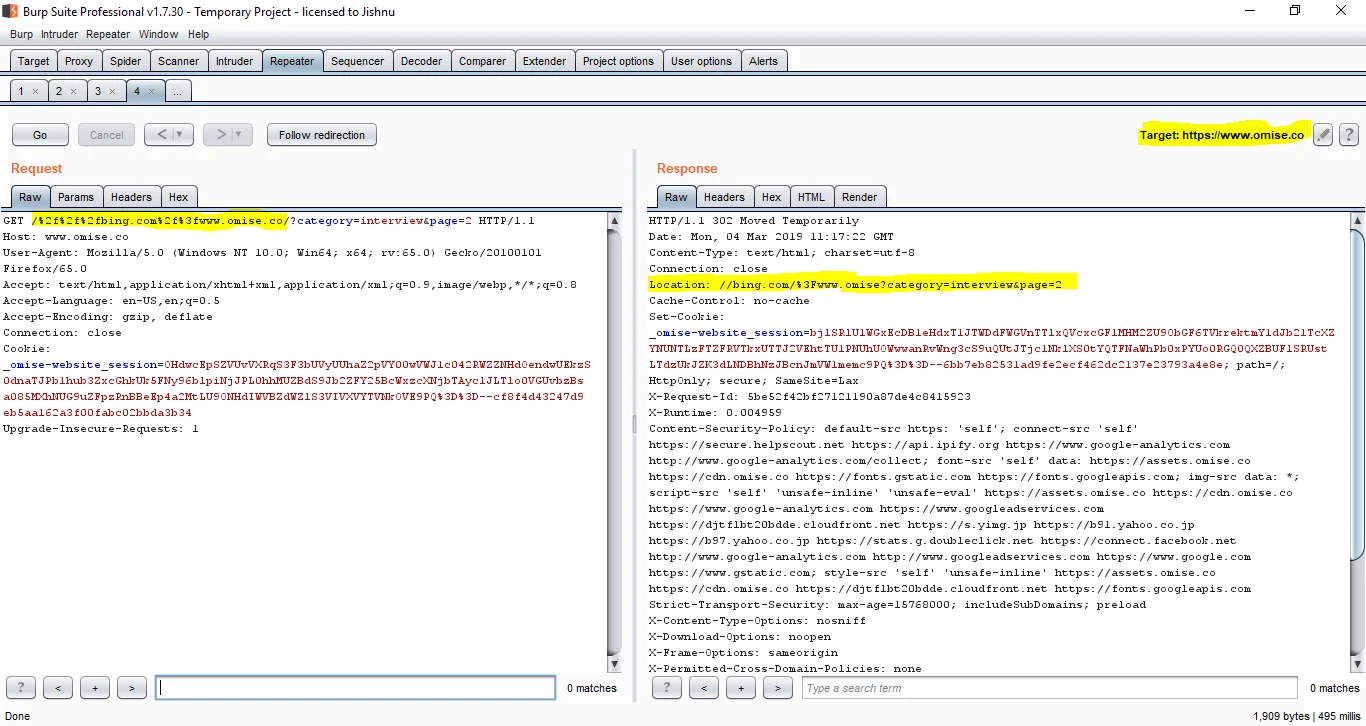
Context
Omise runs a website at www.omise.co. The report concerns a URL rewrite behaviour on that host: the site accepts a path segment and uses it to build a redirect target. The researcher found that a crafted path could send a visitor to an arbitrary external domain, in this case bing.com, while the request was made to www.omise.co. The report classifies the issue as an open redirect and rates it low severity (CVSS 3.3), with a bounty of 100.00 USD. It was disclosed on 2019-03-25.
The normal feature involved is the category listing, which takes a category parameter and a page parameter, for example https://www.omise.co/?category=interview&page=2. The redirect logic sits in front of that page and processes the path portion of the URL.
Setup
The researcher used Burp Suite to intercept the request and send it to Repeater. The only precondition shown is that the site responds to a GET request on the root path with the category and page query parameters. No account, role or special configuration is described. The request captured in the report includes a session cookie, which is not needed to demonstrate the behaviour as described.
Finding it
The researcher identified that the path component of the URL is subject to a rewrite and that the rewritten value is used as a redirect destination. The attack pattern given in the report is:
%2f%2f%2fr87.com%2f%3fwww.omise.co%2f
This is a percent-encoded sequence of slashes followed by a hostname and a query string. The encoded slashes decode to ///, which, when placed in the path, produces a value that the redirect logic treats as a protocol-relative or absolute destination. The trailing ?www.omise.co/ is part of the crafted value. The researcher also gives the working URL form at the top of the report:
https://www.omise.co////bing.com/?www.omise.co/?category=interview&page=2
Exploitation
Step 1: capture the baseline request
The researcher intercepts the normal category URL and sends it to Repeater:
https://www.omise.co/?category=interview&page=2
This is the legitimate page request. This is the legitimate page request used as the baseline.
Step 2: insert the attack pattern into the path
The researcher replaces the path with the encoded pattern:
/%2f%2f%2fbing.com%2f%3fwww.omise.co
Decoded, the path becomes ///bing.com/?www.omise.co. The leading slashes are what turn a relative path into something the redirect handler interprets as an external destination. The host bing.com is the target of the redirect, and the trailing ?www.omise.co is carried along as part of the crafted value.
Step 3: send the request and observe the redirect
The full request as captured in the report is:
GET /%2f%2f%2fbing.com%2f%3fwww.omise.co/?category=interview&page=2 HTTP/1.1
Host: www.omise.co
User-Agent: Mozilla/5.0 (Windows NT 10.0; Win64; x64; rv:65.0) Gecko/20100101 Firefox/65.0
Accept: text/html,application/xhtml+xml,application/xml;q=0.9,image/webp,*/*;q=0.8
Accept-Language: en-US,en;q=0.5
Accept-Encoding: gzip, deflate
Connection: close
Cookie: _omise-website_session=[redacted]
Upgrade-Insecure-Requests: 1
The request line places the encoded pattern in the path, followed by the original query string ?category=interview&page=2. The Host header is www.omise.co, so the request is made to the legitimate site. The response, according to the report, is a redirect to bing.com. The researcher states: "Now it will redirect to bing.com."
The report attaches a screenshot alongside the request.
Root cause
The site takes the path portion of the request and uses it to construct a redirect target without validating that the resulting destination stays on the www.omise.co origin. Because the path is percent-decoded and the leading slashes are preserved, a value such as ///bing.com/?www.omise.co is interpreted as an absolute or protocol-relative URL. The site then redirects the visitor to bing.com. The report does not show the server-side code, so the exact implementation is not stated; the behaviour is consistent with a rewrite rule that passes the raw path into a redirect function without an allow-list or origin check.
Impact
As the researcher states, an attacker can use this vulnerability to redirect users to other malicious websites, which can be used for phishing and similar attacks. The redirect originates from the trusted www.omise.co domain, so a victim following a link sees the legitimate host in the address bar before being sent elsewhere. The report does not describe any additional impact such as credential theft or session compromise; the stated risk is redirection to attacker-controlled destinations.
Fix
A correct fix would be to validate the redirect target against an allow-list of permitted hosts or to reject any path that decodes to an absolute or protocol-relative URL, ensuring the Location header always points to the same origin.
Variants to test
- Try other encoded slash counts, such as
%2f%2fand%2f%2f%2f%2f, in the same path position. A positive result is a redirect to the external host in theLocationheader. - Try a plain double slash without encoding, for example
//bing.com/, to see whether the rewrite decodes before or after the redirect decision. A positive result is the same external redirect. - Try backslash variants such as
%5c%5cbing.com, which some parsers treat as slashes. A positive result is a redirect to the external host. - Try appending the crafted path to other routes that accept a
categoryorpageparameter. A positive result is a redirect on a route other than the one shown here. - Try a host with a userinfo component, such as
[redacted], to see whether the redirect parser is confused by the@. A positive result is a redirect toevil.example.
Hunting notes
This kind of bug tends to hide in URL rewrite rules, legacy redirect handlers and any endpoint that takes a path segment and turns it into a Location header. During recon, look for parameters such as category, page, return, next and url that appear in the path rather than the query string, and for responses that issue a 301 or 302 to a path derived from the request. The signal is a redirect whose target changes when you alter the path, especially when encoded slashes are involved. The researcher demonstrated impact by showing a request to the legitimate host that produced a redirect to bing.com, which demonstrates the redirect to an external host..
What happened, in plain words
Omise runs a website at www.omise.co. Part of that site uses a category listing with a category parameter. using a web address like https://www.omise.co/?category=interview&page=2. The site also has a piece of logic that takes the path part of the address (the bit after the domain name) and uses it to decide where to send the visitor next, a redirect.
A redirect is what happens when a website answers your request with "not here, go over there instead" and gives your browser a new address to load. Normally that is harmless and useful, for example when a page has moved. An open redirect is when the site will send you to any address someone puts in the link, including a completely different website. That is the bug here: the researcher found that a specially crafted path made www.omise.co send the visitor to bing.com, even though the request was made to the Omise site.
The report rates this as low severity (CVSS 3.3) and the program paid a bounty of 100.00 USD. It was disclosed on 2019-03-25.
The feature involved is the category listing. It takes two parameters, category and page. A parameter is a named value attached to a web address after a ?, a bit like a form field filled in for you. The redirect logic sits in front of that page and looks at the path portion of the URL.
Setup
The researcher used Burp Suite, a tool that sits between your browser and a website so you can see and edit every request before it is sent. Inside Burp there is a feature called Repeater, which lets you take one captured request and send it again and again with small changes, watching the response each time. This is the standard way to test a hunch without clicking around a browser.
The only precondition shown is that the site answers a GET request on the root path with the category and page parameters. A GET request is the ordinary kind your browser makes when you type an address or click a link: it asks the server to give you something. No account, role or special configuration is described.
The captured request includes a session cookie. A cookie is a small piece of text the site stores in your browser to remember who you are between requests, like a cloakroom ticket.
Finding it
The researcher noticed that the path part of the URL gets rewritten, and that the rewritten value is then used as the destination of a redirect. The attack pattern given in the report is:
%2f%2f%2fr87.com%2f%3fwww.omise.co%2f
This is a percent-encoded string. Percent encoding is how special characters are written inside a URL so they do not confuse the parser: %2f means a forward slash /, and %3f means a question mark ?. Decoded, the pattern reads ///r87.com/?www.omise.co/. The leading slashes are the interesting part: when they end up in the path, the redirect logic treats what follows as a full external address rather than a page on the same site. The trailing ?www.omise.co/ is simply carried along as part of the crafted value.
The researcher also gives the working URL form at the top of the report:
https://www.omise.co////bing.com/?www.omise.co/?category=interview&page=2
Here the slashes are written literally rather than encoded, and the destination is bing.com.
Exploitation
Step 1: capture the baseline request
The researcher intercepts the normal category URL and sends it to Repeater:
https://www.omise.co/?category=interview&page=2
This is the legitimate page request used as the baseline. Knowing what normal looks like makes it obvious when something changes.
Step 2: insert the attack pattern into the path
The researcher replaces the path with the encoded pattern:
/%2f%2f%2fbing.com%2f%3fwww.omise.co
Decoded, the path becomes ///bing.com/?www.omise.co. The leading slashes are what turn a relative path into something the redirect handler reads as an external destination. bing.com is where the visitor is sent, and the trailing ?www.omise.co rides along as part of the crafted value. The step is done because the hypothesis is that the path is trusted and reused as a redirect target; putting a foreign hostname in the path tests exactly that.
Step 3: send the request and observe the redirect
The full request as captured in the report is:
GET /%2f%2f%2fbing.com%2f%3fwww.omise.co/?category=interview&page=2 HTTP/1.1
Host: www.omise.co
User-Agent: Mozilla/5.0 (Windows NT 10.0; Win64; x64; rv:65.0) Gecko/20100101 Firefox/65.0
Accept: text/html,application/xhtml+xml,application/xml;q=0.9,image/webp,*/*;q=0.8
Accept-Language: en-US,en;q=0.5
Accept-Encoding: gzip, deflate
Connection: close
Cookie: _omise-website_session=[redacted]
Upgrade-Insecure-Requests: 1
Line by line:
GET /%2f%2f%2fbing.com%2f%3fwww.omise.co/?category=interview&page=2 HTTP/1.1is the request line.GETis the method, the long string is the path with the encoded pattern in it, followed by the original query string?category=interview&page=2, andHTTP/1.1is the version of the protocol being spoken.Host: www.omise.cotells the server which site the request is for. It is the legitimate Omise host, so the request really is going to Omise, not to Bing.User-Agent: ...identifies the browser that made the request. It is copied from a normal Firefox session and is not part of the attack.Accept: ...lists the kinds of content the browser is willing to receive, such as HTML and images.Accept-Language: en-US,en;q=0.5says the browser prefers English.Accept-Encoding: gzip, deflatesays the browser can accept compressed responses.Connection: closeasks the server to close the connection after the response.Cookie: _omise-website_session=[redacted]is the session cookie. It is redacted here because it identifies a session.Upgrade-Insecure-Requests: 1is a standard browser hint asking the server to prefer HTTPS.
According to the report, the response is a redirect to bing.com. The researcher states: "Now it will redirect to bing.com."
The report attaches a screenshot alongside the request.
Root cause
The site takes the path portion of the request and uses it to build a redirect target without checking that the destination stays on www.omise.co. Because the path is percent-decoded and the leading slashes are kept, a value such as ///bing.com/?www.omise.co is read as an absolute or protocol-relative URL. A protocol-relative URL is one that starts with // and borrows the current page's protocol, so //bing.com means "Bing, over HTTPS, because we are on HTTPS". The site then redirects the visitor to bing.com. A Location header is the line in the server's response that tells the browser where to go next; it is the mechanism behind every redirect.
The report does not show the server-side code, so the exact implementation is not stated. The behaviour fits a rewrite rule that passes the raw path into a redirect function without an allow-list or origin check. An allow-list is a list of things that are explicitly permitted, with everything else refused.
Impact
As the researcher states, an attacker can use this vulnerability to redirect users to other malicious websites, which can be used for phishing and similar attacks. Phishing is a fake page that imitates a real one to trick you into typing a password or payment details. The redirect starts from the trusted www.omise.co domain, so a victim clicking a link sees the legitimate host in the address bar before being sent elsewhere, which makes the link look far more believable. The report does not describe any additional impact such as credential theft or session compromise; the stated risk is redirection to attacker-controlled destinations.
Fix
A correct fix would be to check the redirect target against an allow-list of permitted hosts, or to reject any path that decodes to an absolute or protocol-relative URL, so the Location header always points to the same origin. Origin here means the scheme, host and port together, the identity of the site.
Variants to test
- Try other encoded slash counts, such as
%2f%2fand%2f%2f%2f%2f, in the same path position. A positive result is a redirect to the external host in theLocationheader. - Try a plain double slash without encoding, for example
//bing.com/, to see whether the rewrite decodes before or after the redirect decision. A positive result is the same external redirect. - Try backslash variants such as
%5c%5cbing.com, which some parsers treat as slashes. A positive result is a redirect to the external host. - Try appending the crafted path to other routes that accept a
categoryorpageparameter. A positive result is a redirect on a route other than the one shown here. - Try a host with a userinfo component, such as
[redacted], to see whether the redirect parser is confused by the@. A positive result is a redirect toevil.example. The userinfo part is the optionalusername:password@section before a hostname in a URL; browsers ignore it for the destination, but naive parsers can be fooled by it.
Hunting notes
This kind of bug tends to hide in URL rewrite rules, legacy redirect handlers and any endpoint that takes a path segment and turns it into a Location header. During recon, the early phase of looking around a target before testing, look for parameters such as category, page, return, next and url that appear in the path rather than the query string, and for responses that issue a 301 or 302 to a path derived from the request. A 301 or 302 is an HTTP status code meaning "moved permanently" or "moved temporarily", the server's way of saying "go to this other address". The signal is a redirect whose target changes when you alter the path, especially when encoded slashes are involved. The researcher demonstrated impact by showing a request to the legitimate host that produced a redirect to bing.com, which demonstrates the redirect to an external host..
Glossary
- Open redirect: a flaw where a site will send a visitor to any address supplied in a link, including a different website.
- Redirect: a server response telling the browser to load a different address instead.
- Parameter: a named value attached to a URL after
?, likecategory=interview. - Path: the part of a URL after the domain name, for example
/some/page. - Query string: the part of a URL after
?, made of parameters. - GET request: the ordinary request a browser makes to fetch a page or resource.
- Burp Suite: a tool that intercepts and edits traffic between browser and server.
- Repeater: a Burp feature for resending one request repeatedly with changes.
- Cookie: a small piece of text stored by the browser to remember state, such as a session.
- Session cookie: a cookie that identifies a logged-in session; treated as a secret.
- Percent encoding: writing special characters in a URL as
%plus two hex digits, such as%2ffor/. - Protocol-relative URL: a URL starting with
//that borrows the current page's protocol. - Absolute URL: a full address including the scheme and host, such as
https://bing.com/. Locationheader: the response header that carries the destination of a redirect.- Origin: the combination of scheme, host and port that identifies a site.
- Allow-list: a list of explicitly permitted values, with everything else refused.
- CVSS: a scoring system for the severity of a vulnerability; 3.3 is low.
- Bounty: money paid by a program for a valid security report.
- Phishing: a fake page or message that imitates a real one to steal information.
- Recon: the early phase of gathering information about a target before testing.
- 301 / 302: HTTP status codes for permanent and temporary redirects.
- Userinfo: the optional
username:password@part before a hostname in a URL. - Endpoint: a specific address on a server that handles a particular kind of request.




