CVE-2024-21111 – Local Privilege Escalation in Oracle VirtualBox
The VirtualBox system service, running as SYSTEM, created its log directory with inherited permissions that let ordinary users write inside it, and on startup it renamed and deleted log files there. By racing that file handling with opportunistic locks and a junction point, an attacker could redirect a file move so a malicious DLL was loaded into a SYSTEM process, gaining administrator rights.
 Published on mdsec.co.uk
Our best in class red team can deliver a holistic cyber attack simulation to provide a true evaluation of your organisation’s cyber resilience.](https://www.mdsec.co.uk/our-services/adversary-simulation/) - [{{media:1}}
The full write-up lives on its author's site
It belongs to its author, so we link to it rather than copy it. The other two tabs are our own rewrites, checked against it.
Context
VirtualBox is a popular open source, cross-platform virtualisation product developed by Oracle Corporation. On Windows, installing VirtualBox also installs a single user-land service, VirtualBox system service (service name VboxSDS), which runs as SYSTEM and is configured to start on demand. The service creates the directory C:\\ProgramData\\VirtualBox\\ for logging purposes, and during startup it rotates its log files by renaming and moving them recursively inside that directory. The write-up below walks through how that rotation behaviour, combined with weak permissions on the log directory, can be turned into an arbitrary file move and ultimately local privilege escalation. The issue is tracked as CVE-2024-21111; the same vulnerability was also discovered by Naor Hodorov, who is credited alongside the author in the Oracle Patch Advisory.
Setup
The only precondition is a default installation of VirtualBox for Windows. After installation, the VboxSDS service can be inspected with sc.exe:
PS C:\\tools> sc.exe qc VboxSDS
[SC] QueryServiceConfig SUCCESS

SERVICE_NAME: VboxSDS
        TYPE               : 10  WIN32_OWN_PROCESS
        START_TYPE         : 3   DEMAND_START
        ERROR_CONTROL      : 1   NORMAL
        BINARY_PATH_NAME   : "C:\\Program Files\\Oracle\\VirtualBox\\VBoxSDS.exe"
        LOAD_ORDER_GROUP   :
        TAG                : 0
        DISPLAY_NAME       : VirtualBox system service
        DEPENDENCIES       : RPCSS
        SERVICE_START_NAME : LocalSystem
This confirms the service runs as LocalSystem and is set to DEMAND_START, so a low privileged user can trigger it but it is not always running. The service creates C:\\ProgramData\\VirtualBox\\ without specifying explicit ACLs, so the directory inherits permissions from C:\\ProgramData, which allows users to create new files and folders:
PS C:\\tools> cacls.exe C:\\ProgramData\\VirtualBox
C:\\ProgramData\\VirtualBox NT AUTHORITY\\SYSTEM:(OI)(CI)(ID)F
                          BUILTIN\\Administrators:(OI)(CI)(ID)F
                          CREATOR OWNER:(OI)(CI)(IO)(ID)F
                          BUILTIN\\Users:(OI)(CI)(ID)R
                          BUILTIN\\Users:(CI)(ID)(special access:)
                                                FILE_WRITE_DATA
                                                FILE_APPEND_DATA
                                                FILE_WRITE_EA
                                                FILE_WRITE_ATTRIBUTES

PS C:\\tools>
The BUILTIN\\Users entry grants write data, append data, write extended attributes and write attributes, which is what makes the directory interesting. The log files themselves, however, inherit the directory permissions in a way that prevents low privileged users from modifying or removing them:
PS C:\\tools> ls C:\\ProgramData\\VirtualBox\\

    Directory: C:\\ProgramData\\VirtualBox

Mode                 LastWriteTime         Length Name
----                 -------------         ------ ----
-a----         4/22/2024   9:44 AM              0 VBoxSDS.log
-a----         4/22/2024   9:43 AM           1924 VBoxSDS.log.1
-a----         4/12/2024   1:49 AM           1924 VBoxSDS.log.10
-a----         4/19/2024   5:32 PM           1924 VBoxSDS.log.2
-a----         4/18/2024  10:41 AM           1281 VBoxSDS.log.3
-a----         4/17/2024  11:27 PM           1924 VBoxSDS.log.4
-a----         4/17/2024  10:20 PM            665 VBoxSDS.log.5
-a----         4/17/2024  10:20 PM           1431 VBoxSDS.log.6
-a----         4/15/2024  11:04 PM           1925 VBoxSDS.log.7
-a----         4/15/2024   1:30 PM            665 VBoxSDS.log.8
-a----         4/15/2024   1:30 PM           1431 VBoxSDS.log.9

PS C:\\tools> cacls.exe C:\\ProgramData\\VirtualBox\\VBoxSDS.log
C:\\ProgramData\\VirtualBox\\VBoxSDS.log NT AUTHORITY\\SYSTEM:(ID)F
                                      BUILTIN\\Administrators:(ID)F
                                      BUILTIN\\Users:(ID)R
PS C:\\tools>
Users only have read access to the log files. That matters because it rules out the usual abuse of directory junctions, a popular primitive when exploiting logic access bugs: a low privileged user cannot simply replace or remove the log files to redirect the service's operations.
Finding it
Analysing the service during startup shows that VboxSDS performs file rename and move operations recursively inside C:\\ProgramData\\VirtualBox. The rotation works by shifting each log file up one index: VboxSDS.log becomes VboxSDS.log.1, VboxSDS.log.1 becomes VboxSDS.log.2, and so on.
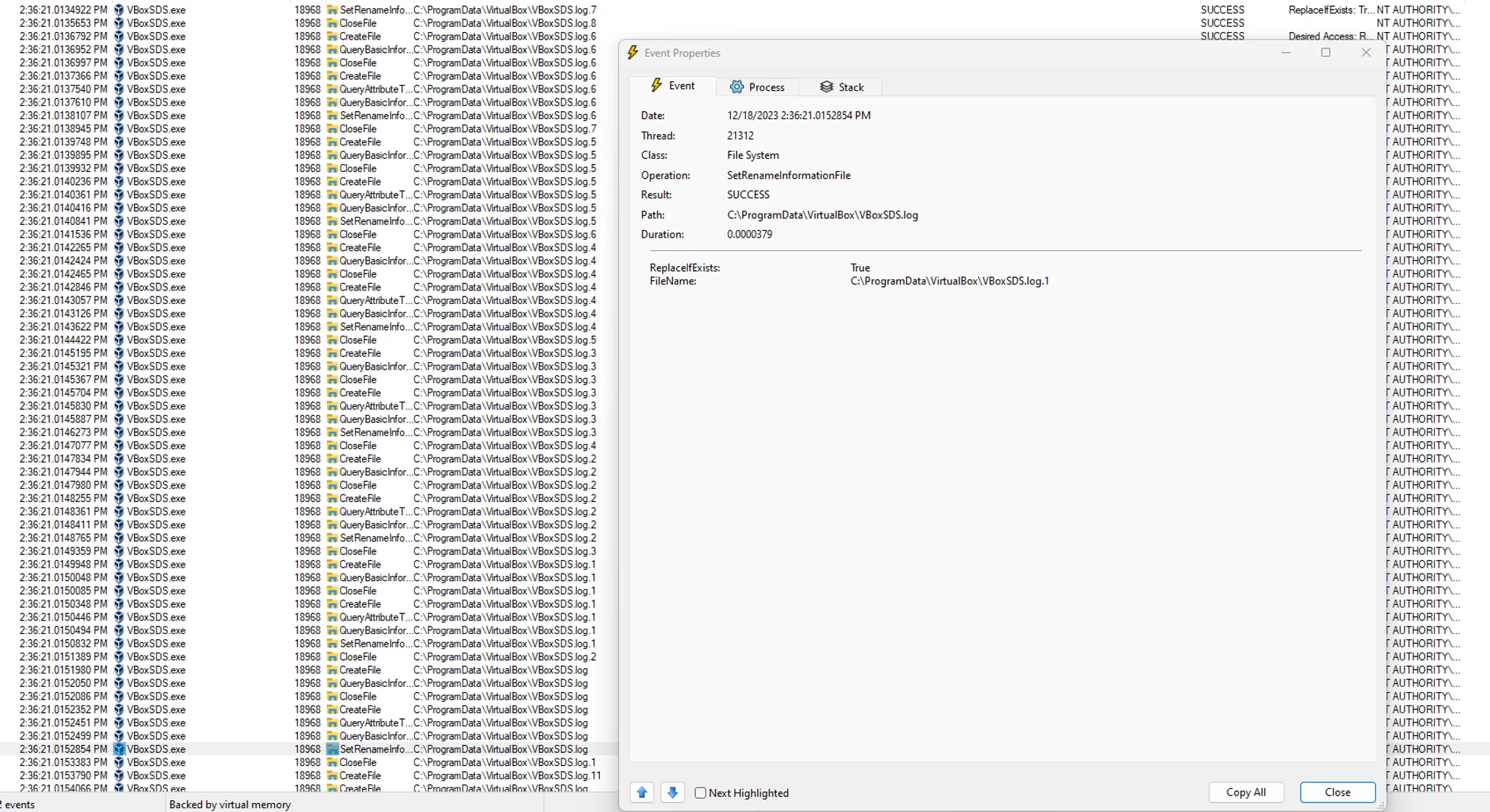
If the only file inside the directory is VboxSDS.log.10, it is deleted instead of being rotated:
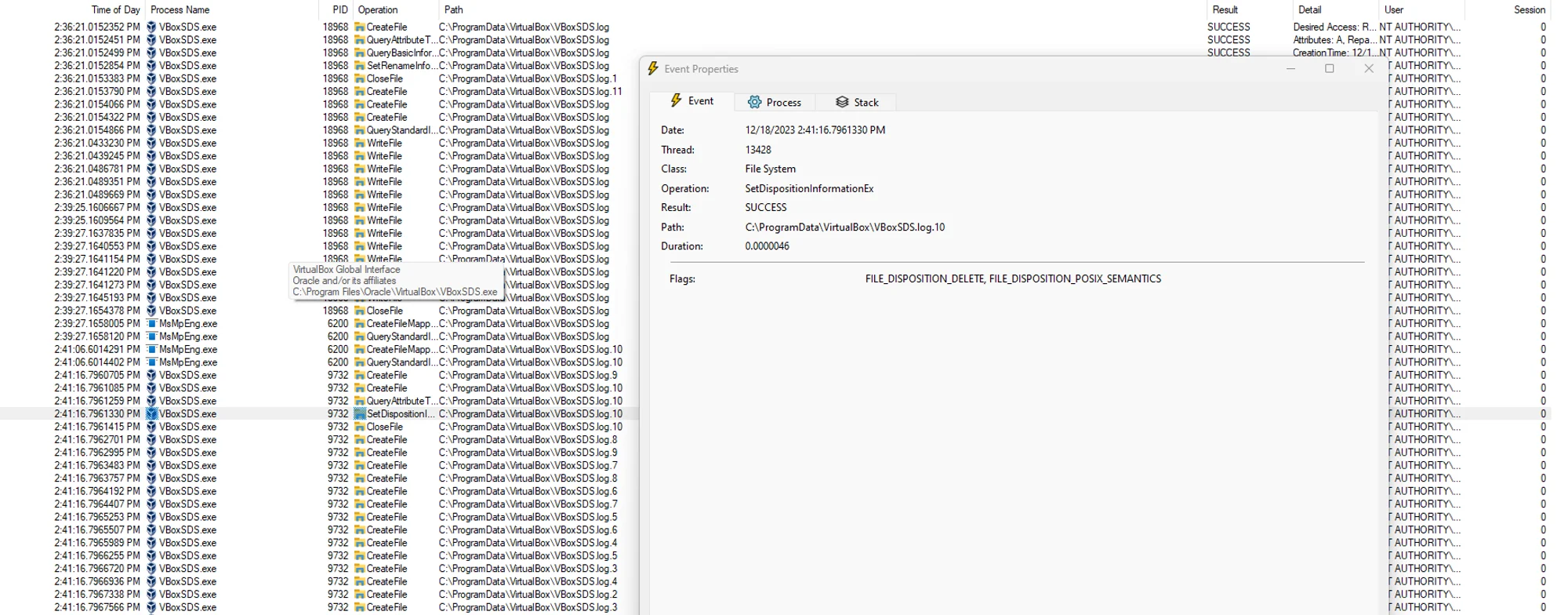
This behaviour can be abused both to delete files in the directory and to perform an arbitrary file move. To clear the directory, two capabilities are needed: the ability to start the service as a low privileged user, and the ability to stop or crash it, since in most cases the directory contains multiple log files and a single start will not empty it.
Starting the service as a low privileged user is possible through COM. The VboxSDS service registers a COM server, and whenever that COM class is instantiated the service is started:
PS C:\\tools> sc.exe queryex VboxSDS

SERVICE_NAME: VboxSDS
        TYPE               : 10  WIN32_OWN_PROCESS
        STATE              : 1  STOPPED
        WIN32_EXIT_CODE    : 0  (0x0)
        SERVICE_EXIT_CODE  : 0  (0x0)
        CHECKPOINT         : 0x0
        WAIT_HINT          : 0x0
        PID                : 0
        FLAGS              :
PS C:\\tools> [Activator]::CreateInstance([type]::GetTypeFromCLSID("74AB5FFE-8726-4435-AA7E-876D705BCBA5"))
System.__ComObject
PS C:\\tools> sc.exe queryex VboxSDS

SERVICE_NAME: VboxSDS
        TYPE               : 10  WIN32_OWN_PROCESS
        STATE              : 4  RUNNING
                                (STOPPABLE, NOT_PAUSABLE, IGNORES_SHUTDOWN)
        WIN32_EXIT_CODE    : 0  (0x0)
        SERVICE_EXIT_CODE  : 0  (0x0)
        CHECKPOINT         : 0x0
        WAIT_HINT          : 0x0
        PID                : 11364
        FLAGS              :
PS C:\\tools>
The service is stopped before the CreateInstance call and running afterwards, with a PID assigned, so instantiating the COM class is enough to bring it up without any elevated rights.
The easiest way found to crash the service was to prevent it from creating the VboxSDS.log file. There are a few ways to do this, but the simplest is to create a directory named VboxSDS.log: the subsequent call to the CreateFile API fails because it expects a file, not a directory.
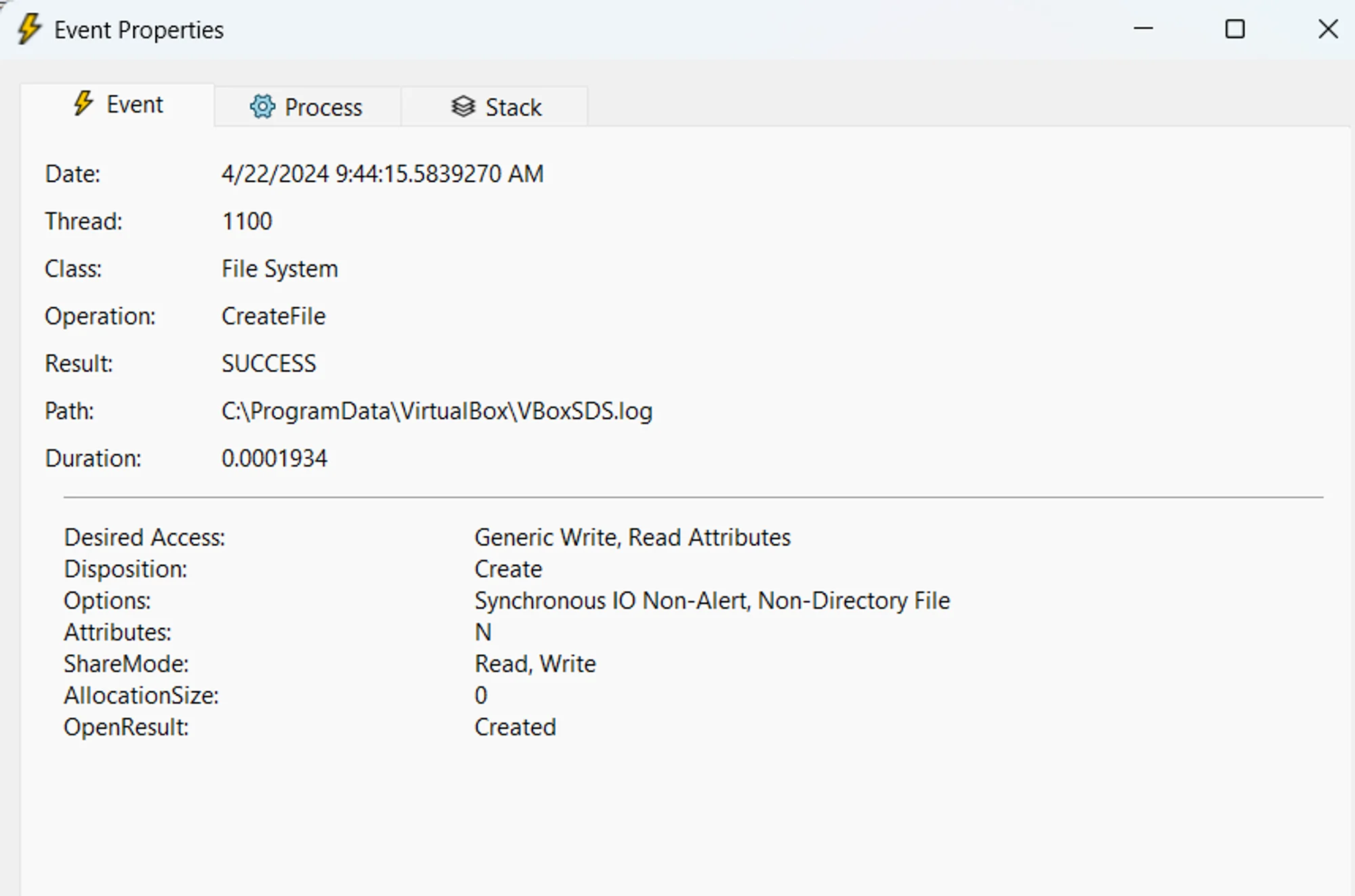
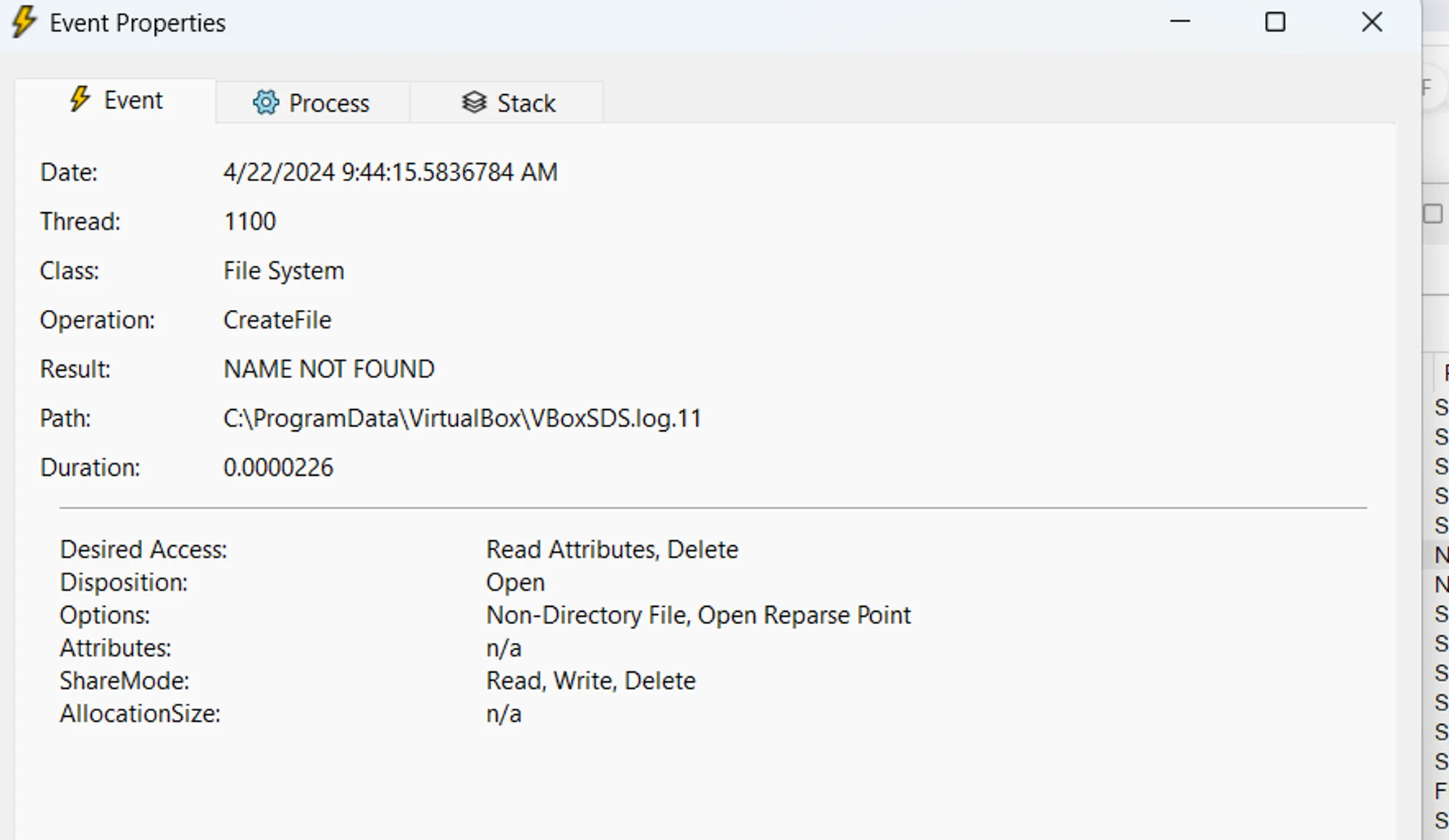
To win the race between moving and creating the VboxSDS.log file, an opportunistic lock is created on VboxSDS.log.11. That file does not normally exist, but the service tries to delete it just before creating VboxSDS.log, which is the moment the oplock fires.
Exploitation
With the ability to both clear the directory and start or crash the VBoxSDS service, the exploit proceeds as follows.
Step 1: Arm the oplock on the last log file
Create the VboxSDS.log.11 file and set an oplock on it. The file does not normally exist, but the service's rotation logic will attempt to delete it just before creating VboxSDS.log, which triggers the lock.
Step 2: Start the service through COM
Use the exposed COM server to start the service, as shown above with the CreateInstance call on CLSID 74AB5FFE-8726-4435-AA7E-876D705BCBA5.
Step 3: Crash the service at the oplock
When the oplock is triggered on VboxSDS.log.11, create the VboxSDS.log directory. The VboxSDS.log directory causes the service to crash.
Step 4: Repeat until the directory is empty
Keep starting the service until the directory is empty.
Step 5: Arm the oplock on the final file
Once the directory is empty, create a VboxSDS.log.9 file and place an opportunistic lock on it.
Step 6: Turn the directory into a junction
Start the service again. When the oplock is triggered, the VboxSDS.log.9 file is deleted and the directory is turned into a junction point to the NT Object Manager directory (\\RPC Control).
Step 7: Create the symbolic links
In the Object Manager directory, two symbolic links are created:
VboxSDS.log.9, which points to the payload DLL.VboxSDS.log.10, which points to a non-existent DLL in thesystem32directory, in this casewow64log.dll.
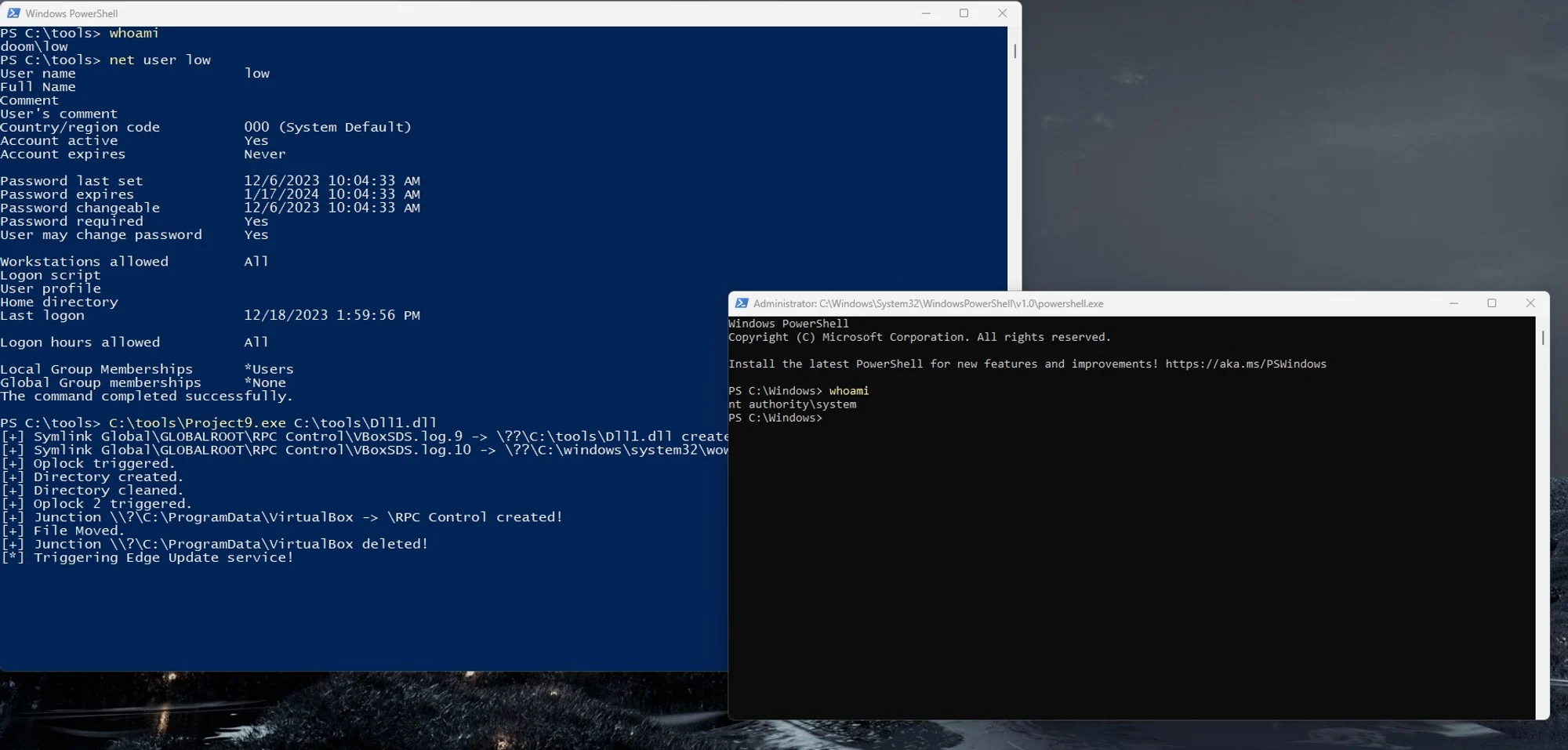
Step 8: Trigger the load
Once wow64log.dll is created, the Microsoft Edge Update Service is started and the payload DLL is loaded into a SYSTEM process.

Root cause
The service creates C:\\ProgramData\\VirtualBox\\ without explicit ACLs, so the directory inherits permissions from C:\\ProgramData that let any user create files and folders inside it. The log rotation then performs rename and move operations recursively inside that directory. Because the directory can be emptied by repeatedly starting and crashing the service, and because the service can be started by any user through its COM server, an attacker can replace the directory with a junction to \\RPC Control at the exact moment the service is about to operate on it. An opportunistic lock on VboxSDS.log.11 is used to win the race between moving and creating the VboxSDS.log file. The log files inherit permissions that prevent low privileged users from modifying or removing them, which limits abuse of directory junctions.
Impact
An attacker with low privileged access to a Windows host with VirtualBox installed can escalate to SYSTEM by loading an arbitrary DLL into a SYSTEM process. The exploit requires the ability to start the VboxSDS service through COM as a low privileged user.
Fix
The vulnerability is referenced in the Oracle Patch Advisory for April 2024.
Variants to test
- Look for other services that create directories under
C:\\ProgramDataor similar world-writable locations without explicit ACLs, and that rotate, move or delete files inside them on startup. A positive result is a directory whose inherited ACL grantsFILE_WRITE_DATAorFILE_APPEND_DATAtoBUILTIN\\Userswhile the service runs asSYSTEM. - Check whether a service can be started by a low privileged user through a registered COM class, as with
VboxSDS. A positive result is a stopped service that transitions toRUNNINGafterCreateInstanceon its CLSID. - Look for services that can be crashed by blocking a file creation, for example by pre-creating a directory with the expected file name. A positive result is a service that terminates when the
CreateFilecall fails. - Test whether an oplock on a file the service deletes just before creating another file gives a usable race window. A positive result is the oplock firing at a predictable point in the rotation sequence.
- Check whether a service follows a directory junction placed at the moment of a file operation, and whether the resulting path can be redirected to
\\RPC Controlto create symbolic links to a payload DLL and a missing DLL loaded by aSYSTEMprocess. A positive result is the payload DLL loading into aSYSTEMprocess when the dependent service is started.
What happened, in plain words
VirtualBox is a free program made by Oracle that lets you run a second, pretend computer inside your real one. People use it to try out other operating systems, test software, or keep a risky program away from their main machine. When you install VirtualBox on Windows, the installer also puts a small helper program on your computer. That helper is called VirtualBox system service, and its internal name is VboxSDS. It runs with the highest level of permission Windows has, an account called SYSTEM, which is even more powerful than a normal administrator. Its job is to write log files, which are simple text records of what the program has been doing, a bit like a diary the program keeps for itself.
The problem the researchers found is that this helper keeps its diary in a folder that ordinary users are allowed to add things to. The helper also tidies up that diary every time it starts: it renames the old pages, shifts them along, and throws away the oldest one. Because an ordinary user can put things in the folder, and because the helper does its tidying with SYSTEM powers, a clever user can trick the helper into moving and deleting files in places it should not touch. That trick is called an arbitrary file move: the attacker does not control the contents of the file, but they control where it ends up.
From there the researchers built a chain that ends with their own code running as SYSTEM. In plain terms: a normal user on the machine can become the most powerful account on it. This kind of bug is called local privilege escalation, often shortened to LPE. "Local" means the attacker already has some kind of account on the machine, even a very limited one. "Privilege escalation" means they use a flaw to climb to a higher level of permission than they were given.
The bug is tracked as CVE-2024-21111. A CVE is a public catalogue number for a known security flaw, so people around the world can refer to the same issue unambiguously. The same flaw was also found independently by Naor Hodorov, who is credited alongside the author in the Oracle Patch Advisory, which is Oracle's public list of security fixes.
This article walks through the whole story in the order the researchers told it: how they inspected the helper, what they noticed about its folder, how they learned to start and crash it at will, and how they combined those pieces into a working exploit.
Setup
The only thing you need to reproduce the starting point is a normal installation of VirtualBox for Windows. Nothing special, no developer tools, no administrator rights beyond what the installer itself needs.
After installation, the researchers looked at the helper service using sc.exe. sc.exe is a built-in Windows command line tool for asking Windows about services. A service is a program that runs in the background, usually without a window, often before anyone logs in. Think of it as a member of staff who works behind the scenes rather than at the front desk.
The command they ran was sc.exe qc VboxSDS. The qc part means "query configuration": show me how this service is set up.
PS C:\\tools> sc.exe qc VboxSDS
[SC] QueryServiceConfig SUCCESS

SERVICE_NAME: VboxSDS
        TYPE               : 10  WIN32_OWN_PROCESS
        START_TYPE         : 3   DEMAND_START
        ERROR_CONTROL      : 1   NORMAL
        BINARY_PATH_NAME   : "C:\\Program Files\\Oracle\\VirtualBox\\VBoxSDS.exe"
        LOAD_ORDER_GROUP   :
        TAG                : 0
        DISPLAY_NAME       : VirtualBox system service
        DEPENDENCIES       : RPCSS
        SERVICE_START_NAME : LocalSystem
Line by line:
PS C:\\tools>is the prompt of PowerShell, Windows' built-in command shell, showing the current folder. Everything after the>is what the researcher typed.sc.exe qc VboxSDSasks Windows for the configuration of the service namedVboxSDS.[SC] QueryServiceConfig SUCCESSis Windows saying the question was understood and answered.SERVICE_NAME: VboxSDSis the internal name of the service.TYPE : 10 WIN32_OWN_PROCESSsays this is a normal Windows program that runs in its own process. A process is one running copy of a program, with its own memory, like one person doing one job.START_TYPE : 3 DEMAND_STARTis the important line. It means the service does not start when the computer boots. It starts only when something asks for it. That is useful for an attacker, because it means they can choose the moment it runs.ERROR_CONTROL : 1 NORMALdescribes what Windows should do if the service fails. Nothing here matters for the exploit.BINARY_PATH_NAME : "C:\\Program Files\\Oracle\\VirtualBox\\VBoxSDS.exe"is the actual program file on disk that Windows launches for this service.LOAD_ORDER_GROUPandTAGare ordering hints for boot time. They are empty or zero here.DISPLAY_NAME : VirtualBox system serviceis the friendly name shown in Windows tools.DEPENDENCIES : RPCSSmeans this service relies on another service calledRPCSS, which handles remote procedure calls, a way for programs to ask other programs to do things.SERVICE_START_NAME : LocalSystemis the second important line. It says the service runs asLocalSystem, the built-in Windows account with the widest powers on the machine. Anything this service does, it does with those powers.
So the picture is: a background program that any user can ask to start, which then acts with the highest possible authority. That combination is exactly the kind of thing security researchers look for.
The service creates the folder C:\\ProgramData\\VirtualBox\\ to keep its logs. C:\\ProgramData is a standard Windows folder for data shared by all users of the computer. When a program creates a folder, Windows can either give that folder a specific list of who is allowed to do what, or let it simply copy the rules from the folder above it. That list of rules is called an ACL, short for Access Control List. Think of it as the guest list at a venue: it says who may enter and what they may do once inside.
The researchers found that this folder was created without a specific guest list, so it inherited the rules from C:\\ProgramData. They checked with cacls.exe, a Windows tool that prints a folder's permissions.
PS C:\\tools> cacls.exe C:\\ProgramData\\VirtualBox
C:\\ProgramData\\VirtualBox NT AUTHORITY\\SYSTEM:(OI)(CI)(ID)F
                          BUILTIN\\Administrators:(OI)(CI)(ID)F
                          CREATOR OWNER:(OI)(CI)(IO)(ID)F
                          BUILTIN\\Users:(OI)(CI)(ID)R
                          BUILTIN\\Users:(CI)(ID)(special access:)
                                                FILE_WRITE_DATA
                                                FILE_APPEND_DATA
                                                FILE_WRITE_EA
                                                FILE_WRITE_ATTRIBUTES

PS C:\\tools>
Line by line:
cacls.exe C:\\ProgramData\\VirtualBoxasks Windows to show the permissions on that folder.NT AUTHORITY\\SYSTEM:(OI)(CI)(ID)Fmeans theSYSTEMaccount has full control (F). The letters in brackets are inheritance flags:OImeans object inherit, so files created inside get the same rule;CImeans container inherit, so subfolders do too;IDmeans the rule was inherited from above rather than set here.BUILTIN\\Administrators:(OI)(CI)(ID)Fgives the administrators group full control in the same way.CREATOR OWNER:(OI)(CI)(IO)(ID)Fgives whoever creates a file full control over that file.IOmeans inherit only, so it applies to things created inside, not to the folder itself.BUILTIN\\Users:(OI)(CI)(ID)Rgives every ordinary user read access (R) to the folder and to what is inside it.- The next block is the interesting one.
BUILTIN\\Users:(CI)(ID)(special access:)says ordinary users also get a set of special permissions on subfolders, and the four lines below spell them out:FILE_WRITE_DATA: create files and write into them.FILE_APPEND_DATA: add data to the end of files, and on a folder this also means create subfolders.FILE_WRITE_EA: write extended attributes, small pieces of extra information attached to a file.FILE_WRITE_ATTRIBUTES: change a file's basic properties such as its timestamps.
In short: any user can create new files and folders inside C:\\ProgramData\\VirtualBox. That is the seed of the whole bug.
The log files themselves, however, are a different story. The researchers listed the folder and then checked the permissions on one log file.
PS C:\\tools> ls C:\\ProgramData\\VirtualBox\\

    Directory: C:\\ProgramData\\VirtualBox

Mode                 LastWriteTime         Length Name
----                 -------------         ------ ----
-a----         4/22/2024   9:44 AM              0 VBoxSDS.log
-a----         4/22/2024   9:43 AM           1924 VBoxSDS.log.1
-a----         4/12/2024   1:49 AM           1924 VBoxSDS.log.10
-a----         4/19/2024   5:32 PM           1924 VBoxSDS.log.2
-a----         4/18/2024  10:41 AM           1281 VBoxSDS.log.3
-a----         4/17/2024  11:27 PM           1924 VBoxSDS.log.4
-a----         4/17/2024  10:20 PM            665 VBoxSDS.log.5
-a----         4/17/2024  10:20 PM           1431 VBoxSDS.log.6
-a----         4/15/2024  11:04 PM           1925 VBoxSDS.log.7
-a----         4/15/2024   1:30 PM            665 VBoxSDS.log.8
-a----         4/15/2024   1:30 PM           1431 VBoxSDS.log.9

PS C:\\tools> cacls.exe C:\\ProgramData\\VirtualBox\\VBoxSDS.log
C:\\ProgramData\\VirtualBox\\VBoxSDS.log NT AUTHORITY\\SYSTEM:(ID)F
                                      BUILTIN\\Administrators:(ID)F
                                      BUILTIN\\Users:(ID)R
PS C:\\tools>
Line by line:
ls C:\\ProgramData\\VirtualBox\\lists the contents of the folder.lsis short for list.- The header
Directory: C:\\ProgramData\\VirtualBoxsays which folder is being listed. - The columns
Mode,LastWriteTime,LengthandNamedescribe each entry: its type and flags, when it was last changed, its size in bytes, and its name. - Each row starting with
-a----is a normal file. Theameans archive, a standard flag Windows puts on files that have been written to. - The names run from
VBoxSDS.logthroughVBoxSDS.log.10. The numbers are not in order in the listing because the listing is sorted by name, and as textVBoxSDS.log.10comes beforeVBoxSDS.log.2. That is a quirk of alphabetical sorting, not a clue about the bug. - The sizes vary, and one file is zero bytes, meaning it is currently empty.
cacls.exe C:\\ProgramData\\VirtualBox\\VBoxSDS.logthen asks for the permissions on one specific log file.NT AUTHORITY\\SYSTEM:(ID)FgivesSYSTEMfull control.BUILTIN\\Administrators:(ID)Fgives administrators full control.BUILTIN\\Users:(ID)Rgives ordinary users read only.
So users can read the logs but cannot change or delete them. That detail matters. A common trick in this kind of bug is to replace a folder with a junction, which is a special kind of folder that actually points somewhere else, like a signpost that redirects you to a different street. If an attacker could freely delete and recreate the log files, they could redirect the service's file operations much more simply. Because the log files are read only to them, that easy route is closed, and the researchers had to find a more patient way in.
Finding it
Next the researchers watched what the service does when it starts. They found that VboxSDS renames and moves files inside C:\\ProgramData\\VirtualBox in a repeating pattern. Each log file is shifted up by one number: VboxSDS.log becomes VboxSDS.log.1, VboxSDS.log.1 becomes VboxSDS.log.2, and so on. This is called log rotation, and it is a very common housekeeping habit: programs keep a fixed number of old logs and throw away the oldest so the folder does not grow forever. Think of a stack of numbered papers where, each morning, every sheet is moved one place down the pile and the bottom sheet is thrown away.
The image shows this shifting in action: the current log becomes the first old log, and the first old log becomes the second.
There is a special case. If the only file in the folder is VboxSDS.log.10, there is nothing to shift it into, so it is simply deleted.
The image shows that final file being removed rather than renamed.
This gives two useful abilities. The service can be made to delete files in the folder, and it can be made to move files to a new name. Both happen with SYSTEM powers, so the attacker is borrowing the helper's authority.
To empty the folder, though, two more things are needed. First, the attacker must be able to start the service as an ordinary user. Second, they must be able to stop or crash it, because in a normal installation the folder holds many log files and one start only shifts them along by one. It is like needing to press a button repeatedly, and also needing a way to stop the machine between presses.
Starting the service as an ordinary user turned out to be easy, through a Windows technology called COM. COM, short for Component Object Model, is a way for programs on the same machine to ask each other for services. Each COM component has a long identifier called a CLSID, a globally unique string that looks like a serial number. When a program asks Windows to create an instance of a COM class, Windows may start the background service that provides it. The researchers found that VboxSDS registers such a COM class, so simply asking for it brings the service to life.
PS C:\\tools> sc.exe queryex VboxSDS

SERVICE_NAME: VboxSDS
        TYPE               : 10  WIN32_OWN_PROCESS
        STATE              : 1  STOPPED
        WIN32_EXIT_CODE    : 0  (0x0)
        SERVICE_EXIT_CODE  : 0  (0x0)
        CHECKPOINT         : 0x0
        WAIT_HINT          : 0x0
        PID                : 0
        FLAGS              :
PS C:\\tools> [Activator]::CreateInstance([type]::GetTypeFromCLSID("74AB5FFE-8726-4435-AA7E-876D705BCBA5"))
System.__ComObject
PS C:\\tools> sc.exe queryex VboxSDS

SERVICE_NAME: VboxSDS
        TYPE               : 10  WIN32_OWN_PROCESS
        STATE              : 4  RUNNING
                                (STOPPABLE, NOT_PAUSABLE, IGNORES_SHUTDOWN)
        WIN32_EXIT_CODE    : 0  (0x0)
        SERVICE_EXIT_CODE  : 0  (0x0)
        CHECKPOINT         : 0x0
        WAIT_HINT          : 0x0
        PID                : 11364
        FLAGS              :
PS C:\\tools>
Line by line:
- The first
sc.exe queryex VboxSDSasks Windows for the current state of the service.queryexis likeqcbut also reports whether it is running and under which process ID. STATE : 1 STOPPEDsays the service is not running at this moment.WIN32_EXIT_CODE : 0 (0x0)andSERVICE_EXIT_CODE : 0 (0x0)mean it last ended without an error. Zero is the conventional code for success.CHECKPOINTandWAIT_HINTare progress markers used during long start or stop operations. Both are zero here.PID : 0means there is no process, which fits a stopped service.FLAGSis empty.- The next line is the key action.
[Activator]::CreateInstance(...)is PowerShell asking Windows to create an object.[type]::GetTypeFromCLSID("74AB5FFE-8726-4435-AA7E-876D705BCBA5")looks up the COM class with that exact identifier. The long string is the CLSID of theVboxSDSCOM server. System.__ComObjectis PowerShell's way of saying "here is the object you asked for". The important part is not the object itself but the side effect: Windows started the service to provide it.- The second
sc.exe queryex VboxSDSchecks again. STATE : 4 RUNNINGconfirms the service is now up.(STOPPABLE, NOT_PAUSABLE, IGNORES_SHUTDOWN)describes what can be done to it: it can be stopped, it cannot be paused, and it ignores shutdown requests.PID : 11364is the process ID, the number Windows assigned to this running copy. It was zero before and is a real number now, which is direct proof the service started.
So an ordinary user can bring the service up just by asking for its COM object. No administrator password, no special tool.
The other half is crashing it. The researchers found the easiest crash was to stop the service from creating its VboxSDS.log file. There are several ways to do that, but the simplest is to create a folder named VboxSDS.log. When the service then calls the CreateFile API to make its log file, the call fails, because a folder with that name already exists and CreateFile expects to create a file. An API, short for Application Programming Interface, is a defined way for one program to ask the operating system or another program to do something. Think of it as a service counter: you fill in a form, hand it over, and get a result back. CreateFile is the counter where programs ask Windows to open or create a file.
The image shows the folder named VboxSDS.log sitting where the service expects its file, which is what makes the CreateFile call fail.
There is a timing problem, though. The service first moves the old logs and only then creates the new VboxSDS.log. The attacker needs to act in the tiny gap between those two steps. To get a reliable signal at exactly the right moment, the researchers used an opportunistic lock, usually shortened to oplock. An oplock is a notification a program can place on a file: "tell me the instant anyone tries to touch this file". It is like asking a shop assistant to ring a bell the moment a particular customer walks in. The file they chose was VboxSDS.log.11. That file does not normally exist, but the service tries to delete it just before creating VboxSDS.log, so the oplock fires at exactly the useful moment.
The image shows the oplock being placed on VboxSDS.log.11, the file the service will try to delete just before it creates the new log.
Exploitation
With the ability to empty the folder and to start or crash the service, the researchers could assemble the full chain. Here is the sequence, step by step, with the reason for each move.
Step 1: Arm the oplock on the last log file
Create the VboxSDS.log.11 file and set an oplock on it. The file does not normally exist, but the service's rotation logic will attempt to delete it just before creating VboxSDS.log, which triggers the lock. The reason for this step is to get a reliable alarm clock. Without it, the attacker would be guessing when to act, and the window is far too short to guess.
Step 2: Start the service through COM
Use the exposed COM server to start the service, as shown above with the CreateInstance call on CLSID 74AB5FFE-8726-4435-AA7E-876D705BCBA5. The reason is simply that the service must be running for its rotation code to execute, and COM is the way an ordinary user can start it.
Step 3: Crash the service at the oplock
When the oplock is triggered on VboxSDS.log.11, create the VboxSDS.log directory. The VboxSDS.log directory causes the service to crash. By crashing it, the attacker freezes the folder in a state they can work with.
Step 4: Repeat until the directory is empty
Keep starting the service until the directory is empty. The reason is that the exploit needs an empty folder later, and the only tool available to empty it is the service's own rotation, one crash at a time.
Step 5: Arm the oplock on the final file
Once the directory is empty, create a VboxSDS.log.9 file and place an opportunistic lock on it. The reason is the same as in step 1: another alarm clock, this time on the file whose deletion will be the trigger for the final move.
Step 6: Turn the directory into a junction
Start the service again. When the oplock is triggered, the VboxSDS.log.9 file is deleted and the directory is turned into a junction point to the NT Object Manager directory (\\RPC Control). A junction is a folder that actually points to another location, like a doorway that opens into a different room than the one it appears to be in. The NT Object Manager is an internal Windows namespace, a kind of hidden directory tree where the system keeps named objects. \\RPC Control is a well-known spot inside it. The reason for this step is to redirect the service's future file operations away from the real folder and into a place where the attacker can define what names mean.
Step 7: Create the symbolic links
In the Object Manager directory, two symbolic links are created:
VboxSDS.log.9, which points to the payload DLL.VboxSDS.log.10, which points to a non-existent DLL in thesystem32directory, in this casewow64log.dll.
A symbolic link is a name that stands for another name, like a forwarding address on an envelope. A DLL, short for Dynamic Link Library, is a file full of code that programs can load and use, a bit like a shared toolbox that many programs borrow from. system32 is the core Windows folder where many important system files live. The reason for these two links is to set a trap: when the service next tries to create or move a file called VboxSDS.log.9 or VboxSDS.log.10, Windows will follow the links instead, and the attacker's payload DLL will end up where a system program will later look for it.
The image shows the two symbolic links in place: one pointing at the payload DLL, the other at the missing wow64log.dll in system32.
Step 8: Trigger the load
Once wow64log.dll is created, the Microsoft Edge Update Service is started and the payload DLL is loaded into a SYSTEM process. The service runs as SYSTEM, so the attacker's code runs as SYSTEM too. That is the finish line: ordinary user in, highest authority out.
The image marks the end of the chain, with the payload loaded into a SYSTEM process.
Root cause
The root cause is a combination of small decisions that are each reasonable on their own. The service creates C:\\ProgramData\\VirtualBox\\ without explicit ACLs, so the folder inherits permissions from C:\\ProgramData that let any user create files and folders inside it. The log rotation then performs rename and move operations recursively inside that folder. Because the folder can be emptied by repeatedly starting and crashing the service, and because the service can be started by any user through its COM server, an attacker can replace the folder with a junction to \\RPC Control at the exact moment the service is about to operate on it. An opportunistic lock on VboxSDS.log.11 is used to win the race between moving and creating the VboxSDS.log file. The log files inherit permissions that prevent low privileged users from modifying or removing them, which limits abuse of directory junctions.
In everyday terms: the helper was given a powerful key, a shared cupboard, and a habit of tidying up without checking who had rearranged the shelves. Each of those is fine alone. Together they let a visitor rearrange the shelves so that the helper's own tidying puts the visitor's box where the helper will later pick it up.
Impact
An attacker with low privileged access to a Windows host with VirtualBox installed can escalate to SYSTEM by loading an arbitrary DLL into a SYSTEM process. The exploit requires the ability to start the VboxSDS service through COM as a low privileged user.
Put plainly: if someone can log in to the machine as an ordinary user, and VirtualBox is installed, they can potentially become the most powerful account on that machine. That is a serious step up, because SYSTEM can do anything on the computer, including reading other users' files and changing system settings.
Fix
The vulnerability is referenced in the Oracle Patch Advisory for April 2024. The advisory is the authoritative place to read what Oracle actually changed.
Variants to test
These are useful because the same pattern often appears in more than one program.
- Look for other services that create directories under
C:\\ProgramDataor similar world-writable locations without explicit ACLs, and that rotate, move or delete files inside them on startup. A positive result is a directory whose inherited ACL grantsFILE_WRITE_DATAorFILE_APPEND_DATAtoBUILTIN\\Userswhile the service runs asSYSTEM. In plain words: find another helper that keeps its diary in a shared cupboard and tidies it with a powerful key. - Check whether a service can be started by a low privileged user through a registered COM class, as with
VboxSDS. A positive result is a stopped service that transitions toRUNNINGafterCreateInstanceon its CLSID. In plain words: can a visitor ring the bell that wakes the powerful helper? - Look for services that can be crashed by blocking a file creation, for example by pre-creating a directory with the expected file name. A positive result is a service that terminates when the
CreateFilecall fails. In plain words: can a visitor put a chair where the helper expects to sit, and make it give up? - Test whether an oplock on a file the service deletes just before creating another file gives a usable race window. A positive result is the oplock firing at a predictable point in the rotation sequence. In plain words: can the visitor get a reliable alarm clock for the exact moment the helper tidies up?
- Check whether a service follows a directory junction placed at the moment of a file operation, and whether the resulting path can be redirected to
\\RPC Controlto create symbolic links to a payload DLL and a missing DLL loaded by aSYSTEMprocess. A positive result is the payload DLL loading into aSYSTEMprocess when the dependent service is started. In plain words: can the visitor swap the doorway so the helper walks into a different room, and leave a parcel there for a powerful program to pick up?
Glossary
- ACL (Access Control List): the list of rules attached to a file or folder saying who may do what with it.
- API (Application Programming Interface): a defined way for one program to ask another program or the operating system to do something, like a service counter with a form.
- Arbitrary file move: a flaw that lets an attacker choose where a file ends up, even if they cannot control its contents.
- CLSID: a long unique identifier for a COM component, used by Windows to find it.
- COM (Component Object Model): a Windows technology that lets programs on the same machine ask each other for services.
- CreateFile: the Windows API that programs call to open or create a file.
- CVE: a public catalogue number for a known security flaw, so everyone can refer to the same issue.
- DLL (Dynamic Link Library): a file full of code that programs load and share, like a shared toolbox.
- Inheritance (of permissions): when a new file or folder automatically copies the rules of the folder it is created in.
- Junction: a special folder that actually points to another location, like a doorway into a different room.
- Local privilege escalation (LPE): using a flaw to climb from a limited account to a more powerful one on the same machine.
- Log: a text record a program keeps of what it has been doing, like a diary.
- Log rotation: the housekeeping habit of renaming old logs, shifting them along, and deleting the oldest.
- NT Object Manager: an internal Windows namespace, a hidden tree where the system keeps named objects.
- Oplock (opportunistic lock): a notification placed on a file that fires the instant someone tries to touch it, like a bell at a shop door.
- Payload: the code an attacker wants to run once the flaw is triggered.
- PID (process ID): the number Windows assigns to a running copy of a program.
- Process: one running copy of a program, with its own memory.
\\RPC Control: a well-known location inside the NT Object Manager namespace, often used to define names that other programs will follow.sc.exe: a built-in Windows command line tool for inspecting and controlling services.- Service: a program that runs in the background, often without a window, usually with its own account and permissions.
- Symbolic link: a name that stands for another name, like a forwarding address.
SYSTEM(LocalSystem): the built-in Windows account with the widest powers on the machine, more powerful than a normal administrator.system32: the core Windows folder where many important system files live.- VirtualBox: a free program by Oracle that lets you run a second, pretend computer inside your real one.
VboxSDS: the internal name of theVirtualBox system service, the helper that writes logs and rotates them.



