for PayPal security team,“get user balances and transaction details” is not a vulnerability!
A WeChat public account operated by PayPal allowed an attacker to bind a victim's PayPal account to the attacker's WeChat session via an OAuth authorization link, after which the attacker could view the victim's email address and balance. The PayPal security team considered this limited information disclosure and not a vulnerability.

I have already contacted paypal cn, they have already taken the feature off to prevent the vulnerability from being exploited.
The full write-up lives on its author's site
It belongs to its author, so we link to it rather than copy it. The other two tabs are our own rewrites, checked against it.
Context
PayPal runs Chinese-language merchant pages and, for Chinese users' app habits, registered two WeChat public accounts: “PayPal贝宝” and “PayPal外贸帮”. The researcher states that both are official PayPal accounts. The feature under examination is the balance query inside the “PayPal外贸帮” public account: a user follows the account, opens “注册查询” then “查询明细”, and the account is supposed to show that user their own PayPal balance details.
The researcher found the entry point on the official merchant page at:
https://www.paypal.com/c2/webapps/mpp/merchant?locale.x=zh_C2
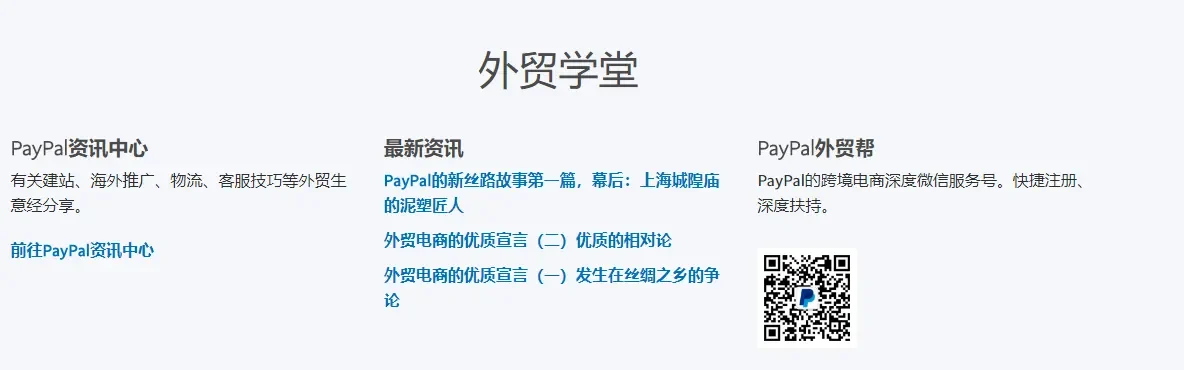
The screenshot is described as taken from PayPal's official website, showing that the service is official.
Setup
No special tooling is described. The researcher used the WeChat app on a phone and a normal browser. The preconditions are:
- A WeChat account controlled by the attacker, used to follow the “PayPal外贸帮” public account and to bind a PayPal account to that WeChat session.
- A victim with a PayPal account, who will open a link the attacker sends and authorise the resulting PayPal consent screen.
- The victim may or may not already be logged in to PayPal in the browser; the report covers both cases.
Finding it
Having established that the two public accounts are official, the researcher tested the balance query function of “PayPal外贸帮” and found what the report calls an account hijacking vulnerability: after the victim logs in through a link sent by the attacker and authorises PayPal, the attacker can obtain the victim's account information and balance information.
Exploitation
Step 1: reach the balance query in the public account
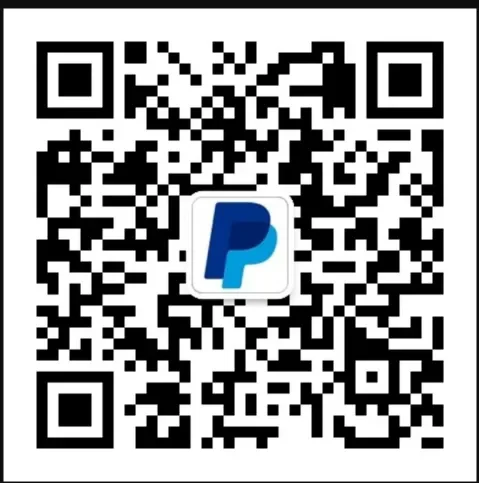
Scan the QR code with WeChat (WeChat app, tap + in the top right corner, Scan QR Code):
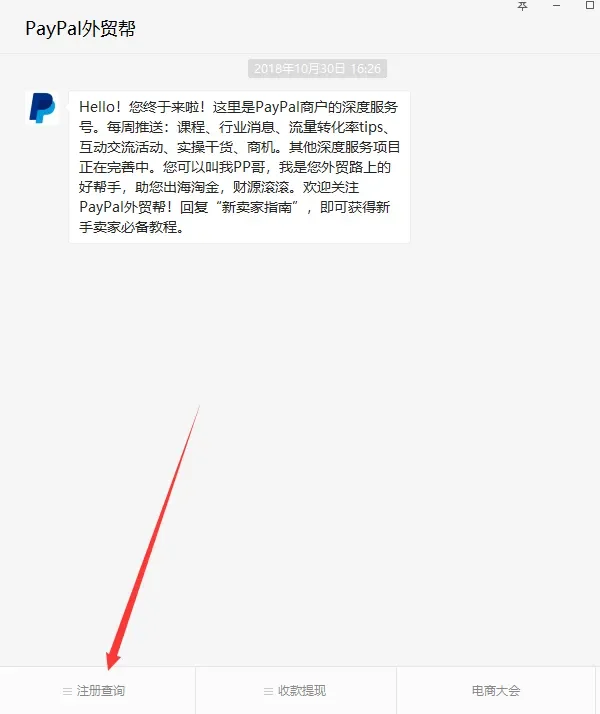
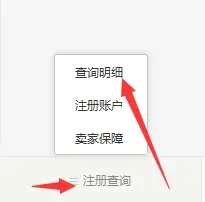
Then tap “Follow”, then “注册查询” and “查询明细”:
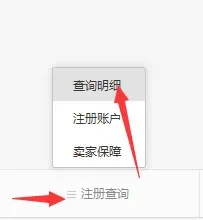
The second screenshot is captioned as the registration query / query details function, the one used to query a user's balance.
Step 2: authorise the WeChat side
On a first visit the account displays the following:
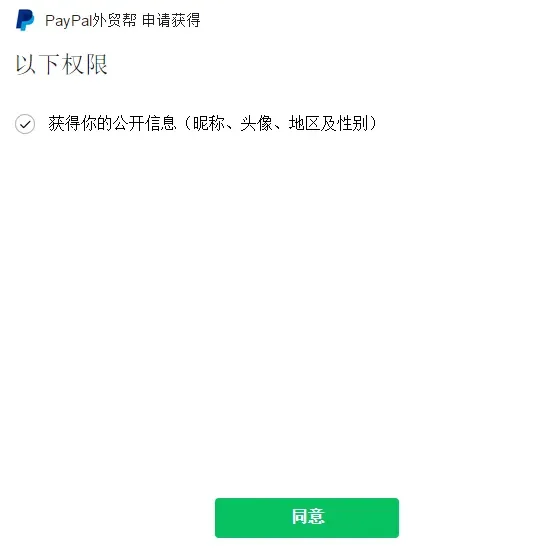
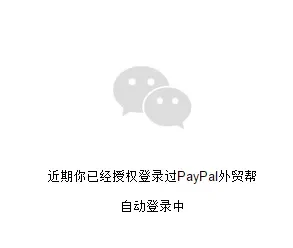
If the WeChat account has visited before, it displays:
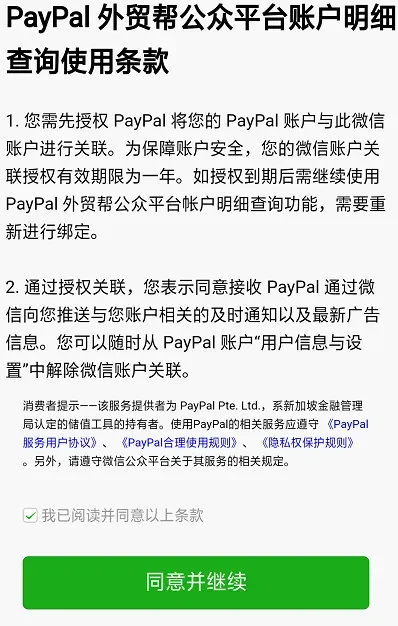
Tap “同意并继续”:
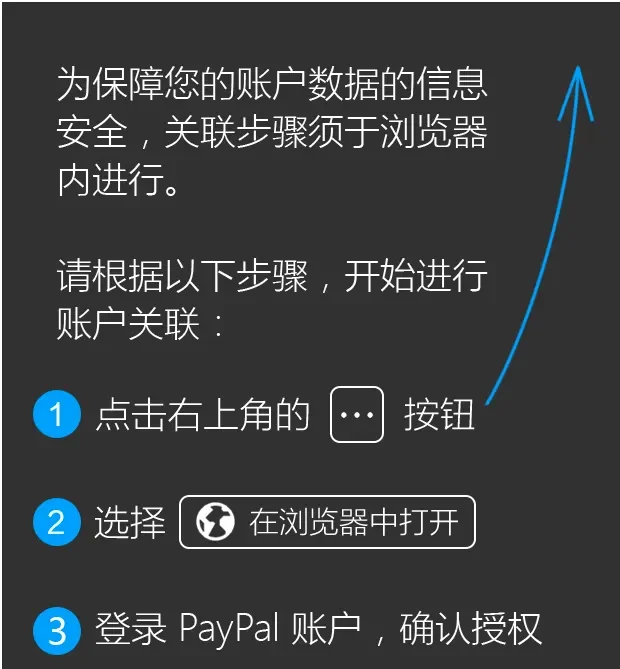
The program then binds the session to the current WeChat account:
Step 3: obtain the authorisation link
As the report notes, you cannot log in to PayPal directly from inside the WeChat app; the link has to be copied into a browser. The link obtained at this stage is:
https://www.paypal-proserv.com/wechat-paypal/lipp?state=[redacted]&source=post_page-----2e5b7f8780de------------------------------------------
The link carries a state value, which reappears in the PayPal authorisation URL in step 4. The source parameter is not explained in the report.
Step 4: send the link to the victim
The attacker sends that link to the victim, who opens it in a browser. If the victim is not logged in, they are first asked to log in to their PayPal account, through this URL:
https://www.paypal.com/c2/signin/authorize?client_id=[redacted]&response_type=code&scope=profile+email+openid+https://uri.paypal.com/services/identity/activities/third-party-providers+https://uri.paypal.com/services/wallet/balance-accounts/read+https://uri.paypal.com/services/paypalattributes&redirect_uri=https://www.paypal-proserv.com/wechat-paypal/authenticate&state=[redacted]
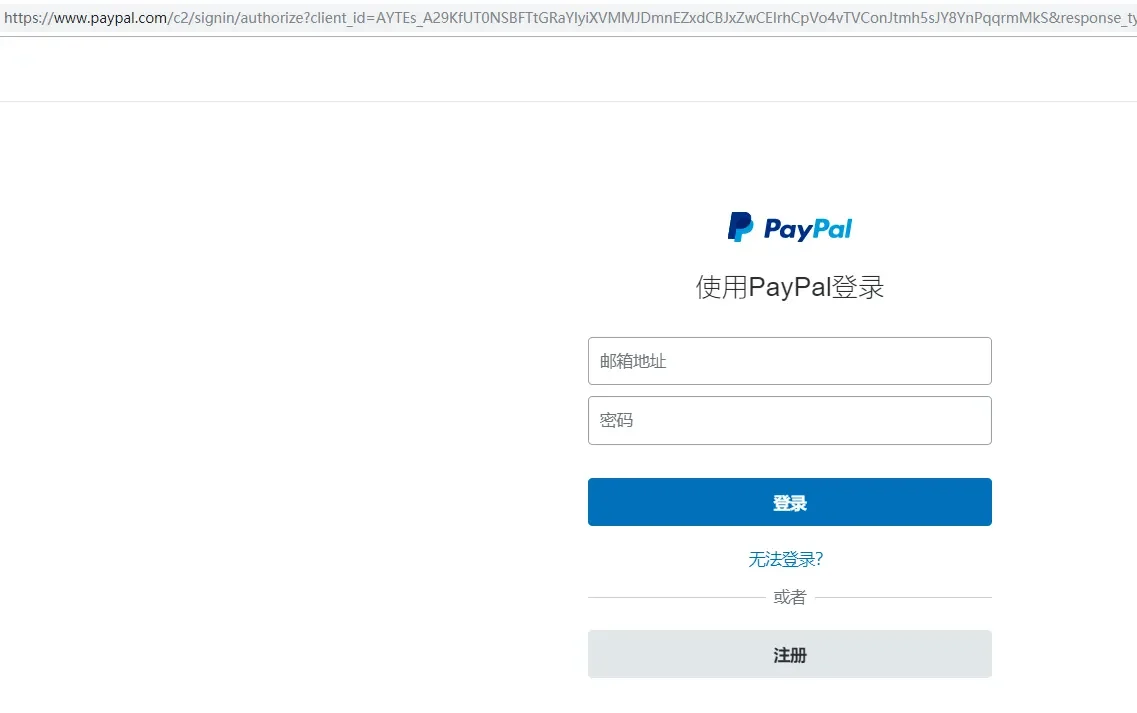
The important parts of this OAuth authorisation request:
client_idis the identifier of the application requesting authorisation.response_type=codeis the standard authorisation code flow.scoperequestsprofile,email,openid, the third-party providers activity scope,https://uri.paypal.com/services/wallet/balance-accounts/read(balance read access) andhttps://uri.paypal.com/services/paypalattributes.redirect_uri=https://www.paypal-proserv.com/wechat-paypal/authenticateis where PayPal returns the user after approval.stateis the same value as in the link the attacker sent.
Step 5: the consent screen
If the victim is already logged in, the consent screen appears directly:
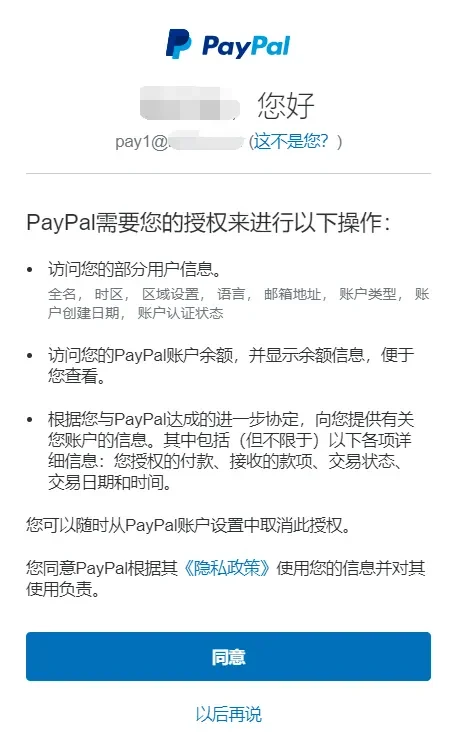
The screenshot is described as showing that PayPal requests not only location and other information but also balance information, and the report stresses that the application requesting the balance permission is PayPal itself.
The report contrasts this with a genuine third-party application, using www.pacificworldcoins.com as the example:
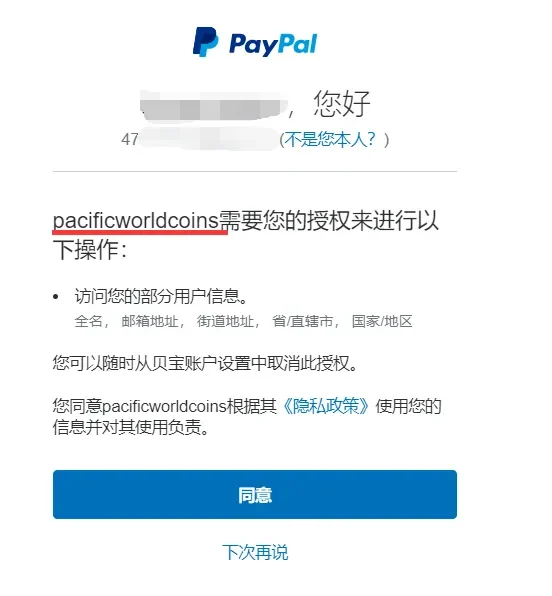
In that comparison the third-party application only asks for geographic location information and cannot obtain balance information. The point the researcher makes is that the consent screen in the attack shows “PayPal” as the requesting party rather than a third-party domain, so the victim sees what looks like an official PayPal request and clicks OK.
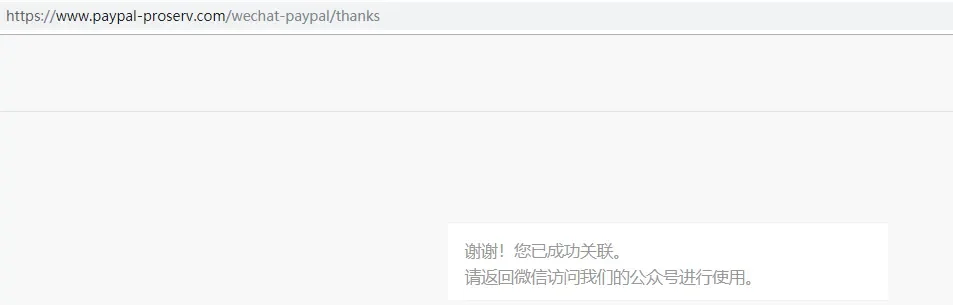
After consent, the victim sees a page saying the user has been successfully bound and should use the WeChat public account for balance inquiry. In reality the victim's PayPal account is now bound to the attacker's WeChat account.
Step 6: read the victim's balance
The attacker opens the “PayPal外贸帮” public account and taps “注册查询” then “查询明细”:
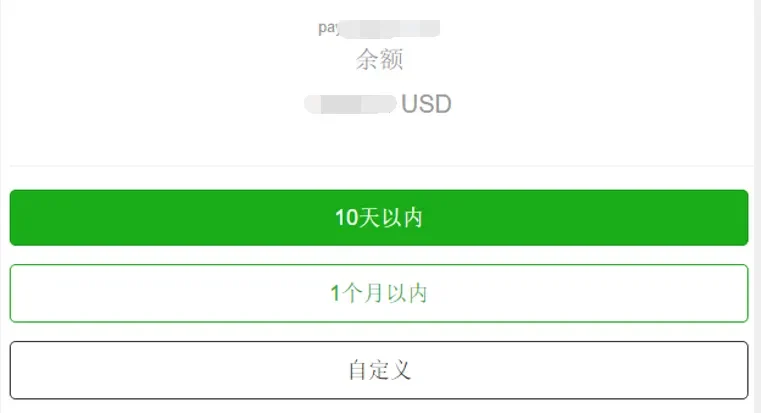
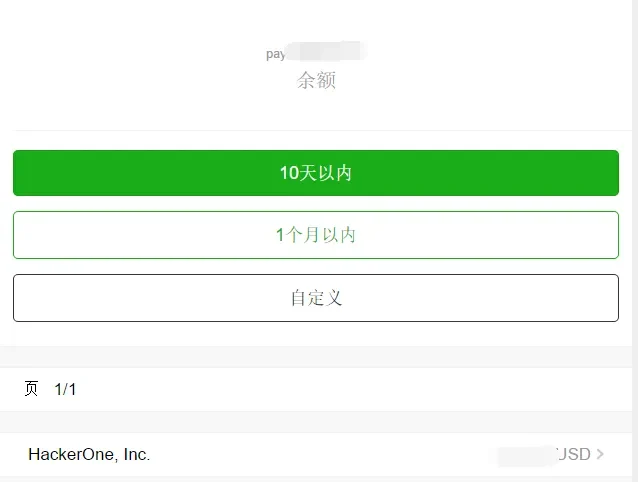
The attacker then obtains the victim's account email address and balance information:
The victim can see what was granted at:
https://www.paypal.com/myaccount/settings/permissions
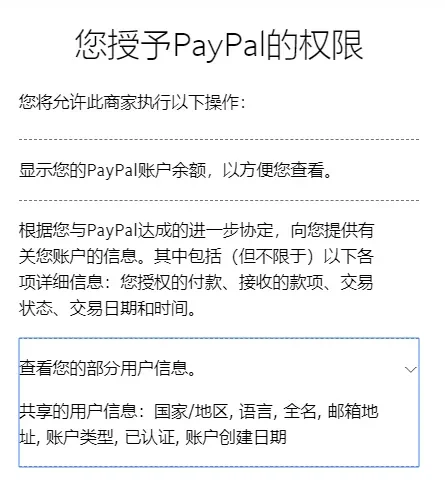
The permissions listed there include basic user information and balance information, and the report again notes that the requesting party shown is PayPal.
After authorisation the attacker can obtain the user's balance details; the report refers to a video demonstrating this.
Root cause
The flow binds a PayPal account to a WeChat session through an OAuth authorisation, and the link carrying the state value can be forwarded to another person. The link carrying that state can be forwarded to any other person, and when that person completes the consent, their PayPal account is bound to the session that created the link. The consent screen presents PayPal itself as the requesting application, unlike the third-party example the report compares it with. The requested scope includes https://uri.paypal.com/services/wallet/balance-accounts/read, and the attacker later reads the victim's balance.
Impact
Under the conditions above, an attacker who gets a victim to open the forwarded link and approve the consent screen can read that victim's PayPal account email address and balance information through the WeChat public account. The report does not show anything beyond reading that information.
PayPal's security team replied that, from what was provided, an attacker can use the authorisation link to link another user's PayPal account, even with the app requesting permissions for PayPal, and can see the email and balance. They said that from their side they were only seeing a type of fraud activity and nothing more, and that the report did not show what an attacker could do beyond that: act as the victim, make purchases in their name or from their balance, or edit major settings. In their view it could at best be considered getting or seeing limited information, and as no impact was shown there was not much to assess in terms of risk.
The researcher disagreed, arguing that knowing what someone bought and when would itself be a problem, and that the handling suggests personal privacy data is treated as meaningless. The researcher also advises white hats not to submit this type of vulnerability to PayPal because there will be no reward, and asks whether the HackerOne security team would handle such a report the same way.
The researcher states that PayPal CN was contacted and that the feature was taken off to prevent the vulnerability from being exploited.
Fix
The report records one change: the feature was removed after the researcher contacted PayPal CN.
Variants to test
- Forwarded OAuth links in chat-platform integrations: start a linking flow in your own account, copy the resulting authorisation URL, open it in a second browser profile logged in as a different user, and approve. A positive result is the second user's account appearing in the first user's linked-account view.
statereuse: replay the samestatevalue in a new session, or complete the flow twice with the samestate. A positive result is a second binding succeeding or the first binding being overwritten.- Scope creep in linking flows: inspect the
scopeparameter of a linking authorisation request for read scopes such as balance or transaction access that the feature does not need. A positive result is the consent screen listing those scopes and the linked view exposing the corresponding data. - Consent-screen branding: compare the consent screen of the platform's own first-party app with that of a third-party app. A positive result is a first-party screen that hides the third-party nature of the data recipient, as in the
www.pacificworldcoins.comcomparison here. - Post-binding actions: after a successful binding, test whether the linked session can do more than read, for example initiate payments or change settings. A positive result answers the question PayPal's team raised about impact.
What happened, in plain words
PayPal has Chinese-language pages for merchants, and to fit how Chinese users use their phones it also runs two official accounts inside WeChat, a very popular messaging app in China. The two accounts are called “PayPal贝宝” and “PayPal外贸帮”. A WeChat public account is roughly like a shop page or a bot inside the messaging app: you follow it, tap buttons, and it can show you information or send you to a web page. The researcher says both accounts are official PayPal accounts.
One of those accounts, “PayPal外贸帮”, has a feature that is meant to show you your own PayPal balance. You follow the account, tap “注册查询” and then “查询明细”, and the account shows you your balance details. The researcher tested that feature and found that the link which connects a PayPal account to a WeChat account can be passed to somebody else. If a victim opens that forwarded link and approves the PayPal screen that appears, the victim's PayPal account gets attached to the attacker's WeChat account instead. From then on the attacker can use the public account to read the victim's account email address and balance.
The researcher reported this to PayPal. PayPal's security team replied that they could see the linking and the email and balance being visible, but that in their view this was only a kind of fraud activity and the report did not show what an attacker could do beyond reading that limited information, so there was not much to assess. The researcher disagreed and argued that knowing someone's purchases and balance is itself a privacy problem. The researcher also says PayPal CN was contacted and the feature was taken off so it could not be exploited.
This article walks through the same steps the researcher took, explaining each concept from scratch. It is meant for someone who can use a browser and a computer and nothing more.
Background concepts you need first
Before the steps, a few ideas come up again and again. Each one is explained here once, in everyday terms.
- A public account inside a messaging app. Think of it as a small service inside WeChat, like a shop counter inside a shopping mall. You follow it, and it offers buttons. Behind the buttons there is a web service that can show you data or send you to a web page.
- A session. When you log in somewhere, the server needs to remember who you are between one page and the next. It does this by giving your browser a small piece of identifying data, often called a cookie or a session token. Think of it as a cloakroom ticket: you show the ticket, the attendant knows which coat is yours. If someone else gets your ticket, they can collect your coat.
- A token or
statevalue. In the flow below, a long random-looking string is used to tie one step to another. In OAuth, astatevalue is normally used to tie a returning response to the flow that started it, like a claim ticket number. If that number can be handed to somebody else, the flow can be completed by somebody else. - OAuth and the consent screen. OAuth is a standard way for one service to ask another service for permission to access your data, without you giving it your password. You have seen it as the “Sign in with Google” or “Continue with Facebook” button. When you click it, a page appears listing what the requesting app wants to see or do, and you press a button to approve. That page is the consent screen. The list of things it asks for is called the scope.
- An API and an authorisation request. An API is a way for one piece of software to talk to another over the web, like a service window at a counter: you hand over a request in a fixed format and get an answer back. The long web address in step 4 is such a request: it is a URL with parameters, and each parameter tells PayPal what is being asked.
- The vulnerability class: information disclosure. Information disclosure means data that should be private becomes visible to someone who should not see it. Here the private data is the victim's PayPal email address and balance. The report also calls the issue an account hijacking, because the victim's account ends up attached to the attacker's WeChat account.
The starting point: the official merchant page
The researcher first wanted to confirm that the WeChat accounts really belong to PayPal, so that the whole flow is a PayPal feature and not an imitation. The entry point found on the official merchant page is:
https://www.paypal.com/c2/webapps/mpp/merchant?locale.x=zh_C2
Reading that address in plain words: www.paypal.com is PayPal's own domain, so the page is served by PayPal. The path /c2/webapps/mpp/merchant points at a merchant page. The part after the question mark, locale.x=zh_C2, is a parameter that asks for the Chinese locale. The screenshot is described as taken from PayPal's official website and shows that the service is official.
What you need before starting
No special tools are described. The researcher used the WeChat app on a phone and an ordinary browser. The preconditions are:
- A WeChat account controlled by the attacker. It is used to follow the “PayPal外贸帮” public account and to bind a PayPal account to that WeChat session.
- A victim who has a PayPal account and who will open a link the attacker sends and approve the PayPal consent screen that appears.
- The victim may or may not already be logged in to PayPal in their browser. The report covers both cases.
Finding the issue
Having established that the two public accounts are official, the researcher tested the balance query function of “PayPal外贸帮”. The report describes what was found as an account hijacking vulnerability: after the victim logs in through a link sent by the attacker and authorises PayPal, the attacker can obtain the victim's account information and balance information.
Walking through the attack
Step 1: reach the balance query in the public account
Scan the QR code with WeChat. In the app, tap + in the top right corner, then Scan QR Code:
A QR code is just a square barcode that the phone camera reads and turns into a link or an action. Scanning it here opens the public account inside WeChat.
Then tap “Follow”, then “注册查询” and “查询明细”:
The second screenshot is captioned as the registration query and query details function, the one used to query a user's balance. Following the account is like subscribing to a shop's updates; the two buttons are the menu entries that lead to the balance query.
Step 2: authorise the WeChat side
On a first visit the account displays the following:
If the WeChat account has visited before, it displays:
Tap “同意并继续”:
The program then binds the session to the current WeChat account:
In plain words: the public account first asks the WeChat user to agree to something, and once they tap the agree button, the service remembers which WeChat account is talking to it. That is the session binding. From this point the service has a session that belongs to this WeChat user, and it will later attach a PayPal account to that session.
Step 3: obtain the authorisation link
As the report notes, you cannot log in to PayPal directly from inside the WeChat app; the link has to be copied into a browser. The link obtained at this stage is:
https://www.paypal-proserv.com/wechat-paypal/lipp?state=[redacted]&source=post_page-----2e5b7f8780de------------------------------------------
Line by line:
https://www.paypal-proserv.com/wechat-paypal/lippis the link obtained at this stage. It is a different domain frompaypal.com, which matters later when we look at what the consent screen shows.state=[redacted]is a value that reappears in the PayPal authorisation URL in step 4.source=post_page-----2e5b7f8780de------------------------------------------is a parameter the report does not explain.
Why this step matters: the link is the thing the attacker will hand to the victim. It carries the same state value that later appears in the PayPal authorisation URL.
Step 4: send the link to the victim
The attacker sends that link to the victim, who opens it in a browser. If the victim is not logged in, they are first asked to log in to their PayPal account, through this URL:
https://www.paypal.com/c2/signin/authorize?client_id=[redacted]&response_type=code&scope=profile+email+openid+https://uri.paypal.com/services/identity/activities/third-party-providers+https://uri.paypal.com/services/wallet/balance-accounts/read+https://uri.paypal.com/services/paypalattributes&redirect_uri=https://www.paypal-proserv.com/wechat-paypal/authenticate&state=[redacted]
This is an OAuth authorisation request. It is a URL with parameters, and each parameter has a job. Reading the important ones:
client_id=[redacted]is the identifier of the application requesting authorisation. Think of it as the name badge of the app that is asking for permission.response_type=codeis the standard authorisation code flow. In plain words, PayPal will hand back a short-lived code that the requesting service can exchange for access, rather than handing over the access directly in the address bar.scopeis the list of permissions being requested. Here it asks forprofile,email,openid, the third-party providers activity scope,https://uri.paypal.com/services/wallet/balance-accounts/read(balance read access) andhttps://uri.paypal.com/services/paypalattributes. The balance read scope is the one that makes the balance visible later.redirect_uri=https://www.paypal-proserv.com/wechat-paypal/authenticateis where PayPal returns the user after approval.stateis the same value as in the link the attacker sent.
Why this step matters: the victim is not being asked to log in to the attacker's site. They are logging in to PayPal, on PayPal's own domain, and then approving a request that carries the attacker's claim ticket.
Step 5: the consent screen
If the victim is already logged in, the consent screen appears directly:
The screenshot is described as showing that PayPal requests not only location and other information but also balance information. The report stresses that the application requesting the balance permission is PayPal itself.
The report contrasts this with a genuine third-party application, using www.pacificworldcoins.com as the example:
In that comparison the third-party application only asks for geographic location information and cannot obtain balance information. The point the researcher makes is that the consent screen in the attack shows “PayPal” as the requesting party rather than a third-party domain. A victim who has been trained to look for a strange domain name on a consent screen sees a familiar name instead, so they click OK.
After consent, the victim sees a page saying the user has been successfully bound and should use the WeChat public account for balance inquiry. In reality the victim's PayPal account is now bound to the attacker's WeChat account.
Why this step matters: this is the moment the victim hands over access. The consent screen is the only warning they get, and here it looks like an official PayPal request.
Step 6: read the victim's balance
The attacker opens the “PayPal外贸帮” public account and taps “注册查询” then “查询明细”:
The attacker then obtains the victim's account email address and balance information:
The victim can see what was granted at:
https://www.paypal.com/myaccount/settings/permissions
The permissions listed there include basic user information and balance information, and the report again notes that the requesting party shown is PayPal. This page is PayPal's own list of which apps and services you have allowed to access your account, so it is where a careful user would go to check what they approved.
After authorisation the attacker can obtain the user's balance details; the report refers to a video demonstrating this.
Why it works
The flow binds a PayPal account to a WeChat session through an OAuth authorisation, and the link carrying the state value can be forwarded to another person. The link carrying that state can be forwarded to any other person, and when that person completes the consent, their PayPal account is bound to the session that created the link. The consent screen presents PayPal itself as the requesting application, unlike the third-party example the report compares it with. The requested scope includes https://uri.paypal.com/services/wallet/balance-accounts/read, and the attacker later reads the victim's balance.
In everyday terms: the claim ticket was not checked against the person holding it. Anyone who ends up with the ticket can collect the coat.
What the impact was, and what PayPal said
Under the conditions above, an attacker who gets a victim to open the forwarded link and approve the consent screen can read that victim's PayPal account email address and balance information through the WeChat public account.
PayPal's security team replied that, from what was provided, an attacker can use the authorisation link to link another user's PayPal account, even with the app requesting permissions for PayPal, and can see the email and balance. In their view it could at best be considered getting or seeing limited information, and as no impact was shown there was not much to assess in terms of risk.
The researcher disagreed, arguing that knowing what someone bought and when would itself be a problem, and that the handling suggests personal privacy data is treated as meaningless. The researcher also advises white hats not to submit this type of vulnerability to PayPal because there will be no reward, and asks whether the HackerOne security team would handle such a report the same way.
The researcher states that PayPal CN was contacted and that the feature was taken off to prevent the vulnerability from being exploited.
How it was fixed
The report records one change: the feature was removed after the researcher contacted PayPal CN.
Similar things worth testing
These are variations on the same idea, useful if you want to look for the same pattern in other services.
- Forwarded OAuth links in chat-platform integrations: start a linking flow in your own account, copy the resulting authorisation URL, open it in a second browser profile logged in as a different user, and approve. A positive result is the second user's account appearing in the first user's linked-account view.
statereuse: replay the samestatevalue in a new session, or complete the flow twice with the samestate. A positive result is a second binding succeeding or the first binding being overwritten.- Scope creep in linking flows: inspect the
scopeparameter of a linking authorisation request for read scopes such as balance or transaction access that the feature does not need. A positive result is the consent screen listing those scopes and the linked view exposing the corresponding data. - Consent-screen branding: compare the consent screen of the platform's own first-party app with that of a third-party app. A positive result is a first-party screen that hides the third-party nature of the data recipient, as in the
www.pacificworldcoins.comcomparison here. - Post-binding actions: after a successful binding, test whether the linked session can do more than read, for example initiate payments or change settings. A positive result answers the question PayPal's team raised about impact.
Glossary
- API: a fixed way for one piece of software to ask another for data or an action over the web, like a service window with a set form to fill in.
- Authorisation code flow: an OAuth pattern where the service receives a short-lived code and exchanges it for access, instead of receiving access directly in the address bar.
- Client ID: the identifier a service uses to name itself when asking another service for permission.
- Consent screen: the page that lists what an app is asking to see or do, with a button to approve or refuse.
- Cookie: a small piece of data a site stores in your browser so it can recognise you on the next request.
- Information disclosure: a weakness where data that should be private becomes visible to someone who should not see it.
- OAuth: a standard way for one service to get limited access to your data on another service, without you handing over your password.
- Parameter: a named value in a web address, written after a
?and joined with&, such asstate=.... - Public account: a service or bot inside a messaging app that users follow and interact with through buttons and menus.
- QR code: a square barcode a phone camera can read to open a link or trigger an action.
- Redirect URI: the address a service sends the user, or the authorisation code, back to after approval.
- Scope: the list of permissions an app requests, such as reading your profile, your email or your balance.
- Session: the server's memory of who you are across several requests, usually kept alive by a cookie or token.
- State: a random value used in OAuth to tie a returning response to the flow that started it, working like a claim ticket number.
- Token: a piece of data that stands in for your identity or permission, so you do not have to send your password each time.
- White hat: a security researcher who looks for weaknesses in order to report them and get them fixed, rather than to abuse them.

