CVE 2022–24082, RCE in the PEGA Platform — Discovery, Remediation & Technical Details (Long Live JMX!!!)
A JMX interface on a Kafka component in the Pega platform was exposed without authentication or SSL, and the RMI port was reachable over the network despite a setting intended to restrict it to localhost. An attacker could load a malicious MBean and execute arbitrary commands on the server.
 Published on marcin-wolak.medium.com
“Java Management Extensions (JMX) is a Java technology that supplies tools for managing and monitoring applications, system objects, devices (such as printers) and service-oriented networks. Those resources are represented by objects called MBeans (for Managed Bean).
The full write-up lives on its author's site
It belongs to its author, so we link to it rather than copy it. The other two tabs are our own rewrites, checked against it.
Java Management Extensions (JMX) is a Java technology that supplies tools for managing and monitoring applications, system objects, devices (such as printers) and service-oriented networks. Those resources are represented by objects called MBeans (for Managed Bean). In the API, classes can be dynamically loaded and instantiated. That dynamic loading and instantiation of Java classes opens a possible remote code execution opportunity when the interface is exposed to the targeted network and not fully protected. The issue is not new (the Metasploit exploitation module dates from 2013), but exploitable setups are still identified in popular software products.
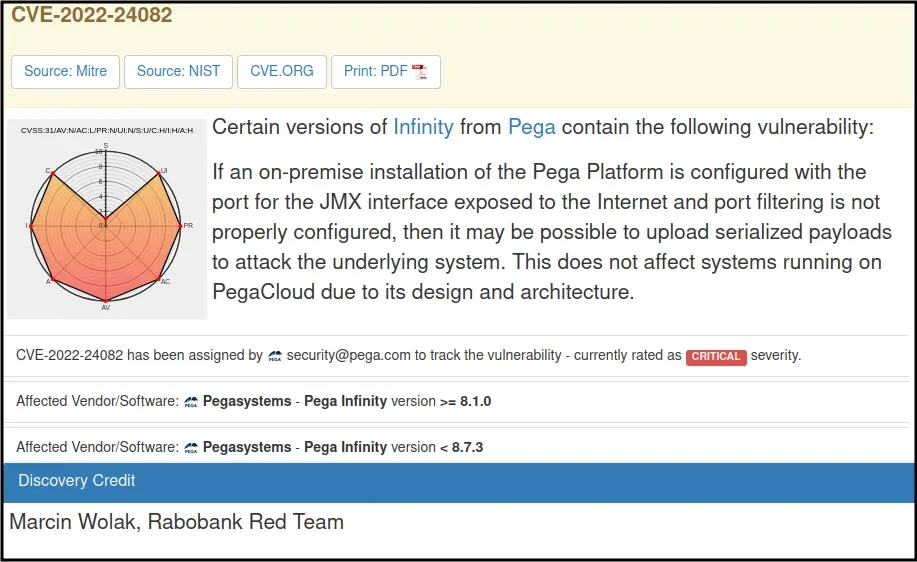
One of the red teaming operations I ran with the (red) team of my colleagues resulted in the identification of this kind of critical vulnerability, with its maximal critical CVSS score of 9.8, in an on-premises Pega platform deployment. The rating for other deployment types, such as cloud based, might be lower because of compensatory factors such as network filtering. The version I exploited was 8.1.2, but the vulnerable ones include versions up to 8.7.3.
Context
PEGA Platform is the company's core software product, their flagship and part of the PEGA Infinity suite of applications for customer engagement and digital process automation, designed to connect customer interfaces with back-end process automation. It is offered in a number of deployment setups, including on-premises installations but also in the most popular cloud environments (Azure, AWS and Google), with wide support for various Kubernetes environments and with the use of Artificial Intelligence for marketing campaigns, customer interfaces and robotic automation.
The vulnerable feature is the JMX interface exposed by the JVM running the Kafka component that is part of the platform. JMX is meant for managing and monitoring applications and system objects through MBeans, and its API allows classes to be dynamically loaded and instantiated. When that interface is reachable from the network and not fully protected, the dynamic loading becomes a remote code execution path.
Setup
The work was a black box red teaming operation against an on-premises Pega platform deployment, version 8.1.2. Identification used the nmap network scanner and its dedicated rmi-dumpregistry script. For exploitation I used the Mogwai Labs JMX exploitation toolkit, available at https://github.com/mogwailabs/mjet.
One important note on the technical details that follow: all of the identification and exploitation steps in the subsequent sections were reproduced using a random Java applet in my own private lab, not against the live platform. That applet is an exact copy of the CVE 2022-24082 misconfiguration condition I discovered in the Kafka component deployment used by the Pega platform.
Finding it
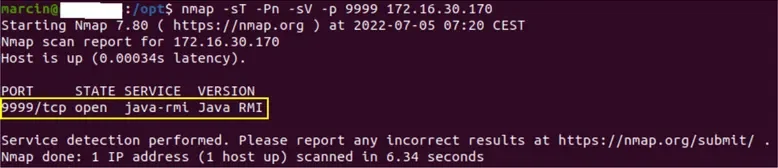
Identification with nmap showed the exposed JVM JMX interface on TCP port 9999.
The next logical step in such a case is dumping the JVM RMI (Remote Method Invocation) registry. There is a dedicated nmap script for this purpose, rmi-dumpregistry (documented at https://nmap.org/nsedoc/scripts/rmi-dumpregistry.html). Its usage is shown below.
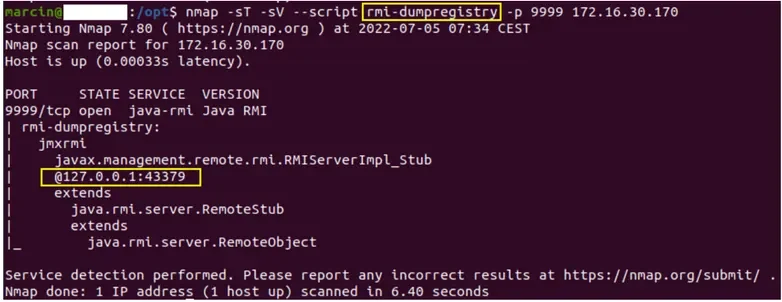
The dump shows the exposed IP endpoint as the local loopback with TCP port 43379. That looks like a properly contained interface. However, an attempt to scan this port over the network gave a surprising result.
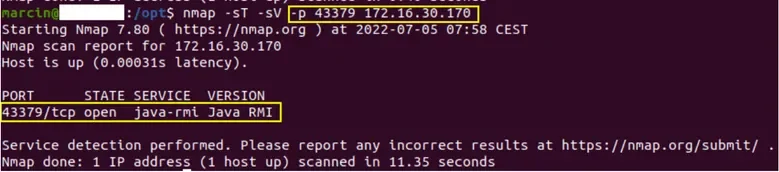
So the port TCP 43379 (Java RMI) is exposed not only on the local loopback ([redacted]) but also over the network.
Exploitation
Step 1: pick a JMX exploitation toolkit
A quick Google search led me to the Mogwai Labs JMX exploitation toolkit at https://github.com/mogwailabs/mjet. It offers a --localhost_bypass option that addresses exactly the condition described above.
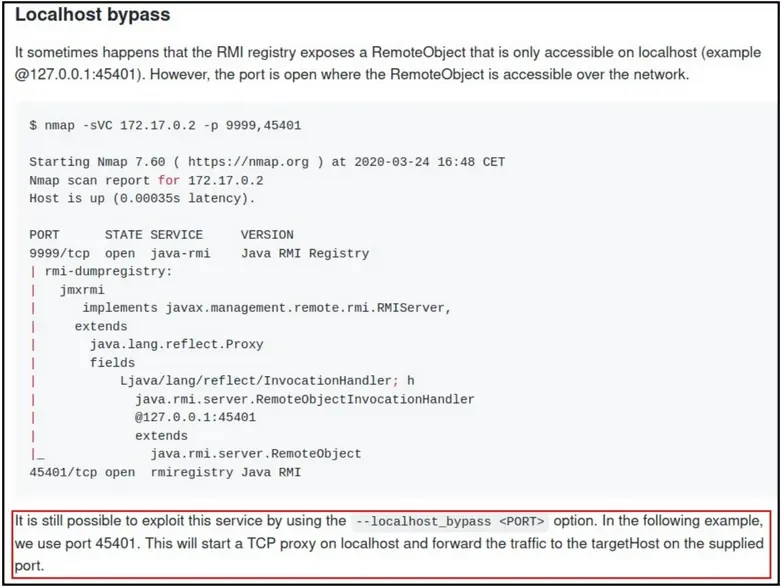
Step 2: understand the bypass
This option basically starts a local TCP proxy and forwards all the traffic to the targeted host over the network.
Step 3: load the attacker's MBean
Full, successful exploitation is shown below.
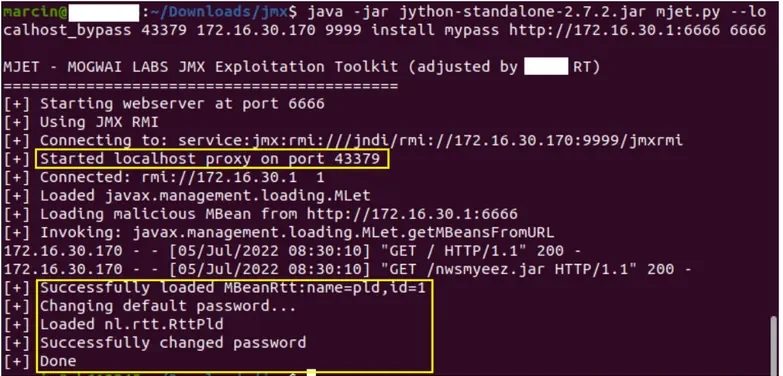
Step 4: execute commands
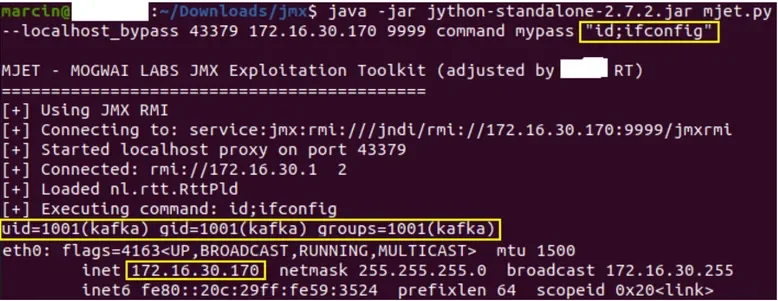
Invocation of the mjet.py exploit targeting the vulnerable server loads the attacker's MBean (MbeanRtt), which is then used to execute commands on the exploited server. The execution of id and ifconfig on the exploited server is shown below.
Root cause
The JVM on the vulnerable Kafka server being part of the PEGA Platform was set up with the following JMX options:
-Dcom.sun.management.jmxremote.authenticate=false
-Dcom.sun.management.jmxremote.ssl=false
-Djava.rmi.server.hostname=[redacted]
-Dcom.sun.management.jmxremote.port=9999
The first two options disable password-based authentication and the use of SSL to authenticate connecting endpoints. The third option, java.rmi.server.hostname=[redacted], was apparently an attempt to limit RMI interface exposure to the local loopback only and prevent possible exploitation over the network. That option, however, only instructs connecting clients to use IP [redacted]; it does not prevent the JVM from listening also on the actual network interface.
The condition is easy to reproduce with a random Java applet, as shown below. In fact, the whole exploitation chain from the earlier figures was performed using such an applet instead of a real Kafka component belonging to the PEGA platform.

Impact
The attacker's MBean was used to execute commands on the exploited server, as shown with id and ifconfig. The CVSS score for the on-premises deployment was 9.8, the maximal critical rating. For other deployment types, such as cloud based, the rating might be lower because of compensatory factors such as network filtering.
Fix
As remediation for the discovered RCE, PEGA Systems implemented ID/password based authentication for the JVM JMX enabled for Kafka. The password is randomly generated on every application (JVM) (re)start. In addition, network exposure of this interface has been limited to the local loopback only, this time effectively.
Working with the vendor
Despite it being the second half of 2022 and despite more than 30 years of extensive experience in cybersecurity, it is still hard for many companies to deal professionally with vulnerabilities identified in their software products. Researchers have to deal with many non-technical challenges to ensure their discoveries are properly registered, processed and addressed by the affected vendors. The truth about identified vulnerabilities is still too inconvenient for many of them, and the fear of bad publicity is terrifying and paralysing. The temptation to sweep everything under the rug, to downplay the problem or even to negotiate (downgrade) the CVSS rating with the researcher is hard to resist.
Taking all of that into account, the way PEGA addressed the discovered issue was all the more positively surprising. From the first contact attempts it was crystal clear that the security of their customers' assets is the absolute top priority. The severity of the issue, the criticality of the vulnerability and the need to act fast were fully recognised from the very beginning, as was the necessity to be completely transparent in communication with clients, which is crucial in helping them understand the associated risk and install the issued patch as soon as possible.
One more remarkable thing is worth sharing. PEGA Software is very serious about the security of their products and they are always subject to rigorous, multi-level security testing. On top of that, PEGA has an astonishing portfolio of customers across industries (Financial, Healthcare, Government, Telecom, Manufacturing, High-Tech and more), and those customers regularly perform their own penetration tests on the PEGA platform. A number of them, known to me personally, pentest this software yearly using services of practically all cybersecurity vendors available on the market. That is how tricky and challenging the implementation of effective security controls for complex software products is.
Variants to test
- Scan for JMX on the default port. Run nmap against candidate hosts and look for the JMX interface on TCP 9999.
- Dump the RMI registry. Use the
rmi-dumpregistrynmap script against the JMX port. - Test the advertised RMI port over the network. Scan the RMI port returned by the registry from a remote position.
- Try the localhost bypass. Point the Mogwai Labs toolkit at the target with
--localhost_bypass. - Load an MBean and run a command. Use the toolkit to load an attacker MBean and execute
id. - Check for authentication and TLS.
- Reproduce locally. Run a Java applet with the same four JMX options in a lab and repeat the chain.
What happened, in plain words
A security researcher found a way to take control of a server running the Pega platform, a large piece of software that companies use to automate their business processes. The problem was a misconfigured management interface that was supposed to be private but could actually be reached from the network. Once reached, the interface allowed the researcher to run any command on the server, which is called remote code execution (RCE). The researcher reported it to Pega, who addressed it. This article explains, step by step and without assuming any prior security knowledge, how the discovery and exploitation worked, and why the misconfiguration happened.
Background: what is JMX and why does it matter?
Java Management Extensions (JMX) is a standard part of Java, a programming language used to build many server applications. JMX provides tools to manage and monitor applications, system objects, devices (like printers) and service-oriented networks. In JMX, those resources are represented by objects called MBeans (Managed Beans). The JMX API allows Java classes to be dynamically loaded and instantiated. That dynamic loading and instantiation of Java classes opens a possible remote code execution opportunity when the interface is exposed to the targeted network and not fully protected.
Think of JMX as a remote control for a Java application: it lets you press buttons to check status, change settings, or load new components. If the remote control is left on the network without a password, anyone who finds it can press the buttons, including the one that loads and runs new code.
The issue is not new: the Metasploit exploitation module for it dates from 2013. But exploitable setups are still identified in popular software products.
One of the red teaming operations I ran with the (red) team of my colleagues resulted in the identification of this kind of critical vulnerability, with its maximal critical CVSS score of 9.8, in an on-premises Pega platform deployment. The rating for other deployment types, such as cloud based, might be lower because of compensatory factors such as network filtering. The version I exploited was 8.1.2, but the vulnerable ones include versions up to 8.7.3.
Figure 1. CVE-2022-24082 Report
Context: what is the Pega platform?
PEGA Platform is the company's core software product, their flagship and part of the PEGA Infinity suite of applications for customer engagement and digital process automation, designed to connect customer interfaces with back-end process automation. It is offered in a number of deployment setups, including on-premises installations but also in the most popular cloud environments (Azure, AWS and Google), with wide support for various Kubernetes environments and with the use of Artificial Intelligence for marketing campaigns, customer interfaces and robotic automation.
In simple terms, Pega is a big application that companies install on their own servers (on-premises) or rent as a service in the cloud. It helps automate workflows, like processing insurance claims or handling customer requests. Because it holds business-critical data, a security flaw in it is serious.
The vulnerable feature is the JMX interface exposed by the JVM running the Kafka component that is part of the platform. JMX is meant for managing and monitoring applications and system objects through MBeans, and its API allows classes to be dynamically loaded and instantiated. When that interface is reachable from the network and not fully protected, the dynamic loading becomes a remote code execution path.
A JVM (Java Virtual Machine) is the engine that runs Java programs. Kafka is a component that handles streams of data, like a message queue. The JVM running Kafka had its JMX remote control turned on and reachable, which is the root of the problem.
Setup: how the researcher approached the target
The work was a black box red teaming operation against an on-premises Pega platform deployment, version 8.1.2. Black box testing means discovering the system from the outside. Red teaming is an authorised simulated attack to find weaknesses before real attackers do.
Identification used the nmap network scanner and its dedicated rmi-dumpregistry script. For exploitation I used the Mogwai Labs JMX exploitation toolkit, available at https://github.com/mogwailabs/mjet.
nmap is a free tool that scans a network to see which ports are open on a server. A port is like a numbered door on a computer; each service listens on a specific door. The rmi-dumpregistry script is an add-on for nmap that talks to a specific Java service (RMI) and lists what it offers.
One important note on the technical details that follow: all of the identification and exploitation steps in the subsequent sections were reproduced using a random Java applet in my own private lab, not against the live platform. That applet is an exact copy of the CVE 2022-24082 misconfiguration condition I discovered in the Kafka component deployment used by the Pega platform.
A Java applet here means a small Java program packaged in a jar file, used as a stand-in for the real Kafka component. The researcher recreated the same misconfiguration in a safe lab environment to show the steps without touching the production system.
Finding it: discovering the exposed interface
Identification with nmap showed the exposed JVM JMX interface on TCP port 9999.
Figure 2. Identification of the exposed JVM JMX interface on the port TCP/9999.
In plain words: the researcher scanned the server and found that port 9999 was open and answering as a JMX interface. That is like finding an unlocked service door labelled "management".
The next logical step in such a case is dumping the JVM RMI (Remote Method Invocation) registry. There is a dedicated nmap script for this purpose, rmi-dumpregistry (documented at https://nmap.org/nsedoc/scripts/rmi-dumpregistry.html). Its usage is shown below.
Figure 3. Dumping RMI registry from the exposed JVM JMX port TCP/9999.
RMI is a Java mechanism that lets objects on one computer call methods on objects in another computer, like a phone directory that tells you which number to dial to reach a service. The registry is that directory. Dumping it means asking the service to list its entries.
The dump shows the exposed IP endpoint as the local loopback with TCP port 43379. That looks like a properly contained interface. However, an attempt to scan this port over the network gave a surprising result.
Figure 4. Java RMI TCP port 43379 exposed not only on the local loopback, but also just over the network (IP [redacted]).
So the port TCP 43379 (Java RMI) is exposed not only on the local loopback ([redacted]) but also over the network.
Local loopback ([redacted]) is a special address that means "this computer itself". Services bound only to loopback can only be reached from the same machine, like a intercom that only works inside the building. The registry was telling clients to connect to [redacted], but the actual RMI port was also listening on the real network address ([redacted]), so it could be reached from outside. That is the crack in the door.
Exploitation: turning the misconfiguration into control
Step 1: pick a JMX exploitation toolkit
A quick Google search led me to the Mogwai Labs JMX exploitation toolkit at https://github.com/mogwailabs/mjet. It offers a --localhost_bypass option that addresses exactly the condition described above.
Figure 5. Localhost bypass option available in the Mogwai Labs JMX exploitation toolkit.
This toolkit is a collection of scripts that automate the steps to abuse JMX. The --localhost_bypass option is a switch that tells the tool to work around the loopback advertisement.
Step 2: understand the bypass
This option basically starts a local TCP proxy and forwards all the traffic to the targeted host over the network. It exists because the RMI registry hands out the loopback address to connecting clients; the proxy makes the client talk to the real, network-reachable RMI port instead.
A proxy is an intermediary that receives your traffic and forwards it to the real destination. Here, the tool runs a small proxy on your own machine that pretends to be the loopback address, but actually sends the traffic to the target's network address. That way, the client thinks it is talking to [redacted], but the packets travel over the network to the real port.
Step 3: load the attacker's MBean
Full, successful exploitation is shown below.
Figure 6. Loading attackers mbean on the targeted server.
Loading an MBean means registering a new management object on the target. The attacker's MBean is a piece of code that the attacker controls, which will later be used to run commands. It is like installing a remote-controlled robot in the server's control room.
Step 4: execute commands
Invocation of the mjet.py exploit targeting the vulnerable server loads the attacker's MBean (MbeanRtt), which is then used to execute commands on the exploited server. The execution of id and ifconfig on the exploited server is shown below.
Figure 7. Execution of commands id & ifconfig on the exploited server.
mjet.py is the main script of the toolkit. id is a standard Unix command that shows which user the command is running as; ifconfig shows network configuration. Running them proves that the attacker can execute arbitrary commands on the server, which is the definition of remote code execution.
Root cause: why the interface was exposed
The JVM on the vulnerable Kafka server being part of the PEGA Platform was set up with the following JMX options:
-Dcom.sun.management.jmxremote.authenticate=false
-Dcom.sun.management.jmxremote.ssl=false
-Djava.rmi.server.hostname=[redacted]
-Dcom.sun.management.jmxremote.port=9999
These are Java startup options that configure the JMX remote interface. Let us go through them one by one:
-Dcom.sun.management.jmxremote.authenticate=false: disables password-based authentication. Anyone can connect without credentials.-Dcom.sun.management.jmxremote.ssl=false: disables SSL/TLS, so traffic is not encrypted and the server does not verify the identity of clients.-Djava.rmi.server.hostname=[redacted]: tells clients to use [redacted] when connecting. This was apparently an attempt to limit RMI interface exposure to the local loopback only and prevent possible exploitation over the network.-Dcom.sun.management.jmxremote.port=9999: sets the JMX port to 9999.
The first two options disable password-based authentication and the use of SSL to authenticate connecting endpoints. The third option, java.rmi.server.hostname=[redacted], was apparently an attempt to limit RMI interface exposure to the local loopback only and prevent possible exploitation over the network. That option, however, only instructs connecting clients to use IP [redacted]; it does not prevent the JVM from listening also on the actual network interface. The result is an interface that looks loopback-only in the registry dump while the RMI port is reachable over the network, with authentication and TLS both switched off.
In everyday terms: the third option is like putting a sign on the door that says "use the back entrance" but not actually locking the front door. The JVM still listens on all network interfaces, so the RMI port is reachable from outside, even though the registry tells clients to use loopback.
The condition is easy to reproduce with a random Java applet, as shown below. In fact, the whole exploitation chain from the earlier figures was performed using such an applet instead of a real Kafka component belonging to the PEGA platform.
Figure 8. Random java applet (samplejvmapp.jar) used to reproduce vulnerable JMX condition present earlier in the PEGA platform.
Impact: what an attacker could do
An attacker who can reach the exposed JMX interface can load their own MBean and execute arbitrary commands on the server, as demonstrated with id and ifconfig. The CVSS score for the on-premises deployment was 9.8, the maximal critical rating. For other deployment types, such as cloud based, the rating might be lower because of compensatory factors such as network filtering. The exposure therefore depends on whether the JMX and RMI ports are reachable from the attacker's position.
CVSS is a standard scoring system for vulnerability severity, where 9.8 is the highest critical level. In practice, this means an attacker could execute commands on the server. The only barrier is network access to the ports.
Fix: how Pega remediated it
As remediation for the discovered RCE, PEGA Systems implemented ID/password based authentication for the JVM JMX enabled for Kafka. The password is randomly generated on every application (JVM) (re)start. In addition, network exposure of this interface has been limited to the local loopback only, this time effectively.
In other words, they added a password that changes each time the service restarts, and they made sure the interface is truly only reachable from the same machine, not from the network. That closes both the authentication gap and the exposure gap.
Working with the vendor: the human side
Despite it being the second half of 2022 and despite more than 30 years of extensive experience in cybersecurity, it is still hard for many companies to deal professionally with vulnerabilities identified in their software products. Researchers have to deal with many non-technical challenges to ensure their discoveries are properly registered, processed and addressed by the affected vendors. The truth about identified vulnerabilities is still too inconvenient for many of them, and the fear of bad publicity is terrifying and paralysing. The temptation to sweep everything under the rug, to downplay the problem or even to negotiate (downgrade) the CVSS rating with the researcher is hard to resist.
Taking all of that into account, the way PEGA addressed the discovered issue was all the more positively surprising. From the first contact attempts it was crystal clear that the security of their customers' assets is the absolute top priority. The severity of the issue, the criticality of the vulnerability and the need to act fast were fully recognised from the very beginning, as was the necessity to be completely transparent in communication with clients, which is crucial in helping them understand the associated risk and install the issued patch as soon as possible.
One more remarkable thing is worth sharing. PEGA Software is very serious about the security of their products and they are always subject to rigorous, multi-level security testing. On top of that, PEGA has an astonishing portfolio of customers across industries (Financial, Healthcare, Government, Telecom, Manufacturing, High-Tech and more), and those customers regularly perform their own penetration tests on the PEGA platform. A number of them, known to me personally, pentest this software yearly using services of practically all cybersecurity vendors available on the market. That is how tricky and challenging the implementation of effective security controls for complex software products is.
Variants to test: how to check for this in your own environment
If you are responsible for a Pega deployment or a similar Java application, here is a checklist of steps to test for the same issue. Each step explains what to do and what a positive result looks like.
- Scan for JMX on the default port. Run nmap against candidate hosts and look for the JMX interface on TCP 9999.
- Dump the RMI registry. Use the
rmi-dumpregistrynmap script against the JMX port. - Test the advertised RMI port over the network. Scan the RMI port returned by the registry from a remote position.
- Try the localhost bypass. Point the Mogwai Labs toolkit at the target with
--localhost_bypass. - Load an MBean and run a command. Use the toolkit to load an attacker MBean and execute
id. - Check for authentication and TLS.
- Reproduce locally. Run a Java applet with the same four JMX options in a lab and repeat the chain.
Glossary
- JMX (Java Management Extensions): a Java technology for managing and monitoring applications and devices through objects called MBeans.
- MBean (Managed Bean): a Java object that represents a manageable resource in JMX.
- JVM (Java Virtual Machine): the runtime engine that executes Java programs.
- RCE (Remote Code Execution): a vulnerability that lets an attacker run arbitrary commands on a remote system.
- CVSS (Common Vulnerability Scoring System): a standard 0-10 score for the severity of a security vulnerability; 9.8 is critical.
- Red teaming: an authorised simulated attack to test an organisation's defences.
- Black box: testing without prior knowledge of the target's internals.
- nmap: a network scanner used to discover open ports and services on a host.
- Port: a numbered communication endpoint on a computer; services listen on specific ports.
- TCP: a reliable, connection-oriented network protocol used by many services.
- RMI (Remote Method Invocation): a Java mechanism that lets objects on one computer call methods on objects in another.
- RMI registry: a directory service that maps names to remote objects for RMI.
- Local loopback ([redacted]): a special IP address that refers to the local machine itself; services bound to it are only reachable locally.
- Proxy: an intermediary that forwards network traffic between a client and a server.
- TLS/SSL: cryptographic protocols that encrypt and authenticate network connections.
- Authentication: the process of verifying the identity of a user or system.
- Kafka: a distributed streaming platform used for building real-time data pipelines and streaming applications.
- JAR (Java ARchive): a file format that packages Java classes and resources into a single file.
- Applet: a small Java program, often used here as a stand-in for a real component in a lab.
- Metasploit: a popular penetration testing framework that includes exploit modules.
- CVE (Common Vulnerabilities and Exposures): a unique identifier for a publicly disclosed security vulnerability.
- On-premises: software installed and run on the customer's own servers, rather than in the cloud.
- Kubernetes: an orchestration system for containerised applications.
- Penetration test (pentest): an authorised assessment of a system's security by simulating attacks.


