Multiple Plone Cross-Site Scripting Vulnerabilities
Plone versions 2.5.5 to 5.1rc1 had two cross-site scripting flaws: one in the login process where the 'came_from' parameter was not sanitised and could be exploited with a CSRF issue and a Firefox-specific bypass, and another in the personal home page member property where a 'javascript:' URL was not sanitised. An attacker could run malicious code in a victim's browser, take over their Plone account, and potentially gain full control of the web server if the victim was an administrator.
 Published on fortinet.com
Plone is a free and open source content management system, and is ranked among the top 2% of all open source projects worldwide. More than 350 solution providers in more than 100 countries currently support it.
The full write-up lives on its author's site
It belongs to its author, so we link to it rather than copy it. The other two tabs are our own rewrites, checked against it.
Plone is a free and open source content management system, ranked among the top 2% of all open source projects worldwide, with more than 350 solution providers in more than 100 countries supporting it. The project has been actively developed since 2001, is available in more than 40 languages, and its users include the Federal Bureau of Investigation (FBI), the Central Intelligence Agency (CIA) and the Intellectual Property Rights Center, among others.
Earlier this year, FortiGuard Labs discovered two cross-site scripting (XSS) vulnerabilities and one cross-site request forgery (CSRF) vulnerability affecting Plone versions from 2.5.5 to 5.1rc1. The first XSS vulnerability exists in the Plone login process and only works in conjunction with the CSRF issue, so Plone addressed them together in a recent update. The second XSS vulnerability is caused by the home page member property.
Context
The target is Plone, a content management system. Two features are involved: the login form and the Personal Information page where a member sets their own profile data, including a home page link.
The login form normally takes the submitted credentials, authenticates the user and issues a 302 redirect. The redirect target is taken from a request parameter called came_from. The Personal Information page lets members set values such as name, email address and home page.
Setup
The vulnerabilities affect Plone versions from 2.5.5 to 5.1rc1. The login XSS requires a valid account with any permission level. The browser bypass described below was demonstrated on the Windows version of Firefox. No other tooling is described.
Finding it
The researcher noticed that the login function incorrectly processes user requests. When a user logs into Plone with a valid account, there are 9 parameters in the login request. The server responds with a 302 redirection containing the value taken from the came_from parameter found in the request. That value is attacker-controlled and Plone does not sterilise it in the response.
The second finding is in the Personal Information page: Plone does not sterilise the home page value before sending it to the server, and later renders it back to visitors of the profile page.
Exploitation
Step 1: Observe the login redirect
A login request with a valid account carries 9 parameters. The server answers with a 302 redirection containing the value taken from came_from. The request and the resulting redirect are shown in figure 1.
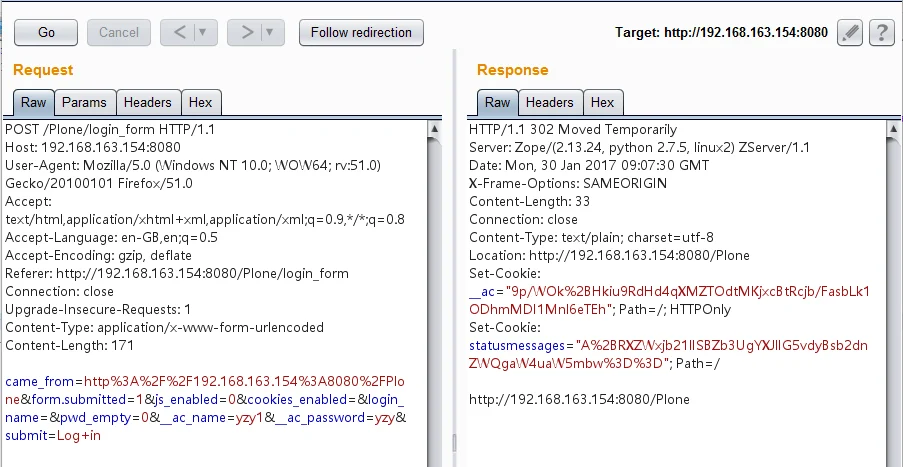
Figure 1. Plone login payload
The problem is that the attacker controls came_from and Plone does not sterilise it in the response.
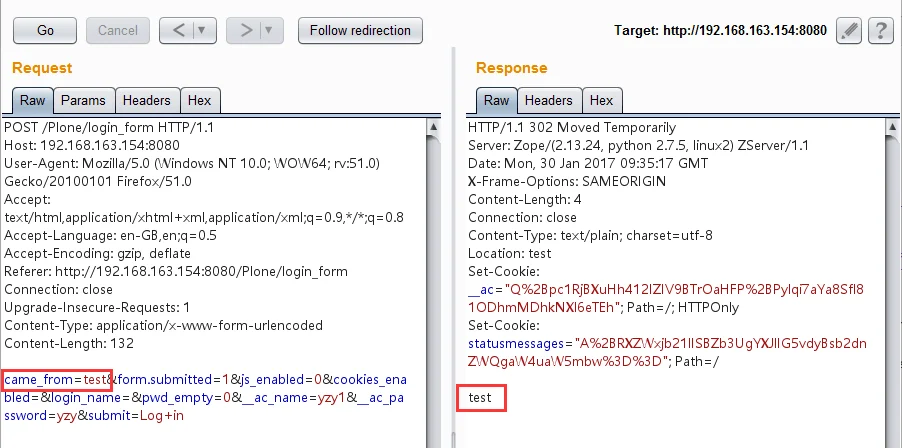
Figure 2. Param came_from
Step 2: Inject HTML through came_from
Setting the came_from value to the payload shown below makes Plone output the HTML tags in the response.
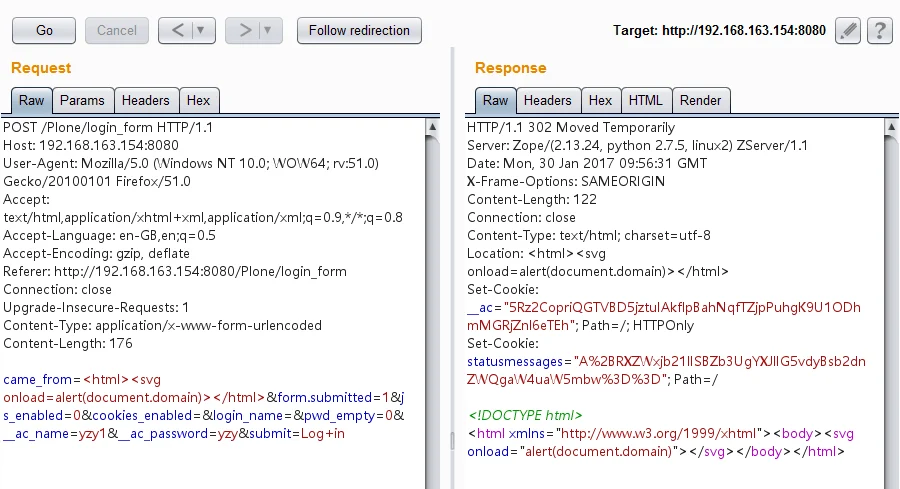
Figure 3. Insert HTML tags
Modern browsers will not execute the body part of a 302 response, so on its own this injection does not run script.
Step 3: Bypass the 302 restriction in Firefox
In Firefox (Windows version) the restriction can be bypassed by making the value start with mailto:. Setting came_from to the value shown below makes Firefox load the 302 response, try to open the default email program, and execute the HTML elements in the body.
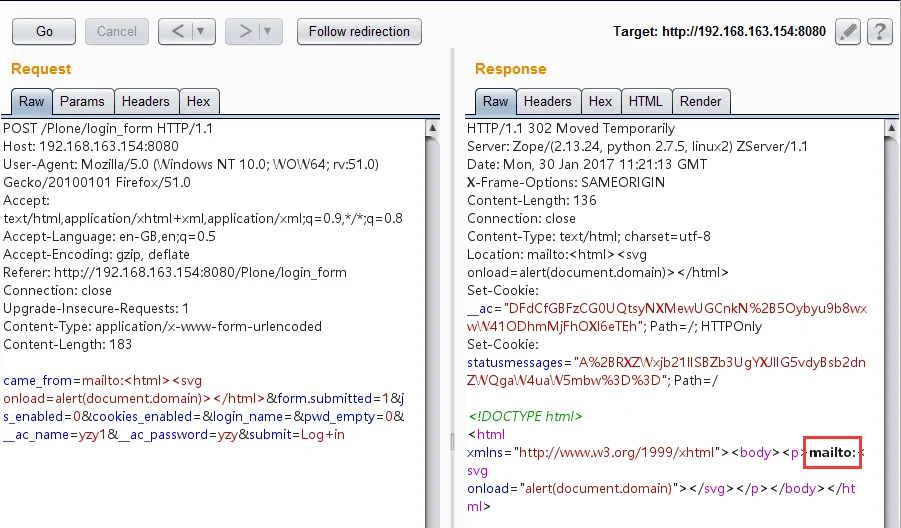
Figure 4. Bypassing the 302 redirect in Firefox I
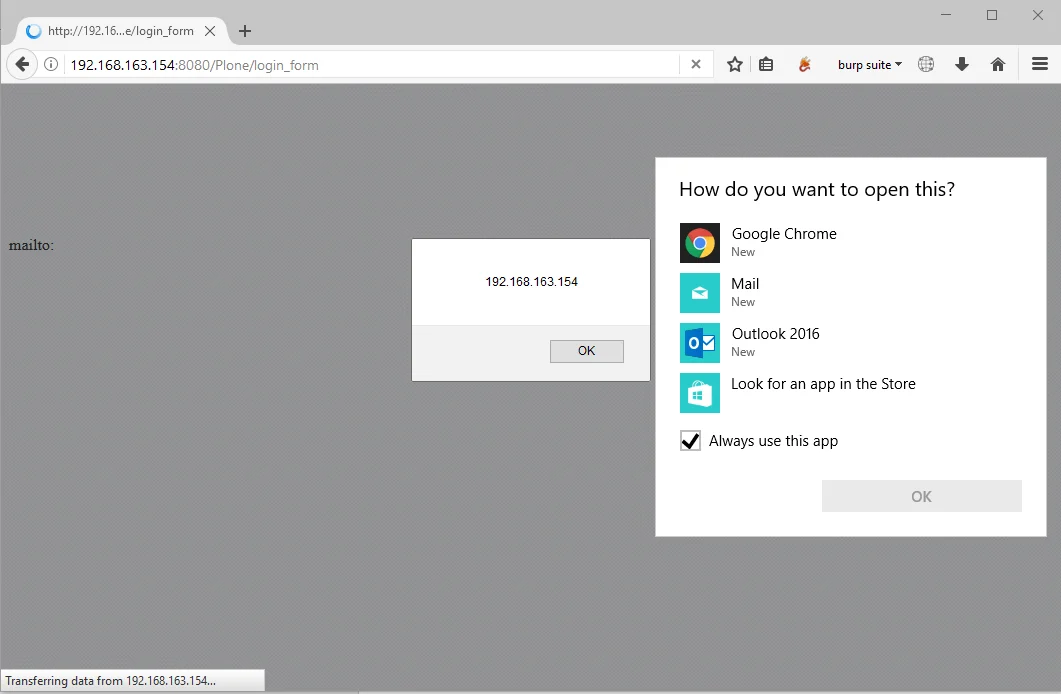
Figure 5. Bypassing the 302 redirect in Firefox II
Step 4: Combine with the missing CSRF protection
There is no CSRF protection in the login process. With the XSS vulnerability, a valid account (any permission), the CSRF issue and the Firefox bypass, an attacker can successfully trigger an XSS attack. The PoC is shown in figure 6 and the triggered attack in figure 7.
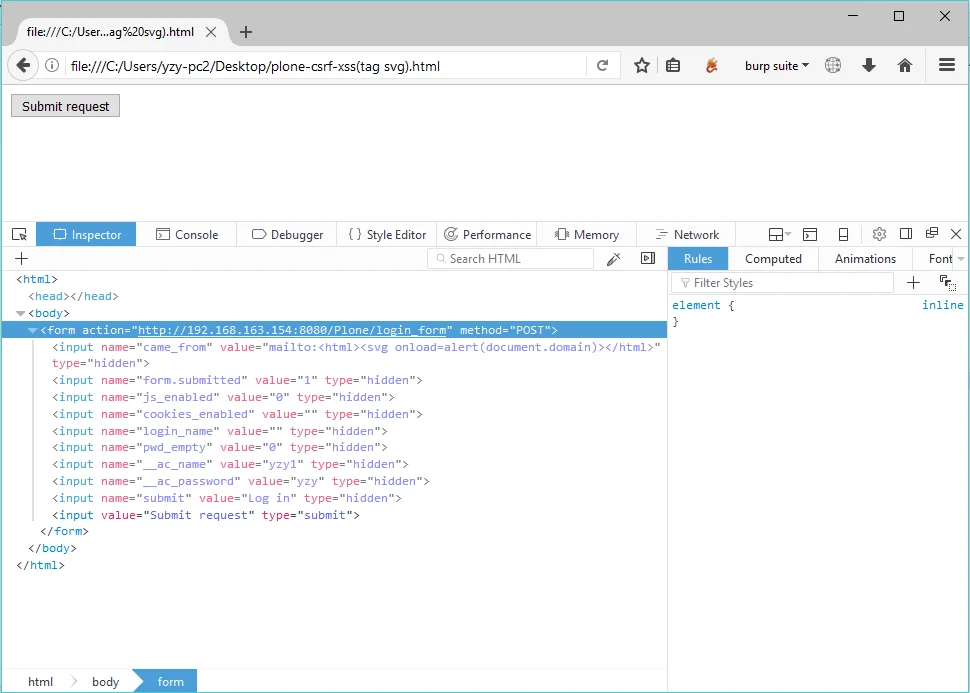
Figure 6. PoC
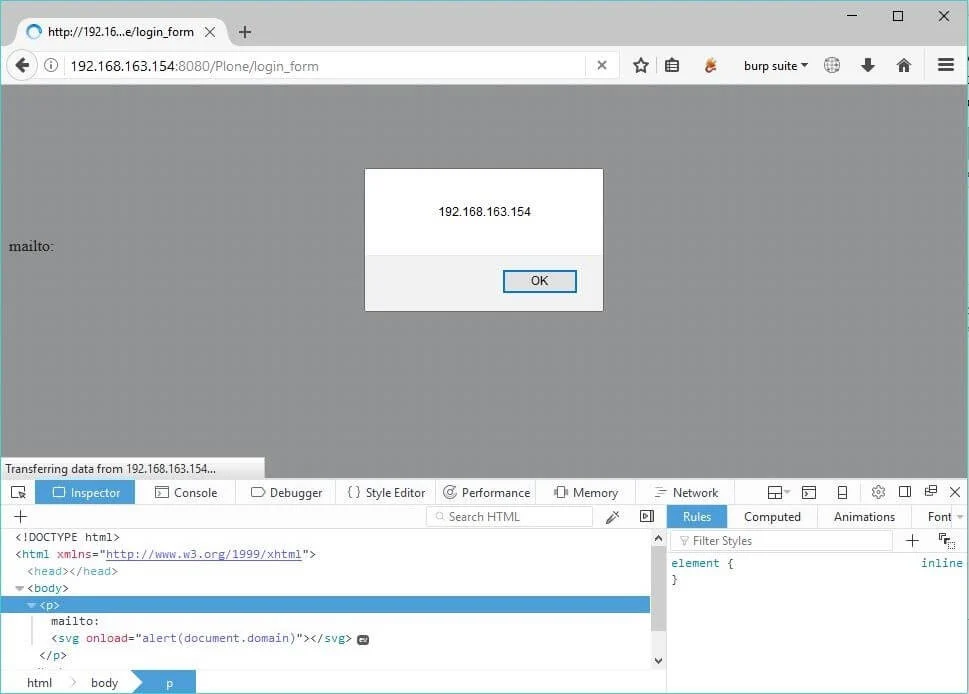
Figure 7. XSS attack triggered
Step 5: Second XSS through the home page property
In the Plone Personal Information page, users can set their own information, such as name, email address, home page and so on.
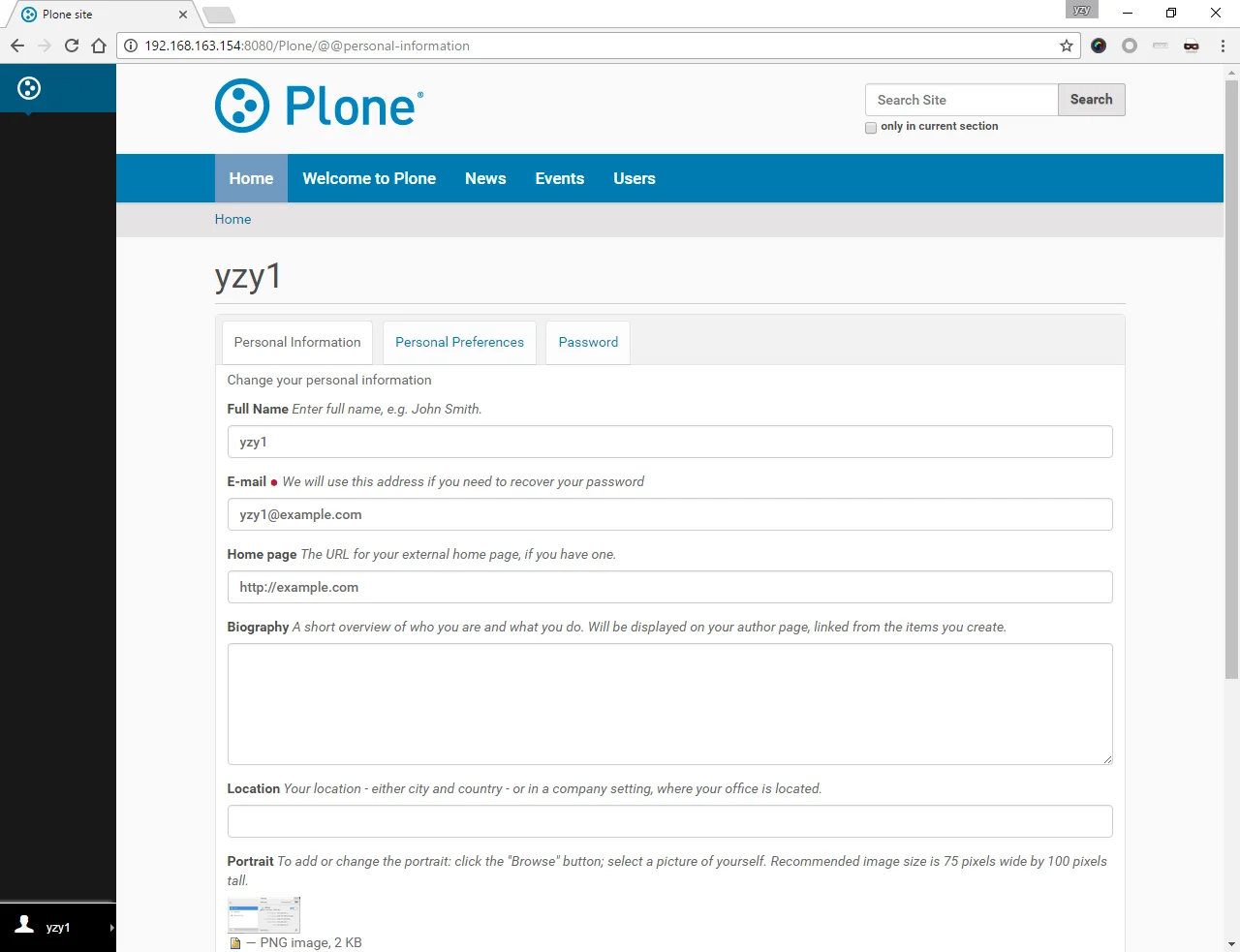
Figure 8. Personal Information page
Plone does not sterilise the home page value before sending it to the server. An attacker can set their home page value to javascript:alert(1).
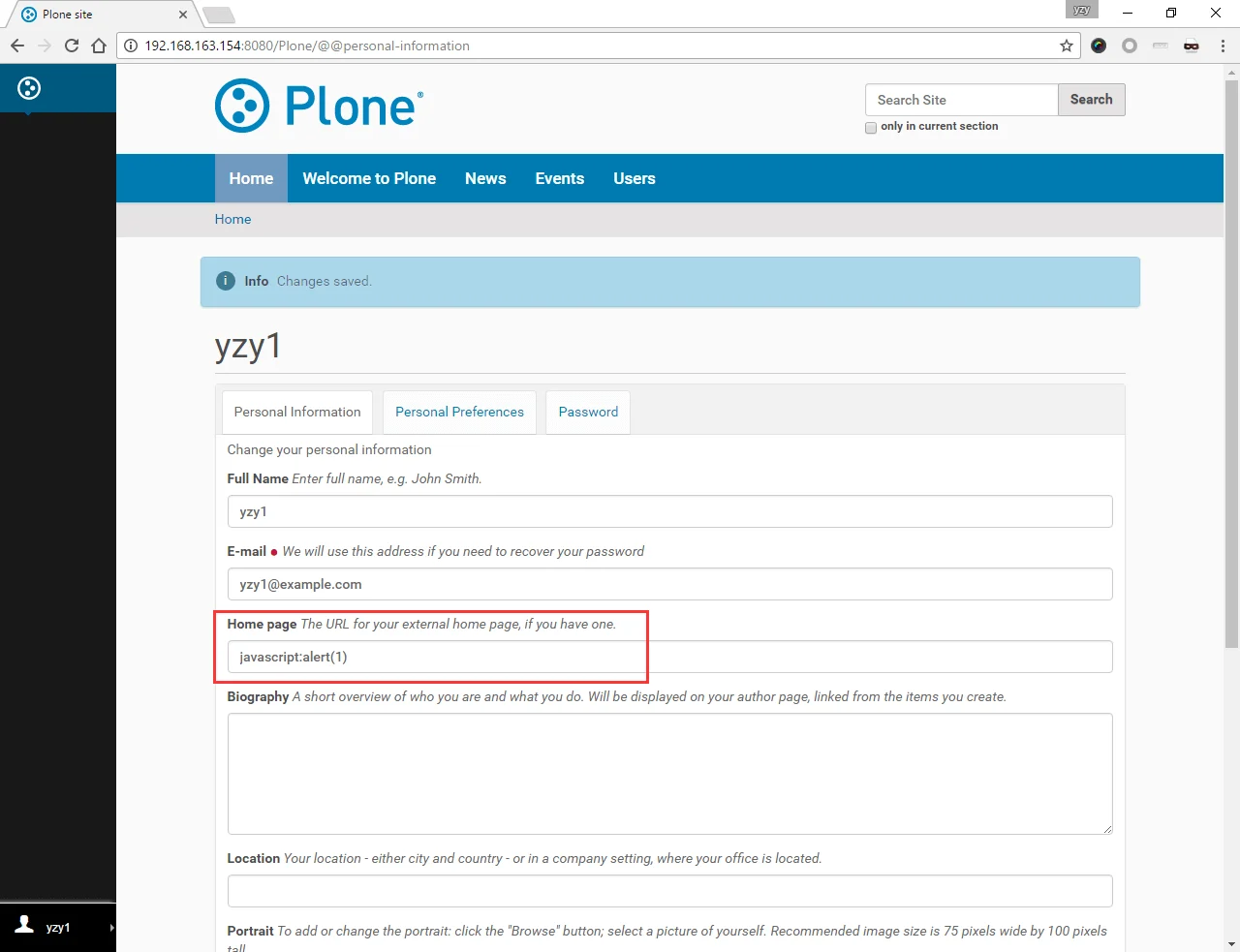
Figure 9. PoC
When the victim accesses the attacker's personal information page, Plone displays the home page value (the XSS code) with the markup shown below. If the victim then clicks the home page link, the XSS code is triggered.
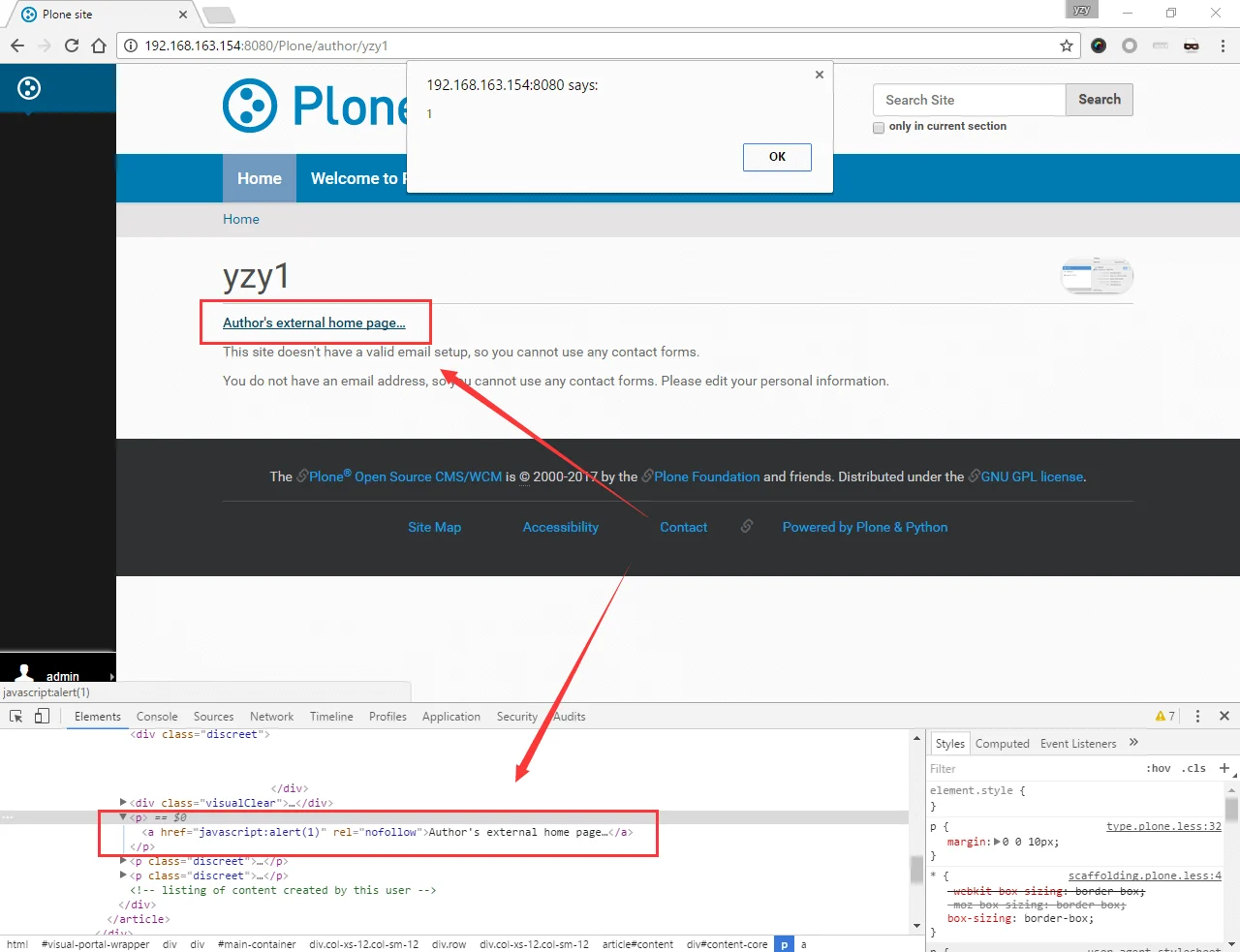
Figure 10. XSS attack triggered
Root cause
The login XSS comes from came_from being reflected into the 302 response without sanitisation, so HTML can be placed in the response body. Browsers normally refuse to execute the body of a 302, but Firefox on Windows follows the mailto: scheme and executes the body, which turns the reflection into script execution. The login process also lacks CSRF protection, so the crafted login request can be delivered on the attacker's behalf. The home page XSS comes from the home page value not being sterilised, so a javascript: value executes when the link is clicked.
Impact
Remote attackers could run malicious code in a victim's browser and trigger an XSS attack, gaining control of the victim's Plone account. If the victim has higher permission, such as system administrator, the attacker could conceivably gain full control of the web server. The login XSS requires a valid account (any permission) and the Firefox bypass to work; the home page XSS requires the victim to visit the attacker's profile page and click the home page link.
Fix
Plone addressed the login XSS and the CSRF issue together in their recent update, All users of Plone should upgrade to the latest version immediately. Organisations running a Fortinet IPS solution are protected by the signatures Plone.Login.Form.XSS and Plone.Personal.Homepage.XSS, issued as part of the zero day practice once the vulnerabilities were confirmed.
Variants to test
- Other redirect parameters. Look for login or auth flows that reflect a
came_from,next,return_toorredirectparameter into a 302Location. A positive result is HTML appearing in the response body of the redirect. - Scheme prefixes. Try values beginning with
mailto:,javascript:or other schemes in redirect parameters on Firefox. A positive result is the browser executing body markup after the redirect. - Profile link fields. Set home page, website or similar profile fields to
javascript:alert(1)and view the profile as another user. A positive result is the link rendering the value and executing on click. - Login CSRF. Submit a login form cross-site without a token.
Reference
What happened, in plain words
Plone is a piece of software that lets an organisation build and run a website: a content management system, or CMS. You install it on a server, and people log in through a web page to write articles, upload files and manage the site. Plone is free and open source, has been developed since 2001, is available in more than 40 languages, and is supported by more than 350 solution providers in more than 100 countries. Its users include the Federal Bureau of Investigation (FBI), the Central Intelligence Agency (CIA) and the Intellectual Property Rights Center.
Earlier this year, FortiGuard Labs found three security problems in Plone, affecting versions from 2.5.5 to 5.1rc1:
- A cross-site scripting (XSS) bug in the login process. On its own it does not work; it only works in conjunction with the CSRF problem below, so Plone addressed them together.
- A cross-site request forgery (CSRF) bug in the same login process.
- A second XSS bug, this one in the "home page" field of a member's profile.
XSS means that an attacker manages to get their own code (usually a short piece of JavaScript, the language browsers run) into a page that another person views, so that the code runs inside that person's browser as if the site itself had written it. CSRF means that an attacker can make a victim's browser send a request to a site where the victim is already logged in, without the victim meaning to, and the site accepts it because the victim's browser automatically attaches the victim's login state.
In practical terms: an attacker could run malicious code in a victim's browser and take control of the victim's Plone account. If the victim is a highly privileged user, such as a system administrator, the attacker could conceivably gain full control of the web server.
The two features involved
To follow the rest, you need to know two ordinary parts of Plone.
The login form. When you log in to a website, you type a username and password into a form and press a button. The server checks them and, if they are right, sends your browser onward to another page. Plone does this with a redirect: a short answer from the server that says "do not show this, go to that address instead". The address to go to is taken from a value in the login request called came_from. That is a normal, helpful feature.
The Personal Information page. On the Personal Information page the member fills in details about themselves: name, email address, home page, and so on.
A useful comparison: think of the login form as a receptionist who, after checking your badge, tells you which room to go to. The room number is written on a slip of paper you handed over. If the receptionist reads the slip without checking it, and you wrote something other than a room number on it, the receptionist will repeat whatever you wrote.
What you need to reproduce it
- A Plone installation in the affected range, 2.5.5 to 5.1rc1.
- A valid account on that Plone, with any permission level.
- The Windows version of Firefox, for the browser trick described below.
No other tools are described.
Finding the first bug: the login redirect
When a user logs into Plone with a valid account, the login request carries 9 parameters. The server answers with a 302 redirect, and the address inside that redirect is built from the came_from value that was in the request. The request and the resulting redirect are shown in figure 1.
Figure 1. Plone login payload
The problem is that the attacker controls what goes into came_from, and Plone does not sterilise it (does not clean or check it) before putting it into the response.
Figure 2. Param came_from
Why this matters: a value that a user supplies and that the server later repeats back without checking is called a reflection. If the server repeats it inside a web page, and the value contains HTML (the language web pages are written in), the browser may treat the attacker's text as part of the page rather than as plain text.
Step 2: putting HTML into the redirect
Setting the came_from value to the payload shown below makes Plone output the HTML tags in the response.
Figure 3. Insert HTML tags
In plain words: instead of a page address, the attacker hands over a fragment of HTML. Plone copies it into the redirect response, so the response now contains HTML that the attacker chose.
There is a catch, though. Modern browsers will not execute the body of a 302 response. A 302 is a short instruction to go elsewhere; browsers treat anything in its body as not worth running. So on its own, this injection does not run script.
Step 3: getting Firefox to run it anyway
In the Windows version of Firefox, that restriction can be bypassed by making the value start with mailto:. mailto: is the address scheme that tells a browser "open the email program". Setting came_from to the value shown below makes Firefox load the 302 response, try to open the default email program, and execute the HTML elements in the body.
Figure 4. Bypassing the 302 redirect in Firefox I
Figure 5. Bypassing the 302 redirect in Firefox II
Why this works, in everyday terms: the browser has a rule that says "do not run anything inside a redirect". But when the redirect points at something outside the web, like an email address, Firefox on Windows handles it differently and ends up running the page content. The attacker is not breaking the rule directly; they are finding a path around it.
Step 4: adding the missing CSRF protection
The login process has no CSRF protection. That means a page on another site can make a victim's browser submit a login request to Plone, and Plone will accept it without asking for any proof that the request came from Plone's own pages.
Put the pieces together: the XSS in the login redirect, a valid account with any permission, the missing CSRF protection, and the Firefox bypass. With all four, an attacker can successfully trigger an XSS attack. The proof-of-concept code is shown in figure 6, and the triggered attack in figure 7.
Figure 6. PoC
Figure 7. XSS attack triggered
The second bug: the home page field
In the Plone Personal Information page, users can set their own information, such as name, email address, home page, and so on.
Figure 8. Personal Information page
Plone does not sterilise the home page value before sending it to the server. For example, an attacker can set their home page value to javascript:alert(1).
Figure 9. PoC
javascript: is an address scheme that tells a browser "run the code that follows instead of going to a page". alert(1) is a tiny piece of JavaScript that makes a pop-up box appear with the number 1 in it. It is harmless by itself; it is used to prove that code ran.
When the victim accesses the attacker's personal information page, Plone displays the home page value (the XSS code) with the markup shown below. If the victim then clicks the home page link, the XSS code is triggered.
Figure 10. XSS attack triggered
Here the victim only needs to visit the attacker's personal information page and click the home page link.
Why it happens
Both bugs come down to the same habit: Plone takes a value that a user supplied and puts it into a page without checking it.
- In the login form,
came_fromis copied into the redirect without cleaning, so HTML can end up in the response. Browsers normally refuse to run the body of a 302, but Firefox on Windows follows themailto:scheme and runs it, which turns a harmless reflection into running code. The login process also has no CSRF protection, so the crafted login request can be delivered on the attacker's behalf. - In the profile, the home page value is stored and shown without cleaning, and it is used directly as a link address, so a
javascript:address runs when clicked.
What an attacker could do
An attacker could run malicious code in a victim's browser and take over the victim's Plone account. If the victim has higher permission, such as system administrator, the attacker could conceivably gain full control of the web server.
The login bug needs a valid account with any permission and the Firefox bypass. The home page bug needs the victim to visit the attacker's profile page and click the home page link.
The fix
Plone fixed the login XSS and the CSRF issue together in a recent update, All users of Plone should upgrade to the latest version immediately.
Organisations that run a Fortinet IPS solution (intrusion prevention system, a device or service that watches network traffic and blocks known attacks) are already protected by the signatures Plone.Login.Form.XSS and Plone.Personal.Homepage.XSS. These were issued as part of Fortinet's zero day practice once the vulnerabilities were confirmed.
Things worth checking elsewhere
These are the same ideas applied to other software, useful if you are learning how to look for this kind of bug.
- Other redirect parameters. Look for login or authentication flows that copy a
came_from,next,return_toorredirectvalue into a 302 redirect. A positive result is HTML appearing in the body of the redirect response. - Scheme prefixes. Try values beginning with
mailto:,javascript:or other schemes in redirect parameters on Firefox. A positive result is the browser running page content after the redirect. - Profile link fields. Set home page, website or similar profile fields to
javascript:alert(1)and view the profile as another user. A positive result is the link showing the value and running it when clicked. - Login CSRF. Submit a login form from another site without a token.
References
- https://plone.org/security/hotfix/20171128
- https://plone.org/security/hotfix/20171128/open-redirection-on-login-form
- https://plone.org/security/hotfix/20171128/xss-using-the-home_page-member-property
- https://fortiguard.com/zeroday/FG-VD-17-006
- https://fortiguard.com/zeroday/FG-VD-17-007
Glossary
- CMS (content management system): software that lets people build and run a website without writing all the code by hand. Plone is one.
- Open source: software whose source code is published and can be freely used, changed and shared.
- XSS (cross-site scripting): getting an attacker's code into a page that someone else views, so it runs in that person's browser as if the site had written it.
- Reflected XSS: the dangerous value is sent in a request and immediately echoed back in the response.
- Stored XSS: the dangerous value is saved on the server (for example in a profile) and shown later to anyone who views it.
- CSRF (cross-site request forgery): making a victim's browser send a request to a site where they are logged in, without their intent, and having the site accept it.
- JavaScript: the programming language that browsers run to make web pages interactive.
- HTML: the language web pages are written in, made of tags such as
<b>or<script>. - Parameter: a named value sent with a request, such as
came_fromin a login form. came_from: the parameter Plone uses to remember which page to send you back to after login.- 302 redirect: a short answer from a server saying "do not show this page, go to this address instead".
Locationheader: the part of a redirect response that holds the address to go to.- Sanitise / sterilise: clean a value so that anything dangerous in it is removed or neutralised before it is used.
- Reflection: when a server copies a value supplied by the user back into its response.
- Scheme: the first part of an address that says what kind it is, such as
http:,mailto:orjavascript:. mailto:: an address scheme that tells the browser to open the email program.javascript:: an address scheme that tells the browser to run the code that follows.alert(1): a tiny piece of JavaScript that shows a pop-up box with the number 1; used to prove code ran.- Payload: the value an attacker sends to try to trigger a bug.
- PoC (proof of concept): a small demonstration showing that a bug can really be triggered.
- IPS (intrusion prevention system): a device or service that watches network traffic and blocks known attacks.
- Signature: a rule an IPS uses to recognise a particular attack.
- Zero day: a vulnerability that is not yet publicly known or fixed when it is found.
- Hotfix: a quick update that fixes a specific problem.
- Permission level: what a logged-in user is allowed to do on the site; a system administrator has the highest level.
- Firefox: a web browser made by Mozilla.




