How I hacked redbus [An online bus-ticketing application]
The PDF generation service accepted user-supplied HTML and used the PD4ML library, which allowed local file inclusion through a proprietary attachment tag. An attacker could read arbitrary files on the server, including SSH private keys and other users' ticket PDFs, and then use ticket IDs to access personal data.
 Published on medium.com
[I drafted this writeup 2 years ago. As it took a long time for the patch, posting it now]
The full write-up lives on its author's site
It belongs to its author, so we link to it rather than copy it. The other two tabs are our own rewrites, checked against it.
Context
redBus is an online bus-ticketing application. After a booking is confirmed, the confirmation page offers a Print/Download link. Following that link takes the user to the subdomain pdf.redbus.com, which renders the ticket as a PDF.
The write-up is about what happens between the HTML ticket page and the generated PDF. The PDF is produced server-side by a library called PD4ML, which converts HTML content into a PDF document. The researcher's interest was in how that conversion handles HTML supplied by the user, and what the converter is allowed to reach on the server and on the network.
Setup
No special account, role or tooling is described beyond a normal booking on the site and a listener under the researcher's control at listener.myserver.com. The researcher also read the PD4ML documentation at pd4ml.com/html.htm.
Finding it
On the confirmation page the researcher clicked the Print/Download link for the first time.
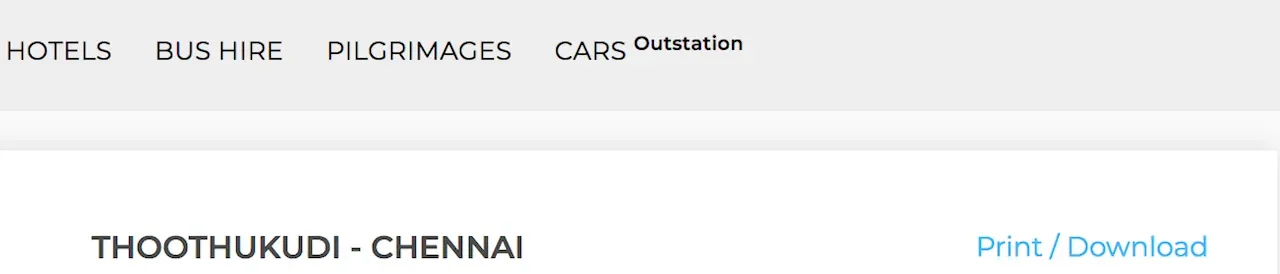
The link redirected to pdf.redbus.com, which displayed the PDF version of the ticket.

Two things stood out. First, the page mentioned PD4ML, which the researcher read as a PDF generation library. Second, the PDF was shown without any ticket ID or equivalent identifier in the URL as a parameter. That raised the question of how the server knew which ticket to render. Going back to the previous page and monitoring the requests triggered by the Download link answered it: the HTML content is sent to the server, and the server transforms that HTML into a PDF.
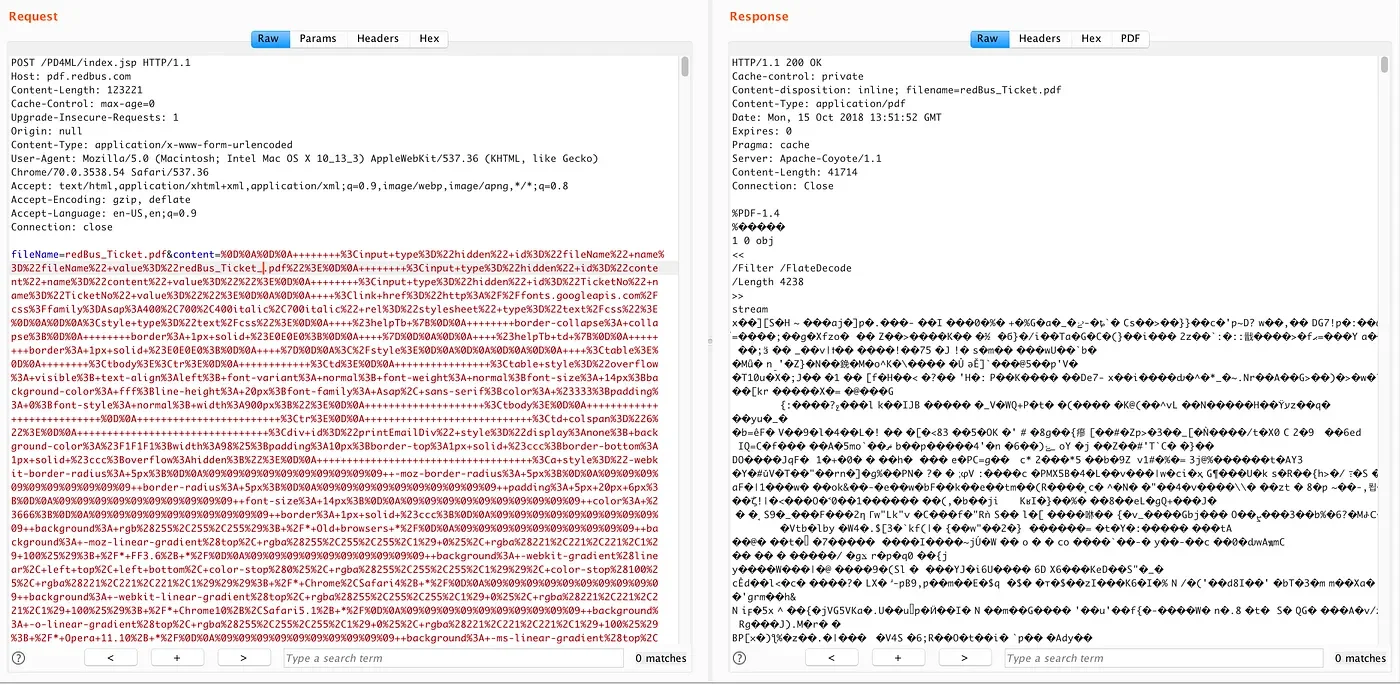
That model, HTML in and PDF out, means the converter parses markup that originates from the client. The obvious question is what that markup is allowed to make the server do.
Exploitation
Step 1: confirm the converter makes outbound requests
To check whether the server performs an external call during the transformation, the researcher submitted an image tag pointing at a listener:
<img src=”http://listener.myserver.com”>
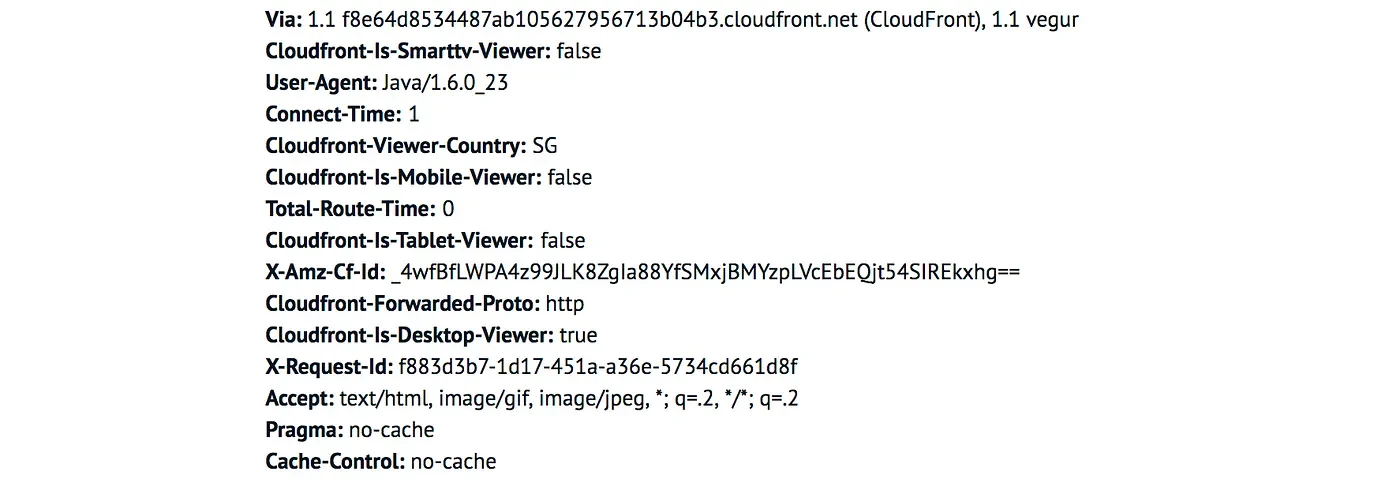
The listener received a request from a Java agent, which the researcher attributes to the redBus PDF server.
Step 2: try to read local files with an iframe
The next attempt was an iframe tag, to see whether the converter would load local files into the frame. The response was blank.
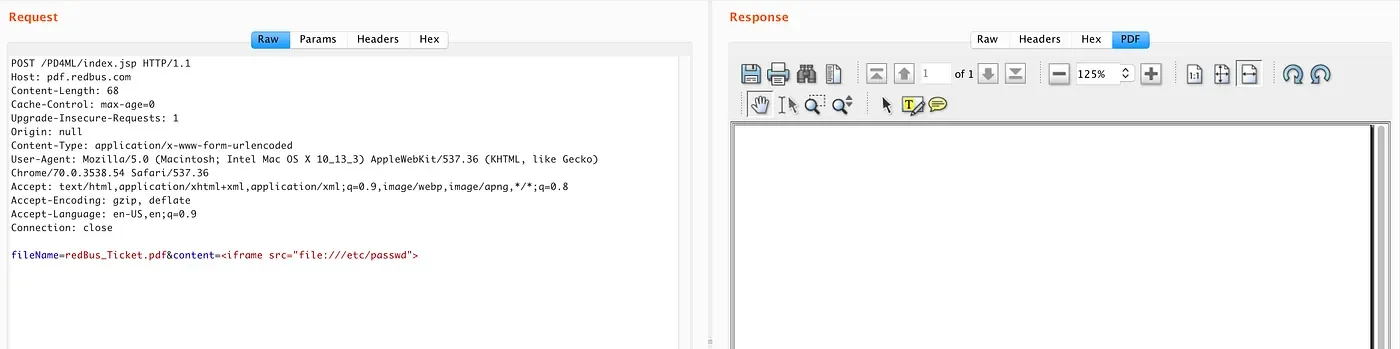
A search confirmed that PD4ML does not support JavaScript, so dynamic pages were not an option. The documentation showed that the iframe tag is not supported by PD4ML, and neither are tags such as object and applet.
Step 3: use the proprietary attachment tag
Further down the documentation the researcher found the section on proprietary tags. The tag <pd4ml:attachment> is used to embed attachments into the PDF, and it expects a src attribute for the attachment link. Supplying a file:// URL as that attribute gave:
<pd4ml:attachment src=”file:///etc/passwd”><pd4ml:attachment>
The researcher confirmed the arbitrary file read.
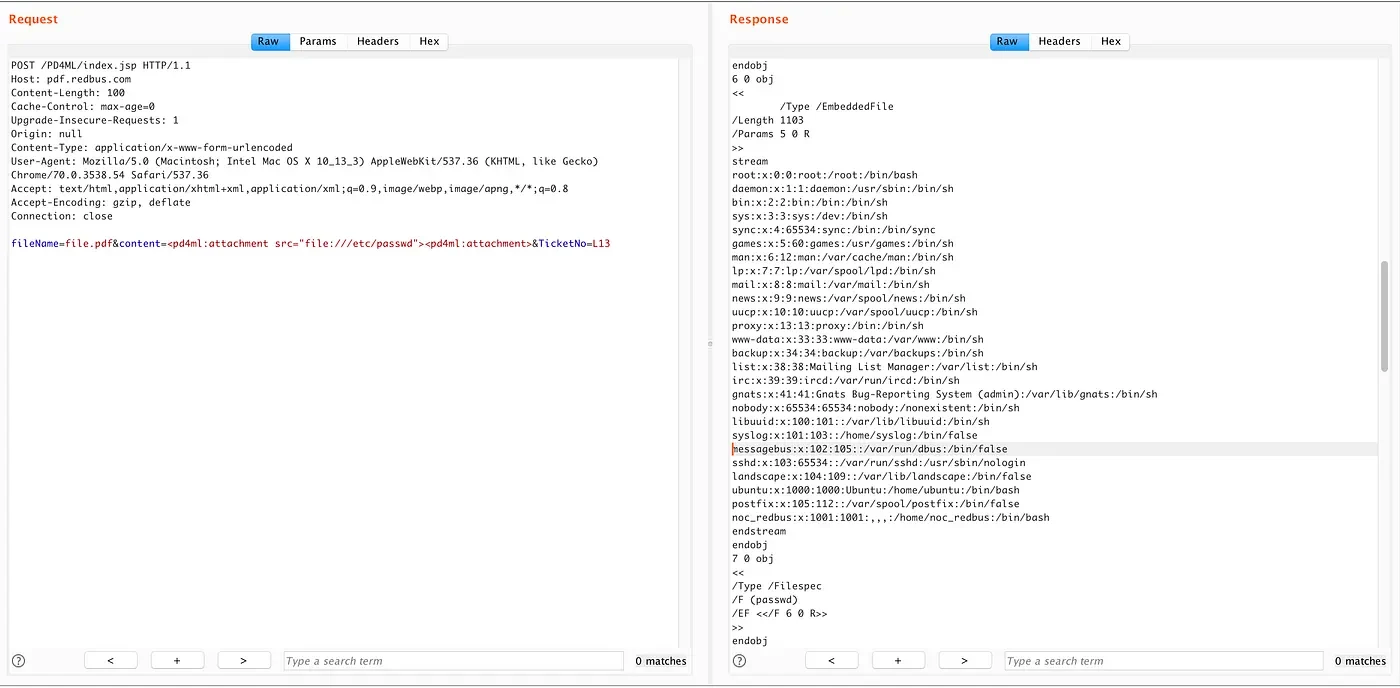
Step 4: walk the filesystem
With arbitrary file read confirmed, the researcher went further. Directory listings were visible as well, which made it easy to move between directories.
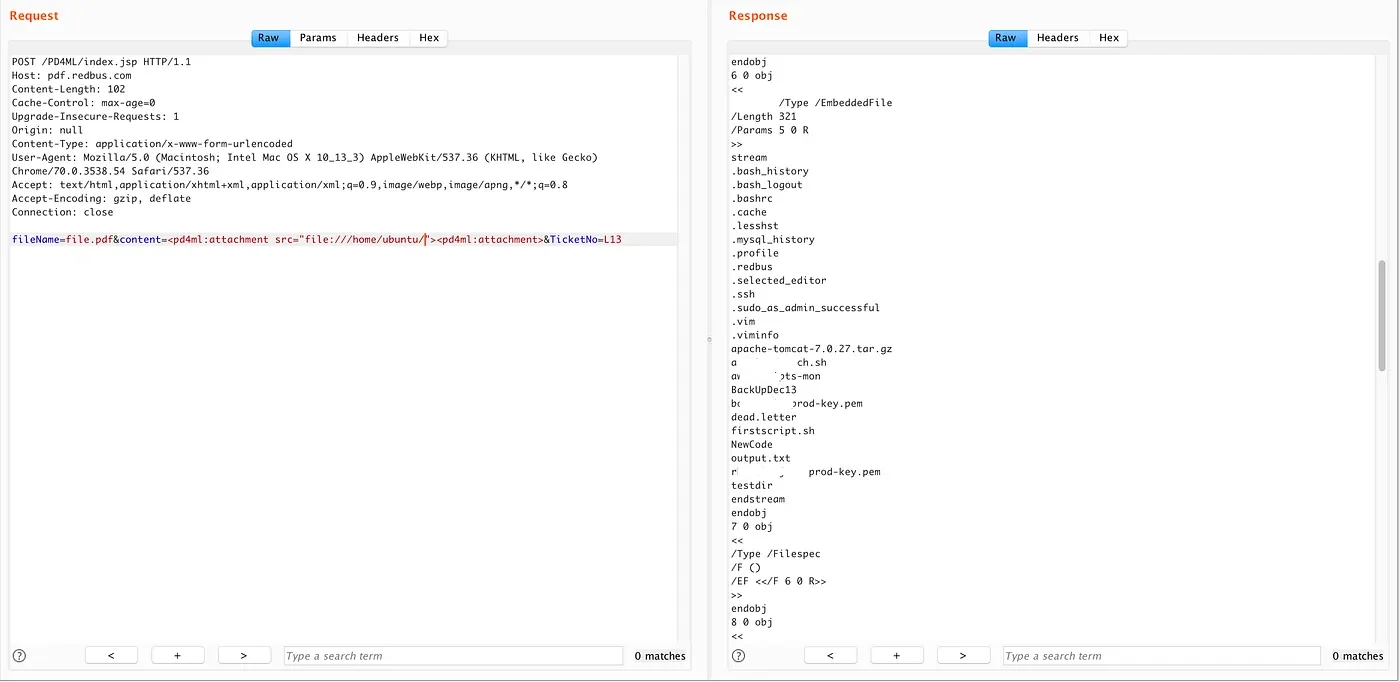
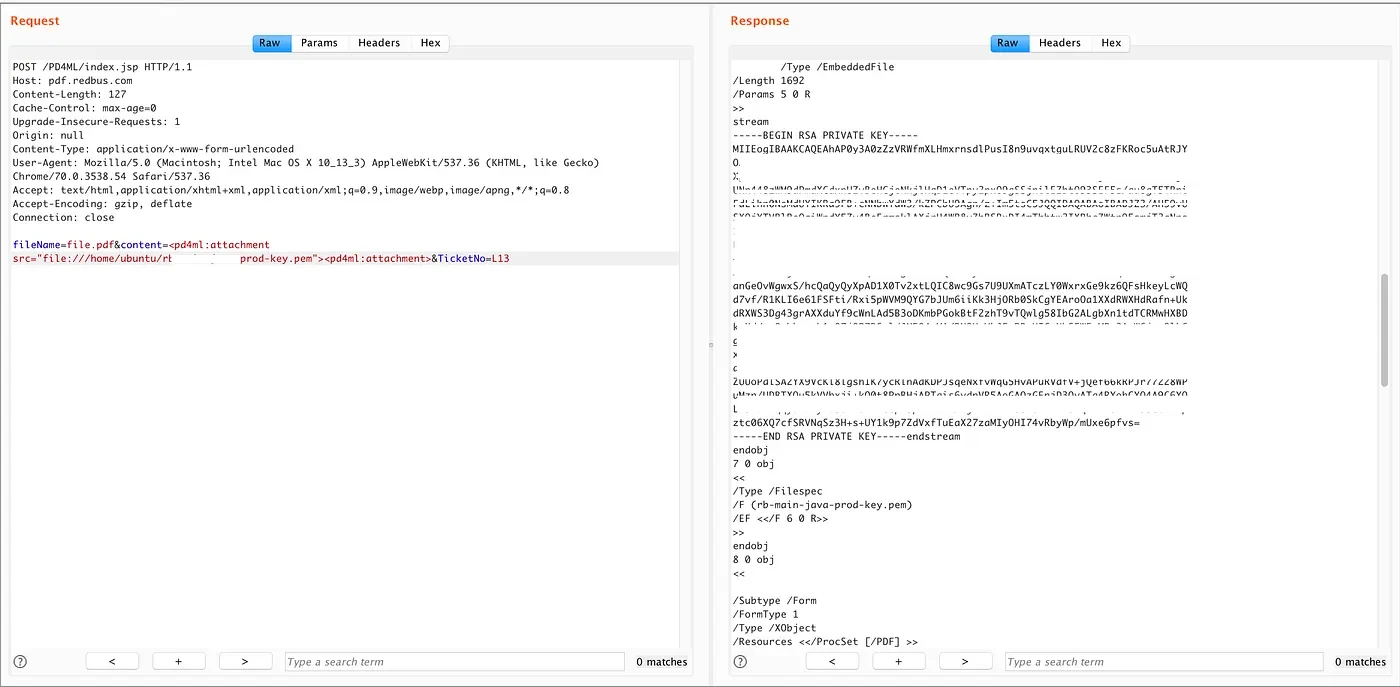
partially redacted private key file
Among the files reached were SSH private keys, configuration files containing database passwords, and mysql_history. The researcher also reasoned that other users' PDF tickets should be stored somewhere on the same host.
Step 5: locate the stored tickets
Using the arbitrary file read, the researcher read the source of index.jsp and found where the PDF files are stored. Navigating to that directory produced the listing of stored tickets.
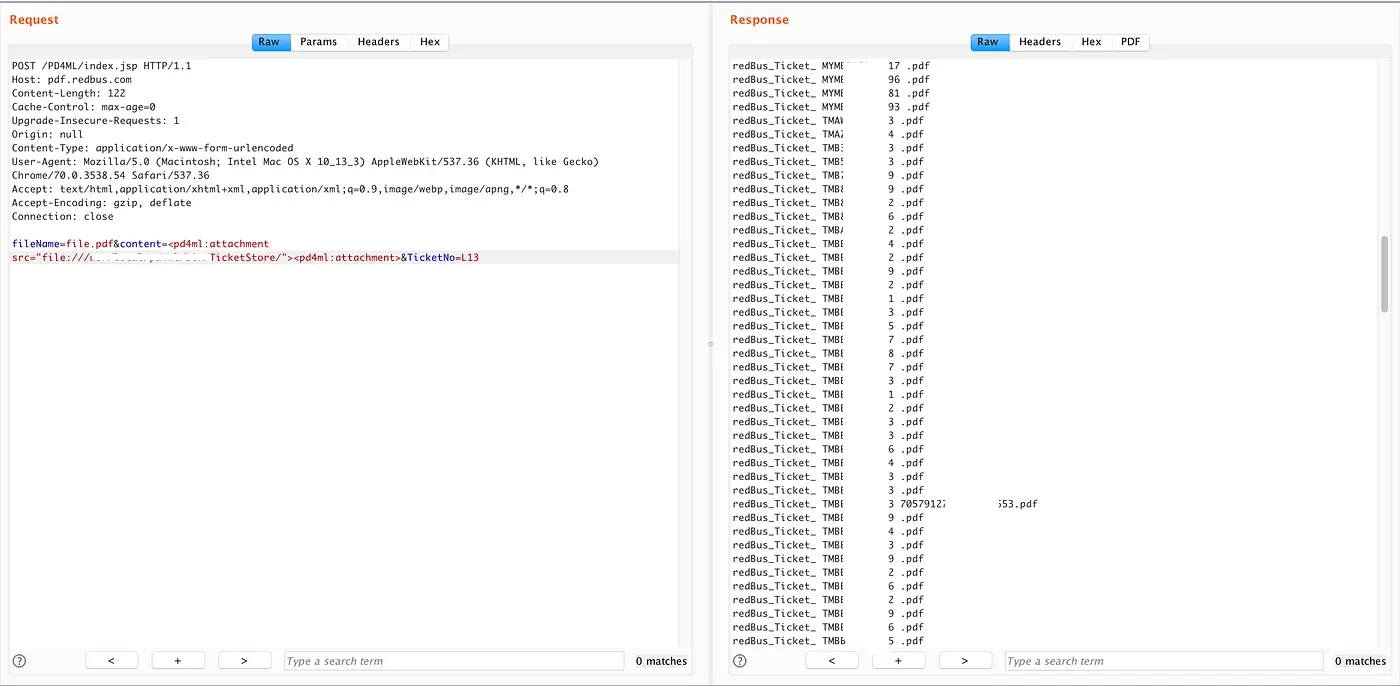
The value is not in the PDFs themselves but in the ticket IDs they contain. With a ticket ID, any authenticated user can extract PII such as email, mobile number, age and date of birth, where available.
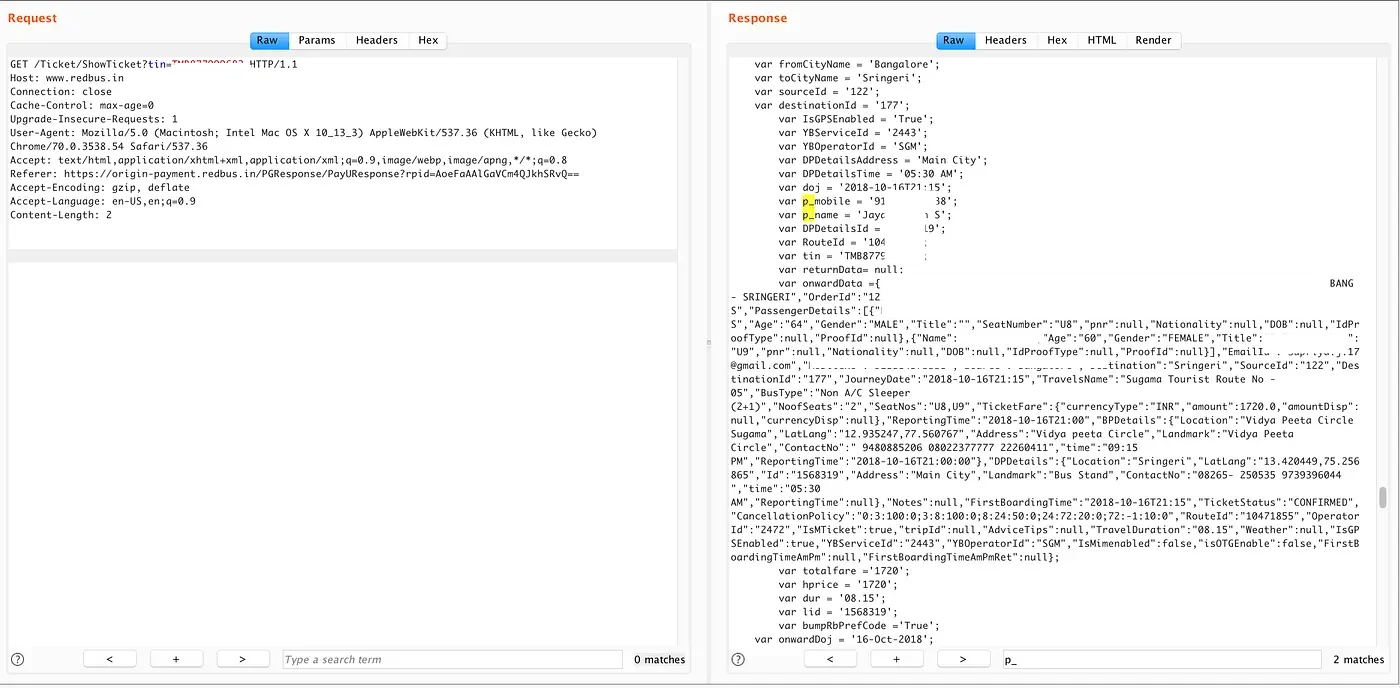
partially redacted response
Root cause
The PDF generation service takes HTML from the client and hands it to PD4ML, which resolves resource references in that markup. The proprietary <pd4ml:attachment> tag accepts a src attribute, and nothing restricted that attribute to safe locations, so a file:// URL was resolved against the server's own filesystem. The attachment tag resolved a file:// URL against the server's own filesystem. The iframe, object and applet tags were unsupported, but that did not matter: the attachment tag provided the same primitive through a different route.
PD4ML itself has optional controls for this. The researcher later learned that the library already provided a way to restrict resource locations, and the fix section below shows the configuration the write-up gives for whitelisting a local directory or remote resource.
Impact
An attacker who can submit HTML to the PDF generator can read files from the server: SSH private keys, configuration files with database passwords, and shell history. The directory listings make it practical to navigate to the files that matter. Beyond the host itself, the stored PDF tickets expose ticket IDs, and a ticket ID lets any authenticated user retrieve PII such as email, mobile number, age and date of birth where available.
Fix
redBus handled this in stages. On the day the issue was reported, the team removed the SSH private keys as an immediate fix. Later they planned to remove the functionality altogether. On 18 December 2019 they notified the researcher that a new workflow for PDF generation had been implemented, but pdf.redbus.com was still accessible and so was the issue.
When the researcher examined the new implementation on 20 December 2019, it used PhantomJS. Local file read was no longer possible because the custom HTML was loaded in an about:blank page, and loading the file:/// protocol inside an iframe was not allowed. HTTP, however, was allowed, which ended in SSRF, reported separately. On 3 February 2020 redBus moved the PDF generation module to an internal micro-service. pdf.redbus.com remained public until 11 September 2020, when it was removed from public access.
For developers using PD4ML, the write-up gives the configuration to whitelist the local directory or remote resource:
Map m = new HashMap(); m.put(PD4Constants.PD4ML_ALLOWED_RESOURCE_LOCATION, “http://server/webapp,file:/my/safe/file/folder"); pd4ml.setDynamicParams(m);
Variants to test
- Remote resource fetch through any tag the converter supports. Submit an image or other resource reference pointing at a listener you control. A request arriving from the server confirms the converter resolves external URLs, which is the precondition for the rest.
- Proprietary attachment tags. For PD4ML, try
<pd4ml:attachment src=”file:///etc/passwd”><pd4ml:attachment>and look for the file contents in the generated PDF. A positive result is the file rendered into the document. - Directory traversal through the same
srcattribute. Point the attachment at directories rather than files and check whether listings are rendered, then walk to configuration files, keys and history files. - Application source for storage paths. Read files such as
index.jspthrough the same primitive to find where generated documents are written, then list that directory. A positive result is a listing of other users' documents and the identifiers inside them. - Converter swap. If the implementation changes, identify the new engine from its behaviour and documentation. With PhantomJS, check whether
file:///is blocked inside iframes while HTTP is allowed, which turns file read into SSRF.
Timeline
- 15 October 2018: Issue reported to redBus. The team immediately removed the SSH private keys as an immediate fix once they acknowledged the issue.
- 16 October 2018: The researcher reported that the issue also leaks user PII; it was considered a duplicate of an issue already being tracked. The researcher received a bounty.
- 6 December 2018: The redBus security team asked the researcher to report it to PD4ML to get a CVE assigned if it was reproducible in the latest version.
- 14 December 2018: Email sent to PD4ML.
- 19 December 2018: redBus security said they planned to remove the functionality.
- 4 January 2019: After back-to-back emails with PD4ML, the researcher learned that optional controls to avoid the issue already existed, and forwarded that to the redBus team.
- 26 February 2019: No update yet.
- 20 September 2019: Patch to be released in a week.
- 18 December 2019: redBus notified the researcher of a new PDF generation workflow, but
pdf.redbus.comand the issue were still accessible. - 20 December 2019: The new implementation used PhantomJS; local file read was blocked, HTTP was allowed, and SSRF was found and reported.
- 3 February 2020: redBus fixed the issue by moving PDF generation to an internal micro-service, with no bounty for this one.
- 16 July 2020:
pdf.redbus.comstill public; the researcher asked for an update. - 11 September 2020:
pdf.redbus.comremoved from public access.
What happened, in plain words
redBus is a website where you buy bus tickets online. When you finish a booking, the confirmation page has a Print/Download link. If you click it, you are sent to a different address, pdf.redbus.com, which shows your ticket as a PDF file (the kind of document you can print or save).
Behind that link, the website does something simple: it takes the ticket page written in HTML (the language web pages are made of) and hands it to a program on the server that turns HTML into a PDF. That program is called PD4ML. The researcher who wrote this report wondered what else that program could be made to do, because it processes HTML that comes from the visitor's browser. In the end, by putting a special tag into the HTML, the researcher could make the server read files from its own disk and show them inside the PDF. Those files included private keys and configuration files with database passwords. The same trick also revealed where other people's ticket PDFs were stored, and those PDFs contained ticket IDs, which in turn expose personal information.
This is a beginner's walkthrough of how that was found, step by step, with the same snippets the researcher used.
The starting point
A few ideas first, because everything below depends on them:
- Server: the computer that runs the website. When you click something, your browser sends a request to the server, and the server sends back a page or a file.
- HTML: the text format that describes what a web page contains (headings, images, links). Your browser reads it and draws the page.
- PDF: a document format that looks the same everywhere. Websites often generate PDFs on the server rather than in your browser.
- Library: a bundle of code written by someone else that a website uses to do a job, such as making PDFs. PD4ML is such a library: it reads HTML and produces a PDF.
- Subdomain: a part of a domain name.
redbus.comis the main site;pdf.redbus.comis a separate address under it, often a different service.
The only extra thing was a listener: a small server the researcher controlled at listener.myserver.com, whose only job was to record any request that arrived at it. Think of it as a doorbell you place in someone else's hallway: if it rings, you know someone walked there.
Finding it
On the confirmation page, the researcher clicked the Print/Download link for the first time.
The link redirected to pdf.redbus.com, which displayed the PDF version of the ticket.
Two things stood out.
- The page mentioned PD4ML. The name reads like a PDF generation library, so the researcher assumed that is what it was.
- The PDF appeared without any ticket ID or similar identifier in the address as a parameter. A parameter is the extra piece of information stuck onto a web address, usually after a
?, that tells the site which item you want (for example?ticket=12345). If there was no ticket ID in the address, how did the server know which ticket to draw?
To answer that, the researcher went back to the previous page and watched the requests the browser made after clicking Download. That is what browser developer tools let you do: see every request and response.
What the requests showed is the model: the HTML content is sent to the server, and the server transforms that HTML into a PDF. So the converter is fed markup that originates from the client side. The natural next question is what that markup is allowed to make the server do.
Exploitation
Step 1: does the converter fetch things from the internet?
An HTML page can point at resources elsewhere: an <img> tag tells the browser to load a picture from a given address. If the PDF converter behaves like a browser and fetches that picture, then a picture address pointing at the researcher's listener would produce a request the researcher can see.
So the researcher submitted this image tag:
<img src=”http://listener.myserver.com”>
Line by line:
<imgstarts an image tag.src=is the attribute that says where the image lives.”http://listener.myserver.com”is the address of the researcher's listener. (The quote characters here are the curly ones from the write-up, not the straight ones a browser normally expects, but the idea is the same.)>closes the tag.
The listener received a request from a Java agent, which the researcher attributes to the redBus PDF server.
A Java agent here means the request came from a Java program, which fits a Java-based PDF library running on the server. The important conclusion: the converter does make outbound requests to addresses written in the HTML. That is the foundation for everything that follows.
Step 2: can it read files on its own disk with an iframe?
An iframe is a frame inside a page that loads another page or document. If the converter honoured an iframe pointing at a local file, the file's contents might appear in the PDF. The researcher tried an iframe tag to see whether the converter would load local files into the frame. The response was blank.
A search confirmed that PD4ML does not support JavaScript. JavaScript is the programming language that makes web pages interactive; without it, tricks that rely on a page running code are out. The documentation also showed that the iframe tag is not supported by PD4ML, and neither are tags such as object and applet (older ways of embedding content in a page). So this route was closed.
Step 3: the proprietary attachment tag
Further down the documentation, the researcher found a section on proprietary tags. These are extra tags that only this library understands, beyond normal HTML. One of them, <pd4ml:attachment>, is used to embed attachments into the PDF, and it expects a src attribute for the attachment link. That src is just like the image's src: it says where to get something. If the library fetches whatever the src points at, then pointing it at a file on the server's own disk should make the server read that file.
A file path like /etc/passwd is how you name a file on a Linux machine. /etc/passwd is a well-known system file that lists user accounts; it is a common first target because reading it proves file access without causing damage. The file:// prefix tells a program to read from the local disk rather than from the network.
So the researcher supplied this:
<pd4ml:attachment src=”file:///etc/passwd”><pd4ml:attachment>
Line by line:
<pd4ml:attachmentopens the library's attachment tag.src=”file:///etc/passwd”says the attachment should come from the local file/etc/passwd.>closes the opening tag.<pd4ml:attachment>is the closing tag as written in the write-up (normally a closing tag would have a slash, but this is exactly what was submitted).
The researcher confirmed the arbitrary file read.
This is called arbitrary file read: the ability to make a server hand you the contents of files it can access. It is a serious problem because servers keep secrets in files.
Step 4: walking around the filesystem
With arbitrary file read confirmed, the researcher went further. Directory listings were visible as well, which made it easy to move between directories.
A directory is a folder. A directory listing is what a server shows when you ask for a folder instead of a file: the names of the files and folders inside it. Being able to list folders is like having a map while exploring a building, instead of guessing door numbers.
partially redacted private key file
Among the files reached were SSH private keys, configuration files containing database passwords, and mysql_history.
- An SSH private key is a secret file that proves your identity when you log in to a server remotely. Anyone who has it can often log in as that user. That is why it is a high-value target.
- A configuration file holds a program's settings, and those settings often include database passwords.
mysql_historyis a record of commands typed into the MySQL database tool, which can reveal how the database is used and sometimes sensitive values.
The researcher also reasoned that other users' PDF tickets should be stored somewhere on the same host.
Step 5: finding the stored tickets
A file ending in .jsp is a Java server page: code that runs on the server to build a web page. Reading the source of index.jsp through the same file-read trick showed where the PDF files are stored. Navigating to that directory produced the listing of stored tickets.
The value is not in the PDFs themselves but in the ticket IDs they contain. A ticket ID is the unique code for one booking. With a ticket ID, any authenticated user can extract PII such as email, mobile number, age and date of birth, where available.
PII stands for personally identifiable information: data that points to a specific person. Authenticated means logged in with a valid account. So the problem is not only that files could be read; the identifiers found in those files unlock personal data through the normal site.
partially redacted response
Why it worked
The PDF generation service takes HTML from the client and hands it to PD4ML, which resolves resource references in that markup. The proprietary <pd4ml:attachment> tag accepts a src attribute, and nothing restricted that attribute to safe locations, so a file:// address was resolved against the server's own filesystem. The attachment tag resolved a file:// address against the server's own filesystem. The iframe, object and applet tags were unsupported, but that did not matter: the attachment tag provided the same capability through a different route.
PD4ML itself has optional controls for this. The researcher later learned that the library already provided a way to restrict resource locations, and the fix section below shows the configuration the write-up gives for whitelisting a local directory or remote resource. A whitelist is a list of things that are allowed; anything not on the list is refused.
What an attacker could get
An attacker who can submit HTML to the PDF generator can read files from the server: SSH private keys, configuration files with database passwords, and shell history. The directory listings make it practical to navigate to the files that matter. Beyond the host itself, the stored PDF tickets expose ticket IDs, and a ticket ID lets any authenticated user retrieve PII such as email, mobile number, age and date of birth where available.
How it was fixed
redBus handled this in stages. On the day the issue was reported, the team removed the SSH private keys as an immediate fix. Later they planned to remove the functionality altogether. On 18 December 2019 they notified the researcher that a new workflow for PDF generation had been implemented, but pdf.redbus.com was still accessible and so was the issue.
When the researcher examined the new implementation on 20 December 2019, it used PhantomJS. PhantomJS is a headless browser: a browser with no visible window, used by programs to render pages. Local file read was no longer possible because the custom HTML was loaded in an about:blank page (a blank starting page), and loading the file:/// protocol inside an iframe was not allowed. HTTP, however, was allowed, which ended in SSRF, reported separately.
SSRF stands for server-side request forgery: the server is tricked into making requests to addresses of the attacker's choosing. It is the same idea as the listener test in Step 1, but treated as a vulnerability in its own right, because the server can reach internal systems that outsiders cannot.
On 3 February 2020 redBus moved the PDF generation module to an internal micro-service. A micro-service is a small, separate program that does one job; making it internal means it is no longer reachable from the public internet. pdf.redbus.com remained public until 11 September 2020, when it was removed from public access.
For developers using PD4ML, the write-up gives the configuration to whitelist the local directory or remote resource:
Map m = new HashMap(); m.put(PD4Constants.PD4ML_ALLOWED_RESOURCE_LOCATION, “http://server/webapp,file:/my/safe/file/folder"); pd4ml.setDynamicParams(m);
Line by line:
Map m = new HashMap();creates an empty map, which is a collection that stores settings under names (like a labelled box).m.put(PD4Constants.PD4ML_ALLOWED_RESOURCE_LOCATION, ...)stores one setting under the namePD4ML_ALLOWED_RESOURCE_LOCATION, which is the library's setting for where resources may be loaded from.“http://server/webapp,file:/my/safe/file/folder"is the allowed list: one web address and one local folder, separated by a comma. Only these locations would be permitted.pd4ml.setDynamicParams(m);hands the map to the PDF library so it applies the restriction.
Things worth trying if you are learning
- Remote resource fetch through any tag the converter supports. Submit an image or other resource reference pointing at a listener you control. A request arriving from the server confirms the converter resolves external URLs, which is the precondition for the rest.
- Proprietary attachment tags. For PD4ML, try
<pd4ml:attachment src=”file:///etc/passwd”><pd4ml:attachment>and look for the file contents in the generated PDF. A positive result is the file rendered into the document. - Directory traversal through the same
srcattribute. Point the attachment at directories rather than files and check whether listings are rendered, then walk to configuration files, keys and history files. - Application source for storage paths. Read files such as
index.jspthrough the same primitive to find where generated documents are written, then list that directory. A positive result is a listing of other users' documents and the identifiers inside them. - Converter swap. If the implementation changes, identify the new engine from its behaviour and documentation. With PhantomJS, check whether
file:///is blocked inside iframes while HTTP is allowed, which turns file read into SSRF.
Timeline
- 15 October 2018: Issue reported to redBus. The team immediately removed the SSH private keys as an immediate fix once they acknowledged the issue.
- 16 October 2018: The researcher reported that the issue also leaks user PII; it was considered a duplicate of an issue already being tracked. The researcher received a bounty.
- 6 December 2018: The redBus security team asked the researcher to report it to PD4ML to get a CVE assigned if it was reproducible in the latest version. A CVE is a public identifier for a known security flaw.
- 14 December 2018: Email sent to PD4ML.
- 19 December 2018: redBus security said they planned to remove the functionality.
- 4 January 2019: After back-to-back emails with PD4ML, the researcher learned that optional controls to avoid the issue already existed, and forwarded that to the redBus team.
- 26 February 2019: No update yet.
- 20 September 2019: Patch to be released in a week.
- 18 December 2019: redBus notified the researcher of a new PDF generation workflow, but
pdf.redbus.comand the issue were still accessible. - 20 December 2019: The new implementation used PhantomJS; local file read was blocked, HTTP was allowed, and SSRF was found and reported.
- 3 February 2020: redBus fixed the issue by moving PDF generation to an internal micro-service, with no bounty for this one.
- 16 July 2020:
pdf.redbus.comstill public; the researcher asked for an update. - 11 September 2020:
pdf.redbus.comremoved from public access.
Glossary
- Server: the computer that runs a website and answers requests from browsers.
- HTML: the text format that describes the content of a web page.
- PDF: a document format that looks the same on any device.
- Library: a bundle of ready-made code a website uses to do a job.
- PD4ML: the library that converts HTML into a PDF in this story.
- Subdomain: a named part of a domain, such as
pdf.redbus.comunderredbus.com. - Parameter: extra information attached to a web address, often after a
?, telling the site what you want. - Listener: a small server you control that records any request reaching it.
- Request: the message a browser (or a server) sends to ask for a page, file or resource.
- Response: the message sent back, containing the page, file or an error.
<img>tag: HTML that tells a page to load an image from an address.srcattribute: the part of a tag that says where the resource comes from.- Java agent: a Java program making the request; here, the PDF library on the server.
- iframe: a frame inside a page that loads another page or document.
- JavaScript: the programming language that makes web pages interactive.
object/applettags: older HTML ways of embedding content in a page.- Proprietary tag: an extra tag understood only by a particular library, beyond standard HTML.
<pd4ml:attachment>: PD4ML's tag for embedding an attachment into the PDF.- File path: the name that locates a file on a disk, such as
/etc/passwd. file://: a prefix meaning "read from the local disk" rather than from the network.- Arbitrary file read: the ability to make a server return the contents of files it can access.
- Directory: a folder.
- Directory listing: a page showing the files and folders inside a directory.
- SSH private key: a secret file that proves identity when logging in to a server remotely.
- Configuration file: a file holding a program's settings, often including passwords.
mysql_history: a record of commands typed into the MySQL database tool..jsp: a Java server page, code that runs on the server to build a web page.- Ticket ID: the unique code identifying one booking.
- PII: personally identifiable information, data that points to a specific person.
- Authenticated: logged in with a valid account.
- Whitelist: a list of allowed things; everything else is refused.
- PhantomJS: a headless browser (no visible window) used by programs to render pages.
about:blank: a blank starting page in a browser.- SSRF: server-side request forgery, tricking a server into making requests to addresses of the attacker's choosing.
- Micro-service: a small separate program that does one job, often kept off the public internet.
- CVE: a public identifier for a known security flaw.
- Bounty: a reward paid by a company for a responsibly reported security issue.