How I got $400 for my first SSRF bug?
The PDF generation feature accepted arbitrary HTML and rendered it server-side, allowing an attacker to embed iframes that fetched internal files and AWS instance metadata. This exposed sensitive data such as secret keys and internal server files.
 Published on blog.usamav.dev
A story about my first SSRF finding on a bug bounty target web app, where I further exploited the SSRF bug into reading internal server files, which leads to AWS instance secret leakage. There were no filtering or firewalls on my target.
The full write-up lives on its author's site
It belongs to its author, so we link to it rather than copy it. The other two tabs are our own rewrites, checked against it.
Context
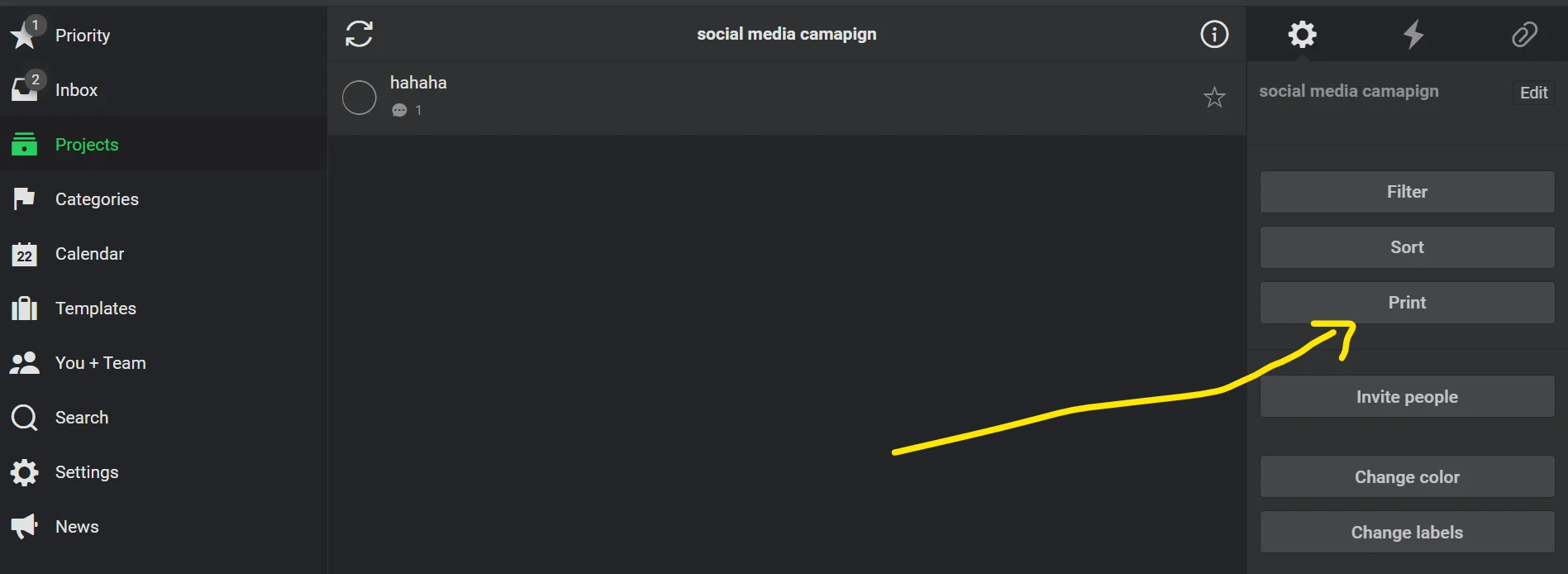
The target was a productivity app with a feature to create and manage projects. Among its features was a button that prints the projects created on the account: clicking it produced a PDF containing the project. The researcher spent almost 8+ hours exploring the app's features before noticing that button. The app is referred to throughout as app.target.com.
Setup
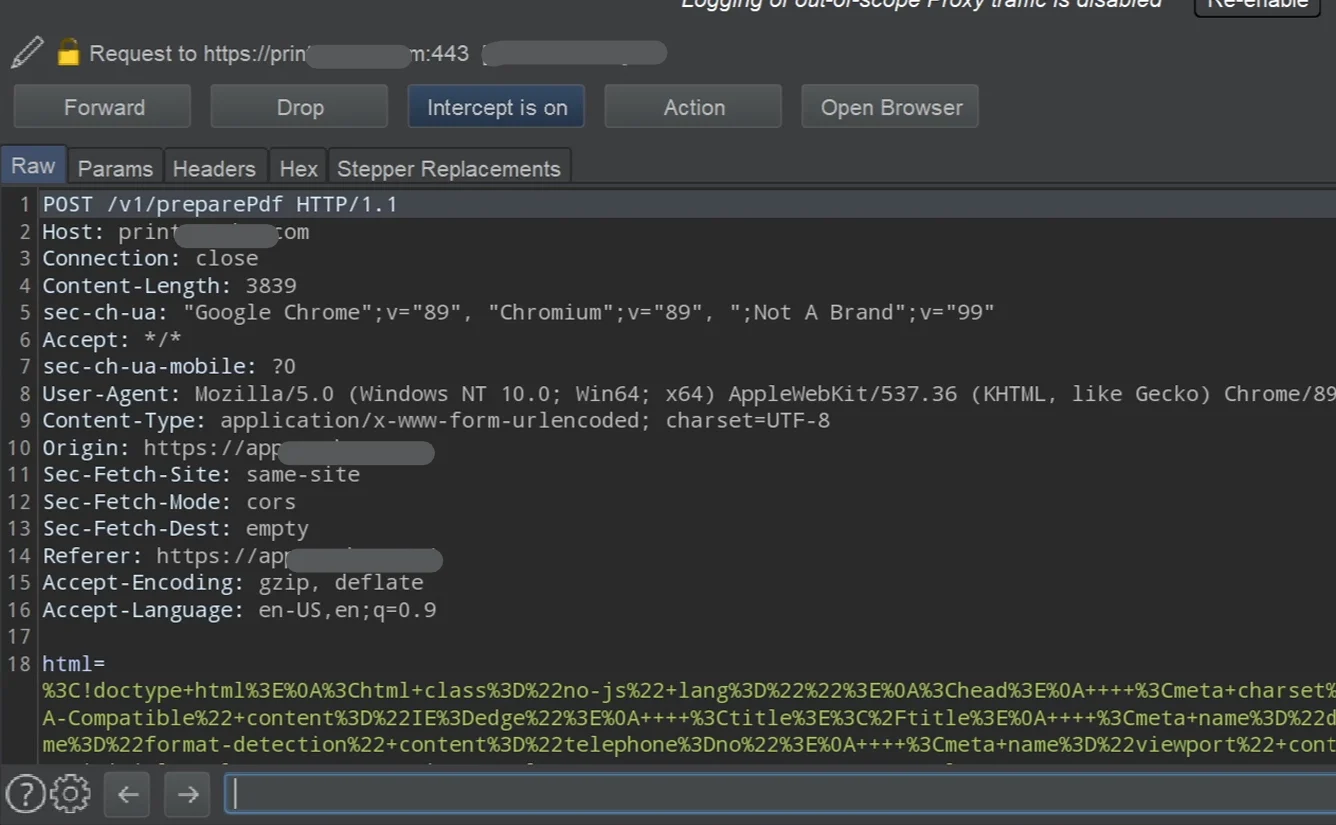
The only tool mentioned is Burp Suite, used to intercept the HTTP request sent to the server when the Print button is clicked. No account details, roles, versions or other preconditions are given in the report.
Finding it
Clicking the print button generated a PDF with the project in it. That was enough to open Burp Suite and look at the request behind the button. The intercepted request contained an html parameter holding a whole bunch of HTML code, from which the server generates the PDF.
Exploitation
Step 1: confirm the html parameter is reflected into the PDF
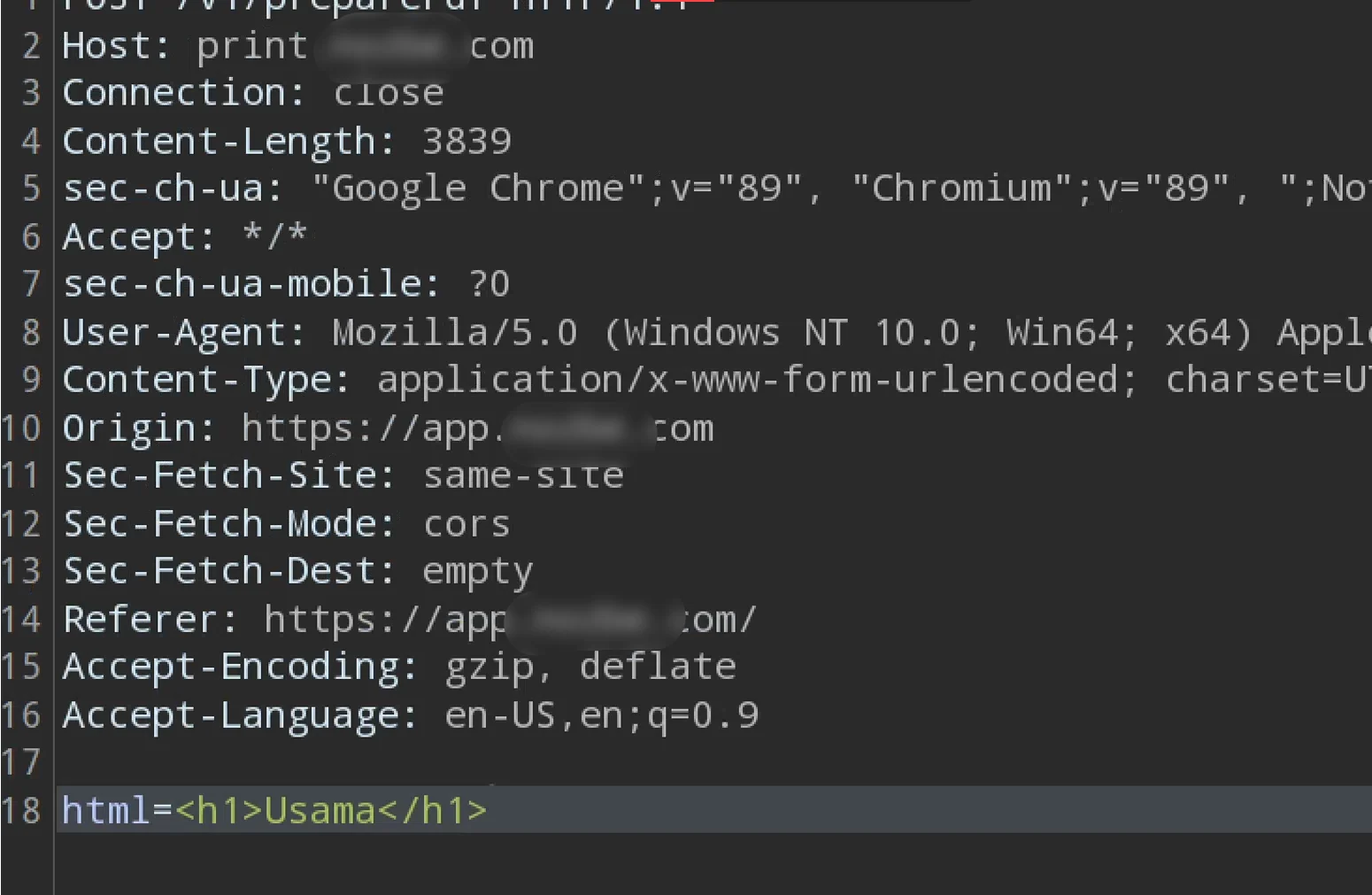
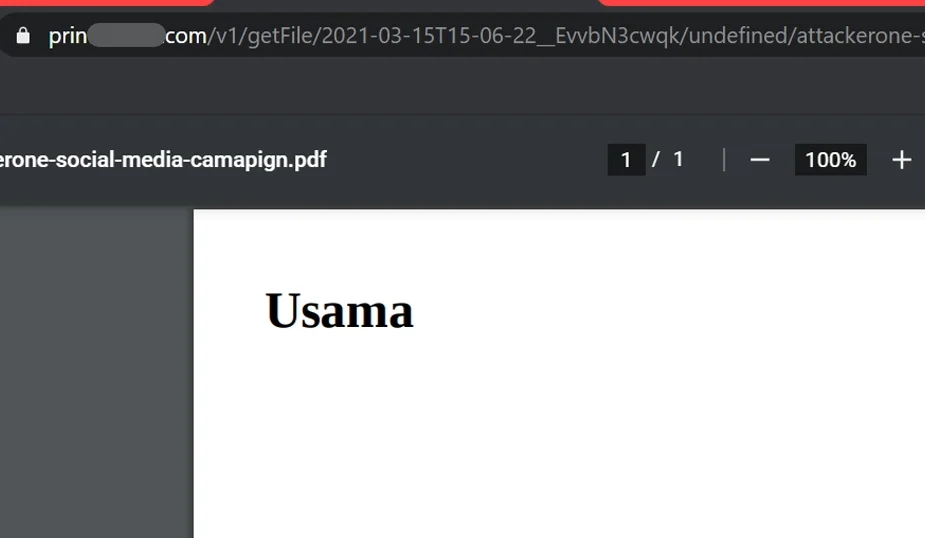
The researcher sent the request with some random HTML code as the html parameter value. The server generated the PDFs successfully.
Step 2: embed an external site with an iframe
Next, an iframe tag was sent as the html parameter's value, pointing at the researcher's personal website:
<iframe src=https://www.usamav.dev width=100% height=100%>
The generated PDF contained the personal website embedded in it.
Step 3: read a local file
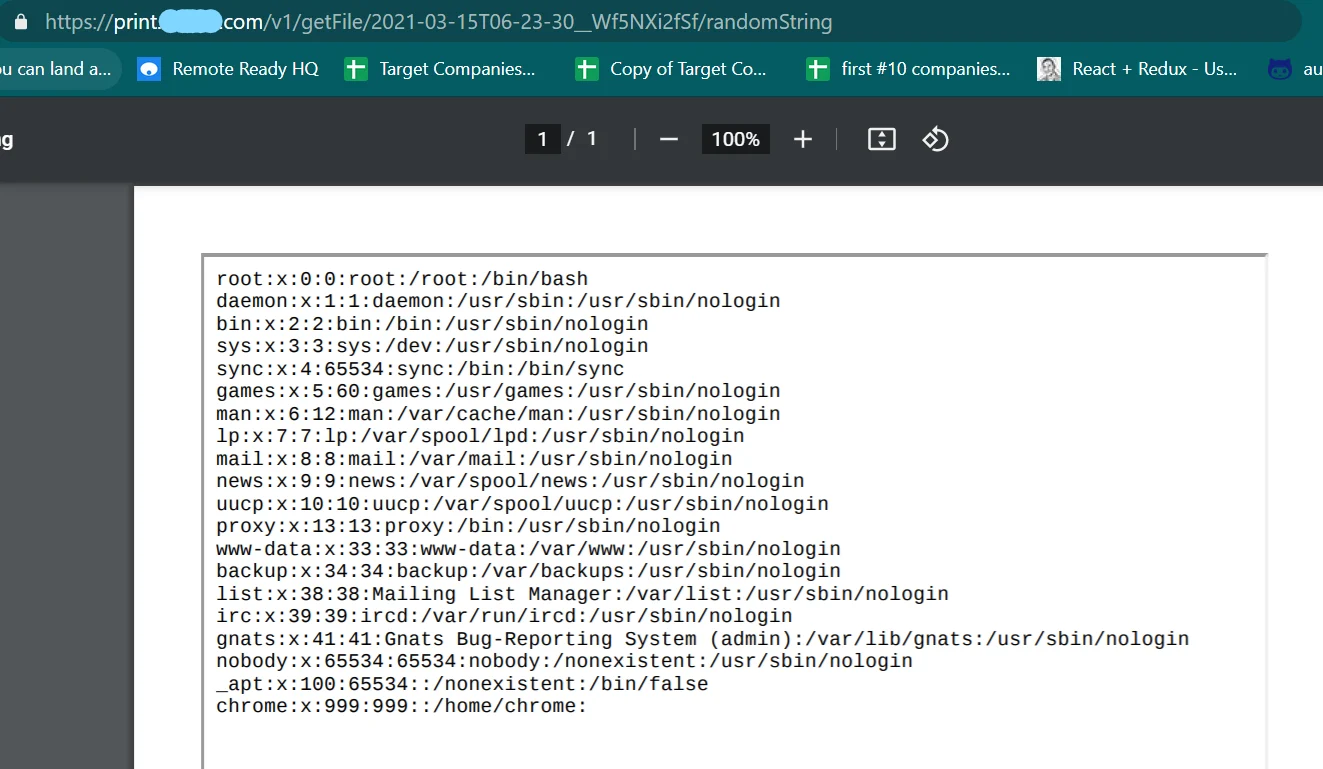
The next step was to access internal files using <iframe> tags, starting with /etc/passwd:
<iframe src=file:///etc/passwd width=100% height=100%>
This generated a PDF with the file's content.
Step 4: reach the AWS EC2 instance metadata
The target was running on an AWS EC2 server, so the researcher moved on to the EC2 instance metadata. The report quotes the AWS documentation:
"To view all categories of instance metadata from within a running instance, use the following URI. http://[redacted]/latest/meta-data/. The IP address [redacted] is a link-local address and is valid only from the instance."
The metadata URI was embedded in the PDF with an iframe tag:
<iframe src="http://[redacted]/latest/meta-data"+width="100%"+height="100%"></iframe>
This was also successful: the PDF came back with the metadata in it.
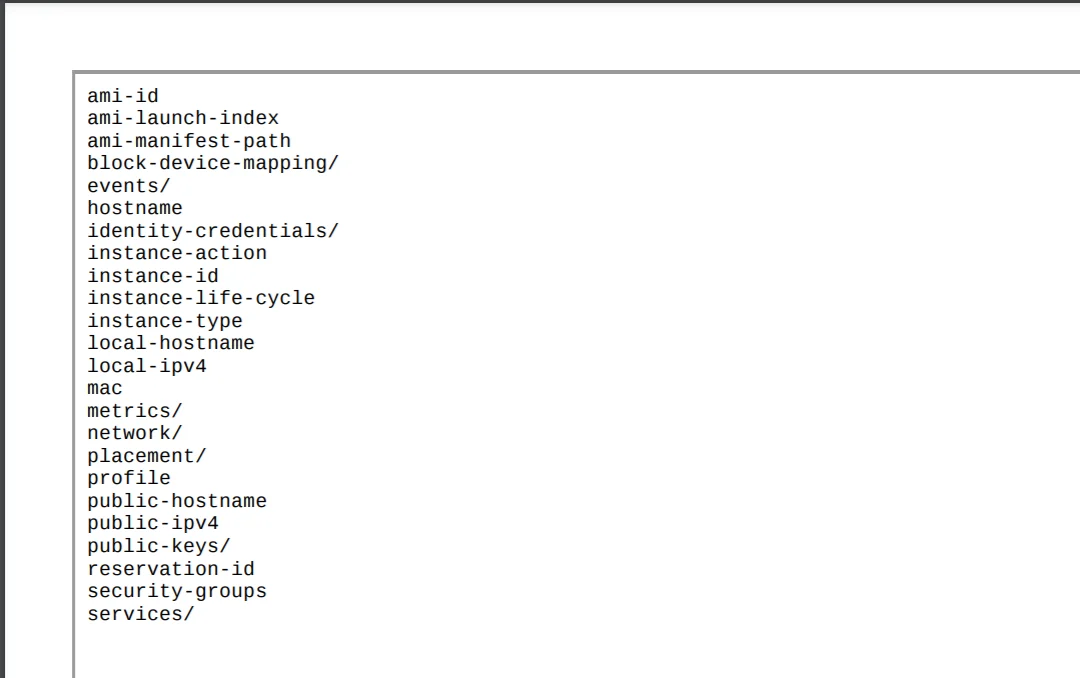
Through this, the researcher was able to access confidential data such as secret_key, private access key, internal server files, mac address, user details and instance details.
Step 5: automate the two-step retrieval
The process took longer than expected because of how the PDF is retrieved. Whenever a request with the HTML code is sent to the server, the server returns a unique code for that PDF; to access the generated PDF, that unique code has to be copied and pasted on another endpoint of the API. To automate this boring task, the researcher wrote a quick Python script for the PDF generation and sent it along with the report. The report does not include the script.
Root cause
The server takes the user-supplied html parameter and renders it into a PDF, and the PDF renderer resolves the resources referenced by tags in that HTML. Because iframe sources are fetched by the server-side renderer rather than by the user's browser, an attacker can make the server request arbitrary URLs: external sites, file:// paths on the host, and the link-local metadata address [redacted]. The report states plainly that there were no filtering or firewalls on the target. The report does not describe any code-level validation.
Impact
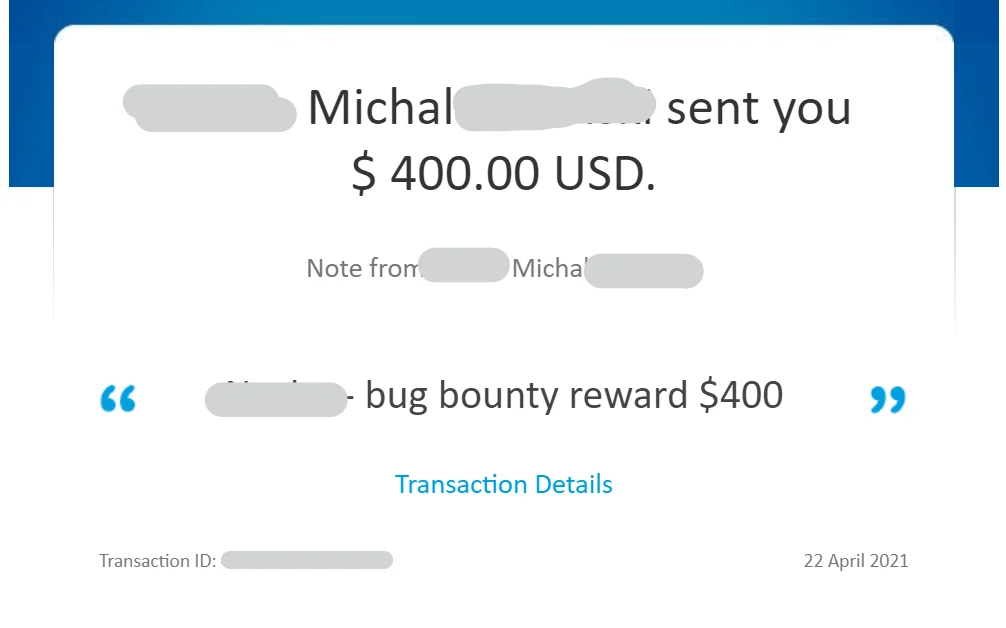
An attacker who can submit the print request can make the server fetch internal and link-local resources and read the results back in the generated PDF. In this case that exposed AWS instance metadata, including secret_key, private access key, internal server files, mac address, user details and instance details. The researcher notes that the bug was not a critical finding as expected, and the bounty was $400, received on 22nd April 2021. The report does not state which users or roles could reach the print feature.
Fix
Based on the root cause, the renderer should not be allowed to resolve arbitrary schemes or destinations from user-supplied HTML: restrict sources to expected values, block file:// and link-local addresses such as [redacted], and, where the metadata service is reachable, enforce IMDSv2 so a simple GET from the renderer is not enough.
Variants to test
- Other HTML-to-PDF or HTML-to-image features (invoices, reports, tickets, receipts). Send an
iframeorimgpointing at an external host you control; a positive result is a request arriving at your host from the server, or the fetched content appearing in the output. - Local file reads. Use
file:///etc/passwd(or a Windows equivalent) as the source; a positive result is the file's content rendered in the document. - Cloud metadata. Point the source at
http://[redacted]/latest/meta-data/; a positive result is metadata appearing in the output. On providers that require a token, check whether the renderer can be made to send the required header. - Internal services. Reference internal hostnames or loopback addresses; a positive result is content or an error page from an internal service appearing in the document.
- Redirect-based bypasses. If direct destinations are blocked, host a URL that redirects to the internal target; a positive result is the internal content appearing despite the filter.

What happened, in plain words
A security researcher found a bug in a web app that lets you create and manage projects. The app had a button that printed your projects into a PDF file. Behind that button, the app was taking a chunk of HTML (the code that web pages are made of) from the request and turning it into a PDF on the server. Because there was no filtering or firewall on the target, the researcher could put special tags in the HTML that made the server fetch things it should never have fetched: a website on the internet, a file on the server's own disk, and finally a special address that cloud servers use to hand out their own secret configuration. That last one exposed confidential data such as secret keys and access keys. The researcher reported it, and received a $400 bounty on 22nd April 2021.
This article walks through the same steps in the same order, explaining every idea from scratch. If you can use a browser, you can follow it.
The ideas you need before we start
A few words come up again and again, so here they are in plain language.
- A web app is a program you use through your browser. You click buttons, fill in forms, and the browser quietly sends messages to a computer somewhere else (the server) asking it to do things.
- A request is one of those messages. When you click a button, your browser sends a request to the server, and the server sends back a response, which is usually a web page or a file.
- An API is the part of a web app that answers those requests with data or files rather than pretty pages. Think of a restaurant: the dining room is the website you see, and the kitchen door where orders go in and dishes come out is the API. You do not have to see the kitchen to order food, but you can still talk to it.
- HTML is the language web pages are written in. It is made of tags, which are instructions in angle brackets like
<iframe>. A tag tells the browser (or a server) to do something, such as show an image or embed another page. - A parameter is a named piece of information sent along with a request. If a request is an envelope, parameters are the labelled items inside it, such as
name=Usamaorhtml=<p>hello</p>. The server reads the label and uses the value. - A PDF is a document file format that looks the same on every computer. Many apps let you export things as PDFs.
- Burp Suite is a tool that sits between your browser and the server. It lets you pause a request, look at exactly what your browser was about to send, change it, and send it on. Think of it as opening the envelope, reading the letter, rewriting it, and sealing it again before it reaches the kitchen.
- SSRF stands for Server-Side Request Forgery. It means tricking the server into making a request on your behalf, to a place you are not allowed to reach yourself. You are not breaking into the server directly; you are asking it politely to go and fetch something for you, and it does.
- An iframe is an HTML tag that embeds one web page inside another.
<iframe src="...">means "show whatever is at this address inside a little window here". file://is the way to point at a file on the local computer's disk instead of at a website.file:///etc/passwdmeans "the file called passwd in the etc folder on this machine".- AWS EC2 is Amazon's service for renting computers in the cloud. Each rented computer is called an instance.
- Instance metadata is a small internal service that every AWS instance can ask for information about itself: its identity, its network details, and sometimes credentials. It is meant only for the instance itself, never for the outside world.
- A link-local address is a special network address that only works from the machine it belongs to.
[redacted]is the one AWS uses for metadata. From your own laptop it means nothing; from inside an AWS instance it is the front door to that instance's own information. - A secret key or access key is a long password-like string that lets a program prove who it is to a cloud service. If someone else gets it, they can act as that program.
With those in hand, the story makes sense.
The target and the feature
The target was a productivity app, a place to create and manage projects. The researcher spent almost 8+ hours exploring the app's features before noticing a button that prints the projects created on the account. Clicking it produced a PDF containing the project.
Why does a print button matter? Because printing means the server has to build a document for you. Building a document means the server is doing work on your behalf, and any time a server does work on your behalf, it is worth asking: what exactly is it building, and from what?
Looking behind the button
Clicking the button generated a PDF with the project in it. That was enough to open Burp Suite and look at the request behind the button. The researcher intercepted the HTTP request sent to the server when the Print button is clicked.
The request contained an html parameter holding a whole bunch of HTML code, from which the server generates the PDF.
This is the key observation. The app is not building the PDF from your project data on its own. It is taking HTML that arrives in the request and turning that into a PDF. In other words, the customer is handing the kitchen a recipe and the kitchen is cooking it without reading it first.
Step 1: confirm the html parameter is used as the document source
Before exploiting anything, you confirm the behaviour. The researcher sent the request with some random HTML code as the html parameter value, and the server generated the PDFs successfully.
Why this step? Because a parameter appearing in a request does not prove the server uses it. Maybe it is ignored, or logged, or overwritten. By sending HTML as the parameter value and seeing PDFs generated, the researcher showed the value reaches the document. That is the difference between a guess and a finding.
Step 2: make the server fetch an external website
Next, an iframe tag was sent as the html parameter's value, pointing at the researcher's personal website:
<iframe src=https://www.usamav.dev width=100% height=100%>
Line by line:
<iframestarts an iframe tag, which embeds another page inside the current one.src=https://www.usamav.devis the address of the page to embed.srcis short for source.width=100% height=100%asks for the embedded window to fill the whole width and height of the document.>closes the tag.
The generated PDF contained the personal website embedded in it.
Why this step? Because it answers a crucial question: when the server builds the PDF, does it go out and fetch the addresses mentioned in the HTML? If the answer is yes, then the server is making requests chosen by whoever sent the HTML. That is the definition of SSRF. The researcher used their own website because it is a place they control and can recognise: if it shows up in the PDF, the server definitely went and got it.
Step 3: read a file on the server's own disk
Now that the server fetches what the HTML says, the next question is how far that reach goes. The next step was to access internal files using <iframe> tags, starting with /etc/passwd:
<iframe src=file:///etc/passwd width=100% height=100%>
Line by line:
<iframestarts the embedding tag again.src=file:///etc/passwdtells it to load a file from the local disk instead of a website.file://means "this machine's filesystem", and/etc/passwdis a standard file on Linux systems that lists user accounts.width=100% height=100%makes the embedded window fill the document.>closes the tag.
This generated a PDF with the file's content.
Why this step? Because fetching a public website is interesting but not necessarily harmful. Fetching a file that only exists on the server's own disk is a different matter: it means the server will read its own private files and hand them back to you inside a PDF. /etc/passwd is the classic first file to try because it is present on almost every Linux machine and its contents are easy to recognise.
Step 4: reach the cloud server's own metadata
The target was running on an AWS EC2 server, so the researcher moved on to the EC2 instance metadata. The report quotes the AWS documentation:
"To view all categories of instance metadata from within a running instance, use the following URI. http://[redacted]/latest/meta-data/. The IP address [redacted] is a link-local address and is valid only from the instance."
In plain words: every AWS instance has a little information desk at the address [redacted]. Only the instance itself can walk up to that desk. Outsiders cannot reach it, which is exactly why it is interesting: if you can make the server walk up to the desk for you, you get information you could never get yourself.
The metadata URI was embedded in the PDF with an iframe tag:
<iframe src="http://[redacted]/latest/meta-data"+width="100%"+height="100%"></iframe>
Line by line:
<iframestarts the embedding tag.src="http://[redacted]/latest/meta-data"is the address to fetch: the metadata desk of the instance. The quotes around the value are just how the attribute is written here.+width="100%"+height="100%"sets the size of the embedded window. The+characters appear between the attributes exactly as they were sent in the request.></iframe>closes the tag properly this time, with a matching end tag.
This was also successful. The researcher immediately got the PDF with the metadata in it.
Why this step? Because the metadata desk is where cloud instances keep the information that lets them prove who they are. If the server will fetch that address for you, the PDF becomes a window into the instance's identity. Through this, the researcher was able to access confidential data such as secret_key, private access key, internal server files, mac address, user details and instance details.
Step 5: automating the two-step retrieval
The whole process took a little while longer than expected. Whenever a request with the HTML code is sent to the server, the server returns a unique code for that PDF. To access the generated PDF, that unique code has to be copied and pasted on another endpoint of the API.
Think of it like a cloakroom: you hand in your coat, you get a ticket with a number, and later you hand the ticket back to collect the coat. Here, the first request hands in the HTML and gets back a ticket; the second request hands in the ticket and gets back the PDF. Doing that by hand for every test is slow and error-prone.
To automate this boring task, the researcher wrote a quick Python script for the PDF generation and sent it along with the report. The report does not include the script.
Why this step? Because testing is repetition. Every new address you want the server to fetch means another two requests and another copy-paste. A script turns a minute of clicking into a second of waiting, and it also makes the finding easy for the security team to reproduce.
Reporting it and the outcome
The researcher spent almost 1 day alone writing the bug report and sent it to the responsible security team. Within a few hours, they responded. The Python script was sent along with the report. It was the researcher's first ever SSRF finding on a real-world target.
Although, the bug was not a critical finding as expected.
And finally, the bounty amount of $400 was received on 22nd April 2021.
Why it worked
The server takes the user-supplied html parameter and renders it into a PDF, and the resulting PDFs contained the resources referenced by tags in that HTML. Because iframe sources are fetched by the server-side renderer rather than by the user's browser, an attacker can make the server request arbitrary URLs: external sites, file:// paths on the host, and the link-local metadata address [redacted]. The report states plainly that there were no filtering or firewalls on the target, so nothing blocked the scheme or the destination. The report does not describe any code-level validation.
In everyday terms: the app accepted a recipe from the customer, cooked it exactly as written, and did not check whether the recipe said "go and fetch the safe keys from the back office". The kitchen had the keys; the customer did not; the recipe bridged the gap.
What the fix would look like
The report does not say what the vendor changed. Based on the root cause, the renderer should not be allowed to resolve arbitrary schemes or destinations from user-supplied HTML: restrict sources to expected values, block file:// and link-local addresses such as [redacted], and, where the metadata service is reachable, enforce IMDSv2 so a simple GET from the renderer is not enough.
Where else to look
If you want to try this kind of testing on a target you are allowed to test, these are the same ideas applied elsewhere.
- Other HTML-to-PDF or HTML-to-image features (invoices, reports, tickets, receipts). Send an
iframeorimgpointing at an external host you control; a positive result is a request arriving at your host from the server, or the fetched content appearing in the output. - Local file reads. Use
file:///etc/passwd(or a Windows equivalent) as the source; a positive result is the file's content rendered in the document. - Cloud metadata. Point the source at
http://[redacted]/latest/meta-data/; a positive result is metadata appearing in the output. On providers that require a token, check whether the renderer can be made to send the required header. - Internal services. Reference internal hostnames or loopback addresses; a positive result is content or an error page from an internal service appearing in the document.
- Redirect-based bypasses. If direct destinations are blocked, host a URL that redirects to the internal target; a positive result is the internal content appearing despite the filter.
Glossary
- API: the part of a web app that answers requests with data or files, as opposed to the pages you see in a browser.
- AWS EC2: Amazon's service for renting computers in the cloud; each rented computer is an instance.
- Burp Suite: a tool that sits between your browser and a server so you can pause, inspect and modify requests.
- Bounty: a payment made by an organisation to someone who reports a security bug to it.
file://: a way of pointing at a file on the local disk rather than at a website.- HTML: the language web pages are written in, made of tags in angle brackets.
- HTML-to-PDF: a feature that turns HTML code into a PDF document.
htmlparameter: the named value in the request that carries the HTML the server turns into a PDF.iframe: an HTML tag that embeds one page inside another.- IMDSv2: a stricter version of the AWS metadata service that requires a session token, so a simple fetch is not enough.
- Instance: one rented computer in a cloud service such as AWS EC2.
- Instance metadata: information an AWS instance can ask about itself, including credentials, reachable only from that instance.
- Link-local address: a network address that only works from the machine it belongs to;
[redacted]is AWS's metadata address. - Parameter: a named piece of information sent with a request, such as
html=.... - PDF: a document file format that looks the same on every computer.
- Request: a message your browser (or a tool) sends to a server asking it to do something.
- Response: what the server sends back, such as a page or a file.
- Server: the computer that runs a web app and answers requests.
- SSRF (Server-Side Request Forgery): tricking a server into making a request on your behalf to somewhere you cannot reach yourself.
- Tag: an instruction in HTML written in angle brackets, such as
<iframe>. - Unique code: the identifier the server returns for a generated PDF, which you then use on another endpoint to collect the file.



