IDOR Vulnerability in Banner Deletion
The banner deletion endpoint checks that the user has access to the supplied client and campaign but does not verify ownership of the specific banner being deleted. A Manager could therefore delete banners belonging to other Managers by supplying their own client and campaign identifiers alongside a victim's banner identifier.
 Originally disclosed on HackerOne
- Triaged in 2 hours
- Fixed in 18 hours
- Disclosed after 23 days
Summary
I found an IDOR vulnerability in Revive Adserver's banner deletion endpoint that lets any Manager delete banners belonging to other Managers. The code validates access to the parent campaign but doesn't check if the user owns the specific banner being deleted. This means Manager A can sabotage Manager B's ad campaigns by deleting their banners.
Description
The /www/admin/banner-delete.php endpoint is vulnerable to Insecure Direct Object Reference (IDOR). When I tested it, I could delete another manager's banners by manipulating the bannerid parameter while keeping my own valid clientid and campaignid.
Here's what happens: The endpoint checks if I have access to the client and campaign (lines 30-31), but it never verifies I own the specific banner I'm trying to delete (missing check at line 32). The code then loops through the provided banner IDs and deletes them without any ownership validation (lines 40-48).
I discovered this while comparing similar deletion endpoints. The campaign-delete.php file properly validates ownership inside the loop, but banner-delete.php doesn't.
Steps to Reproduce
Prerequisites
- Two Manager accounts (Manager A - attacker, Manager B - victim)
- Each manager has their own client, campaign, and banners
- Revive Adserver 6.0.1 running
Exploitation Steps
- Login as Manager A (attacker)
- Navigate to
http://localhost:8080/www/admin/ - Login with Manager A credentials
- Navigate to
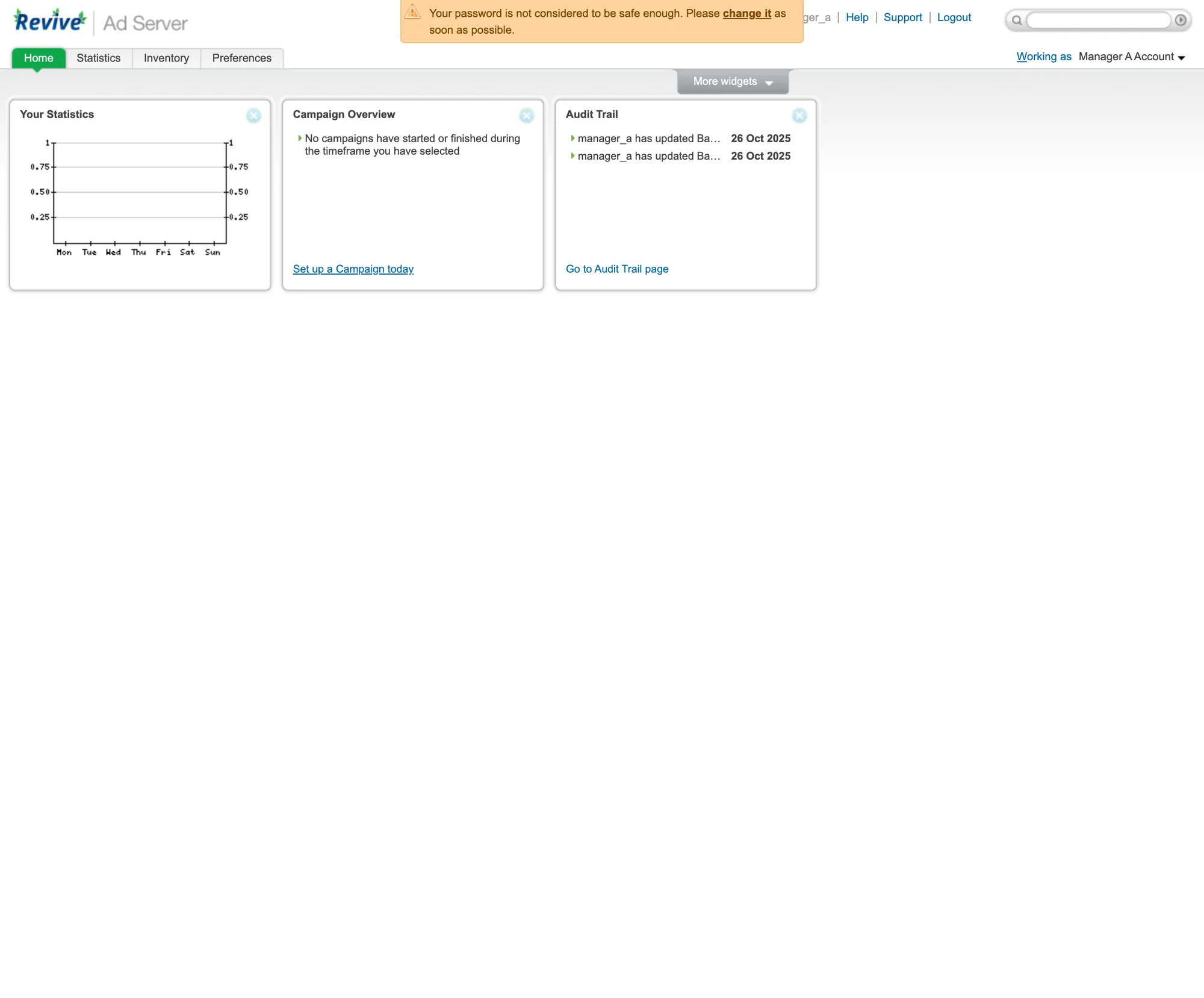
Manager A successfully authenticated and viewing dashboard
-
Navigate to your campaign's banner page
http://localhost:8080/www/admin/campaign-banners.php?clientid=100&campaignid=100(Use your own clientid and campaignid)
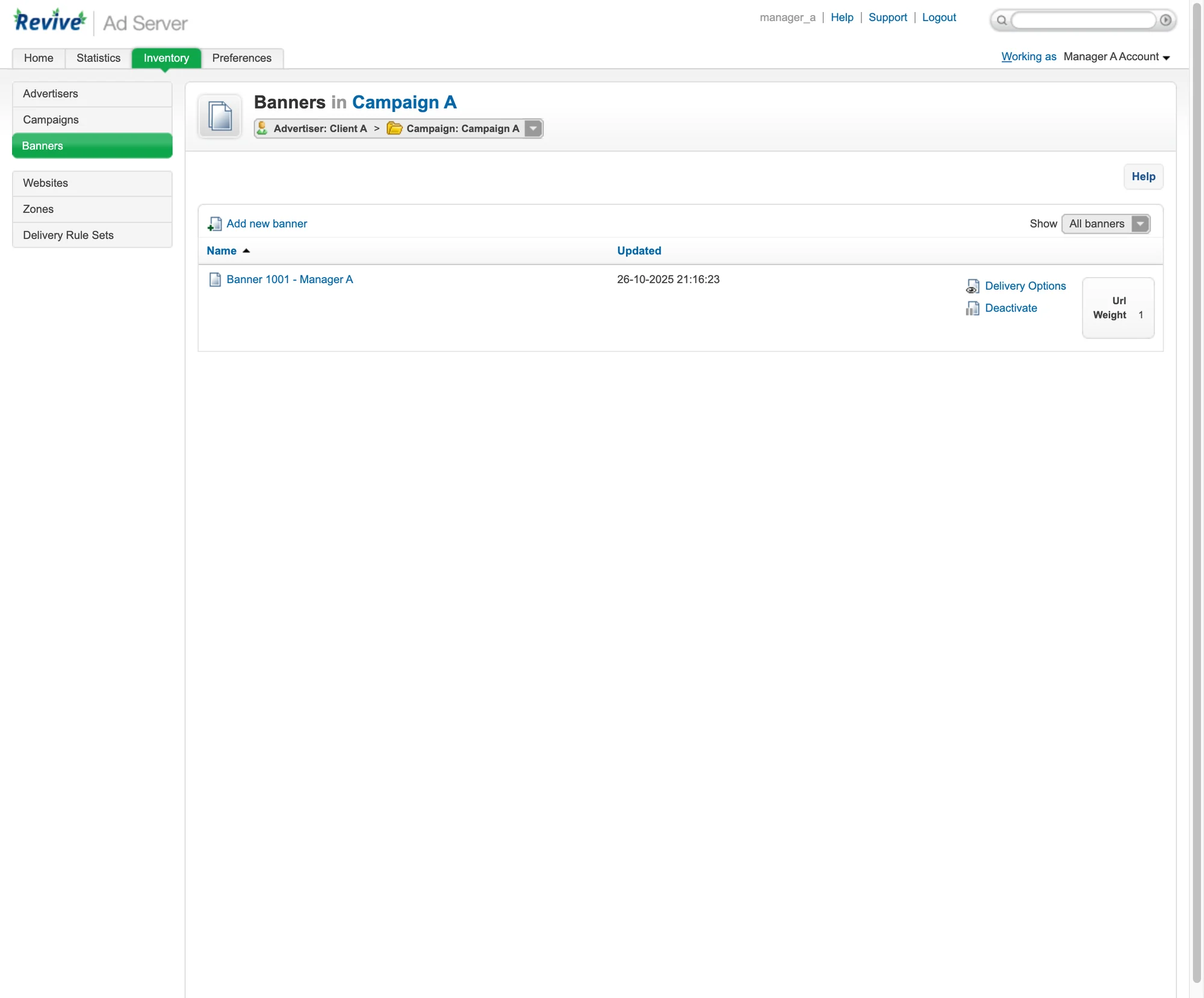
Manager A viewing their legitimate banner - note the CSRF token in the Deactivate link
-
Extract CSRF token
- Open browser DevTools → Network tab
- Look for any action link (Deactivate/Delete)
- Copy the
tokenparameter value (32-character hex string) - Example:
token=9fec0e8e46e9eb237d67d3da6e3e615b
-
Identify victim's banner ID
- Banner IDs are sequential integers
- You can enumerate them or get them through other means
- For this test: victim's banner ID is 2001
-
Craft malicious deletion URL
http://localhost:8080/www/admin/banner-delete.php?token=<YOUR_TOKEN>&clientid=100&campaignid=100&bannerid=2001token: Your valid CSRF token (from step 3)clientid=100: YOUR client ID (passes authorization check)campaignid=100: YOUR campaign ID (passes authorization check)bannerid=2001: VICTIM's banner ID (NO check!)
-
Execute the attack
- Paste the crafted URL into your browser's address bar
- Press Enter (within the same session)
- You'll get redirected with a "Banner has been deleted" confirmation
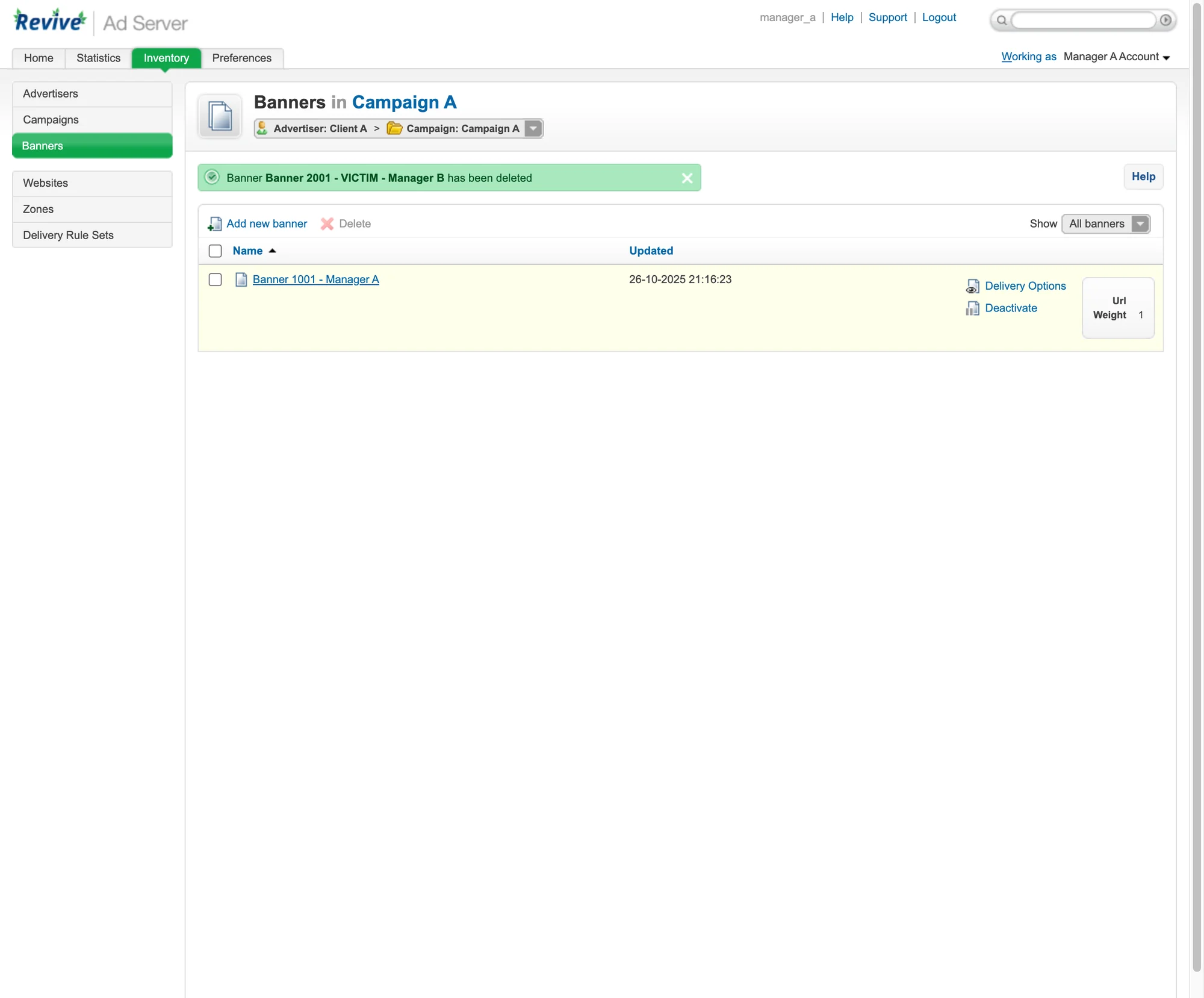
CRITICAL: Green success message confirms Manager B's banner was deleted by Manager A
Impact
This vulnerability allows horizontal privilege escalation between managers. Here's what an attacker can do:
- Campaign Sabotage - Delete competitors' banners to disrupt their ad campaigns
- Revenue Loss - Victims lose active advertisements and potential revenue
- Reputation Damage - Affected clients may lose trust in the platform
- Data Integrity Violation - Unauthorized deletion bypasses audit controls
Attack Characteristics
- Low Privilege Required: Only needs a Manager account (not Admin)
- Easy to Exploit: Simple parameter manipulation, no special tools needed
- Stealthy: Looks like a legitimate deletion in logs
- Scalable: Can be automated to delete multiple banners
- Cross-Context: Manager in Agency X can attack Manager in Agency Y
Context
Revive Adserver is an open source ad server, and the report concerns its administrative interface, specifically the banner deletion feature. Managers work inside the admin UI at /www/admin/, where they own clients, campaigns and banners. Deleting a banner is a normal housekeeping action: a manager opens a campaign's banner list and removes a banner that is no longer needed.
The endpoint that performs the deletion is /www/admin/banner-delete.php. It takes a CSRF token, a clientid, a campaignid and one or more bannerid values. The report describes what happens when the ownership of the banner is not checked against the ownership of the client and campaign.
Setup
The researcher used two Manager accounts and a local installation:
- Manager A, the attacker.
- Manager B, the victim.
- Each manager has their own client, campaign and banners.
- Revive Adserver 6.0.1 running at
http://localhost:8080.
No special tooling is needed beyond a browser and its DevTools. The attack is carried out by editing a URL.
Finding it
The researcher compared similar deletion endpoints. campaign-delete.php validates ownership inside its deletion loop, so a manager can only delete campaigns they own. banner-delete.php does not do the same for banners: it checks access to the parent client and campaign, but never checks that the specific banner being deleted belongs to the caller. That difference is what made the endpoint look wrong.
Exploitation
Step 1: Log in as Manager A
Navigate to the admin interface and authenticate with the attacker's credentials:
http://localhost:8080/www/admin/
The screenshot shows Manager A authenticated and viewing the dashboard.
Step 2: Open your own campaign's banner page
http://localhost:8080/www/admin/campaign-banners.php?clientid=100&campaignid=100
These are the attacker's own clientid and campaignid. The page lists the attacker's banners and contains action links (Deactivate, Delete) that carry a CSRF token.
The screenshot shows Manager A viewing a legitimate banner, with the CSRF token visible in the Deactivate link.
Step 3: Extract the CSRF token
Open the browser DevTools, go to the Network tab, and look at any action link (Deactivate or Delete). Copy the token parameter value, which is a 32-character hex string. The report gives this example:
[redacted]
This is the attacker's own valid token, taken from their own session and page.
Step 4: Identify the victim's banner ID
Banner IDs are sequential integers, so they can be enumerated or obtained through other means. In this test the victim's banner ID is 2001.
Step 5: Craft the deletion URL
http://localhost:8080/www/admin/banner-delete.php?[redacted]&clientid=100&campaignid=100&bannerid=2001
The parameters break down as follows:
token: the attacker's valid CSRF token from step 3.clientid=100: the attacker's own client ID, which passes the authorization check.campaignid=100: the attacker's own campaign ID, which also passes the authorization check.bannerid=2001: the victim's banner ID, which is not checked.
Step 6: Execute the attack
Paste the crafted URL into the browser's address bar and press Enter, within the same session. The application redirects with a "Banner has been deleted" confirmation.
The screenshot shows the green success message confirming that Manager B's banner was deleted by Manager A.
Root cause
The endpoint validates access to the parent client and campaign (lines 30-31 of the file) but never verifies that the caller owns the specific banner being deleted; the missing check is at line 32. The code then loops over the supplied banner IDs and deletes them without any ownership validation (lines 40-48). Because the client and campaign IDs in the request are the attacker's own, the authorization checks that do exist pass, and the banner ID is used as a direct object reference with no further validation.
The CSRF token does not help here: it is the attacker's own valid token, so it proves the request came from the attacker's session but says nothing about which banner the attacker may delete. The comparison with campaign-delete.php, which validates ownership inside the loop, shows that the intended pattern exists elsewhere in the codebase but was not applied to banner deletion.
Impact
The vulnerability allows horizontal privilege escalation between managers. According to the report, an attacker can:
- Campaign Sabotage: delete competitors' banners to disrupt their ad campaigns.
- Revenue Loss: victims lose active advertisements and potential revenue.
- Reputation Damage: affected clients may lose trust in the platform.
- Data Integrity Violation: unauthorized deletion bypasses audit controls.
The report lists these attack characteristics:
- Low Privilege Required: only a Manager account is needed, not Admin.
- Easy to Exploit: simple parameter manipulation, no special tools needed.
- Stealthy: the deletion looks like a legitimate one in the logs.
- Scalable: it can be automated to delete multiple banners.
- Cross-Context: a Manager in Agency X can attack a Manager in Agency Y.
Fix
The pattern it points to is the one already used in campaign-delete.php: validate ownership of each object inside the deletion loop, so that a banner is only deleted when it belongs to the client and campaign the caller is authorized for, rather than trusting the parent IDs alone.
Variants to test
- Other bulk deletion endpoints. Look for endpoints that accept a parent ID plus a list of child IDs, such as deleting zones, campaigns or trackers. A positive result is a success message after supplying your own parent ID and someone else's child ID.
- Single-object endpoints with a parent parameter. Any
*-delete.phpor*-edit.phpthat takes both a parent ID and an object ID is worth testing with a mismatched pair. A positive result is the object being changed or removed while the parent IDs belong to you. - Sequential identifier enumeration. Where IDs are sequential integers, try neighbouring values in the object parameter while keeping your own valid parent IDs and token. A positive result is a confirmation message for an object you do not own.
- Comparison across sibling endpoints. Where one deletion endpoint validates ownership inside its loop, check whether its siblings do the same. A positive result is a sibling endpoint that accepts a foreign object ID with your own parent IDs.
What happened, in plain words
Revive Adserver is a piece of software that websites use to show adverts. Think of it as a noticeboard manager: it stores the adverts (called banners), decides which ones appear where, and counts how often they are shown. People called Managers log into a private admin area to look after their own clients, campaigns and banners. A client is roughly "the company whose adverts these are", a campaign is "a group of adverts for one purpose", and a banner is "one actual advert image or piece of code".
The report is about the button, or rather the web address, that deletes a banner. Deleting a banner is ordinary housekeeping: a manager opens the list of banners in one of their campaigns and removes one that is no longer needed.
The problem is that the deletion page checks some things but not the most important one. It checks that you are allowed to touch the client and the campaign you name in the address. It never checks that the banner you are asking to delete actually belongs to that campaign. So a manager can put their own client and campaign in the address, put somebody else's banner number at the end, and the software deletes the other person's banner.
This kind of mistake has a name: an Insecure Direct Object Reference, or IDOR. "Direct object reference" means the software lets you point at a thing by its number (here, the banner number). "Insecure" means it does not check whether that thing is yours before acting on it. A simple comparison: imagine a hotel where the receptionist checks that you are a paying guest, then hands you a key to any room number you say out loud. You are a legitimate guest, so the first check passes, but nobody checks that room 214 is the room you booked.
The researcher needed only a browser. No special attack tools, no programming. The whole attack is editing a web address and pressing Enter.
Context
Revive Adserver is open source, which means its code is publicly available for anyone to read. The report concerns its administrative interface: the private pages that Managers use, which live under /www/admin/. Inside that area a Manager owns clients, campaigns and banners, and deleting a banner is a normal action performed from a campaign's banner list.
The page that performs the deletion is /www/admin/banner-delete.php. A .php file is a script that runs on the web server and produces a web page; the name tells you it is the script that handles banner deletion. It accepts four things in the address:
- a CSRF
token, - a
clientid, - a
campaignid, - one or more
banneridvalues.
A CSRF token is a short random string that the server gives your browser and expects back with actions that change something. Its purpose is to prove the request came from a page the server itself served to your session, rather than from a malicious page that tricked your browser. We will come back to why it does not save the day here.
The report describes what happens when the ownership of the banner is not checked against the ownership of the client and campaign.
Setup
The researcher used two Manager accounts and a local installation:
- Manager A, the attacker.
- Manager B, the victim.
- Each manager has their own client, campaign and banners.
- Revive Adserver 6.0.1 running at
http://localhost:8080.
localhost means "this computer"; 8080 is the port number the local web server listens on. Running the software locally means the researcher can test freely without touching a real installation.
No special tooling is needed beyond a browser and its DevTools. DevTools (developer tools) are the panel built into browsers, usually opened with F12, that let you inspect the page, the network requests it makes, and more. The attack is carried out by editing a URL.
Finding it
The researcher compared similar deletion pages. campaign-delete.php checks ownership inside its deletion loop, so a manager can only delete campaigns they own. banner-delete.php does not do the same for banners: it checks access to the parent client and campaign, but never checks that the specific banner being deleted belongs to the caller. That difference is what made the page look wrong.
"Parent" here means the container: a banner sits inside a campaign, and a campaign sits inside a client. Checking the parent is not the same as checking the child. If you are allowed into a building, that does not mean every locker inside it is yours.
Exploitation
Step 1: Log in as Manager A
Navigate to the admin interface and authenticate with the attacker's credentials:
http://localhost:8080/www/admin/
This address opens the admin area's front page. The researcher logs in as Manager A, the attacker, because every later step must happen inside a real, logged-in session. A session is the server's memory of "this browser is logged in as this user"; it is usually kept alive by a cookie, a small piece of data the browser stores and sends back with each request.
The screenshot shows Manager A authenticated and viewing the dashboard.
Step 2: Open your own campaign's banner page
http://localhost:8080/www/admin/campaign-banners.php?clientid=100&campaignid=100
Everything after the ? is the query string: a list of name=value pairs sent to the server. Here clientid=100 and campaignid=100 are the attacker's own client and campaign. The page lists the attacker's banners and contains action links (Deactivate, Delete) that carry a CSRF token.
Why open your own page first? Because you need a valid token, and the easiest place to get one is a page the server has just given you. You are not attacking anything yet; you are collecting the key the server expects.
The screenshot shows Manager A viewing a legitimate banner, with the CSRF token visible in the Deactivate link.
Step 3: Extract the CSRF token
Open the browser DevTools, go to the Network tab, and look at any action link (Deactivate or Delete). Copy the token parameter value, which is a 32-character hex string. The report gives this example:
[redacted]
Line by line: token= is the parameter name the server expects, and the long string after it is the value. "Hex" means hexadecimal, a way of writing numbers using the digits 0 to 9 and the letters a to f; 32 such characters is a common length for a random token. This is the attacker's own valid token, taken from their own session and page.
Why does this matter? Because the server will reject a deletion request without a valid token. The attacker is not stealing anyone's token; they are using their own, which is exactly the point: the token proves the request came from the attacker's session, and nothing more.
Step 4: Identify the victim's banner ID
Banner IDs are sequential integers, so they can be enumerated or obtained through other means. In this test the victim's banner ID is 2001.
"Sequential integers" means the numbers go 1, 2, 3 and so on as banners are created. "Enumerated" means trying numbers one after another to see which exist. If you know your own banner's number, guessing that the next one belongs to someone else is reasonable. The report also says the ID could be obtained through other means, without saying which.
Step 5: Craft the deletion URL
http://localhost:8080/www/admin/banner-delete.php?[redacted]&clientid=100&campaignid=100&bannerid=2001
The parameters break down as follows:
token: the attacker's valid CSRF token from step 3.<YOUR_TOKEN>is a placeholder; in the real request the long hex string goes there.clientid=100: the attacker's own client ID, which passes the authorization check.campaignid=100: the attacker's own campaign ID, which also passes the authorization check.bannerid=2001: the victim's banner ID, which is not checked.
Why mix your own IDs with someone else's? Because the checks that exist look only at the client and campaign. By supplying your own, you satisfy them. The banner number is the one value the software uses without asking whether it is yours. This is the whole trick: a valid key for the front door, and a room number that is not yours.
Step 6: Execute the attack
Paste the crafted URL into the browser's address bar and press Enter, within the same session. The application redirects with a "Banner has been deleted" confirmation.
"Within the same session" matters because the token and your login only work while you are logged in as Manager A. A redirect is the server telling the browser "go and show this other page", which is where the confirmation appears.
The screenshot shows the green success message confirming that Manager B's banner was deleted by Manager A.
Root cause
The page validates access to the parent client and campaign (lines 30-31 of the file) but never verifies that the caller owns the specific banner being deleted; the missing check is at line 32. The code then loops over the supplied banner IDs and deletes them without any ownership validation (lines 40-48). Because the client and campaign IDs in the request are the attacker's own, the authorization checks that do exist pass, and the banner ID is used as a direct object reference with no further validation.
A "loop" is code that repeats an action for each item in a list. Here it repeats the deletion for each banner ID supplied. The report says the code loops over the supplied banner IDs and deletes them.
The CSRF token does not help here: it is the attacker's own valid token, so it proves the request came from the attacker's session but says nothing about which banner the attacker may delete. The comparison with campaign-delete.php, which validates ownership inside the loop, shows that the intended pattern exists elsewhere in the codebase but was not applied to banner deletion.
In plain terms: the software asked "are you allowed in this building?" and forgot to ask "is this locker yours?".
Impact
The vulnerability allows horizontal privilege escalation between managers. "Privilege escalation" means gaining access you should not have; "horizontal" means moving sideways between users of the same level, rather than upwards to a more powerful role. Manager A does not become an administrator; they simply reach into Manager B's things.
According to the report, an attacker can:
- Campaign Sabotage: delete competitors' banners to disrupt their ad campaigns.
- Revenue Loss: victims lose active advertisements and potential revenue.
- Reputation Damage: affected clients may lose trust in the platform.
- Data Integrity Violation: unauthorized deletion bypasses audit controls.
"Data integrity" means data staying correct and unaltered; "audit controls" are the records and safeguards that let you tell who changed what.
The report lists these attack characteristics:
- Low Privilege Required: only a Manager account is needed, not Admin.
- Easy to Exploit: simple parameter manipulation, no special tools needed.
- Stealthy: the deletion looks like a legitimate one in the logs.
- Scalable: it can be automated to delete multiple banners.
- Cross-Context: a Manager in Agency X can attack a Manager in Agency Y.
"Logs" are the records a server keeps of what happened. The report says the deletion looks like a legitimate one in the logs. "Scalable" means the effort does not grow much with the number of targets: one request can carry several banner IDs, and requests can be repeated.
Fix
The pattern it points to is the one already used in campaign-delete.php: validate ownership of each object inside the deletion loop, so that a banner is only deleted when it belongs to the client and campaign the caller is authorized for, rather than trusting the parent IDs alone.
In everyday terms: before opening the locker, check the name on it against the name of the person asking.
Variants to test
These are ideas for where the same mistake might appear elsewhere. Each one is a way of asking "does this page check the child, or only the parent?"
- Other bulk deletion endpoints. Look for pages that accept a parent ID plus a list of child IDs, such as deleting zones, campaigns or trackers. A positive result is a success message after supplying your own parent ID and someone else's child ID.
- Single-object endpoints with a parent parameter. Any
*-delete.phpor*-edit.phpthat takes both a parent ID and an object ID is worth testing with a mismatched pair. A positive result is the object being changed or removed while the parent IDs belong to you. - Sequential identifier enumeration. Where IDs are sequential integers, try neighbouring values in the object parameter while keeping your own valid parent IDs and token. A positive result is a confirmation message for an object you do not own.
- Comparison across sibling endpoints. Where one deletion page validates ownership inside its loop, check whether its siblings do the same. A positive result is a sibling page that accepts a foreign object ID with your own parent IDs.
"Sibling endpoints" means pages that do similar jobs, such as deleting a campaign and deleting a banner. If one of them got the check right, the others are worth a look.
Glossary
- Ad server: software that stores adverts and decides which ones to show, where and when.
- Admin interface: the private, logged-in area of a web application where users manage their data.
- API: a defined way for one piece of software to ask another to do something; here, the web addresses the admin pages respond to.
- Audit controls: records and safeguards that let you tell who changed what, and when.
- Authorization: the check that a logged-in user is allowed to perform a particular action on a particular thing.
- Banner: one actual advert, such as an image or a snippet of code, managed inside a campaign.
- Campaign: a group of banners collected for one advertising purpose.
- Client: in Revive Adserver, the owner of campaigns and banners; a manager looks after one or more clients.
- Cookie: a small piece of data a website stores in your browser and gets back with later requests, often used to keep you logged in.
- CSRF token: a random string the server gives your session and expects back with actions that change something, to prove the request came from a page the server served to you.
- CVSS: a scoring system that rates the severity of a security flaw.
- Data integrity: the property that data stays correct and unaltered except by authorised changes.
- DevTools: the developer panel built into browsers, used to inspect pages and the network requests they make.
- Endpoint: a specific web address that performs a specific action on the server.
- Enumeration: trying values one after another, such as numbers, to discover which ones exist.
- Hex / hexadecimal: a way of writing numbers using 0 to 9 and a to f.
- Horizontal privilege escalation: reaching another user's data or actions while staying at the same permission level.
- IDOR (Insecure Direct Object Reference): a flaw where the software lets you name an object by its identifier without checking that the object is yours.
- Localhost: the name a computer uses for itself; a local installation runs on your own machine.
- Logs: records a server keeps of what happened.
- Loop: code that repeats an action for each item in a list.
- Manager: a Revive Adserver user role that looks after clients, campaigns and banners, below the Admin role.
- Open source: software whose code is publicly available to read.
- Parameter: a name=value pair in a web address or request that tells the server what you want.
- Parent / child: a container and the thing inside it, such as a campaign and its banners.
- PHP: a programming language commonly used to build web pages on the server.
- Port: a numbered channel on a computer that a network service listens on; 8080 is a common one for local web servers.
- Privilege escalation: gaining access or power you should not have.
- Query string: the part of a web address after the
?, made of parameters. - Redirect: the server telling the browser to go and show a different page.
- Root cause: the underlying reason a flaw exists, as opposed to its symptoms.
- Scalable: able to affect many targets without much extra effort.
- Sequential integers: whole numbers that follow one another, such as 1, 2, 3.
- Session: the server's memory of who is logged in from a given browser.
- Sibling endpoints: pages that perform similar jobs, such as two different delete pages.
- Stealthy: hard to notice, here because the action resembles a normal one in the records.
- Token: a short string used to prove something, such as that a request came from your session.
- URL: the address of a page or resource on the web.
- Victim: the person whose data or actions are affected by an attack.