Stored XSS in Conversion Statistics via Tracker Name
Tracker names in Revive Adserver were output without HTML escaping on the conversion statistics page, allowing an advertiser to store a script that runs in an admin's browser. The attacker could steal the admin's session cookies and take over the admin account.
 Originally disclosed on HackerOne
- Triaged in 13 hours
- Fixed in 39 hours
- Disclosed after 24 days
I found stored XSS on the conversion statistics page. Advertisers can inject malicious JavaScript through tracker names, which executes when admins view conversion reports (www/admin/stats-conversions.php:356). I was able to steal admin session cookies using this vulnerability. This is a privilege escalation problem: low-privilege advertiser accounts can compromise high-privilege admin accounts.
--
Affected System
- Product: Revive Adserver
- Version Tested: 6.0.1
- Component: Statistics / Conversion Reports
- File:
www/admin/stats-conversions.php:356 - URL:
http://[host]/www/admin/stats-conversions.php?clientid=[id]
Vulnerable Code
// www/admin/stats-conversions.php:356
echo "<td align='$phpAds_TextAlignLeft' style='padding: 0 4px'>{$conversion['trackername']}</td>
      <td align='$phpAds_TextAlignLeft' style='padding: 0 4px'>{$conversion['campaignid']}</td>
      <td align='$phpAds_TextAlignLeft' style='padding: 0 4px'>{$conversion['campaignname']}</td>";
The Problem:
- Tracker names are output directly without
htmlspecialchars()escaping - The data comes from advertiser-controlled input (tracker creation form)
- No input validation strips HTML tags at storage time
- Admins viewing conversion reports execute the payload in their browser context
How I Reproduced It
Prerequisites:
- Advertiser account (low privileges)
- Admin account to view the report (for testing impact)
Steps:
- Login as advertiser and create a malicious tracker:
- Navigate to: Inventory → Advertisers → Click your advertiser name (e.g., "Test Advertiser") → Trackers tab
- Click Add new tracker
- Set tracker name to:
HTML <img src=x onerror="alert('XSS: ' + document.cookie)"> - Set tracker type to "Sale" and status to "Active"
- Click Save Changes
- The tracker is now saved (tracker ID 1)
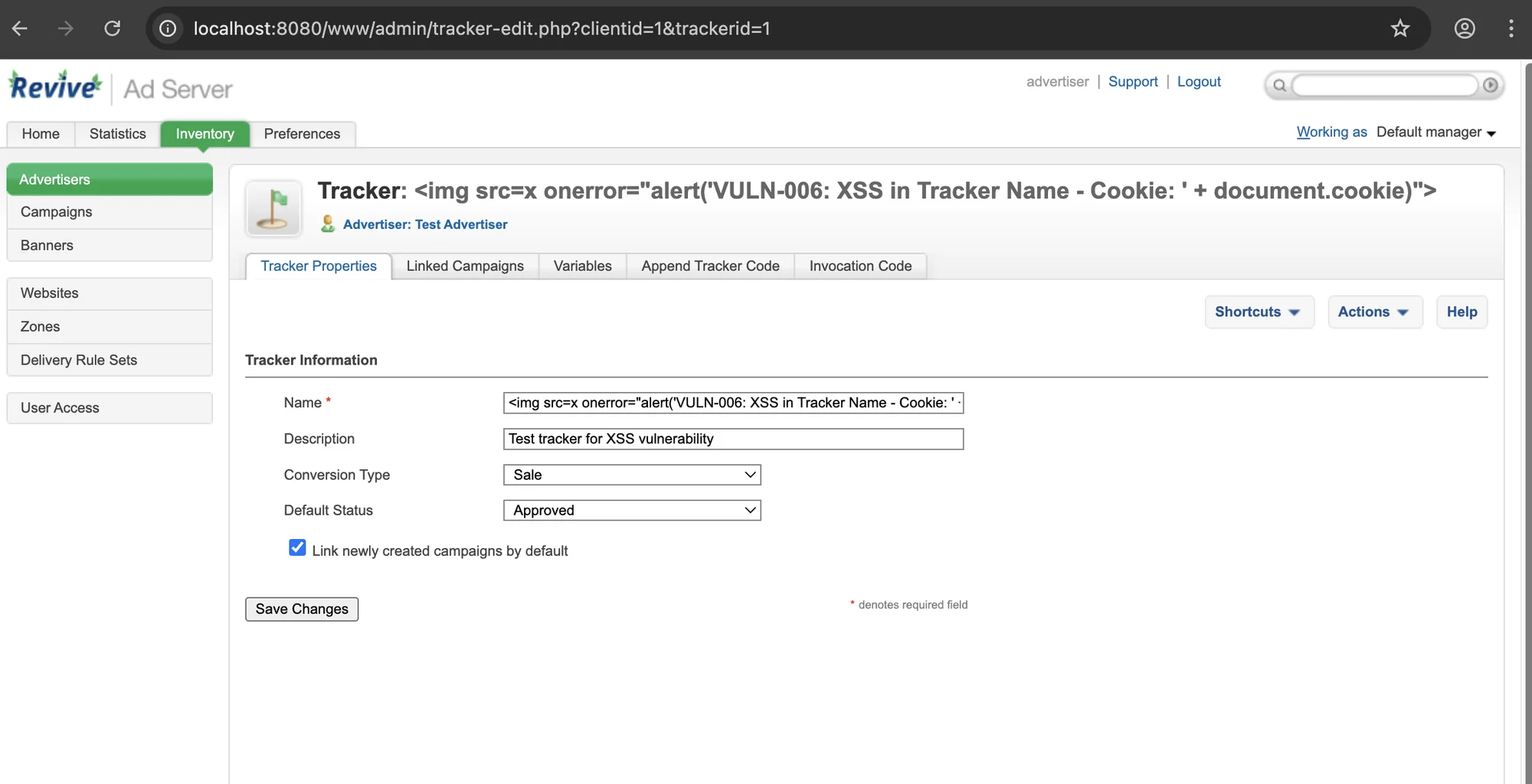
-
Create conversion records (via normal tracking or database):
SQL -- Link conversion to malicious tracker INSERT INTO rv_data_intermediate_ad_connection ( tracker_id, ad_id, inside_window, tracker_date_time, connection_date_time, connection_action, connection_status, updated ) VALUES (1, 1, 1, NOW(), NOW(), 1, 4, NOW()); -
Login as admin and navigate to:
http://[host]/www/admin/stats-conversions.php?clientid=1Note: This page may not be accessible via the menu in default/fresh installations. See "Menu Configuration Note" in the Notes section below for details.
-
Result: JavaScript alert fires immediately:
XSS: sessionID=abc123; ox_install_session_id=def456
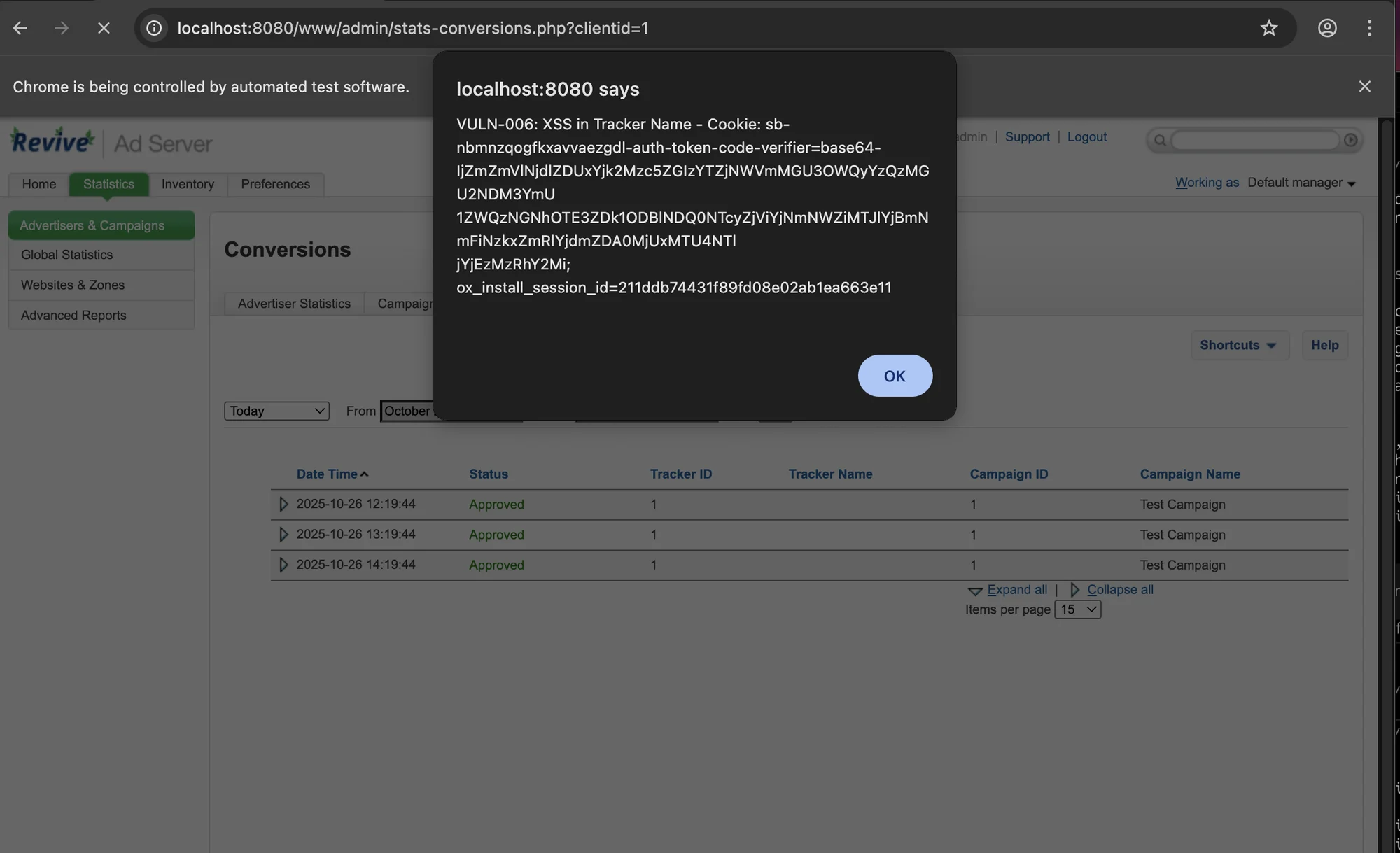
I confirmed the XSS executes in the admin's browser context with full cookie access. The payload persists - it fires every time any admin views conversion statistics for that advertiser.
Notes
Additional Findings:
While investigating this issue, I noticed:
- Lines 357-358 also lack
htmlspecialchars()oncampaignidandcampaignname - Campaign names are also user-controlled (by advertisers) and suffer from the same vulnerability
- Other
stats-*.phpfiles may have similar issues - I haven't audited them all yet
Testing Scope:
I tested this vulnerability in an isolated Docker environment using accounts I created. I did not:
- Test against production/public Revive Adserver installations
- Attempt actual exploitation beyond controlled PoC
- Exfiltrate or access any real user data
Menu Configuration Note:
Important: The stats-conversions.php page is not included in the default menu system on fresh Revive Adserver installations. During testing, I had to manually enable it by modifying lib/OA/Admin/Menu/config.php to add the menu entry:
$oMenu->addTo("2.1", new OA_Admin_Menu_Section("stats-conversions",
'Conversions', "stats-conversions.php?clientid={clientid}",
false, "statistics/conversions"));
This is likely a configuration issue rather than a security control, as:
- The code-level permission check (
OA_Permission::enforceAccount) allows advertiser/manager access - Other statistics pages with similar data are accessible
- The vulnerable code exists regardless of menu visibility
Impact
An advertiser (or compromised advertiser account) can inject persistent XSS that executes when admins view conversion statistics. I successfully captured admin session cookies, which enable full account takeover. The attacker can then create admin accounts, modify campaigns, access all advertiser data, or inject code affecting all users. This works because advertisers routinely create trackers, and admins routinely review conversion statistics - no unusual behavior required.
Context
Revive Adserver is an open source ad server. Advertisers use it to define campaigns and trackers, and administrators review the resulting statistics, including conversion reports. The conversion statistics page renders, for each conversion, the tracker name, the campaign ID and the campaign name in an HTML table.
The report targets that page, www/admin/stats-conversions.php, and specifically line 356. The researcher tested version 6.0.1 of the product, with the component described as Statistics / Conversion Reports. The page is reached at a URL of the form:
http://[host]/www/admin/stats-conversions.php?clientid=[id]
Setup
The researcher used two roles:
- An advertiser account, which has low privileges and is allowed to create trackers.
- An admin account, used to view the conversion report and observe the impact.
Testing was done in an isolated Docker environment with accounts the researcher created. The report states that no production or public Revive Adserver installation was tested, that exploitation did not go beyond a controlled proof of concept, and that no real user data was exfiltrated or accessed.
One precondition matters for reproducing the page: on a fresh installation, stats-conversions.php is not part of the default menu. The researcher had to enable it manually by editing lib/OA/Admin/Menu/config.php and adding a menu entry:
$oMenu->addTo("2.1", new OA_Admin_Menu_Section("stats-conversions",
'Conversions', "stats-conversions.php?clientid={clientid}",
false, "statistics/conversions"));
The researcher treats this as a configuration matter rather than a security control, for three reasons given in the report: the code-level permission check (OA_Permission::enforceAccount) allows advertiser and manager access, other statistics pages with similar data are accessible, and the vulnerable code exists regardless of whether the menu entry is visible.
Finding it
The researcher found stored cross-site scripting on the conversion statistics page. Advertisers can inject JavaScript through tracker names, and that script executes when an administrator views the conversion report. The researcher was able to steal admin session cookies this way, and frames the issue as privilege escalation: a low-privilege advertiser account can compromise a high-privilege admin account.
The vulnerable output is at www/admin/stats-conversions.php:356:
// www/admin/stats-conversions.php:356
echo "<td align='$phpAds_TextAlignLeft' style='padding: 0 4px'>{$conversion['trackername']}</td>
<td align='$phpAds_TextAlignLeft' style='padding: 0 4px'>{$conversion['campaignid']}</td>
<td align='$phpAds_TextAlignLeft' style='padding: 0 4px'>{$conversion['campaignname']}</td>";
The report lists four reasons this is wrong:
- Tracker names are output directly, without
htmlspecialchars()escaping. - The data comes from advertiser-controlled input, entered through the tracker creation form.
- No input validation strips HTML tags at storage time.
- Admins viewing conversion reports execute the payload in their own browser context.
Exploitation
Step 1: create a malicious tracker as an advertiser
Log in as the advertiser and navigate to Inventory → Advertisers → click your advertiser name (for example "Test Advertiser") → Trackers tab. Click Add new tracker and set the tracker name to:
<img src=x onerror="alert('XSS: ' + document.cookie)">
Set the tracker type to "Sale" and the status to "Active", then click Save Changes. The tracker is saved with tracker ID 1.
The payload is an image element whose src points at a non-existent resource, so the browser fires onerror. The handler reads document.cookie and shows it in an alert, which demonstrates that the script runs in the viewer's origin with access to cookies.
The screenshot shows the tracker creation step in the advertiser interface.
Step 2: create conversion records
A conversion record has to reference the malicious tracker for it to appear in the report. The researcher created one through normal tracking or directly in the database, with this statement:
-- Link conversion to malicious tracker
INSERT INTO rv_data_intermediate_ad_connection (
    tracker_id, ad_id, inside_window, tracker_date_time,
    connection_date_time, connection_action, connection_status, updated
) VALUES (1, 1, 1, NOW(), NOW(), 1, 4, NOW());
The row links tracker_id 1 (the malicious tracker) to ad_id 1, with the current timestamps. Once such a row exists, the tracker name is pulled into the conversion statistics output.
Step 3: view the report as an admin
Log in as the admin and navigate to:
http://[host]/www/admin/stats-conversions.php?clientid=1
As noted above, this page may not be reachable through the menu on a default or fresh installation; the menu entry had to be added for testing.
Step 4: observe execution
The JavaScript alert fires immediately, displaying the admin's cookies:
XSS: sessionID=abc123; ox_install_session_id=def456
The researcher confirmed that the script executes in the admin's browser context with full cookie access. The payload persists: it fires every time any admin views conversion statistics for that advertiser.
The screenshot shows the alert firing on the conversion statistics page.
Root cause
The tracker name is concatenated into the HTML table cell without escaping. The value is stored as the advertiser supplied it, and no validation removes HTML tags when the tracker is saved. When an administrator loads the conversion report, the stored markup is parsed by the browser as part of the admin page, so the event handler runs with the admin's session.
The report also notes that lines 357 and 358 lack htmlspecialchars() on campaignid and campaignname. Campaign names are likewise user-controlled by advertisers and suffer from the same vulnerability. The researcher adds that other stats-*.php files may have similar issues but had not audited them all at the time of writing.
Impact
An advertiser, or anyone who has compromised an advertiser account, can inject persistent XSS that executes when admins view conversion statistics. The researcher captured admin session cookies, which enable full account takeover. From there an attacker could create admin accounts, modify campaigns, access all advertiser data, or inject code affecting all users.
The attack requires no unusual behaviour: advertisers routinely create trackers, and admins routinely review conversion statistics. The report's impact statement is based on the controlled test in the isolated environment described above.
Fix
The report does not describe a patch or a code change made in response. A fix consistent with the root cause would be to escape the values at output with htmlspecialchars(), covering trackername, campaignid and campaignname on lines 356 to 358, and to review the other stats-*.php pages for the same pattern.
Variants to test
- Other columns in the same table. The report already flags
campaignidandcampaignnameas unescaped. A positive result is a campaign name containing markup that executes when the conversion report is opened. - Other statistics pages. The researcher suspected other
stats-*.phpfiles. Try advertiser-controlled names (campaigns, trackers, banners, websites, zones) in each statistics view; a positive result is script execution in the admin context. - Other advertiser-controlled fields rendered to admins. Any field an advertiser can set that later appears in an administrative report is a candidate. A positive result is the same stored execution pattern: save the payload as the advertiser, view the report as an admin, and see the handler run.
- Menu visibility as a false control. On installations where a statistics page is hidden from the menu, check whether the page is still reachable by URL and whether the permission check permits access. A positive result is that the page loads and renders stored data even though no menu entry exists.
What happened, in plain words
Revive Adserver is a piece of software that websites use to show adverts and to keep track of how those adverts perform. Think of it as a noticeboard manager: advertisers put up their adverts, and the people running the site (administrators, or admins) look at reports to see what happened. One of those reports is the conversion report, which counts things like sales or sign-ups that came from an advert.
A security researcher found that an ordinary advertiser, who is only supposed to manage their own adverts, could type a small piece of JavaScript (a program that runs inside a web browser) into a field called the tracker name. That text was saved and later shown, without any cleaning, on a page that admins use. When an admin opened that page, the JavaScript ran inside the admin's own browser, with the admin's permissions. The researcher used this to read the admin's session cookie, which is the little pass that proves you are logged in. With that pass, someone could act as the admin.
This kind of bug is called stored cross-site scripting, or stored XSS. "Stored" means the harmful text is saved on the server and shown to other people later, rather than being a one-off trick in a single link. The report calls it a privilege escalation problem: a low-privilege account (the advertiser) can take over a high-privilege account (the admin).
The product and the page
Revive Adserver is open source, meaning its code is public and anyone can read it. Advertisers use it to define campaigns (groups of adverts) and trackers (things that record whether an advert led to a sale or another action). Admins review the statistics that come out of this, including the conversion reports.
The conversion statistics page builds an HTML table, one row per conversion, and in each row it prints the tracker name, the campaign ID and the campaign name. HTML is the language web pages are written in; a table is just a grid of rows and cells.
The report focuses on one file, www/admin/stats-conversions.php, and specifically line 356. The researcher tested version 6.0.1 of the product, and describes the affected component as Statistics / Conversion Reports. The page is reached at a URL of this shape:
http://[host]/www/admin/stats-conversions.php?clientid=[id]
A URL is the address you type in a browser. The part after the question mark is called a query string, and it carries small pieces of information to the page. Here clientid tells the page which advertiser's conversions to show. [host] stands for the server's address and [id] stands for a number identifying the advertiser.
Setting up the test
The researcher used two accounts:
- An advertiser account. This has low privileges: it can create trackers and manage its own adverts, but it cannot administer the whole system.
- An admin account. This has high privileges and was used to open the conversion report and watch what happened.
All testing was done in an isolated Docker environment. Docker is a tool that runs a self-contained copy of software on your own computer, like a sandbox, so experiments cannot affect real websites. The accounts were created by the researcher. The report is explicit that no production or public Revive Adserver installation was tested, that the exploitation did not go beyond a controlled proof of concept, and that no real user data was taken or accessed.
There is one practical detail to know before reproducing the page. On a fresh installation, stats-conversions.php is not listed in the default menu, so you cannot simply click your way to it. The researcher enabled it by hand, editing a configuration file called lib/OA/Admin/Menu/config.php and adding a menu entry:
$oMenu->addTo("2.1", new OA_Admin_Menu_Section("stats-conversions",
    'Conversions', "stats-conversions.php?clientid={clientid}",
    false, "statistics/conversions"));
This is PHP, the programming language Revive Adserver is written in. The line takes the menu object, called $oMenu, and adds a new section to it. OA_Admin_Menu_Section creates the entry itself: "stats-conversions" is its internal name, 'Conversions' is the label a person sees, "stats-conversions.php?clientid={clientid}" is the address the entry links to, In short, the line makes a hidden page appear in the menu.
The researcher treats this as a configuration matter, not a security control. A security control is something deliberately built to stop unauthorised access, such as a password prompt. The report gives three reasons: the code-level permission check, OA_Permission::enforceAccount, allows advertiser and manager access; other statistics pages with similar data are reachable; and the vulnerable code exists whether or not the menu entry is visible. Hiding a door is not the same as locking it.
Finding the bug
The researcher found stored cross-site scripting on the conversion statistics page. Advertisers can inject JavaScript through tracker names, and that script runs when an administrator views the conversion report. The researcher stole admin session cookies this way and frames the issue as privilege escalation: a low-privilege advertiser account can compromise a high-privilege admin account.
The vulnerable output is at www/admin/stats-conversions.php:356:
// www/admin/stats-conversions.php:356
echo "<td align='$phpAds_TextAlignLeft' style='padding: 0 4px'>{$conversion['trackername']}</td>
      <td align='$phpAds_TextAlignLeft' style='padding: 0 4px'>{$conversion['campaignid']}</td>
      <td align='$phpAds_TextAlignLeft' style='padding: 0 4px'>{$conversion['campaignname']}</td>";
Line by line: echo is the PHP instruction that sends text to the browser. The text is a piece of HTML: <td ...> opens a table cell and </td> closes it. align and style are attributes that control how the cell looks. $phpAds_TextAlignLeft is a variable holding an alignment value. {$conversion['trackername']} inserts the tracker name into the cell, {$conversion['campaignid']} inserts the campaign ID, and {$conversion['campaignname']} inserts the campaign name. The important part is that these three values are dropped straight into the page with no cleaning.
The report lists four reasons this is wrong:
- Tracker names are output directly, without
htmlspecialchars()escaping.htmlspecialchars()is a PHP function that turns characters like<and>into harmless codes, so the browser shows them as text instead of treating them as HTML. - The data comes from advertiser-controlled input, entered through the tracker creation form.
- No input validation strips HTML tags when the data is stored.
- Admins viewing conversion reports run the payload in their own browser context. "Browser context" means the script runs as if it were part of the admin's page, with the admin's login and permissions.
Exploitation
Step 1: create a malicious tracker as an advertiser
Log in as the advertiser and navigate to Inventory → Advertisers → click your advertiser name (for example "Test Advertiser") → Trackers tab. Click Add new tracker and set the tracker name to:
<img src=x onerror="alert('XSS: ' + document.cookie)">
This is HTML. <img> is the tag for an image. src=x tells the browser to load the image from a location called x, which does not exist. onerror is an event handler: a piece of JavaScript the browser runs when something goes wrong, here when the image fails to load. The JavaScript is alert('XSS: ' + document.cookie). alert shows a pop-up box. document.cookie is the browser's way of reading the cookies for the current page, and the + joins the text 'XSS: ' with whatever the cookies contain. So the pop-up displays the viewer's cookies.
Set the tracker type to "Sale" and the status to "Active", then click Save Changes. The tracker is saved with tracker ID 1.
The screenshot shows the tracker creation step in the advertiser interface.
Step 2: create conversion records
For the tracker name to appear in the report, there has to be a conversion record that points at the malicious tracker. The researcher created one through normal tracking or directly in the database, with this statement:
-- Link conversion to malicious tracker
INSERT INTO rv_data_intermediate_ad_connection (
    tracker_id, ad_id, inside_window, tracker_date_time,
    connection_date_time, connection_action, connection_status, updated
) VALUES (1, 1, 1, NOW(), NOW(), 1, 4, NOW());
This is SQL, the language used to talk to a database, which is an organised store of data. INSERT INTO adds a new row to a table. The table is rv_data_intermediate_ad_connection, and the names in the first set of brackets are its columns: tracker_id, ad_id, inside_window, tracker_date_time, connection_date_time, connection_action, connection_status and updated. VALUES supplies the data for those columns in the same order: tracker 1, advert 1, 1 for inside_window, NOW() for the two timestamps (the current date and time), 1 for the action, 4 for the status, and NOW() again for updated. The first line, starting with --, is a comment and does nothing. The row links tracker_id 1, the malicious tracker, to ad_id 1. Once such a row exists, the tracker name is pulled into the conversion statistics output.
Step 3: view the report as an admin
Log in as the admin and navigate to:
http://[host]/www/admin/stats-conversions.php?clientid=1
This is the same page shape as before, with clientid=1 selecting the advertiser whose conversions are shown. As noted above, on a default or fresh installation the page may not be reachable through the menu; the menu entry had to be added for testing.
Step 4: observe execution
The JavaScript alert fires immediately, displaying the admin's cookies:
XSS: sessionID=abc123; ox_install_session_id=def456
This is the text the pop-up showed. sessionID and ox_install_session_id are cookie names, and the values after the equals signs are the cookie values. A session cookie is what a website gives your browser after you log in, so it can recognise you on the next page; anyone who copies it can often act as you.
The researcher confirmed that the script runs in the admin's browser context with full cookie access. The payload persists: it fires every time any admin views conversion statistics for that advertiser.
The screenshot shows the alert firing on the conversion statistics page.
Root cause
The tracker name is pasted into the HTML table cell without escaping. The value is stored exactly as the advertiser supplied it, and no validation removes HTML tags when the tracker is saved. When an administrator loads the conversion report, the stored markup is read by the browser as part of the admin page, so the event handler runs with the admin's session.
The report also notes that lines 357 and 358 lack htmlspecialchars() on campaignid and campaignname. Campaign names are likewise controlled by advertisers and suffer from the same vulnerability. The researcher adds that other stats-*.php files may have similar issues but had not audited them all at the time of writing.
Impact
An advertiser, or anyone who has taken over an advertiser account, can inject persistent XSS that runs when admins view conversion statistics. The researcher captured admin session cookies, which enable full account takeover. From there an attacker could create admin accounts, modify campaigns, access all advertiser data, or inject code affecting all users.
The attack needs no unusual behaviour: advertisers routinely create trackers, and admins routinely review conversion statistics. The impact statement is based on the controlled test in the isolated environment described above.
Fix
The report does not describe a patch or a code change made in response. A fix consistent with the root cause would be to escape the values at output with htmlspecialchars(), covering trackername, campaignid and campaignname on lines 356 to 358, and to review the other stats-*.php pages for the same pattern.
Variants to test
- Other columns in the same table. The report already flags
campaignidandcampaignnameas unescaped. A positive result is a campaign name containing markup that runs when the conversion report is opened. - Other statistics pages. The researcher suspected other
stats-*.phpfiles. Try advertiser-controlled names (campaigns, trackers, banners, websites, zones) in each statistics view; a positive result is script execution in the admin context. - Other advertiser-controlled fields shown to admins. Any field an advertiser can set that later appears in an administrative report is a candidate. A positive result is the same stored execution pattern: save the payload as the advertiser, view the report as an admin, and see the handler run.
- Menu visibility as a false control. On installations where a statistics page is hidden from the menu, check whether the page is still reachable by URL and whether the permission check permits access. A positive result is that the page loads and shows stored data even though no menu entry exists.
Glossary
- Advertiser: a user account that creates and manages adverts, with limited permissions.
- Admin (administrator): a user account with high permissions, able to manage the whole system and view reports.
- Browser context: the environment a script runs in, including the page's origin, cookies and logged-in session.
- Campaign: a group of adverts managed together in Revive Adserver.
- Conversion: an action such as a sale or sign-up that is credited to an advert.
- Cookie: a small piece of data a website stores in your browser, often used to remember that you are logged in.
- Cross-site scripting (XSS): a bug where untrusted text is shown as code in a page, so an attacker's script runs in someone else's browser.
- Database: an organised store of data that software reads and writes.
- Docker: a tool that runs software in a self-contained environment on your own machine.
- Escaping: converting special characters into harmless text so a browser displays them instead of treating them as code.
- Event handler: a piece of JavaScript attached to an element that runs when something happens, such as an image failing to load.
- HTML: the language web pages are written in.
htmlspecialchars(): a PHP function that escapes characters such as<and>for safe display.- JavaScript: the programming language browsers run to make pages interactive.
- Menu entry: a clickable item in the application's navigation menu.
- Payload: the harmful input an attacker supplies, here the HTML with JavaScript.
- PHP: the programming language Revive Adserver is written in.
- Privilege escalation: using a low-permission account to gain the powers of a higher-permission one.
- Proof of concept (PoC): a controlled demonstration that a vulnerability works.
- Query string: the part of a URL after the question mark that passes values to the page.
- Revive Adserver: an open source ad server used to serve adverts and report on them.
- Session cookie: a cookie that identifies your logged-in session; copying it can let someone act as you.
- SQL: the language used to query and change databases.
- Stored XSS: XSS where the harmful text is saved on the server and shown to other users later.
- Tracker: a Revive Adserver object that records whether an advert led to a conversion.
- URL: the address of a page or resource on the web.
- Validation: checking input to make sure it meets expected rules, for example rejecting HTML tags.
- Variable: a named container in a program that holds a value.