Reflected XSS through multiple inputs in the issue collector on Jira
The Jira issue collector on jira.roblox.com was vulnerable to reflected cross-site scripting through multiple input fields, as described in CVE-2018-5230. An attacker could use crafted payloads to steal Roblox user cookies, which were shared with the core site.

- Triaged in 3 hours
- Fixed in 43 hours
- Paid in 43 hours
- Disclosed after 20 months
Summary by the researcher
I was able to decipher a CVE and apply it, in this case leading to reflected XSS through multiple inputs on the Jira issue collector. Thank you to the Roblox team for working with me well to help resolve this vulnerability.
The report
**Note I put this as Medium because that's what the CVE is. This vulnerability is known and it's classified under CVE-2018-5230. Here's a link to the thread on it by Atlassian: https://jira.atlassian.com/browse/JRASERVER-67289 Description
I noticed when testing that your Jira installation at jira.roblox.com is running on version 7.6.3, which isn't the latest version. When you have something like Jira or Wordpress, having the latest installation is critical because lots of vulnerabilities for previous versions will be disclosed right after the company releases the latest version. That was the case here.
So I decided that since it was on 7.6.3, I'd check CVEs and see if there were any that effected Jira installations 7.6.3 and newer. After a LOT of scouring (there's tons of CVEs for Jira on older or different platforms) I found CVE-2018-5230, which isn't very helpful but it led me in the direction of the issue collector.
CVE-2018-5230 outlines "XSS in the issue collector" but doesn't specify anything, so that was left up to me.
Locations
After some testing in all of the issue collector, I've compiled this list of the reflected XSS locations in it. To make it easier, I've set this up with each having it's own number and explanation on how to use it.
There's only one filter that I've found for these; when using certain HTML tags like "src=" and in JS alerts using alert("texthere"), it appends two backslashes, ex. if you put in this payload:
<iframe src="//google.com"></iframe>
The output in the page will be:
<iframe src="\"//google.com\""></iframe>
HOWEVER I found a bypass to this filter; instead of using double quotes, simply use all single quotes in payloads. For example if you use the payload
<iframe src='//google.com'></iframe>
The output will be:
<iframe src="//google.com"></iframe>
1ST AREA https://jira.roblox.com/issues/?filter=-8 in the "Updated Date" section. HOW TO EXPLOIT:
- Go to the link above
- Click the "Updated Date:" text area
- Put your XSS payload in "More than [ ] minutes ago" (15 character payload limit) or in "In range [ ] to [ ]" (No length limit, ONLY put the payload in the first box)
- Click Update
- Payload will run. If it doesn't run chances are you used double quotes somewhere. Only use single quotes!
Each area past this first one uses the exact same method of exploitation and has the same inputs/outputs so I'll just put the links to them https://jira.roblox.com/issues/?filter=-7 https://jira.roblox.com/issues/?filter=-6
Resolution
Update your JIRA version to 7.6.7 or later, might as well update to the latest version. This should sufficiently patch all of these vulnerabilities.
Additional Information
I know this isn't a core Roblox domain but I strongly believe it has the same impact regardless; as you can see from the attachment:
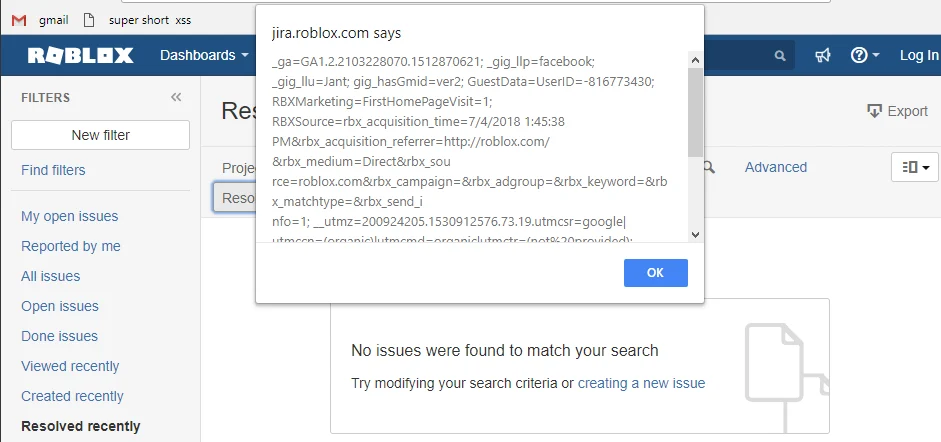
The core Roblox cookies are shared onto this domain, so that's a main factor in why this has equal impact as to if it were on roblox.com.
Impact
An attacker could use carefully crafted payloads with simple social engineering to steal Roblox user's accounts. As I've mentioned, the cookies from Roblox's core site are shared with this one as well, and while it may not be a core Roblox site, it's still a *.roblox.com so any suspicions of phishing by the victim could be excused with that reasoning.
Additionally, with XSS you can use specially designed iframes linked to your own JS content, allowing jacking of cookies and other information from the victim.
Context
Roblox ran a Jira installation at jira.roblox.com. Jira is Atlassian's issue tracker, and one of its features is the issue collector: a small widget that lets users of an external site submit feedback or bug reports into a Jira project without leaving that site. The installation also exposes filter views under /issues/?filter=<id> with date-based search controls.
The researcher found reflected cross-site scripting in several inputs of that issue collector, and tied it to a known Atlassian issue, CVE-2018-5230, described only as "XSS in the issue collector". The report was filed as Medium because that is the severity of the CVE, and it was disclosed on 24 March 2020.
Setup
No special account, role or tooling is described. The only precondition that matters is the version: the researcher noticed that jira.roblox.com was running Jira 7.6.3, which was not the latest release at the time. The testing was done against the filter pages and the issue collector inputs on that host.
Finding it
The starting observation was the version. The researcher's reasoning is that products like Jira or WordPress should be kept current, because vulnerabilities in older versions are disclosed shortly after a new release ships, and an outdated installation is therefore a predictable target.
With 7.6.3 identified, the next step was to look through CVEs affecting Jira 7.6.3 and newer. The researcher notes that this took a lot of scouring, since there are many Jira CVEs for older versions and other platforms. The one that mattered was CVE-2018-5230, which only says "XSS in the issue collector" and specifies nothing else, so working out the actual inputs was left to the researcher. The Atlassian thread for it is at https://jira.atlassian.com/browse/JRASERVER-67289.
Exploitation
Step 1: map the inputs
Testing across the issue collector produced a list of reflected XSS locations. Each is reached through the same method of exploitation and has the same inputs and outputs, so the report gives the first one in full and links the rest.
Step 2: understand the filter
One filter was found. When certain HTML tags such as src= are used, and in JS alerts written as alert("texthere"), the application appends two backslashes. For example, this payload:
<iframe src="//google.com"></iframe>
produces this output in the page:
<iframe src="\"//google.com\""></iframe>
Step 3: bypass the filter with single quotes
The bypass is to avoid double quotes entirely and use only single quotes in payloads. With this payload:
<iframe src='//google.com'></iframe>
the output becomes:
<iframe src="//google.com"></iframe>
Step 4: trigger it in the first area
The first location is the "Updated Date" section of the filter view at https://jira.roblox.com/issues/?filter=-8.
- Go to the link above.
- Click the "Updated Date:" text area.
- Put the XSS payload in "More than [ ] minutes ago", which has a 15 character payload limit, or in "In range [ ] to [ ]", which has no length limit; in the range case put the payload only in the first box.
- Click Update.
- The payload runs. If it does not run, the likely cause is a double quote somewhere; only single quotes work.
Step 5: the other areas
The remaining locations use the exact same method, inputs and outputs, so the report only lists their links:
https://jira.roblox.com/issues/?filter=-7
https://jira.roblox.com/issues/?filter=-6
Root cause
The report attributes the behaviour to the unpatched Jira version rather than to Roblox's own code: 7.6.3 predates the fix for CVE-2018-5230, an XSS in the issue collector. The only defence the researcher observed was the backslash-appending filter, and it is defeated by switching from double quotes to single quotes, after which the value is reflected into the page and the markup is interpreted. Why the filter treats the two quote styles differently is not explained in the report.
Impact
The researcher argues that the impact equals that of a bug on a core Roblox domain, even though jira.roblox.com is not one. The attachment shows that the core Roblox cookies are shared onto this domain, which is the main reason for that assessment.
With carefully crafted payloads and simple social engineering, an attacker could steal Roblox users' accounts. Because the host is still under *.roblox.com, a victim's suspicion of phishing could be excused on that basis. XSS also allows specially designed iframes linked to the attacker's own JavaScript content, which permits jacking of cookies and other information from the victim.
Fix
The recommendation is to update Jira to 7.6.7 or later, or simply to the latest version, which the researcher says should sufficiently patch all of these vulnerabilities. The report recommends the upgrade and does not describe any other change.
Variants to test
- Repeat the single-quote substitution on every reflected parameter you find: send a payload with
'where the filter expects"and check whether the response contains the attribute value unescaped. A positive result is markup that the browser parses rather than displays. - Probe other date and range inputs in filter and search views, including the bounded "More than" field, to see whether the 15 character limit can be worked around with a short payload. A positive result is execution from a payload of 15 characters or fewer.
- Check whether the same collector is embedded on other subdomains and whether cookies are shared across them. A positive result is a session cookie readable from the collector's origin.
- Compare the installed Jira version against the fixed release for CVE-2018-5230 and other collector issues. A positive result is a version below the fix with the collector still enabled.
What happened, in plain words
Roblox, the gaming platform, ran a piece of software called Jira at the web address jira.roblox.com. Jira is made by a company called Atlassian, and it is an issue tracker: a tool that teams use to keep a list of tasks, bugs and requests, and to move each one through stages until it is done. Think of it as a shared to-do board for a company, where every card is a problem or a piece of work.
One feature of Jira is the issue collector. It is a small form that can be placed on another website so that visitors of that site can send a bug report or feedback straight into a Jira project without leaving the page they are on. Imagine a suggestion box bolted onto the wall of a shop: you write your note, drop it in, and it ends up on the right desk inside the company. The collector draws that form, and on this installation it also showed filter views, which are saved searches you can open at addresses like /issues/?filter=<id>, with controls for searching by date.
The researcher found a bug called reflected cross-site scripting (XSS) in several of the input boxes of that issue collector. Cross-site scripting means that a website takes something a visitor typed and puts it back into the page as if it were part of the website's own instructions. A browser cannot tell the difference between instructions the site wrote and instructions that arrived inside a visitor's input, so if an attacker can get their own instructions into that input, the browser will follow them. "Reflected" means the input is bounced straight back in the same response, rather than being stored and shown to other people later.
The researcher connected the bug to a known Atlassian problem, CVE-2018-5230. A CVE is a public catalogue number for a security flaw, so that people around the world can refer to the same issue by the same name. This particular CVE was described only as "XSS in the issue collector", with no further detail, so the researcher had to work out which inputs were affected. The report was filed as Medium severity because that is the severity of the CVE, and it was disclosed on 24 March 2020.
Setup
The report describes no special account, role or tooling. The only precondition that mattered was the version of the software. The researcher noticed that jira.roblox.com was running Jira 7.6.3, which was not the latest release at the time. The testing was done against the filter pages and the issue collector inputs on that host.
Finding it
The starting point was the version number. The researcher's reasoning is that products like Jira or WordPress should be kept up to date, because vulnerabilities in older versions are disclosed shortly after a new release ships. WordPress is a popular system for building websites, mentioned as another product that must be kept up to date. When a fix is published, the details of what was broken often become public too, which tells anyone who is interested exactly what to try on installations that have not been updated. An outdated installation is therefore a predictable target.
With 7.6.3 identified, the next step was to look through CVEs affecting Jira 7.6.3 and newer. The researcher notes that this took a lot of scouring, since there are many Jira CVEs for older versions and other platforms. The one that mattered was CVE-2018-5230, which only says "XSS in the issue collector" and specifies nothing else, so working out the actual inputs was left to the researcher. The Atlassian thread for it is at https://jira.atlassian.com/browse/JRASERVER-67289.
Exploitation
Step 1: map the inputs
Testing across the issue collector produced a list of reflected XSS locations. Each is reached through the same method of exploitation and has the same inputs and outputs, so the report gives the first one in full and links the rest. Mapping the inputs first is the sensible order of work: before you can show that a bug is real, you need to know every place where your text comes back to you.
Step 2: understand the filter
One filter was found. A filter here means a piece of code on the server that inspects what you typed and changes it before sending it back, usually to make dangerous text harmless. This one reacts to certain HTML tags such as src=, and to JavaScript alerts written as alert("texthere"), by appending two backslashes.
HTML is the language web pages are written in. Tags are the instructions in angle brackets, like <iframe>, and attributes are the settings inside a tag, like src="...". An iframe is a frame that loads another page inside the current one, and its src attribute says which address to load. JavaScript is the programming language browsers run, and alert("texthere") is the command that pops up a small dialog box with a message.
For example, this payload:
<iframe src="//google.com"></iframe>
produces this output in the page:
<iframe src="\"//google.com\""></iframe>
Line by line: the payload is a single instruction to the browser, an inline frame whose source is //google.com, closed again with </iframe>. The output shows what came back from the server. The double quotes around the address have been replaced by \". " is the HTML way of writing a double quote character without the browser treating it as the end of an attribute, and the backslash before it is the extra character the filter added. The output shows the double quotes replaced by \", with the extra backslash the filter added. In other words, the filter noticed the double quotes and spoiled them.
Step 3: bypass the filter with single quotes
The bypass is to avoid double quotes entirely and use only single quotes in payloads. With this payload:
<iframe src='//google.com'></iframe>
the output becomes:
<iframe src="//google.com"></iframe>
Line by line: the payload is the same frame, but the address is wrapped in single quotes instead of double quotes. The output shows the address wrapped in ordinary double quotes, with no backslashes and no ". The browser now receives a well-formed src attribute and loads the frame. The filter was looking for double quotes, so switching to single quotes walked straight past it. Why the filter treats the two quote styles differently is not explained in the report.
Step 4: trigger it in the first area
The first location is the "Updated Date" section of the filter view at https://jira.roblox.com/issues/?filter=-8. A filter view is a saved search in Jira; the number after filter= picks which saved search to show, and -8 is one of them. The "Updated Date" control lets you narrow the list to issues changed within a certain period.
- Go to the link above.
- Click the "Updated Date:" text area.
- Put the XSS payload in "More than [ ] minutes ago", which has a 15 character payload limit, or in "In range [ ] to [ ]", which has no length limit; in the range case put the payload only in the first box.
- Click Update.
- The payload runs. If it does not run, the likely cause is a double quote somewhere; only single quotes work.
Why these steps: the two boxes are the inputs that the page takes and reflects. The "More than" box only accepts 15 characters, which is short, so a longer payload has to go in the "In range" box, and only in the first of its two boxes, because that is the one that is reflected. Clicking Update submits the values, the server sends them back inside the page, and the browser follows them as instructions. The note about double quotes is the lesson from the previous step: any double quote in the payload brings the filter back into play and the payload stops working.
Step 5: the other areas
The remaining locations use the exact same method, inputs and outputs, so the report only lists their links:
https://jira.roblox.com/issues/?filter=-7
https://jira.roblox.com/issues/?filter=-6
Line by line: these are two more saved filter views on the same host, numbered -7 and -6. The same "Updated Date" inputs and the same single-quote payload apply, which is why the report does not repeat the walkthrough for each one.
Root cause
The report attributes the behaviour to the unpatched Jira version rather than to Roblox's own code: 7.6.3 predates the fix for CVE-2018-5230, an XSS in the issue collector. The only defence the researcher observed was the backslash-appending filter, and it is defeated by switching from double quotes to single quotes, after which the value is reflected into the page and the markup is interpreted. Why the filter treats the two quote styles differently is not explained in the report; likely it escapes double quotes only and does not normalise single-quoted attribute values.
Impact
The researcher argues that the impact equals that of a bug on a core Roblox domain, even though jira.roblox.com is not one. The attachment shows that the core Roblox cookies are shared onto this domain, which is the main reason for that assessment.
A cookie is a small piece of data that a website asks your browser to keep and to send back on every later request to that site. The most important one is the session cookie: after you log in, the site gives your browser a value that stands in for your password, so you do not have to type it again on every page. Anyone who obtains that value can act as you until it expires. "Shared onto this domain" means the browser sends the same Roblox cookie to jira.roblox.com as it does to the main Roblox site, so a script running on the Jira host can read the credential that protects the main account. The attachment is the evidence for that sharing.
With carefully crafted payloads and simple social engineering, an attacker could steal Roblox users' accounts. Social engineering means persuading a person to do something, such as clicking a link, rather than breaking in technically. Because the host is still under *.roblox.com, a victim's suspicion of phishing could be excused on that basis: the address looks like Roblox, so a user who checks the domain before clicking would see nothing wrong. XSS also allows specially designed iframes linked to the attacker's own JavaScript content, which permits jacking of cookies and other information from the victim. In plain terms, the attacker's page inside the frame can reach out to the attacker's own server and send the stolen cookie there.
Fix
The recommendation is to update Jira to 7.6.7 or later, or simply to the latest version, which the researcher says should sufficiently patch all of these vulnerabilities. The report recommends the upgrade and does not describe any other change.
Variants to test
- Repeat the single-quote substitution on every reflected parameter you find: send a payload with
'where the filter expects"and check whether the response contains the attribute value unescaped. A positive result is markup that the browser parses rather than displays. - Probe other date and range inputs in filter and search views, including the bounded "More than" field, to see whether the 15 character limit can be worked around with a short payload. A positive result is execution from a payload of 15 characters or fewer.
- Check whether the same collector is embedded on other subdomains and whether cookies are shared across them. A positive result is a session cookie readable from the collector's origin.
- Compare the installed Jira version against the fixed release for CVE-2018-5230 and other collector issues. A positive result is a version below the fix with the collector still enabled.
Glossary
- Jira: Atlassian's issue tracker, a tool for keeping and managing a list of tasks, bugs and requests.
- Issue collector: a Jira feature that puts a small feedback or bug report form on another website so visitors can submit items into a Jira project.
- Filter view: a saved search in Jira, opened at an address such as
/issues/?filter=<id>. - Cross-site scripting (XSS): a flaw where a site puts a visitor's input back into the page as if it were the site's own instructions, so the browser executes it.
- Reflected XSS: XSS where the input is returned in the same response instead of being stored and shown to others later.
- CVE: a public catalogue number for a security flaw, so the same issue can be referred to by the same name worldwide.
- Severity: a rating of how serious a flaw is; this report was filed as Medium because that is the severity of the CVE.
- HTML: the language web pages are written in, using tags in angle brackets.
- Tag: an instruction in HTML, such as
<iframe>. - Attribute: a setting inside an HTML tag, such as
src="...". - iframe: an HTML element that loads another page inside the current one; its
srcattribute gives the address. - JavaScript: the programming language browsers run.
alert(): a JavaScript command that shows a small dialog box with a message.- Payload: the text an attacker types into an input, crafted to be treated as code by the browser.
- Filter: server-side code that inspects and changes input before returning it, usually to make dangerous text harmless.
- Escaping: converting special characters into a harmless written form, such as
"for a double quote, so the browser does not treat them as instructions. ": the HTML way of writing a double quote character without ending an attribute.- Backslash: the
\character; here the filter adds two of them to spoil certain input. - Bypass: a way around a defence, here using single quotes instead of double quotes.
- Cookie: a small piece of data a site asks the browser to keep and send back on later requests to that site.
- Session cookie: the cookie that stands in for your password after login; whoever holds it can act as you until it expires.
- Social engineering: persuading a person to take an action, such as clicking a link, instead of breaking in technically.
- Phishing: a trick that makes a malicious page or message look trustworthy so the victim hands over information or clicks.
*.roblox.com: the wildcard form of the domain, meaning any subdomain of roblox.com, such asjira.roblox.com.- WordPress: a widely used system for building websites, mentioned as another product that must be kept up to date.
- Patch: a fix released by the software maker for a known flaw.