Login form on non-HTTPS page
The login form on a Rockstar Games microsite was served over HTTP by default, even though an HTTPS version existed. An attacker on the same network could use sslstrip to intercept and read the submitted username and password.

- Triaged in 3 days
- Fixed in 9 days
- Paid in 9 days
- Disclosed after 39 days
Summary:
A page on a microsite is not fully protected by an SSL certificate. This could allow an attacker in a Man-in-the-Middle position to obtain usernames and passwords of users visiting the site.
Description:
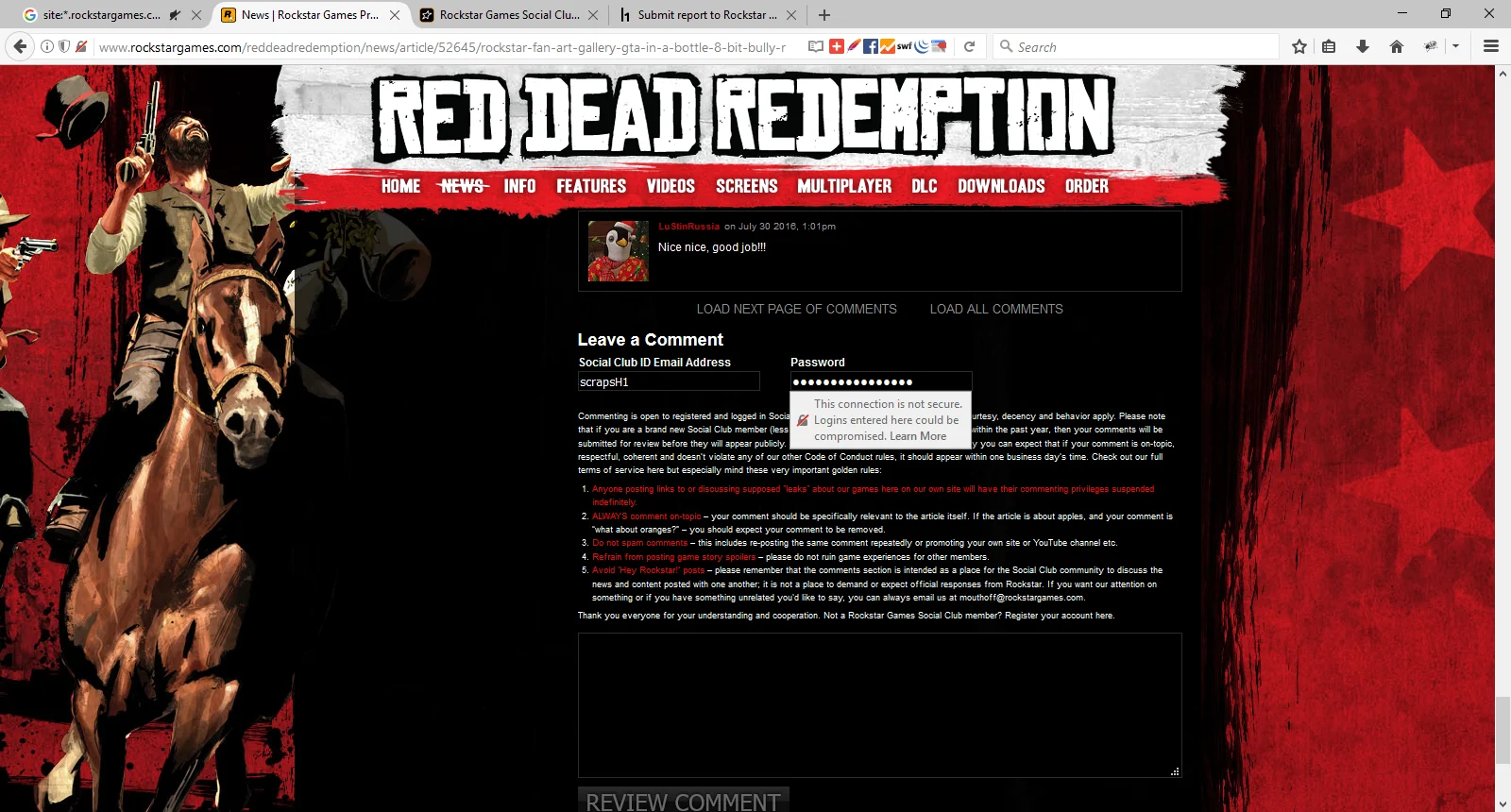
On the Red Dead Redemption subpage, the comments section on news articles allows registered social club users to post comments. When posting a comment, the user first has to login, which appears as if it is done over a non-secure page:
Note the warning in screenshot 1, firefox has identified that this page is not protected with an SSL certificate, therefore the username and password will be sent over a plaintext connection. In itself, this may be enough to put some users off using your page.
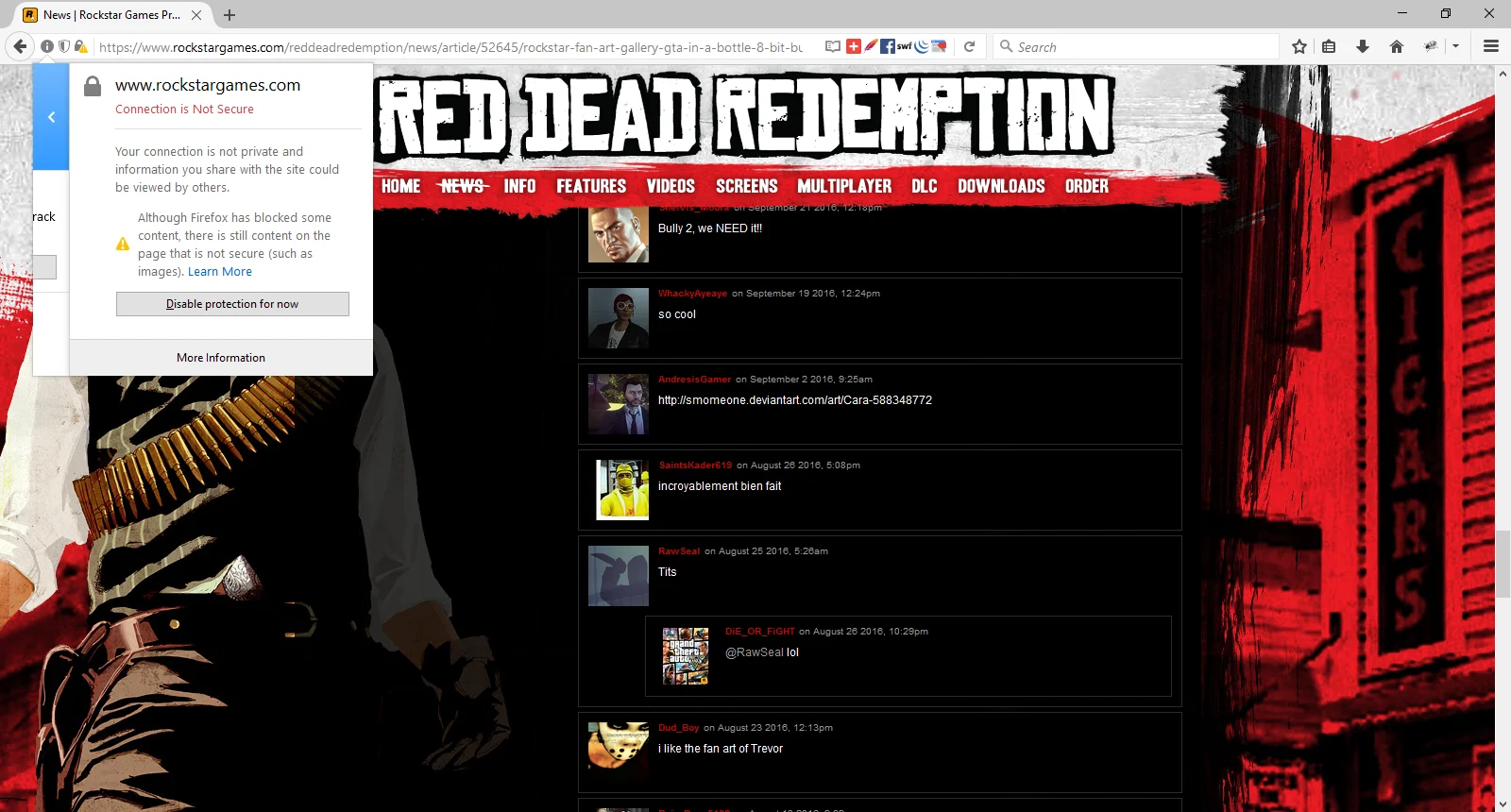
Interestingly, if you manually change the address bar to be https, it does redirect to a https version of the same page, albeit with a mixed content error (screenshot 2). This indicates that an SSL certificate is in place for this page, however not all requests are sent through HTTPS by default.
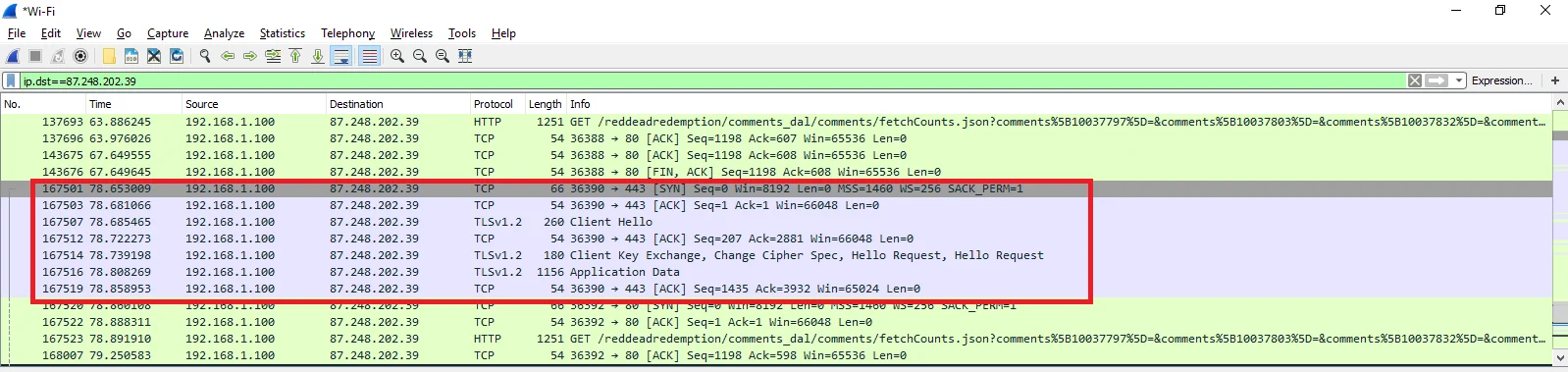
Once submit is pressed on the comment, it appears as though the request is sent over a HTTPS connection (when seen through Burp Suite or Wireshark), which suggests that the page does protect the username and password with SSL/TLS, see packets 167501-167519 in screenshot 3. Although this will work in most cases, there are techniques that can defeat this, such as using the sslstrip tool. There are several in-depth descriptions of how this works, such as this one
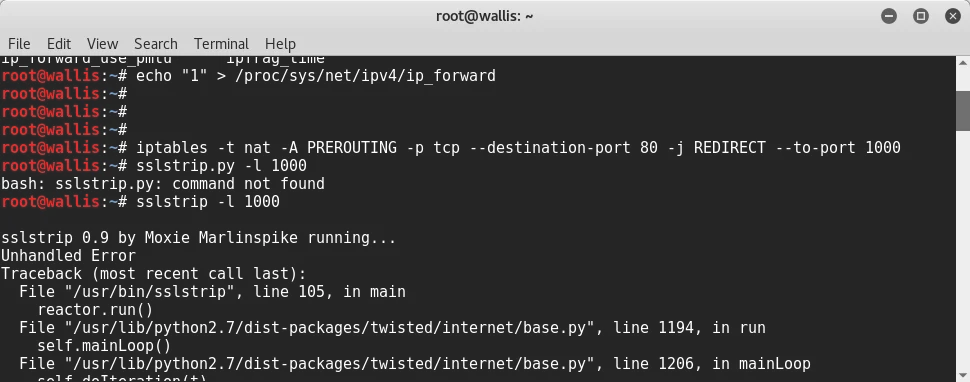
An example of using this is shown in screenshots 4 and 5 below, which was carried out solely on my own computer and against my own user account (scrapsH1).
Steps to reproduce:
- On a Kali Linux machine, set up sslstrip as per screenshot 3
- Set the browser settings to use the Kali machine as a proxy server. NB, this was done in this example for convenience. In a real-world attack, an attacker could force everyone on the network to use his machine as a proxy using a technique such as ARP Spoofing, thereby requiring no interaction from the user
- When the user submits a comment, rather than their POST request being protected by HTTPS, the attacking machine will negotiate the HTTPS connection with the rockstargames server, but trick the user machine into believing that the request should be sent as a HTTP request rather than HTTPS
- As the request has been sent via HTTP, the POST request is now visible to sslstrip, which collects the credentials entered by the user, as per screenshot 5.
Impact:
If a user were to visit this page from a public or shared network (eg, starbucks, airport, library, etc) and submit a comment, a malicious user on the same network would be able to obtain that users username and password by conducting a Man-in-the-Middle attack using sslstrip and wireshark.
This would allow the malicious user complete access to the user's account.
Remediation:
- If any part of a site is required to be protected by SSL, the entire site should be protected by SSL. Ts this would stop the attack outlined above from working, as a certificate error would be displayed to the user.
- HTTP Strict Transport security could be used to mitigate this attack, which would tell all browsers not to allow a HTTP connection to the rockstargames website
Attachments

Context
The target is a Rockstar Games microsite, specifically the Red Dead Redemption subpage. News articles on that subpage have a comments section, and registered Social Club users can post comments there. To post a comment, a user first has to log in. The report is about the page that presents that login: it is served over plain HTTP by default, even though an HTTPS version of the same page exists.
The weakness class recorded for the report is cleartext transmission of sensitive information, and the concern is that an attacker in a man-in-the-middle position could obtain usernames and passwords of users visiting the site.
Setup
The researcher used a Kali Linux machine to run sslstrip, and configured the browser to use that machine as a proxy server. The report notes that the proxy configuration was done for convenience in the example; in a real-world attack an attacker could force everyone on the network to use his machine as a proxy using a technique such as ARP spoofing, requiring no interaction from the user.
The demonstration was carried out solely on the researcher's own computer and against his own user account (scrapsH1). Traffic was inspected with Burp Suite and Wireshark.
Finding it
The researcher noticed that the comments section on news articles allows registered Social Club users to post comments, and that the login a user must complete first appears to be done over a non-secure page. The page in question is:
http://www.rockstargames.com/reddeadredemption/news/article/52645/rockstar-fan-art-gallery-gta-in-a-bottle-8-bit-bully-red.html/#comments
Firefox flagged the page as not protected with an SSL certificate, which means the username and password would be sent over a plaintext connection. The report notes that this in itself may be enough to put some users off using the page.
Screenshot 1 shows the browser warning that the page is not protected by SSL.
A second observation made the picture less clear. Manually changing the address bar to https redirects to an HTTPS version of the same page, but with a mixed content error.
Screenshot 2 shows that HTTPS version and the mixed content error. This indicates that an SSL certificate is in place for the page, but that not all requests are sent through HTTPS by default.
Exploitation
Step 1: Observe the submit behaviour
When submit is pressed on the comment, the request appears to be sent over an HTTPS connection when seen through Burp Suite or Wireshark. That suggests the page does protect the username and password with SSL/TLS. The report points to packets 167501-167519 in screenshot 3.
Screenshot 3 shows the captured packets for the comment submission.
Although this works in most cases, the researcher notes that there are techniques that can defeat it, such as the sslstrip tool, and links to in-depth descriptions of how it works.
Step 2: Set up sslstrip on Kali Linux
On a Kali Linux machine, sslstrip is set up as per screenshot 3. The browser settings are then pointed at the Kali machine as a proxy server. As noted above, the proxy configuration was for convenience; an attacker could instead force everyone on the network through his machine with a technique such as ARP spoofing, so no user interaction is required.
Step 3: Submit a comment through the proxy
When the user submits a comment, rather than the POST request being protected by HTTPS, the attacking machine negotiates the HTTPS connection with the Rockstar Games server, but tricks the user machine into believing that the request should be sent as an HTTP request rather than HTTPS.
Step 4: Read the credentials from the downgraded request
Because the request has been sent via HTTP, the POST request is now visible to sslstrip, which collects the credentials entered by the user, as per screenshot 5.
Screenshots 4 and 5 show the sslstrip demonstration carried out on the researcher's own computer against his own account.
Root cause
The page is reachable over HTTP by default, even though an HTTPS version exists and a certificate is in place. Because the page is served over plain HTTP by default, an attacker in a man-in-the-middle position can use sslstrip to downgrade the comment submission before it reaches the browser as HTTPS. The submit itself goes over HTTPS, so a passive observer of that single request sees TLS, but that does not help when the page that drives the login was delivered in the clear. sslstrip defeats the upgrade by negotiating HTTPS with the server on the attacker's side while presenting the request to the victim's machine as HTTP.
Impact
If a user visits this page from a public or shared network (for example a coffee shop, airport or library) and submits a comment, a malicious user on the same network would be able to obtain that user's username and password by conducting a man-in-the-middle attack using sslstrip and Wireshark. That would give the malicious user complete access to the user's account. The report frames this as a possibility under those network conditions, not as something that happens on every visit.
Fix
The report recommends two remediations:
- If any part of a site is required to be protected by SSL, the entire site should be protected by SSL. This would stop the attack outlined above from working, because a certificate error would be displayed to the user.
- HTTP Strict Transport Security could be used to mitigate the attack, telling all browsers not to allow an HTTP connection to the Rockstar Games website.
The report does not say which of these, if any, was implemented.
Variants to test
- Look for login or comment forms on pages that load over HTTP while an HTTPS version of the same URL exists. A positive result is a redirect to HTTPS only when you type it manually, with the default link still plain HTTP.
- Check for mixed content on the HTTPS version of a page that also serves over HTTP. A positive result is the HTTPS page loading some resources over HTTP, which shows the site is not consistently enforcing TLS.
- Test whether HSTS is present on the host. A positive result for the attacker is the absence of a Strict-Transport-Security header, meaning a browser will still attempt HTTP first.
- Reproduce the downgrade with sslstrip on your own machine and account, watching for credentials appearing in the stripped POST request.
Hunting notes
This kind of bug tends to hide on older microsites and subdomains that sit beside a main site which is fully HTTPS: the certificate exists, but the default links and redirects still use HTTP. During recon, the signals are pages that load over HTTP, an HTTPS version that only appears when typed manually, and mixed content warnings on that HTTPS version. The researcher demonstrated the attack on his own computer and against his own user account, capturing the credentials entered in the stripped POST request.
What happened, in plain words
Rockstar Games runs a website for its games. One part of that website is a small section (a "microsite") for Red Dead Redemption. On that section, news articles have a comments area, and people who have a Rockstar "Social Club" account can log in and post comments.
To post a comment you first have to log in with a username and password. The researcher found that the page showing that login form was loaded over plain, unencrypted HTTP by default, even though a secure HTTPS version of the same page existed. That means the username and password typed there would be sent over a plaintext connection.
The worry is a "man-in-the-middle" attack: someone sitting between your computer and the website, on the same network, who can watch or alter what passes between you. With the right tooling, that person could end up seeing your username and password. The report records this as a high severity issue, classed as cleartext transmission of sensitive information, and it was paid a bounty of 350.00 USD.
Before going further, two everyday ideas help:
- HTTP vs HTTPS. Think of HTTP as sending a postcard: anyone who handles it on the way can read the writing. HTTPS is the same postcard put inside a sealed, tamper-proof envelope. Your browser shows a padlock for HTTPS and a warning for plain HTTP.
- SSL/TLS certificate. This is the digital paperwork a website presents to prove it is really itself and to set up that sealed envelope. When a site has a valid certificate, the browser can encrypt the conversation.
The page in question
The researcher started from the comments section on a news article. To comment, a registered Social Club user has to log in first, and that login appeared to happen on a non-secure page. The address was:
http://www.rockstargames.com/reddeadredemption/news/article/52645/rockstar-fan-art-gallery-gta-in-a-bottle-8-bit-bully-red.html/#comments
Reading that address in plain words:
http://at the start means the page is requested over plain, unencrypted HTTP, not HTTPS.www.rockstargames.comis the website's address on the internet./reddeadredemption/news/article/52645/...is the path to one specific news article on the Red Dead Redemption section.#commentsat the end is a marker that tells the browser to jump down to the comments part of the page. It does not change which page is loaded.
Firefox flagged this page as not protected with an SSL certificate. In practice that means the username and password typed there would be sent over a plaintext connection, readable by anyone in a position to watch the traffic. The report notes that the warning alone may be enough to put some users off using the page.
The first screenshot shows the browser warning that the page is not protected by SSL.
A second observation made things less clear cut. If you manually change the address bar to https, the site redirects you to an HTTPS version of the same page, but that version shows a mixed content error.
The second screenshot shows that HTTPS version and the mixed content error. "Mixed content" means a page that is itself loaded securely is still pulling in some of its parts over plain HTTP. The lesson here: an SSL certificate is in place for the page, but not all requests are sent through HTTPS by default. The site can do secure, it just does not insist on it.
Trying it out
Step 1: Watch what happens when you submit
When the submit button is pressed on a comment, the request appears to go over an HTTPS connection when viewed through Burp Suite or Wireshark. Both are tools for inspecting network traffic: Burp Suite sits between your browser and the site and lets you read and edit requests, and Wireshark records the raw packets travelling on the network. Seeing HTTPS there suggests the page does protect the username and password with SSL/TLS. The report points to packets 167501-167519 in the third screenshot.
The third screenshot shows the captured packets for the comment submission.
So far, so good, in most cases. But the researcher notes there are techniques that can defeat this, such as the sslstrip tool, and links to in-depth descriptions of how it works. The key idea: if the very first page arrives over plain HTTP, an attacker can interfere before the browser is ever told to switch to HTTPS.
Step 2: Set up sslstrip on Kali Linux
Kali Linux is a Linux distribution that comes with many security testing tools preinstalled. sslstrip is one of those tools: it watches traffic passing through it and rewrites secure HTTPS links into plain HTTP ones, so the victim's browser keeps talking in the clear while the tool itself talks HTTPS to the real server.
On the Kali machine, sslstrip is set up as per the third screenshot. The browser settings are then pointed at the Kali machine as a proxy server. A proxy is a middleman computer that all your web traffic is routed through; here the researcher deliberately made his own Kali machine that middleman so he could watch and rewrite the traffic.
The report notes that this proxy configuration was done for convenience in the example. In a real-world attack, an attacker could force everyone on the network to use his machine as a proxy using a technique such as ARP spoofing, so no interaction from the user is required. ARP spoofing is a way of lying to computers on a local network about where other machines are, so their traffic quietly goes through the attacker instead of straight to the router.
Step 3: Submit a comment through the proxy
When the user submits a comment, rather than the POST request being protected by HTTPS, the attacking machine negotiates the HTTPS connection with the Rockstar Games server, but tricks the user machine into believing that the request should be sent as an HTTP request rather than HTTPS.
A POST request is simply the way a browser sends data to a website, for example the contents of a login form or a comment. "Negotiates the HTTPS connection" means the attacker's machine does the secure handshake with the real server on its own side, so the server is happy, while the victim's browser is told to keep using plain HTTP.
Step 4: Read the credentials from the downgraded request
Because the request has been sent via HTTP, the POST request is now visible to sslstrip, which collects the credentials entered by the user, as per the fifth screenshot.
The fourth and fifth screenshots show the sslstrip demonstration, carried out on the researcher's own computer against his own account.
Why it works
The page is reachable over HTTP by default, even though an HTTPS version exists and a certificate is in place. Because the first page load is plain HTTP, an attacker in a man-in-the-middle position can rewrite or intercept the flow before the browser is ever told to use HTTPS. The submit itself goes over HTTPS, so someone passively watching that single request sees TLS (the encryption behind HTTPS), but that does not help when the page that drives the login was delivered in the clear. sslstrip defeats the upgrade by negotiating HTTPS with the server on the attacker's side while presenting the request to the victim's machine as HTTP.
What the impact is
If a user visits this page from a public or shared network (for example a coffee shop, airport or library) and submits a comment, a malicious user on the same network would be able to obtain that user's username and password by conducting a man-in-the-middle attack using sslstrip and Wireshark. That would give the malicious user complete access to the user's account. The report frames this as a possibility under those network conditions, not as something that happens on every visit.
How to fix it
The report recommends two remediations:
- If any part of a site is required to be protected by SSL, the entire site should be protected by SSL. This would stop the attack outlined above from working, because a certificate error would be displayed to the user.
- HTTP Strict Transport Security could be used to mitigate the attack, telling all browsers not to allow an HTTP connection to the Rockstar Games website. HTTP Strict Transport Security (HSTS) is a setting a website can send that tells browsers: always use HTTPS for me, never plain HTTP, even if a link says otherwise.
The report does not say which of these, if any, was implemented.
Other places to look for the same problem
- Look for login or comment forms on pages that load over HTTP while an HTTPS version of the same URL exists. A positive result is a redirect to HTTPS only when you type it manually, with the default link still plain HTTP.
- Check for mixed content on the HTTPS version of a page that also serves over HTTP. A positive result is the HTTPS page loading some resources over HTTP, which shows the site is not consistently enforcing TLS.
- Test whether HSTS is present on the host. A positive result for the attacker is the absence of a Strict-Transport-Security header, meaning a browser will still attempt HTTP first.
- Reproduce the downgrade with sslstrip on your own machine and account, watching for credentials appearing in the stripped POST request.
Notes for people learning to hunt
This kind of bug tends to hide on older microsites and subdomains that sit beside a main site which is fully HTTPS: the certificate exists, but the default links and redirects still use HTTP. During recon, the signals are pages that load over HTTP, an HTTPS version that only appears when typed manually, and mixed content warnings on that HTTPS version. The researcher demonstrated the attack on his own computer and against his own user account, capturing the credentials entered in the stripped POST request.
Glossary
- HTTP: the basic language browsers and websites use to exchange pages and form data, sent unencrypted.
- HTTPS: HTTP wrapped in encryption, so the conversation cannot be read or altered by someone in the middle.
- SSL/TLS: the encryption technology behind HTTPS; a certificate proves the site's identity and sets up the secure connection.
- SSL certificate: the digital paperwork a website presents to prove it is genuine and to enable encryption.
- Plaintext: data sent without encryption, readable by anyone who can see it.
- Cleartext transmission of sensitive information: a weakness where private data such as passwords travels unencrypted.
- Man-in-the-middle (MITM): an attacker positioned between you and a website, able to watch or change the traffic.
- Microsite: a small, separate section of a larger website, often for one product or game.
- Social Club: Rockstar Games' account system that users register with to log in and post comments.
- Mixed content: a securely loaded page that still pulls in some parts over plain HTTP.
- Proxy server: a middleman computer that web traffic is routed through.
- Kali Linux: a Linux distribution bundled with security testing tools.
- sslstrip: a tool that rewrites HTTPS links to HTTP so a victim's browser keeps talking in the clear.
- Burp Suite: a tool that sits between browser and website to inspect and edit requests.
- Wireshark: a tool that records and displays raw network packets.
- Packet: one small chunk of data travelling across a network.
- POST request: the way a browser sends data to a website, such as a login form or a comment.
- ARP spoofing: lying to computers on a local network about where other machines are, so their traffic goes through the attacker.
- HTTP Strict Transport Security (HSTS): a setting that tells browsers to always use HTTPS for a site and never plain HTTP.
- Header: a small piece of information sent alongside a web request or response, such as an HSTS instruction.
- Credentials: a username and password used to log in.
- Bounty: a payment a company makes to a researcher who reports a valid security bug.