Attachment object in GraphQL continues to grant access to files, even if they are removed from rendering
Files attached to a program's policy page remained retrievable through a GraphQL attachments query even after the owner removed them from the page rendering and deleted them from the attachments tab. An unauthenticated user could query the attachments object for a given program handle and obtain links to files the owner believed were gone.
 Originally disclosed on HackerOne
- Triaged in 12 hours
- Fixed in 4 months
- Disclosed after 5 months
Summary:
Hi team,
Our team noticed that you(program) can attach files to the policy page. These files can be anything, images, text, archive, etc.In other words, these files may or may not contain sensitive information. Our team believes that the data that can be attached in different vectors is high . Therefore, in the CVSS calculator, we set Confidentiality: High.
Also, the HackerOne platform slightly confuses customers in this situation. When the client tries to delete a file from the tab where the file is attached, the page shows that the file was deleted, and after clicking the "Update policy page" button, it shows that it was successfully updated. But the page does not reload, and the client sees that the file was indeed deleted. We also tested this on the endpoint, and indeed. The update takes place without the involvement of the Attachment file. But after you refresh the policy edit page, this file will appear again. But visually, the client initially believes that the file was deleted, until he refreshes the page and sees it. We believe this is misleading to the customer
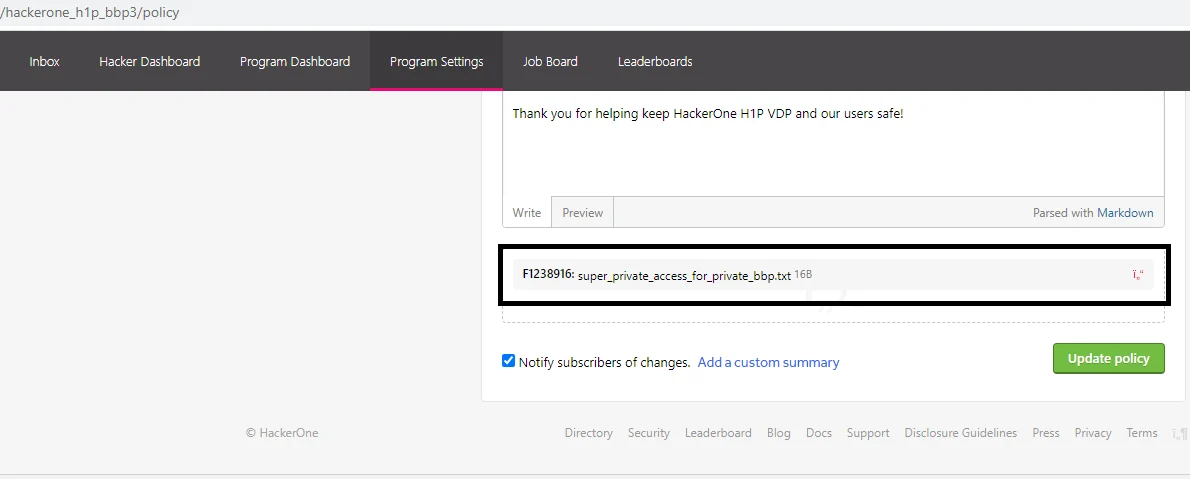
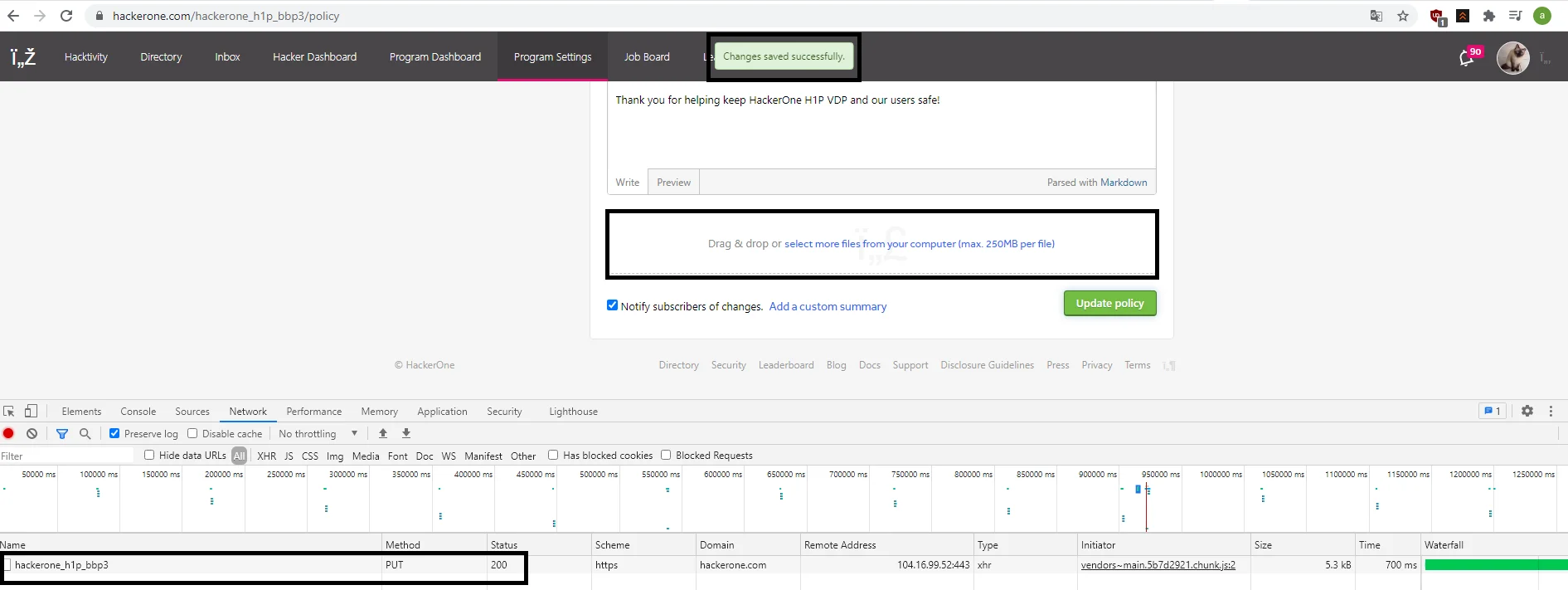
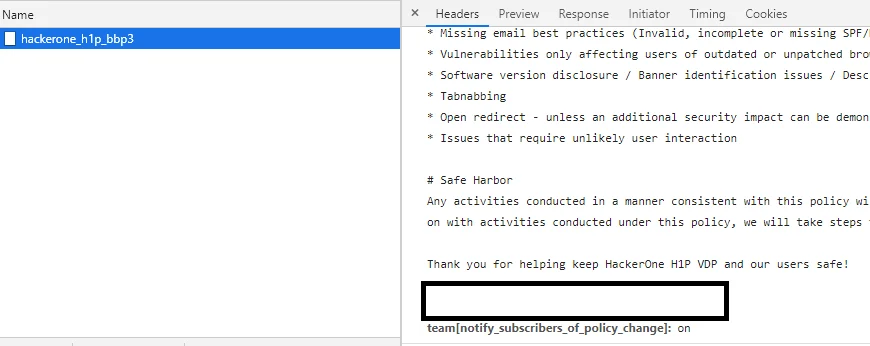
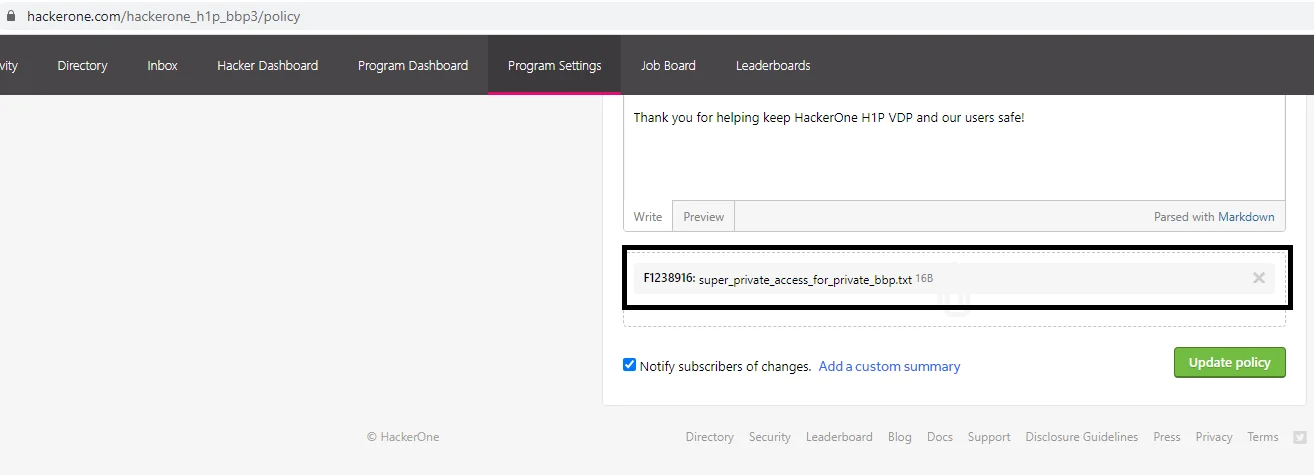
In any case, we believe that when a client deletes a file from the page rendering({F_number_file}), it deletes the path (link) to that file, i.e. it believes that it is not possible for other people to get it.
Steps To Reproduce:
- Customer create private program on platform HackerOne
- Customer attached some file that has sensitive data (for example while the program is private)
- Customer decided to open their program and become public
- Removes rendering to a file on a page (
{F_number_file}) / Also decides to delete from the attachments tab - The program goes public
Next, any unauthorized user can make a GraphQL request
https://hackerone.com/graphql
POST:
{"query":"query {team(handle:\"security\"){attachments{_id,content_type,created_at,expiring_url,file_name,file_size,id,long_lasting_url}}}"}
Change the handle to the desired one
Recommendation:
Review the relationship to deleting files for the policy page, or change access to the Attachment object in GraphQL if rendering was removed
Impact
Granting access to files even if they are removed from rendering
Context
HackerOne's platform lets a program attach files to its policy page. Those files can be anything: images, text, archives. The report's author points out that such attachments may or may not contain sensitive information, and that the amount of data that can be attached through different vectors is high. Because of that, the CVSS vector used in the report sets Confidentiality to High.
The target named in the report is the GraphQL endpoint at http://hackerone.com/graphql. The feature under scrutiny is the Attachment object exposed through that endpoint, and the way it relates to the rendering of files on a policy page.
Setup
The precondition is a program on the platform that has attached a file containing sensitive data, for example while the program was private. The scenario then moves the program to public and removes the file from the page. No special tooling is described beyond the ability to send a GraphQL request to the endpoint.
Finding it
The author noticed two related behaviours.
First, the platform's interface is misleading when a file is deleted. When the client tries to delete a file from the tab where the file is attached, the page shows that the file was deleted, and after clicking the "Update policy page" button it shows that the update succeeded. The page does not reload, and the client sees the file as deleted. The author tested this against the endpoint as well and confirms the update takes place without the attachment file being involved. After refreshing the policy edit page, however, the file appears again. Visually the client initially believes the file was deleted until the page is refreshed.
Second, and more importantly, the author's interpretation is that when a client deletes a file from the page rendering, the platform deletes the path (link) to that file. The client therefore believes it is no longer possible for other people to obtain it. The screenshots below follow that sequence: the attached file, the deletion, the state where the attachment is no longer present, and the page after the update.
Exploitation
Step 1: Create a private program
The customer creates a private program on the HackerOne platform.
Step 2: Attach a sensitive file
The customer attaches a file that has sensitive data, for example while the program is private.
Step 3: Make the program public
The customer decides to open the program and become public.
Step 4: Remove the file from rendering
The customer removes the rendering of the file on the page and also decides to delete it from the attachments tab. The interface reports success, as described above.
Step 5: Query the GraphQL endpoint as an unauthorised user
Once the program is public, any unauthorised user can make the following GraphQL request:
https://hackerone.com/graphql
POST:
{"query":"query {team(handle:\"security\"){attachments{_id,content_type,created_at,expiring_url,file_name,file_size,id,long_lasting_url}}}"}
The team field is selected by handle, and the handle in the example is security; the author notes that it should be changed to the desired one. Inside the team, the query selects the attachments collection and asks for _id, content_type, created_at, expiring_url, file_name, file_size, id and long_lasting_url for each attachment. The query asks for expiring_url and long_lasting_url among other fields for each attachment.
The report does not include the response body returned by this request.
Root cause
The author's reading is that deleting a file from the page rendering only removes the path (link) to the file, while the Attachment object remains reachable through GraphQL. The recommendation frames the same point from the other side: either review the relationship to deleting files for the policy page, or change access to the Attachment object in GraphQL when rendering was removed.
Impact
The impact stated in the report is granting access to files even if they are removed from rendering. The affected party is the program that attached the file: data it believed it had removed from public view stays retrievable. In the report's steps the program is made public before the unauthorised user sends the query. The author hedges on the sensitivity of the content itself, noting that attached files may or may not contain sensitive information, while arguing that the volume of data that can be attached across vectors is high, which is why Confidentiality is set to High in the CVSS calculation. The platform rates the issue medium with a CVSS score of 5.3, classified as Information Disclosure.
Fix
The report does not describe a fix that was applied. Its recommendation is to review the relationship to deleting files for the policy page, or to change access to the Attachment object in GraphQL if rendering was removed.
Variants to test
- Query the
attachmentsfield of a team whose files were removed from the policy page but not deleted from the attachments tab, and check whetherexpiring_urlandlong_lasting_urlstill resolve. A positive result is a working URL for a file the page no longer renders. - Repeat the query after deleting the file from the attachments tab as well as from rendering, to see whether the object survives both removal paths. A positive result is the attachment still appearing in the response.
- Compare the rendered policy page with the GraphQL response for the same team. A positive result is any attachment present in the API response but absent from the page.
- Test the same pattern on other objects that have a rendered representation and an API representation, such as profile media or program resources. A positive result is an object that is hidden in the interface but returned by the API to an unauthorised viewer.
Hunting notes
This kind of bug tends to hide where a product has two views of the same object: a rendered page and an API object, with deletion implemented on only one of them. The signal during recon is an interface that reports a deletion as successful without reloading, especially when a refresh brings the item back; that mismatch between the optimistic UI state and the persisted state is worth following into the API. The author described the impact as granting access to files even if they are removed from rendering, and named the fields requested in the query. The report does not include the response body, so the demonstration rests on the request and the described behaviour rather than on captured output.
What happened, in plain words
HackerOne is a website where companies (called "programs") run bug bounty programmes: they publish a page describing what they want tested, and security researchers report problems to them. That page is called a policy page, and the platform lets a program attach files to it, such as images, text documents or archives.
A program can start out private, meaning only invited people can see it, and later become public, meaning anyone can see it. While a program is private, its owner might attach a file that contains sensitive information, because they think only a small group will ever see it. When the program later goes public, the owner may remove that file from the page, expecting it to be gone from public view.
The report says that removing the file from the page does not actually remove access to it. The report says the file can still be reached through the GraphQL Attachment object after it is removed from rendering. An API (application programming interface) is the behind-the-scenes doorway a website's own pages use to talk to its servers; the same doorway can be used by anyone who knows how to send the right request, not just by the website's pages.
The report also describes a confusing detail in the interface: when the owner deletes a file, the page says it was deleted and says the update succeeded, but the page does not reload. After refreshing the policy edit page, the file appears again.
The platform rated this as a medium severity issue, a CVSS score of 5.3, classified as Information Disclosure. Information Disclosure simply means information that should be hidden can be seen by someone who should not see it.
The setup
To reproduce the problem you need a program on the platform that has attached a file containing sensitive data, for example while the program was private. The scenario then makes the program public and removes the file from the page. The report describes no special tools: being able to send a request to the platform's API endpoint is enough.
The endpoint named in the report is:
GraphQL is a way for a client to ask a server for exactly the pieces of data it wants, in a single request, by describing the shape of the answer. The endpoint is the address that accepts those requests.
Finding it
The author noticed two related behaviours.
First, the interface is misleading when a file is deleted. When the client tries to delete a file from the tab where the file is attached, the page shows that the file was deleted, and after clicking the "Update policy page" button it shows that the update succeeded. The page does not reload, and the client sees the file as deleted. The author tested this against the endpoint as well and confirms the update takes place without the attachment file being involved. After refreshing the policy edit page, however, the file appears again. Visually the client initially believes the file was deleted until the page is refreshed.
Second, and more importantly, the author's interpretation is that when a client deletes a file from the page rendering, the platform deletes the path (link) to that file. The client therefore believes it is no longer possible for other people to obtain it. The screenshots below follow that sequence: the attached file, the deletion, the state where the attachment is no longer present, and the page after the update.
Exploitation
Step 1: Create a private program
The customer creates a private program on the HackerOne platform. A private program is one that is not visible to the general public, so anything attached to it is, in the owner's mind, restricted to a small audience.
Step 2: Attach a sensitive file
The customer attaches a file that has sensitive data, for example while the program is private. This is the file the owner will later want to take back.
Step 3: Make the program public
The customer decides to open the program and become public. Once the program is public, any unauthorised user can make the GraphQL request.
Step 4: Remove the file from rendering
The customer removes the rendering of the file on the page and also decides to delete it from the attachments tab. "Rendering" means the part of the page that displays the file to visitors; removing it takes the file off the visible page. The interface reports success, as described above, so the owner has no reason to think anything is wrong.
Step 5: Query the GraphQL endpoint as an unauthorised user
Once the program is public, any unauthorised user can make the following GraphQL request:
https://hackerone.com/graphql
POST:
{"query":"query {team(handle:\"security\"){attachments{_id,content_type,created_at,expiring_url,file_name,file_size,id,long_lasting_url}}}"}
Line by line, in plain words:
https://hackerone.com/graphqlis the address the request is sent to. The report's target section names the same endpoint overhttp; the request itself is written withhttps.POST:means the request is sent using the POST method, the way a browser sends data to a server rather than just asking for a page.- The body is a JSON object, which is a common text format for structured data: curly braces hold named values.
"query"is the name of the field in that JSON object, and its value is the GraphQL query itself, written as a string.query { ... }says this is a read request: fetch data, do not change anything.team(handle:"security")asks for one team, identified by its handle. A handle is the short public name of a program. The example usessecurity; the author notes it should be changed to the desired one, meaning you substitute the handle of the program you are looking at.attachments{ ... }asks, inside that team, for its attachments: the files that were uploaded to the program.- The list inside the inner braces names the pieces of information wanted for each attachment:
_id,content_type,created_at,expiring_url,file_name,file_size,idandlong_lasting_url.
What those fields mean:
| Field | What it is |
|---|---|
_id |
An internal identifier for the attachment |
content_type |
The kind of file, for example an image or a text document |
created_at |
When the attachment was created |
expiring_url |
A link to the file that stops working after some time |
file_name |
The name of the file |
file_size |
How large the file is |
id |
Another identifier for the attachment |
long_lasting_url |
A link to the file that keeps working for a long time |
The query asks for expiring_url and long_lasting_url among other fields for each attachment. Metadata is data about the file (its name, size, type); a URL is what you actually open to get the file's contents.
The report does not include the response body returned by this request.
Root cause
The author's reading is that deleting a file from the page rendering only removes the path (link) to the file, while the Attachment object remains reachable through GraphQL. An object here means one record in the platform's data, in this case the record describing an uploaded file.
The recommendation frames the same point from the other side: either review the relationship to deleting files for the policy page, or change access to the Attachment object in GraphQL when rendering was removed. Authorisation means checking whether the person asking is allowed to see the thing they are asking for; here the check on the API side does not take the page-side removal into account.
Impact
The impact stated in the report is granting access to files even if they are removed from rendering. The affected party is the program that attached the file: data it believed it had removed from public view stays retrievable.
In the report's steps the program is made public before the unauthorised user sends the query. The author hedges on the sensitivity of the content itself, noting that attached files may or may not contain sensitive information, while arguing that the volume of data that can be attached across vectors is high, which is why Confidentiality is set to High in the CVSS calculation. Confidentiality, in that scoring system, measures how much secret information an attacker can get at.
The platform rates the issue medium with a CVSS score of 5.3, classified as Information Disclosure.
Fix
The report does not describe a fix that was applied. Its recommendation is to review the relationship to deleting files for the policy page, or to change access to the Attachment object in GraphQL if rendering was removed.
Variants to test
- Query the
attachmentsfield of a team whose files were removed from the policy page but not deleted from the attachments tab, and check whetherexpiring_urlandlong_lasting_urlstill resolve. A positive result is a working URL for a file the page no longer renders. - Repeat the query after deleting the file from the attachments tab as well as from rendering, to see whether the object survives both removal paths. A positive result is the attachment still appearing in the response.
- Compare the rendered policy page with the GraphQL response for the same team. A positive result is any attachment present in the API response but absent from the page.
- Test the same pattern on other objects that have a rendered representation and an API representation, such as profile media or program resources. A positive result is an object that is hidden in the interface but returned by the API to an unauthorised viewer.
Hunting notes
This kind of bug tends to hide where a product has two views of the same object: a rendered page and an API object, with deletion implemented on only one of them. The signal during recon is an interface that reports a deletion as successful without reloading, especially when a refresh brings the item back; that mismatch between the optimistic UI state and the persisted state is worth following into the API. "Optimistic UI" means the page updates as if the action succeeded before the server has confirmed it; "persisted state" means what the server actually stored.
The author described the impact as granting access to files even if they are removed from rendering, and named the fields requested in the query. The report does not include the response body, so the demonstration rests on the request and the described behaviour rather than on captured output.
Glossary
- API: the doorway a website's own pages use to talk to its servers; other software can use the same doorway if it knows how.
- Attachment: a file uploaded to a program's page, such as an image, text document or archive.
- Authorisation: the check of whether the person making a request is allowed to see or do what they are asking for.
- Confidentiality (CVSS): the part of a severity score that measures how much secret information an attacker can obtain.
- Content type: the kind of file, for example an image or a text document.
- CVSS: a standard scoring system for the severity of security issues, producing a number and a vector describing the characteristics of the issue.
- Endpoint: the address on a server that accepts a particular kind of request.
- Expiring URL: a link to a file that stops working after some time.
- GraphQL: a way for a client to ask a server for exactly the pieces of data it wants in a single request, by describing the shape of the answer.
- Handle: the short public name that identifies a program on the platform.
- Information Disclosure: a weakness where information that should be hidden can be seen by someone who should not see it.
- JSON: a common text format for structured data, using curly braces and named values.
- Long-lasting URL: a link to a file that keeps working for a long time.
- Metadata: data about a file, such as its name, size and type, rather than its contents.
- Object: one record in the platform's data, here the record describing an uploaded file.
- Optimistic UI: an interface that shows an action as successful before the server has confirmed it.
- Persisted state: what the server actually stored, as opposed to what the page currently shows.
- POST: an HTTP method used to send data to a server, rather than just asking for a page.
- Private program: a program on the platform that is not visible to the general public.
- Public program: a program on the platform that anyone can see.
- Rendering: the part of a page that displays something to visitors; removing it takes the item off the visible page.
- Unauthorised user: someone who is not a member of the program and has no special permission to see its data.
- Vector (in the report): a route through which data can be attached or reached.



