Disclosure of Email title report in quick award paypout email (no content mode)
When a program set its email notifications to 'no content', the instant bounty award email still included the report title. An attacker who could trigger a bounty payout could learn the title of a private report.

- Triaged in 17 days
- Fixed in 21 days
- Paid in 21 days
- Disclosed after 35 days
Hello H1 Security Team
#Description In report #645264 and #669776, email title disclosure has been fixed in no content settings. However, there is one more area which needs to be fix - "Instant bounty Award Email". In this email, even though email settings have been set as "No content", still it's displaying Report Title.
#Step to Reproduce
- Go to Program Email settings
/program_name/email_settingsand set email Settings as "no content".
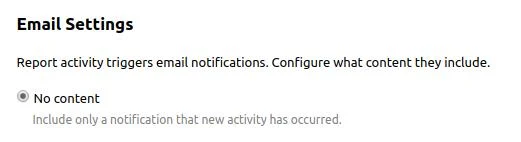
- Now, Reward someone with quick Bounty Payout API.
curl "https://api.hackerone.com/v1/programs/42738/bounties" \
  -X POST \
  -u "dummy:xxxxxxxx" \
  -H "Content-Type: application/json" \
  -d @- <<EOD
    {
      "data": {
        "type": "bounty",
        "attributes": {
          "amount": 100,
          "reference": "aaaaa",
          "title": "SQL injection in example.com",
          "recipient": "[email protected]",
          "currency": "USD",
          "severity_rating": "high"
        }
      }
    }
EOD
- In email, it's disclosing the Report Title even though Email settings has been set to "no content".
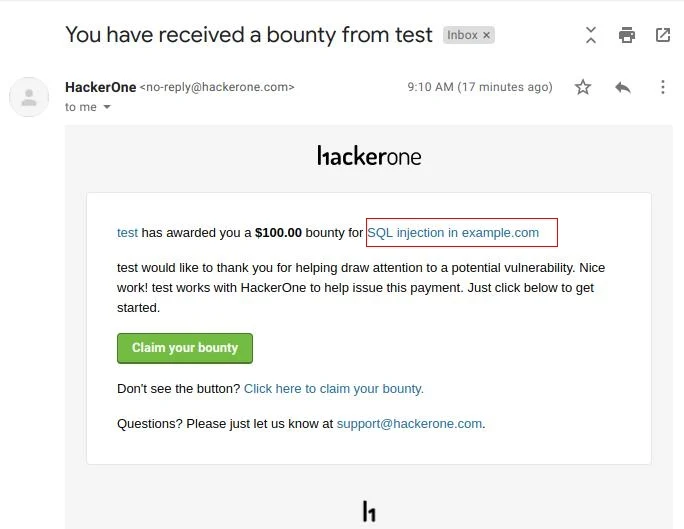
Thanks Kunal
Impact
- Email report Title is been leaked in the settings as Email-notification: No content.
Context
HackerOne lets a program configure how much detail its notification emails carry. One of the available settings is "No content", which is meant to keep report content out of emails so that sensitive material does not travel through mailboxes. The researcher had already reported, in #645264 and #669776, that the report title leaked in emails despite this setting, and that issue had been fixed for the no content configuration.
This report concerns a remaining path that still carried the title: the instant bounty award email sent when a program pays a bounty through the API. Even with the program's email settings set to "No content", that email displayed the report title.
Setup
The researcher works against a HackerOne program and its email settings page, reachable at /program_name/email_settings. Paying the bounty is done through the HackerOne API with the quick bounty payout endpoint, authenticated with HTTP basic credentials. The report does not describe the account or role used beyond the API credentials shown in the request.
Finding it
The earlier fixes covered the no content mode for the emails that had been reported before. The researcher looked at another email that a program can trigger, the instant bounty award notification, and found that it still rendered the report title. The precondition is the same as for the fixed cases: the program has chosen "No content" for its email settings, so the title should not appear anywhere in the message.
Exploitation
Step 1: set the program email settings to no content
Go to the program email settings at /program_name/email_settings and set the email settings to "no content".
The screenshot shows the program email settings page with the no content option selected.
Step 2: award a bounty through the API
Reward someone with the quick bounty payout API:
curl "https://api.hackerone.com/v1/programs/42738/bounties" \
  -X POST \
  -u "dummy:xxxxxxxx" \
  -H "Content-Type: application/json" \
  -d @- <<EOD
    {
      "data": {
        "type": "bounty",
        "attributes": {
          "amount": 100,
          "reference": "aaaaa",
          "title": "SQL injection in example.com",
          "recipient": "[redacted]",
          "currency": "USD",
          "severity_rating": "high"
        }
      }
    }
EOD
The request posts to the bounties endpoint of program 42738, authenticating with basic credentials (-u). The JSON body is a bounty resource whose attributes carry the amount, a reference, the report title, the recipient address, the currency and the severity rating. The title attribute is the value that later appears in the email.
Step 3: read the award email
The email discloses the report title even though the email settings are set to "no content".
The screenshot shows the received email with the report title visible in it.
Root cause
The no content setting was applied to the notification emails that had been reported previously, but the instant bounty award email still displayed the report title. The report does not describe the implementation, so the exact mechanism is likely a separate template or code path that was missed when the earlier fixes were made.
Impact
The report title is leaked in the award email despite the program having selected the "No content" email setting. The exposure is limited to the title; the report does not claim that any other report content is disclosed.
Fix
The fix should be to apply the same no content handling to the instant bounty award email that the earlier reports established for the other notification emails, so that the title is omitted when the program has chosen that setting.
Variants to test
- Trigger every other program-triggered email (bounty awarded, state changes, comments, mentions, invitations) while the program is set to "No content" and check whether the report title or any other report field appears. A positive result is any report-derived text in the message body or subject.
- Award a bounty through the API with a distinctive
titlevalue and compare the email against the same action performed through the web interface. A positive result is the title appearing in either path when it should be suppressed. - Change the email setting and re-trigger the same notification to confirm the setting is honoured per email type. A positive result is a notification that ignores the setting.
Hunting notes
This kind of bug hides in notification paths that are added or changed separately from the main email templates: API-triggered actions, payout and award flows, and any message assembled from stored bounty or report data. During recon, look for programs that expose an email settings page and a public API for bounty payouts, then exercise each notification type under the strictest setting. The researcher showed impact by including a screenshot of the email containing the report title after setting the program to "No content".
Summary
| Item | Value |
|---|---|
| Program | HackerOne |
| Weakness | Information Disclosure |
| Severity | Low |
| Bounty | 500.00 USD |
| Disclosed | 2019-10-11 |
| Researcher | kunal94 |
What happened, in plain words
HackerOne is a website where companies (called "programs") run bug bounty schemes: security researchers report software flaws to them, and the company can pay a cash reward, called a bounty, for a useful report. HackerOne sends emails to people when things happen, for example when a bounty is paid out.
A program can choose how much detail those emails contain. One option is called "No content", and its purpose is simple: keep the actual report material out of email, so that sensitive details do not end up sitting in mailboxes. The researcher had already reported, in two earlier reports (#645264 and #669776), that the report title still appeared in emails even with this setting on, and that problem had been fixed for the no content configuration.
This report is about one email that was missed: the instant bounty award email, the message sent when a program pays a bounty through the HackerOne API. Even with the program's email settings set to "No content", that email showed the report title.
A few words used throughout, explained from zero:
- API: a way for one computer program to talk to a website directly, without a person clicking buttons. Think of it as a service counter at a shop: you hand over a written order in a fixed format and get a response back, instead of walking around the shelves yourself.
- Email settings: a page where a program decides how much information its notification emails may contain.
- Report title: the short headline a researcher gives their report, for example naming the kind of flaw and the affected site.
- Information disclosure: a class of security bug where information that should stay hidden is shown to someone, or somewhere, it should not be. Here, the title ends up in an email that was supposed to carry no report content.
Setup
The researcher works against a HackerOne program and its email settings page, reachable at /program_name/email_settings. Paying the bounty is done through the HackerOne API with the quick bounty payout endpoint, authenticated with HTTP basic credentials. The report does not describe the account or role used beyond the API credentials shown in the request.
In plain terms: the researcher needs two things. First, access to a program's email settings page, where the "No content" option lives. Second, a way to pay a bounty through the API, which requires credentials, meaning a username and a secret password-like value that prove the request comes from someone allowed to pay bounties. The report does not say anything more about which account or role was used.
Finding it
The earlier fixes covered the no content mode for the emails that had been reported before. The researcher looked at another email that a program can trigger, the instant bounty award notification, and found that it still rendered the report title. The precondition is the same as for the fixed cases: the program has chosen "No content" for its email settings, so the title should not appear anywhere in the message.
Why this matters: when a bug is fixed in one place, the same mistake often survives in a similar place that was built separately. The earlier reports fixed the emails that had been tested. The researcher's idea was to check a different email that a program can cause to be sent, the one that goes out the moment a bounty is paid, and to see whether it respects the same setting. It did not.
Exploitation
Step 1: set the program email settings to no content
Go to the program email settings at /program_name/email_settings and set the email settings to "no content".
The screenshot shows the program email settings page with the no content option selected.
This step establishes the condition of the test. The program is telling HackerOne, through its own settings page, that its notification emails must not carry report content. From this point on, any report text appearing in an email is a violation of that choice, which is exactly what the researcher wants to demonstrate.
Step 2: award a bounty through the API
Reward someone with the quick bounty payout API:
curl "https://api.hackerone.com/v1/programs/42738/bounties" \
  -X POST \
  -u "dummy:xxxxxxxx" \
  -H "Content-Type: application/json" \
  -d @- <<EOD
    {
      "data": {
        "type": "bounty",
        "attributes": {
          "amount": 100,
          "reference": "aaaaa",
          "title": "SQL injection in example.com",
          "recipient": "[redacted]",
          "currency": "USD",
          "severity_rating": "high"
        }
      }
    }
EOD
Line by line, in plain words:
curlis a command-line tool for sending web requests. It is the equivalent of typing an address into a browser, but it lets you control exactly what is sent."https://api.hackerone.com/v1/programs/42738/bounties"is the address being called. It is the bounties part of the API for program number42738. The number identifies which program is paying.-X POSTsays the request is a POST, meaning it is asking the server to create something new, here a bounty payment. A browser normally does this when you submit a form.-u "dummy:xxxxxxxx"supplies the credentials, a username and a secret, in the formusername:password. The values shown are placeholders, not real secrets. This is how the server knows the request is authorised to pay a bounty.-H "Content-Type: application/json"tells the server that the body of the request is written in JSON, a common text format for structured data. Think of it as labelling the envelope so the recipient knows which language the letter is written in.-d @- <<EOD ... EODsends the body of the request, read from the lines betweenEODandEOD. Everything in between is the JSON describing the bounty.- Inside the JSON,
"type": "bounty"says what kind of thing is being created. Theattributesblock holds its details:amountis the sum paid,referenceis a short label,titleis the report title,recipientis the address of the person being paid,currencyis the money unit, andseverity_ratingis how serious the flaw is rated. - The
titlevalue,"SQL injection in example.com", is the piece of text that later shows up in the email. It names a flaw type (SQL injection) and a host (example.com), which is exactly the kind of detail the no content setting is meant to keep out of mail.
Why this step: paying a bounty is what causes the instant award email to be sent. Doing it through the API is simply a convenient, scriptable way to trigger that email with a title the researcher controls, so that if the title appears in the message it is unmistakable.
Step 3: read the award email
The email discloses the report title even though the email settings are set to "no content".
The screenshot shows the received email with the report title visible in it.
This is the observation that proves the bug. The program chose "No content", yet the message that arrived in the mailbox contains the report title. The setting was not honoured for this particular email.
Root cause
The no content setting was applied to the notification emails that had been reported previously, but the instant bounty award email still displayed the report title.
In everyday terms: the website has several different email templates, the pre-written layouts used to build each message. The earlier fix cleaned the templates that had been reported. The award email is built from its own template, or its own piece of code, and that one was never given the same cleaning step, so it happily prints the title it was handed.
Impact
The report title is leaked in the award email despite the program having selected the "No content" email setting. The exposure is limited to the title; the report does not claim that any other report content is disclosed.
Why a title alone can matter: a title like the one in the request tells a reader both what kind of weakness exists and which site it affects. The title names a flaw type and a host, and it appears in an email despite the no content setting. The report is careful to say that only the title leaked, not the body of the report.
Fix
The fix should be to apply the same no content handling to the instant bounty award email that the earlier reports established for the other notification emails, so that the title is omitted when the program has chosen that setting.
Variants to test
- Trigger every other program-triggered email (bounty awarded, state changes, comments, mentions, invitations) while the program is set to "No content" and check whether the report title or any other report field appears. A positive result is any report-derived text in the message body or subject.
- Award a bounty through the API with a distinctive
titlevalue and compare the email against the same action performed through the web interface. A positive result is the title appearing in either path when it should be suppressed. - Change the email setting and re-trigger the same notification to confirm the setting is honoured per email type. A positive result is a notification that ignores the setting.
Hunting notes
This kind of bug hides in notification paths that are added or changed separately from the main email templates: API-triggered actions, payout and award flows, and any message assembled from stored bounty or report data. During recon, look for programs that expose an email settings page and a public API for bounty payouts, then exercise each notification type under the strictest setting. The researcher showed impact by including a screenshot of the email containing the report title after setting the program to "No content".
Summary
| Item | Value |
|---|---|
| Program | HackerOne |
| Weakness | Information Disclosure |
| Severity | Low |
| Bounty | 500.00 USD |
| Disclosed | 2019-10-11 |
| Researcher | kunal94 |
Glossary
- API: a way for software to talk to a website directly, sending structured requests and receiving structured responses, without a person clicking through pages.
- Bounty: a cash reward a program pays to a researcher for a useful security report.
- Bug bounty program: a scheme run by a company on a platform such as HackerOne, inviting researchers to report flaws in exchange for rewards.
- Credentials: a username plus a secret value that prove a request is allowed to perform an action.
- curl: a command-line tool for sending web requests, used to call APIs and inspect exactly what is sent and received.
- Email settings: a program's configuration page deciding how much report detail its notification emails may contain.
- HTTP basic authentication: a simple way of sending a username and secret with a request, encoded in a header, so the server can check who is calling.
- Information disclosure: a bug class where information that should stay hidden is shown to someone or somewhere it should not be.
- Instant bounty award email: the notification sent immediately when a bounty is paid out.
- JSON: a plain-text format for structured data, made of names and values in curly braces, used as the body of API requests.
- No content: an email setting that keeps report content out of notification emails.
- POST: an HTTP request method that asks a server to create something, such as a bounty payment.
- Recon: the exploratory phase of security testing, where you map out what a target offers before trying anything.
- Report title: the short headline of a security report, often naming the flaw type and the affected host.
- Root cause: the underlying reason a bug exists, as opposed to its visible symptom.
- Severity rating: a label for how serious a flaw is, such as low, medium, high or critical.
- Template: a pre-written layout a website uses to build an email or page, filling in values such as a title.
- Vulnerability class: a category of security flaw, such as information disclosure or SQL injection.