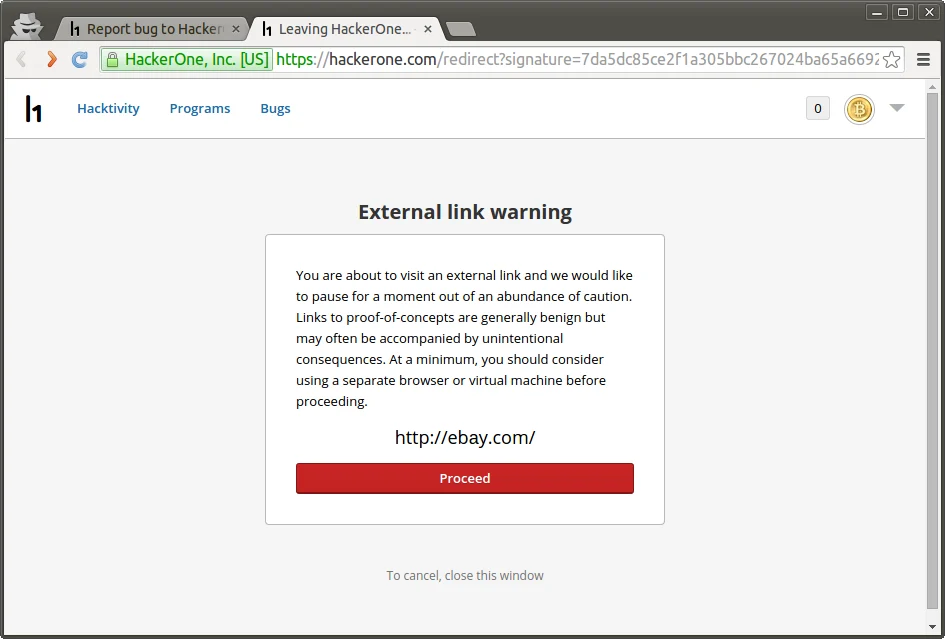
homograph attack. IDNs displayed in unicode in bug reports and on external link warning page

- Triaged in 3 days
- Fixed in 8 days
- Paid in 8 days
- Disclosed after 9 days
the IDN: http://ebаy.com/
is a homograph for the latin ebay.com. if you click that first link, youm might think that you are going to ebay.com. in fact, you are going to a homograph url http://xn--eby-7cd.com/
more info http://www.chromium.org/developers/design-documents/idn-in-google-chrome
it would be safer to show the punycode version of the url so that it would be apparent that something weird is going on. that is, show http://xn--eby-7cd.com/ instead of http://ebаy.com/
Attachments
What the report shows
The report concerns how internationalised domain names (IDNs) are displayed in bug reports. The researcher, mrrm, submitted it to HackerOne, where it was classified as a violation of secure design principles and paid a bounty of 500.00 USD. It was disclosed on 2014-10-09.
The core of the finding is a single homograph domain:
http://ebаy.com/
That string is not the Latin ebay.com. One of the characters is a Cyrillic letter that renders almost identically to a Latin one, so the URL looks like the well-known brand at a glance. The researcher explains that a reader who clicks the first link might think they are going to ebay.com, when in fact they are going to the homograph URL:
http://xn--eby-7cd.com/
The report links to two external references for background: a Chromium design document on IDN handling in Google Chrome, and a Punycode conversion tool at charset.org that decodes http%3A%2F%2Fxn--eby-7cd.com%2F back to normal text.
The suggested remedy is to display the Punycode form of the URL rather than the Unicode form, so that it becomes apparent that something unusual is going on. In other words, show http://xn--eby-7cd.com/ instead of http://ebаy.com/. The report does not describe a specific endpoint, parameter or header, and it does not give a severity rating or a description of a fix that was applied.
The attachment is a screenshot illustrating the issue:
Root cause
The report frames the issue as a display problem: showing the Unicode form hides that the host is not the Latin domain it resembles. Because Cyrillic and Latin glyphs can be visually identical, the rendered URL is indistinguishable from the legitimate brand domain to a casual reader, while the browser resolves it to a completely different Punycode host. The report suggests showing the Punycode form so that the substitution would be apparent.
Impact
The impact described is deception of the person reading the URL. A link that appears to point at a well-known site can in fact point at a different homograph domain. The report keeps this at the level of user confusion: the reader "might think" they are going to the real site. It does not describe credential theft, malware delivery or any other follow-on attack, and it does not claim that any specific user was affected. The practical risk is that a reader may believe the link goes to the brand it resembles.
How this kind of bug works
DNS labels are ASCII, so non-ASCII names are encoded with Punycode (the xn-- prefix). Browsers and other software decode that back to Unicode for display, which is friendlier for legitimate internationalised sites but also means two different labels can render identically. The classic case is a single character from another script substituted for a Latin letter, as in the report. A related case is bidirectional text, where right-to-left control characters reorder the visible string so the displayed URL does not match the real one.
Defences work at the display and policy layer. Browsers apply IDN display policies that fall back to Punycode when a label mixes scripts in suspicious ways or contains characters from scripts the user is unlikely to expect. Applications that show URLs to users, such as report renderers, link warning interstitials and email clients, can apply the same rule: show the encoded form, or show both forms, whenever the decoded form is ambiguous. Registries and registrars add restrictions on mixed-script labels, and some browsers highlight the registrable domain so the reader's eye lands on the part that actually matters.
How to test for it
- Identify every place the application renders a URL or hostname to a user: report bodies, comments, profile fields, link warning pages, email notifications, chat messages, redirect interstitials.
- Submit a URL whose hostname uses a character from a different script that resembles a Latin letter, and observe how it is rendered. Compare the rendered text with the Punycode form the browser actually resolves.
- Check whether the application shows the encoded form, flags the mixed script, or highlights the registrable domain. If it silently renders the Unicode form with no signal, you have a candidate.
- Test bidirectional control characters in the path and hostname as a separate case, since they can reorder the visible string.
- Confirm the finding by resolving the hostname and showing that it is not the domain it appears to be.
A positive result is a rendered URL that a reasonable reader would take for a different domain, with no visual or textual warning. Common false positives: the application does show the Punycode form somewhere nearby, the browser itself already falls back to Punycode for that label, or the substituted character is visually distinct enough that no reasonable person would be misled. Also check that the domain you use is one you are authorised to reference; do not register lookalikes of third-party brands for testing.
How it is fixed
Display the Punycode form, or display both forms, whenever a hostname contains mixed scripts or characters outside the expected set. Apply the browser IDN display policy on the server side rather than trusting the client. Highlight the registrable domain in rendered links so the reader's attention goes to the part that determines where the link goes. For warning interstitials, show the encoded host alongside the decoded one. Where the application accepts user-supplied URLs, normalise and validate them on input as well as on display.
Hunting notes
This class tends to hide in any feature that echoes user-supplied URLs back to other users: support tickets, bug trackers, comment threads, moderation queues, notification emails and security warning pages. Recon signals include rich text rendering of links, link previews, and any place where the application builds its own interstitial before redirecting. To make a report land, show the rendered string and the resolved host side by side, explain which character differs and from which script, and state clearly what the reader would believe. Keep the claim proportionate: the finding is about deception of the reader, so describe the deception precisely rather than inflating it into account takeover.
What happened, in plain words
Every website has a name, called a domain name, that you type into your browser, such as ebay.com. The internet itself only understands a limited set of characters (the Latin letters A to Z, digits and a hyphen), so names that use other alphabets have to be translated into that limited form before they can be used. That translation is called Punycode, and translated names start with xn--.
Browsers do the opposite for you: they take the xn-- form and show it back in the original alphabet, so that people who write in other scripts can read their own domain names. That is friendly for real sites, but it opens a door. Some letters in other alphabets look exactly like Latin letters. If someone registers a domain using one of those lookalike letters, the browser will display a name that looks identical to a well-known brand, while the actual address is completely different. This trick is called a homograph attack.
The researcher, mrrm, reported this to HackerOne.
The report is built around one example domain:
http://ebаy.com/
At a glance this looks like the Latin ebay.com. It is not. One of the characters is a Cyrillic letter that is drawn almost the same way as the Latin one, so the address reads like the famous brand but is a different name entirely. The researcher explains that if you click that first link, you might think you are going to ebay.com, when in fact you are going to the homograph URL:
http://xn--eby-7cd.com/
That second line is the same address written in the form the internet actually uses. The xn-- prefix is the marker that says "this name was translated from another alphabet". Seeing it is the clue that something unusual is going on.
The report points to two external references for background: a Chromium design document about how Google Chrome handles internationalised domain names, and a Punycode conversion tool at charset.org that turns http%3A%2F%2Fxn--eby-7cd.com%2F back into normal text.
The suggested remedy is simple: show the Punycode version of the URL instead of the Unicode version, so that it becomes apparent that something weird is going on. In other words, show http://xn--eby-7cd.com/ rather than http://ebаy.com/. The report does not name a specific page, parameter or header.
The attachment is a screenshot illustrating the issue:
In general, how this kind of bug works
Domain names are stored and looked up in that limited Latin form, so any name using another alphabet is encoded with Punycode, which is why it carries the xn-- prefix. Browsers and other software decode it back to the original characters for display. That is convenient for legitimate sites in other scripts, but it also means two different names can be drawn identically on screen. The classic case is a single character from another script swapped in for a Latin letter, exactly as in the report. A related case is bidirectional text, where special control characters reorder the visible string so that what you see does not match the real address.
Defences live at the display and policy layer. Browsers apply rules that fall back to the Punycode form when a name mixes scripts in suspicious ways or contains characters the user is unlikely to expect. Applications that show URLs to people, such as bug report pages, link warning screens and email clients, can apply the same idea: show the encoded form, or show both forms, whenever the decoded form is ambiguous. Registries and registrars restrict mixed-script names, and some browsers highlight the part of the domain that actually determines where the link goes.
How to test for it
- Find every place the application shows a URL or hostname to a user: report bodies, comments, profile fields, link warning pages, email notifications, chat messages, redirect screens.
- Submit a URL whose hostname uses a character from a different script that resembles a Latin letter, and watch how it is displayed. Compare what you see with the Punycode form the browser actually resolves.
- Check whether the application shows the encoded form, flags the mixed script, or highlights the main domain. If it silently shows the Unicode form with no signal, you have a candidate.
- Test bidirectional control characters in the path and hostname as a separate case, since they can reorder the visible string.
- Confirm the finding by resolving the hostname and showing that it is not the domain it appears to be.
A positive result is a displayed URL that a reasonable reader would take for a different domain, with no visual or textual warning. Common false positives: the application does show the Punycode form somewhere nearby, the browser itself already falls back to Punycode for that name, or the substituted character is visually distinct enough that no reasonable person would be misled. Also make sure the domain you use is one you are allowed to reference; do not register lookalikes of third-party brands for testing.
How it is fixed
Show the Punycode form, or both forms, whenever a hostname mixes scripts or contains characters outside the expected set. Apply the browser's display policy on the server side rather than trusting the client. Highlight the main domain in displayed links so the reader's attention goes to the part that decides where the link leads. For warning screens, show the encoded host next to the decoded one. Where the application accepts URLs from users, normalise and validate them on input as well as on display.
Hunting notes
This class of bug tends to hide in any feature that echoes user-supplied URLs back to other people: support tickets, bug trackers, comment threads, moderation queues, notification emails and security warning pages. Useful signals are rich text rendering of links, link previews, and any place where the application builds its own warning screen before redirecting. To make a report land, show the displayed string and the resolved host side by side, explain which character differs and from which script, and state clearly what the reader would believe. Keep the claim proportionate: the finding is about deceiving the reader, so describe the deception precisely rather than inflating it into account takeover.
Glossary
- Domain name: the human-readable name of a website, such as
ebay.com. - Internationalised domain name (IDN): a domain name that uses characters from alphabets other than Latin.
- Punycode: the encoding that turns a non-Latin domain name into the limited Latin form the internet uses, marked by the
xn--prefix. - Homograph attack: registering a domain whose characters look like those of another domain, so the two appear identical on screen.
- Cyrillic: an alphabet used by several languages, some of whose letters look the same as Latin letters.
- Unicode: the standard that assigns a number to every character in every writing system.
- Bidirectional text: text mixing left-to-right and right-to-left scripts, where control characters can reorder what is displayed.
- Registrable domain: the main part of a domain name, the part that determines who controls the site.
- Bounty: a payment made to a researcher who reports a security problem.
- Disclosure: the point at which a reported issue is made public.
- Violation of secure design principles: a category for flaws where the design of a feature, rather than a coding mistake, creates the risk.



