Invalid Phabricator API token revealed through error message when escalating a report
When a user enters an invalid Phabricator API token in the integration settings and later tries to escalate a report, the error message displays the entered token. This allows team members with limited permissions to view API tokens they normally cannot access.

- Triaged in 3 hours
- Fixed in 3 months
- Paid in 2 days
- Disclosed after 3 months
Summary
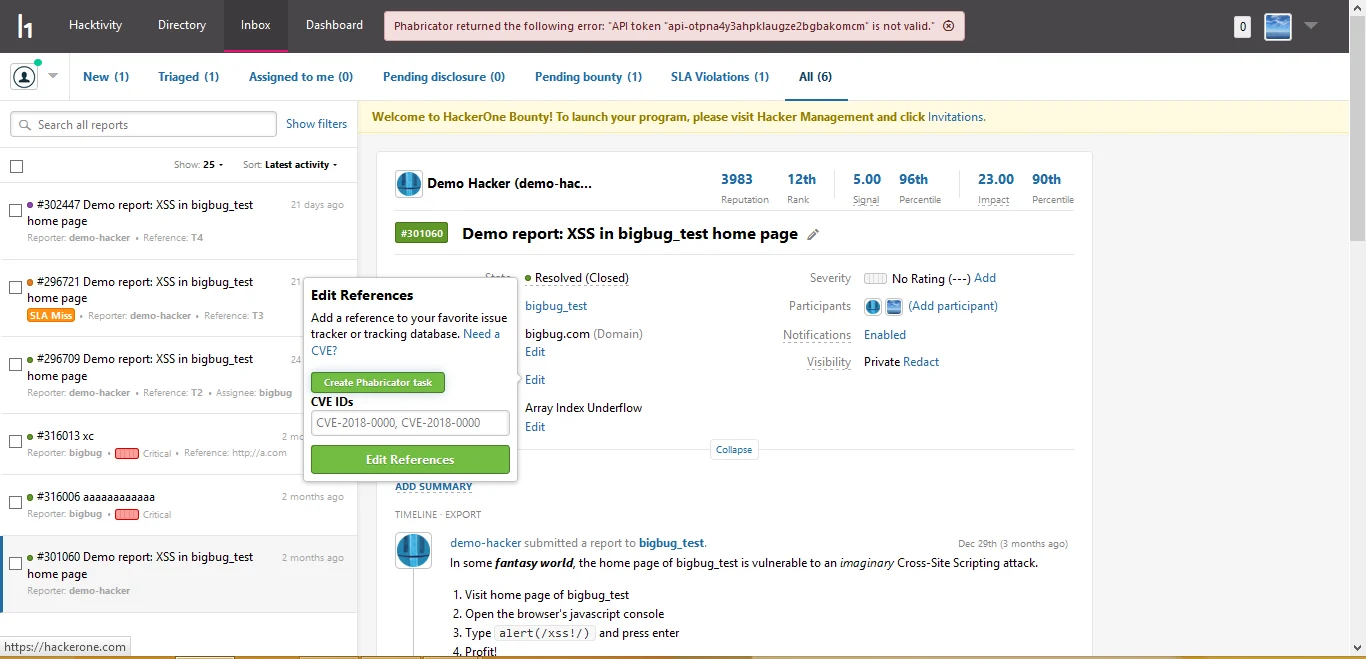
While trying to create a phabricator task by escalating to phabricator, error message contains the API token as a part of the pop up. This is seen when a user tries to enter an invalid API token.
Description
It was seen that after setting up phabricator integration in a program, when trying to escalate a report to phabricator, if the API token entered was invalid in terms of length/authenticity, the error message contains the entered API token.
This was seen when trying to escalate a report using a phabricator instance and previously used API token.
Steps to reproduce
- Visit https://hackerone.com/*program name*/phabricator_integration
- Enter an instance URL
- Enter the API token incorrectly.
- Now navigate to any report you want to escalate.
- Click on Edit References.
- Click on "Create phabricator task"
- Error message will appear with API token.
- Invalid token error
- Invalid length error
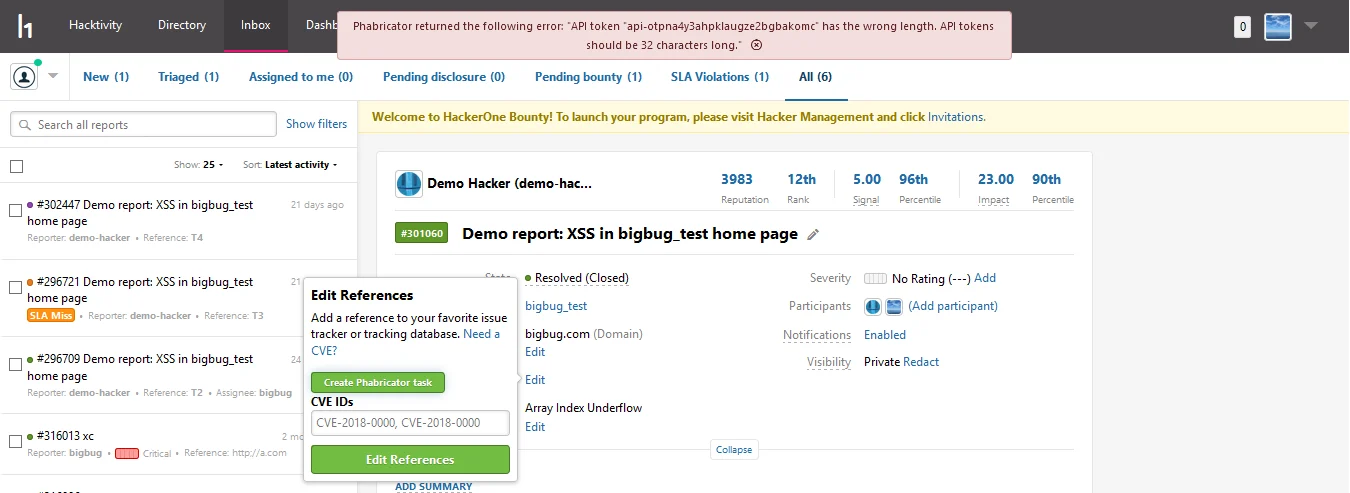
Above image contains an API token that was entered incorrectly in terms of length.
Both of the above errors contain the API token that was entered incorrectly.
Fix
- One thing to mention is that the integration page does not validate the API token lengths while entering. API token lengths should be checked on integration setting page itself.
- Validity of API token should also be checked while saving integration settings itself.
Impact
- API tokens are not normally displayed anywhere else after setting up the integration. Team members with limited permissions who normally have no access to such information can see the API tokens.
- Mistyped API token like the one below could easily reveal actual API tokens. The mistyped API tokens could be part of actual API tokens.
Context
HackerOne lets a program connect its reports to a Phabricator instance so that a report can be escalated into a Phabricator task. The integration is configured per program at a settings page, where a user supplies an instance URL and an API token. Once configured, a report can be escalated from the report's references area by choosing to create a Phabricator task.
The bug in this report is an information exposure through an error message: when the stored API token is invalid, the error shown during escalation includes the token itself. The report was filed against hackerone.com and was disclosed on 2018-06-27.
Setup
To reproduce, you need access to a program's Phabricator integration settings and the ability to escalate a report. The researcher set up the Phabricator integration for a program and then tried to escalate a report using a Phabricator instance and a previously used API token. No special tooling is described; the whole flow happens in the web interface.
Finding it
The researcher noticed the problem while trying to create a Phabricator task by escalating a report. The error pop-up contained the API token as part of its message. The trigger was an API token that was invalid in terms of length or authenticity: the error message echoed back the token that had been entered.
What makes this interesting is the normal behaviour of the feature. After the integration is set up, API tokens are not normally displayed anywhere else. So the error message becomes a way to read a value that is otherwise hidden, and it does so for users who would not otherwise have access to it.
Exploitation
Step 1: Open the integration settings
Visit the Phabricator integration page for the program:
https://hackerone.com/*program name*/phabricator_integration
This is the per-program settings page where the instance URL and API token are stored.
Step 2: Enter an instance URL
Provide the URL of the Phabricator instance. This is the endpoint the integration will talk to when creating tasks.
Step 3: Enter the API token incorrectly
The token is entered with a wrong length or otherwise invalid value. The integration page does not validate the token length at this point.
Step 4: Navigate to a report
Open any report that you want to escalate. The escalation entry point lives in the report's references area.
Step 5: Open Edit References
Click on Edit References to reach the escalation controls for the report.
Step 6: Create a Phabricator task
Click on "Create phabricator task". Click on "Create phabricator task".
Step 7: Read the error message
The request fails because the token is invalid, and the error message appears with the API token inside it.
Two error variants were observed. The first is the invalid token error:
The second is the invalid length error:
That second screenshot shows an API token that was entered incorrectly in terms of length. Both errors contain the API token that was entered incorrectly.
Root cause
The error message shown during escalation includes the API token that was entered. The integration settings page also does not check the token length when the value is entered, and the token's validity is not checked when the integration settings are saved. A bad token is therefore stored without complaint and only surfaces later, during escalation, in an error that echoes it back.
The report notes that team members with limited permissions can see the API token through this error.
Impact
API tokens are not normally displayed anywhere else after the integration is set up. Through this error message, team members with limited permissions, who normally have no access to such information, can see the API tokens.
There is a second angle. A mistyped API token could easily reveal actual API tokens, because the mistyped tokens could be part of actual API tokens:
In other words, a mistyped token could be part of a real token, so the error may reveal a fragment of a genuine secret.
Fix
The report proposes two changes:
- The integration page should validate API token lengths while the token is being entered, on the integration settings page itself.
- The validity of the API token should also be checked while saving the integration settings.
Variants to test
- Other integration settings pages. Configure a third-party integration with a deliberately malformed credential and then trigger an action that uses it. A positive result is an error message that contains the credential you entered.
- Save-time versus use-time validation. Try saving an obviously invalid credential and see whether the settings page accepts it silently. If it does, the failure will surface later, possibly to a different user, which is the condition that made this bug matter.
- Partial secrets. Enter a truncated or slightly altered version of a real credential. A positive result is the altered value being echoed back in full, since the fragment can reveal part of the genuine secret.
- Permission boundaries. Reproduce the flow with an account that has limited permissions and no access to the integration settings. A positive result is that account seeing the credential in the error.
Hunting notes
This kind of bug tends to hide in error handling around third-party integrations: places where a stored credential is used by a background or server-side call and the resulting exception is rendered back to the user. During recon, look for per-program or per-organisation integration settings pages, and for escalation or sync actions that depend on them. The signal is a settings form that accepts a credential without validating it, combined with an action that later fails and shows a detailed message.
The researcher showed impact by pointing out two things the program could act on: the token is not displayed anywhere else after setup, and users with limited permissions can see it through the error. The report also noted that a mistyped token can contain part of a real one, which turns a display bug into a partial secret disclosure.
What happened, in plain words
HackerOne is a website where security researchers report bugs to companies. A company that receives reports on HackerOne can connect its account to another tool called Phabricator, which is a task and project tracker. Once the two are connected, a report on HackerOne can be turned into a task in Phabricator with a click, so the company's developers can work on it in their usual tool.
To make that connection, someone on the company's side fills in a settings page with two things: the web address of their Phabricator installation, and a special password-like string called an API token. The token is the credential the integration uses for its Phabricator API calls.
The bug in this report is simple to describe. When the token that had been saved was wrong, the error message shown on screen contained the token itself. So a value that is normally hidden became readable through that error, including by team members with limited permissions.
This kind of bug has a name: information exposure through an error message. The report was filed against hackerone.com and was disclosed on 2018-06-27.
Background: the words you need
Before walking through the steps, here are the ideas the report relies on.
- API: an API (application programming interface) is a way for one piece of software to talk to another without a human clicking buttons. A useful comparison is a restaurant. You do not walk into the kitchen; you tell the waiter what you want, and the waiter carries the order in and the food out. The API is the waiter: a fixed set of requests one system is allowed to make to another.
- API token: a long random string that acts like a password for that machine-to-machine conversation. When HackerOne talks to Phabricator, it sends the token along so Phabricator knows the request is genuine. Because it works like a password, anyone who can read it can pretend to be the integration.
- Phabricator: a task tracking tool used by software teams. In this story it is the place where a HackerOne report is copied to as a task.
- Integration: a connection between two products. Here it means the saved settings (instance URL plus API token) that let HackerOne create tasks in a particular Phabricator installation.
- Instance URL: the web address of one particular Phabricator installation, for example the address of the company's own copy of the software. The integration needs it so it knows where to send the request.
- Escalation: turning a report into a task in another system. On HackerOne this is done from the report's references area.
- Error message: the text a website shows when something goes wrong. Good error messages say what failed without repeating secret values back to the screen.
- Information exposure through an error message: a vulnerability class where an error reveals something the user should not be able to see, such as a password, a token or an internal detail. The mistake is not that the error happens; it is that the error includes sensitive data.
Context
HackerOne lets a program connect its reports to a Phabricator instance so that a report can be escalated into a Phabricator task. The integration is configured per program at a settings page, where a user supplies an instance URL and an API token. Once configured, a report can be escalated from the report's references area by choosing to create a Phabricator task.
The bug in this report is an information exposure through an error message: when the stored API token is invalid, the error shown during escalation includes the token itself.
Setup
To reproduce, you need access to a program's Phabricator integration settings and the ability to escalate a report. The researcher set up the Phabricator integration for a program and then tried to escalate a report using a Phabricator instance and a previously used API token. No special tooling is described; the whole flow happens in the web interface.
The interesting case is when the second person does not have the first permission, because then the error message hands them something they were never meant to see.
Finding it
The researcher noticed the problem while trying to create a Phabricator task by escalating a report. The error pop-up contained the API token as part of its message. The trigger was an API token that was invalid in terms of length or authenticity: the error message echoed back the token that had been entered.
"Invalid in terms of length" means the string was too short or too long to be a real token. "Invalid in terms of authenticity" means the length was plausible but the value was not a token Phabricator recognised. Either way, the request failed, and the failure message repeated the value back.
What makes this interesting is the normal behaviour of the feature. After the integration is set up, API tokens are not normally displayed anywhere else. So the error message becomes a way to read a value that is otherwise hidden, and it does so for users who would not otherwise have access to it.
A comparison: imagine a cloakroom that never shows you the ticket numbers, but when you hand in a wrong ticket it reads your ticket out loud to the whole queue. The reading out loud is the bug.
Exploitation
The steps below are the researcher's reproduction steps, in order. Each one is followed by an explanation of why it is there.
Step 1: Open the integration settings
Visit the Phabricator integration page for the program:
https://hackerone.com/*program name*/phabricator_integration
Line by line: https://hackerone.com/ is the HackerOne website. *program name* is a placeholder for the name of the specific program whose settings you are opening; the asterisks are not typed literally, they mark the part that changes per program. phabricator_integration is the page that holds the Phabricator connection settings for that program.
Why this step: the integration has to exist before it can be used. This page is where the instance URL and the API token are stored, so it is the starting point of the whole flow.
Step 2: Enter an instance URL
Provide the URL of the Phabricator instance. This is the endpoint the integration will talk to when creating tasks.
Why this step: the integration needs to know where to send the request. Without an address there is nowhere for the task to be created, and the later failure would not be about the token at all.
Step 3: Enter the API token incorrectly
The token is entered with a wrong length or otherwise invalid value. The integration page does not validate the token length at this point.
Why this step: this is the heart of the bug. A careful settings page would check the token before saving it, or at least check its length. This one does not, so a bad value goes into storage without complaint. That is what allows the failure to happen later, in front of a different person.
Step 4: Navigate to a report
Open any report that you want to escalate. The escalation entry point lives in the report's references area.
Why this step: escalation is an action on a report, so you need a report to act on. Any report works; the content does not matter.
Step 5: Open Edit References
Click on Edit References to reach the escalation controls for the report.
Why this step: the references area is where links between a report and other systems are managed. The button that creates a Phabricator task lives there, so this is how you reach it.
Step 6: Create a Phabricator task
Click on "Create phabricator task". Click on "Create phabricator task".
Why this step: this is the moment the saved token is actually used. Up to now the bad token has just been sitting in storage. Clicking the button triggers the escalation, and the error message appears with the API token inside it.
Step 7: Read the error message
The request fails because the token is invalid, and the error message appears with the API token inside it.
Two error variants were observed. The first is the invalid token error:
The screenshot shows the invalid token error pop-up. The point to notice is that the message includes the token value.
The second is the invalid length error:
That second screenshot shows an API token that was entered incorrectly in terms of length. Both errors contain the API token that was entered incorrectly.
Two error variants were observed, one for an invalid token and one for an invalid length, and both contain the API token that was entered incorrectly. That matters because it means the leak is not a one-off in a single message; it is a habit of the error handling.
Root cause
The error message shown during escalation includes the API token that was entered. The integration settings page also does not check the token length when the value is entered, and the token's validity is not checked when the integration settings are saved. A bad token is therefore stored without complaint and only surfaces later, during escalation, in an error that echoes it back.
The report notes that team members with limited permissions can see the API token through this error.
In everyday terms: the person who set up the connection made a typo, but the complaint about the typo is delivered to whoever next uses the connection. The settings page had the chance to catch the mistake at the door and did not take it.
Impact
API tokens are not normally displayed anywhere else after the integration is set up. Through this error message, team members with limited permissions, who normally have no access to such information, can see the API tokens.
There is a second angle. A mistyped API token could easily reveal actual API tokens, because the mistyped tokens could be part of actual API tokens:
In other words, a mistyped token could be part of a real token, so the error may reveal a fragment of a genuine secret.
Why the second angle matters: people often mistype by leaving off the end of a string or by changing one character. If the beginning of the mistyped value is the beginning of the real token, then the error message has just published the first part of a genuine secret. A fragment is not the whole key, but it narrows the search for anyone trying to guess the rest.
Fix
The report proposes two changes:
- The integration page should validate API token lengths while the token is being entered, on the integration settings page itself.
- The validity of the API token should also be checked while saving the integration settings.
Why these two: the first catches obvious mistakes at the moment they are made, while the person who made them is still looking at the form. The second checks the token's validity while saving the integration settings. Together they mean a bad token never gets saved, so it never reaches the escalation step, and the error message never has a reason to mention it.
Variants to test
These are the same ideas applied to other places, for anyone who wants to look for similar bugs.
- Other integration settings pages. Configure a third-party integration with a deliberately malformed credential and then trigger an action that uses it. A positive result is an error message that contains the credential you entered.
- Save-time versus use-time validation. Try saving an obviously invalid credential and see whether the settings page accepts it silently. If it does, the failure will surface later, possibly to a different user, which is the condition that made this bug matter.
- Partial secrets. Enter a truncated or slightly altered version of a real credential. A positive result is the altered value being echoed back in full, since the fragment can reveal part of the genuine secret.
- Permission boundaries. Reproduce the flow with an account that has limited permissions and no access to the integration settings. A positive result is that account seeing the credential in the error.
Hunting notes
This kind of bug tends to hide in error handling around third-party integrations: places where a stored credential is used by a background or server-side call and the resulting exception is rendered back to the user. During recon, look for per-program or per-organisation integration settings pages, and for escalation or sync actions that depend on them. The signal is a settings form that accepts a credential without validating it, combined with an action that later fails and shows a detailed message.
The researcher showed impact by pointing out two things the program could act on: the token is not displayed anywhere else after setup, and users with limited permissions can see it through the error. The report also noted that a mistyped token can contain part of a real one, which turns a display bug into a partial secret disclosure.
Glossary
- API: a fixed way for one piece of software to send requests to another, like a waiter carrying orders between a customer and a kitchen.
- API token: a long random string used like a password so one system can prove to another that a request is genuine.
- Credential: any value used to prove identity, such as a password or an API token.
- Endpoint: the specific web address that a request is sent to.
- Error message: the text shown when something fails.
- Escalation: turning a report into a task in another system, here from HackerOne into Phabricator.
- Exception: the technical event raised inside a program when something goes wrong; it usually produces an error message.
- Information exposure through an error message: a bug where an error reveals data the user should not see, such as a token.
- Instance URL: the web address of one particular installation of a piece of software.
- Integration: a saved connection between two products that lets them exchange data.
- Permission: the right of a user account to perform an action or see a page.
- Phabricator: a task and project tracking tool used by software teams.
- Recon: the exploratory phase of looking for bugs, where you map out pages and features before testing them.
- References area: the part of a HackerOne report where links to other systems are managed.
- Root cause: the underlying reason a bug exists, as opposed to where it happens to show up.
- Server-side call: a request made by the website's own servers rather than by your browser.
- Token length: the number of characters in a token; a real token has a specific expected length.
- Validation: checking that a value is acceptable before accepting or using it.
- Vulnerability class: a family of bugs that share the same kind of mistake.





