No email verification on username change
The support process for changing a username did not verify that the request came from the account owner's email address, and no notification was sent to the original email. An attacker could email support from their own address and have another user's username changed.
 Originally disclosed on HackerOne
- Fixed in 13 hours
- Paid in 13 hours
- Disclosed after 50 days
Hello Hackerone People This is an issue that i discovered in the username change option. Basically anyone can ask your system to change anyone's username on hackerone. I tested this by mailing at [email protected] to change the username of my friend's account from yhunterz to yahoohuntz whose email address associated was ██████████, But i mailed from the email ███████ (screenshot attached)
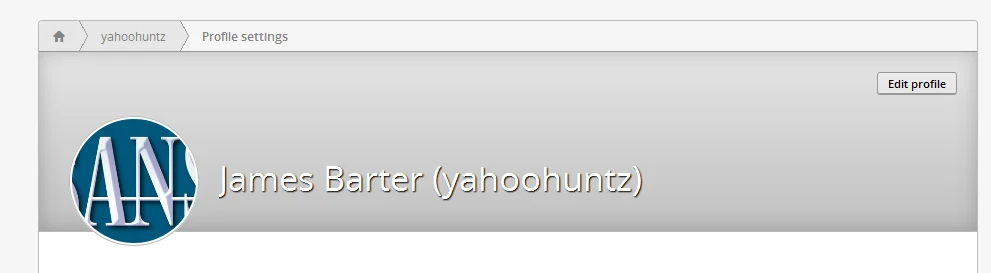
I was asked for a confirmation from the same address without even verifying that the mail associated is of the original account or not. Moreover no email confirmation was sent to the original email to verify that the change has been made. I have also attached a screenshot of my friend's email account that shows no mail regarding username change. The screenshot showing the username change has also been attached
You can also internally check that the username of the account with the email ███████ was yhunterz which was changed to yahoohuntz afterwards
The attack scenario here is
- Victim has an account [email protected] with the username victim
- Attacker mails from [email protected] to change the username of the account (Usernames are visible to everyone on hackerone)
- Attacker confirms the change from his own email without any prompt to the original user
And the username is changed
I hope this is not a low hanging fruit here. Because it beats the concept of anyone changing anyone's username
Awaiting your reply
Attachments
Context
HackerOne exposes usernames publicly: the report notes that usernames are visible to everyone on the platform. The feature involved here is the username change process, which the researcher approached by emailing [redacted] A user who wanted a different username wrote to [redacted] and the change was carried out on their behalf.
The report describes a flaw in how that manual process verified ownership of the account: the confirmation step was tied to the address that sent the request, not to the address registered on the account whose username was being changed.
Setup
No special tooling was needed. The researcher used two things:
- A friend's HackerOne account, whose username was
yhunterzand whose registered email address is redacted in the report. - An email address of the researcher's own, also redacted, from which the request was sent.
A third element was access to the friend's mailbox, used afterwards to show that no notification of the change had arrived there.
Finding it
The researcher tested whether the username change process would accept a request from an address unrelated to the target account. The support workflow asked for confirmation, but the confirmation was requested from the same address that had sent the request. Nothing checked whether that address belonged to the account being modified, and nothing was sent to the account's registered address to tell the owner that a change had been made.
That combination is what made the issue interesting: a confirmation step existed, but it confirmed the wrong thing. It proved that the requester controlled the mailbox they were writing from, not that they controlled the account.
Exploitation
Step 1: Send the change request from an unrelated address
The researcher emailed [redacted] asking to change the username of the friend's account from yhunterz to yahoohuntz. The request was sent from the researcher's own address, not from the address registered on the account.
Step 2: Confirm from the same unrelated address
Support asked for a confirmation, and the researcher supplied it from the same address that had sent the original request. No verification was performed to establish that this mailbox was associated with the original account.
Step 3: Observe that the change went through
The username was changed to yahoohuntz. The researcher also notes that the platform could verify internally that the account carrying the redacted email address had the username yhunterz before the change and yahoohuntz afterwards.
Step 4: Check the victim's mailbox
The researcher had access to the friend's email account and confirmed that no message about the username change had been received. The screenshot of that mailbox, showing no mail regarding the change, was attached to the report, as was a screenshot showing the username change itself.
The attachment is the victim account view used to support the claim.
The attack scenario as described
- Victim has an account [redacted] with the username victim.
- Attacker mails from [redacted] to change the username of the account (usernames are visible to everyone on HackerOne).
- Attacker confirms the change from his own email without any prompt to the original user.
And the username is changed.
The scenario requires only that the attacker knows the victim's public username.
Root cause
The support process treated the confirmation reply as proof of ownership of the account. In practice it only proved control of the sending mailbox. The registered address on the account was never used as the reference point: it was neither used to authorise the request nor used to notify the owner afterwards.
The registered address was not used to authorise the request or to notify the owner afterwards.
Impact
An attacker who knows a public username can have that username reassigned to a value of their choosing, on an account they do not own and cannot otherwise access. The owner receives no notification, so the change can go unnoticed. Usernames are visible to everyone on HackerOne, so the change is visible to other users.
The report does not describe any further consequence, such as access to the account itself, and the change is limited to the username.
Fix
The report does not state what was changed. Based on the described behaviour, the process should anchor the change to the account's registered address: send the confirmation request to that address rather than to the sender, and notify the registered address whenever a username change is completed. Requests arriving from any other address should not be actionable on their own.
Variants to test
- Support-mediated changes of any profile field. Ask support to change a display name, handle or linked address from an unrelated mailbox. A positive result is the change being applied after confirmation sent only to the requester.
- Confirmation sent to the requester instead of the account owner. Look for any workflow where the reply-to or from address drives the verification. A positive result is a confirmation link or code delivered to the attacker's mailbox for a victim-owned resource.
- Missing notification after a sensitive change. Perform a legitimate change on your own account and check whether the registered address is told. A positive result is silence, which is what allows the attack above to stay hidden.
- Public identifier reassignment. On platforms where handles are public, try to claim a handle that belongs to another account through a support or migration path. A positive result is the handle moving without the owner's involvement.
Hunting notes
This class of bug hides in manual and semi-manual processes: support desks, migration requests, account merges and anything handled by a human reading an email. Those flows often sit outside the application's normal authorisation checks, so the usual session and CSRF protections do not apply to them.
Signals during recon are workflows described in help pages or support articles that ask you to email in for a change, and any confirmation step whose destination you can influence. When testing, keep the demonstration minimal and verifiable: use an account you control or, as here, one whose owner cooperates, and document both sides, the request that was accepted and the absence of any notice to the real owner. The report showed the before and after usernames and the empty victim inbox.
What happened, in plain words
HackerOne is a website where companies pay people to find security problems in their software. Every person on HackerOne has a username, a short public name that everyone can see, and an email address, which is private and only used to log in and receive messages.
At the time of this report, a username change was requested by emailing [redacted] You had to write an email to the support team at [redacted] and ask them to do it for you. The researcher was asked for a confirmation from the same address before the change was made.
The researcher found that this process had a hole in it. The support team asked for confirmation, but they asked the person who sent the email to confirm from the same email address they had written from. They never checked whether that address was the one registered on the account whose username was being changed. And after the change was made, nobody told the real owner of the account.
So anyone who knew a public username could email support, ask for that username to be changed, confirm from their own mailbox, and the change would go through. The real owner would never know.
This kind of problem is called an information disclosure in the report's classification, though the more descriptive name for it is a broken authorisation check: the system checked that the requester controlled an email address, but not that they controlled the email address belonging to the account.
The setup
No special tools were needed. The researcher used three things:
- A friend's HackerOne account. Its username was
yhunterz, and its registered email address is blacked out in the report. - An email address of the researcher's own, also blacked out, from which the request was sent.
- Access to the friend's mailbox, used afterwards to show that no notification of the change had arrived there.
The account belonged to a friend of the researcher.
How the flaw was found
The researcher tested whether the username change process would accept a request from an unrelated address. The support workflow did ask for confirmation, but the confirmation was requested from the same address that had sent the request. Nothing checked whether that address belonged to the account being modified, and nothing was sent to the account's registered address to tell the owner that a change had been made.
That combination is what made the issue interesting. A confirmation step existed, but it confirmed the wrong thing. It proved that the requester controlled the mailbox they were writing from, not that they controlled the account.
A useful comparison: imagine a bank that lets you change the address on someone else's account as long as you confirm the request from your own phone number. The bank checked that you own a phone, not that you own the account.
Walking through the attack
Step 1: Send the change request from an unrelated address
The researcher emailed [redacted] asking to change the username of the friend's account from yhunterz to yahoohuntz. The request was sent from the researcher's own address, not from the address registered on the account.
Why this step matters: this is the moment where a correct system should have stopped. If the sender's address does not match the account's registered address, the request should be refused or redirected to the real owner for approval.
Step 2: Confirm from the same unrelated address
Support asked for a confirmation, and the researcher supplied it from the same address that had sent the original request. No verification was performed to establish that this mailbox was associated with the original account.
Why this step matters: a confirmation step is only useful if it confirms the right thing. Here it confirmed that the person writing the emails could read the replies to their own emails, which was never in doubt. It did not confirm ownership of the account.
Step 3: Observe that the change went through
The username was changed to yahoohuntz. The researcher also notes that the platform could verify internally that the account carrying the redacted email address had the username yhunterz before the change and yahoohuntz afterwards.
Why this step matters: the change actually happened.
Step 4: Check the victim's mailbox
The researcher had access to the friend's email account and confirmed that no message about the username change had been received. The screenshot of that mailbox, showing no mail regarding the change, was attached to the report, as was a screenshot showing the username change itself.
Why this step matters: the absence of a notification is what lets the attack stay hidden. The real owner was not told about the change. Silence means the victim may not notice for a long time.
The attachment is the victim account view used to support the claim.
The attack scenario as described
- Victim has an account [redacted] with the username victim.
- Attacker mails from [redacted] to change the username of the account (usernames are visible to everyone on HackerOne).
- Attacker confirms the change from his own email without any prompt to the original user.
And the username is changed.
The scenario requires only that the attacker knows the victim's public username.
A quick note on the terms in that scenario: an email address here is just a mailbox, like a physical letterbox. A username is the public label attached to an account, like a nickname on a forum. The attacker needs only the label, which is visible to anyone browsing the site.
Why it worked
The support process treated the confirmation reply as proof of ownership of the account. In practice it only proved control of the sending mailbox. The registered address on the account was never used as the reference point: it was neither used to authorise the request nor used to notify the owner afterwards.
The registered address was not used to authorise the request or to notify the owner afterwards.
In everyday terms: the support team was talking to whoever wrote in, and treating that conversation as the source of truth, instead of looking up the account and asking its owner.
What an attacker could do with it
An attacker who knows a public username can have that username reassigned to a value of their choosing, on an account they do not own and cannot otherwise access. The owner receives no notification, so the change can go unnoticed. Usernames are visible to everyone on HackerOne, so the change is visible to other users.
The report does not describe any further consequence, such as access to the account itself, and the change is limited to the username.
How it should be fixed
The report does not state what was changed. Based on the described behaviour, the process should anchor the change to the account's registered address: send the confirmation request to that address rather than to the sender, and notify the registered address whenever a username change is completed. Requests arriving from any other address should not be actionable on their own.
In plain words: the confirmation should go to the mailbox that the account already trusts, not to the mailbox that asked for the change.
Similar things to look for
These are variations on the same idea, useful if you want to test related features on other sites.
- Support-mediated changes of any profile field. Ask support to change a display name, handle or linked address from an unrelated mailbox. A positive result is the change being applied after confirmation sent only to the requester.
- Confirmation sent to the requester instead of the account owner. Look for any workflow where the reply-to or from address drives the verification. A positive result is a confirmation link or code delivered to the attacker's mailbox for a victim-owned resource.
- Missing notification after a sensitive change. Perform a legitimate change on your own account and check whether the registered address is told. A positive result is silence, which is what allows the attack above to stay hidden.
- Public identifier reassignment. On platforms where handles are public, try to claim a handle that belongs to another account through a support or migration path. A positive result is the handle moving without the owner's involvement.
Notes for people hunting this kind of bug
This class of bug hides in manual and semi-manual processes: support desks, migration requests, account merges and anything handled by a human reading an email. Those flows often sit outside the application's normal authorisation checks, so the usual session and CSRF protections do not apply to them.
Two terms worth knowing there. A session is the browser's proof that you are logged in, usually stored as a cookie, a small piece of data the site gives your browser after you log in. CSRF (cross-site request forgery) is an attack where another website tricks your logged-in browser into sending a request you did not intend. Neither of those defences helps when the action happens over email, because email has no browser session and no cookie.
Signals during recon are workflows described in help pages or support articles that ask you to email in for a change, and any confirmation step whose destination you can influence. When testing, keep the demonstration minimal and verifiable: use an account you control or, as here, one whose owner cooperates, and document both sides, the request that was accepted and the absence of any notice to the real owner. The report showed the before and after usernames and the empty victim inbox.
Glossary
- HackerOne: a website where companies run bug bounty programmes, paying researchers who report security problems in their software.
- Username: the public name attached to an account, visible to everyone on the platform.
- Registered email address: the private email address stored on an account, used for login and notifications.
- Support workflow: a process where a human on the support team handles a request manually, here over email.
- Confirmation step: a check where the requester must prove they can receive and reply to a message, usually to prove they control a mailbox.
- Authorisation check: a check that the person making a request is allowed to make it, for example that they own the account being changed.
- Information disclosure: a category of security issue where information or a capability is exposed to someone who should not have it; here the ability to change another person's username.
- Session: the state that keeps you logged in, usually represented by a cookie stored in your browser.
- Cookie: a small piece of data a website stores in your browser, often used to identify your logged-in session.
- CSRF (cross-site request forgery): an attack where a malicious site causes your logged-in browser to send a request you did not intend.
- Recon: short for reconnaissance, the phase of looking around a target to find features and workflows worth testing.
- Bug bounty: a programme where a company pays researchers for reporting security flaws.
- Impact: the practical harm a flaw can cause, such as taking over a public identity.
- Root cause: the underlying reason a flaw exists, as opposed to its visible symptom.
- Precondition: something that must be true before an attack works, here that the attacker knows the victim's public username.








