Password not checked when disabling 2FA on HackerOne
The two-factor authentication disable flow on HackerOne accepted any password as long as a valid authentication or backup code was supplied. An attacker who already had a valid OTP or backup code could turn off 2FA without knowing the account password.
 Originally disclosed on HackerOne
- Triaged in 7 days
- Fixed in 16 days
- Paid in 9 days
- Disclosed after 16 days
Hi,
when I was submitted a report to a program that request 2FA ON, I notice that if you try to disable this option will ask for backup code - password and if you enter a random password in the request filed and a correct backup code it will be successfully disabled the 2FA without check if the password was correct or not.
#PoC
- go to your account and activate the
2FAfrom/settings/auth - after active this option click on
Disabledicon besideTwo-factor authentication. - a new window will open asking for
Authentication or backup code - Passwordto confirm the disabled.
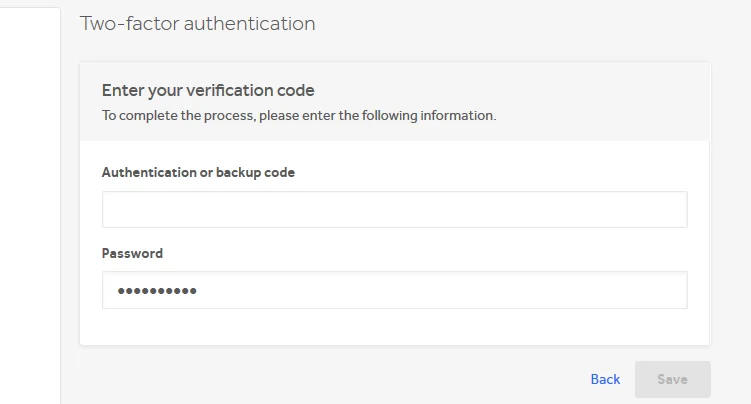
- in the first box enter a valid
Authentication or backup codeand in the password filed enter any random/wrong password and click save. - the option will be disabled successful without check the validation of the password.
#graphql Request
{"query":"mutation Destroy_two_factor_authentication_credentials_mutation($input_0:DestroyTwoFactorAuthenticationCredentialsInput!,$first_1:Int!,$throttle_time_2:Int!,$first_4:Int!,$size_3:ProfilePictureSizes!) {destroyTwoFactorAuthenticationCredentials(input:$input_0) {clientMutationId,...F1,...F2}} fragment F0 on User {id,totp_supported,totp_enabled,remaining_otp_backup_code_count,account_recovery_phone_number,username,name,_profile_picturePkPpF:profile_picture(size:$size_3)} fragment F1 on DestroyTwoFactorAuthenticationCredentialsPayload {me {id,user_type,_program_health_acknowledgements2aGZgn:program_health_acknowledgements(first:$first_1,throttle_time:$throttle_time_2) {edges {node {id,reason,team_member {user {id},id,team {handle,name,sla_failed_count,id}}},cursor},pageInfo {hasNextPage,hasPreviousPage}},new_feature_notification {name,description,url,id},...F0}} fragment F2 on DestroyTwoFactorAuthenticationCredentialsPayload {me {totp_enabled,remaining_otp_backup_code_count,id},was_successful,_errors3exXYb:errors(first:$first_4) {edges {node {type,field,message,id},cursor},pageInfo {hasNextPage,hasPreviousPage}}}",
"variables":{"input_0":{"password":"██████████","otp_code":"███","clientMutationId":"9"},"first_1":1,"throttle_time_2":3600,"first_4":100,"size_3":"small"}}
Impact
user can disable Two-factor authentication without entering a valid password
Not written yet. The AI write-up for this report has not been written yet. The Original tab links to the source.
How it worked
Root cause
Likely the GraphQL mutation that disables 2FA validated the OTP or backup code but never verified the supplied password against the account.
Impact
A user could disable two-factor authentication without entering a valid password, so anyone with a valid OTP or backup code could remove the account's second factor.
What the attacker needed
A valid OTP or backup code; access to the account settings
How it was found
- Enable two-factor authentication from the account settings page.
- Click the disable icon next to the two-factor authentication option.
- In the confirmation window, enter a valid authentication or backup code.
- Enter any random or wrong password in the password field and save.
- The two-factor authentication is disabled without the password being checked.
Explained by bugbounty.wiki with AI from the original and checked against quotes from it; it can still be wrong. Read the original before relying on a detail.
Not written yet. The AI write-up for this report has not been written yet. The Original tab links to the source.
Two-factor authentication (2FA) is a second lock on an account, usually a short code from an app. Normally, turning it off should require both the password and a valid code. Here the site only checked the code and ignored the password, so anyone holding a valid code could remove the extra protection.
What is Account takeover?
Getting into someone else's account through a flaw in sign-in, password reset, second factor, single sign-on or session handling.


