Report Private Links Leaks to Google Analytics via Query String Param
When a participant clicked a link in a private report, the link URL was sent to Google Analytics via a POST request before redirecting to an external warning page. This leaked private proof-of-concept links, which could contain sensitive reproduction steps, to a third-party analytics service.

- Triaged in 14 days
- Fixed in 31 days
- Disclosed after 36 days
Hello HackerOne Team,
According to HackerOne privacy
HackerOne sometimes partners with third-party services which may use various tracking technologies to provide certain services or features, including targeted online marketing. These technologies allow a partner to recognize your computer or mobile device each time you visit HackerOne, but do not allow access to Your Information from HackerOne. For a list of current partners, please contact us at [email protected].
Summary:
When the report is still private, no one will get access to any of the report contents aside from the reporter (participants) and security team members.
But i have found that when the report contents have a link URLs and any participants clicks the link, the link was being leaked to external domain which is Google Analytics.
Impact:
Most of the researcher provides a link/url as a PoC pointing to some video reproduction steps, that link is private only for the sec team to reproduce the issue, but security teams didn't know that the link provided by the researcher already leak upon clicking the link.
Please note that most of the link for PoC video contains sensitive information such steps to reproduce the bug.
Steps to reproduce:
- Click any url/link on the private report and capture the request using burp.
- Observe that there is a
POSTthat leaks the private link to google analytics before after redirecting to the external link warning page.
PoC Screenshot:
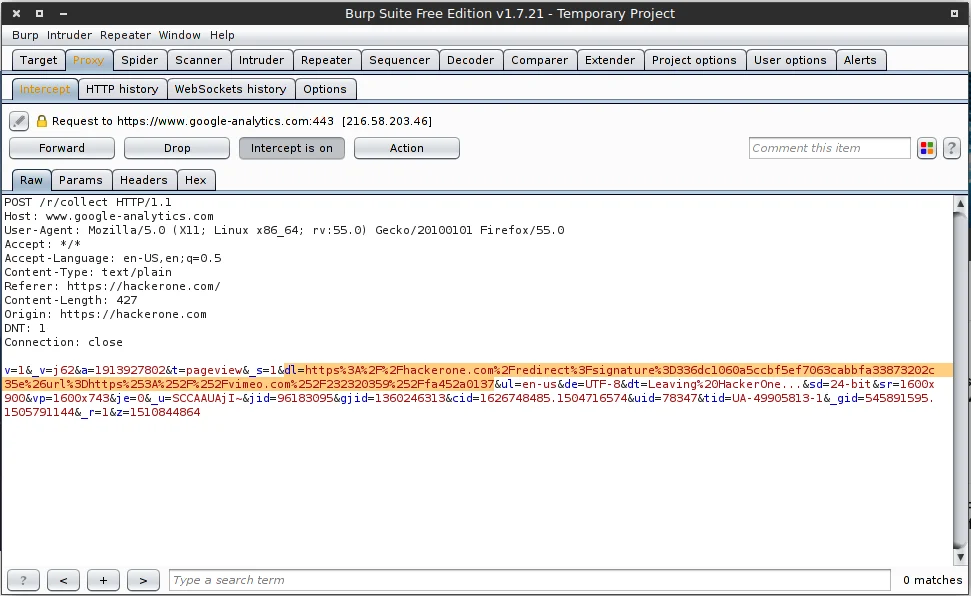
Scenario:
- Look at my vimeo public profile there is no video uploaded yet: https://vimeo.com/user70143644
- But in reality i have uploaded a private video with a private link: https://vimeo.com/232320359/fa452a0137
- Now the private link is for the security team to reproduce the issue.
- When i create a report with this content: https://vimeo.com/232320359/fa452a0137 and the sec team clicks that, the below PoC POST request was being called and it will redirect to external domain warning page.
POST /r/collect HTTP/1.1
Host: www.google-analytics.com
User-Agent: Mozilla/5.0 (X11; Linux x86_64; rv:55.0) Gecko/20100101 Firefox/55.0
Accept: */*
Accept-Language: en-US,en;q=0.5
Content-Type: text/plain
Referer: https://hackerone.com/
Content-Length: 428
Origin: https://hackerone.com
DNT: 1
Connection: close

v=1&_v=j62&a=2078508761&t=pageview&_s=1&dl=https%3A%2F%2Fhackerone.com%2Fredirect%3Fsignature%3D336dc1060a5ccbf5ef7063cabbfa33873202c35e%26url%3Dhttps%253A%252F%252Fvimeo.com%252F232320359%252Ffa452a0137&ul=en-us&de=UTF-8&dt=Leaving%20HackerOne...&sd=24-bit&sr=1600x900&vp=1600x743&je=0&_u=SCCAAUAjI~&jid=346100484&gjid=1015600924&cid=1626748485.1504716574&uid=78347&tid=UA-49905813-1&_gid=545891595.1505791144&_r=1&z=1287598365
Observe the dl and url parameter:
dl: Contains the hackerone signature url: Contains the private PoC link
dl=https%3A%2F%2Fhackerone.com%2Fredirect%3Fsignature%3D336dc1060a5ccbf5ef7063cabbfa33873202c35e%26url%3Dhttps%253A%252F%252Fvimeo.com%252F232320359%252Ffa452a0137
Let me know if anything else is needed.
Regards @reydd
Context
HackerOne is a bug bounty platform where researchers submit vulnerability reports to security teams. Reports can be private: while a report is still private, only the reporter (and other participants) and the security team members can see its contents. Researchers routinely paste links into a report as proof of concept, for example a link to a video that walks through the reproduction steps. Those links are meant to be visible only to the people who can read the report.
HackerOne's privacy statement, quoted in the report, says that the platform sometimes partners with third-party services that use tracking technologies, and that these technologies "do not allow access to Your Information from HackerOne". The researcher used that statement as the baseline against which the behaviour below looked wrong.
Setup
The report does not describe any special account setup beyond the normal roles: a researcher who can create a private report, and security team members who can read it. The only tool named is Burp, used to capture the request generated when a link in a report is clicked. The captured request shows Firefox 55 on Linux (X11; Linux x86_64; rv:55.0) as the browser.
Finding it
The researcher's starting observation is simple: a private report's contents should not reach anyone outside the reporter and the security team. When a report contains a URL and a participant clicks it, the platform first shows an external link warning page (the captured request has the page title Leaving HackerOne...). The researcher found that before that redirect, a POST request is sent to Google Analytics, and the private link is carried inside it.
The concern is that proof-of-concept links often point to a video of the reproduction steps, and such a video can itself contain sensitive information about the bug. The security team clicking the link would not know that the link had already left the platform.
Exploitation
Step 1: click a link in a private report and capture the request
The researcher clicks any URL in a private report with Burp capturing traffic. The result is a POST to Google Analytics that fires before the redirect to the external link warning page. The captured request is:
POST /r/collect HTTP/1.1
Host: www.google-analytics.com
User-Agent: Mozilla/5.0 (X11; Linux x86_64; rv:55.0) Gecko/20100101 Firefox/55.0
Accept: */*
Accept-Language: en-US,en;q=0.5
Content-Type: text/plain
Referer: https://hackerone.com/
Content-Length: 428
Origin: https://hackerone.com
DNT: 1
Connection: close

v=1&_v=j62&a=2078508761&t=pageview&_s=1&dl=https%3A%2F%2Fhackerone.com%2Fredirect%3Fsignature%[redacted]%26url%3Dhttps%253A%252F%252Fvimeo.com%252F232320359%252Ffa452a0137&ul=en-us&de=UTF-8&dt=Leaving%20HackerOne...&sd=24-bit&sr=1600x900&vp=1600x743&je=0&_u=SCCAAUAjI~&jid=346100484&gjid=1015600924&cid=1626748485.1504716574&uid=78347&tid=UA-49905813-1&_gid=545891595.1505791144&_r=1&z=1287598365
The hit has t=pageview and tid=UA-49905813-1, sent to /r/collect on www.google-analytics.com. The Referer header is https://hackerone.com/, and the document title dt=Leaving%20HackerOne... matches the external link warning page.
Step 2: read the private link out of the hit
The researcher points at two parameters in the body:
dlcontains the HackerOne redirect URL, including its signature.urlcontains the private proof-of-concept link.
The relevant fragment is:
dl=https%3A%2F%2Fhackerone.com%2Fredirect%3Fsignature%[redacted]%26url%3Dhttps%253A%252F%252Fvimeo.com%252F232320359%252Ffa452a0137
Decoding it once gives the redirect URL with a signature parameter and a url parameter; the url value is itself double-encoded, so the private link appears as https%3A%2F%2Fvimeo.com%2F232320359%2Ffa452a0137 inside the outer encoding. In other words, the document location that Google Analytics records is the HackerOne redirect endpoint, and that endpoint's query string carries the destination link. The private link therefore travels to a third-party domain as part of the analytics payload.
Step 3: demonstrate that the link really is private
To show that the leaked value is not something already public, the researcher uses a Vimeo account. The public profile at https://vimeo.com/user70143644 shows no uploaded video. In reality a private video exists at a private link:
https://vimeo.com/232320359/fa452a0137
The private link is meant only for the security team, so they can reproduce the issue. When a report is created containing that link and a security team member clicks it, the POST request above is sent and the browser then moves on to the external domain warning page.
Root cause
The analytics hit is a pageview for the external link warning page, and the pageview's document location is the HackerOne redirect URL rather than a neutral page address. Because the redirect endpoint carries the destination in its url query parameter (alongside a signature), the destination link is embedded in the value sent to Google Analytics. The report does not describe the code behind the analytics call.
The external link warning page is shown, but the analytics request is sent before the redirect. The privacy statement's promise that tracking partners do not get access to user information is what the researcher measures the behaviour against.
Impact
A private link placed in a report and clicked by a participant was disclosed to Google Analytics, a third-party domain, even though the report was still private. The people affected are reporters and security team members who click such links. The most sensitive case is a proof-of-concept video link, because the video can contain the reproduction steps for the bug.
Fix
The behaviour it identifies implies that the analytics pageview for the external link warning page should not include the redirect URL's query string, or that the destination should not be placed in a query parameter that ends up in the document location sent to analytics.
Variants to test
- Other pages that embed user-supplied URLs in their own query string (redirectors, link checkers, preview pages) and load analytics: capture the analytics hit and look for the destination in
dl,dpordr. A positive result is the private or user-supplied URL appearing encoded in the hit. - Analytics calls on pages reached after a form submission or report view: check whether report identifiers, titles or content fragments appear in the pageview payload. A positive result is any report-specific value in the request body.
- Redirect endpoints with signed URLs: check whether the signature and the destination both travel to third parties. A positive result is a signed redirect URL reproduced verbatim in an outbound request.
- Other third-party scripts loaded on private pages (tag managers, session replay, error reporting): inspect their outbound requests for the current location. A positive result is the private URL in a request to a domain outside the application.
What happened, in plain words
HackerOne is a website where security researchers report bugs to companies. A researcher writes a report, and the company's security team reads it. Reports can be private: while a report is private, only the person who wrote it (and anyone else invited to the conversation) and the security team can see what is inside.
Researchers often put links in a report as proof. A very common proof is a link to a video that shows, step by step, how the bug can be triggered. That link is meant to be seen only by the people who can read the report.
The researcher in this report noticed something odd. When someone clicks a link inside a private report, HackerOne first shows a warning page (the page title is Leaving HackerOne...) before sending the browser on to the outside site. But before that warning page finishes loading, the browser also sends a small message to Google Analytics, a third-party tracking service. That message contains the private link. So the link leaves HackerOne and reaches a company that is not part of the private report at all.
HackerOne's own privacy statement, quoted in the report, says that its tracking partners "do not allow access to Your Information from HackerOne". The researcher used that sentence as the standard to measure the behaviour against: the link is the reporter's information, and it was reaching a tracking partner.
Why does this matter? Because a proof-of-concept video can itself show the reproduction steps for the bug. If the link to that video is disclosed to a third party, the sensitive material behind the link is one step closer to being exposed, and the security team clicking the link has no idea it already happened.
The pieces involved
Before walking through the steps, here are the ideas you need.
- Bug bounty platform: a website where researchers submit vulnerability reports and companies pay or thank them for finding problems. HackerOne is one.
- Private report: a report that is visible only to its participants and the security team. Think of it as a shared document with a very short guest list.
- Proof of concept (PoC): evidence that a bug is real. Often a link to a video or a set of steps.
- Third party: a company other than the one running the website. Google Analytics is a third party here.
- Google Analytics: a service that websites embed to count visits and understand how people use their pages. The website's pages send small messages (called hits) to Google's servers describing what page was viewed.
- Query string: the part of a web address after the
?sign. It carries small pieces of data, for example?url=https://example.com. Each piece is a parameter, written asname=value. - URL encoding: web addresses cannot contain certain characters safely, so they are replaced with codes such as
%3Afor:and%2Ffor/. Encoding can be applied more than once, which is why you sometimes see%253A(an encoded%3A). - Redirect: when a website sends your browser to a different address automatically. HackerOne uses a redirect page so it can warn you before you leave.
- Signature: a long string attached to a link that proves the link was generated by the website and has not been tampered with. It works like a wax seal on an envelope.
- Burp: a tool that sits between your browser and the internet and lets you read every request and response. It is like a mail intercept desk that opens each envelope and shows you the contents before passing it on.
- HTTP request: the message your browser sends to a server when it wants something. It has a first line (method and path), a set of headers (extra information such as which browser you use), and sometimes a body (the actual data).
- POST: an HTTP method used when the browser sends data to a server, as opposed to
GET, which is normally used to ask for a page. - Cookie / tracking identifier: a small value stored in your browser so a service can recognise you on later visits. Google Analytics uses identifiers such as
cidanduidfor this. - Information disclosure: a vulnerability class where information that should stay private becomes visible to someone who should not see it. Nothing is broken or taken over; the problem is that a secret leaked.
Setting up
The report does not describe any special account setup. The only roles involved are the normal ones: a researcher who can create a private report, and security team members who can read it. The only tool named is Burp, used to capture the request that is generated when a link in a report is clicked. The captured request shows Firefox 55 on Linux (X11; Linux x86_64; rv:55.0) as the browser.
Finding it
The starting point is a simple expectation: the contents of a private report should not reach anyone outside the reporter and the security team. When a report contains a URL and a participant clicks it, HackerOne first shows an external link warning page. The captured request has the page title Leaving HackerOne..., which matches that warning page.
The researcher found that before the redirect happens, a POST request is sent to Google Analytics, and the private link is carried inside it. The security team clicking the link would have no way of knowing that the link had already left the platform.
Step by step
Step 1: click a link in a private report and capture the request
The researcher clicks any URL in a private report while Burp is capturing traffic. The result is a POST to Google Analytics that fires before the redirect to the external link warning page. The captured request is:
POST /r/collect HTTP/1.1
Host: www.google-analytics.com
User-Agent: Mozilla/5.0 (X11; Linux x86_64; rv:55.0) Gecko/20100101 Firefox/55.0
Accept: */*
Accept-Language: en-US,en;q=0.5
Content-Type: text/plain
Referer: https://hackerone.com/
Content-Length: 428
Origin: https://hackerone.com
DNT: 1
Connection: close

v=1&_v=j62&a=2078508761&t=pageview&_s=1&dl=https%3A%2F%2Fhackerone.com%2Fredirect%3Fsignature%[redacted]%26url%3Dhttps%253A%252F%252Fvimeo.com%252F232320359%252Ffa452a0137&ul=en-us&de=UTF-8&dt=Leaving%20HackerOne...&sd=24-bit&sr=1600x900&vp=1600x743&je=0&_u=SCCAAUAjI~&jid=346100484&gjid=1015600924&cid=1626748485.1504716574&uid=78347&tid=UA-49905813-1&_gid=545891595.1505791144&_r=1&z=1287598365
Line by line, in plain words:
POST /r/collect HTTP/1.1: the browser is sending data (POST) to the path/r/collecton the server it is talking to, using version 1.1 of the HTTP protocol./r/collectis the address Google Analytics uses to receive a hit.Host: www.google-analytics.com: the server being contacted is Google Analytics, not HackerOne. This is the key point: the message is going to a third party.User-Agent: Mozilla/5.0 (X11; Linux x86_64; rv:55.0) Gecko/20100101 Firefox/55.0: the browser identifies itself as Firefox 55 on a 64-bit Linux machine.Accept: */*: the browser will accept any kind of response.Accept-Language: en-US,en;q=0.5: the browser prefers English (US).Content-Type: text/plain: the body of the message is plain text.Referer: https://hackerone.com/: the page that caused this request was on HackerOne. This tells Google Analytics where the hit came from.Content-Length: 428: the body is 428 bytes long.Origin: https://hackerone.com: the request was made by a page whose origin is HackerOne. Browsers send this header on cross-site requests so the receiving server knows which site made the call.DNT: 1: the browser is asking not to be tracked. It is a request, not a guarantee.Connection: close: close the connection after this exchange.- The blank line separates the headers from the body.
- The body is one long line of
name=valuepairs joined by&. These are the parameters of the analytics hit. The important ones for this report aret=pageview(this hit records a page view),tid=UA-49905813-1(the analytics property id),dt=Leaving%20HackerOne...(the page title, which is the external link warning page), anddl=...(the document location, the address of the page being recorded).
Step 2: read the private link out of the hit
The researcher points at two parameters in the body:
dlcontains the HackerOne redirect URL, including its signature.urlcontains the private proof-of-concept link.
The relevant fragment is:
dl=https%3A%2F%2Fhackerone.com%2Fredirect%3Fsignature%[redacted]%26url%3Dhttps%253A%252F%252Fvimeo.com%252F232320359%252Ffa452a0137
What this fragment means, piece by piece:
dl=is the parameter name. It stands for document location, the address of the page Google Analytics is recording.https%3A%2F%2Fhackerone.com%2Fredirectdecodes tohttps://hackerone.com/redirect. That is HackerOne's redirect endpoint, the page that sends you on to the outside site.%3Fdecodes to?, so everything after it is the query string of that redirect URL.signature%[redacted]decodes to `[redacted] The signature is the seal that proves the redirect link was generated by HackerOne.%26decodes to&, which separates the next parameter.url%3Dhttps%253A%252F%252Fvimeo.com%252F232320359%252Ffa452a0137decodes tourl=https%3A%2F%2Fvimeo.com%2F232320359%2Ffa452a0137. The destination is itself encoded once more, which is why you see%253A(an encoded%3A) rather than%3A.
Decoding it once gives the redirect URL with a signature parameter and a url parameter; the url value is itself double-encoded, so the private link appears as https%3A%2F%2Fvimeo.com%2F232320359%2Ffa452a0137 inside the outer encoding. In other words, the document location that Google Analytics records is the HackerOne redirect endpoint, and that endpoint's query string carries the destination link. The private link therefore travels to a third-party domain as part of the analytics payload.
Step 3: demonstrate that the link really is private
To show that the leaked value is not something already public, the researcher uses a Vimeo account. The public profile at https://vimeo.com/user70143644 shows no uploaded video. In reality a private video exists at a private link:
https://vimeo.com/232320359/fa452a0137
The private link is meant only for the security team, so they can reproduce the issue. When a report is created containing that link and a security team member clicks it, the POST request above is sent and the browser then moves on to the external domain warning page.
Why it happens
The analytics hit is a pageview for the external link warning page, and the pageview's document location is the HackerOne redirect URL rather than a neutral page address. Because the redirect endpoint carries the destination in its url query parameter (alongside a signature), the destination link is embedded in the value sent to Google Analytics. The report does not describe the code behind the analytics call.
The external link warning page is shown, but the analytics request is sent before the redirect. The privacy statement's promise that tracking partners do not get access to user information is what the researcher measures the behaviour against.
What it means for people
A private link placed in a report and clicked by a participant was disclosed to Google Analytics, a third-party domain, even though the report was still private. The people affected are reporters and security team members who click such links. The most sensitive case is a proof-of-concept video link, because the video can contain the reproduction steps for the bug.
How it could be fixed
The behaviour it identifies implies that the analytics pageview for the external link warning page should not include the redirect URL's query string, or that the destination should not be placed in a query parameter that ends up in the document location sent to analytics.
Other places to look
- Other pages that embed user-supplied URLs in their own query string (redirectors, link checkers, preview pages) and load analytics: capture the analytics hit and look for the destination in
dl,dpordr. A positive result is the private or user-supplied URL appearing encoded in the hit. - Analytics calls on pages reached after a form submission or report view: check whether report identifiers, titles or content fragments appear in the pageview payload. A positive result is any report-specific value in the request body.
- Redirect endpoints with signed URLs: check whether the signature and the destination both travel to third parties. A positive result is a signed redirect URL reproduced verbatim in an outbound request.
- Other third-party scripts loaded on private pages (tag managers, session replay, error reporting): inspect their outbound requests for the current location. A positive result is the private URL in a request to a domain outside the application.
Glossary
- Bug bounty platform: a website where researchers submit vulnerability reports and companies review and reward them.
- Private report: a report visible only to its participants and the security team.
- Proof of concept (PoC): evidence that a bug is real, often a link to a video or a list of steps.
- Third party: a company other than the one running the website, such as an analytics provider.
- Google Analytics: a service that websites embed to count visits and record which pages are viewed.
- Hit: a single message sent to Google Analytics describing one event, such as a page view.
- Query string: the part of a web address after
?, made ofname=valueparameters separated by&. - Parameter: one
name=valuepair inside a query string or request body. - URL encoding: replacing characters that are unsafe in a web address with
%codes, such as%3Afor:and%2Ffor/. - Double encoding: encoding an already encoded value, which is why
%3Acan appear as%253A. - Redirect: an automatic instruction that sends the browser to a different address.
- Signature: a long string attached to a link that proves the link was generated by the website and not altered.
- Burp: a tool that sits between the browser and the internet and lets you read every request and response.
- HTTP request: the message a browser sends to a server, made of a first line, headers and sometimes a body.
- Header: an extra line of information in an HTTP request or response, such as
HostorReferer. - Body: the data part of an HTTP request, after the blank line that follows the headers.
- POST: an HTTP method used when the browser sends data to a server.
- GET: an HTTP method normally used to ask for a page.
- Origin: the site that made a request, sent in the
Originheader on cross-site requests. - Referer: the address of the page that caused a request, sent in the
Refererheader. - User-Agent: a header in which the browser identifies itself and its version.
- DNT: a header asking a site not to track the user; it is a request, not a guarantee.
- Cookie / tracking identifier: a small value stored in the browser so a service can recognise the same visitor later; Google Analytics uses identifiers such as
cidanduid. - Document location (
dl): the address of the page being recorded in an analytics hit. - Endpoint: a specific address on a server that accepts requests, such as
/r/collector/redirect.