Report redaction doesn't apply to report title update activities
The redaction feature does not search report title update activities, so sensitive keywords in title changes remain unredacted. An attacker could potentially see this information after full disclosure.
b21cbe5e1e1a9be6a2b9da3 Follow
 Originally disclosed on HackerOne
- Triaged in 8 hours
- Fixed in 5 days
- Disclosed after 49 days
Summary: The Redact option doesn't redact all keywords identified in the report- which may leave sensitive information unredacted.
Description (Include Impact):
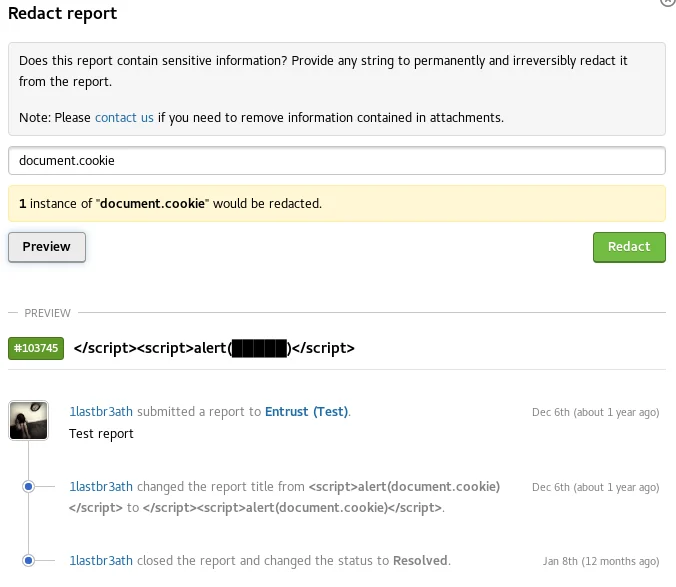
The option only search through reporter's initial report & follow-up comments, leaving other comments untouched. Furthermore, it doesn't search in changes to report status. For better clarity, please refer to my screenshot attached.
For example, if a team member has changed the report title, it fails to redact changes. Any such status changes are left untouched which is insufficient prior to full disclosure IMO.
Steps To Reproduce
For easier reproduction, please;
- Change report Title prior to redact keywords
- Now, redact some texts from report title as in screenshot
Screenshots:
What the report shows
The target is HackerOne's own report handling, specifically the Redact option that lets a team remove sensitive keywords from a report before it is disclosed. The researcher found that redaction does not cover everything that appears on a report page.
According to the report, the redaction search only walks through the reporter's initial report and the follow-up comments. Other comments are left untouched. It also does not search changes to report status. The example given is a report title that a team member has changed: if the title contains a keyword that is being redacted, the change to the title is not redacted.
The researcher's concern is that these status changes are left untouched, which they describe as insufficient prior to full disclosure. The report is filed under violation of secure design principles and rated low severity.
Steps to reproduce
The report gives two steps:
- Change the report title before redacting keywords.
- Redact some text from the report title as in the screenshot.
The screenshot below is the researcher's illustration of the behaviour:
No bounty amount, fix or resolution detail is included in the text.
Root cause
The same gap applies to comments from other participants, which fall outside the searched set.
Impact
If a keyword is redacted from the report body but survives in a title change or in a comment, the sensitive value is not removed. The report frames this as insufficient prior to full disclosure. The researcher hedges the finding as insufficient prior to full disclosure rather than describing a direct exploit.
How this kind of bug works
Redaction features exist because reports often contain data that must not become public: personal data, credentials, internal hostnames, customer identifiers. The feature is a find-and-replace over stored content, and its correctness depends entirely on the completeness of the set of fields it covers.
Reports are rarely a single text blob. A typical report page is assembled from several sources: the report body, comments from the reporter and from staff, and an activity feed recording edits, status changes, assignments and title changes. Each of these may be stored in a different table or column and rendered by a different template. A redaction routine written against the body field alone will silently miss the rest. The bug class is therefore an incomplete-coverage problem, a sibling of stored-data leaks where one copy of a value is scrubbed and another is not.
Rendering-time filtering, where the keyword is masked whenever content is displayed, avoids the problem of stale copies but must itself cover every template.
How to test for it
This class of bug is testable wherever a platform offers redaction, deletion or anonymisation of user content.
- Identify every surface where your text can appear: the main body, comments, edit history, title, tags, attachments, notifications, exports and any public or API view of the same object.
- Place a unique, harmless marker string in each surface. For a title, edit the title to contain the marker; for history, make an edit that records the marker in the change log.
- Trigger the redaction or deletion for that marker.
- Re-read every surface, including the activity feed, the API representation and any cached or exported copy, and check whether the marker is still present.
A positive result is the marker surviving in a place the feature claims to cover, ideally visible to a user who should not see it. Common false positives are markers that remain only in a private audit log the feature never claimed to touch, or content that was never in scope of the redaction. Confirm what the feature promises before reporting, and show the surviving value in the context a disclosed reader would see.
How it is fixed
Hunting notes
Redaction and deletion features are common on bug bounty platforms, support desks, CRMs, forums and any product with a "remove my data" flow. They are attractive because the promise is explicit, which makes any surviving copy a clear violation of intended behaviour. Recon signals include help-centre articles describing redaction or anonymisation, API endpoints that return activity or audit feeds, and interfaces that show edit history alongside content. To make the report land, demonstrate the surviving value in the exact view a disclosed or unauthorised reader would get, and tie it to the feature's stated guarantee rather than to a general data-retention concern.
What happened, in plain words
HackerOne is a platform where security researchers report bugs to companies. Each report is a page with a title, a description written by the researcher, comments, and a history of changes such as status updates and title edits. When a report is eventually made public ("disclosed"), the company can use a feature called Redact to remove sensitive words from it first, for example a password, a customer name or an internal server name.
Redaction works like find-and-replace in a word processor: you give it a word, and it should replace that word everywhere it appears on the report page. The researcher found that it does not replace the word everywhere. According to the report, the search only looks at two places: the researcher's original description and the researcher's follow-up comments. It skips comments written by other people, and it skips the record of changes to the report, such as a title edit made by a team member.
The example in the report is a title change. If a team member edits the report title and the new title contains a word that is later redacted, the edit is not touched. The old, sensitive word stays in the report's change history. The researcher calls this insufficient prior to full disclosure.
The report is filed under "Violation of Secure Design Principles" and rated low severity. No bounty amount, fix or resolution detail is included in the text.
Steps to reproduce
The report gives two steps:
- Change the report title before redacting keywords.
- Redact some text from the report title as in the screenshot.
The screenshot is the researcher's illustration of the behaviour:
In general, how this kind of bug works
A redaction feature exists because reports often contain data that must not become public: personal data, credentials, internal hostnames, customer identifiers. The feature is a find-and-replace over stored content, and whether it works depends entirely on how complete the list of places it searches is.
A report page is rarely one single block of text. It is assembled from several sources: the description, comments from the reporter and from staff, and an activity feed recording edits, status changes, assignments and title changes. Each of these may be stored in a different place and drawn on the page by a different piece of code. A redaction routine written only for the description will silently miss the rest. This is an incomplete-coverage problem: one copy of a value is scrubbed and another is not.
The right defences are structural rather than clever. List every field and event type that can contain text a user typed, apply redaction to all of them together, and keep that list under review as new activity types are added. A second option is to mask the word whenever content is displayed, rather than only when it is stored; that avoids stale copies but must itself cover every template.
How to test for it
This class of bug can be tested wherever a platform offers redaction, deletion or anonymisation of user content.
- Identify every surface where your text can appear: the main body, comments, edit history, title, tags, attachments, notifications, exports and any public or API view of the same object.
- Place a unique, harmless marker string in each surface. For a title, edit the title to contain the marker; for history, make an edit that records the marker in the change log.
- Trigger the redaction or deletion for that marker.
- Re-read every surface, including the activity feed, the API representation and any cached or exported copy, and check whether the marker is still present.
A positive result is the marker surviving in a place the feature claims to cover, ideally visible to a user who should not see it. Common false positives are markers that remain only in a private audit log the feature never claimed to touch, or content that was never in scope of the redaction. Confirm what the feature promises before reporting, and show the surviving value in the context a disclosed reader would see.
How it is fixed
Where to look for it
Redaction and deletion features are common on bug bounty platforms, support desks, CRMs, forums and any product with a "remove my data" flow. They are attractive targets because the promise is explicit, which makes any surviving copy a clear violation of intended behaviour. Signals worth watching include help-centre articles describing redaction or anonymisation, API endpoints that return activity or audit feeds, and interfaces that show edit history alongside content. To make the report land, demonstrate the surviving value in the exact view a disclosed or unauthorised reader would get, and tie it to the feature's stated guarantee rather than to a general data-retention concern.
Glossary
- Redact: to remove or mask specific words from content before other people can see it.
- Disclosure: making a bug report public, usually after it has been fixed.
- Report: the page where a researcher describes a bug to a company on a bug bounty platform.
- Activity feed: the list of changes made to a report, such as edits, status changes and assignments.
- Title change: an edit to the name of the report, recorded separately from the description.
- Keyword: the word or phrase the team wants removed during redaction.
- Find-and-replace: a text operation that searches for a word and substitutes another in its place.
- Incomplete coverage: a security flaw where a protection is applied to some copies of data but not all of them.
- Secure design principles: the idea that a feature should be built so its safety does not depend on users remembering to do the right thing.
- Severity: a rating of how serious a bug is, here low.
- Regression test: an automated check that confirms a fixed bug stays fixed.
- Defence in depth: applying more than one layer of protection so that one failure does not expose the data.
- API: a way for programs to read and change data on a service, separate from the web page.
- Audit log: a private record of actions taken on a system, kept for review.



