Subdomain takeover #3 at info.hacker.one
The researcher found a way to bypass a previous fix and take over the subdomain info.hacker.one by injecting a new parameter into a page update request at UnbouncePages. An attacker could use the taken-over domain to host fake login forms and steal credentials or other sensitive information.

- Fixed in 7 days
- Paid in 53 days
- Disclosed after 3 months
Summary by the researcher
i've been able to bypass it again the fixes and takeover the subdomain info.hacker.one with a new vulnerable PARAM at UnbouncePages App.
I hope you enjoy this report as i enjoyed doing it.
@ak1t4
The report
Summary:
Hi team, looking the last fix released from unbounce team at https://hackerone.com/reports/209004 i've been able again to bypass it again and takeover the subdomain info.hacker.one with a new vulnerable PARAM at UnbouncePages App
Actual Dns Entry:
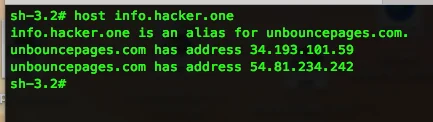
Steps To Reproduce & New PoC for HackerOne
- I have claimed the domain and placed a new-page for PoC validation located under:
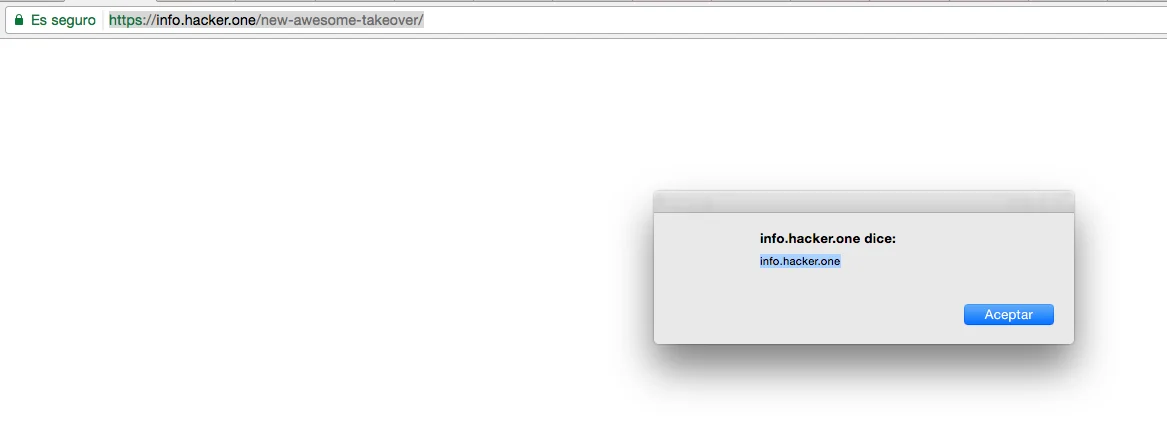
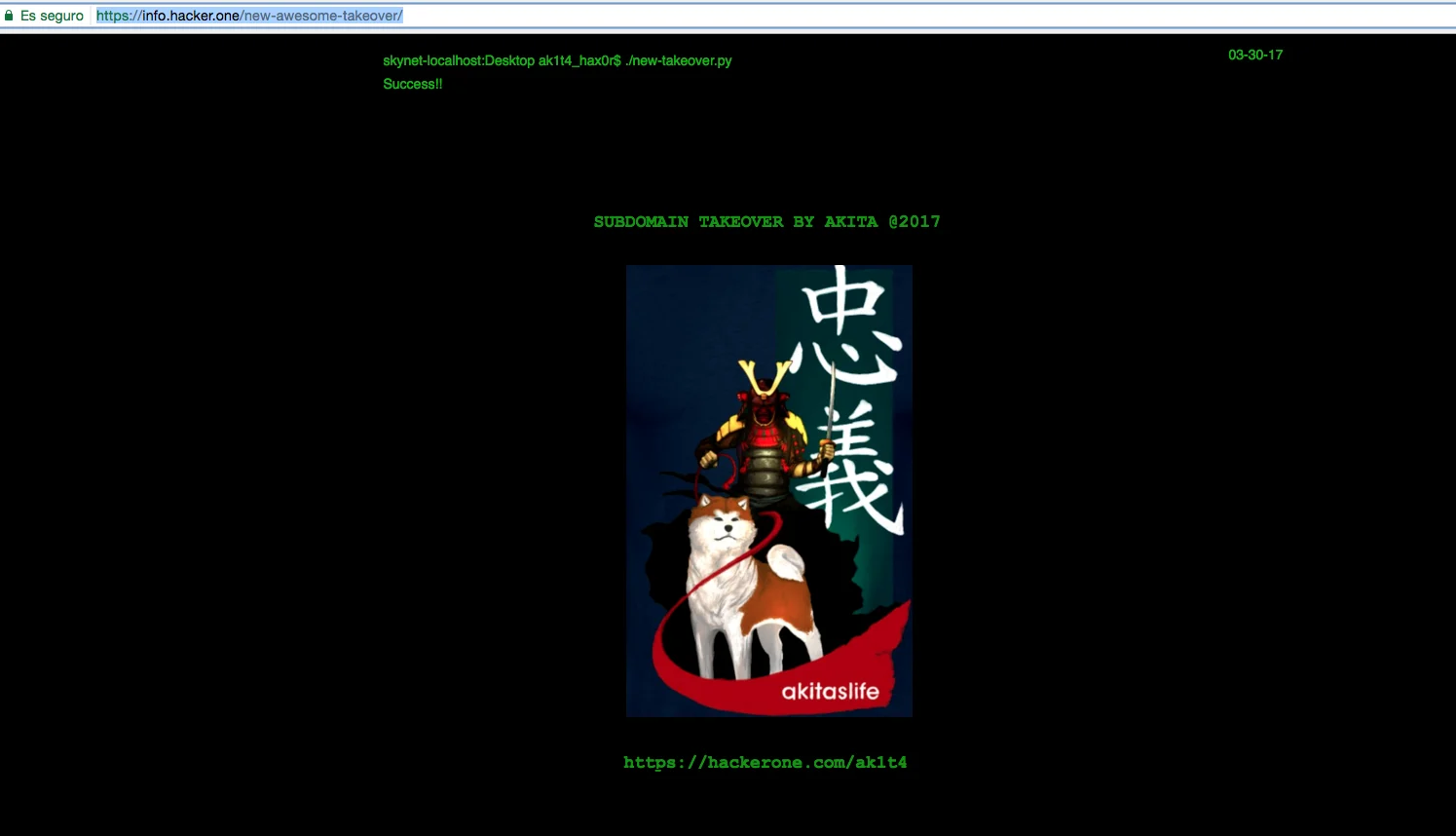
Go to -> https://info.hacker.one/new-awesome-takeover/ 2) You see the alert box and the New Subdomain Takeover
[ Unbounce Pages Team Section ]
Reproduction Steps PoC at new PARAM-Endpoint
- Login to account
- Create a New Page under any domain
- Go to "EDIT NAME"
- Fill with any input
- Intercept Request with burp or another proxy
- Add this body params:
&page%5Burl%5D=info%2ehacker%2eone%2Ftakeover-bypass-by-ak1t4
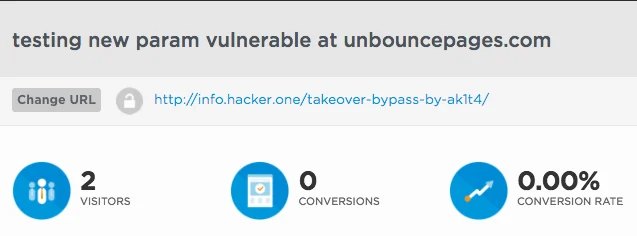
- Refresh page - You see the New Claimed Domain at Url Page
[ POST REQUEST ]
POST /2235922/pages/eb50eb0c-48a8-483b-8747-285aacbeaed6 HTTP/1.1
Host: app.unbounce.com
Connection: close
Content-Length: 160
X-NewRelic-ID: XQQAUl9ADAQFV1hW
Origin: https://app.unbounce.com
X-CSRF-Token: 7fHXoRIVY2kDTQxt+k6jjNgJagryJHBfu7MuZLtB7V4=
User-Agent: Mozilla/5.0 (Macintosh; Intel Mac OS X 10_10_1) AppleWebKit/537.36 (KHTML, like Gecko) Chrome/56.0.2924.87 Safari/537.36
Content-Type: application/x-www-form-urlencoded; charset=UTF-8
Accept: */*
X-Requested-With: XMLHttpRequest
Referer: https://app.unbounce.com/2235922/pages/eb50eb0c-48a8-483b-8747-285aacbeaed6
Accept-Encoding: gzip, deflate, br
Accept-Language: es-ES,es;q=0.8,fi;q=0.6,en;q=0.4
Cookie: optimizelyEndUserId=oeu1486009343856r0.6355656073169369; __qca=P0-1900902187-1486458680293; km_lv=x; _okdetect=%7B%22token%22%3A%2214865300449170%22%2C%22proto%22%3A%22https%3A%22%2C%22host%22%3A%22app.unbounce.com%22%7D; _ok=9006-109-10-5599; _hjIncludedInSample=1; __distillery=13f6068_9ea46c19-8132-4e4f-a2a7-33f852efb977-854183e7d-b084e0ec963d-a310; _vis_opt_s=1%7C; _vis_opt_test_cookie=1; _vwo_uuid_v2=900CADBE3098CA856771F9DD381BEE83|2fbe46dc8984391b55ad33e11de009f6; __hstc=26860514.14d0f12fb1edb765ae477bb6b6c8267f.1488073812483.1490506325671.1490587373830.17; __hssrc=1; hubspotutk=14d0f12fb1edb765ae477bb6b6c8267f; ubvt=186.133.157.681486461608015598; _okac=bc8588c05fd6d7326c40a2ed71d3c572; _okla=1; _okbk=cd5%3Davailable%2Ccd4%3Dtrue%2Cvi5%3D0%2Cvi4%3D1490899590655%2Cvi3%3Dactive%2Cvi2%3Dfalse%2Cvi1%3Dfalse%2Ccd8%3Dchat%2Ccd6%3D0%2Ccd3%3Dfalse%2Ccd2%3D0%2Ccd1%3D0%2C; _lp-webapp_session=BAh7CEkiD3Nlc3Npb25faWQGOgZFVEkiJTE4MzQ0MTI1MTEyZmVmZWY1OGFjMzRlOWE5MmUxZWEyBjsAVEkiEF9jc3JmX3Rva2VuBjsARkkiMTdmSFhvUklWWTJrRFRReHQrazZqak5nSmFncnlKSEJmdTdNdVpMdEI3VjQ9BjsARkkiDHVzZXJfaWQGOwBGaQOOrh8%3D--7dc60f053571cb02d56d36e32bcfa074a50559d1; optimizelySegments=%7B%22181202216%22%3A%22false%22%2C%22181231084%22%3A%22referral%22%2C%22181236069%22%3A%22gc%22%7D; optimizelyBuckets=%7B%7D; _ga=GA1.2.698694919.1486458679; olfsk=olfsk4517478054873454; wcsid=PNXDqm36xvlrxT6B9x5TA0S0RE0PFAam; hblid=gQ8SNvQtERsXysoj9x5TA2AiCS3RE0OF; _okgid=bc6ff4d51dee8959d8e5980f77366c67; _ga=GA1.3.698694919.1486458679; kvcd=1490911449733; km_ai=████; km_ni=███████; km_vs=1; intercom-session-eqe7kbcu=KzB6MDkwZFQxdzBXUU1zRExacHl5c0VpZXpuSTVBaFpQbHBkd0FSOStJZ29mNldnYThhVFRVbFFFdXhtNEY3Ty0tVDRGTDVGZy9QakxqNTFSL3N2Q0RJUT09--a0cd83192ad36755d2bcaaaeefa0aa8026c4e5d7; _oklv=1490911811537%2CPNXDqm36xvlrxT6B9x5TA0S0RE0PFAam

utf8=%E2%9C%93&_method=put&authenticity_token=7fHXoRIVY2kDTQxt%2Bk6jjNgJagryJHBfu7MuZLtB7V4%3D&page%5Bname%5D=testing+new+param+vulnerable+at+unbouncepages.com+&page%5Burl%5D=info%2ehacker%2eone%2Ftakeover-bypass-by-ak1t4
Vulnerable Injected PARAM: page%5Burl%5D=anydomain.com Endpoint: /[account-id]/pages/[page-id]
This Request update the page with the New Domain (any domain could be used and creating content into it)
I create a New Private Video PoC here for the above explained -> https://youtu.be/1PWS76Am7y0
(All branded domains under unbounce app are vulnerable)
Security Impact at H1:
*An attacker can utilize this domain info.hacker.one for targeting the organization by fake login hackerOne forms, or steal sensitive information of teams (credentials, credit card information, etc)
Security impact at Unbounce Pages:
*An attacker can utilize this bug affecting all branded domains and customers at unbouncepages.com and use all domains with evil purposes as stealing of sensitive information, credentials, credit card info, etc
Please let me know if more info needed or any help,
Best Regards, @ak1t4
Context
HackerOne runs a public bug bounty programme, and its own infrastructure is fair game for researchers. One of its subdomains, info.hacker.one, was pointed at Unbounce, a hosted landing-page service. Unbounce lets a customer attach a custom domain to a page they have built, and it serves that page from the customer's domain. The feature exists so a marketing team can publish a landing page at, say, promo.example.com without running a web server.
That arrangement depends on Unbounce refusing to let one account claim a domain that belongs to someone else. If the claim check can be bypassed, the domain's DNS still points at Unbounce, and the attacker's page is served from the victim's hostname. This is a subdomain takeover, and the researcher had already reported one bypass of the same check in an earlier report (209004). This write-up covers a second bypass, through a different parameter.
Setup
- An Unbounce account, logged in to the web application at
app.unbounce.com. - A page created under any domain in that account, which gives you a page identifier to edit.
- An intercepting proxy (the report names Burp) to modify the request that saves the page name.
- The target subdomain
info.hacker.one, whose DNS entry still pointed at Unbounce.
The researcher included the target's DNS entry in the report:
Finding it
The starting point was the fix that Unbounce shipped after report 209004. The researcher found another way to influence the page's URL through the page editor. The name field is a normal part of the page editor, and the request that saves it carries the page's URL as a form parameter. The earlier fix had closed one path; the researcher found a new vulnerable parameter that bypassed it.
Exploitation
Step 1: Claim the domain and publish a page
The researcher claimed the domain and placed a page for proof-of-concept validation at:
https://info.hacker.one/new-awesome-takeover/
Visiting that URL showed the alert box and the new subdomain takeover. The two screenshots below show the page being served from the HackerOne subdomain:
Step 2: Reproduce the parameter injection in the Unbounce editor
The reproduction steps for the vulnerable parameter endpoint are:
- Log in to the account.
- Create a new page under any domain.
- Go to "EDIT NAME".
- Fill in any input.
- Intercept the request with Burp or another proxy.
- Add this body parameter:
&page%5Burl%5D=info%2ehacker%2eone%2Ftakeover-bypass-by-ak1t4
- Refresh the page. The newly claimed domain appears at the page URL.
The added parameter is URL-encoded. Decoded, page%5Burl%5D is page[url], and the value info%2ehacker%2eone%2Ftakeover-bypass-by-ak1t4 is info.hacker.one/takeover-bypass-by-ak1t4. In other words, the attacker supplies the hostname and path that the page should be published under, and the server accepts it.
Step 3: The full request
The intercepted request, with the injected parameter in the body, is shown below. The session cookie and CSRF token have been redacted.
POST /2235922/pages/eb50eb0c-48a8-483b-8747-285aacbeaed6 HTTP/1.1
Host: app.unbounce.com
Connection: close
Content-Length: 160
X-NewRelic-ID: XQQAUl9ADAQFV1hW
Origin: https://app.unbounce.com
X-CSRF-Token: [redacted]
User-Agent: Mozilla/5.0 (Macintosh; Intel Mac OS X 10_10_1) AppleWebKit/537.36 (KHTML, like Gecko) Chrome/56.0.2924.87 Safari/537.36
Content-Type: application/x-www-form-urlencoded; charset=UTF-8
Accept: */*
X-Requested-With: XMLHttpRequest
Referer: https://app.unbounce.com/2235922/pages/eb50eb0c-48a8-483b-8747-285aacbeaed6
Accept-Encoding: gzip, deflate, br
Accept-Language: es-ES,es;q=0.8,fi;q=0.6,en;q=0.4
Cookie: [redacted]

utf8=%E2%9C%93&_method=put&authenticity_token=[redacted]&page%5Bname%5D=testing+new+param+vulnerable+at+unbouncepages.com+&page%5Burl%5D=info%2ehacker%2eone%2Ftakeover-bypass-by-ak1t4
The request targets the page resource under the account ID and page ID. It is a form-encoded PUT (sent as a POST with _method=put), authenticated by the session cookie and the authenticity_token, and it carries the page name alongside the injected page[url] value. The server applies the new URL to the page, updating it with the attacker-chosen domain.
The researcher identifies the vulnerable parameter and endpoint as:
- Vulnerable injected parameter:
page%5Burl%5D=anydomain.com - Endpoint:
/[account-id]/pages/[page-id]
The request updates the page with the new domain, and any domain could be used, with content created into it.
A private video walkthrough of the above was recorded:
Step 4: Scope of the flaw
The researcher notes that all branded domains under the Unbounce app are vulnerable, not just the HackerOne subdomain.
Root cause
The page editor accepts a client-supplied page[url] value, and the request updates the page with the new domain. The earlier fix addressed a different parameter, so the same class of bug remained reachable through this one. The target's DNS entry is shown in the report, and the researcher's page was served from the subdomain.
Impact
At HackerOne, an attacker could use info.hacker.one to target the organisation with fake login forms or to steal sensitive information from teams, such as credentials and credit card information. At Unbounce, the same bug affects all branded domains and customers, and any of those domains could be used for the same purposes. The report rates the issue as low severity with a CVSS score of 3.5.
Fix
The report does not describe the fix that was ultimately applied.
Variants to test
- Other writable URL fields. Look for parameters that set a hostname or full URL on a hosted object, such as
page[url],site[domain],custom_domainorhost. A positive result is the object being served from a hostname you do not own. - Sibling endpoints. Try the same body parameter against other page or site update endpoints under
/[account-id]/pages/[page-id]. A positive result is the same domain change being accepted there. - Partial fixes. After a vendor patches one parameter, retry the same feature with related parameter names and encodings. A positive result is the takeover still working through the new name.
- Dangling DNS. Enumerate subdomains whose DNS points at hosted services and check whether the corresponding resource is unclaimed. A positive result is a page you can publish under the victim's hostname.
What happened, in plain words
HackerOne is a company that runs a bug bounty programme: outside researchers are invited to look for security mistakes in its systems and report them. Because HackerOne's own website is part of that programme, a researcher called @ak1t4 was allowed to test it. This report is about one of HackerOne's subdomains, info.hacker.one.
A subdomain is a name that sits in front of a main domain, like info in front of hacker.one. When you type a name into your browser, a system called DNS looks it up and tells the browser which server to contact. Think of DNS as a phone book: you give it a name, it gives you an address.
HackerOne had pointed info.hacker.one at Unbounce. Unbounce is a hosted service for building landing pages: a marketing team designs a page in Unbounce's editor, and Unbounce stores and serves it. Unbounce also lets a customer attach their own domain to a page, so the page appears at, for example, promo.example.com without the customer running any web server. That is the feature at the centre of this report.
For that feature to be safe, Unbounce must refuse to let one account claim a domain that belongs to somebody else. If that check can be bypassed, the victim's DNS still points at Unbounce, but Unbounce now serves the attacker's page under the victim's name. That is called a subdomain takeover: the attacker does not touch the victim's servers at all, they simply get the victim's hostname to display their own content.
The researcher had already found one bypass of this check in an earlier report, number 209004. Unbounce fixed it. This report describes a second bypass, through a different parameter. A parameter is a named value sent along with a request, a bit like a field on a form: the name says what the value is for, and the value is the content.
Setup
To follow the same path, the researcher needed:
- An Unbounce account, logged in to the web application at
app.unbounce.com. - A page created under any domain in that account, which gives a page identifier to edit.
- An intercepting proxy (the report names Burp) to modify the request that saves the page name. A proxy sits between your browser and the website and lets you pause a request, change it, and then send it on. Think of it as editing a letter after you have sealed it but before it is posted.
- The target subdomain
info.hacker.one, whose DNS entry still pointed at Unbounce.
The researcher included the target's DNS entry in the report:
Finding it
The starting point was the fix Unbounce shipped after report 209004. The researcher found another way to influence the page's URL through the page editor. The name field is an ordinary part of the page editor, and the request that saves it carries the page's URL as a form parameter. The earlier fix had closed one path; the researcher found a new vulnerable parameter that bypassed it.
Exploitation
Step 1: Claim the domain and publish a page
The researcher claimed the domain and placed a page for proof-of-concept validation at:
https://info.hacker.one/new-awesome-takeover/
This is a plain web address. https:// is the secure version of the protocol browsers use to fetch pages, info.hacker.one is the hostname, and /new-awesome-takeover/ is the path, the location of a particular page on that host. Visiting that URL showed the alert box and the new subdomain takeover. In other words, a page the researcher controlled was being served from HackerOne's own subdomain. The two screenshots below show the page being served from the HackerOne subdomain:
Step 2: Reproduce the parameter injection in the Unbounce editor
The reproduction steps for the vulnerable parameter endpoint are:
- Log in to the account.
- Create a new page under any domain.
- Go to "EDIT NAME".
- Fill in any input.
- Intercept the request with Burp or another proxy.
- Add this body parameter:
&page%5Burl%5D=info%2ehacker%2eone%2Ftakeover-bypass-by-ak1t4
- Refresh the page. The newly claimed domain appears at the page URL.
Why each step: logging in gives a valid session, so the server knows who is asking. Creating a page gives something to edit, and the editor's name field is the feature that sends the URL. Filling in any input is just to have a normal request to intercept. The proxy is needed because the browser will not normally send the extra parameter; you have to add it by hand. Refreshing shows whether the server accepted the change.
The added parameter is URL-encoded. URL encoding is how special characters travel safely inside a web address or form body: characters that have a special meaning are replaced by a percent sign and two hexadecimal digits. Decoded, page%5Burl%5D is page[url], and the value info%2ehacker%2eone%2Ftakeover-bypass-by-ak1t4 is info.hacker.one/takeover-bypass-by-ak1t4. In other words, the attacker supplies the hostname and path that the page should be published under, and the server accepts it.
Step 3: The full request
The intercepted request, with the injected parameter in the body, is shown below. The session cookie and CSRF token have been redacted.
POST /2235922/pages/eb50eb0c-48a8-483b-8747-285aacbeaed6 HTTP/1.1
Host: app.unbounce.com
Connection: close
Content-Length: 160
X-NewRelic-ID: XQQAUl9ADAQFV1hW
Origin: https://app.unbounce.com
X-CSRF-Token: [redacted]
User-Agent: Mozilla/5.0 (Macintosh; Intel Mac OS X 10_10_1) AppleWebKit/537.36 (KHTML, like Gecko) Chrome/56.0.2924.87 Safari/537.36
Content-Type: application/x-www-form-urlencoded; charset=UTF-8
Accept: */*
X-Requested-With: XMLHttpRequest
Referer: https://app.unbounce.com/2235922/pages/eb50eb0c-48a8-483b-8747-285aacbeaed6
Accept-Encoding: gzip, deflate, br
Accept-Language: es-ES,es;q=0.8,fi;q=0.6,en;q=0.4
Cookie: [redacted]

utf8=%E2%9C%93&_method=put&authenticity_token=[redacted]&page%5Bname%5D=testing+new+param+vulnerable+at+unbouncepages.com+&page%5Burl%5D=info%2ehacker%2eone%2Ftakeover-bypass-by-ak1t4
Line by line, in plain words:
POST /2235922/pages/eb50eb0c-48a8-483b-8747-285aacbeaed6 HTTP/1.1is the first line of the request.POSTis the method, the verb that says what kind of action is being asked for; here it is sending data to the server. The path identifies the resource: an account number, thenpages, then a long page identifier.HTTP/1.1is the version of the language the browser and server speak.Host: app.unbounce.comsays which website the request is for. One server can host many sites, so this tells it which one.Connection: closeasks the server to close the connection after this exchange.Content-Length: 160states how many bytes of body follow, so the server knows where the body ends.X-NewRelic-IDis a header added by a monitoring tool. Headers are extra labelled lines of information that travel with a request, like the notes on a parcel.Origin: https://app.unbounce.comtells the server which site the request came from, which helps it decide whether to accept it.X-CSRF-Token: [redacted]is a security token. CSRF stands for cross-site request forgery: an attack where another website tries to make your browser send a request you did not intend. The token is a secret value the server gave the page, and the server checks it to confirm the request really came from its own page. It has been removed here because it is sensitive.User-Agentdescribes the browser and operating system that sent the request.Content-Type: application/x-www-form-urlencoded; charset=UTF-8says the body is formatted like a web form, as name equals value pairs joined by ampersands, and that the text is UTF-8 encoded.Accept: */*says the client will accept any kind of response.X-Requested-With: XMLHttpRequestmarks the request as having been made by JavaScript in the page rather than by typing a URL.Referersays which page the request was made from.Accept-Encodinglists the compression formats the client can handle.Accept-Languagelists the languages the user prefers.Cookie: [redacted]carries the cookies. A cookie is a small piece of data the website stored in your browser earlier, and the browser sends it back with each request so the site can recognise you. The session cookie is what proves you are logged in, so it has been removed here.- The blank line separates the headers from the body.
- The body is the form data:
utf8=%E2%9C%93is a checkbox-style field,_method=puttells the server to treat this POST as a PUT, which is the verb normally used to update something,authenticity_token=[redacted]is the same CSRF token again,page%5Bname%5D=...is the page name, andpage%5Burl%5D=info%2ehacker%2eone%2Ftakeover-bypass-by-ak1t4is the injected value that sets the page's URL.
The request targets the page resource under the account ID and page ID. It is a form-encoded PUT (sent as a POST with _method=put), authenticated by the session cookie and the authenticity_token, and it carries the page name alongside the injected page[url] value. The server applies the new URL to the page, updating it with the attacker-chosen domain.
The researcher identifies the vulnerable parameter and endpoint as:
- Vulnerable injected parameter:
page%5Burl%5D=anydomain.com - Endpoint:
/[account-id]/pages/[page-id]
An endpoint is simply the address of a particular function on a server, the place a request is sent to. The request updates the page with the new domain, and any domain could be used, with content created into it.
A private video walkthrough of the above was recorded:
Step 4: Scope of the flaw
The researcher notes that all branded domains under the Unbounce app are vulnerable, not just the HackerOne subdomain.
Root cause
The page editor accepts a client-supplied page[url] value, and the request updates the page with the new domain. The earlier fix addressed a different parameter, so the same class of bug remained reachable through this one. The target's DNS entry is shown in the report, and the researcher's page was served from the subdomain.
Impact
At HackerOne, an attacker could use info.hacker.one to target the organisation with fake login forms or to steal sensitive information from teams, such as credentials and credit card information. A fake login form on a trusted-looking address is convincing because the address bar shows the real company name. At Unbounce, the same bug affects all branded domains and customers, and any of those domains could be used for the same purposes. The report rates the issue as low severity with a CVSS score of 3.5. CVSS is a standard scoring system for security issues; a higher number means more serious.
Fix
The report does not describe the fix that was ultimately applied. Proving control usually means being able to place a specific value in the domain's DNS records or on a page served from it.
Variants to test
- Other writable URL fields. Look for parameters that set a hostname or full URL on a hosted object, such as
page[url],site[domain],custom_domainorhost. A positive result is the object being served from a hostname you do not own. - Sibling endpoints. Try the same body parameter against other page or site update endpoints under
/[account-id]/pages/[page-id]. A positive result is the same domain change being accepted there. - Partial fixes. After a vendor patches one parameter, retry the same feature with related parameter names and encodings. A positive result is the takeover still working through the new name.
- Dangling DNS. Enumerate subdomains whose DNS points at hosted services and check whether the corresponding resource is unclaimed. A positive result is a page you can publish under the victim's hostname.
Glossary
- Subdomain: a name placed in front of a main domain, such as
infoininfo.hacker.one, used to point at a separate service. - DNS: the system that translates a name like
info.hacker.oneinto the address of the server that should answer for it. - Hosted landing-page service: a company that stores and serves web pages for you, so you do not run your own web server.
- Custom domain: your own domain name attached to a page hosted somewhere else, so the page appears under your name.
- Subdomain takeover: getting a victim's hostname to serve content you control, usually because the hostname still points at a service where nobody has claimed the matching resource.
- Parameter: a named value sent with a request, like a field on a form.
- Endpoint: the address of a particular function on a server that a request is sent to.
- Intercepting proxy: a tool that sits between browser and website, letting you pause, inspect and change requests.
- Burp: a well-known intercepting proxy used in security testing.
- URL encoding: replacing special characters with a percent sign and two hexadecimal digits so they can travel safely in a web address or form body.
- HTTP: the language browsers and servers use to exchange requests and responses.
- Header: an extra labelled line of information sent with a request or response.
- Method: the verb in a request, such as GET to fetch or POST to send data.
- PUT: an HTTP method normally used to update an existing resource.
- Cookie: a small piece of data a website stores in your browser and gets back on later requests, used to recognise you.
- Session cookie: the cookie that proves you are logged in.
- CSRF: cross-site request forgery, an attack where another site makes your browser send a request you did not intend.
- CSRF token: a secret value the server gives a page and checks on submission, to confirm the request came from that page.
- Proof of concept (PoC): a small demonstration that a security issue is real.
- Root cause: the underlying mistake that makes a vulnerability possible.
- Impact: what an attacker could actually do if the issue is exploited.
- Severity: how serious an issue is judged to be.
- CVSS: a standard scoring system for security issues, where a higher score means more serious.
- Dangling DNS: a DNS entry that still points at a hosted service where the matching resource is no longer claimed, leaving it open to takeover.




