Takeover of hackerone.engineering via Medium
A HackerOne-owned domain redirected visitors to a Medium blog page that no longer existed, so anyone could register that Medium page and control what visitors saw. The researcher claimed the page and showed that the redirected domain then displayed attacker-chosen content, enabling phishing or fake job adverts.

- Fixed in 56 days
- Paid in 9 days
- Disclosed after 2 months
Hi HackerOne Team!
==**NOTE: I'm redoing the report because the last one wasn't looked at correctly #2705602 and the report was closed, so don't close it as duplicate, just see that the takeover on the hackerone page happened. **==
Just click on the link: https://hackerone.engineering and see the Takeover. (We made the PoC)
Summary
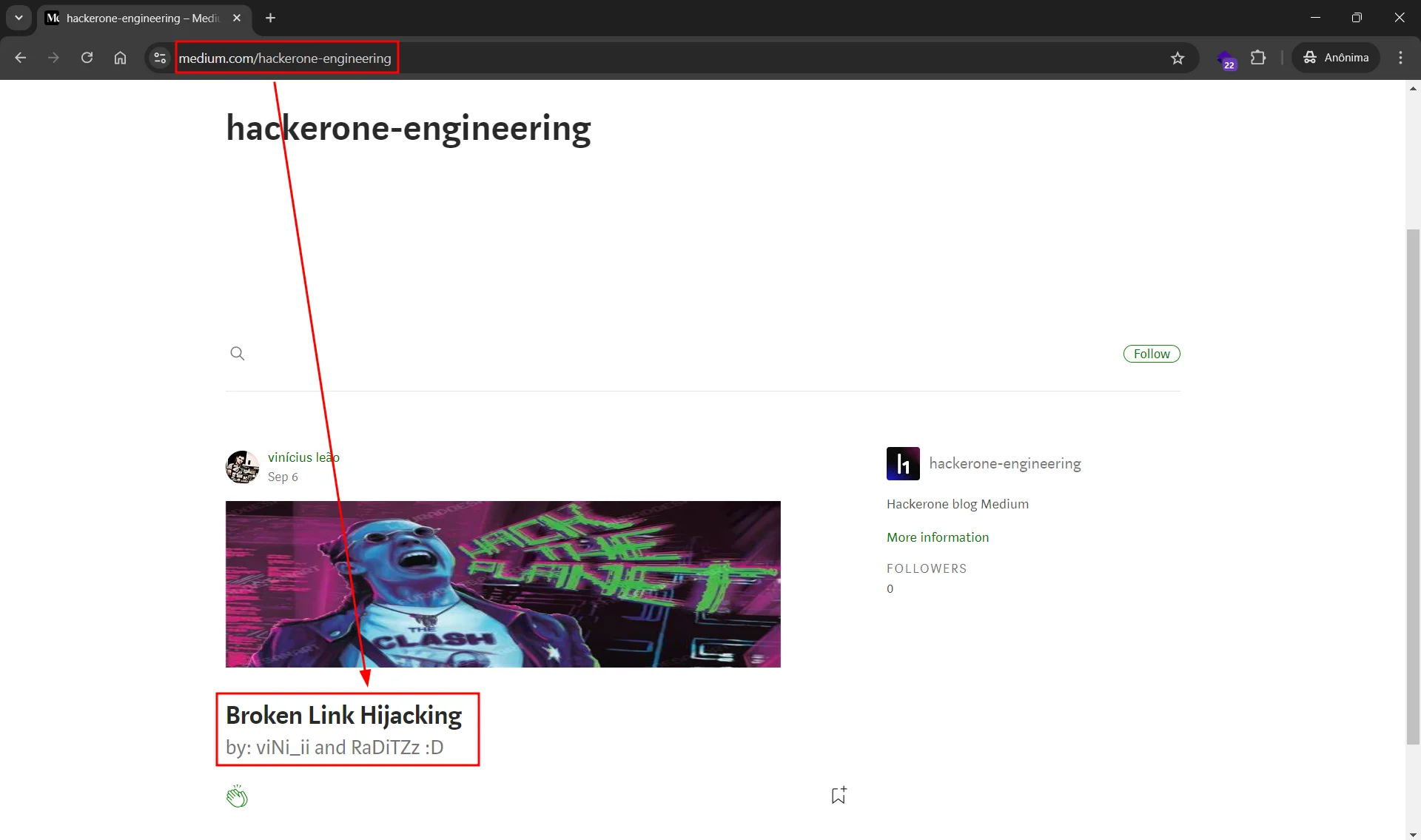
During a Recon at HackerOne it was possible to identify a Broken Link Hijacking vulnerability, in which the hackerone.engineering domain that belongs to HackerOne pointed to a non-existent page on Medium returning a 404 status code, and due to this ==it was possible to do the HackerOne Takeover==.
Description
During a Recon I discovered that HackerOne has a domain hackerone.engineering that belongs to HackerOne itself that was not mentioned within the scope, ==but at the same time it was not mentioned outside the scope==.
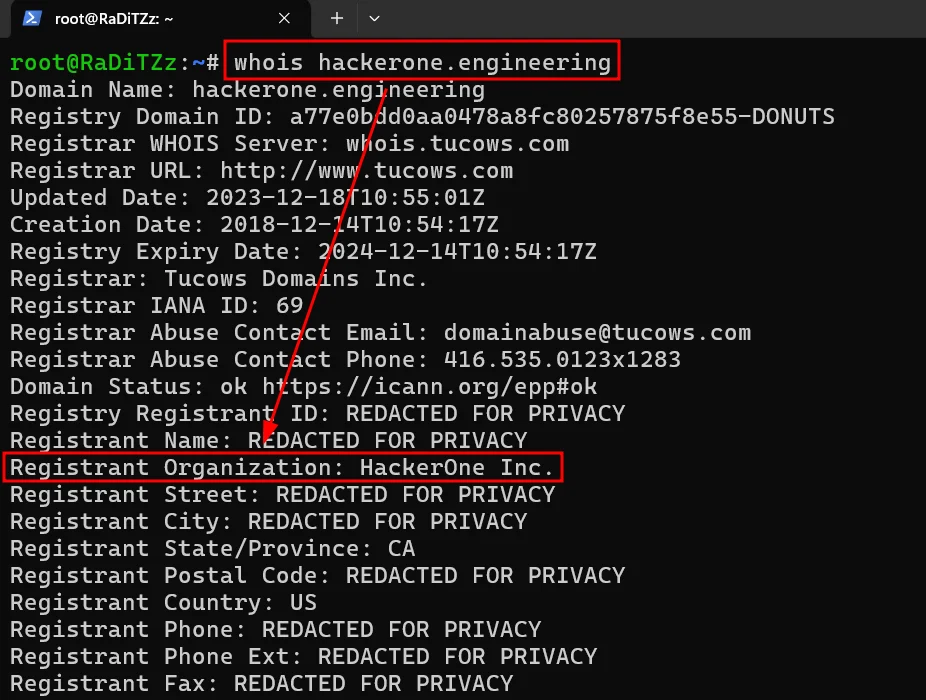
I discovered that the domain hackerone.engineering was used by HackerOne as a company blog through evidence on the Wayback Machine. Below I will leave screenshots and URL to prove that it really belongs to HackerOne.
Whois
Wayback Machine
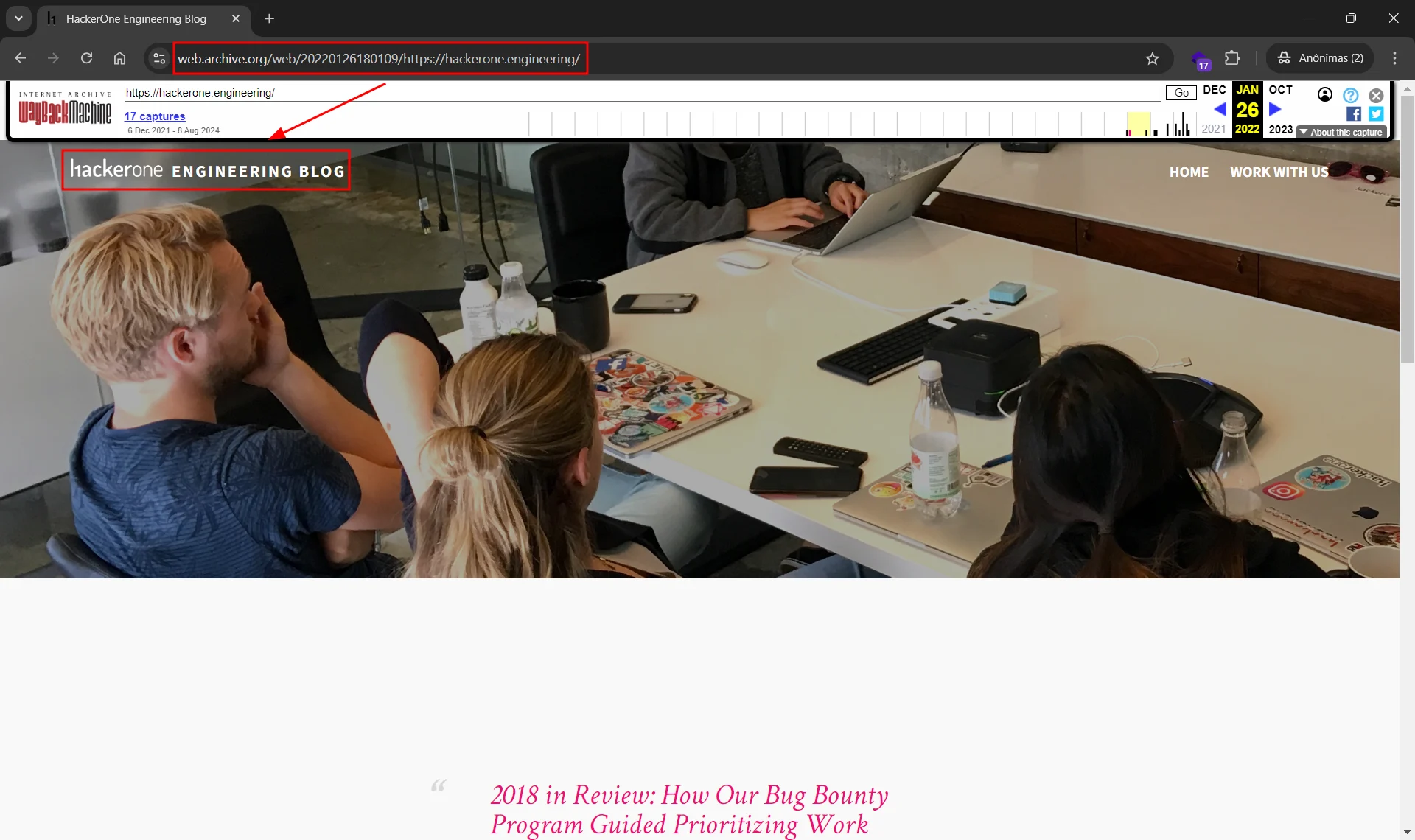
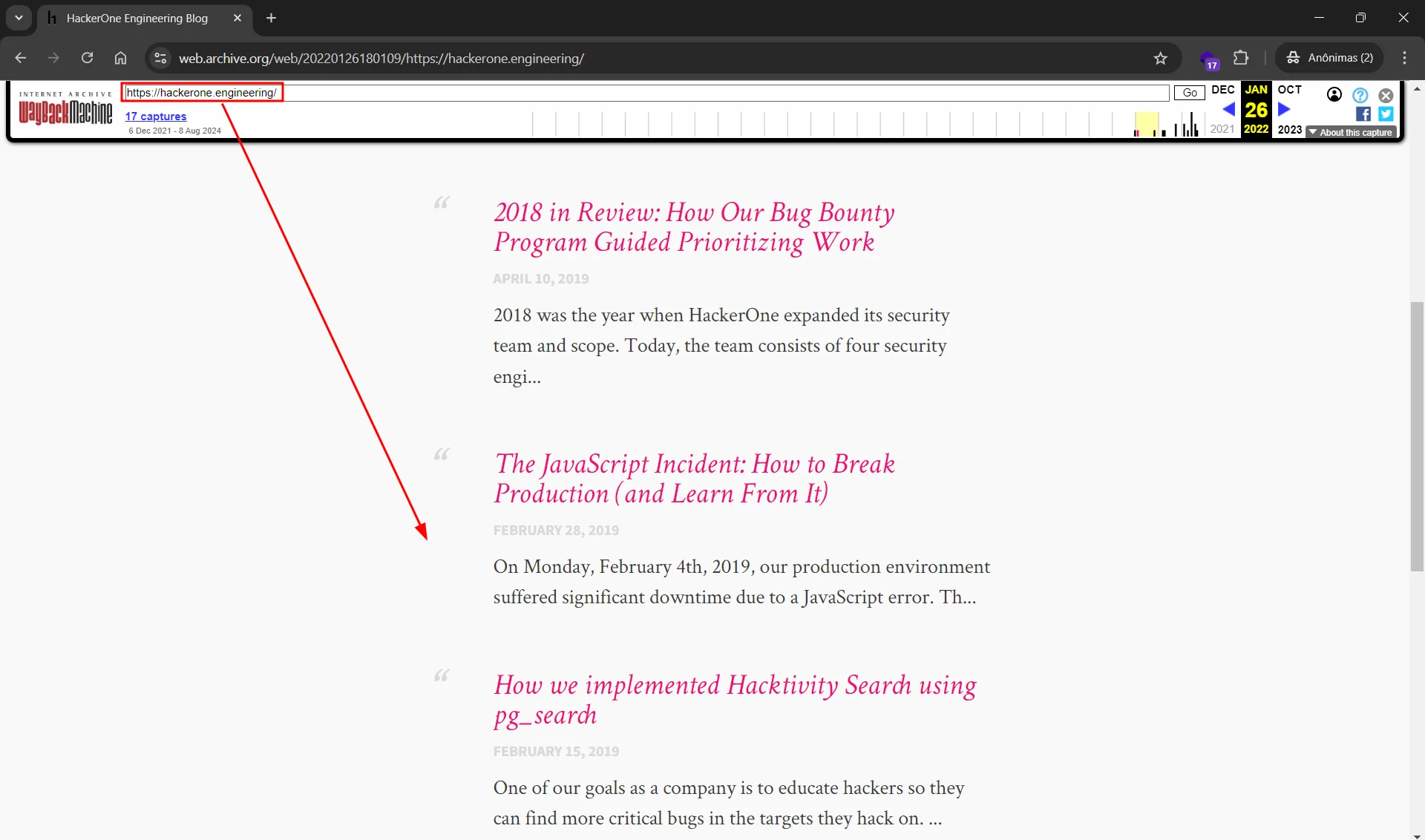
URL: https://web.archive.org/web/20220126180109/https://hackerone.engineering/
HackerOne's own report
#2085260 - Report on hackerone.engineering
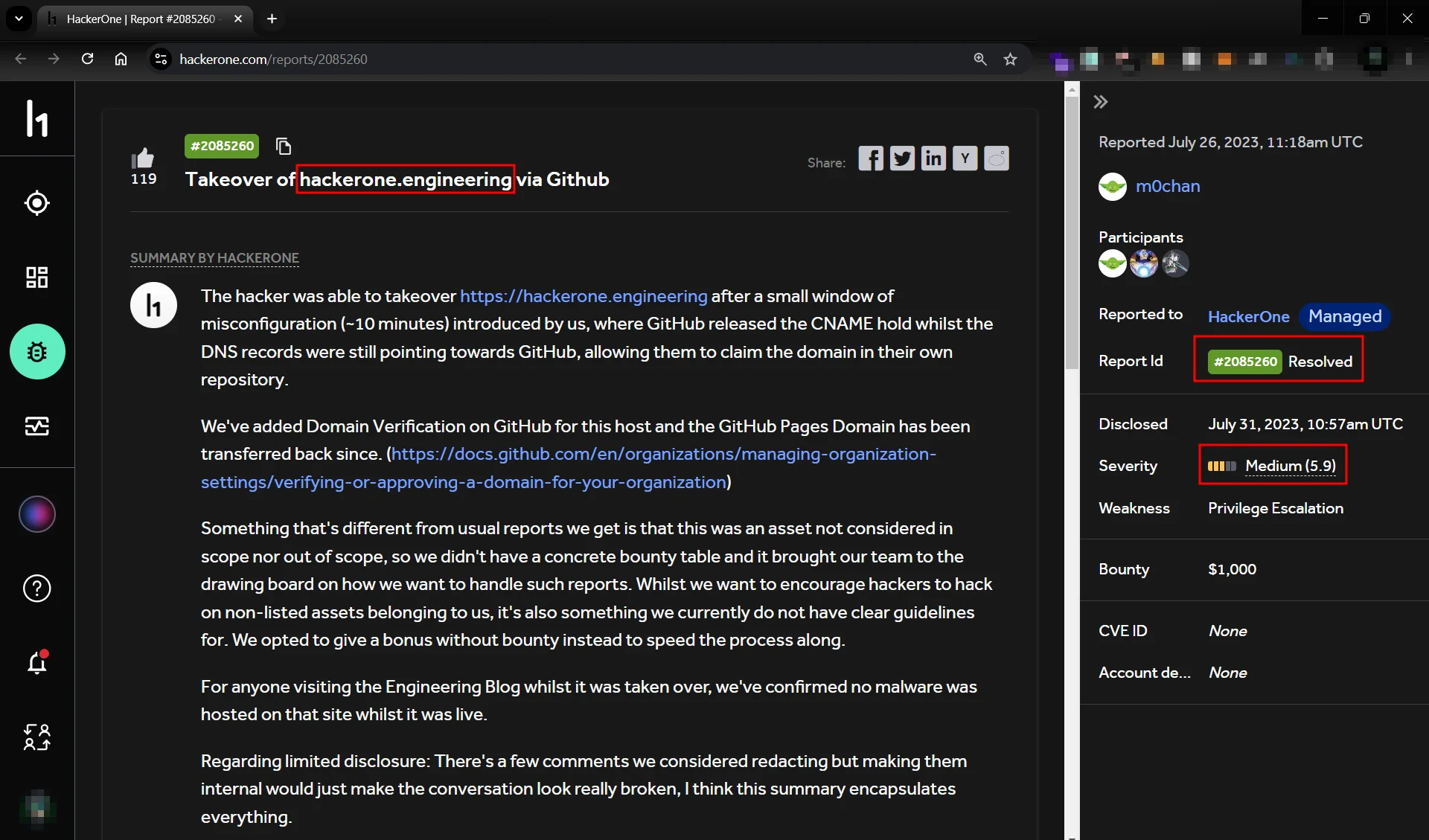
Based on this information, it was possible to deduce that the domain actually belongs to HackerOne. When I accessed the hackerone.engineering domain, I was redirected to a page on medium that didn't exist.
https://hackerone.engineering ===> https://medium.com/hackerone-engineering (404 Not Found)
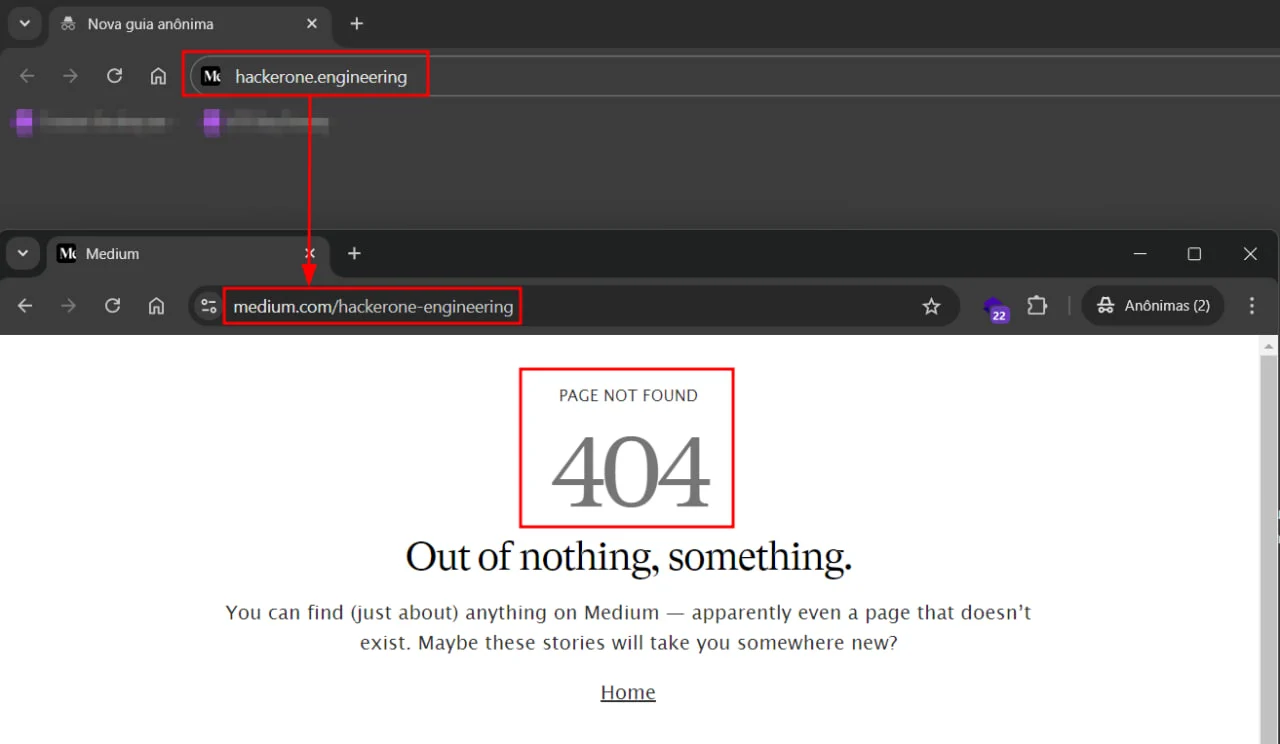
Since the Medium page doesn't exist, I was able to create the page with the same Medium news reference, ==Successfully Hijacking the Broken Link!==
Broken Link Hijacking
Steps to Reproduce
- Just click on the link: https://hackerone.engineering
- See what happened at the Takeover on the HackerOne Page.
Impact
The attacker can control the new content of the broken link and create a page that looks legitimate. This allows them to carry out phishing attacks or promote fake job openings, which also damages HackerOne's reputation.
Kind Regards.
Context
HackerOne owns the domain hackerone.engineering, which was used as a company blog. The domain redirected visitors to a Medium page at medium.com/hackerone-engineering that did not exist. That Medium page no longer existed, so the redirect ended on a 404. The report describes this as a Broken Link Hijacking: a link that a trusted party still points at, but whose destination is free for anyone to claim.
The researcher notes that hackerone.engineering was not listed inside the program scope, but also was not listed outside it. The domain was found during reconnaissance.
Setup
No accounts, tools or versions are described beyond a browser and the Wayback Machine. The precondition for the attack is simply that the Medium publication name referenced by the redirect was unclaimed. The researcher notes that a previous report, #2705602, was not looked at correctly and was closed, so this is a resubmission with a working proof of concept.
Finding it
The researcher first had to establish that the domain really belongs to HackerOne. Three pieces of evidence are given:
- WHOIS records for the domain.
- Archived snapshots on the Wayback Machine showing the domain in use as a HackerOne blog.
- An earlier HackerOne report, #2085260, which concerns
hackerone.engineering.
The WHOIS output is presented as ownership evidence.
The archived page is cited at this URL:
https://web.archive.org/web/20220126180109/https://hackerone.engineering/
The earlier report #2085260 is shown as further confirmation that the domain is HackerOne's.
With ownership established, the researcher visited hackerone.engineering and observed the redirect chain ending at a Medium page that did not exist:
The Medium page did not exist, and the researcher was able to create it with the same name. That is the gap: the redirect is still live and still trusted, but the name it points to is available.
Exploitation
Step 1: Register the abandoned Medium publication
Because the Medium page did not exist, the researcher was able to create a publication using the same Medium name referenced by the redirect. The report describes this as successfully hijacking the broken link. No registration request or form data is shown.
The video shows the hijacked page in place.
Step 2: Visit the HackerOne domain
The reproduction is two steps:
- Just click on the link: https://hackerone.engineering
- See what happened at the Takeover on the HackerOne Page.
After the publication was claimed, the redirect from hackerone.engineering landed on content controlled by the researcher rather than on a 404. The takeover is visible directly on the HackerOne-branded domain.
Root cause
The domain hackerone.engineering redirected to an external Medium page that did not exist. The redirect kept sending visitors to a Medium page that did not exist. The weakness is classified as reliance on reverse DNS resolution for a security-critical action; in practice the failure is trust in an external identifier (the Medium publication name) that is not owned or monitored.
Impact
An attacker who claims the abandoned destination controls the content that visitors to the HackerOne domain see. Because the link starts on a HackerOne-owned domain, the content can be made to look legitimate. The report lists phishing and promotion of fake job openings as the concrete abuses, and notes the resulting damage to HackerOne's reputation. The severity recorded for the report is low, with a CVSS score of 3.7.
Fix
The report does not describe a fix. The general remedy for this class of issue is to remove or repoint redirects whose external destination is no longer controlled by the organisation, and to monitor owned domains for redirects to third-party names that can be registered by others.
Variants to test
- Enumerate an organisation's domains and follow every redirect to third-party platforms (Medium, GitHub Pages, Netlify, Vercel, status pages, link shorteners). A positive result is a redirect that ends on a 404 or on a name that can be registered.
- Check archived snapshots of the domain for older destinations that may still be referenced elsewhere. A positive result is an old publication or repository name that is now unclaimed.
- Try registering the abandoned name on the third-party platform. A positive result is that registration succeeds and the original redirect now serves your content.
- Look for the same pattern in documentation, marketing links and email templates, not just the apex domain. A positive result is any trusted link whose destination name is free.
- Check whether the organisation has a policy of listing owned domains, and compare it against WHOIS and certificate transparency records. A positive result is an owned domain that is neither in scope nor explicitly out of scope, as was the case here.
What happened, in plain words
HackerOne is a company that runs a website where security researchers report bugs. Like most companies, it owns several web addresses (domains). One of them was hackerone.engineering, which HackerOne used as its company blog.
The address forwarded visitors to a page on Medium, a popular website where anyone can publish articles. The Medium page it forwarded to was called hackerone-engineering. That page no longer existed, so anyone who followed the link ended up on a "page not found" error.
Here is the important part: on Medium, the name of a publication is like a username. If nobody is using the name, anyone can register it. Because the HackerOne address still forwarded visitors to that empty name, the researcher simply registered the name on Medium. From then on, anyone visiting hackerone.engineering saw content written by the researcher, on a page that looked like it belonged to HackerOne.
This kind of problem is called Broken Link Hijacking. A trusted link still points somewhere, but the place it points to is free for anyone to take over.
The researcher had submitted a previous report, #2705602, which was not looked at correctly and was closed. This report is a resubmission, with a working proof of concept (a demonstration that the problem is real), and it asks the team not to close it as a duplicate.
Setup
The report does not describe any special tools, accounts or software versions. All you need is a normal web browser and access to the Wayback Machine, a free service that stores old copies of web pages.
The only precondition for the attack is that the Medium publication name used by the redirect was not registered by anyone. That is what made the takeover possible.
Finding it
Before claiming anything, the researcher had to show that hackerone.engineering really belongs to HackerOne. Otherwise the whole finding would be meaningless. Three pieces of evidence are given:
- WHOIS records for the domain.
- Archived snapshots on the Wayback Machine showing the domain used as a HackerOne blog.
- An earlier HackerOne report, #2085260, which concerns
hackerone.engineering.
WHOIS is a public directory of domain registrations. When someone registers a domain, basic details about who owns it are recorded and can be looked up. It is a bit like a public land registry for web addresses: it tells you who holds the name.
The WHOIS output is presented as evidence that the domain belongs to HackerOne.
The Wayback Machine is an archive that regularly saves copies of websites. If a site changes or disappears, you can go back and see what it looked like on a given date. Think of it as a photo album of the internet.
The archived page is cited at this URL:
https://web.archive.org/web/20220126180109/https://hackerone.engineering/
This line is a link to the Wayback Machine. The long number in the middle, 20220126180109, is a timestamp: 26 January 2022, 18:01:09. It tells the archive which saved copy to show. The rest is the original address that was saved. Opening it shows the domain as it looked when HackerOne was still using it as a blog.
The earlier report #2085260 is shown as further confirmation that the domain is HackerOne's.
With ownership established, the researcher visited hackerone.engineering and watched where it sent visitors. The result was a redirect chain that ended on a Medium page that did not exist:
This line is a simple diagram of the redirect. On the left is the address a visitor types. The arrow means "forwards to". On the right is the Medium address it lands on, followed by 404 Not Found.
A redirect is an automatic forwarding instruction. When your browser asks a web server for a page, the server can answer "that page is not here, go to this other address instead", and the browser follows it without you doing anything. It is like a receptionist pointing you to a different office.
404 Not Found is the standard answer a web server gives when the page you asked for does not exist. It is the internet's way of saying "nothing here".
That 404 is the gap. The Medium page did not exist, and the researcher was able to create it with the same name. The redirect was still live and still trusted, but the name it pointed to was available for the taking.
Exploitation
Step 1: Register the abandoned Medium publication
Because the Medium page did not exist, the researcher was able to create a publication using the same Medium name that the redirect pointed to. The report describes this as successfully hijacking the broken link. No registration request or form data is shown.
The video shows the hijacked page in place.
Step 2: Visit the HackerOne domain
The reproduction is two steps:
- Just click on the link: https://hackerone.engineering
- See what happened at the Takeover on the HackerOne Page.
After the publication was claimed, the redirect from hackerone.engineering landed on content controlled by the researcher instead of on a 404. The takeover is visible directly on the HackerOne-branded domain.
Root cause
The domain hackerone.engineering redirected to an external Medium page that did not exist. The redirect kept sending visitors to a Medium page that did not exist.
The weakness is classified as reliance on reverse DNS resolution for a security-critical action. In practice, the failure is trust in an external identifier, the Medium publication name, that the organisation does not own or monitor.
Impact
An attacker who claims the abandoned destination controls the content that visitors to the HackerOne domain see. Because the link starts on a HackerOne-owned domain, the content can be made to look legitimate. The report lists phishing and promotion of fake job openings as the concrete abuses, and notes the resulting damage to HackerOne's reputation.
Phishing is a trick where an attacker builds a page that looks like a real service and uses it to fool people into handing over information or clicking further links. The trusted-looking address is what makes the trick work.
The severity recorded for the report is low, with a CVSS score of 3.7. CVSS is a standard scoring system for security issues: the higher the number, the more serious the problem, on a scale up to 10.
Fix
The report does not describe a fix. The general remedy for this class of issue is to remove or repoint redirects whose external destination is no longer controlled by the organisation, and to monitor owned domains for redirects to third-party names that can be registered by others.
Variants to test
- Enumerate an organisation's domains and follow every redirect to third-party platforms (Medium, GitHub Pages, Netlify, Vercel, status pages, link shorteners). A positive result is a redirect that ends on a 404 or on a name that can be registered.
- Check archived snapshots of the domain for older destinations that may still be referenced elsewhere. A positive result is an old publication or repository name that is now unclaimed.
- Try registering the abandoned name on the third-party platform. A positive result is that registration succeeds and the original redirect now serves your content.
- Look for the same pattern in documentation, marketing links and email templates, not just the apex domain. A positive result is any trusted link whose destination name is free.
- Check whether the organisation has a policy of listing owned domains, and compare it against WHOIS and certificate transparency records. A positive result is an owned domain that is neither in scope nor explicitly out of scope, as was the case here.
Glossary
- Domain: a web address that a person or organisation registers, such as
hackerone.engineering. - Redirect: an automatic instruction from a web server that sends your browser to a different address.
- 404 Not Found: the standard response meaning the requested page does not exist.
- Broken Link Hijacking: taking over a trusted link whose destination has become free for anyone to claim.
- Reconnaissance (recon): the early research phase where someone gathers information about a target before testing it.
- Scope: the list of systems a bug bounty program says are allowed to be tested.
- Proof of concept (PoC): a working demonstration that a problem is real.
- WHOIS: a public lookup service that shows who registered a domain.
- Wayback Machine: a free archive that stores old copies of web pages.
- Medium: a website where anyone can publish articles and create named publications.
- Publication: a named channel on Medium; the name is like a username and can be registered by anyone if it is free.
- Phishing: a trick that uses a legitimate-looking page to fool people into giving away information or clicking further links.
- CVSS: a standard scoring system for security issues, from 0 to 10.
- Reverse DNS resolution: looking up a name from an address rather than an address from a name; here the report uses the term for the weakness class of trusting an external name.
- Certificate transparency: public logs of security certificates issued for websites, useful for discovering domains an organisation owns.
- Apex domain: the main domain itself, such as
hackerone.engineering, rather than a subdomain likeblog.hackerone.engineering.





