protocol & Ports are not shown in third-party site redirect warning page
The third-party redirect warning page on Semrush only displays the domain of the destination URL, omitting the protocol and port. An attacker could craft a link that appears to go to a normal website but actually uses a different protocol (such as FTP or VNC) to launch a local application or direct the user elsewhere.

- Triaged in 3 days
- Fixed in 3 days
- Paid in 33 days
- Disclosed after 33 days
Summary: protocol & Ports are not shown in third-party site redirect warning page
Vulnerable Endpoint :- https://www.semrush.com/redirect?url=ftp://evil.com:1337
Description: I noticed #311330 this report where you guys fixed a open redirect report by adding a external third-party site redirect warning page . It was a great fix . Although a issue caught in my eye . Urls contains a protocol and Ports . If I add a url with any other protocol like ftp:// then it's not shown in the external warning page what can be used to take a user to any other place then user expected to go .
Browsers Verified In:
- All Browsers .
Steps To Reproduce:
- Visit https://www.semrush.com/redirect?url=ftp://evil.com:1337
- You will see a warning page only saying about the domain but no warning about the protocol & Port like below :-
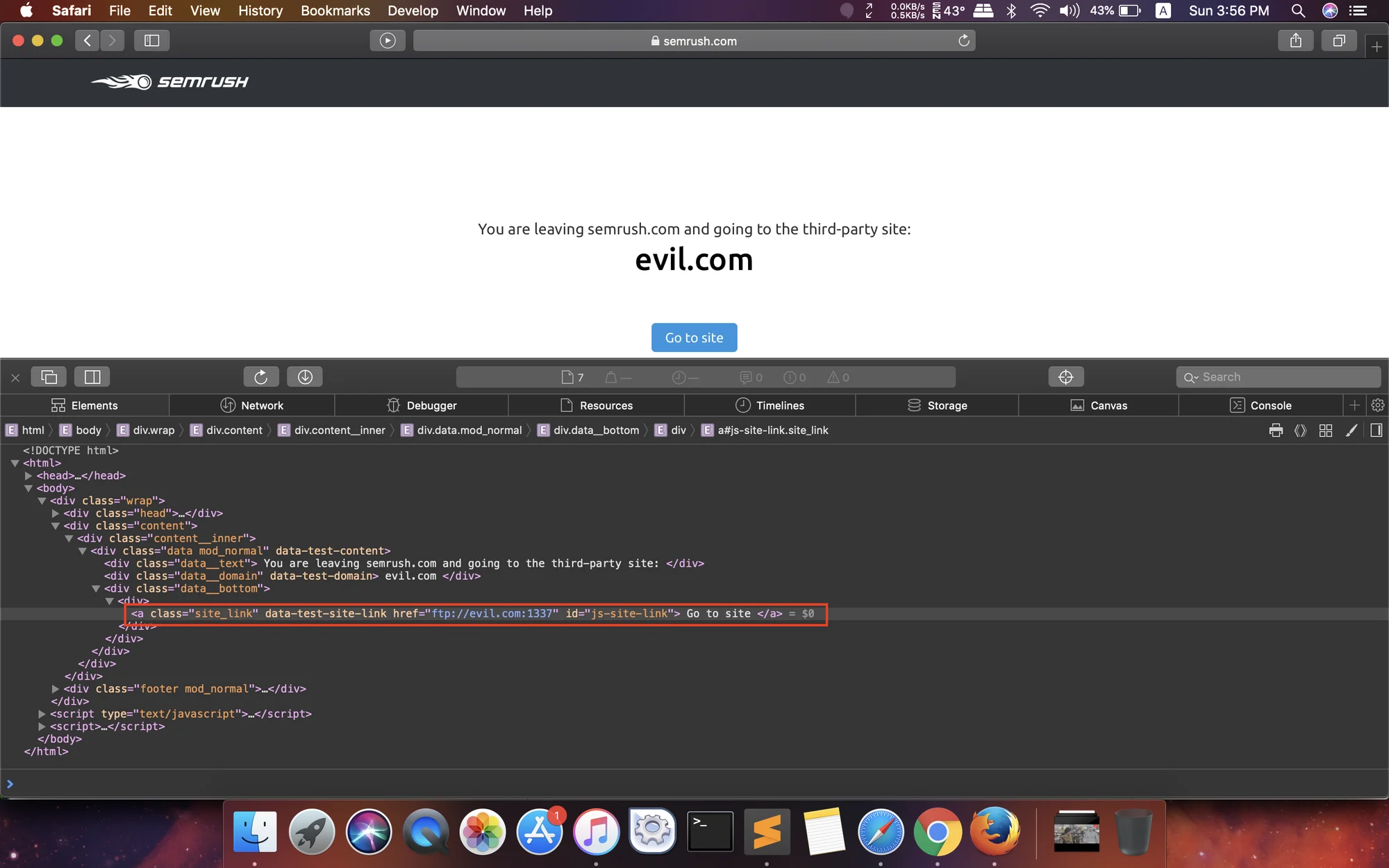
Screenshot_2018-12-09_at_3.56.14_PM.png From the original on HackerOne - But the source says it will take user to ftp://evil.com:1337 not only evil.com
<a href="ftp://evil.com:1337" id="js-site-link" class="site_link" data-test-site-link="">
Go to site </a>
Supporting Material/References:
Screenshot_2018-12-09_at_3.56.14_PM.png From the original on HackerOne 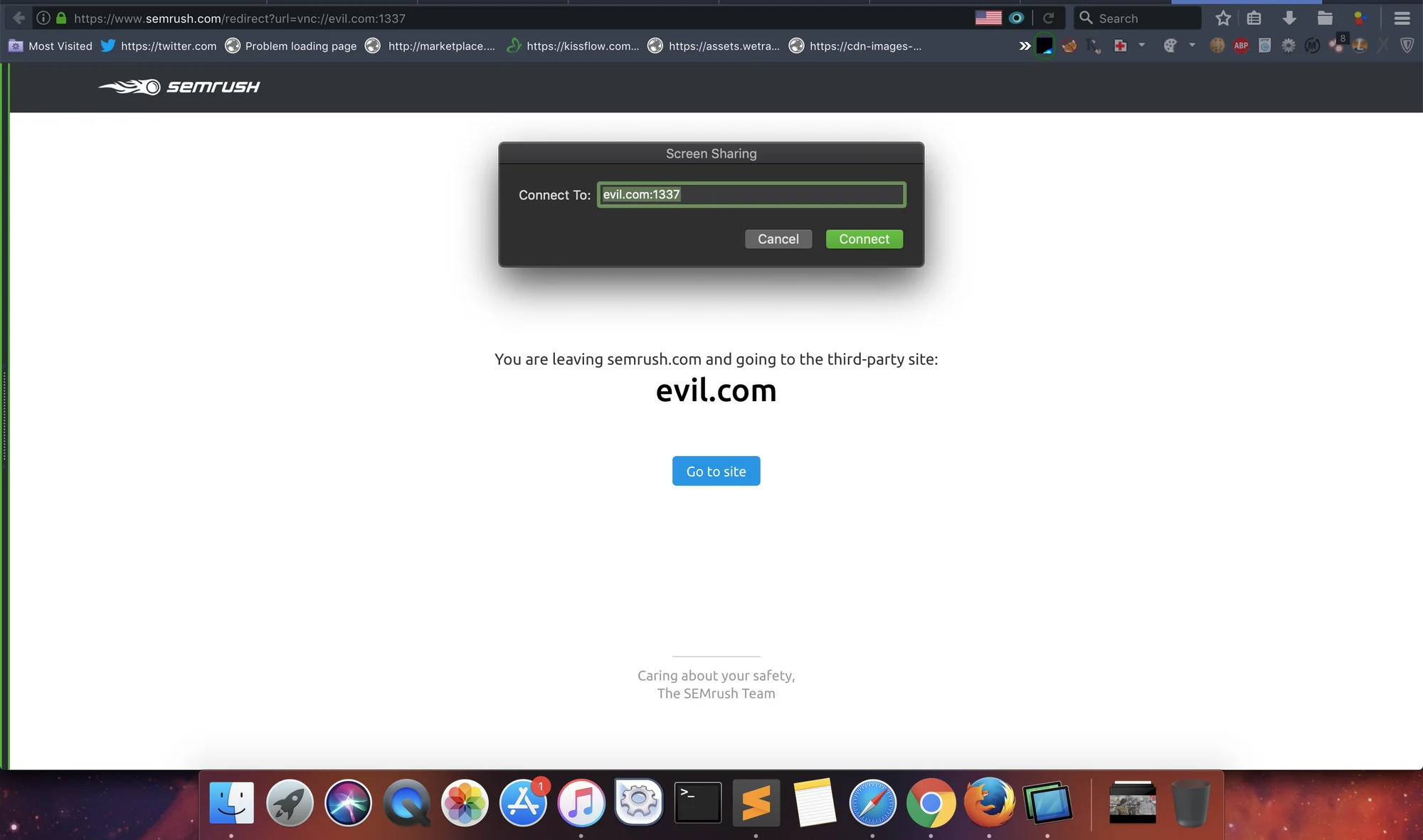
Screenshot_2018-12-09_at_4.00.50_PM.png
Impact
I noticed in url= parameter many protocols can be used . Like I can use vnc:// protocol and on my mac os if I visit https://www.semrush.com/redirect?url=ftp://evil.com:1337 and click on Go to site then it will open my mac environment's default VNC app like below screenshot :-
So while user may think they will visit a site but actually they will request to a site with a protocol what may take them to anything else .
##FIX :- I can suggest 2 possible fix here :-
- Show the protocol & Ports of the inputted url in the Warning page .
- Or only allow users to add HTTP & HTTPS protocol .
Thanks .
Not written yet. The AI write-up for this report has not been written yet. The Original tab links to the source.
How it worked
Root cause
Likely the warning page only extracts and displays the hostname from the destination URL, ignoring the protocol and port components.
Impact
A user could be tricked into launching a local application or visiting an unexpected destination because the warning page does not disclose the protocol or port, though the report only demonstrates this on a Mac with a VNC handler.
What the attacker needed
Victim clicks a crafted redirect link; operating system has a handler for the chosen protocol
The fix
The warning page should display the full protocol and port of the destination URL, or the redirect should only allow HTTP and HTTPS protocols.
How it was found
- Visit the redirect endpoint with a URL parameter that uses the ftp protocol and a non-standard port.
- Observe that the warning page only shows the domain, not the protocol or port.
- Check the page source to confirm the link actually points to the full ftp URL.
- Click the 'Go to site' link and see that the operating system opens its default application for that protocol (e.g., a VNC client).
Explained by bugbounty.wiki with AI from the original and checked against quotes from it; it can still be wrong. Read the original before relying on a detail.
Not written yet. The AI write-up for this report has not been written yet. The Original tab links to the source.
When you click a link that leaves a website, a warning page is supposed to show you where you are going. Here, the warning only showed the domain name (like evil.com) but hid the protocol (like ftp://) and the port number. That means the link could open a different program on your computer instead of a web page, and you would not be warned.
What is Open redirect?
A trusted site forwards users to any address an attacker picks; rarely paid alone, often the missing link in a chain.