Exploitation of Server Side Template Injection with Craft CMS plugin SEOmatic <=3.1.3 [CVE-2018-14716]

During a recent webapplication testing I decided to perform some fuzzing of certain paths within the URI of a CMS and happened to find a potential SSTI (server side template injection) within one of the CMS’ plugins which I then was able to successfully exploit for information disclosure. In this post I want to share…
The full write-up lives on its author's site
It belongs to its author, so we link to it rather than copy it. The other two tabs are our own rewrites, checked against it.
Context
During a web application test the author fuzzed paths within the URI of a CMS and found a potential server side template injection (SSTI) inside one of the CMS's plugins, which he then exploited for information disclosure. The value was processed by the template engine on the server and reflected in the canonicalURL, which is part of the Link header of the response. The affected component turned out to be the SEOmatic plugin for Craft CMS, and the issue was later tracked as CVE-2018-14716.
SSTI is the case where user input is unsafely embedded into a template, most often because user defined input is directly concatenated into the template, so a template expression in that input is evaluated by the server. The author points readers new to the topic to James Kettle's Portswigger article, the printable whitepaper and the BlackHat 2015 talk (paper and video). He was aware of the concept but this was the first time he met it in the wild, so he re-read the paper before going further.
Setup
The report does not describe the target application beyond the fact that it runs Craft CMS with the SEOmatic plugin, and it does not give the exact version of Craft CMS. The tools used were:
- a browser and manual requests against the injection point;
- TPLMAP for automated exploitation;
- the Craft CMS v2 and v3 documentation and the Twig 2.x documentation;
- Shodan.io for the later impact assessment.
The author also reviewed older, already fixed Craft CMS and Twig vulnerabilities before building his own approach, and recommends downloading the source code and reading the internals when that is an option.
Finding it
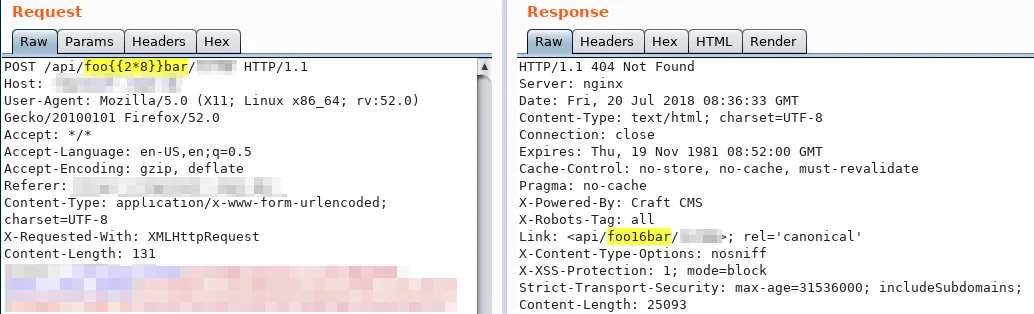
The initial fuzzing produced a response in which some kind of math logic had been evaluated by the template engine and reflected in the canonicalURL inside the Link header.
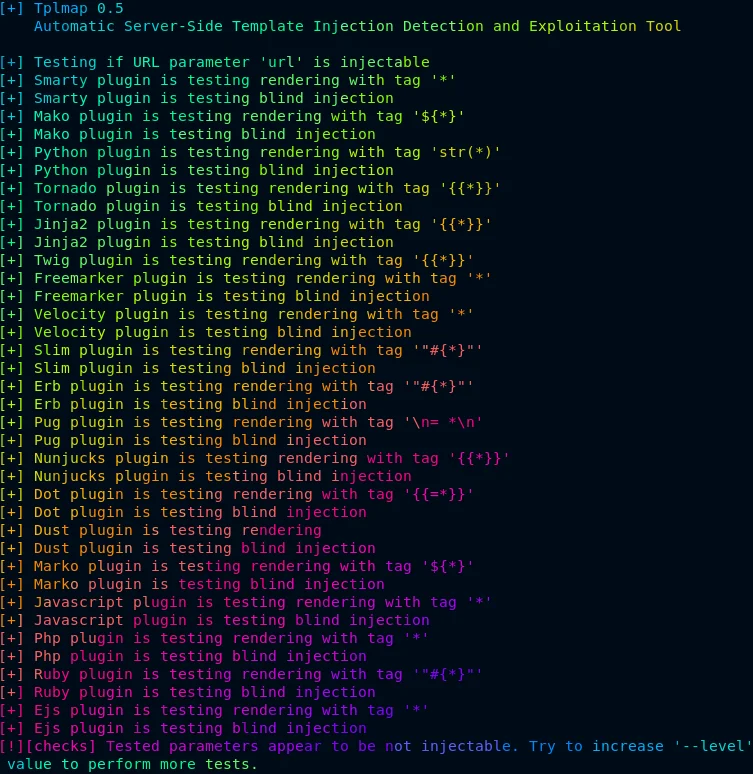
The first attempt at exploitation was to run TPLMAP against the injection point. That failed:
Stepping back, the author listed what was known. Arbitrary input was being processed by the template engine, and the response headers suggested the site was running Craft CMS:
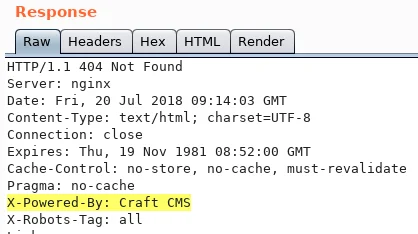
The headers did not leak the exact version number. Since Craft uses Twig, one of the PHP template engines covered in Kettle's research, the author read the Craft v2 and v3 documentation and the Twig 2.x documentation to understand the objects, methods and syntax available in templates.
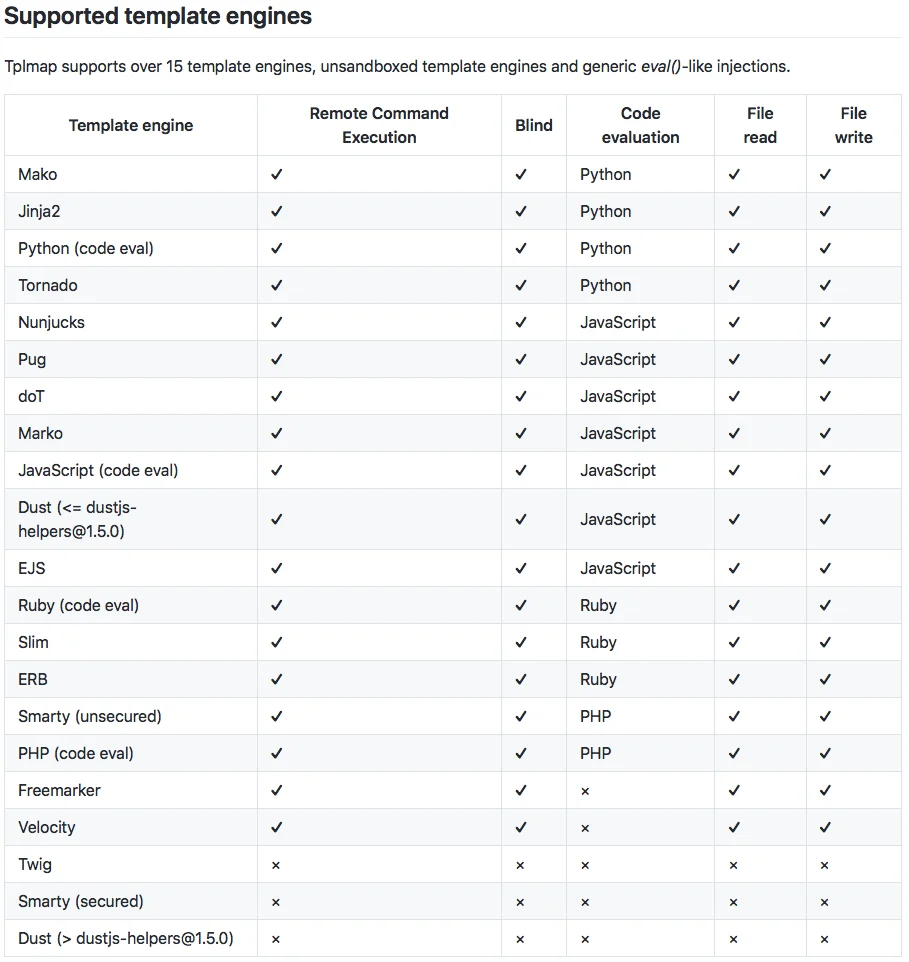
A useful detail came out of the TPLMAP failure: Twig is not supported by the tool, which is why the automated attempt produced no loot in the first place.
Exploitation
Step 1: try the known Twig RCE technique
According to Kettle's research, Twig's _self object and its env attribute are the route to remote code execution:
{{_self.env.registerUndefinedFilterCallback("exec")}}
{{_self.env.getFilter("id")}}
uid=1000(k) gid=1000(k) groups=1000(k),10(wheel)
Calling it through the injection point showed that _self was not an object but merely a string returning the template's name:
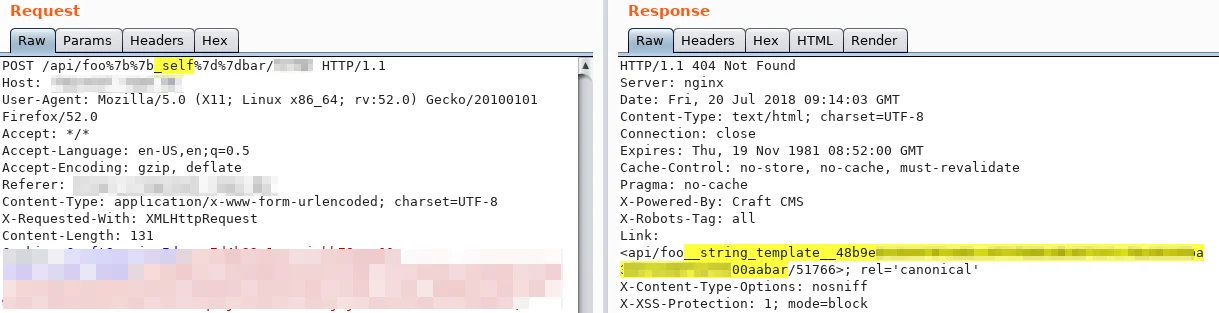
According to the documentation and other statements, this changed between Twig v1 and Twig v2, so the target was running an updated Twig version that is not prone to the vulnerabilities disclosed in Kettle's research. At the time there appeared to be no publicly available exploit alternative for Twig v2, which the author also gives as the reason TPLMAP does not support Twig exploitation.
Step 2: interact with the CMS objects instead
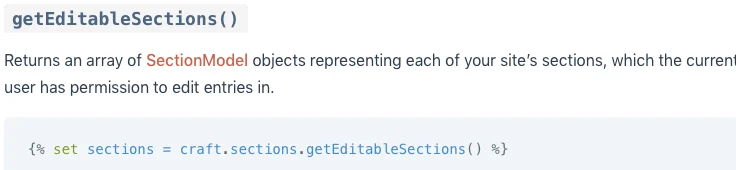
With no documented way to exploit Twig v2 itself, the author went after the objects, filters and methods that Craft CMS exposes to templates. The documentation showed that the editable sections could be queried:
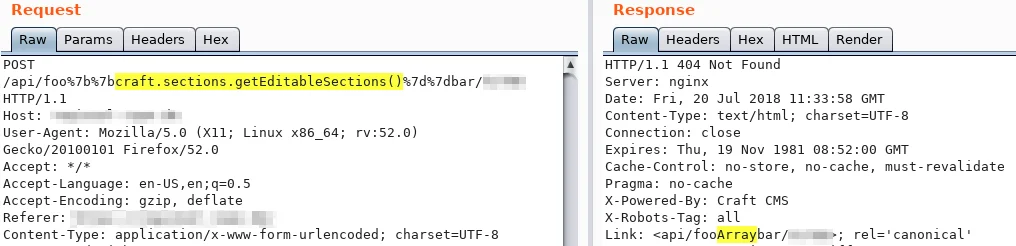
Trying it through the injection point returned an array, confirming that CMS objects and methods could be called:
Step 3: read configuration files
Digging through the documentation revealed a method for reading information from configuration files, which the author notes is also what some people used to exploit Craft CMS with former vulnerabilities:
{{ craft.config.get('someConfigSetting', 'someConfigFile') }}
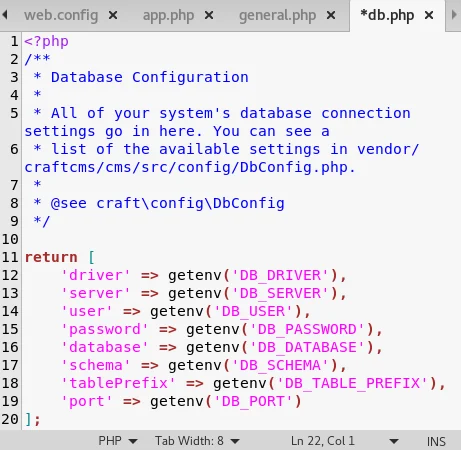
Looking at the configuration files, db.php contained plenty of interesting values:
Step 4: work around the output filter
Passing parameters to craft.config.get() and asking for the password entry within db.php did not return the value in usable form: the framework sanitises control characters by replacing them with corresponding HTML entities.
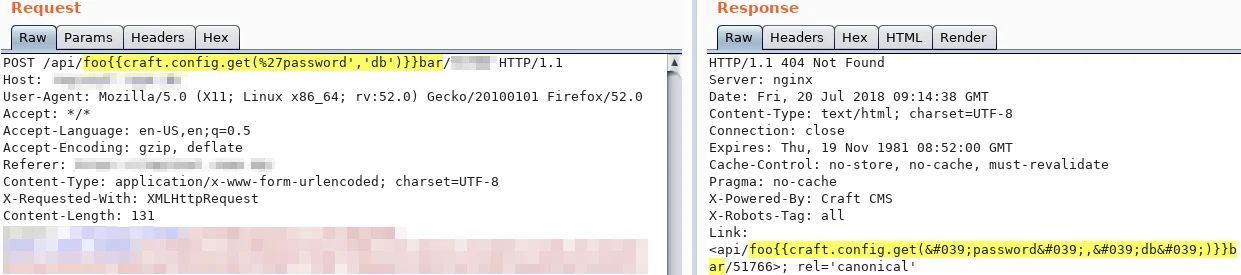
The author tried evasive manoeuvres such as exotic character escape sequences and exotic encoding schemes, but after analysing the filter behaviour concluded that it was quite robust, so a change of strategy was needed.
Step 5: use the User-Agent as a parameter channel
Back in the Craft documentation, the craft.request set of methods looked interesting. Among them was getUserAgent:

A quick test confirmed that the function reflects the value of the client's User-Agent header, and that the output is again sanitised with HTML entities:

To pass a return value on to another method, Twig's set call stores the result in a new variable:

Because two parameter values are needed, the author either uses a second method as a springboard or uses Twig filters for string manipulation. Here he uses slice() to combine multiple values within the User-Agent header.
Step 6: extract the database password
The combined syntax looks like this:
{% set dummy = craft.request.getUserAgent()|slice(0,8)%}
{% set dummy2 = craft.request.getUserAgent()|slice(9,2)%}
{{craft.config.get(dummy,dummy2)}}
User-Agent: password db
The two set calls slice the User-Agent header into the setting name and the config file name, and craft.config.get() is then called with those variables. Running it against the target extracted the database password from the configuration file:
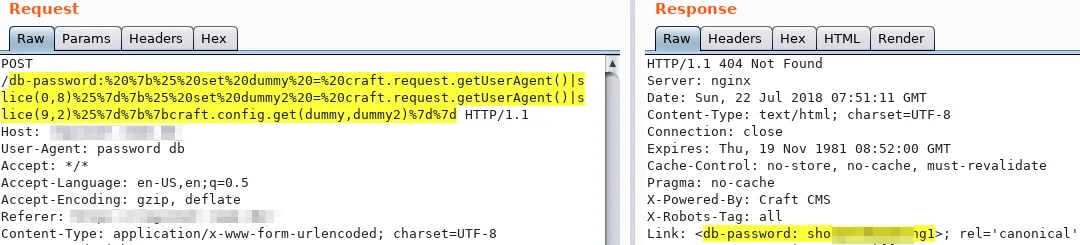
Step 7: enumerate users
With access to a broad variety of methods, the author could iterate through all CMS users and collect their email addresses, for example to notify them that their site needs a security fix:
{% for author in craft.users %}
{{ author.email }}
{% endfor %}
Samples of the extracted data:
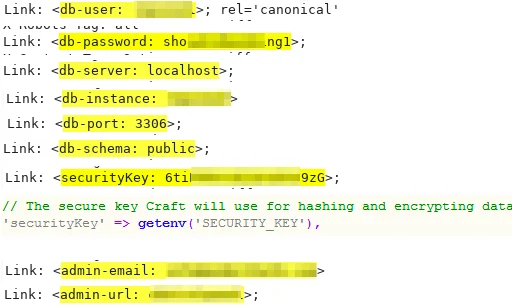
Root cause
The issue was caused by the SEOmatic plugin. According to the developer, the attack only works for URLs that are not associated with a corresponding Entry in Craft CMS. The reason is that the default setting for the canonicalUrl field was the Twig code:
{{ craft.app.request.pathInfo | striptags }}
SEOmatic's global settings are a fallback only if nothing else matches. Most pages match an entry, category or product of some kind, and in those cases the canonicalUrl is not set to the offending Twig code, so the exploit does not work. An attacker therefore needs a URL that both exists as a Twig template, so it does not throw a 404, and does not have an entry, category or product associated with it.
The output filter that replaced control characters with HTML entities did not prevent the attack; it only forced the author to move the parameter values into the User-Agent header and slice them inside the template.
Impact
On a vulnerable installation, an attacker who can reach a URL that exists as a Twig template but has no associated entry, category or product can execute template expressions on the server. In this report that was used to read configuration values such as the database password and to enumerate CMS users and their email addresses. The report does not demonstrate remote code execution on the Twig v2 target.
For the impact assessment the author pulled data from Shodan.io, since some people had asked how he found their website in the first place:
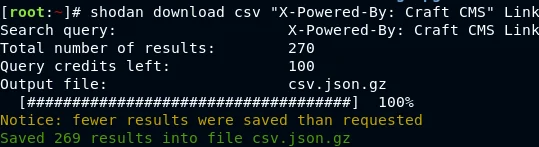
He split the data into multiple files grouped by port numbers:

The Shodan API can only be queried for string values contained within the data sections of the collected information, so he filtered for entries that actually include a proper Link header and therefore might be affected:
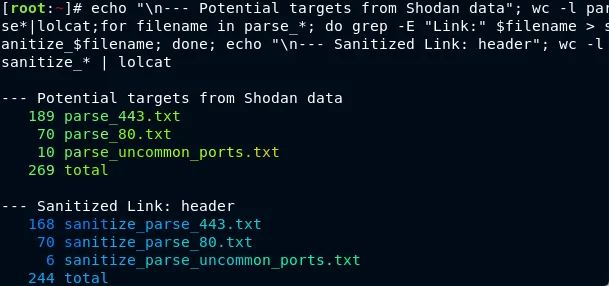
That left 244 out of 269. Crawling the remaining targets produced the final list:
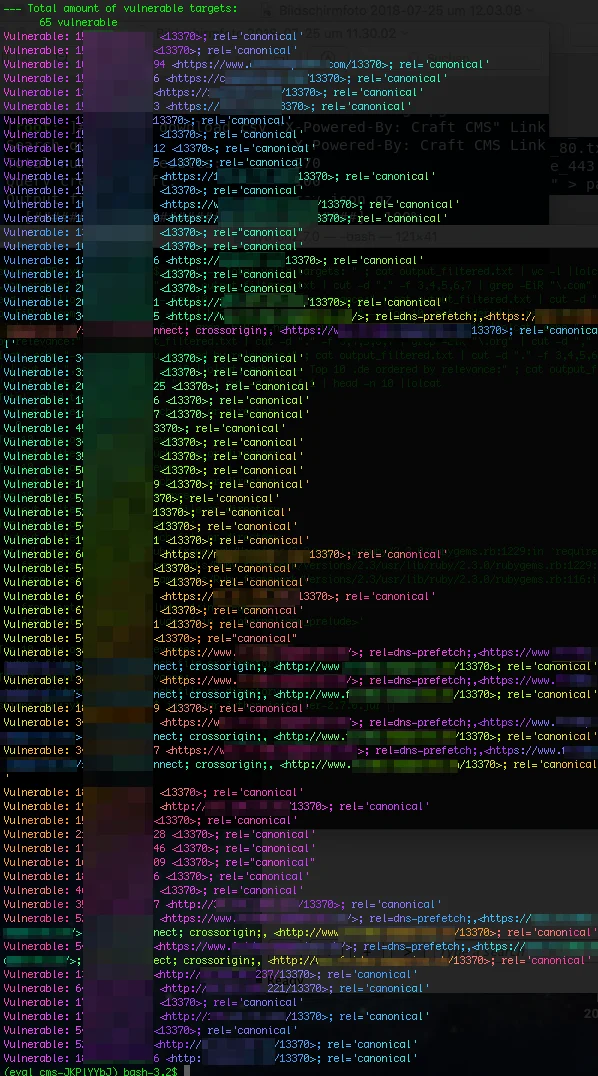
Overall he identified 65 vulnerable targets. He then dumped the email addresses of roughly 300 admin accounts and notified them; a number of them replied quickly confirming they had updated their installation. The developer also pointed the matter out on Twitter, so most people should have been running a fixed version soon.
Fix
The developer fixed the issue right after it was reported. The fixed version is SEOmatic 3.1.4, and the fixing commit is linked in the report.
Variants to test
- Send a template expression such as a simple arithmetic operation in a URL parameter and check whether the evaluated result appears in the
Linkheader'scanonicalURL. A positive result is the computed value rather than the literal expression. - Try
{{_self}}through the injection point. If it returns the template name as a string, the target is on Twig v2 and the known_self.envRCE technique will not work; if it is an object, the older technique is worth trying. - Call a CMS object method such as the editable sections query and look for an array in the response, which confirms that CMS objects and methods are reachable from the template.
- Call
craft.config.get()with a setting name and config file name. If the value comes back with control characters replaced by HTML entities, try moving the parameters into theUser-Agentheader and slicing them with Twig'sslice()filter, as in the payload above. - Iterate
craft.usersand readauthor.emailto confirm user enumeration. A positive result is a list of addresses in the response. - On other Craft CMS sites, test URLs that exist as Twig templates but have no entry, category or product associated with them, since those are the only ones where the SEOmatic fallback applies.
Final words
Leveraging existing scanning and exploitation tools is easy, but once you hit a wall it pays to spend time sharpening the axe before cutting down the tree: identify and process comprehensive information to understand the target, and at the very least you will have learned something new.
Timeline
- 2018-07-19: Discovered
- 2018-07-23: Vendor notified
- 2018-07-24: Version 3.1.4 released, issue resolved
- 2018-07-29: CVE-2018-14716 assigned
- 2018-07-30: Public disclosure
- 2018-07-31: PoC added to Exploit-DB
What happened, in plain words
A security researcher was testing a website that runs a content management system (CMS) called Craft CMS. A CMS is the software many organisations use to build and edit a website without writing code: you log in to an admin panel, write pages, and the CMS stores them and serves them to visitors. Craft CMS can be extended with add-ons called plugins, and this site used one called SEOmatic, which helps with search engine optimisation (the settings that tell Google and other search engines what a page is about).
While poking at the site's URLs, the researcher found that a value he supplied was not just displayed back to him: it was treated as a small program and run by the server. That class of bug is called server side template injection, or SSTI. He then used it to read sensitive settings from the site, including a database password, and to collect the email addresses of the site's users. The plugin's developer fixed it quickly, and the bug was given the public tracking number CVE-2018-14716.
This article walks through the same journey for someone who has never done security testing: what each term means, what the researcher typed, and why.
Introduction
What a template is
A website that shows the same layout on thousands of pages does not write that layout thousands of times. It writes one template: a page skeleton with blanks in it, plus placeholders that get filled in when a visitor asks for a page. A template engine is the program that takes the template, fills in the blanks, and produces the final HTML that your browser receives.
The placeholders are written in a small language. Craft CMS uses one called Twig. A placeholder looks like {{ something }}, and the engine replaces it with the value of something before the page is sent. Templates can also do simple logic, such as adding two numbers or looping over a list.
What server side template injection is
Normally the blanks are filled with data the site controls: a page title from the database, a user's name, and so on. SSTI happens when a site takes input from a visitor and pastes it into the template as if it were part of the template itself, instead of treating it as plain text. If you send {{ 7*7 }} and the page comes back saying 49, the server did not show your text, it ran it. That is the tell-tale sign.
The researcher had read about this class of bug before, in the well-known article and BlackHat 2015 talk by James Kettle, and this was the first time he met it on a real site. He re-read the paper before continuing.
What he found first
He was guessing URL paths (this is called fuzzing: trying many variations quickly to see which ones behave differently) and hit an injection point whose value was processed by the template engine. The result appeared in a field called canonicalURL, which the site puts into an HTTP response header called Link.
Two terms here. A response header is a small piece of metadata the server sends alongside the page, invisible in the page body but readable in the browser's developer tools. canonicalURL is the address a page declares as its "official" address, used by search engines.
The screenshot shows the initial injection point: a request where a small arithmetic expression was evaluated by the server and the result came back inside the Link header.
Setup
The report does not describe the target beyond saying it runs Craft CMS with the SEOmatic plugin, and it does not give the exact Craft CMS version. The tools involved were:
- a browser and manual requests against the injection point;
- TPLMAP, a free tool that automates template injection exploitation;
- the official Craft CMS v2 and v3 documentation and the Twig 2.x documentation;
- Shodan.io, a search engine for internet-connected devices and servers, used later to estimate how many sites were affected.
He also read up on older, already fixed Craft CMS and Twig vulnerabilities, and recommends downloading a product's source code and reading it when you can. Reading old bug reports is like reading past exam papers: the questions change, but the way the examiner thinks does not.
Finding it
The automated tool fails
The first thing he tried was the easy route: point TPLMAP at the injection point and let it do the work. It did not work.
The screenshot shows TPLMAP failing to get anything useful.
Step back and list what is known
Instead of giving up, he wrote down the facts. One: arbitrary input is being processed by the template engine. Two: the response headers suggest the site runs Craft CMS.
The screenshot shows the response headers that identify the site as Craft CMS.
The headers did not reveal the exact version number. Since Craft uses Twig, he read the Craft v2 and v3 documentation and the Twig 2.x documentation to learn which objects, methods and syntax a template can use. Documentation is the map of what the template engine can reach; without it you are guessing names.
Why TPLMAP failed
The failure itself was informative: TPLMAP does not support Twig. The tool simply had no recipe for this template language, which is why the automated attempt produced nothing.
The screenshot shows the list of template engines TPLMAP supports, with Twig absent.
Exploitation
Step 1: try the known Twig remote code execution technique
According to Kettle's research, in older Twig versions the _self object and its env attribute could be abused to run operating system commands. Remote code execution (RCE) means an attacker can make the server run commands of their choosing, the most severe outcome of a web bug.
{{_self.env.registerUndefinedFilterCallback("exec")}}
{{_self.env.getFilter("id")}}
uid=1000(k) gid=1000(k) groups=1000(k),10(wheel)
Line by line:
{{_self.env.registerUndefinedFilterCallback("exec")}}tells the template engine: if anyone asks for a filter that does not exist, run the system commandexecinstead._selfrefers to the template itself,envis its internal environment object, andregisterUndefinedFilterCallbackregisters a fallback.{{_self.env.getFilter("id")}}then asks for a filter calledid. Because of line 1, the server runs the Unix commandid, which prints who the server process is running as.- The last line is the output of
id: the user and group identifiers of the account the web server runs under. Seeing this means the server executed your command.
He sent this through the injection point. It did not work: _self was not an object he could call methods on, it was just a string containing the template's name.
The screenshot shows _self returning a plain string rather than an object.
According to the documentation and other public statements, this changed between Twig v1 and Twig v2. So the target was on an updated Twig that is not vulnerable to the technique from Kettle's research. At the time there was no publicly available alternative exploit for Twig v2, which the author also gives as the reason TPLMAP does not support Twig.
Step 2: talk to the CMS instead of the template engine
If you cannot break the engine, use what the engine legitimately offers. Craft CMS deliberately exposes many objects, filters and methods to templates so that site builders can query content. The documentation showed that the editable sections of the site could be queried.
The screenshot shows the sample method from the documentation.
He tried it through the injection point and got an array back. An array is simply a list of values. Getting a list proved that CMS objects and methods were reachable from his injected template code.
The screenshot shows the editable sections being read out through the injection.
Step 3: read configuration files
Digging further in the documentation, he found a method for reading values from the site's configuration files. Configuration files are the settings files a CMS keeps on disk, and they often contain secrets such as database credentials. The author notes that some people had used this same method to exploit Craft CMS in earlier vulnerabilities.
{{ craft.config.get('someConfigSetting', 'someConfigFile') }}
Line by line:
craft.config.get(...)asks Craft for a configuration value.- The first argument,
'someConfigSetting', is the name of the setting you want. - The second argument,
'someConfigFile', is the name of the configuration file to look in.
Looking at the configuration files, db.php (the file that holds database settings) contained plenty of interesting values.
The screenshot shows the contents of db.php.
Step 4: the output filter blocks the obvious attempt
He asked craft.config.get() for the password entry inside db.php. The value did not come back in usable form: the framework replaces control characters with HTML entities. HTML entities are codes like ' that a browser displays as a character but that are not the character itself. Control characters are non-printing characters such as line breaks. The filter was mangling the output.
The screenshot shows the password value returned with control characters encoded as HTML entities.
He tried evasive tricks such as unusual character escape sequences and unusual encodings, but after studying the filter he concluded it was robust. A change of strategy was needed.
Step 5: use the User-Agent header as a parameter channel
Back in the Craft documentation, the craft.request group of methods looked interesting. One of them was getUserAgent.
The screenshot shows the getUserAgent method in the documentation.
A quick test confirmed that the function returns the value of the visitor's User-Agent header. The User-Agent is a header your browser sends with every request to say what browser and operating system it is; sites use it to adapt pages. The output was again sanitised with HTML entities.
The screenshot shows craft.request.getUserAgent() reflecting the User-Agent value.
To pass a value from one method to another, Twig's set call stores a result in a new variable. A variable is a named box that holds a value so you can use it later.
The screenshot shows variables being set and used in Twig.
Because he needed two parameter values (a setting name and a file name), he used Twig's slice() filter to cut pieces out of the User-Agent string. A filter transforms a value, and slice() takes a substring by start position and length.
Step 6: extract the database password
The combined payload:
{% set dummy = craft.request.getUserAgent()|slice(0,8)%}
{% set dummy2 = craft.request.getUserAgent()|slice(9,2)%}
{{craft.config.get(dummy,dummy2)}}
User-Agent: password db
Line by line:
{% set dummy = craft.request.getUserAgent()|slice(0,8)%}takes the User-Agent value, keeps characters starting at position 0 for 8 characters, and stores them in a variable calleddummy. With the User-Agentpassword db, that ispassword.{% set dummy2 = craft.request.getUserAgent()|slice(9,2)%}takes characters starting at position 9 for 2 characters and stores them indummy2. That isdb.{{craft.config.get(dummy,dummy2)}}calls the configuration reader with the setting namepasswordand the file namedb, which is exactly the pair that was blocked before.User-Agent: password dbis the header value he sends with the request, so the two slices have something to cut.
Running this against the target extracted the database password from the configuration file.
The screenshot shows the database password being extracted.
Step 7: enumerate users
With a broad set of methods available, he could loop over all CMS users and collect their email addresses, for example to warn them that their site needed a security fix.
{% for author in craft.users %}
{{ author.email }}
{% endfor %}
Line by line:
{% for author in craft.users %}starts a loop over every user account in the CMS, calling each oneauthorin turn.{{ author.email }}prints that user's email address.{% endfor %}closes the loop.
Samples of the extracted data:
The screenshot shows the collected user data.
Root cause
The bug came from the SEOmatic plugin. According to the developer, the attack only works on URLs that are not associated with a corresponding Entry in Craft CMS. An Entry is a piece of content, such as a page or a news item, that a site editor created in the CMS.
The reason is that the default setting for the canonicalUrl field was this Twig code:
{{ craft.app.request.pathInfo | striptags }}
Line by line:
craft.app.request.pathInfois the path part of the URL the visitor requested.| striptagsis a filter that removes HTML tags from that value.- The whole expression is placed inside
{{ }}, so the template engine evaluates it and writes the result into the canonical URL.
SEOmatic's global settings are a fallback only when nothing else matches. Most pages match an entry, category or product, and in those cases the canonical URL is not set to the offending Twig code, so the exploit does not work. An attacker therefore needs a URL that both exists as a Twig template, so it does not return a 404 (the standard "page not found" response), and has no entry, category or product associated with it.
The output filter that replaced control characters with HTML entities did not prevent the attack; it only forced the parameter values into the User-Agent header and into slice() calls inside the template.
Impact
On a vulnerable installation, an attacker who can reach a URL that exists as a Twig template but has no associated entry, category or product can run template expressions on the server. In this report that was used to read configuration values such as the database password and to list CMS users and their email addresses. The report does not demonstrate remote code execution on the Twig v2 target.
For the impact assessment he pulled data from Shodan.io, since some people had asked how he found their website in the first place.
The screenshot shows the data collected from Shodan.
He split the data into multiple files grouped by port numbers. A port is a numbered channel on a server; web traffic normally uses port 80 or 443, but sites can listen on others.
The screenshot shows the data grouped by port numbers.
The Shodan API can only be queried for string values contained within the data sections of the collected information, so he filtered for entries that actually include a proper Link header and therefore might be affected. An API is a way for one program to ask another program for data, here asking Shodan for its records.
The screenshot shows the Shodan data being sanitised.
That left 244 out of 269. Crawling the remaining targets produced the final list. Crawling means automatically requesting pages from many sites and recording the responses.
The screenshot shows the list of vulnerable hosts.
Overall he identified 65 vulnerable targets. He then dumped the email addresses of roughly 300 admin accounts and notified them; a number of them replied quickly confirming they had updated their installation. The developer also pointed the matter out on Twitter, so most people should have been running a fixed version soon.
Fix
The developer fixed the issue right after it was reported. The fixed version is SEOmatic 3.1.4, and the fixing commit is linked in the report.
Variants to test
- Send a template expression such as a simple arithmetic operation in a URL parameter and check whether the evaluated result appears in the
Linkheader'scanonicalURL. A positive result is the computed value rather than the literal expression. - Try
{{_self}}through the injection point. If it returns the template name as a string, the target is on Twig v2 and the known_self.envRCE technique will not work; if it is an object, the older technique is worth trying. - Call a CMS object method such as the editable sections query and look for an array in the response, which confirms that CMS objects and methods are reachable from the template.
- Call
craft.config.get()with a setting name and config file name. If the value comes back with control characters replaced by HTML entities, try moving the parameters into theUser-Agentheader and slicing them with Twig'sslice()filter, as in the payload above. - Iterate
craft.usersand readauthor.emailto confirm user enumeration. A positive result is a list of addresses in the response. - On other Craft CMS sites, test URLs that exist as Twig templates but have no entry, category or product associated with them, since those are the only ones where the SEOmatic fallback applies.
Final words
Using existing scanning and exploitation tools is easy, but once you hit a wall it pays to spend time sharpening the axe before cutting down the tree: gather and process comprehensive information to understand the target, and at the very least you will have learned something new.
Timeline
- 2018-07-19: Discovered
- 2018-07-23: Vendor notified
- 2018-07-24: Version 3.1.4 released, issue resolved
- 2018-07-29: CVE-2018-14716 assigned
- 2018-07-30: Public disclosure
- 2018-07-31: PoC added to Exploit-DB
Glossary
- API: a way for one program to ask another program for data or actions, usually over the internet.
- Array: an ordered list of values held together under one name.
- Canonical URL: the address a page declares as its official address, used by search engines.
- CMS (content management system): software that lets people create and edit a website through an admin panel without writing code.
- Control character: a non-printing character such as a line break or tab.
- Crawling: automatically requesting pages from many sites and recording the responses.
- CVE: a public identifier assigned to a known security vulnerability so people can refer to it unambiguously.
- Entry: a piece of content, such as a page or news item, created by a site editor in a CMS.
- Filter (Twig): a function that transforms a value, for example cutting a substring or removing HTML tags.
- Fuzzing: trying many variations of input quickly to see which ones behave differently.
- HTML entity: a code such as
'that a browser displays as a character but that is not the character itself. - HTTP header: a small piece of metadata sent with a request or response, separate from the page body.
- Link header: an HTTP response header that can carry related URLs, including the canonical URL.
- Plugin: an add-on that extends a CMS with extra features.
- Port: a numbered channel on a server; web traffic normally uses 80 or 443.
- Remote code execution (RCE): a bug that lets an attacker make the server run commands of their choosing.
- Response header: metadata the server sends alongside the page, readable in browser developer tools.
- Server side template injection (SSTI): a bug where visitor input is pasted into a template as if it were template code, so the server evaluates it.
- Shodan.io: a search engine for internet-connected devices and servers.
- Slice: a Twig filter that takes a substring by start position and length.
- Template: a page skeleton with placeholders that a template engine fills in to produce the final page.
- Template engine: the program that takes a template and the data, and produces the final HTML.
- Twig: the template language used by Craft CMS, written in PHP.
- User-Agent: an HTTP header your browser sends to say what browser and operating system it is.
- Variable: a named box that holds a value so you can use it later.
- 404: the standard HTTP response meaning "page not found".


