Cleartext Transmission of password via Email
The application sent the user's password in cleartext within a signup email, and the password was also visible in the page source. An attacker who could intercept the email could obtain the password and compromise the account.

- Triaged in 3 days
- Fixed in 10 days
- Paid in 3 days
- Disclosed after 3 months
Summary:
After successfully signup as a fan, the password was then sent to email by cleartext
Steps To Reproduce:
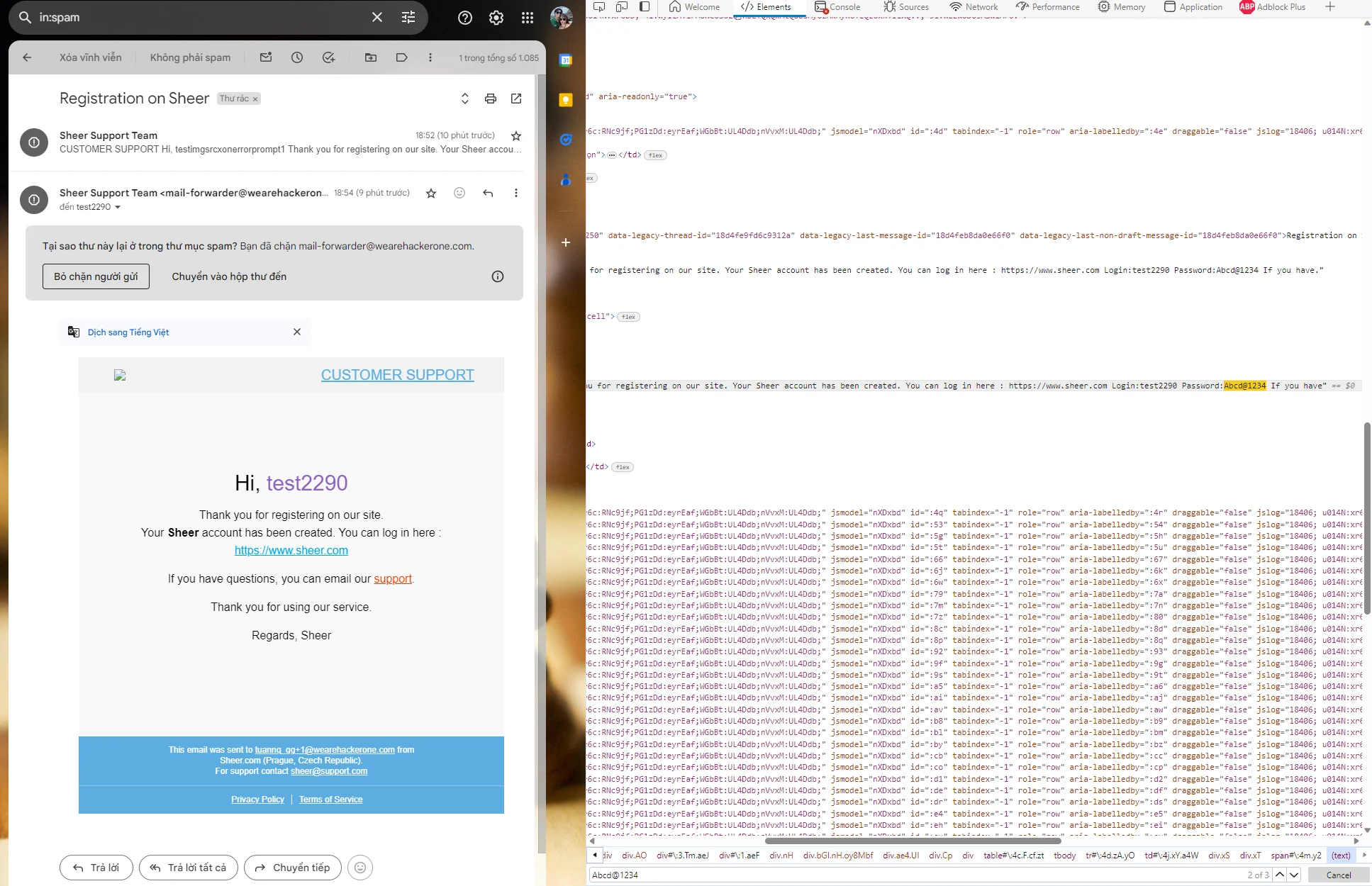
- After successfully signup as a fan, check the email and see that the password was sent in cleartext, it does not appear in the UI, just F12 and you can see the user password
Impact
If the mail channel was sniffed, the attacker can compromise user accounts easily
What the report shows
The target is the fan signup flow on www.sheer.com. The researcher, tuannq_gg, reported that after a fan completes signup, the account password is sent to the user's email address in cleartext. The report was filed on HackerOne, rated low severity under the weakness class Cleartext Transmission of Sensitive Information, and paid a bounty of 200.00 USD. It was disclosed on 2024-04-22.
The reproduction is short and consists of a single step:
- Sign up as a fan.
- Open the email that arrives and observe that the password is present in cleartext.
- The password is not shown in the visible email body; the researcher opened the developer tools (F12) and found the user password in the message source.
The screenshot accompanies the step where the password is found via F12. The report does not include the raw email source, the exact markup, the request that triggered the email, or any headers.
The stated impact is conditional: if the mail channel were sniffed, an attacker could compromise user accounts easily. The report does not describe a fix, and it does not say whether the password was generated by the server or chosen by the user.
Root cause
The signup flow includes the account password in the email content, and the value survives into the message source. The report shows the value present in the message source. Sending a credential over email at all is the underlying mistake; hiding it from the rendered view does not remove it from the message.
Impact
Email is transported over SMTP, often without transport encryption between every hop, and the message is stored on mail servers and in the recipient's mailbox. If the mail channel were sniffed, an attacker could compromise user accounts easily. Because the password is the account credential, possession of it is enough to log in as the fan. The report limits itself to the sniffing scenario and does not claim that any account was actually compromised.
How this kind of bug works
Credentials are secrets that should only ever be known to the user and stored by the application in hashed form. Email is not a confidential channel: messages pass through multiple servers, may be queued and stored, and are frequently retained indefinitely. A password placed in an email therefore leaves the application's control and exists in at least one additional location that the user did not choose and cannot audit.
Hiding the value in the rendered view, for example in a hidden input, a comment, or an attribute, changes nothing about the exposure, because the full message source is delivered to the client. The bug class covers any flow that transmits a password or other long-lived secret in cleartext over a channel that is not designed to protect it: welcome emails, password reminders, support notifications, and similar messages.
Defences are straightforward: never send passwords by email, generate one-time tokens with short lifetimes for account activation or password reset, and require the user to set the password themselves over HTTPS.
How to test for it
- Identify flows that send email: registration, invitation, password reset, account changes, and support contact forms.
- Complete each flow with a distinctive password value that you can search for later, and use a mailbox you control.
- Retrieve the raw message, not just the rendered view.
- Search the entire source, including hidden fields, HTML comments, attributes, plain-text alternatives, and attachments, for the exact value you submitted.
- A positive result is the literal password appearing anywhere in the delivered message. Record the message source as evidence, with the secret redacted.
Common false positives: a value that looks like a password but is actually a one-time token, an activation code, or a username; a password echoed back in a form field on the web page rather than in the email; and test data that the application generated but never actually sent. Confirm that the string in the message is the credential that authenticates the account, and that it works at login.
How it is fixed
Stop including passwords in any email content. If the flow needs to confirm an account, send a single-use, time-limited activation link instead. If a password must be communicated, force a reset on first login so the transmitted value is not a long-lived credential. Review email templates for hidden fields and template variables that interpolate secrets, and add a check in the mail-sending code that rejects messages containing credential fields.
Hunting notes
This bug tends to hide in registration and onboarding emails, invitation flows for team or fan accounts, and password reminder features that predate modern reset links. Recon signals include any signup flow that asks the user to choose a password and then promises a confirmation email, and templates that render user-supplied values into hidden inputs.
To make the report land, show the raw message source with the password visible, prove that the value authenticates the account, and describe the realistic interception or mailbox-access scenario. Keep the severity claim proportionate: without evidence of interception, programs usually treat this as low impact, as this report was.
What happened, in plain words
This report is about the signup process for fans on www.sheer.com. When someone creates a fan account, the site sends them an email. The researcher, tuannq_gg, found that this email contains the account password in cleartext.
Cleartext means the password is written out as ordinary readable text, not scrambled or protected in any way. The researcher reported it on HackerOne, where it was rated low severity under the weakness class Cleartext Transmission of Sensitive Information, and it earned a bounty of 200.00 USD. It was disclosed on 2024-04-22.
A useful comparison: sending a password by email is like writing your house key on a postcard. The postcard passes through many hands and sits in a mailbox, and anyone who reads it has a copy of the key.
What the report shows
The reproduction is short. It has a single step:
- Sign up as a fan.
- Open the email that arrives and see that the password is present in cleartext.
- The password is not visible in the normal email view. The researcher pressed F12 to open the browser's developer tools and found the user password in the message source.
The screenshot accompanies the step where the password is found via F12. The report does not include the raw email source, the exact markup, the request that triggered the email, or any headers.
Why each step matters:
- Signing up as a fan is the trigger: the email arrives after signup.
- Opening the email shows what a normal user receives. The password is not on screen, which is why most people would never notice the problem.
- Pressing F12 lets the researcher see the user password. A hidden value is still delivered to the recipient, so hiding it changes nothing about the exposure.
The stated impact is conditional: if the mail channel were sniffed, an attacker could compromise user accounts easily. Sniffing means secretly capturing network traffic as it passes by. The report does not describe a fix, and it does not say whether the password was generated by the server or chosen by the user.
In general, how this kind of bug works
Credentials are secrets that should only ever be known to the user and stored by the application in hashed form. Hashing means turning the password into a scrambled value that cannot easily be turned back into the original. Email is not a confidential channel: messages pass through multiple servers, may be queued and stored, and are frequently kept indefinitely. A password placed in an email therefore leaves the application's control and exists in at least one extra location that the user did not choose and cannot audit.
Hiding the value in the rendered view, for example in a hidden input, a comment, or an attribute, changes nothing about the exposure, because the full message source is delivered to the client. This bug class covers any flow that transmits a password or other long-lived secret in cleartext over a channel that is not designed to protect it: welcome emails, password reminders, support notifications, and similar messages.
Defences are straightforward: never send passwords by email, generate one-time tokens with short lifetimes for account activation or password reset, and require the user to set the password themselves over HTTPS. HTTPS is the encrypted version of the web protocol, so data between browser and server is protected in transit.
How to test for it
- Identify flows that send email: registration, invitation, password reset, account changes, and support contact forms.
- Complete each flow with a distinctive password value that you can search for later, and use a mailbox you control.
- Retrieve the raw message, not just the rendered view.
- Search the entire source, including hidden fields, HTML comments, attributes, plain-text alternatives, and attachments, for the exact value you submitted.
- A positive result is the literal password appearing anywhere in the delivered message. Record the message source as evidence, with the secret redacted.
Common false positives: a value that looks like a password but is actually a one-time token, an activation code, or a username; a password echoed back in a form field on the web page rather than in the email; and test data that the application generated but never actually sent. Confirm that the string in the message is the credential that authenticates the account, and that it works at login.
How it is fixed
Stop including passwords in any email content. If the flow needs to confirm an account, send a single-use, time-limited activation link instead. If a password must be communicated, force a reset on first login so the transmitted value is not a long-lived credential. Review email templates for hidden fields and template variables that interpolate secrets, and add a check in the mail-sending code that rejects messages containing credential fields.
Hunting notes
This bug tends to hide in registration and onboarding emails, invitation flows for team or fan accounts, and password reminder features that predate modern reset links. Recon signals include any signup flow that asks the user to choose a password and then promises a confirmation email, and templates that render user-supplied values into hidden inputs.
To make the report land, show the raw message source with the password visible, prove that the value authenticates the account, and describe the realistic interception or mailbox-access scenario. Keep the severity claim proportionate: without evidence of interception, programs usually treat this as low impact, as this report was.
Glossary
- Cleartext: data sent or stored as ordinary readable text, with no scrambling or encryption.
- Cleartext Transmission of Sensitive Information: a weakness class where secrets such as passwords travel over a channel that does not protect them.
- Credential: a secret, such as a password, that proves who you are when logging in.
- Hashing: turning a password into a scrambled value that is stored instead of the original, so a database leak does not directly reveal passwords.
- Email / SMTP: the system that carries email messages between servers; SMTP is the protocol used to send them, and messages are often stored along the way.
- Sniffing: secretly capturing network traffic as it passes, to read what is inside.
- Developer tools (F12): the panel built into browsers that shows the code and network activity behind a page.
- Message source: the full underlying code of an email, including parts that are not displayed on screen.
- Hidden field: a value placed in a page or message that is not shown to the user but is still delivered.
- Token: a short-lived value used once, for example to activate an account, instead of a long-lived password.
- HTTPS: the encrypted version of the web protocol, protecting data between browser and server.
- False positive: a finding that looks like a bug but is not one, for example a token mistaken for a password.
- Severity: how serious a bug is judged to be, here rated low.
- Bounty: a payment made by a program to a researcher for a valid report.
- HackerOne: the platform where the report was filed and disclosed.



