apps.shopify.com - CSRF token leakage through Google Analytics
A CSRF token was leaked in the URL when a user was redirected after logging in to send a support message, and the token was then sent to the app developer's Google Analytics. An attacker could read the token from their analytics dashboard and use it to forge requests on behalf of the victim.
 Originally disclosed on HackerOne
- Triaged in 13 days
- Fixed in 24 days
- Paid in 31 days
- Disclosed after 31 days
#Description:
When a user tries to send a support a message to an app developer in apps.shopify.com , he will be asked to login and once he is logged in , he will be redirected to apps.shopify.com/[app_id]?authenticity_token=[current_user_authenticity_token].
Developers can track their app page view in apps.shopify.com by adding a google tracking code while editing their app.
With that said , here is how now attacker can steal someone's CSRF token and use it to submit requests on behalf of that user:
- Attacker tricks the victim to visit an HTML page that he has control over it
- The HTML page opens a new window that redirects to
https://apps.shopify.com/[attacker's_app]/support_interactions/new - The victim will be redirected to
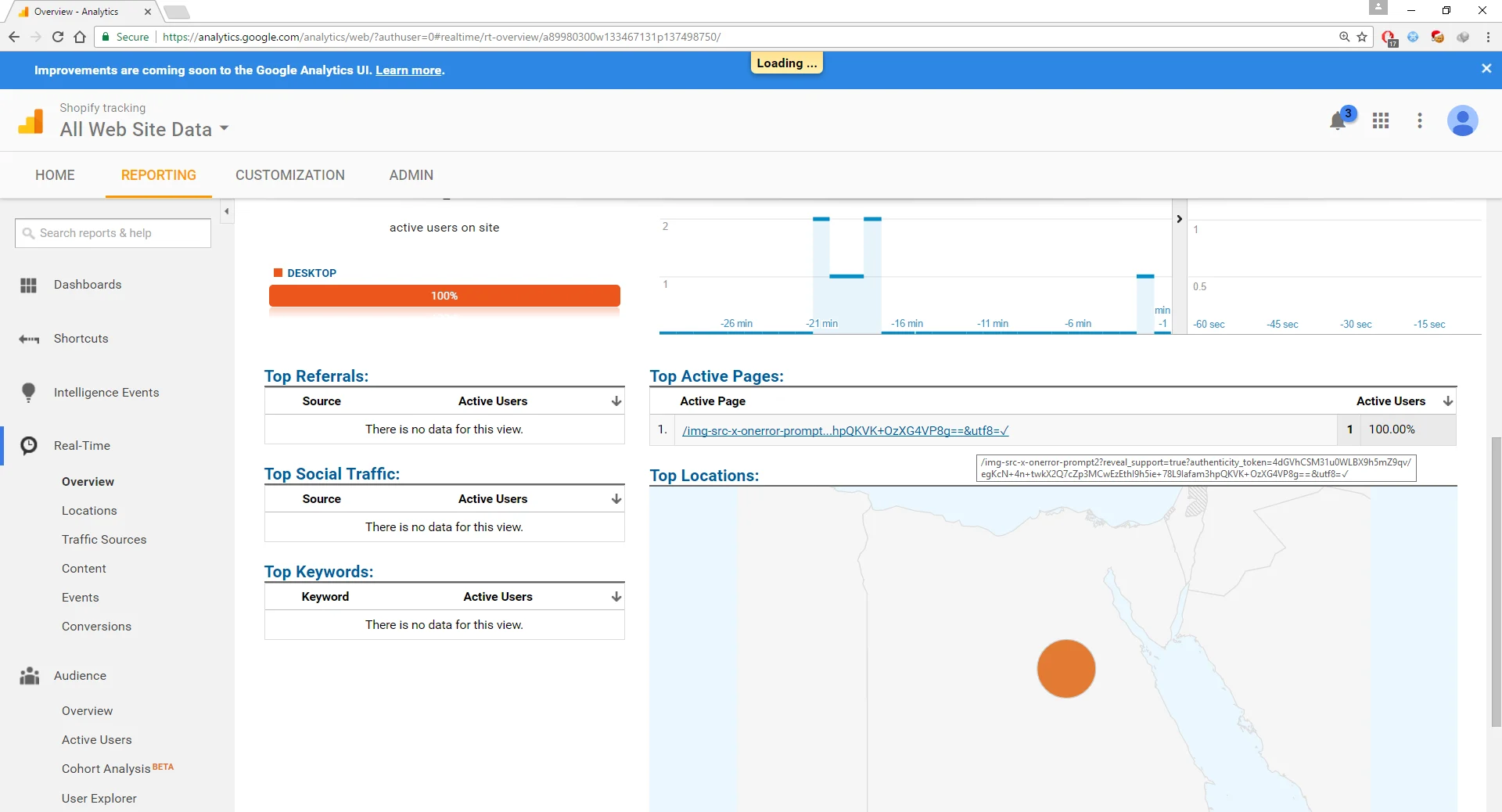
https://apps.shopify.com/#loginonce he is logged in , he will be redirected tohttps://apps.shopify.com/[attacker's_app]?authenticity_token=[victim's_token] - The attacker can now see the victim's authenticity token by checking Real-Time analytics at his google analytics dashboard
- The attacker can use the victim's CSRF token to forge HTML requests that edit the victim's app listing by issuing requests to
https://apps.shopify.com/services/shopify_applications/edit, if the victim has a shopify application or he can use it to submit reviews,support messages ..etc
#Steps to reproduce:
- Go to
https://app.shopify.com/services/partners/api_clients/newto create a new application then after creating it click Edit App Listing and at Google analytics code field enter your google analytics code. - Go to
https://apps.shopify.com/[your_app_id]/support_interactions/new, you'll be redirected to the login page , enter your shop domain then login. - After logging in you'll be redirected to
https://apps.shopify.com/img-src-x-onerror-prompt2?reveal_support=true?authenticity_token=[Your_CSRF_TOKEN]&utf8=%E2%9C%93 - Now go to your google analytics dashboard
https://analytics.google.com/analytics/web/-> Real Time analytics , and you'll see the whole URL with the authenticity token disclosed.
Not written yet. The AI write-up for this report has not been written yet. The Original tab links to the source.
How it worked
Root cause
Likely the application included the CSRF token in the redirect URL, and the developer-controlled Google Analytics script captured the full URL including the token.
Impact
An attacker could use the stolen CSRF token to forge requests that edit the victim's app listing or submit reviews and support messages on their behalf.
What the attacker needed
Victim clicks a link; victim logs in; attacker has an app with Google Analytics
How it was found
- Create a new application and add a Google Analytics code to its app listing.
- Visit the support interaction page for that app, which redirects to login.
- Log in and get redirected to a URL containing the authenticity token.
- Check the Google Analytics real-time dashboard to see the full URL with the token.
Explained by bugbounty.wiki with AI from the original and checked against quotes from it; it can still be wrong. Read the original before relying on a detail.
Not written yet. The AI write-up for this report has not been written yet. The Original tab links to the source.
A CSRF token is a secret code a website gives you to prove that a form submission really came from you. Here, that secret code was put into the web address after login, and the app developer's Google Analytics code recorded the full address. So the developer could see the secret code and use it to act as the victim.
What is Info disclosure?
Data the application should keep private (personal data, internal details, other users' records) reaches someone it should not.




