How to do 55000 subdomain takeover in a blink of an eye
Subdomains with CNAME records pointing to Shopify were vulnerable to takeover if the corresponding shop name was unclaimed, allowing an attacker to claim the shop and serve content on the victim's subdomain. The researchers identified over 55,000 such vulnerable subdomains at scale.
 Published on medium.com
TL;DR In this article we will describe a process that allowed us to identify more then 55.000 subdomains vulnerable to Subdomain Takeover on Shopify platform.
The full write-up lives on its author's site
It belongs to its author, so we link to it rather than copy it. The other two tabs are our own rewrites, checked against it.
Context
Shopify is a cloud service provider that lets you create an e-commerce website very easily. The vulnerability described here is subdomain takeover, and the author is explicit that it is not specific to Shopify: the same class of issue is common to several other cloud service providers. The article describes a process that identified more than 55,000 subdomains vulnerable to subdomain takeover on the Shopify platform.

When the DNS record still points at Shopify but no shop claims the name, the hostname is left dangling and can be claimed by someone else.
Setup
The researcher used two DNS record shapes as the starting condition for a takeover:
- Mapping with application name: CNAMEs pointing to
myshopname.myshopify.com. - Mapping with DNS: CNAMEs pointing to
shops.myshopify.com.
The author notes there could also be other methods, possibly legacy ones, which they intended to investigate in the near future.
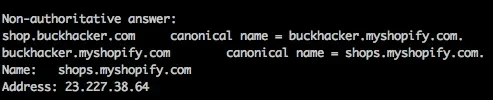
For the walkthrough the researcher created their own examples. In the first case a CNAME was set up for shop.buckhacker.com pointing to buckhacker.shopify.com. In the second case a subdomain was made a CNAME pointing to shops.myshopify.com.
The tooling was a browser, Burp to observe the traffic behind the registration page, a script released on the author's GitHub page (SubDomainTakeoverTools) to check whether a shop name is available, and a second script, ShopifySubdomainTakeoverCheck.py, for the takeover check itself. The large-scale pass used the FDNS dataset and a one-line bash pipeline.
Finding it
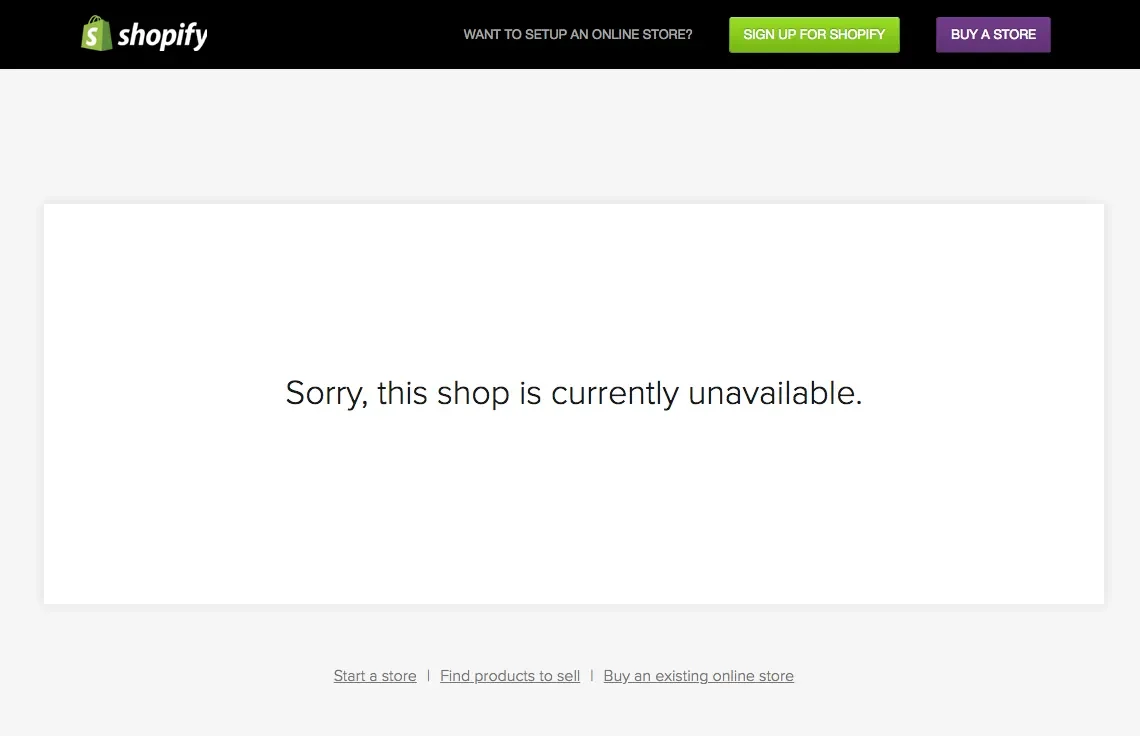
During a bug bounty programme or a penetration test, the author says, if you encounter one of two particular web pages you may have a subdomain takeover. The first is shown below.
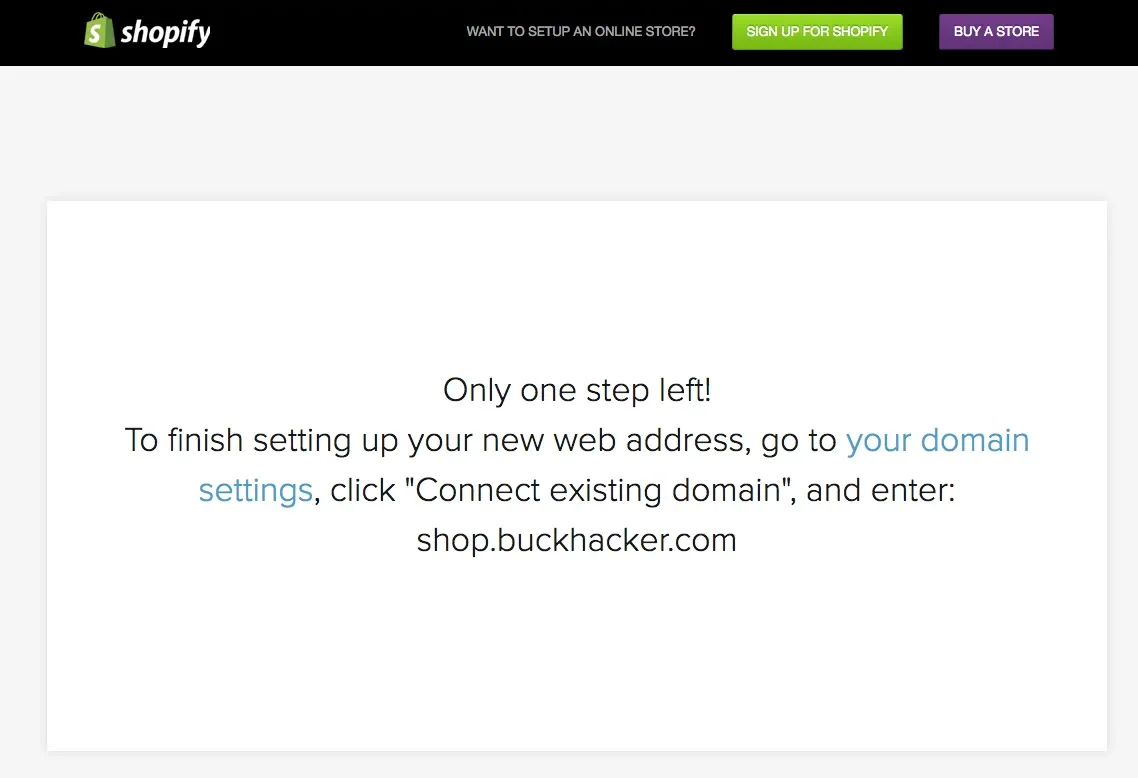
The second example of a vulnerable page:
Seeing the page is only a hint. The author stresses that detecting a takeover purely from the Shopify error message page produces a lot of false positives: many pages showed the "vulnerable" error message while only a small percentage of them were actually vulnerable. That is why the check has to go further than the page content.
Exploitation
Step 1: Confirm the DNS record points at Shopify
For the application-name case, the CNAME for shop.buckhacker.com points to buckhacker.shopify.com. If the shop name buckhacker is not claimed on Shopify, it can be claimed and the subdomain taken over.
Step 2: Check whether the shop name is available
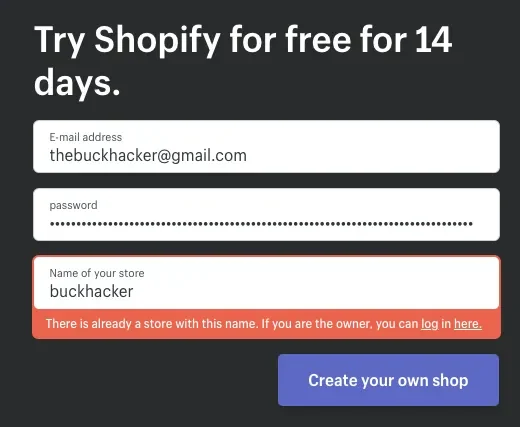
During account registration you are forced to choose your shop name, and that page reveals whether a name is available. The two outcomes look like this.
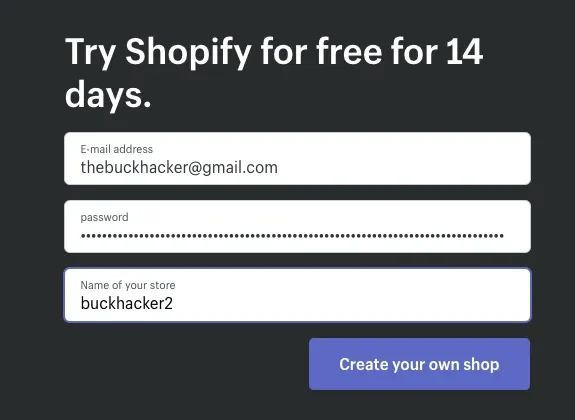
Watching the page in Burp shows a request to a REST API that returns two kinds of response:
#1 Unavailable ({"status":"unavailable","message":null,"host":"buckhacker.myshopify.com"})

#2 Available ({"status":"available","message":null,"host":"buckhacker2.myshopify.com"})
The API returns two kinds of response, one for an unavailable name and one for an available name. The author released a simple script to automate this check so you do not have to do it by hand.
Step 3: Connect the vulnerable domain in the Shopify portal
Once the shop name is known to be available, it is connected through the Shopify portal. After logging in, go to the left menu, "Online Store", then "Domains".
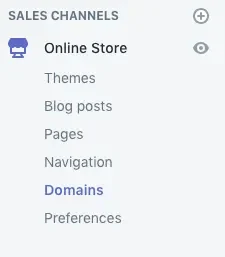
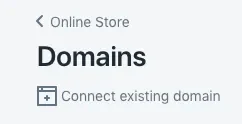
Click "Connect existing domain".
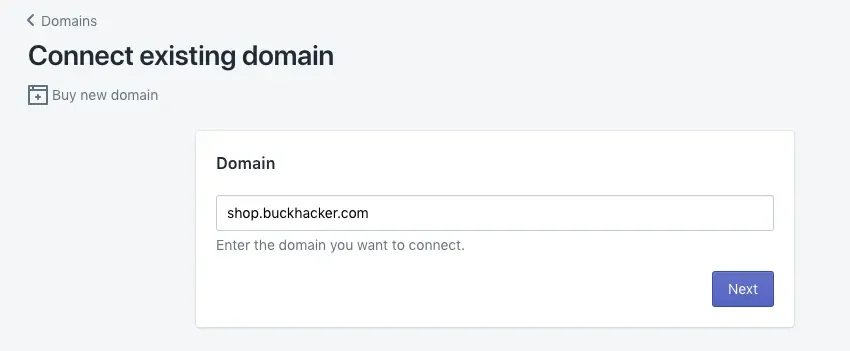
In the next form, enter the vulnerable domain.
Click "Next" and then "Verify Connection".
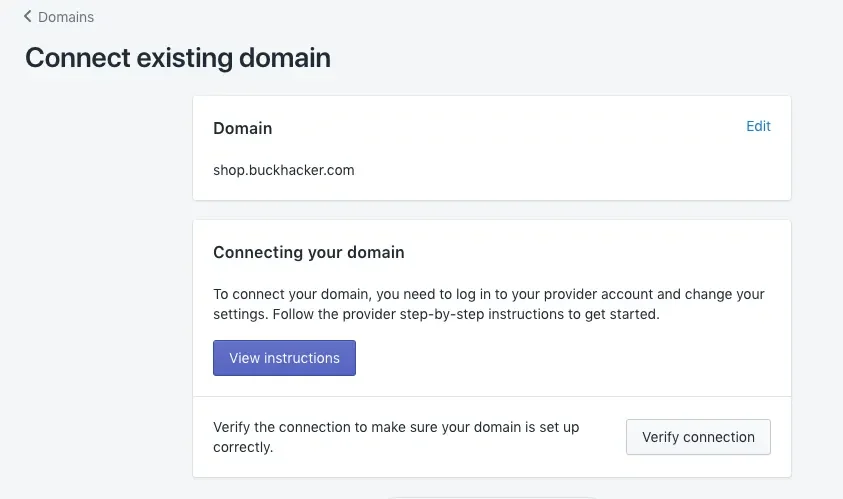
If all steps were performed correctly you are redirected to the following page.
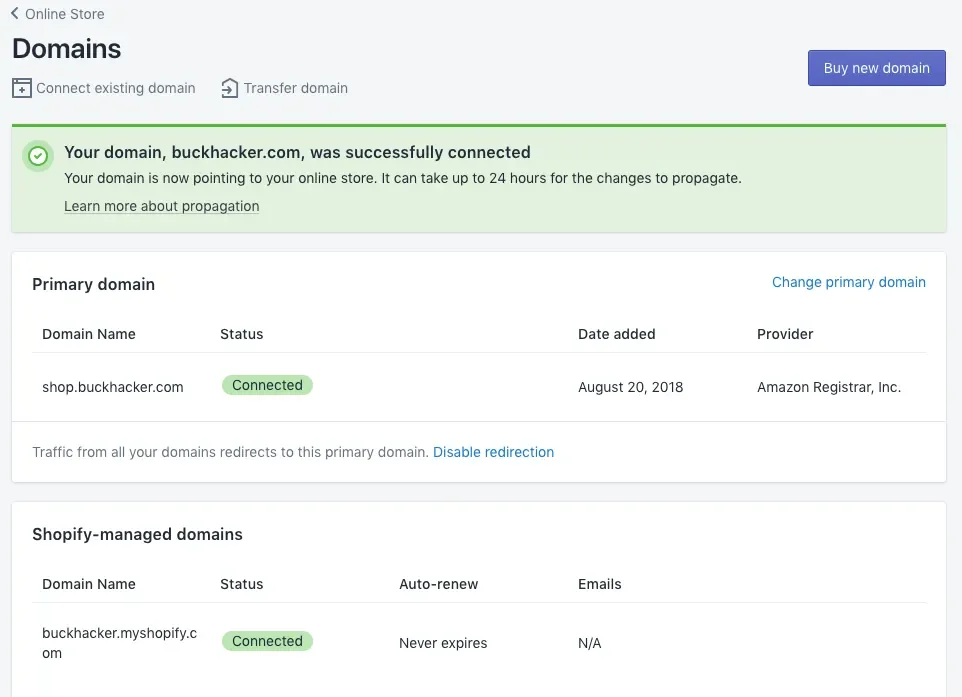
Reaching that page means the subdomain takeover has been performed successfully.
The author notes this first case is rarer, because the shop name is chosen during account creation: for the name to be free, the user has to delete the whole account or change the name. During the investigation, 2% of the websites were affected by this misconfiguration.
Step 4: The DNS mapping case
In the second case the subdomain is a CNAME pointing to shops.myshopify.com.
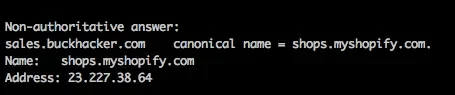
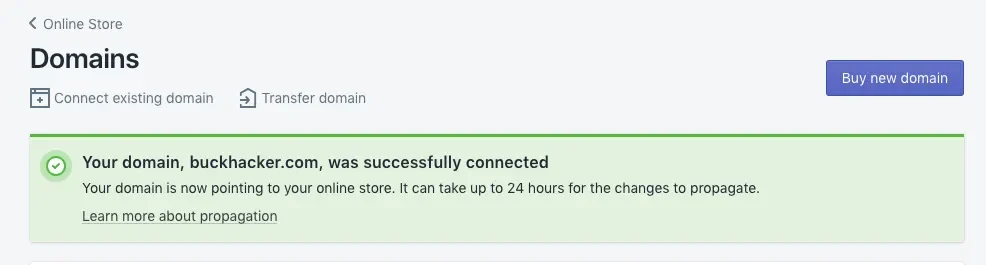
This is the most common case of subdomain takeover on Shopify. Here a shop can be created with any available name and simply connected from the Shopify portal exactly as in the previous case. The screenshots below illustrate the process.
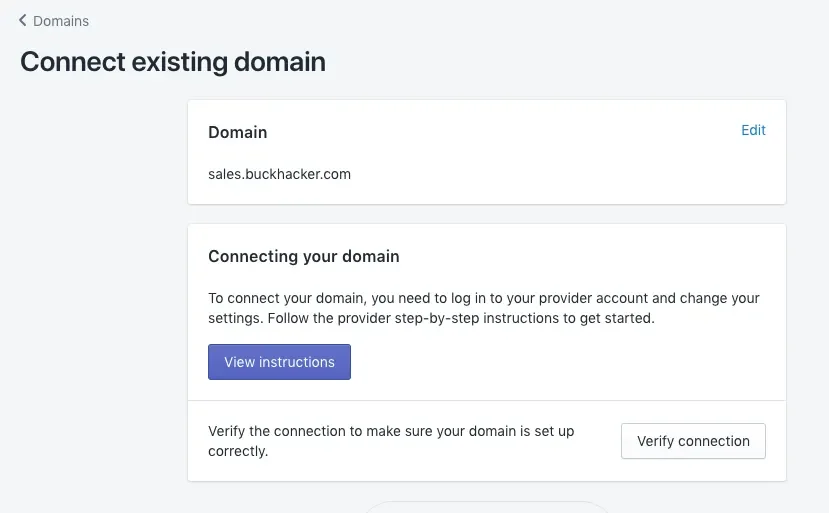
Confirmation of a successful connection:
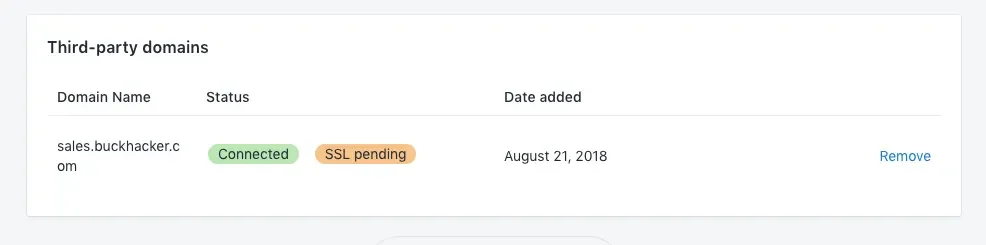
Another confirmation:
Step 5: Large-scale exploitation with FDNS
The author points to Project Sonar and the FDNS dataset as a good way to identify this class of vulnerability at scale.
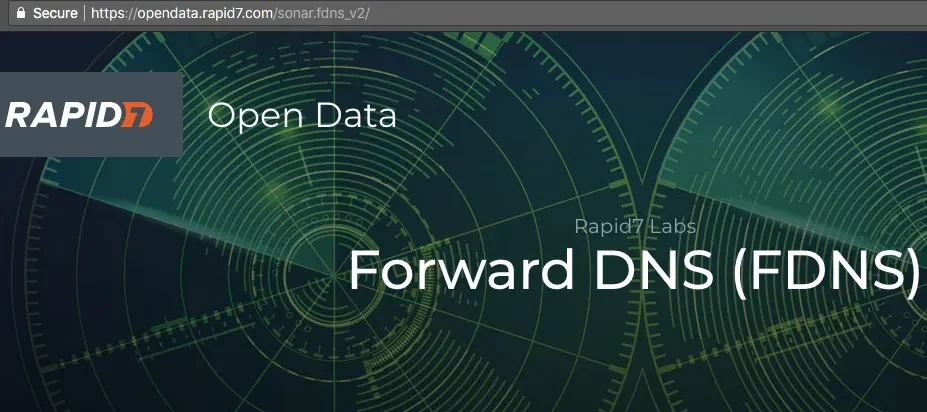
The FDNS dataset provides, among other things, CNAME records. You can look inside it for all subdomains whose CNAME points to shop.myshopify.com or myshopname.shopify.com, then run the takeover check on each.

The whole pass can be done with the script and one line of bash:
zcat $FDNS_DATASET | strings | grep shopify.com | cut -d "\"" -f 8 | grep -v "shopify.com" | while read subdomain; do python3 ShopifySubdomainTakeoverCheck.py $subdomain; done
Step 6: Why a dedicated script
Many existing scripts detect a subdomain takeover only from the Shopify error message page, which the author found produces many false positives. The dedicated script performs three checks: the page error message, the CNAME, and then, if needed, the REST API request described above. The author hopes future subdomain takeover tools will implement similar techniques to reduce false positives.
Run against all the FDNSv2 datasets (from the beginning of 2017, with some additional tuning), the result was more than 55,000 subdomains vulnerable to subdomain takeover. That list can then be used to check whether your bug bounty or customer domain names appear in it. The author adds that the same technique can be used on other cloud service providers.
Root cause
A hostname is left pointing, via CNAME, at a Shopify hostname that no shop currently claims. Shopify serves an error page for the unclaimed name, but the name itself remains registrable, so anyone who registers a shop with that name and connects the domain through the portal inherits the hostname. In the application-name case the name is chosen at account creation, so it only becomes free if the original owner deletes the account or changes the name; in the DNS mapping case any available shop name can be connected to the dangling record. The author's observation that page-content-only detection yields many false positives suggests the error page alone is not a reliable signal, which is why the CNAME and the REST API status are checked as well. The report does not describe any server-side control that was bypassed.
Impact
An attacker who finds a dangling record can claim the corresponding shop name and serve their own content on the victim's subdomain. The author frames the practical use as checking whether your bug bounty or customer domain names appear in the resulting list of more than 55,000 vulnerable subdomains. The report does not describe specific abuse beyond the takeover itself, and the figure is tied to the FDNSv2 datasets from the beginning of 2017 with additional tuning, so it is a snapshot of that corpus rather than a live count.
Fix
The author's contribution on the detection side is the three-check script, intended to cut the false positives that page-message-only tools produce.
Variants to test
- Application-name mapping: find a CNAME to
something.myshopify.comand query the registration REST API for that name. A response with"status":"available"is a positive result. - DNS mapping: find a CNAME to
shops.myshopify.com, create a shop with any available name and connect the domain through "Online Store" > "Domains" > "Connect existing domain". A positive result is the redirect to the confirmation page after "Verify Connection". - Page-only triage: collect hosts showing the Shopify error page, then confirm each with the CNAME and the REST API check.
- Dataset sweep: run the bash pipeline over an FDNS-style dataset and feed each candidate to the checker. A positive result is a subdomain the script reports as vulnerable after all three checks.
- Other cloud providers: the author states the technique applies to other cloud service providers too, so the same pattern (dangling CNAME to a provider hostname, provider-specific claim flow) is worth testing elsewhere. A positive result is a hostname you can claim and serve content on.
What happened, in plain words
A security researcher identified more than 55,000 subdomains vulnerable to takeover on the Shopify platform. The trick is called a subdomain takeover, and it does not require breaking any password or hacking any server. It works because of a small mistake in how a domain name is set up.
To understand it, you need one idea first: the Domain Name System (DNS). Think of DNS as the internet's phone book. When you type a name like shop.example.com into your browser, your computer asks DNS "which server should I talk to for this name?" and DNS answers with an address. One common kind of DNS answer is a CNAME (Canonical Name) record, which is like a forwarding note: it says "this name is really just another name, go look that one up instead". So shop.example.com can have a CNAME saying "I am an alias for buckhacker.shopify.com", and your browser then follows that pointer to Shopify's servers.
Now the mistake. A shop owner sets up that CNAME so their own domain shows their Shopify shop. Later they close or rename their Shopify shop, but they forget to remove the CNAME. The DNS record still points at Shopify, but no shop claims that name any more. Shopify's servers still answer, but only with an error page saying the shop does not exist. Anyone who now creates a Shopify shop with that same free name inherits the dangling pointer, and their content appears on the victim's domain. That is the takeover.
The researcher stresses that this is not a Shopify-only problem: the same pattern exists at several other cloud service providers. They also praise Shopify's security team for responding quickly and communicating well.
The image above is a screenshot of the Wikipedia page describing Shopify, used here to introduce what the company is. In short, Shopify is a cloud service provider: instead of running your own web server, you rent space and tools from them over the internet, and they let you build an e-commerce website very easily.
If you already understand subdomain takeover on Shopify, the author says you can skip to the end, where the large-scale method is shown.
Subdomain Takeovers on Shopify
During a bug bounty programme (a scheme where companies pay people for reporting security problems) or a penetration test (an authorised security assessment), the author says that if you come across one of two particular web pages, you may be looking at a subdomain takeover. The first page is shown below.
This screenshot shows the Shopify error page that appears when a hostname points at Shopify but no shop is attached to it. The caption calls it a page that signals a potential subdomain takeover.
A second example of a vulnerable page:
This is another example of a vulnerable page.
Seeing the page is only a hint, not proof. The author is explicit that deciding purely from the Shopify error message produces a lot of false positives: many pages showed the "vulnerable" error message, but only a small percentage of them were actually vulnerable. A false positive means the tool says "problem here" when there is no real problem. That is why the check has to go further than what the page displays.
There are two shapes of DNS record that allow a takeover on Shopify:
- Mapping with application name: a CNAME pointing to
myshopname.myshopify.com(a hostname that contains the shop's own name). - Mapping with DNS: a CNAME pointing to
shops.myshopify.com(a generic Shopify hostname shared by many shops).
The author notes there could be other methods too, possibly older legacy ones, which they planned to investigate in the near future.
Case #1: Mapping with application name
For the walkthrough the researcher created their own example. They set up a CNAME for shop.buckhacker.com pointing to buckhacker.shopify.com.
This screenshot shows the output of nslookup, a command-line tool that asks DNS what a name resolves to. It confirms that shop.buckhacker.com is an alias (CNAME) for buckhacker.shopify.com.
If the shop name buckhacker is not claimed on Shopify, someone can claim it and take over the subdomain. So the next question is: how do you check whether a shop name is claimed or not?
During account registration, Shopify forces you to choose your shop name, and that page reveals whether a name is available. The two outcomes look like this.
This screenshot shows the registration page when the chosen shop name is not available, meaning someone already owns it.
This screenshot shows the same page when the name is available, meaning nobody owns it and it can be registered.
Watching the page in Burp (Burp Suite, a tool that sits between your browser and the website and lets you read every request and response) shows that the page talks to a REST API. An API (Application Programming Interface) is a way for one piece of software to ask another for data or actions, without a human clicking buttons. REST is just a common style for such APIs, usually exchanging data as JSON, a text format of key and value pairs. The API returns two kinds of response:
#1 Unavailable ({"status":"unavailable","message":null,"host":"buckhacker.myshopify.com"})

#2 Available ({"status":"available","message":null,"host":"buckhacker2.myshopify.com"})
Line by line, in plain words:
#1 Unavailableis a comment label meaning "this is the response when the name is taken".{"status":"unavailable", ...}is the JSON body. Thestatusfield is the decision point:unavailablemeans the name is already claimed."message":nullmeans there is no extra message;nullis the JSON way of saying "nothing"."host":"buckhacker.myshopify.com"echoes the corresponding*.myshopify.comhostname for that name.#2 Availableis the label for the other outcome.{"status":"available", ...}means the name can be registered."host":"buckhacker2.myshopify.com"is the hostname that would be assigned if you registered it.
Because the answer is machine-readable, you can write a script that asks the API about many names automatically instead of typing each one into the browser. The author released a simple script on their GitHub page (SubDomainTakeoverTools) to save you that work.
Step 3: Connect the vulnerable domain in the Shopify portal
Once you know the shop name is available, you connect it through the Shopify portal (the web dashboard where a merchant manages their shop). After logging in, go to the left menu, "Online Store", then "Domains".
This screenshot shows the left-hand menu with "Online Store" expanded and "Domains" selected, which is where domain settings live.
Click "Connect existing domain".
This screenshot shows the Domains page with the "Connect existing domain" button, used when the domain is already registered elsewhere and you want Shopify to serve it.
In the next form, enter the vulnerable domain.
This screenshot shows the form where you type the domain name you want to attach.
Click "Next" and then "Verify Connection".
This screenshot shows the step after clicking Next.
If all steps were performed correctly, you are redirected to the following page.
This screenshot shows the confirmation page. Reaching it means the subdomain takeover has been performed successfully.
The author notes this first case is rarer, because the shop name is chosen during account creation. For the name to become free, the original user has to delete the whole account or change the name. During the investigation, 2% of the websites were affected by this misconfiguration.
Step 4: The DNS mapping case
In the second case the subdomain is a CNAME pointing to shops.myshopify.com.
This screenshot shows the example the researcher created for this case.
This is the most common case of subdomain takeover on Shopify. Here you can create a shop with any available name and simply connect it from the Shopify portal exactly as in the previous case. The screenshots below illustrate the process.
This screenshot illustrates connecting sales.buckhacker.com to the researcher's shop.
Confirmation of a successful connection:
This screenshot shows the confirmation that the vulnerable subdomain was connected successfully.
Another confirmation:
Another confirmation.
Step 5: Large-scale exploitation with FDNS
The author points to Project Sonar and the FDNS dataset as a good way to find this class of vulnerability at scale. Project Sonar is a public research effort that scans the internet and publishes the results. FDNS (Forward DNS) is one of its datasets: a large collection of DNS records observed across the internet, including CNAME records.
The FDNS dataset provides, among other things, CNAME records. You can search inside it for all subdomains whose CNAME points to shop.myshopify.com or myshopname.shopify.com, then run the takeover check on each one.
This screenshot shows subdomains of buckhacker.com in the FDNS dataset.
The whole pass can be done with the script and one line of bash:
zcat $FDNS_DATASET | strings | grep shopify.com | cut -d "\"" -f 8 | grep -v "shopify.com" | while read subdomain; do python3 ShopifySubdomainTakeoverCheck.py $subdomain; done
Line by line, in plain words:
$FDNS_DATASETis a shell variable holding the file's path.|is a pipe: it passes the output of one command as input to the next, like a conveyor belt.stringspulls out readable text from binary data, so you can search it.grep shopify.comkeeps only the lines that mentionshopify.com.while read subdomain; do ... doneloops over each remaining line, storing it in the variablesubdomain.python3 ShopifySubdomainTakeoverCheck.py $subdomainruns the Python checker on each subdomain.
Step 6: Why a dedicated script
Many existing scripts detect a subdomain takeover only from the Shopify error message page, which the author found produces many false positives. The dedicated script performs three checks: the page error message, the CNAME, and then, if needed, the REST API request described above. The author hopes future subdomain takeover tools will implement similar techniques to reduce false positives.
Run against all the FDNSv2 datasets (from the beginning of 2017, with some additional tuning), the result was more than 55,000 subdomains vulnerable to subdomain takeover. That list can then be used to check whether your bug bounty or customer domain names appear in it. The author adds that the same technique can be used on other cloud service providers.
Root cause
A hostname is left pointing, via CNAME, at a Shopify hostname that no shop currently claims. Shopify serves an error page for the unclaimed name, but the name itself remains registrable, so anyone who registers a shop with that name and connects the domain through the portal inherits the hostname. In the application-name case the name is chosen at account creation, so it only becomes free if the original owner deletes the account or changes the name; in the DNS mapping case any available shop name can be connected to the dangling record. The author's observation that page-content-only detection yields many false positives suggests the error page alone is not a reliable signal, which is why the CNAME and the REST API status are checked as well. The report does not describe any server-side control that was bypassed.
Impact
An attacker who finds a dangling record can claim the corresponding shop name and serve their own content on the victim's subdomain. The author frames the practical use as checking whether your bug bounty or customer domain names appear in the resulting list of more than 55,000 vulnerable subdomains. The report does not describe specific abuse beyond the takeover itself, and the figure is tied to the FDNSv2 datasets from the beginning of 2017 with additional tuning, so it is a snapshot of that corpus rather than a live count.
Fix
The author's contribution on the detection side is the three-check script, intended to cut the false positives that page-message-only tools produce.
Variants to test
- Application-name mapping: find a CNAME to
something.myshopify.comand query the registration REST API for that name. A response with"status":"available"is a positive result. - DNS mapping: find a CNAME to
shops.myshopify.com, create a shop with any available name and connect the domain through "Online Store" > "Domains" > "Connect existing domain". A positive result is the redirect to the confirmation page after "Verify Connection". - Page-only triage: collect hosts showing the Shopify error page, then confirm each with the CNAME and the REST API check.
- Dataset sweep: run the bash pipeline over an FDNS-style dataset and feed each candidate to the checker. A positive result is a subdomain the script reports as vulnerable after all three checks.
- Other cloud providers: the author states the technique applies to other cloud service providers too, so the same pattern (dangling CNAME to a provider hostname, provider-specific claim flow) is worth testing elsewhere. A positive result is a hostname you can claim and serve content on.
Timeline
- 21 August 2018: report to Shopify via the HackerOne programme.
- 21 August 2018: first initial feedback from Shopify.
- 23 August 2018: second feedback from Shopify.
- 10 September 2018: publication.
Glossary
- API (Application Programming Interface): a way for one piece of software to ask another for data or to perform an action, without a human clicking buttons.
- Bash: the command-line shell on Linux and macOS, where you type commands and chain them with pipes.
- Bug bounty programme: a scheme where a company pays people for reporting security problems responsibly.
- Burp (Burp Suite): a tool that sits between your browser and a website so you can read and modify every request and response.
- Cloud service provider: a company that rents computing and website services over the internet instead of you running your own server.
- CNAME (Canonical Name): a DNS record that says one name is an alias for another name, like a forwarding note.
- DNS (Domain Name System): the internet's phone book, translating names into the addresses of the servers that answer for them.
- Domain / subdomain: a domain is a name like
example.com; a subdomain is a name in front of it, likeshop.example.com. - False positive: a tool or test reporting a problem where there is none.
- FDNS (Forward DNS) dataset: a large public collection of DNS records observed across the internet, published by Project Sonar.
- JSON: a text format of key and value pairs, commonly used by APIs to exchange data.
- Penetration test: an authorised security assessment where someone tries to break into a system with permission.
- Pipe (
|): a shell operator that passes the output of one command as input to the next. - Project Sonar: a public research effort that scans the internet and publishes the results.
- REST: a common style for web APIs, usually exchanging data as JSON over HTTP.
- Shopify portal: the web dashboard where a merchant manages their shop, including domains.
- Subdomain takeover: claiming control of a subdomain because its DNS record points at a service where nobody has claimed the name any more.
nslookup: a command-line tool that asks DNS what a name resolves to.strings: a command-line tool that extracts readable text from binary data.grep: a command-line tool that filters lines matching a pattern.cut: a command-line tool that extracts fields from each line, split on a chosen character.zcat: a command-line tool that prints the contents of a compressed file without decompressing it to disk first.



